


What if you could type a sentence and watch it become a fully rendered video in minutes? That's exactly what the latest generation of text to video AI tools delivers — and the race for the best AI text to video generator has never been more competitive. From Hollywood-grade physics simulations to budget-friendly social clips, the landscape in 2026 is packed with options that range from free hobbyist tools to studio-caliber platforms.
But with so many choices, how do you know which text to video generator actually delivers on its promises? We tested seven of the most talked-about platforms head-to-head, evaluating each on visual quality, motion realism, pricing, duration limits, and ease of use. Whether you're a content creator who needs quick social videos, a marketer building ad campaigns, or a filmmaker prototyping scenes, this ranked comparison will help you find the right AI video generator from text for your workflow.
Table of Contents
- 1.Quick Comparison: Top Text-to-Video AI Generators
- 2.insMind — Best Overall Text-to-Video Platform
- 3.Sora 2 — Best for Cinematic Quality
- 4.Runway Gen-4.5 — Best for Professional Workflows
- 5.Kling AI — Best Value for Money
- 6.Pika — Best for Quick Social Content
- 7.Google Veo 3 — Best for Realistic Motion
- 8.Seedance 2.0 — Best for Consistent Characters
- 9.How to Create Videos from Text with insMind
- 10.How to Choose the Right Text-to-Video Tool
- 11.Frequently Asked Questions
- 12.Start Creating AI Videos from Text Today
Quick Comparison: Top Text-to-Video AI Generators
Before diving into the details, here's a quick snapshot of how the seven best text to video AI platforms stack up in 2026. This table covers the key factors most creators care about: pricing, maximum video length, output quality, and ideal use case.
| Tool | Starting Price | Max Duration | Best For |
|---|---|---|---|
| insMind | Free trial | Varies by model | Overall best, multi-model access |
| Sora 2 | $200/mo | 60 seconds | Cinematic quality |
| Runway Gen-4.5 | $12/mo | 16 seconds | Professional filmmaking |
| Kling AI | $5/mo | 5 minutes | Value and long-form |
| Pika | Free tier | Short clips | Quick social content |
| Google Veo 3 | Via AI Studio | Varies | Realistic motion |
| Seedance 2.0 | Varies | Varies | Character consistency |
Now let's break down each platform so you can decide which AI text to video generator truly fits your needs.
1. insMind — Best Overall Text-to-Video Platform
Why settle for one AI model when you can access several of the most powerful ones from a single dashboard? That's the core proposition of insMind, and it's the reason this AI text-to-video tool earns the top spot in our ranking. Instead of forcing you to choose between competing models, insMind aggregates access to Kling 2.6, the Kling 3.0 model, Google Veo 3.1 video model, and other cutting-edge engines — all from one clean, intuitive interface.
The platform supports the full spectrum of AI video creation: text-to-video, image-to-video, and video effects. You can generate video from text in multiple aspect ratios — 16:9 for YouTube, 9:16 for TikTok and Reels, or 1:1 for Instagram posts — without needing to switch tools. Several of the available models also support native audio generation, meaning your output can include synchronized sound right from the start.
What really sets insMind apart is the flexibility. Different AI models excel at different styles: some handle cinematic storytelling better, while others are faster for social-first content. By giving you access to all of them, insMind lets you pick the best tool for each specific job. And with a free trial that lets you test the waters before committing, it's the most accessible entry point for anyone curious about AI video generation in 2026.
 Pros
Pros
- Multiple top-tier AI models accessible from one interface
- Clean, beginner-friendly design with powerful options
- Free tier available for testing and light use
- Flexible aspect ratios (16:9, 9:16, 1:1)
- Supports the latest models as they launch, including audio-enabled engines
Cons
- Advanced models may require credits beyond the free tier
- Queue times can increase during peak usage hours
2. Sora 2 — Best for Cinematic Quality
Can an AI truly replicate the visual richness of a Hollywood production? Sora 2 comes closer than anything else on the market. OpenAI's flagship text to video AI model delivers breathtaking physics simulation — water, cloth, light, and gravity behave with a realism that was unthinkable just two years ago. It can generate clips up to 60 seconds long with native audio, making it the only tool here that consistently produces video content with the weight and depth of professional cinematography.
The catch? Access comes through ChatGPT Pro at $200 per month, and output quality remains inconsistent. In our testing, roughly 30% of generations were genuinely stunning, while about 20% had visible artifacts or failed entirely. Sora 2 is a tool for patient creators with deep pockets who are willing to iterate for exceptional results.
Pros
- Best-in-class physics and visual realism
- Longest single-clip duration (up to 60 seconds)
- Native audio generation built in
- Excellent for storytelling and narrative sequences
Cons
- Very expensive at $200/month (ChatGPT Pro required)
- Inconsistent output quality — many generations need re-rolls
- Access is still invite-only for some features
3. Runway Gen-4.5 — Best for Professional Workflows
What if you need frame-level control over camera movement and composition? Runway Gen-4.5 remains the go-to choice for filmmakers and professional video editors. As one of the longest-running players in the AI video generator from text space, Runway has built a mature ecosystem with proven reliability, detailed camera controls, and seamless integration into existing post-production workflows.
Gen-4.5 offers precise control over pan, tilt, zoom, and dolly movements — a level of direction that most competitors simply can't match. It also excels at image-to-video conversion, letting you turn your images into videos with impressive fidelity. Plans start at $12/month and scale to $76/month for teams, making it a reasonable investment for professionals. The trade-off is a 16-second maximum clip length and relatively slow generation times.
Pros
- Precise camera control unmatched by competitors
- Professional-grade tools designed for filmmakers
- Reliable, consistent output quality
- Strong ecosystem with plugins and API access
Cons
- Short maximum duration of 16 seconds per clip
- Generation is slower compared to newer competitors
- Text rendering within videos remains weak
4. Kling AI — Best Value for Money
Is it possible to generate video from text without draining your budget? Kling AI proves it is. Starting at just $5 per month, Kling delivers surprisingly strong motion quality, detailed character rendering, and — most impressively — video lengths of up to five minutes per generation. No other tool on this list offers that kind of duration at anywhere near that price point.
Kling excels at action-heavy scenes where strong motion dynamics are essential. Character consistency across longer clips is notably good, and the platform's high-resolution output holds up well even on large screens. The downsides are a less polished user interface compared to Western competitors, unpredictable queue times, and limited availability in some regions. But for creators who need volume and length on a budget, Kling AI is hard to beat.
Pros
- Longest videos of any tool — up to 5 minutes
- Most affordable paid plans starting at $5/month
- Strong motion quality and dynamic action rendering
- High-resolution detail that scales well
Cons
- Interface is less polished than competitors
- Queue times can be unpredictable during peak periods
- Regional availability may be limited
5. Pika — Best for Quick Social Content
Need a video in under a minute? Pika is built for speed. Designed with social media creators in mind, this text to video generator prioritizes fast iteration and simplicity over maximum fidelity. The interface is stripped-down and intuitive — type a prompt, pick a style, and you'll have a short clip ready to post in seconds rather than minutes.
Pika's free tier is generous enough for casual experimentation, and it's a solid choice for creators who need to produce a high volume of short-form content for platforms like TikTok, Instagram Reels, and YouTube Shorts. While it doesn't match the visual polish of premium tools like Sora 2 or Runway, it fills a clear gap for creators who value speed and accessibility above all else.
Pros
- Fastest generation times among all tools tested
- Simple, beginner-friendly interface
- Well-suited for high-volume social content
- Free tier available for experimentation
Cons
- Lower visual quality than premium competitors
- Limited clip duration for longer content needs
- Less cinematic depth and detail
6. Google Veo 3 — Best for Realistic Motion
How close can AI-generated video get to looking indistinguishable from real footage? Google Veo 3 is pushing that boundary further than almost any other tool. Leveraging Google's vast computational resources and training data, Veo 3 produces videos with exceptional realism — natural lighting, fluid human motion, and accurate environmental detail that frequently passes the "is this real?" test.
Veo 3 also features native audio synchronization, so generated clips include matching sound effects and ambient audio. Access is currently available through Google AI Studio, which integrates neatly with other Google tools. The main limitations are restricted public access, usage caps that can feel tight for heavy users, and fewer customization knobs compared to tools like Runway. But for pure visual realism, Veo 3 is among the very best.
Pros
- Outstanding visual realism and natural motion
- Native audio sync included in output
- Seamless integration with Google ecosystem
- Improving rapidly with frequent model updates
Cons
- Limited public access — availability is still rolling out
- Fewer customization and control options
- Usage caps can limit heavy creators
7. Seedance 2.0 — Best for Consistent Characters
What happens when you need the same character to appear consistently across multiple video clips? This is where most AI video generators struggle — and where Seedance 2.0 shines. Built around reference-driven workflows, Seedance accepts text, image, and even video inputs to maintain character identity, outfit details, and visual style across generations.
This makes Seedance particularly valuable for serial content creators, educators building course materials, and marketers who need brand-consistent mascots or spokespeople across campaigns. The platform supports fast iteration, so you can refine your results quickly without losing the thread of your character's identity. The trade-off is that Seedance is a newer platform with a smaller community, less documentation, and a steeper learning curve for first-time users.
Pros
- Multi-modal input: text, image, and video references
- Best-in-class character consistency across clips
- Fast iteration and refinement cycle
- Good motion quality for character-driven content
Cons
- Newer platform with less proven long-term track record
- Limited community resources and tutorials
- Steeper learning curve than simpler tools
How to Create Videos from Text with insMind
Ready to generate video from text right now? Here's exactly how to do it using the AI video generator at insMind. The entire process takes just a few minutes, and you don't need any video editing experience to get started.
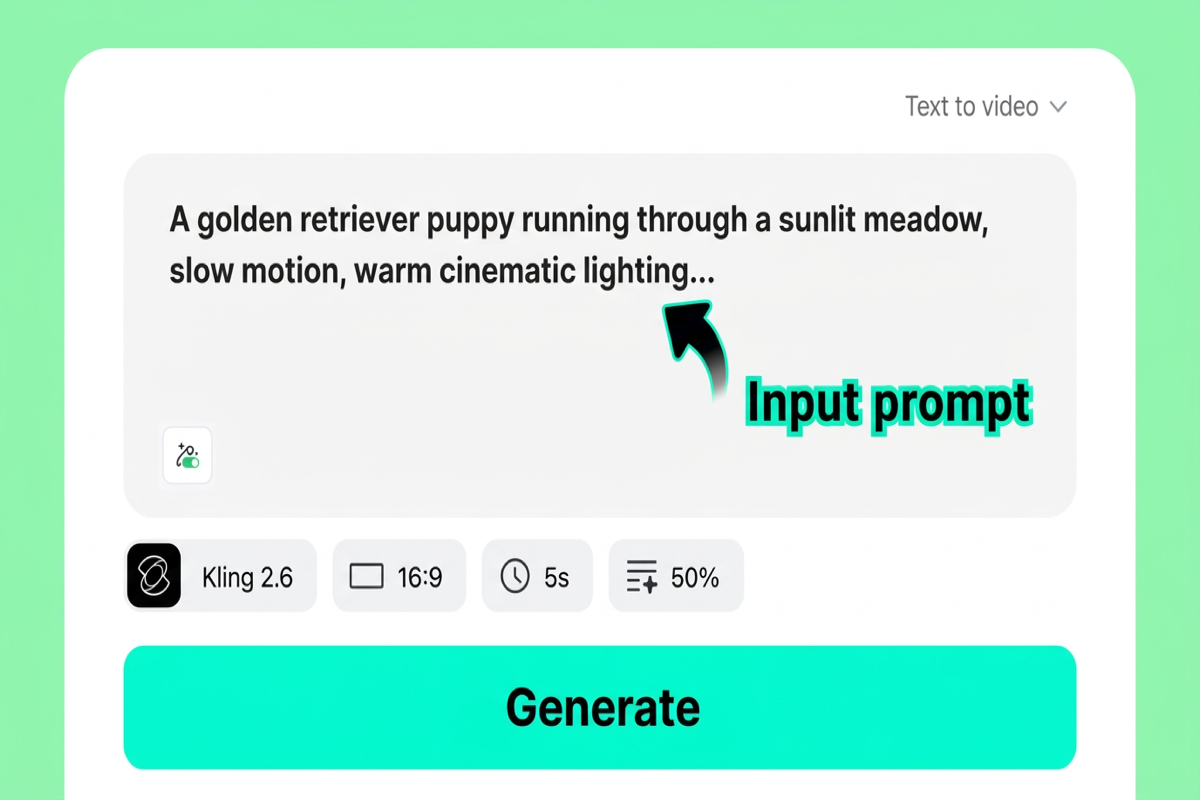
Step 1: Enter Your Text Prompt
Start by describing your video scene in as much detail as possible. Include the characters, their actions, camera angles, lighting conditions, and the artistic style you want. The more specific your prompt, the better the AI can translate your vision into video. For example: "A woman in a red dress walks through a sunlit flower market, camera slowly tracking her from the side, warm golden-hour lighting, cinematic film grain."
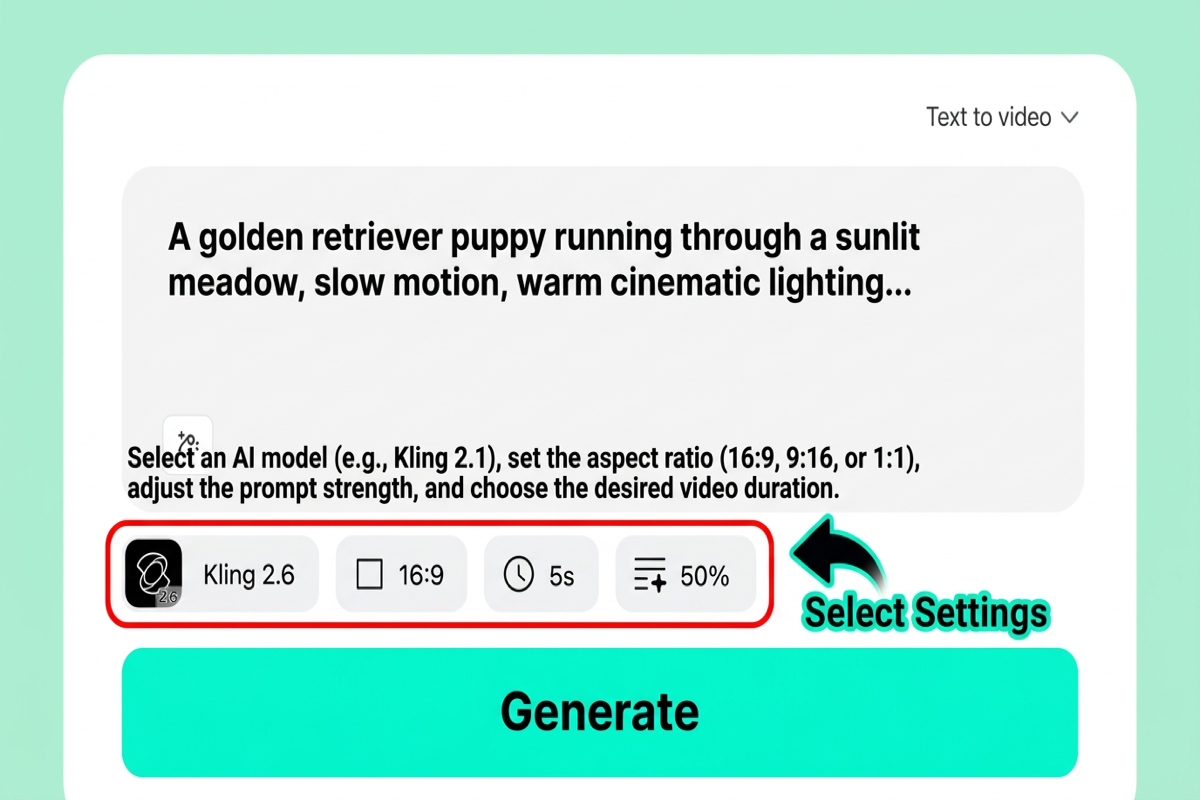
Step 2: Customize Video Settings
Choose your preferred video length, aspect ratio (16:9 for landscape, 9:16 for vertical, or 1:1 for square), and AI model. We recommend trying Kling 2.6 for fast, reliable results, Kling 3.0 for enhanced detail, or Google Veo 3.1 for maximum realism. Each model has its strengths, so experiment to find the one that best matches your project.
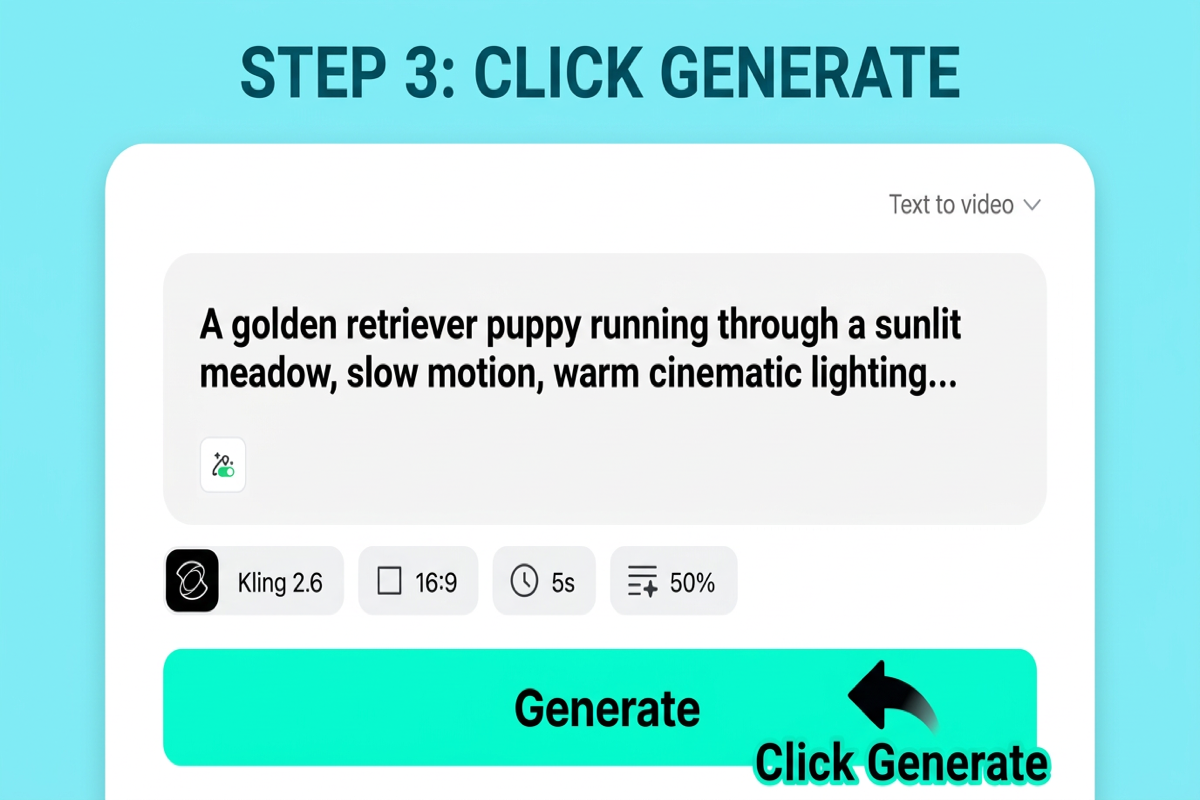
Step 3: Generate Your Video
Hit the generate button and let the AI model go to work. Behind the scenes, the engine analyzes your text prompt and converts it into visual elements — building scene composition, choreographing character movement, planning camera motion, and applying your chosen artistic style. Generation typically takes between 30 seconds and a few minutes depending on the model and current queue load.
Step 4: Download and Share
Once your video is ready, preview it directly in the browser. If you're happy with the result, download it in high quality. You can share directly to social media platforms or import the file into your favorite video editor for further refinement. If the result isn't quite right, tweak your prompt and regenerate — iteration is key to getting the best results from any text to video AI tool.

How to Choose the Right Text-to-Video Tool
With seven strong contenders, how do you narrow it down? Ask yourself these four questions to find the best text to video AI for your specific situation:
What's your budget? If you need a free option to start, insMind and Pika both offer free trial. For the absolute cheapest paid plan, Kling AI starts at $5/month. Sora 2's $200/month price tag makes it viable only for serious professionals or studios.
How long do your videos need to be? Most tools max out at 10–60 seconds. Kling AI is the standout for duration at up to 5 minutes. If you only need short clips for social media, Pika or Runway will serve you well.
How important is visual quality? For cinematic realism, Sora 2 and Google Veo 3 lead the pack. For solid quality at a lower price, insMind gives you access to multiple high-end models so you can choose the right engine for each project.
What's your use case? Social content creators should prioritize speed (Pika, insMind). Filmmakers need camera control (Runway). Marketers who need character consistency should look at Seedance 2.0. And if you want the most flexibility in a single platform, insMind's multi-model approach covers the widest range of scenarios.
Frequently Asked Questions
What is the best free text-to-video AI generator?
insMind offers the most capable free tier for text to video AI generation in 2026. It gives you access to multiple AI models without requiring a credit card, so you can test different engines and find the one that works best for your content. Pika also offers a free plan, though with more limited output quality.
Can AI generate videos longer than 30 seconds from text?
Yes. Sora 2 can produce clips up to 60 seconds, and Kling AI supports video generation up to 5 minutes in a single prompt. Most other tools cap out between 10 and 16 seconds per generation, though you can stitch multiple clips together for longer content.
Which text-to-video AI has the best quality?
For pure visual fidelity and physics simulation, Sora 2 leads the pack — but at a steep price and with inconsistent results. Google Veo 3 is a close second for realism. For the best balance of quality, flexibility, and cost, insMind's multi-model platform lets you choose the highest-quality engine available for each specific video.
Is text-to-video AI good enough for commercial use?
Absolutely. In 2026, leading AI video generators from text produce output that's regularly used in social media marketing, product demos, advertising, and even short film production. Tools like Runway Gen-4.5 and Sora 2 are already integrated into professional studio workflows. For commercial use, always check each platform's licensing terms and usage rights.
What's the difference between text-to-video and image-to-video AI?
Text-to-video AI creates a video entirely from a written description — the AI generates all visuals from scratch. Image-to-video AI takes an existing image as a starting frame and animates it into motion. Many platforms, including insMind, support both methods. Image-to-video is useful when you already have a specific visual you want to bring to life, while text-to-video gives you maximum creative freedom from a blank canvas.
Start Creating AI Videos from Text Today
The text to video AI landscape in 2026 offers something for every creator, every budget, and every use case. Whether you need the cinematic depth of Sora 2, the professional control of Runway, the value of Kling AI, or the multi-model flexibility of insMind, you've never had more powerful options at your fingertips.
If you're looking for the single best starting point — one platform that gives you access to multiple cutting-edge models, flexible output settings, and a free tier to begin experimenting — insMind is our top recommendation. Stop imagining your ideas and start watching them come to life.

Ryan Barnett
I'm a tech enthusiast and writer who loves exploring AI, digital tools, and the latest tech trends. I break down complex topics to make them simple and useful for everyone.


