
YouTube Equipment for Beginners: Gear, AI Video & Your First Upload (2026)
Make YouTube Videos with AI Free

Starting a YouTube channel in 2026 is exciting, but the gear aisle can feel overwhelming. Do you need a cinema camera on day one? Is your phone “good enough”? And where does AI fit in if you are not ready to film elaborate B-roll every week? This guide breaks down practical beginner equipment—microphone, lighting, and camera—and shows you how to pair that hardware with an AI video workflow so you can publish consistently, not just occasionally.
You will learn what to buy first (and what to skip), how to keep audio clean on a budget, and how to use the insMind AI Video Generator to turn text prompts or still images into short clips you can drop into intros, outros, and YouTube Shorts. By the end, you will have a realistic starter kit plus a repeatable five-step pipeline: choose text-to-video or image-to-video, pick a model, write a strong prompt or upload a reference image, generate a YouTube-friendly clip, then download and upload to YouTube with the right aspect ratio and metadata.
If you are ready to stop collecting gear and start publishing, let’s go.
Table of Contents
YouTube Starter Gear: What to Buy First
Most successful beginner channels are built on three pillars: intelligible speech, a stable image, and enough light that viewers are not guessing what you are showing. You can absolutely start with a modern smartphone—many creators do—as long as you invest in audio first. Viewers forgive a slightly soft image far sooner than they forgive noisy, hollow sound.
A simple USB or XLR dynamic microphone (or a quality lavalier if you move on camera) will instantly lift your production value. For lighting, a key light with adjustable temperature beats a random desk lamp because it keeps skin tones consistent across episodes. A compact tripod or phone mount keeps your frame level, which matters more than resolution when people watch on phones.
Use the table below as a quick sanity check. It is not a shopping list of premium gear; it is a priority map so you spend money where viewers notice it first.
| Priority | Gear | Why it matters on YouTube | Typical beginner move |
|---|---|---|---|
| 1 | Microphone + interface | Clear voiceovers and hooks keep watch time up. | USB mic or lav; record a clap sync if you use multiple sources. |
| 2 | Key light + fill | Even lighting reads as “professional” on any camera. | Softbox or LED panel; add a reflector for budget fill. |
| 3 | Tripod / mount | Stable framing reduces distraction and editing time. | Ball head tripod; phone cage if mobile-first. |
| 4 | Camera or phone | 1080p is still fine if motion is controlled. | Use what you own; upgrade after 20+ uploads. |
Once your basics are covered, the fastest way to add variety without buying new lenses is to generate supplemental footage with AI: product pans, abstract backgrounds, and Shorts-friendly vertical clips that match your niche.
Why AI Video Fits a Beginner YouTube Workflow
Consistency beats perfection on YouTube. If you only publish when you have perfect sunlight, a full script, and two hours of B-roll, you will fall behind channels that ship weekly with a simpler stack. AI video generation is not a replacement for your personality; it is a multiplier for scenes that would otherwise require stock subscriptions, extra filming days, or motion graphics skills you are still learning.
With insMind, you can move between text-to-video and image-to-video in one place. That matters for YouTube because different videos need different sources: a talking-head explainer might only need a branded intro clip generated from text, while a tutorial about thumbnails might start from a PNG mockup you already designed—ideal for image-to-video. You can also iterate quickly: adjust the prompt, regenerate, and cut the best take into Premiere, CapCut, or DaVinci Resolve.
For Shorts, short AI clips are especially useful. Vertical formats reward punchy motion in the first second; a well-prompted scene can hold attention while you deliver the payoff in captions or voiceover.
How to Create YouTube-Ready Clips with insMind (Step-by-Step)
Follow these five steps whenever you want a fresh clip for an intro, transition, or Short. The workflow mirrors how working creators batch content: open the tool, choose a mode, lock creative direction with a model and prompt, generate, then export in the right aspect ratio for YouTube or Shorts.
Step 1: Open the insMind AI Video Generator
Go to the AI Video Generator and sign in. You will see the main workspace where you can start from text, from an uploaded still image, or explore video effects depending on your campaign. For YouTube, bookmark this page—it is the hub for generating clips you will later place on your timeline.
insMind exposes multiple models tuned for different motion styles and quality levels. You do not need to master every model on day one; pick one, learn its strengths, and standardize your prompts so results stay predictable as your channel grows.
Step 2: Choose Text-to-Video or Image-to-Video
Select the creation path that matches your asset. Text-to-video is perfect when you only have a concept: describe the scene, camera move, and lighting. Image-to-video is ideal when you already have a thumbnail sketch, logo lockup, or product still you want to animate—the visual identity stays anchored while motion is added.
For faceless channels, text-to-video can carry entire Shorts. For personal brands, image-to-video helps you animate branded overlays without learning complex motion design.
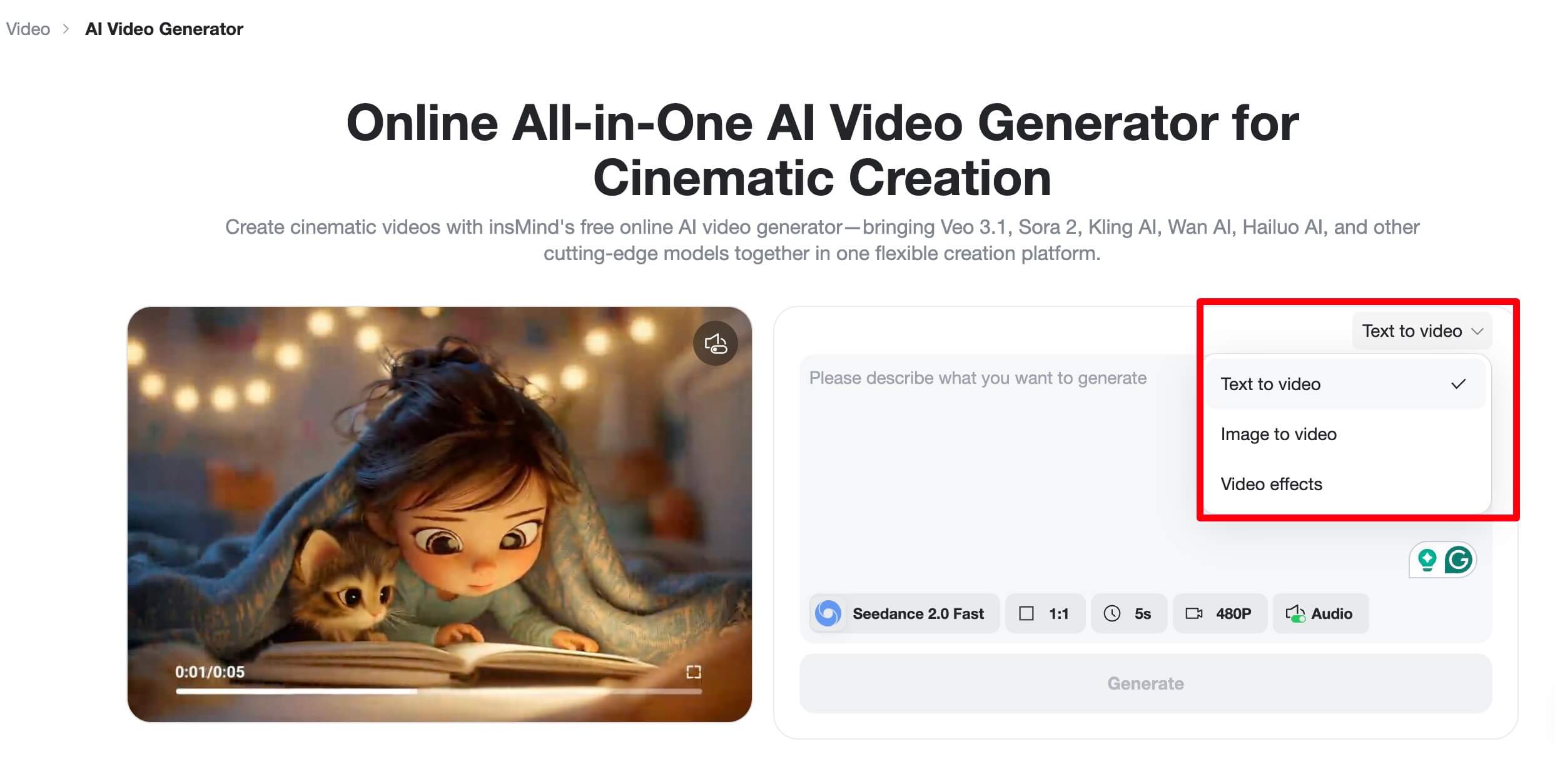
Step 3: Pick a Model and Refine Your Prompt
Choose a model that fits your clip length and motion needs. Then write a prompt that names the subject, environment, camera behavior, and pacing. For YouTube, explicitly mention aspect ratio intent (“16:9 widescreen” or “vertical 9:16 for Shorts”) when it affects composition, and describe the first second—that is where retention is won or lost.
If you are animating from an image, reference the important edges and colors so the model preserves branding. Iterate: generate, watch, tweak one variable at a time (lighting, camera, motion), and regenerate.
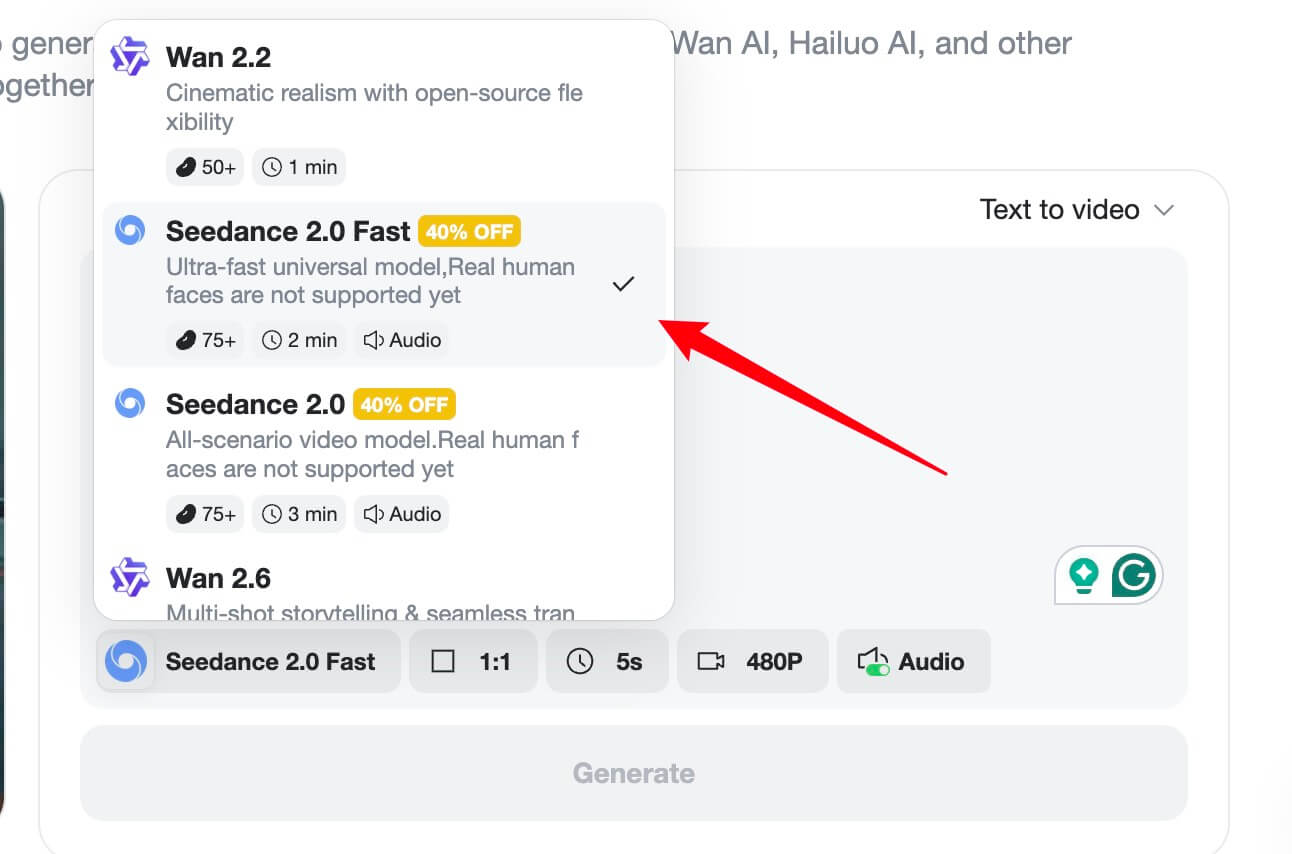
Step 4: Generate Your Clip
Click generate and let the model render. Preview the result before you move on. If something looks off, adjust seed-related settings if available, or simplify the prompt: fewer simultaneous actions often yield cleaner motion. For longer YouTube videos, plan multiple short generations you can stitch rather than expecting one clip to cover a full chapter.
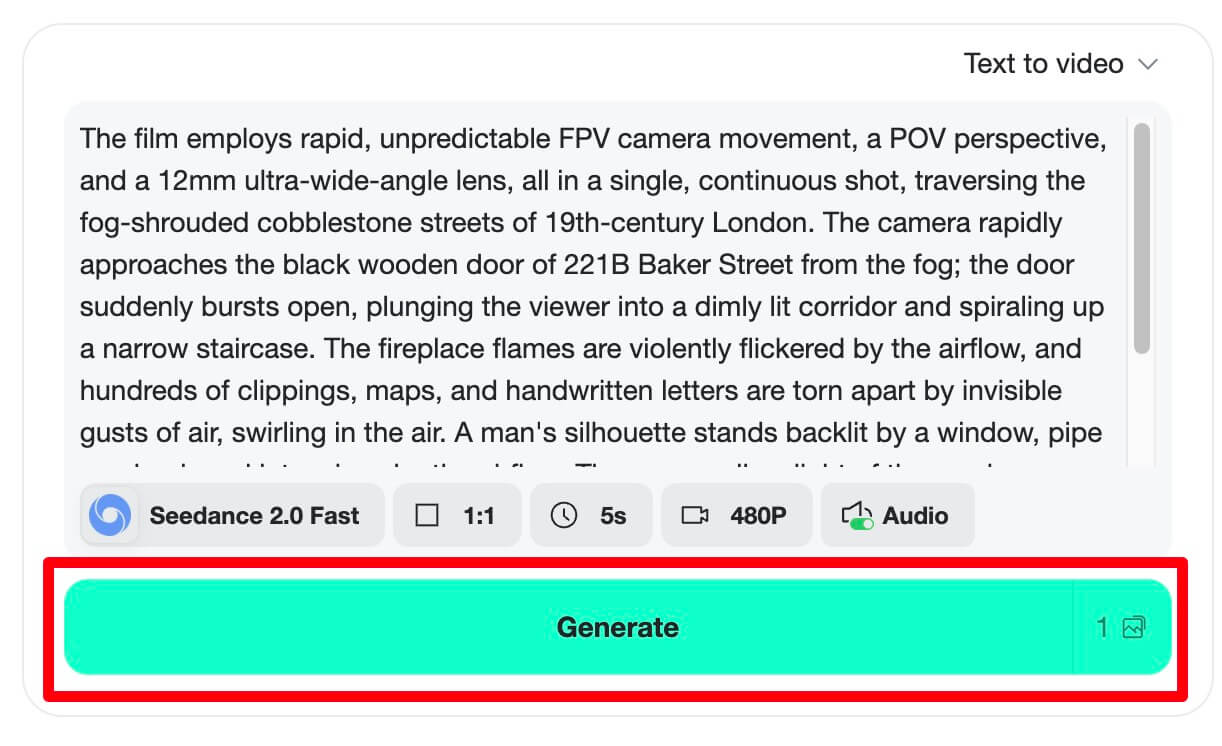
Step 5: Download and Upload to YouTube
Export the clip in a format your editor accepts (commonly MP4). For long-form, assemble with your talking-head footage, normalize loudness, add chapters, and upload to YouTube Studio. For Shorts, keep the strongest motion in the first frame, add on-screen text, and verify vertical crop in the Shorts preview.
When you are satisfied, upload from desktop or mobile, write a title that matches search intent, and place your primary keyword naturally in the first lines of the description along with a clear call-to-action.
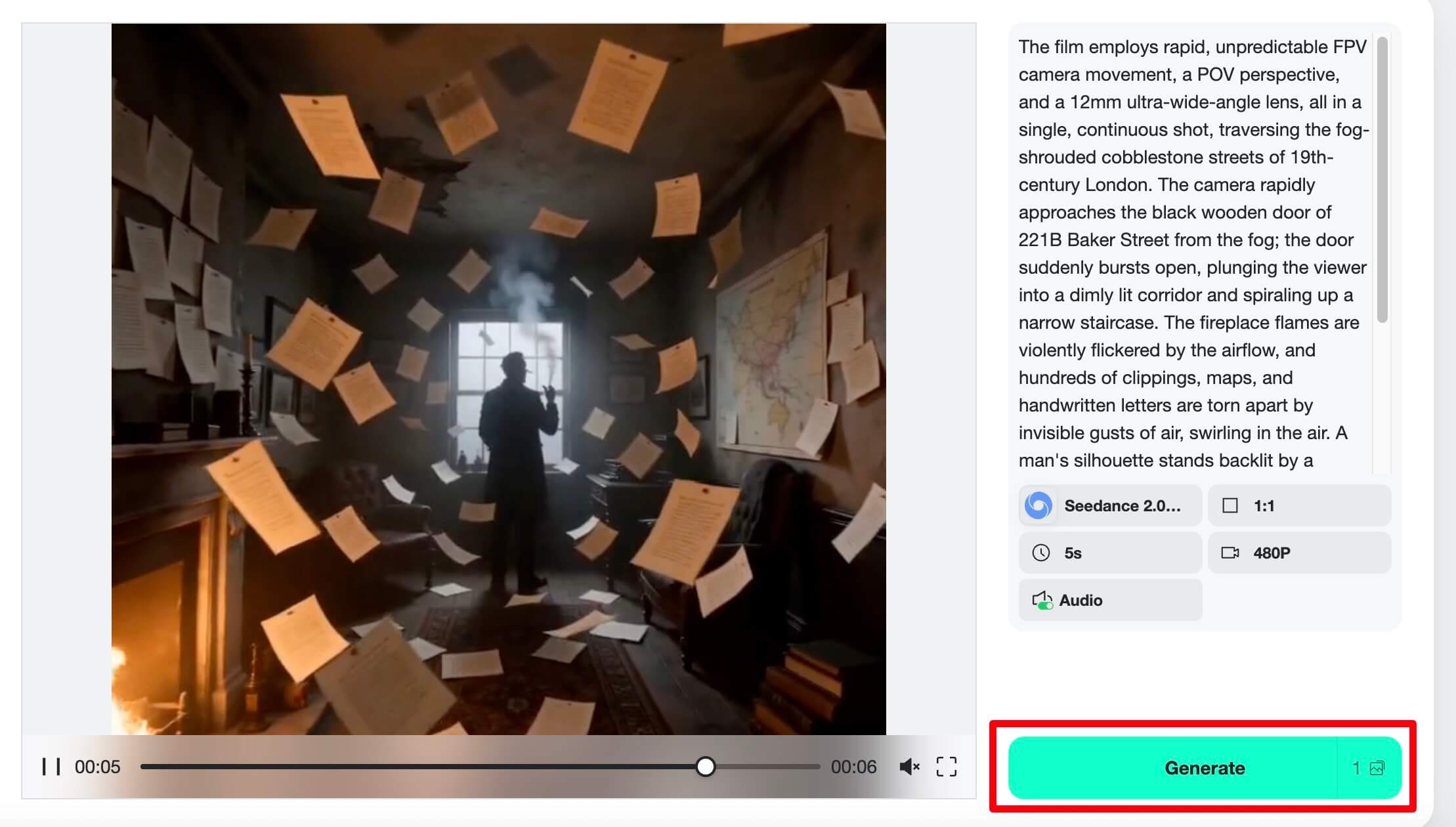
Text-to-Video vs Image-to-Video for YouTube
Text-to-video shines when you need rapid ideation: testing hooks, generating background loops, or producing faceless explainers where the visuals support a voiceover script. The tradeoff is consistency; characters and objects may drift between generations, which matters less for abstract B-roll than for serialized storytelling.
Image-to-video shines when brand assets already exist: channel banners adapted to motion, product photos with subtle parallax, or meme templates you want to animate without redrawing. Because the frame is anchored, you get repeatable looks across a series of uploads.
Many creators mix both: image-to-video for branded segments, text-to-video for variety and fast experiments. insMind keeps both modes in one flow so you are not switching tools midweek when your content calendar changes.
Common Beginner Mistakes to Avoid
Even with good gear and a solid AI pipeline, a few habits quietly hurt channels. First, ignoring loudness: YouTube listeners bounce when audio jumps between clips. Normalize speech and generated clips to a consistent LUFS target in your editor. Second, overloading prompts: asking for ten simultaneous actions confuses the model; stage motion in separate clips instead. Third, skipping metadata: titles, descriptions, and chapters help discovery; AI can speed up visuals, but SEO still needs your keywords and clarity.
Fourth, waiting for perfect gear: upgrade after you have proof of concept from real uploads, not before. Finally, inconsistent aspect ratios: mixing landscape and vertical without a plan creates awkward padding; decide per asset whether it is long-form 16:9 or Shorts-first 9:16 before you generate.
Frequently Asked Questions
Do I need an expensive camera to start on YouTube?
No. Many channels grow with a smartphone plus good audio and lighting. Invest where viewers perceive quality first: clarity of speech, stable framing, and a well-lit subject. Upgrade cameras when your content strategy outgrows your current sensor, not because of gear forums.
Can I use AI-generated clips on monetized YouTube videos?
In most cases, yes, when your platform license allows commercial use. Always read the terms for the specific model and plan you use. insMind is built for creator workflows; pair generated footage with original commentary, editing, and value-add so your video reflects genuine effort and complies with platform policies.
What is the best format for Shorts vs long-form?
Shorts favor vertical 9:16 with an immediate hook in the first second. Long-form generally uses 16:9. Generate AI clips in the target aspect ratio when possible to avoid heavy cropping. If you reuse a landscape clip inside a Short, plan safe margins for key subjects.
How do I keep my channel sounding professional?
Treat audio as a system: mic placement, room tone reduction, gentle EQ, and loudness normalization. Record room tone for noise profiling when possible. For AI clips, match perceived loudness to your voiceover so viewers are not reaching for the volume control.
How often should beginners upload?
Pick a sustainable cadence—for many creators that is one long video per week plus a few Shorts—rather than burning out on daily uploads. AI can reduce time on B-roll, but scripting, filming, and packaging still need calendar space.
Publish Your First Video This Week
You now have a grounded gear priority list, a clear reason to add AI clips to your workflow, and a repeatable five-step process inside insMind to produce YouTube-ready footage. The gap between “thinking about YouTube” and running a channel is not more equipment—it is shipping episodes, reading analytics, and improving one element each week.
Open the generator, create one intro or Short tonight, and schedule your upload. Small, consistent improvements compound faster than waiting for the perfect studio.

Jordan Lee
I write practical creator guides at insMind, focusing on AI video workflows, YouTube growth, and gear that earns its place in your bag.
Keep reading

How to Use Seedance 2.5 for AI Videos
Learn how to use Seedance 2.5 for text-to-video and image-to-video, write stronger prompts, guide motion with references, and review results.

How to Make a Creepy Voice for Horror Content Step by Step
Learn how to make a creepy voice for horror videos, podcasts, and games with insMind.

How to Remove TikTok Watermark: 4 Easy Steps for Clean Videos
Learn how to remove TikTok watermark from videos in four practical steps with insMind.

Top 10 Seedance 2.5 Alternatives for AI Video in 2026
Compare top Seedance 2.5 alternatives and learn how to create AI videos with insMind.

Seedance 2.5 vs. MiniMax H3: Which AI Video Model Should You Use?
Compare Seedance 2.5 and MiniMax H3 for AI video creation.

30 Instagram Reels Prompts You Can Copy and Try
Copy-ready Instagram Reels prompts for products, fashion, creators, travel, food, pets, and lifestyle videos.

How to Write Instagram Reels Prompts for AI Videos
Learn to write Instagram Reels prompts for polished AI videos, product clips, creator posts, and lifestyle content.

30 TikTok Video Prompts You Can Copy and Try
Copy-ready TikTok video prompts for ads, creators, products, fashion, pets, travel, and more.

How to Create an AI Micro-drama: A Step-by-Step Guide
Learn how to create an AI micro-drama with insMind.

How to Create a Short Film Using AI in 2026
Learn how to create a short film using AI with insMind.

Instagram Reel Ads: Examples, Specs, Sizes, and Best Practices
Learn Instagram Reel ad specs, examples, safe zones, and best practices.

YouTube Ads Best Practices: How to Create Video Ads
Learn YouTube ads best practices and create video ads with insMind.

YouTube Channel Trailer Examples: 15 Inspiring Ideas for Your Channel
Explore YouTube channel trailer examples and create a polished trailer with insMind.

15 Best YouTube Ad Examples and Templates to Inspire Your Next Campaign
Explore YouTube ad examples and templates, then create video ads with insMind.

How to Make a Hype Video with AI: The Easy Guide
Learn how to make a hype video with AI using insMind.

Instagram Ad Templates for Feed, Stories, Reels, and Carousel Ads
Learn Instagram ad templates for Feed, Stories, Reels, and Carousel Ads.

Facebook Video Ad Specs: Sizes, Formats, and Lengths for 2026
Learn Facebook video ad specs, sizes, formats, and lengths for 2026, then make ad-ready videos with insMind fast.

How to Create Facebook Video Templates for Posts, Ads, Covers, and Live Video
Learn how to use Facebook video templates for posts, ads, covers, and live video with insMind.

Instagram Ad Examples: 15 Creative Ideas That Convert
Explore 15 Instagram ad examples and learn how to make them with insMind.

Instagram Ad Sizes and Specs: Complete 2026 Guide
Find Instagram ad sizes, specs, ratios, and dimensions for every major placement.

10+ Video Resume Examples with Scripts for Every Career Stage
Explore video resume examples and scripts, then create a polished video resume with insMind.

How to Make a Sports Hype Video with AI: A 4-Step Guide
Learn how to make a sports hype video with AI.

YouTube Ad Specs for 2026: Sizes, Formats, and Lengths
YouTube ad specs for sizes, formats, dimensions, and lengths, plus a four-step insMind workflow.

30 Best Grok Imagine Video Prompts You Can Copy and Try
Copy 30 Grok Imagine video prompts and learn how to write better prompts for creative AI videos.

50 Scroll-Stopping AI Brainrot Prompts for Viral Meme Videos
Copy 50 scroll-stopping AI brainrot prompts for chaotic meme videos.

How to Turn Any Photo into a Brainrot Meme Video
Learn how to turn any photo into a brainrot meme video with AI.

How to Make a Retirement Video with AI
Learn how to make a retirement video with AI.

How to Make Your Own Graduation Video from Photos with AI
Learn how to make a graduation video from photos with AI.

How to Make Your Own Outro Video
Learn how to make your own outro video with insMind.

Higgsfield vs Pollo AI: Which Video Platform Fits You?
Compare Higgsfield vs Pollo AI for cinematic control, model choice, ease of use, and pricing.

Pollo AI Review 2026: Features, Pros, Cons, and Verdict
Read our Pollo AI review for 2026 and explore its features, pricing, strengths, limitations, ideal users, and practical tips for better results.

How to Create Cute Baby Talking Videos from Photos
Learn how to create baby talking videos from photos with text, audio, and AI lip sync.

How to Make Your Own Talking Avatar with AI
Learn how to make your own talking avatar with AI from a portrait and script.

Seedance 2.0 Mini vs Seedance 2.0: Which Model Should You Use?
Compare Seedance 2.0 Mini and Seedance 2.0 for AI video creation.

How to Create Talking Animal Videos from Photos That Steal the Show
Learn how to create talking animal videos from photos with AI.

How to Turn a Character Image into a Consistent AI Video
Learn how to turn a character image into a consistent AI video with insMind.

10 Krea AI Alternatives for Creating and Editing AI Videos in 2026
Compare the best Krea AI alternatives for creating and editing AI videos, including insMind, Runway, Kling AI, Luma, Pika, VEED, and more.

Seedance 2.0 Mini Prompts to Copy: 20 Video Ideas
Copy Seedance 2.0 Mini prompts for cinematic AI videos with insMind.

Seedance 2.0 vs Seedance 2.5: What Changed?
Compare Seedance 2.0 and Seedance 2.5 with examples, prompts, and insMind workflow.

10 Best Pollo AI Alternatives for AI Video Creation in 2026
Compare the best Pollo AI alternatives for AI video creation, including insMind, Runway, Kling AI, Luma, Pika, VEED, and more.

How to Make an AI Video of Yourself That Actually Feels Like You
Create a realistic AI video of yourself from a photo and script.

How to Turn Old Photos into a Beautiful Tribute Video with AI
Turn old photos and memories into beautiful AI tribute videos.

How to Make a Daily Vlog with AI in Minutes
Create daily AI vlogs from photos, prompts, or ideas in minutes.

How to Create 2026 FIFA World Cup Highlights with AI
Create 2026 FIFA World Cup highlights, fan clips, and football videos with AI.

Best AI Video Extender for Creators: Top Tools Compared
Compare the best AI video extender tools for creators in 2026 and learn how to make short videos longer with insMind.

How to Edit YouTube Videos Faster with AI
Edit YouTube videos faster with AI background and style tools.

How to Create Training Videos with AI: A Complete Guide for Beginners
Create clear training videos from images and prompts with AI.

Create Product Reveal Videos with an AI Unboxing Video Maker
Learn how to create AI unboxing videos for product reveals, UGC, teasers, and ecommerce demos.

Create Smooth AI Video Transitions with Kling Start/End Frame
Learn how to create smooth AI video transitions with Kling Start/End Frame.

What Can You Choose for the Best InVideo Alternatives in 2026?
Compare the best InVideo alternatives and see why insMind is a strong AI video generator for creators and marketers.

10 Best Animaker Alternatives in 2026: New Trends in AI Video Creation
Compare the best Animaker alternatives for AI video creation, including free and open-source picks.

10 Best HeyGen Alternatives in 2026: Create AI Videos with More Freedom
Compare the best HeyGen alternatives for AI video creation, including free and open-source picks.

How to Make a Faceless YouTube Channel with AI
Make a faceless YouTube channel with AI tools, scripts, video ideas, and insMind.

Best CapCut Alternatives: 8 AI Video Editors Compared
Compare the best CapCut alternatives for iPhone, Android, PC, and AI video editing.

How Ecommerce Brands Replace Products in Videos with AI
Replace products in ecommerce videos with AI for ads, listings, and creative testing.

How to Change Video Background Without Green Screen: Step-by-Step Guide
Learn how to change video backgrounds without a green screen using simple AI editing steps.

How to Seamlessly Replace Objects in Videos with AI
Step-by-step guide on replace objects in videos with AI: how it works, best practices, and how to do it free with insMind.

How to Identify AI-Generated Videos: A Comprehensive Guide
Learn how to identify AI-generated videos using expert tips and insMind's tools for authenticity verification.

Can AI Really Edit Videos For You? A Deep Dive Into AI Video Editing
Discover how AI can edit videos effectively, using insMind and other top tools. Learn workflows, compare features, and explore future trends.

Crafting Viral Bigfoot AI Videos: A Step-by-Step Guide
Create viral Bigfoot AI videos with insMind. Learn how to optimize for TikTok and YouTube, avoid common mistakes, and more.

Discover the Versatility of Happy Horse 1.0 for AI Video Creation
Happy Horse 1.0 review explores AI video generation, integration with insMind, and practical applications for content creators.

Seedance 2.0 vs. Happy Horse 1.0: Which AI Video Generator Fits Your Needs?
Discover the differences between Seedance 2.0 and Happy Horse 1.0. Learn which AI video generator suits your needs best.

How to Make Educational Videos for Kids with AI (4 Easy Steps)
Write a structured script, choose model and audio, generate, and download—a step-by-step guide to making AI educational videos for kids with prompt templates.

Best AI Prompts for Explainer Videos (Proven Templates)
Four proven AI prompt templates for explainer videos—presenter, product demo, faceless brand, and tutorial—plus how to use insMind in 3 steps.

Best AI Explainer Video Generator for Business (2026 Guide)
Choose text-to-video or image-to-video, configure model and audio, generate and download—a complete 2026 guide to AI explainer videos for business with insMind.

Best Prompts for Wan 2.7: Multi-Shot Guide for Cinematic AI Video
Choose text or image mode, write scene-block prompts for Wan 2.7, set duration and audio, then download—plus 40+ language narrative tips.

How to Create Kids Videos with AI: A Parent-Friendly Guide
Upload art or start from text, write kid-safe prompts, pick Google Veo 3.1, generate and download—steps for parents and teachers.

From Script to Screen: How to Create Engaging Story Videos with AI Tools
Learn how to create story videos with AI: split scripts into scenes, optional reference images, generate clips in insMind, then merge. No pro editor required to start.

How to Make a Baby Dance Video with AI: Step-by-Step Guide
Turn a baby photo into a cute AI dance clip. Upload, write a motion prompt, pick model and duration, generate—no editing skills needed.

How to Make a Cat Dance Video with AI: Step-by-Step Guide
Turn a cat photo into a funny dance clip with AI image to video. Upload, write a motion prompt, generate, and download—no editing skills.

Best AI Tool for Pet Dance Videos (2026 Compared)
Compare top AI pet dance video tools with real screenshots, pros and cons, and a tested insMind image-to-video workflow plus copy-ready prompt.

Top 20 AI Fruit Video Prompts to Copy & Paste
Discover top AI fruit video prompts for creating engaging, trendy videos. Perfect for TikTok and other platforms, these prompts inspire creative content.

Funny AI Video Prompts That Work (Tested Examples)
Get 20+ tested funny AI video prompts that actually make people laugh. Copy-paste prompts for TikTok, Reels, and YouTube Shorts with step-by-step instructions.

Affordable AI Video Solutions for E-commerce Startups
Discover affordable AI video solutions for e-commerce startups. Learn about budget-friendly tools and maximize ROI with AI-generated content.

Transforming Marketing with AI Video Ads
Discover how AI video ads are transforming online marketing with personalized, efficient, and creative solutions. Learn techniques and examples.

Mastering Cinematic Ad Creation with Seedance 2.0
Create cinematic ads with Seedance 2.0, a powerful AI tool for video advertisements. Learn how to make stunning video ads using Seedance 2.0.

Mastering Viral Video Creation with Seedance 2.0
Discover how to create viral videos using Seedance 2.0 with tips, prompts, and insights on social media trends.

Close-Up Shot: Definition, Story Uses & Tighter Framing
What is a close-up shot? Definition, when to use tight framing for emotion and detail, and tips for shooting cleaner inserts on any camera.

YouTube Equipment for Beginners: Gear, AI Video & Your First Upload (2026)
Beginner YouTube equipment: priority order for mic, light, and camera; clear audio on a budget; phone vs dedicated camera; Shorts and 16:9 basics.

How to Create Anime Videos with AI (Step-by-Step Guide)
Learn how to create anime videos with AI step by step. Use text-to-video and image-to-video to generate stunning anime animations with insMind.

How to Make Viral Funny Videos with AI in 5 Minutes
Learn how to make viral funny videos with AI in minutes. Step-by-step guide to creating hilarious TikTok and Instagram clips using insMind AI funny video generator.

How to Create Talking Old Photo Videos with AI
Learn how to animate old photos with AI. Turn vintage portraits into talking videos with realistic motion using insMind free photo animation tool.

7 Best Sora 2 Alternatives for AI Video Generation in 2026
Discover the best Sora 2 alternatives for AI video generation. Compare insMind, Runway, Kling AI, Pika, and more to find the right tool for your needs.

AI Prompts for TikTok Video Generator: Complete Guide
Discover the best AI prompts for TikTok video generation. 20+ ready-to-use prompts plus a step-by-step guide to creating viral TikTok content with AI.

How to Upscale Anime Video to 4K with AI (Step-by-Step)
Learn how to upscale anime video to 4K using AI. Step-by-step guide to enhancing low-res anime with sharper lines and cleaner colors.

AI Marketing Video Generator: Create Promo Videos from Text
Learn how to turn text into professional marketing videos using AI. Step-by-step guide to creating promo videos in minutes.

Text-to-Video AI Ranked: Which Generator Wins in 2026?
Compare the 7 best text-to-video AI generators in 2026 including insMind, Sora 2, Runway, Kling AI, Pika, and more.

Animate Anime Images with AI: Turn Static Art into Dynamic Anime Videos
Learn how to animate anime images with AI. Turn static anime art into stunning animated videos easily.

How to Remove Kling Watermark from AI Videos
Explore the best ways to remove Kling AI watermark. Compare editing methods and discover watermark-free Kling generation options.

AI Video Editor: Edit Videos Instantly with Prompts
Use insMind AI Video Editor and prompts to edit videos, remove objects, change backgrounds and more.

Control the Narrative: Create Cinematic AI Videos with Start & End Frames
From start to finish, take control of AI video storytelling with Start & End Frames.

How to Create a Stranger Things Transition Video (Step-by-Step Guide)
Create a Stranger Things–style Upside Down transition with AI in just a few steps using insMind.

Transform Your Ideas: Generate Videos from Text Instantly
Turn text into videos in seconds with InsMind's AI—ideal for social media, ads, and presentations. No editing skills required.

Tralalero Tralala: How to Animate the Italian Shark Meme with AI Flair
Animate the viral “Tralalero Tralala” Italian Shark meme with AI for fun, shareable content.

Top TikTok Memes 2025: 'Tung Tung Tung Sahur' & Viral Trends You Can't Miss
2025 TikTok trends: AI-generated Italian Brainrot memes and creepy Tung Tung Tung Sahur dominate viral humor.