


Ecommerce teams move fast. A product color changes, packaging gets refreshed, a seasonal label expires, or a best-selling SKU needs a new ad angle by Friday. But what happens when the best footage you have still shows the old product? Do you reshoot the entire video, brief creators again, wait for edits, and rebuild every ad variation from scratch?
That used to be the normal workflow. Now, AI video editing gives brands a faster option: replace the product inside an existing video while keeping the scene, motion, lighting, and marketing context intact. With insMind's AI video object replacer, ecommerce brands can update product videos for paid social, Shopify product pages, Amazon listings, and creative testing without starting over.
Table of Contents
Why Product Replacement Matters for Ecommerce Video
Video is one of the highest-leverage assets in ecommerce marketing. A single strong product demo can support TikTok ads, Meta ads, landing pages, email campaigns, marketplace listings, and retargeting creatives. But product details change constantly. Packaging evolves, labels are localized, colors rotate by season, and bundles get updated for promotions.
Traditional video production makes every change expensive. Even a small product swap can require a new shoot, new talent, new props, and a new editing cycle. That slows down campaigns and limits how many ideas your team can test.
AI product replacement changes the equation. Instead of filming a new clip, you can upload an existing product video, describe what should change, and let AI track the selected object across the footage. For brands that rely on fast creative iteration, an AI video editor can turn one original clip into multiple campaign-ready variations.
What Can Ecommerce Brands Replace in Videos?
The best use cases are practical, not gimmicky. Ecommerce teams usually replace products in videos to keep assets accurate, localized, or better aligned with a specific audience.
-
Packaging designs, such as old boxes, outdated bottles, or seasonal wraps
-
Product colors, such as changing a black shoe to white or a red mug to blue
-
Labels and logos, especially for rebrands or marketplace-specific creative
-
Entire products, such as swapping an old model for a new release
-
Props around the product, such as accessories, surfaces, or background items
This is especially useful when the original video already has good lighting, a strong hook, or natural hand movement. Why throw away a strong creative just because the product needs an update?
How to Replace Products in Videos with insMind
insMind is built for prompt-based editing, so you do not need a traditional timeline or frame-by-frame masking workflow. The process is simple enough for marketers but still practical for production teams that need consistent video outputs.
Step 1: Upload Your Product Video
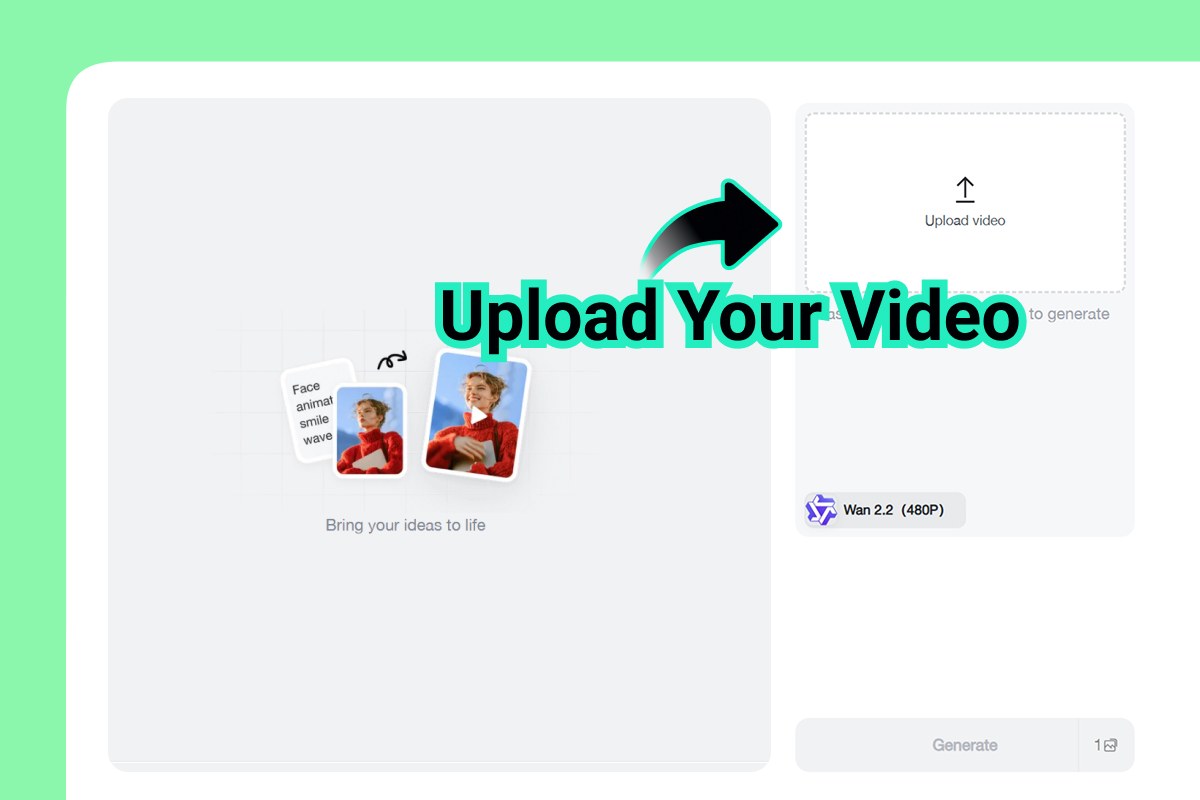
Start by opening the AI video object replacer and uploading the product video you want to edit. This could be a product demo, UGC-style ad, unboxing clip, lifestyle shot, or marketplace video. Choose a clip where the product is visible enough for AI tracking. Clean lighting and a clear product silhouette usually produce better results.
Step 2: Describe Your Edit
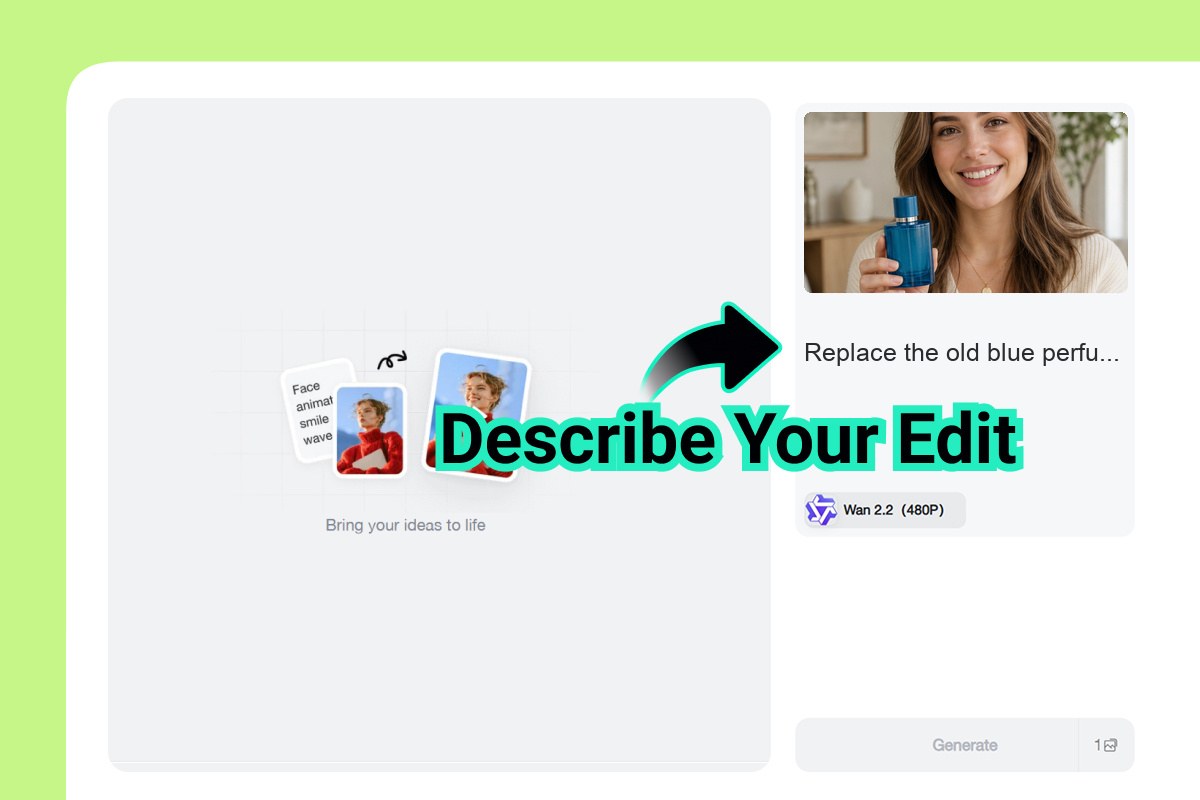
Next, describe what you want to replace. You can change packaging designs, product colors, labels and logos, or entire products. Be specific. Instead of writing "change the product," try: "replace the blue perfume bottle with a gold bottle while keeping the creator, hand motion, and lighting natural." insMind automatically tracks the selected object throughout the video, so the replacement stays aligned across frames.
Step 3: Apply the Edit
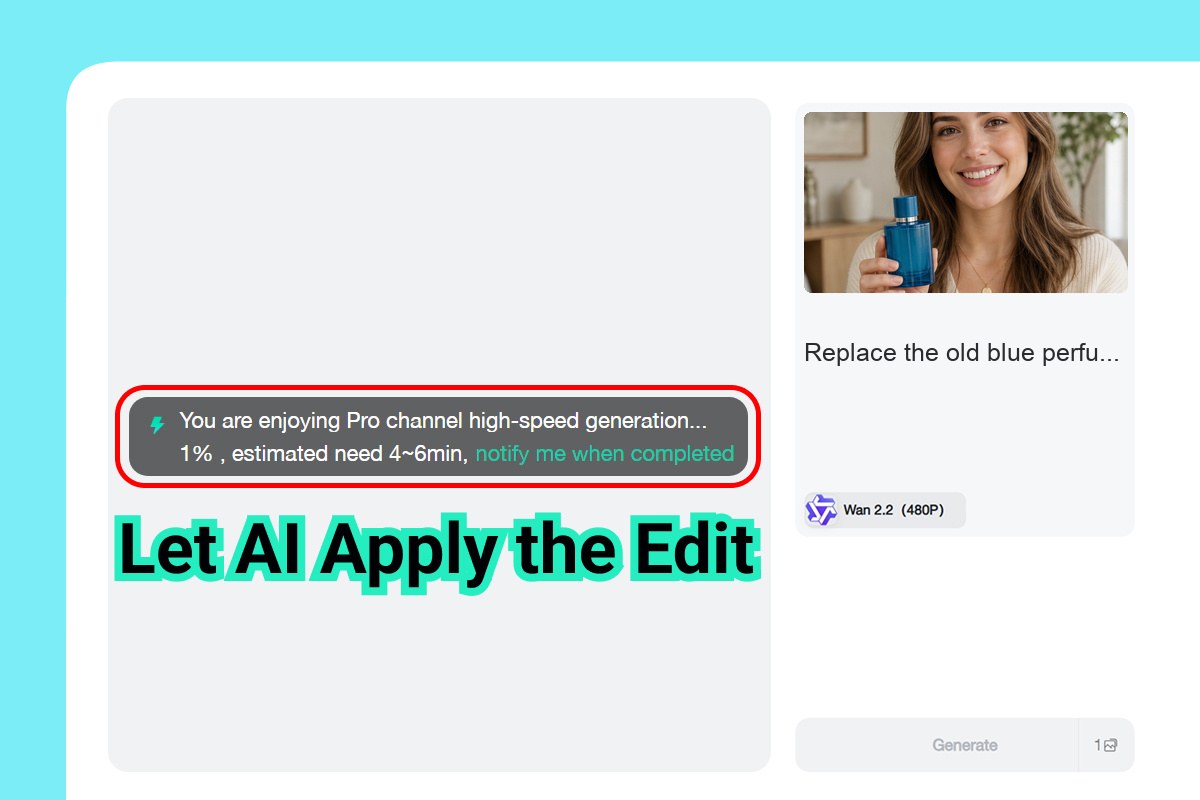
After you submit the prompt, insMind applies the edit across the clip. The AI analyzes the object, follows its movement, and renders the new product detail into the scene. This is where product replacement becomes more useful than a static overlay. The result should respect the scene's motion, perspective, and lighting so the updated video feels natural.
Step 4: Download and Reuse for Marketing
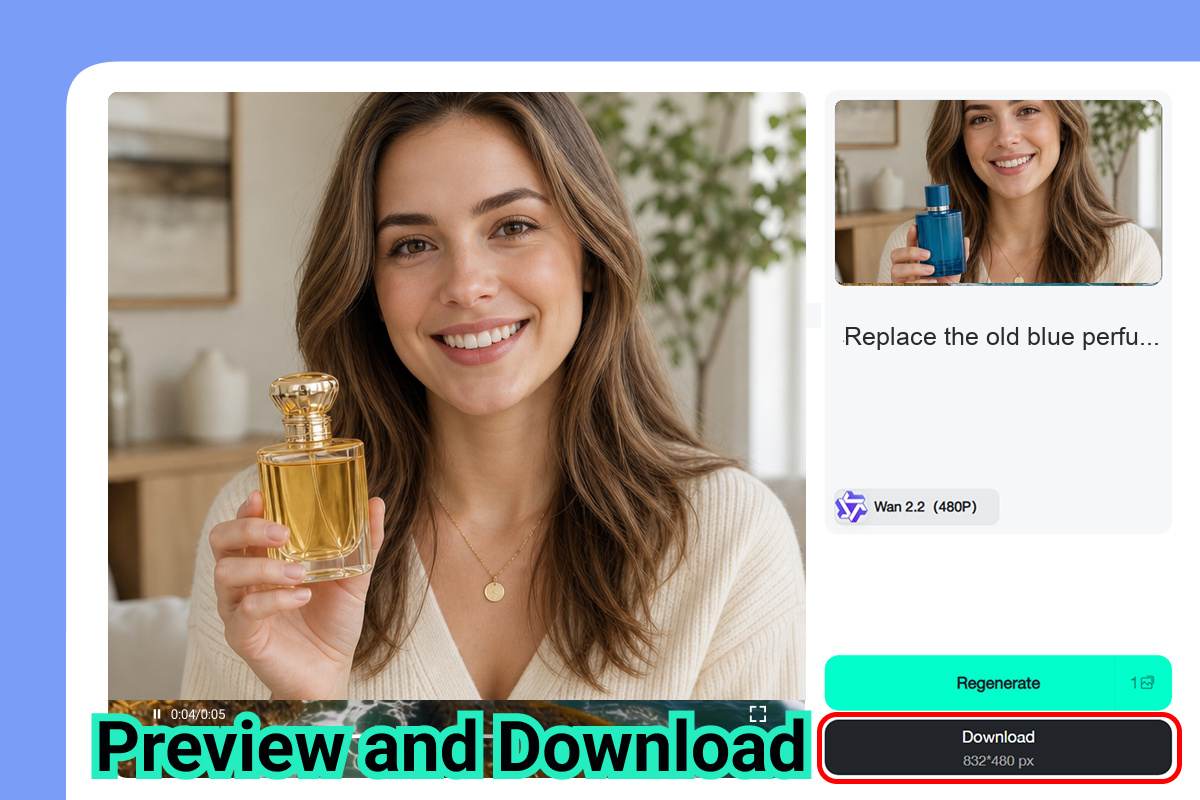
Once the edit looks right, download the updated video and reuse it across your marketing channels. Ecommerce teams can create versions for TikTok Ads, Meta Ads, Shopify product pages, Amazon listings, and A/B testing creatives. If you also need new product visuals from scratch, pair this workflow with an AI product video generator to create fresh scenes for additional campaigns.
Practical Campaign Ideas for Product Replacement
Want to get more value from one strong video shoot? Product replacement works best when you connect it to a clear marketing goal.
For paid social, you can test different product colors in the same hook. The creator, lighting, and pacing stay constant, so you can isolate whether the product variation affects performance. For rebrands, you can update logos and labels across older videos without rebuilding the entire asset library. For marketplaces, you can adapt the same video to a Shopify product page, Amazon listing, or regional product version.
You can also use product replacement to refresh seasonal creative. A plain product box can become a holiday package. A summer skincare bottle can become a winter bundle. A neutral home decor item can become a limited-edition colorway. This lets your team build more ad variations without multiplying production costs.
Tips for Better AI Product Replacement Results
AI editing works best when your input footage gives the model enough visual information. If the product is tiny, heavily blurred, or constantly blocked by hands, the replacement may look less stable. Choose footage where the product is visible, well-lit, and not too reflective.
Write prompts like a creative brief. Include the object, replacement, color, material, label detail, and style. For example: "replace the blue protein shake bottle with a matte black bottle with a silver logo, keep the hand motion and kitchen lighting natural." Specific prompts help the AI understand what should change and what should stay untouched.
Also, avoid changing too many things at once in a short clip. If your goal is to swap the product, keep the background, subject, and camera movement consistent. If you need to change the scene environment too, use a related tool like the video background changer in a separate pass.
Common Mistakes to Avoid
The biggest mistake is treating AI product replacement like magic instead of direction. Vague prompts create vague results. If you want a specific ecommerce output, say exactly what the product should become.
Another mistake is using footage that was never suitable for replacement. Extreme motion blur, blocked products, fast cuts, and reflective packaging can make the edit harder to track. Start with your cleanest clip, then expand to more complex footage once you understand the tool's behavior.
Finally, do not forget channel requirements. TikTok Ads, Meta Ads, Shopify, and Amazon each have different viewing contexts. A product replacement that looks great on a large landing page hero may need tighter framing or a different crop for vertical ads.
FAQ
Can AI replace a product throughout an entire video?
Yes. AI product replacement can track a selected object across frames and apply the replacement throughout the clip. The result depends on footage quality, object visibility, lighting, and motion complexity.
Can ecommerce brands replace packaging or labels only?
Yes. You can describe smaller edits such as replacing a logo, changing a label, or updating packaging colors. This is useful for rebrands, seasonal campaigns, and marketplace-specific assets.
Do I need to upload a product link?
No. For this workflow, upload the product video and describe the edit. You do not need to upload a product URL for the steps described in this guide.
Is AI product replacement good for ad testing?
Yes. It is especially useful for testing colorways, packaging, product bundles, and campaign angles while keeping the same base footage. That helps teams create controlled A/B tests faster.
What types of videos work best?
Clear ecommerce clips work best: product demos, UGC ads, unboxing shots, lifestyle videos, and marketplace product videos. Avoid clips where the product is too small, hidden, or heavily blurred.
Start Reusing Your Best Product Videos
Your best ecommerce videos should not expire every time a product detail changes. With AI product replacement, you can keep the hook, scene, and pacing that already work, then update the product for the next campaign. Ready to turn one video into multiple ad-ready versions?

Sid Buckley
I'm a professional writer and amateur photographer, and I author insightful articles at insMind to help you integrate AI into compelling image creation.
Keep reading

How to Use Seedance 2.5 for AI Videos
Learn how to use Seedance 2.5 for text-to-video and image-to-video, write stronger prompts, guide motion with references, and review results.

How to Make a Creepy Voice for Horror Content Step by Step
Learn how to make a creepy voice for horror videos, podcasts, and games with insMind.

How to Remove TikTok Watermark: 4 Easy Steps for Clean Videos
Learn how to remove TikTok watermark from videos in four practical steps with insMind.

Top 10 Seedance 2.5 Alternatives for AI Video in 2026
Compare top Seedance 2.5 alternatives and learn how to create AI videos with insMind.

Seedance 2.5 vs. MiniMax H3: Which AI Video Model Should You Use?
Compare Seedance 2.5 and MiniMax H3 for AI video creation.

30 Instagram Reels Prompts You Can Copy and Try
Copy-ready Instagram Reels prompts for products, fashion, creators, travel, food, pets, and lifestyle videos.

How to Write Instagram Reels Prompts for AI Videos
Learn to write Instagram Reels prompts for polished AI videos, product clips, creator posts, and lifestyle content.

30 TikTok Video Prompts You Can Copy and Try
Copy-ready TikTok video prompts for ads, creators, products, fashion, pets, travel, and more.

How to Create an AI Micro-drama: A Step-by-Step Guide
Learn how to create an AI micro-drama with insMind.

How to Create a Short Film Using AI in 2026
Learn how to create a short film using AI with insMind.

Instagram Reel Ads: Examples, Specs, Sizes, and Best Practices
Learn Instagram Reel ad specs, examples, safe zones, and best practices.

YouTube Ads Best Practices: How to Create Video Ads
Learn YouTube ads best practices and create video ads with insMind.

YouTube Channel Trailer Examples: 15 Inspiring Ideas for Your Channel
Explore YouTube channel trailer examples and create a polished trailer with insMind.

15 Best YouTube Ad Examples and Templates to Inspire Your Next Campaign
Explore YouTube ad examples and templates, then create video ads with insMind.

How to Make a Hype Video with AI: The Easy Guide
Learn how to make a hype video with AI using insMind.

Instagram Ad Templates for Feed, Stories, Reels, and Carousel Ads
Learn Instagram ad templates for Feed, Stories, Reels, and Carousel Ads.

Facebook Video Ad Specs: Sizes, Formats, and Lengths for 2026
Learn Facebook video ad specs, sizes, formats, and lengths for 2026, then make ad-ready videos with insMind fast.

How to Create Facebook Video Templates for Posts, Ads, Covers, and Live Video
Learn how to use Facebook video templates for posts, ads, covers, and live video with insMind.

Instagram Ad Examples: 15 Creative Ideas That Convert
Explore 15 Instagram ad examples and learn how to make them with insMind.

Instagram Ad Sizes and Specs: Complete 2026 Guide
Find Instagram ad sizes, specs, ratios, and dimensions for every major placement.

10+ Video Resume Examples with Scripts for Every Career Stage
Explore video resume examples and scripts, then create a polished video resume with insMind.

How to Make a Sports Hype Video with AI: A 4-Step Guide
Learn how to make a sports hype video with AI.

YouTube Ad Specs for 2026: Sizes, Formats, and Lengths
YouTube ad specs for sizes, formats, dimensions, and lengths, plus a four-step insMind workflow.

30 Best Grok Imagine Video Prompts You Can Copy and Try
Copy 30 Grok Imagine video prompts and learn how to write better prompts for creative AI videos.

50 Scroll-Stopping AI Brainrot Prompts for Viral Meme Videos
Copy 50 scroll-stopping AI brainrot prompts for chaotic meme videos.

How to Turn Any Photo into a Brainrot Meme Video
Learn how to turn any photo into a brainrot meme video with AI.

How to Make a Retirement Video with AI
Learn how to make a retirement video with AI.

How to Make Your Own Graduation Video from Photos with AI
Learn how to make a graduation video from photos with AI.

How to Make Your Own Outro Video
Learn how to make your own outro video with insMind.

Higgsfield vs Pollo AI: Which Video Platform Fits You?
Compare Higgsfield vs Pollo AI for cinematic control, model choice, ease of use, and pricing.

Pollo AI Review 2026: Features, Pros, Cons, and Verdict
Read our Pollo AI review for 2026 and explore its features, pricing, strengths, limitations, ideal users, and practical tips for better results.

How to Create Cute Baby Talking Videos from Photos
Learn how to create baby talking videos from photos with text, audio, and AI lip sync.

How to Make Your Own Talking Avatar with AI
Learn how to make your own talking avatar with AI from a portrait and script.

Seedance 2.0 Mini vs Seedance 2.0: Which Model Should You Use?
Compare Seedance 2.0 Mini and Seedance 2.0 for AI video creation.

How to Create Talking Animal Videos from Photos That Steal the Show
Learn how to create talking animal videos from photos with AI.

How to Turn a Character Image into a Consistent AI Video
Learn how to turn a character image into a consistent AI video with insMind.

10 Krea AI Alternatives for Creating and Editing AI Videos in 2026
Compare the best Krea AI alternatives for creating and editing AI videos, including insMind, Runway, Kling AI, Luma, Pika, VEED, and more.

Seedance 2.0 Mini Prompts to Copy: 20 Video Ideas
Copy Seedance 2.0 Mini prompts for cinematic AI videos with insMind.

Seedance 2.0 vs Seedance 2.5: What Changed?
Compare Seedance 2.0 and Seedance 2.5 with examples, prompts, and insMind workflow.

10 Best Pollo AI Alternatives for AI Video Creation in 2026
Compare the best Pollo AI alternatives for AI video creation, including insMind, Runway, Kling AI, Luma, Pika, VEED, and more.

How to Make an AI Video of Yourself That Actually Feels Like You
Create a realistic AI video of yourself from a photo and script.

How to Turn Old Photos into a Beautiful Tribute Video with AI
Turn old photos and memories into beautiful AI tribute videos.

How to Make a Daily Vlog with AI in Minutes
Create daily AI vlogs from photos, prompts, or ideas in minutes.

How to Create 2026 FIFA World Cup Highlights with AI
Create 2026 FIFA World Cup highlights, fan clips, and football videos with AI.

Best AI Video Extender for Creators: Top Tools Compared
Compare the best AI video extender tools for creators in 2026 and learn how to make short videos longer with insMind.

How to Edit YouTube Videos Faster with AI
Edit YouTube videos faster with AI background and style tools.

How to Create Training Videos with AI: A Complete Guide for Beginners
Create clear training videos from images and prompts with AI.

Create Product Reveal Videos with an AI Unboxing Video Maker
Learn how to create AI unboxing videos for product reveals, UGC, teasers, and ecommerce demos.

Create Smooth AI Video Transitions with Kling Start/End Frame
Learn how to create smooth AI video transitions with Kling Start/End Frame.

What Can You Choose for the Best InVideo Alternatives in 2026?
Compare the best InVideo alternatives and see why insMind is a strong AI video generator for creators and marketers.

10 Best Animaker Alternatives in 2026: New Trends in AI Video Creation
Compare the best Animaker alternatives for AI video creation, including free and open-source picks.

10 Best HeyGen Alternatives in 2026: Create AI Videos with More Freedom
Compare the best HeyGen alternatives for AI video creation, including free and open-source picks.

How to Make a Faceless YouTube Channel with AI
Make a faceless YouTube channel with AI tools, scripts, video ideas, and insMind.

Best CapCut Alternatives: 8 AI Video Editors Compared
Compare the best CapCut alternatives for iPhone, Android, PC, and AI video editing.

How Ecommerce Brands Replace Products in Videos with AI
Replace products in ecommerce videos with AI for ads, listings, and creative testing.

How to Change Video Background Without Green Screen: Step-by-Step Guide
Learn how to change video backgrounds without a green screen using simple AI editing steps.

How to Seamlessly Replace Objects in Videos with AI
Step-by-step guide on replace objects in videos with AI: how it works, best practices, and how to do it free with insMind.

How to Identify AI-Generated Videos: A Comprehensive Guide
Learn how to identify AI-generated videos using expert tips and insMind's tools for authenticity verification.

Can AI Really Edit Videos For You? A Deep Dive Into AI Video Editing
Discover how AI can edit videos effectively, using insMind and other top tools. Learn workflows, compare features, and explore future trends.

Crafting Viral Bigfoot AI Videos: A Step-by-Step Guide
Create viral Bigfoot AI videos with insMind. Learn how to optimize for TikTok and YouTube, avoid common mistakes, and more.

Discover the Versatility of Happy Horse 1.0 for AI Video Creation
Happy Horse 1.0 review explores AI video generation, integration with insMind, and practical applications for content creators.

Seedance 2.0 vs. Happy Horse 1.0: Which AI Video Generator Fits Your Needs?
Discover the differences between Seedance 2.0 and Happy Horse 1.0. Learn which AI video generator suits your needs best.

How to Make Educational Videos for Kids with AI (4 Easy Steps)
Write a structured script, choose model and audio, generate, and download—a step-by-step guide to making AI educational videos for kids with prompt templates.

Best AI Prompts for Explainer Videos (Proven Templates)
Four proven AI prompt templates for explainer videos—presenter, product demo, faceless brand, and tutorial—plus how to use insMind in 3 steps.

Best AI Explainer Video Generator for Business (2026 Guide)
Choose text-to-video or image-to-video, configure model and audio, generate and download—a complete 2026 guide to AI explainer videos for business with insMind.

Best Prompts for Wan 2.7: Multi-Shot Guide for Cinematic AI Video
Choose text or image mode, write scene-block prompts for Wan 2.7, set duration and audio, then download—plus 40+ language narrative tips.

How to Create Kids Videos with AI: A Parent-Friendly Guide
Upload art or start from text, write kid-safe prompts, pick Google Veo 3.1, generate and download—steps for parents and teachers.

From Script to Screen: How to Create Engaging Story Videos with AI Tools
Learn how to create story videos with AI: split scripts into scenes, optional reference images, generate clips in insMind, then merge. No pro editor required to start.

How to Make a Baby Dance Video with AI: Step-by-Step Guide
Turn a baby photo into a cute AI dance clip. Upload, write a motion prompt, pick model and duration, generate—no editing skills needed.

How to Make a Cat Dance Video with AI: Step-by-Step Guide
Turn a cat photo into a funny dance clip with AI image to video. Upload, write a motion prompt, generate, and download—no editing skills.

Best AI Tool for Pet Dance Videos (2026 Compared)
Compare top AI pet dance video tools with real screenshots, pros and cons, and a tested insMind image-to-video workflow plus copy-ready prompt.

Top 20 AI Fruit Video Prompts to Copy & Paste
Discover top AI fruit video prompts for creating engaging, trendy videos. Perfect for TikTok and other platforms, these prompts inspire creative content.

Funny AI Video Prompts That Work (Tested Examples)
Get 20+ tested funny AI video prompts that actually make people laugh. Copy-paste prompts for TikTok, Reels, and YouTube Shorts with step-by-step instructions.

Affordable AI Video Solutions for E-commerce Startups
Discover affordable AI video solutions for e-commerce startups. Learn about budget-friendly tools and maximize ROI with AI-generated content.

Transforming Marketing with AI Video Ads
Discover how AI video ads are transforming online marketing with personalized, efficient, and creative solutions. Learn techniques and examples.

Mastering Cinematic Ad Creation with Seedance 2.0
Create cinematic ads with Seedance 2.0, a powerful AI tool for video advertisements. Learn how to make stunning video ads using Seedance 2.0.

Mastering Viral Video Creation with Seedance 2.0
Discover how to create viral videos using Seedance 2.0 with tips, prompts, and insights on social media trends.

Close-Up Shot: Definition, Story Uses & Tighter Framing
What is a close-up shot? Definition, when to use tight framing for emotion and detail, and tips for shooting cleaner inserts on any camera.

YouTube Equipment for Beginners: Gear, AI Video & Your First Upload (2026)
Beginner YouTube equipment: priority order for mic, light, and camera; clear audio on a budget; phone vs dedicated camera; Shorts and 16:9 basics.

How to Create Anime Videos with AI (Step-by-Step Guide)
Learn how to create anime videos with AI step by step. Use text-to-video and image-to-video to generate stunning anime animations with insMind.

How to Make Viral Funny Videos with AI in 5 Minutes
Learn how to make viral funny videos with AI in minutes. Step-by-step guide to creating hilarious TikTok and Instagram clips using insMind AI funny video generator.

How to Create Talking Old Photo Videos with AI
Learn how to animate old photos with AI. Turn vintage portraits into talking videos with realistic motion using insMind free photo animation tool.

7 Best Sora 2 Alternatives for AI Video Generation in 2026
Discover the best Sora 2 alternatives for AI video generation. Compare insMind, Runway, Kling AI, Pika, and more to find the right tool for your needs.

AI Prompts for TikTok Video Generator: Complete Guide
Discover the best AI prompts for TikTok video generation. 20+ ready-to-use prompts plus a step-by-step guide to creating viral TikTok content with AI.

How to Upscale Anime Video to 4K with AI (Step-by-Step)
Learn how to upscale anime video to 4K using AI. Step-by-step guide to enhancing low-res anime with sharper lines and cleaner colors.

AI Marketing Video Generator: Create Promo Videos from Text
Learn how to turn text into professional marketing videos using AI. Step-by-step guide to creating promo videos in minutes.

Text-to-Video AI Ranked: Which Generator Wins in 2026?
Compare the 7 best text-to-video AI generators in 2026 including insMind, Sora 2, Runway, Kling AI, Pika, and more.

Animate Anime Images with AI: Turn Static Art into Dynamic Anime Videos
Learn how to animate anime images with AI. Turn static anime art into stunning animated videos easily.

How to Remove Kling Watermark from AI Videos
Explore the best ways to remove Kling AI watermark. Compare editing methods and discover watermark-free Kling generation options.

AI Video Editor: Edit Videos Instantly with Prompts
Use insMind AI Video Editor and prompts to edit videos, remove objects, change backgrounds and more.

Control the Narrative: Create Cinematic AI Videos with Start & End Frames
From start to finish, take control of AI video storytelling with Start & End Frames.

How to Create a Stranger Things Transition Video (Step-by-Step Guide)
Create a Stranger Things–style Upside Down transition with AI in just a few steps using insMind.

Transform Your Ideas: Generate Videos from Text Instantly
Turn text into videos in seconds with InsMind's AI—ideal for social media, ads, and presentations. No editing skills required.

Tralalero Tralala: How to Animate the Italian Shark Meme with AI Flair
Animate the viral “Tralalero Tralala” Italian Shark meme with AI for fun, shareable content.

Top TikTok Memes 2025: 'Tung Tung Tung Sahur' & Viral Trends You Can't Miss
2025 TikTok trends: AI-generated Italian Brainrot memes and creepy Tung Tung Tung Sahur dominate viral humor.