


 Ryan Barnett·April 9, 2026
Want to make AI videos that actually make people laugh — and go viral? The secret isn’t the tool you use. It’s the prompt you write. A great funny AI video prompt is the difference between a forgettable clip and one that gets millions of views on TikTok, Instagram Reels, or YouTube Shorts.
But writing prompts that are genuinely funny? That’s harder than it sounds. Most AI-generated “comedy” falls flat because the prompts lack structure, surprise, or specificity. The good news: there’s a formula that works — and we’ve tested dozens of prompts to find the ones that consistently produce hilarious results.
In this guide, you’ll get 20+ tested funny AI video prompts you can copy and paste, a proven prompt-writing framework, step-by-step instructions for generating videos with AI funny video generator, and tips to maximize your chances of going viral. Ready to make the internet laugh? Let’s go.
Table of Contents
Why Most Funny AI Video Prompts Fail
Ever typed “make a funny video” into an AI generator and gotten something painfully boring? You’re not alone. The problem isn’t the AI — it’s the prompt. Here are the three biggest reasons funny prompts fall flat:
1. Too Vague
“A funny cat video” gives the AI almost nothing to work with. There’s no scene, no action, no punchline. The AI will generate something generic — a cat sitting there, maybe with a slight head tilt. Not exactly TikTok gold.
2. No Comedic Structure
Comedy works because of surprise, contrast, or escalation. If your prompt doesn’t build in a twist or absurd element, the AI has no “joke” to animate. A good prompt needs a setup and a payoff — just like a joke.
3. Missing Visual Details
AI video generators are visual tools. They need descriptions of what you can see: expressions, actions, camera angles, lighting. “Make it funny” is an abstract instruction. “Dramatic zoom on a confused hamster wearing a tiny business suit” is something the AI can actually render.
The fix? A simple framework that bakes humor directly into the prompt structure. Let’s break it down.
The Anatomy of a High-Performing Funny Prompt
After testing dozens of prompts across multiple AI video generators, we found that every prompt that consistently produces funny results follows the same four-part structure:
| Element | What It Does | Example |
|---|---|---|
| Character | Who or what is in the scene | A serious businessman, a tiny hamster, a grandma |
| Action | What they’re doing | Presenting to a boardroom, trying to skateboard |
| Twist | The unexpected element that creates humor | The audience is cats in suits, the skateboard is a banana |
| Style | Visual tone and mood keywords | Meme style, dramatic zoom, cinematic lighting |
Why this works: Humor is fundamentally about breaking expectations. The “twist” element creates the contrast between what you expect (a normal boardroom meeting) and what you get (the audience is cats). The “style” element tells the AI how to frame the joke visually — dramatic zoom on the awkward silence, meme-style pacing, exaggerated expressions.
Here’s the formula in action:
“A serious businessman presenting quarterly results to a room full of cats wearing tiny suits, dramatic zoom on their unimpressed faces, awkward silence, meme style, comedic timing”
That prompt has a clear character, a specific action, an absurd twist, and style directions. The AI knows exactly what to generate — and the result is genuinely funny.
20+ Tested Funny AI Video Prompts (Copy and Paste)
Ready to make some hilarious content? Here are our top-performing prompts, organized by humor category. All have been tested with AI video generator and produced genuinely funny results.
Animal Comedy Prompts
Animals + absurd situations = viral gold. These consistently outperform other categories on TikTok and Reels.
-
1. “A cute squirrel rapidly inflates into a giant round balloon version of itself, becoming extremely chubby and bouncy. It struggles to keep balance, slightly bouncing and rolling on the ground. Exaggerated cartoon physics, funny and absurd, vibrant colors, meme style, playful energy.”
-
2. “A golden retriever sitting at a desk wearing reading glasses, typing on a laptop with one paw, looking extremely confused at the screen, office cubicle background, dramatic zoom on its bewildered face, comedy style.”
-
3. “A cat wearing sunglasses and a leather jacket, walking in slow motion down a hallway like an action hero, dramatic wind blowing its fur, cinematic lighting, meme energy, absurd confidence.”
-
4. “Two hamsters sitting across from each other at a tiny dining table with candles, one dramatically flips the table, food flying everywhere, soap opera zoom, relationship drama meme style.”
-
5. “A duck wearing a tiny hard hat, confidently leading a construction crew of confused workers, clipboard in wing, dramatic boss energy, meme style, comedic timing.”
Absurd Situation Prompts
The more impossible and unexpected the scenario, the funnier the result. Lean into the absurdity.
-
6. “A serious businessman presenting quarterly results to a room full of cats wearing tiny suits, dramatic zoom on their unimpressed faces, awkward silence, boardroom setting, meme style.”
-
7. “A grandma aggressively breakdancing at a family dinner, spinning on the dining table, everyone frozen in shock, dramatic lighting, action movie camera angles, viral comedy energy.”
-
8. “A baby in a tiny business suit giving a TED talk to an audience of stuffed animals, using a pointer stick, extremely serious expression, dramatic pauses, motivational speaker energy, meme style.”
-
9. “A fish flopping out of a bowl, putting on tiny sneakers, and going for a jog through a living room, determined expression, Rocky training montage style, motivational music energy.”
-
10. “An office printer slowly gaining sentience, growing tiny legs, and walking away from a stressed employee during a deadline, dramatic escape scene, horror movie tension but comedy pacing.”
Exaggeration and Transformation Prompts
These work exceptionally well with image-to-video — upload a photo and describe the exaggerated transformation.
-
11. “Person eating spicy food, face slowly turning bright red, steam shooting from ears, eyes watering dramatically, Pixar-style exaggeration, comedic escalation, meme energy.”
-
12. “A small dog barking at its reflection, progressively getting more dramatic, final bark creates a shockwave that blows furniture back, anime power-up style, over-the-top energy.”
-
13. “Person trying to take a selfie, phone slips, dramatic slow-motion falling sequence with Matrix-style camera rotation, face morphing through five stages of grief, meme edit pacing.”
-
14. “A pug walking normally, then suddenly its body inflates like a balloon and it floats away with a confused expression, owner looking up in disbelief, Pixar physics, absurd comedy.”
-
15. “Person opens fridge at 3 AM, fridge light creates dramatic movie reveal lighting, the leftover pizza glows like a sacred artifact, choir sound effect energy, cinematic worship scene.”
Trending Format Prompts
These tap into formats already proven viral on social media. Great for riding trends while they’re hot.
-
16. “POV: your alarm clock is a drill sergeant, tiny soldier on your nightstand screaming at you, dramatic close-up on its angry face, you pulling blankets over your head, comedy skit energy.”
-
17. “Pixar-style rendering of this person as a clumsy superhero, cape getting caught in doors, tripping over buildings, saving the day by accident, vibrant colors, exaggerated expressions.”
-
18. “Funko Pop version of this person as a confused chef: big head, vinyl texture, failing at flipping pancakes in a chaotic kitchen, nostalgic humor, fast cuts.”
-
19. “Ancient Roman gladiator enters the Colosseum, crowd goes wild, he pulls out a laptop and starts a PowerPoint presentation, crowd confusion, dramatic anticlimax, historical meme energy.”
-
20. “Medieval knight on horseback approaches a dragon, draws sword dramatically, dragon pulls out a ‘please do not disturb’ sign and goes back to sleep, disappointed knight, anticlimactic comedy.”
Quick-Fire Bonus Prompts
-
21. “A toddler staring at broccoli on a plate like it’s a crime scene, detective zoom, noir lighting, dramatic voiceover energy.”
-
22. “Two seagulls arguing over a french fry, courtroom drama style, one is the lawyer, one is the defendant, meme energy.”
-
23. “A roomba gaining consciousness and chasing the family cat, cat’s eyes go wide, horror movie chase scene but tiny and adorable, meme pacing.”
How to Create Funny AI Videos with insMind Prompts
Got a prompt you love? Here’s how to turn it into an actual video in minutes.
Step 1: Upload Your Photo or Choose Text-to-Video
Head to the funny video generator and choose your creation method. For the funniest results, we strongly recommend image-to-video — upload a meme image, pet photo, or selfie. This keeps the subject consistent and gives the AI a clear visual anchor for the comedy.
If you prefer to start from scratch, text-to-video works great for completely AI-generated scenes like the animal comedy prompts above.
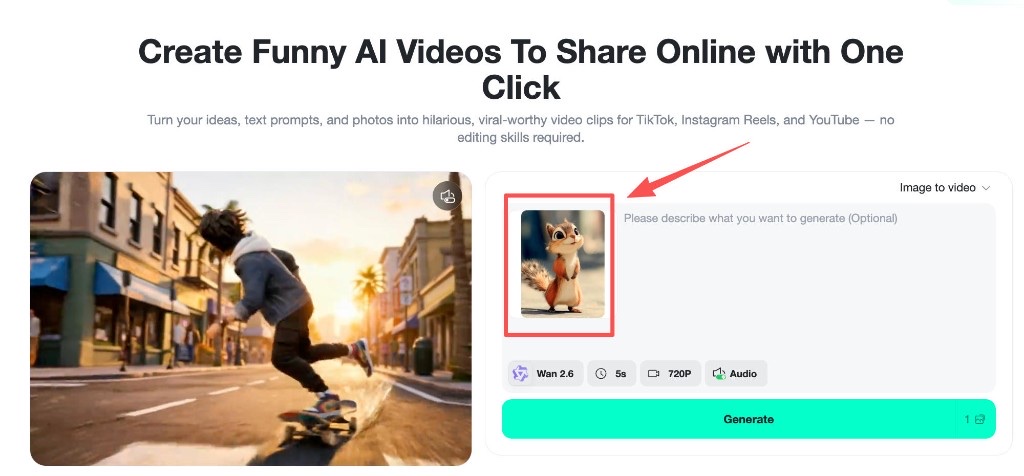
Step 2: Write a High-Performing Funny Prompt
This is the most important step. Use the four-part framework: Character + Action + Twist + Style. Paste one of the tested prompts above, or write your own using this structure.
For example, if you uploaded a squirrel photo:
“A cute squirrel rapidly inflates into a giant round balloon version of itself, becoming extremely chubby and bouncy. It struggles to keep balance, slightly bouncing and rolling on the ground. Exaggerated cartoon physics, funny and absurd, vibrant colors, meme style, playful energy.”
The more specific and visual your prompt, the funnier the output. Don’t be afraid to be ridiculous — absurdity is your best friend.
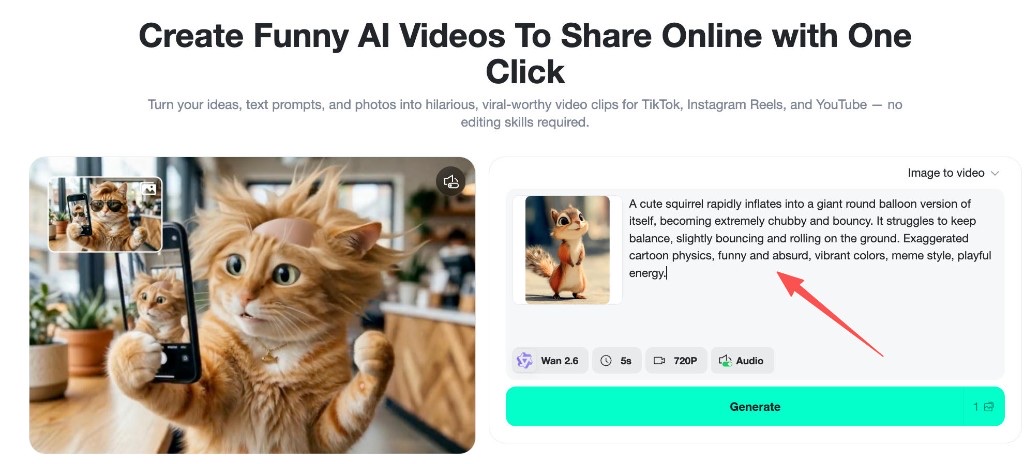
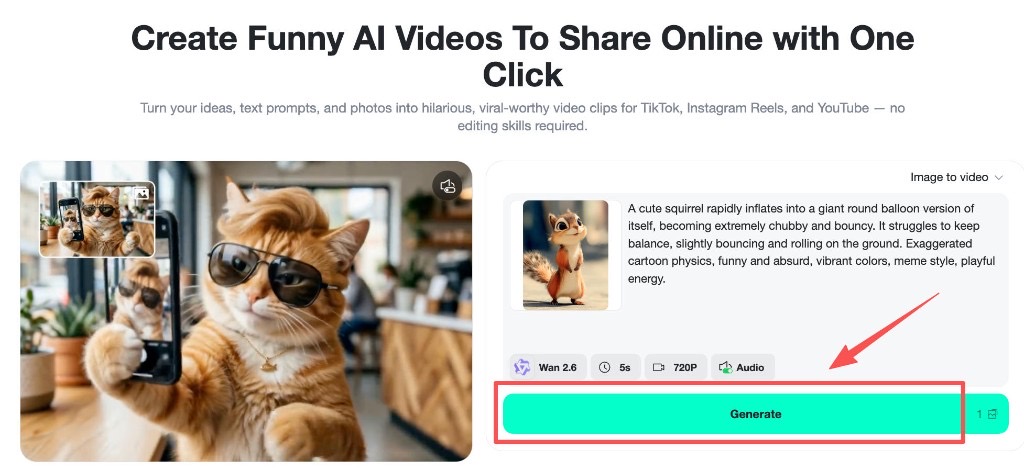
Step 3: Generate Your Funny Video
Click Generate and let insMind work its magic. The AI will interpret your prompt, build the comedic scene, apply motion and timing, and render a ready-to-share video — typically in under a minute. You can preview the result and regenerate with tweaked prompts if the timing or expressions need adjustment.
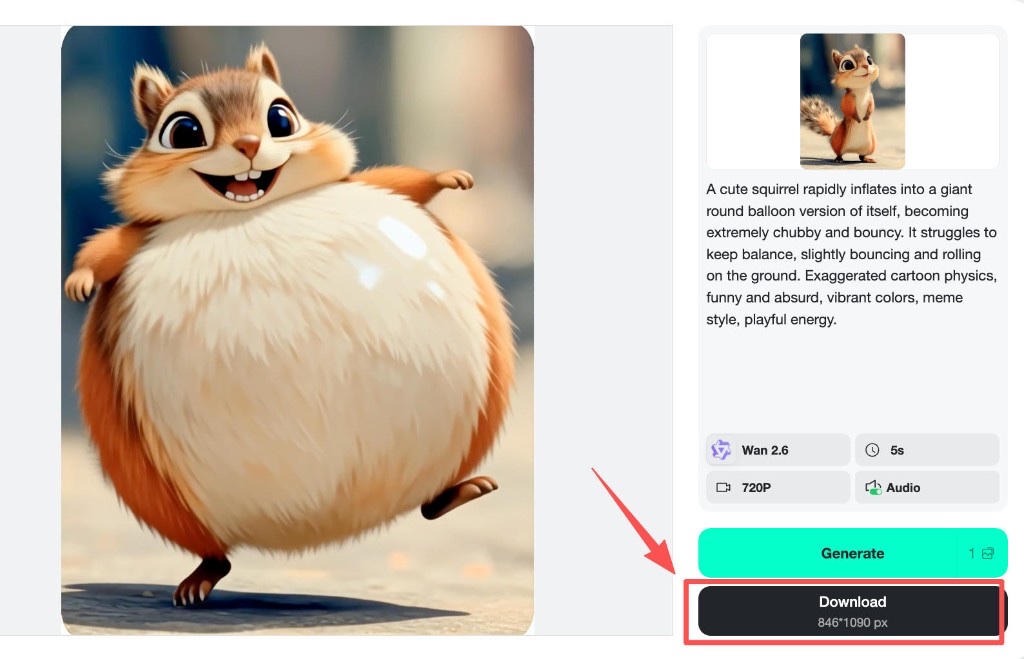
Step 4: Download and Post for Virality
Once your video looks hilarious, download it and post to your platform of choice:
-
TikTok — the top platform for funny AI content right now. Use 9:16 format.
-
Instagram Reels — performs well with slightly more polished comedy. 9:16 format.
-
YouTube Shorts — great for evergreen funny content that gets recommended over time.
Pro tip: Post the same video across all three platforms to maximize reach. Add trending audio on TikTok for an extra viral boost.
Tips for Making Your AI Videos Go Viral
Great prompts are the foundation, but going viral requires a few extra strategies. Here’s what separates content that gets 100 views from content that hits a million.
Hook in the First 2 Seconds
Social media users decide whether to keep watching within the first two seconds. Your prompt should create an immediately eye-catching opening — a dramatic zoom, an unexpected visual, or an absurd setup that demands attention. Words like “dramatic zoom,” “sudden,” and “extreme close-up” in your prompt help the AI create that instant hook.
Use Image-to-Video for Relatability
The most viral AI funny videos use real photos as a starting point. Upload a pet photo, a selfie, or a popular AI meme image and then animate it with a funny prompt. This makes the video feel personal and relatable — two ingredients that drive shares.
Ride Trending Formats
Check what’s trending on TikTok right now. Pixar transformations, Funko Pop conversions, and “brainrot” content are dominating in 2026. Adapt these trends into your prompts — the AI handles the visual execution while you ride the trend wave.
Keep It Short
Funny videos work best at 5–15 seconds. Don’t try to tell a long story. One setup, one punchline, one laugh. AI generators like insMind produce 5-second clips that are perfect for this format.
Add Captions and Trending Audio
After downloading your AI video, add text captions (many viewers watch on mute) and a trending audio track. This combination dramatically increases your video’s chance of being recommended by the algorithm.
Batch Create and Test
Don’t put all your eggs in one prompt. Generate 5–10 variations, post them over a few days, and see what resonates. The beauty of AI video generation is speed — you can test more ideas in an hour than most creators produce in a week.
Frequently Asked Questions
What makes a good funny AI video prompt?
A good funny AI video prompt includes four elements: a clear character (who’s in the scene), a specific action (what they’re doing), an unexpected twist (the comedic element), and style keywords (how it should look). The twist is the most important part — it creates the humor through surprise or absurd contrast.
Can I use these prompts for free?
Yes. All the prompts in this guide work with insMind’s free tier. You can generate funny AI videos without a watermark and without paying anything. Premium plans give you higher resolution and faster generation, but the free plan is more than enough to start creating viral content.
Should I use text-to-video or image-to-video for funny prompts?
Both work, but image-to-video is recommended for the best results. Uploading a photo (especially a pet or meme image) gives the AI a consistent visual reference and makes the humor more relatable. Text-to-video is great for completely AI-generated scenes where you don’t have a source image.
Which AI model is best for funny videos?
For funny and exaggerated content, Wan 2.6 and Seedance 1.5 Pro both produce excellent results on insMind. Wan 2.6 handles cartoon-style exaggeration well, while Seedance excels at dynamic character movement. Experiment with both to see which matches your comedy style.
How do I make my AI funny videos go viral on TikTok?
Focus on these five things: (1) create a strong visual hook in the first 2 seconds, (2) keep videos short (5–15 seconds), (3) use trending audio, (4) add text captions, and (5) post consistently. Batch-create multiple videos from different prompts and post daily to find what resonates with your audience.
Start Making Funny AI Videos Today
You now have everything you need: a proven prompt framework, 23 tested prompts you can copy and paste, and a step-by-step workflow for turning those prompts into actual videos. The only thing left is to try it.
The beauty of AI video generation is that you can experiment endlessly without spending hours on editing. Write a prompt, generate a video, see if it’s funny. If not, tweak and try again. Some of the biggest viral hits on TikTok were the result of creators just playing around with absurd ideas — and now you have the tools and face editing meme tools to do the same thing in minutes.
Ready to make the internet laugh?
Ryan Barnett
I'm a tech enthusiast and writer who loves exploring AI, digital tools, and the latest tech trends. I break down complex topics to make them simple and useful for everyone.
Keep reading

How to Use Seedance 2.5 for AI Videos
Learn how to use Seedance 2.5 for text-to-video and image-to-video, write stronger prompts, guide motion with references, and review results.

How to Make a Creepy Voice for Horror Content Step by Step
Learn how to make a creepy voice for horror videos, podcasts, and games with insMind.

How to Remove TikTok Watermark: 4 Easy Steps for Clean Videos
Learn how to remove TikTok watermark from videos in four practical steps with insMind.

Top 10 Seedance 2.5 Alternatives for AI Video in 2026
Compare top Seedance 2.5 alternatives and learn how to create AI videos with insMind.

Seedance 2.5 vs. MiniMax H3: Which AI Video Model Should You Use?
Compare Seedance 2.5 and MiniMax H3 for AI video creation.

30 Instagram Reels Prompts You Can Copy and Try
Copy-ready Instagram Reels prompts for products, fashion, creators, travel, food, pets, and lifestyle videos.

How to Write Instagram Reels Prompts for AI Videos
Learn to write Instagram Reels prompts for polished AI videos, product clips, creator posts, and lifestyle content.

30 TikTok Video Prompts You Can Copy and Try
Copy-ready TikTok video prompts for ads, creators, products, fashion, pets, travel, and more.

How to Create an AI Micro-drama: A Step-by-Step Guide
Learn how to create an AI micro-drama with insMind.

How to Create a Short Film Using AI in 2026
Learn how to create a short film using AI with insMind.

Instagram Reel Ads: Examples, Specs, Sizes, and Best Practices
Learn Instagram Reel ad specs, examples, safe zones, and best practices.

YouTube Ads Best Practices: How to Create Video Ads
Learn YouTube ads best practices and create video ads with insMind.

YouTube Channel Trailer Examples: 15 Inspiring Ideas for Your Channel
Explore YouTube channel trailer examples and create a polished trailer with insMind.

15 Best YouTube Ad Examples and Templates to Inspire Your Next Campaign
Explore YouTube ad examples and templates, then create video ads with insMind.

How to Make a Hype Video with AI: The Easy Guide
Learn how to make a hype video with AI using insMind.

Instagram Ad Templates for Feed, Stories, Reels, and Carousel Ads
Learn Instagram ad templates for Feed, Stories, Reels, and Carousel Ads.

Facebook Video Ad Specs: Sizes, Formats, and Lengths for 2026
Learn Facebook video ad specs, sizes, formats, and lengths for 2026, then make ad-ready videos with insMind fast.

How to Create Facebook Video Templates for Posts, Ads, Covers, and Live Video
Learn how to use Facebook video templates for posts, ads, covers, and live video with insMind.

Instagram Ad Examples: 15 Creative Ideas That Convert
Explore 15 Instagram ad examples and learn how to make them with insMind.

Instagram Ad Sizes and Specs: Complete 2026 Guide
Find Instagram ad sizes, specs, ratios, and dimensions for every major placement.

10+ Video Resume Examples with Scripts for Every Career Stage
Explore video resume examples and scripts, then create a polished video resume with insMind.

How to Make a Sports Hype Video with AI: A 4-Step Guide
Learn how to make a sports hype video with AI.

YouTube Ad Specs for 2026: Sizes, Formats, and Lengths
YouTube ad specs for sizes, formats, dimensions, and lengths, plus a four-step insMind workflow.

30 Best Grok Imagine Video Prompts You Can Copy and Try
Copy 30 Grok Imagine video prompts and learn how to write better prompts for creative AI videos.

50 Scroll-Stopping AI Brainrot Prompts for Viral Meme Videos
Copy 50 scroll-stopping AI brainrot prompts for chaotic meme videos.

How to Turn Any Photo into a Brainrot Meme Video
Learn how to turn any photo into a brainrot meme video with AI.

How to Make a Retirement Video with AI
Learn how to make a retirement video with AI.

How to Make Your Own Graduation Video from Photos with AI
Learn how to make a graduation video from photos with AI.

How to Make Your Own Outro Video
Learn how to make your own outro video with insMind.

Higgsfield vs Pollo AI: Which Video Platform Fits You?
Compare Higgsfield vs Pollo AI for cinematic control, model choice, ease of use, and pricing.

Pollo AI Review 2026: Features, Pros, Cons, and Verdict
Read our Pollo AI review for 2026 and explore its features, pricing, strengths, limitations, ideal users, and practical tips for better results.

How to Create Cute Baby Talking Videos from Photos
Learn how to create baby talking videos from photos with text, audio, and AI lip sync.

How to Make Your Own Talking Avatar with AI
Learn how to make your own talking avatar with AI from a portrait and script.

Seedance 2.0 Mini vs Seedance 2.0: Which Model Should You Use?
Compare Seedance 2.0 Mini and Seedance 2.0 for AI video creation.

How to Create Talking Animal Videos from Photos That Steal the Show
Learn how to create talking animal videos from photos with AI.

How to Turn a Character Image into a Consistent AI Video
Learn how to turn a character image into a consistent AI video with insMind.

10 Krea AI Alternatives for Creating and Editing AI Videos in 2026
Compare the best Krea AI alternatives for creating and editing AI videos, including insMind, Runway, Kling AI, Luma, Pika, VEED, and more.

Seedance 2.0 Mini Prompts to Copy: 20 Video Ideas
Copy Seedance 2.0 Mini prompts for cinematic AI videos with insMind.

Seedance 2.0 vs Seedance 2.5: What Changed?
Compare Seedance 2.0 and Seedance 2.5 with examples, prompts, and insMind workflow.

10 Best Pollo AI Alternatives for AI Video Creation in 2026
Compare the best Pollo AI alternatives for AI video creation, including insMind, Runway, Kling AI, Luma, Pika, VEED, and more.

How to Make an AI Video of Yourself That Actually Feels Like You
Create a realistic AI video of yourself from a photo and script.

How to Turn Old Photos into a Beautiful Tribute Video with AI
Turn old photos and memories into beautiful AI tribute videos.

How to Make a Daily Vlog with AI in Minutes
Create daily AI vlogs from photos, prompts, or ideas in minutes.

How to Create 2026 FIFA World Cup Highlights with AI
Create 2026 FIFA World Cup highlights, fan clips, and football videos with AI.

Best AI Video Extender for Creators: Top Tools Compared
Compare the best AI video extender tools for creators in 2026 and learn how to make short videos longer with insMind.

How to Edit YouTube Videos Faster with AI
Edit YouTube videos faster with AI background and style tools.

How to Create Training Videos with AI: A Complete Guide for Beginners
Create clear training videos from images and prompts with AI.

Create Product Reveal Videos with an AI Unboxing Video Maker
Learn how to create AI unboxing videos for product reveals, UGC, teasers, and ecommerce demos.

Create Smooth AI Video Transitions with Kling Start/End Frame
Learn how to create smooth AI video transitions with Kling Start/End Frame.

What Can You Choose for the Best InVideo Alternatives in 2026?
Compare the best InVideo alternatives and see why insMind is a strong AI video generator for creators and marketers.

10 Best Animaker Alternatives in 2026: New Trends in AI Video Creation
Compare the best Animaker alternatives for AI video creation, including free and open-source picks.

10 Best HeyGen Alternatives in 2026: Create AI Videos with More Freedom
Compare the best HeyGen alternatives for AI video creation, including free and open-source picks.

How to Make a Faceless YouTube Channel with AI
Make a faceless YouTube channel with AI tools, scripts, video ideas, and insMind.

Best CapCut Alternatives: 8 AI Video Editors Compared
Compare the best CapCut alternatives for iPhone, Android, PC, and AI video editing.

How Ecommerce Brands Replace Products in Videos with AI
Replace products in ecommerce videos with AI for ads, listings, and creative testing.

How to Change Video Background Without Green Screen: Step-by-Step Guide
Learn how to change video backgrounds without a green screen using simple AI editing steps.

How to Seamlessly Replace Objects in Videos with AI
Step-by-step guide on replace objects in videos with AI: how it works, best practices, and how to do it free with insMind.

How to Identify AI-Generated Videos: A Comprehensive Guide
Learn how to identify AI-generated videos using expert tips and insMind's tools for authenticity verification.

Can AI Really Edit Videos For You? A Deep Dive Into AI Video Editing
Discover how AI can edit videos effectively, using insMind and other top tools. Learn workflows, compare features, and explore future trends.

Crafting Viral Bigfoot AI Videos: A Step-by-Step Guide
Create viral Bigfoot AI videos with insMind. Learn how to optimize for TikTok and YouTube, avoid common mistakes, and more.

Discover the Versatility of Happy Horse 1.0 for AI Video Creation
Happy Horse 1.0 review explores AI video generation, integration with insMind, and practical applications for content creators.

Seedance 2.0 vs. Happy Horse 1.0: Which AI Video Generator Fits Your Needs?
Discover the differences between Seedance 2.0 and Happy Horse 1.0. Learn which AI video generator suits your needs best.

How to Make Educational Videos for Kids with AI (4 Easy Steps)
Write a structured script, choose model and audio, generate, and download—a step-by-step guide to making AI educational videos for kids with prompt templates.

Best AI Prompts for Explainer Videos (Proven Templates)
Four proven AI prompt templates for explainer videos—presenter, product demo, faceless brand, and tutorial—plus how to use insMind in 3 steps.

Best AI Explainer Video Generator for Business (2026 Guide)
Choose text-to-video or image-to-video, configure model and audio, generate and download—a complete 2026 guide to AI explainer videos for business with insMind.

Best Prompts for Wan 2.7: Multi-Shot Guide for Cinematic AI Video
Choose text or image mode, write scene-block prompts for Wan 2.7, set duration and audio, then download—plus 40+ language narrative tips.

How to Create Kids Videos with AI: A Parent-Friendly Guide
Upload art or start from text, write kid-safe prompts, pick Google Veo 3.1, generate and download—steps for parents and teachers.

From Script to Screen: How to Create Engaging Story Videos with AI Tools
Learn how to create story videos with AI: split scripts into scenes, optional reference images, generate clips in insMind, then merge. No pro editor required to start.

How to Make a Baby Dance Video with AI: Step-by-Step Guide
Turn a baby photo into a cute AI dance clip. Upload, write a motion prompt, pick model and duration, generate—no editing skills needed.

How to Make a Cat Dance Video with AI: Step-by-Step Guide
Turn a cat photo into a funny dance clip with AI image to video. Upload, write a motion prompt, generate, and download—no editing skills.

Best AI Tool for Pet Dance Videos (2026 Compared)
Compare top AI pet dance video tools with real screenshots, pros and cons, and a tested insMind image-to-video workflow plus copy-ready prompt.

Top 20 AI Fruit Video Prompts to Copy & Paste
Discover top AI fruit video prompts for creating engaging, trendy videos. Perfect for TikTok and other platforms, these prompts inspire creative content.

Funny AI Video Prompts That Work (Tested Examples)
Get 20+ tested funny AI video prompts that actually make people laugh. Copy-paste prompts for TikTok, Reels, and YouTube Shorts with step-by-step instructions.

Affordable AI Video Solutions for E-commerce Startups
Discover affordable AI video solutions for e-commerce startups. Learn about budget-friendly tools and maximize ROI with AI-generated content.

Transforming Marketing with AI Video Ads
Discover how AI video ads are transforming online marketing with personalized, efficient, and creative solutions. Learn techniques and examples.

Mastering Cinematic Ad Creation with Seedance 2.0
Create cinematic ads with Seedance 2.0, a powerful AI tool for video advertisements. Learn how to make stunning video ads using Seedance 2.0.

Mastering Viral Video Creation with Seedance 2.0
Discover how to create viral videos using Seedance 2.0 with tips, prompts, and insights on social media trends.

Close-Up Shot: Definition, Story Uses & Tighter Framing
What is a close-up shot? Definition, when to use tight framing for emotion and detail, and tips for shooting cleaner inserts on any camera.

YouTube Equipment for Beginners: Gear, AI Video & Your First Upload (2026)
Beginner YouTube equipment: priority order for mic, light, and camera; clear audio on a budget; phone vs dedicated camera; Shorts and 16:9 basics.

How to Create Anime Videos with AI (Step-by-Step Guide)
Learn how to create anime videos with AI step by step. Use text-to-video and image-to-video to generate stunning anime animations with insMind.

How to Make Viral Funny Videos with AI in 5 Minutes
Learn how to make viral funny videos with AI in minutes. Step-by-step guide to creating hilarious TikTok and Instagram clips using insMind AI funny video generator.

How to Create Talking Old Photo Videos with AI
Learn how to animate old photos with AI. Turn vintage portraits into talking videos with realistic motion using insMind free photo animation tool.

7 Best Sora 2 Alternatives for AI Video Generation in 2026
Discover the best Sora 2 alternatives for AI video generation. Compare insMind, Runway, Kling AI, Pika, and more to find the right tool for your needs.

AI Prompts for TikTok Video Generator: Complete Guide
Discover the best AI prompts for TikTok video generation. 20+ ready-to-use prompts plus a step-by-step guide to creating viral TikTok content with AI.

How to Upscale Anime Video to 4K with AI (Step-by-Step)
Learn how to upscale anime video to 4K using AI. Step-by-step guide to enhancing low-res anime with sharper lines and cleaner colors.

AI Marketing Video Generator: Create Promo Videos from Text
Learn how to turn text into professional marketing videos using AI. Step-by-step guide to creating promo videos in minutes.

Text-to-Video AI Ranked: Which Generator Wins in 2026?
Compare the 7 best text-to-video AI generators in 2026 including insMind, Sora 2, Runway, Kling AI, Pika, and more.

Animate Anime Images with AI: Turn Static Art into Dynamic Anime Videos
Learn how to animate anime images with AI. Turn static anime art into stunning animated videos easily.

How to Remove Kling Watermark from AI Videos
Explore the best ways to remove Kling AI watermark. Compare editing methods and discover watermark-free Kling generation options.

AI Video Editor: Edit Videos Instantly with Prompts
Use insMind AI Video Editor and prompts to edit videos, remove objects, change backgrounds and more.

Control the Narrative: Create Cinematic AI Videos with Start & End Frames
From start to finish, take control of AI video storytelling with Start & End Frames.

How to Create a Stranger Things Transition Video (Step-by-Step Guide)
Create a Stranger Things–style Upside Down transition with AI in just a few steps using insMind.

Transform Your Ideas: Generate Videos from Text Instantly
Turn text into videos in seconds with InsMind's AI—ideal for social media, ads, and presentations. No editing skills required.

Tralalero Tralala: How to Animate the Italian Shark Meme with AI Flair
Animate the viral “Tralalero Tralala” Italian Shark meme with AI for fun, shareable content.

Top TikTok Memes 2025: 'Tung Tung Tung Sahur' & Viral Trends You Can't Miss
2025 TikTok trends: AI-generated Italian Brainrot memes and creepy Tung Tung Tung Sahur dominate viral humor.