


Want to make people laugh with AI-generated videos — without any editing skills? You are in the right place. AI funny video generators have exploded in popularity, making it possible for anyone to create hilarious, shareable clips in minutes rather than hours.
Whether you want to turn a pet photo into a skateboarding meme, create absurd talking-head comedy, or generate slapstick scenes from a single text prompt, today’s AI tools can handle it all. The best part? You do not need expensive software, acting talent, or even a camera. Just an idea and a few clicks.
In this guide, we show you exactly how to make viral funny videos with AI using insMind — step by step, with prompt tips that maximize your chances of going viral on TikTok, Instagram Reels, and YouTube Shorts.
Table of Contents
What Is an AI Funny Video Generator?
An AI funny video generator is an online tool that uses artificial intelligence to create comedy videos from text prompts, images, or a combination of both. Instead of filming, editing, and adding effects manually, you describe what you want — and the AI builds the video for you.
These tools are trained on millions of video clips and understand concepts like comedic timing, exaggerated motion, slapstick physics, and absurd scenarios. Give the AI a prompt like “a duck wearing 3D glasses eating popcorn in a movie theater” and it will generate a short, shareable clip complete with motion and sound.
Modern AI funny video makers support multiple creation modes:
Text to video: Type a funny idea and the AI generates the entire scene from scratch.
Image to video: Upload a meme image, pet photo, or selfie and watch it come to life with hilarious motion.
Video effects: Apply funny AI effects like face edits, exaggerated expressions, or absurd transformations to existing footage.
The result is a ready-to-share video clip optimized for social media — no editing timeline, no render queue, no learning curve.
Why AI Funny Videos Go Viral
Funny content has always dominated social media, but AI-generated comedy videos have an unfair advantage: they are weird, unexpected, and endlessly creative. Here is why they spread so fast:
Absurdity grabs attention. AI creates scenarios that no human would film — a cat in sunglasses skateboarding, a dog shopping for groceries in a button-down shirt. The sheer absurdity stops the scroll.
Meme culture thrives on AI. AI-generated visuals have become a meme format of their own. Platforms like TikTok and Instagram reward this kind of novel content with algorithmic boosts.
Low effort, high output. You can produce 10 funny clips in the time it takes to edit one traditional video. This volume approach means more chances to hit a viral moment.
Shareability is built in. Funny AI videos are inherently reaction-worthy. People tag friends, duet the videos, and remix them — all of which multiplies reach.
Anyone can do it. You do not need a camera, actors, or editing skills. A good prompt is all it takes to create content that competes with professional creators.
AI-generated comedy content gets shared 3x more than standard posts, according to recent platform data. If you want to grow a social media audience quickly, funny AI videos are one of the fastest paths available right now.
How to Make Funny Videos with insMind (Step-by-Step)
insMind makes it easy to create funny AI videos in minutes — whether you start from a text prompt, a meme image, or a pet photo. The AI funny video generator supports multiple AI models and creation modes, so you can experiment until you find the perfect comedic style. Here is how to do it:
Step 1: Open the AI Funny Video Generator
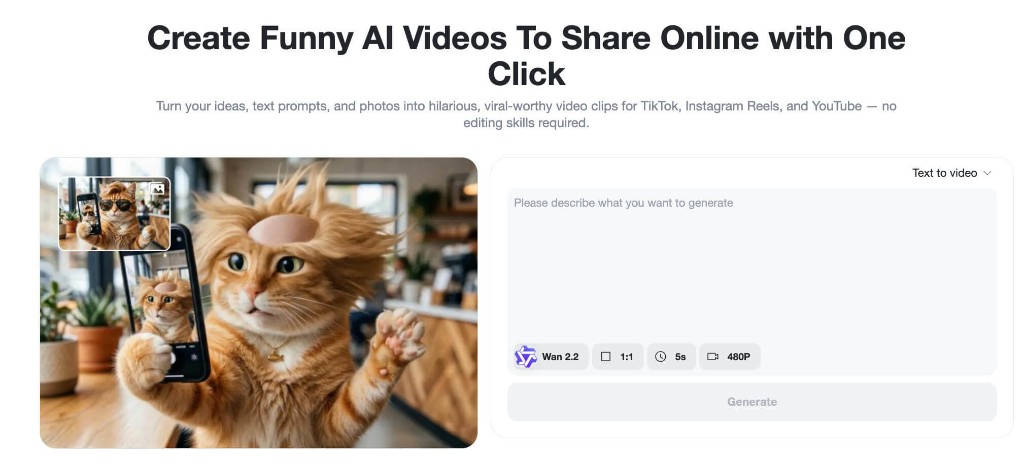
Go to the insMind funny video generator page. You will see the creation interface with options for text-to-video, image-to-video, and video effects. The tool generates videos from both text descriptions and uploaded images, supports humor-specific prompts, and includes motion and sound generation.
Choose your creation mode based on what you have:
Text to video if you have a funny idea but no image
Image to video if you have a meme photo, pet picture, or selfie to animate
Video effects if you want to apply funny transformations to existing content
Step 2: Upload Images or Choose Your Input
To make your video more personal and funny, upload images that serve as the starting point for AI animation:
Your pet doing something silly
A friend’s selfie (with permission)
Classic meme pictures
Any photo with comedic potential
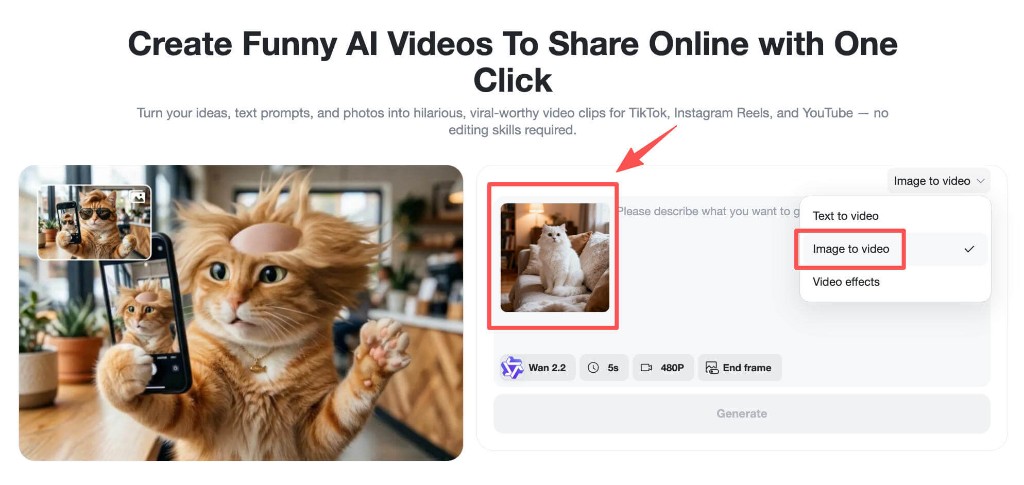
Switch to “Image to video” mode from the dropdown menu, then drag and drop your image onto the canvas. For AI-generated sound effects or dialogue, select a model that supports audio generation (like Kling 3.0). Include detailed descriptions of funny sound effects, monologues, or dialogue in your prompt for maximum comedic impact.
Step 3: Enter Your Funny Idea or Prompt
This is where the magic happens. Write a descriptive prompt that tells the AI exactly what funny scenario you want. The more specific and visual your description, the funnier the result.
Here is a great example prompt:
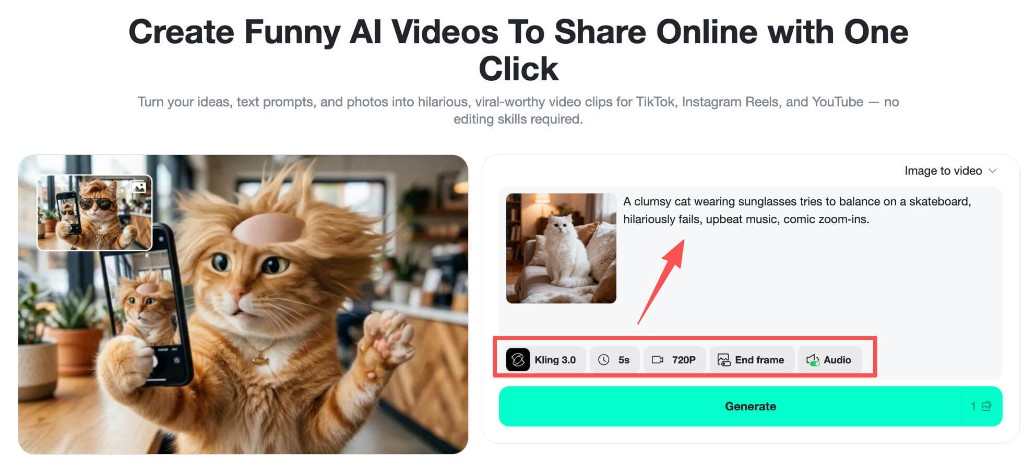
“A clumsy cat wearing sunglasses tries to balance on a skateboard, hilariously fails, upbeat music, comic zoom-ins.”
When writing your prompt, include these elements for the best comedic results:
Exaggeration: Blow things out of proportion — bigger reactions, more dramatic fails
Unexpected twist: Set up one expectation, then break it
Clear action + emotion: Describe what happens AND how the character reacts
Comedic style: Specify the tone — slapstick, absurd, satirical, or deadpan
Also select your preferred AI model and video settings. Kling 3.0 is excellent for image-to-video with audio support, while Wan 2.2 works well for quick text-to-video clips.
Step 4: Generate and Download
Hit the Generate button and let the AI work its magic. In minutes, the AI will:
Animate the scene based on your prompt
Add natural motion and comedic transitions
Match audio and sound effects to the action
Apply comedic timing and pacing
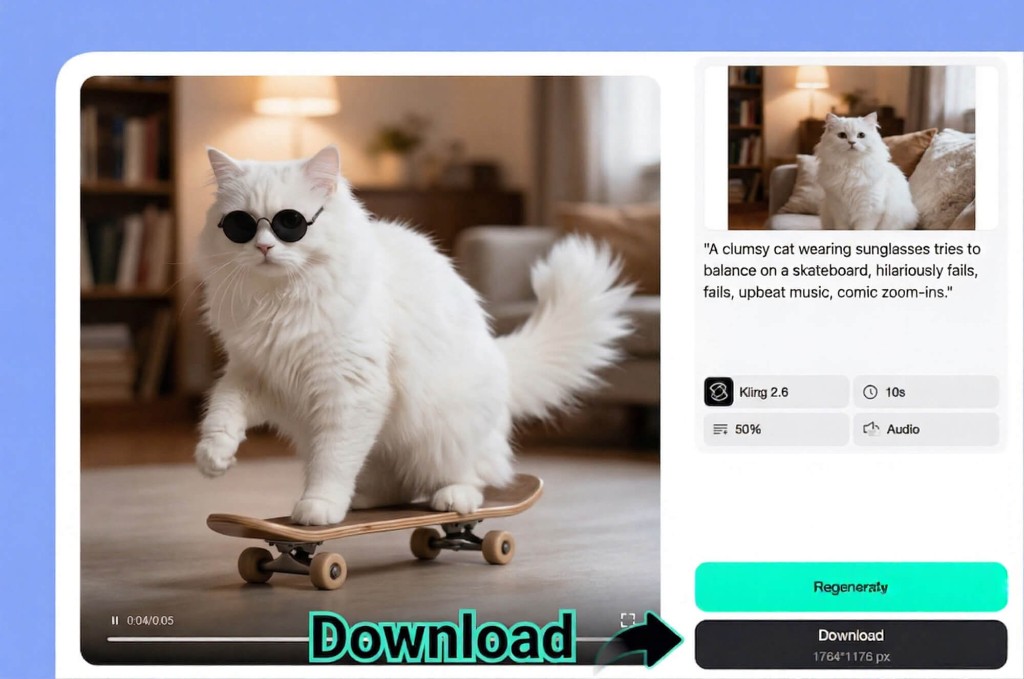
Preview the result, and if you love it, download in high definition. Not quite right? Adjust your prompt, try a different AI model, or regenerate for a fresh take. You can create multiple variations in minutes to find the funniest version.
Best Prompt Ideas for Viral Funny AI Videos
Not sure what to create? Here are proven prompt categories that consistently generate viral-worthy funny videos:
Animal Comedy
Animals doing human things is an evergreen comedy formula. AI makes it even better because the scenarios can be completely impossible:
“A golden retriever in a business suit giving a TED talk about belly rubs, dramatic hand gestures, professional lighting”
“Two cats having a heated argument at a restaurant, one dramatically flips the table, slow motion replay”
“A hamster operating heavy construction machinery, epic movie trailer music, cinematic angles”
Everyday Absurdity
Take normal situations and crank the absurdity to maximum:
“A person dramatically slipping on a banana peel in slow motion with opera music, the banana peel winks at the camera”
“A toaster launches bread into orbit, NASA control room reaction, breaking news graphics”
“Monday morning office meeting where everyone is secretly a superhero, deadpan delivery”
Meme Recreation
Turn static memes into animated videos for extra engagement. Upload your favorite AI meme image and add motion:
Upload a “distracted partner” meme and make all three characters walk away in different dramatic directions
Animate the “this is fine” dog with increasingly chaotic background action
Give any reaction meme face full-body movement and exaggerated expressions
Pop Culture Parodies
Reference popular shows, movies, or trends with an AI twist:
“A chihuahua reenacting the Titanic door scene, dramatic violin music, tiny dog-sized ocean”
“A group of vegetables performing a dramatic courtroom trial, the accused broccoli pleads not guilty”
Tips for Making Your AI Funny Videos Go Viral
Creating a funny video is one thing. Making it go viral is another. Here are the strategies that separate a 100-view clip from a million-view hit:
Hook in the first second. Start with the most absurd or intriguing visual. Social media users decide within one second whether to keep watching. Lead with your funniest moment, not a slow build.
Keep it short. The sweet spot for funny AI videos is 5–15 seconds. Short enough to watch on repeat, long enough to deliver the punchline. TikTok and Reels reward high completion rates.
Add trending audio. Pair your AI video with popular sounds or music on TikTok. The algorithm prioritizes content using trending audio, giving your video an automatic visibility boost.
Post at peak hours. For most audiences, the best times to post are 7–9 AM and 7–11 PM in your target timezone. Experiment and check your analytics.
Use hashtags strategically. Combine broad tags (#funny, #AI, #meme) with niche ones (#AIcomedy, #funnyAI, #AImemes). This puts your video in front of both large and targeted audiences.
Batch create content. Use the AI video generator to produce 5–10 variations of the same concept. Post the best one, save the rest for tomorrow. Consistency is key to building momentum.
Engage with comments. Reply to comments with new AI videos. This drives comment-section engagement, which the algorithm loves.
Experiment with funny face filters and effects. Combine AI video generation with funny visual effects for extra layers of comedy that feel fresh and original.
Frequently Asked Questions
Is there a free AI funny video generator?
Yes. insMind offers free credits for new users, so you can create funny AI videos at no cost. The free tier includes access to multiple AI models and both text-to-video and image-to-video creation modes. Additional credits are available through affordable subscription plans.
What makes a good prompt for funny AI videos?
The best funny prompts combine a specific visual scenario with exaggeration and unexpected elements. Include the subject, the action, the comedic style (slapstick, absurd, satirical), and any audio or mood details. For example: “A penguin confidently walks into a job interview, adjusts tiny glasses, pulls out a briefcase full of fish.”
Can I use my own photos to make funny AI videos?
Absolutely. Upload any image — pet photos, selfies, meme pictures, or product shots — and the AI will animate it based on your prompt. Image-to-video mode is perfect for creating personalized comedy content that feels unique and shareable.
Which AI model works best for funny videos?
It depends on your creation mode. Kling 3.0 is excellent for image-to-video with audio support, making it great for talking or sound-based comedy. Wan 2.2 works well for quick text-to-video generation. insMind lets you switch between models to find the one that best matches your comedic vision.
How long does it take to generate a funny AI video?
Most videos generate in 1–3 minutes depending on the model and video length. A typical 5-second clip can be ready in under a minute. You can generate multiple variations quickly and pick the funniest one.
Start Making Funny AI Videos Today
AI has made comedy video creation accessible to everyone. You do not need a film crew, an editing suite, or even a sense of timing — the AI handles the comedic pacing for you. All you need is a funny idea.
Whether you are building a TikTok following, creating content for your brand, or just want to make your friends laugh, insMind’s AI funny video generator gives you everything you need to produce shareable comedy clips in minutes.
Ready to create your first viral funny video? Try it now and see how quickly a simple prompt can turn into your most-shared post ever.

Ryan Barnett
I'm a tech enthusiast and writer who loves exploring AI, digital tools, and the latest tech trends. I break down complex topics to make them simple and useful for everyone.
Keep reading

How to Use Seedance 2.5 for AI Videos
Learn how to use Seedance 2.5 for text-to-video and image-to-video, write stronger prompts, guide motion with references, and review results.

How to Make a Creepy Voice for Horror Content Step by Step
Learn how to make a creepy voice for horror videos, podcasts, and games with insMind.

How to Remove TikTok Watermark: 4 Easy Steps for Clean Videos
Learn how to remove TikTok watermark from videos in four practical steps with insMind.

Top 10 Seedance 2.5 Alternatives for AI Video in 2026
Compare top Seedance 2.5 alternatives and learn how to create AI videos with insMind.

Seedance 2.5 vs. MiniMax H3: Which AI Video Model Should You Use?
Compare Seedance 2.5 and MiniMax H3 for AI video creation.

30 Instagram Reels Prompts You Can Copy and Try
Copy-ready Instagram Reels prompts for products, fashion, creators, travel, food, pets, and lifestyle videos.

How to Write Instagram Reels Prompts for AI Videos
Learn to write Instagram Reels prompts for polished AI videos, product clips, creator posts, and lifestyle content.

30 TikTok Video Prompts You Can Copy and Try
Copy-ready TikTok video prompts for ads, creators, products, fashion, pets, travel, and more.

How to Create an AI Micro-drama: A Step-by-Step Guide
Learn how to create an AI micro-drama with insMind.

How to Create a Short Film Using AI in 2026
Learn how to create a short film using AI with insMind.

Instagram Reel Ads: Examples, Specs, Sizes, and Best Practices
Learn Instagram Reel ad specs, examples, safe zones, and best practices.

YouTube Ads Best Practices: How to Create Video Ads
Learn YouTube ads best practices and create video ads with insMind.

YouTube Channel Trailer Examples: 15 Inspiring Ideas for Your Channel
Explore YouTube channel trailer examples and create a polished trailer with insMind.

15 Best YouTube Ad Examples and Templates to Inspire Your Next Campaign
Explore YouTube ad examples and templates, then create video ads with insMind.

How to Make a Hype Video with AI: The Easy Guide
Learn how to make a hype video with AI using insMind.

Instagram Ad Templates for Feed, Stories, Reels, and Carousel Ads
Learn Instagram ad templates for Feed, Stories, Reels, and Carousel Ads.

Facebook Video Ad Specs: Sizes, Formats, and Lengths for 2026
Learn Facebook video ad specs, sizes, formats, and lengths for 2026, then make ad-ready videos with insMind fast.

How to Create Facebook Video Templates for Posts, Ads, Covers, and Live Video
Learn how to use Facebook video templates for posts, ads, covers, and live video with insMind.

Instagram Ad Examples: 15 Creative Ideas That Convert
Explore 15 Instagram ad examples and learn how to make them with insMind.

Instagram Ad Sizes and Specs: Complete 2026 Guide
Find Instagram ad sizes, specs, ratios, and dimensions for every major placement.

10+ Video Resume Examples with Scripts for Every Career Stage
Explore video resume examples and scripts, then create a polished video resume with insMind.

How to Make a Sports Hype Video with AI: A 4-Step Guide
Learn how to make a sports hype video with AI.

YouTube Ad Specs for 2026: Sizes, Formats, and Lengths
YouTube ad specs for sizes, formats, dimensions, and lengths, plus a four-step insMind workflow.

30 Best Grok Imagine Video Prompts You Can Copy and Try
Copy 30 Grok Imagine video prompts and learn how to write better prompts for creative AI videos.

50 Scroll-Stopping AI Brainrot Prompts for Viral Meme Videos
Copy 50 scroll-stopping AI brainrot prompts for chaotic meme videos.

How to Turn Any Photo into a Brainrot Meme Video
Learn how to turn any photo into a brainrot meme video with AI.

How to Make a Retirement Video with AI
Learn how to make a retirement video with AI.

How to Make Your Own Graduation Video from Photos with AI
Learn how to make a graduation video from photos with AI.

How to Make Your Own Outro Video
Learn how to make your own outro video with insMind.

Higgsfield vs Pollo AI: Which Video Platform Fits You?
Compare Higgsfield vs Pollo AI for cinematic control, model choice, ease of use, and pricing.

Pollo AI Review 2026: Features, Pros, Cons, and Verdict
Read our Pollo AI review for 2026 and explore its features, pricing, strengths, limitations, ideal users, and practical tips for better results.

How to Create Cute Baby Talking Videos from Photos
Learn how to create baby talking videos from photos with text, audio, and AI lip sync.

How to Make Your Own Talking Avatar with AI
Learn how to make your own talking avatar with AI from a portrait and script.

Seedance 2.0 Mini vs Seedance 2.0: Which Model Should You Use?
Compare Seedance 2.0 Mini and Seedance 2.0 for AI video creation.

How to Create Talking Animal Videos from Photos That Steal the Show
Learn how to create talking animal videos from photos with AI.

How to Turn a Character Image into a Consistent AI Video
Learn how to turn a character image into a consistent AI video with insMind.

10 Krea AI Alternatives for Creating and Editing AI Videos in 2026
Compare the best Krea AI alternatives for creating and editing AI videos, including insMind, Runway, Kling AI, Luma, Pika, VEED, and more.

Seedance 2.0 Mini Prompts to Copy: 20 Video Ideas
Copy Seedance 2.0 Mini prompts for cinematic AI videos with insMind.

Seedance 2.0 vs Seedance 2.5: What Changed?
Compare Seedance 2.0 and Seedance 2.5 with examples, prompts, and insMind workflow.

10 Best Pollo AI Alternatives for AI Video Creation in 2026
Compare the best Pollo AI alternatives for AI video creation, including insMind, Runway, Kling AI, Luma, Pika, VEED, and more.

How to Make an AI Video of Yourself That Actually Feels Like You
Create a realistic AI video of yourself from a photo and script.

How to Turn Old Photos into a Beautiful Tribute Video with AI
Turn old photos and memories into beautiful AI tribute videos.

How to Make a Daily Vlog with AI in Minutes
Create daily AI vlogs from photos, prompts, or ideas in minutes.

How to Create 2026 FIFA World Cup Highlights with AI
Create 2026 FIFA World Cup highlights, fan clips, and football videos with AI.

Best AI Video Extender for Creators: Top Tools Compared
Compare the best AI video extender tools for creators in 2026 and learn how to make short videos longer with insMind.

How to Edit YouTube Videos Faster with AI
Edit YouTube videos faster with AI background and style tools.

How to Create Training Videos with AI: A Complete Guide for Beginners
Create clear training videos from images and prompts with AI.

Create Product Reveal Videos with an AI Unboxing Video Maker
Learn how to create AI unboxing videos for product reveals, UGC, teasers, and ecommerce demos.

Create Smooth AI Video Transitions with Kling Start/End Frame
Learn how to create smooth AI video transitions with Kling Start/End Frame.

What Can You Choose for the Best InVideo Alternatives in 2026?
Compare the best InVideo alternatives and see why insMind is a strong AI video generator for creators and marketers.

10 Best Animaker Alternatives in 2026: New Trends in AI Video Creation
Compare the best Animaker alternatives for AI video creation, including free and open-source picks.

10 Best HeyGen Alternatives in 2026: Create AI Videos with More Freedom
Compare the best HeyGen alternatives for AI video creation, including free and open-source picks.

How to Make a Faceless YouTube Channel with AI
Make a faceless YouTube channel with AI tools, scripts, video ideas, and insMind.

Best CapCut Alternatives: 8 AI Video Editors Compared
Compare the best CapCut alternatives for iPhone, Android, PC, and AI video editing.

How Ecommerce Brands Replace Products in Videos with AI
Replace products in ecommerce videos with AI for ads, listings, and creative testing.

How to Change Video Background Without Green Screen: Step-by-Step Guide
Learn how to change video backgrounds without a green screen using simple AI editing steps.

How to Seamlessly Replace Objects in Videos with AI
Step-by-step guide on replace objects in videos with AI: how it works, best practices, and how to do it free with insMind.

How to Identify AI-Generated Videos: A Comprehensive Guide
Learn how to identify AI-generated videos using expert tips and insMind's tools for authenticity verification.

Can AI Really Edit Videos For You? A Deep Dive Into AI Video Editing
Discover how AI can edit videos effectively, using insMind and other top tools. Learn workflows, compare features, and explore future trends.

Crafting Viral Bigfoot AI Videos: A Step-by-Step Guide
Create viral Bigfoot AI videos with insMind. Learn how to optimize for TikTok and YouTube, avoid common mistakes, and more.

Discover the Versatility of Happy Horse 1.0 for AI Video Creation
Happy Horse 1.0 review explores AI video generation, integration with insMind, and practical applications for content creators.

Seedance 2.0 vs. Happy Horse 1.0: Which AI Video Generator Fits Your Needs?
Discover the differences between Seedance 2.0 and Happy Horse 1.0. Learn which AI video generator suits your needs best.

How to Make Educational Videos for Kids with AI (4 Easy Steps)
Write a structured script, choose model and audio, generate, and download—a step-by-step guide to making AI educational videos for kids with prompt templates.

Best AI Prompts for Explainer Videos (Proven Templates)
Four proven AI prompt templates for explainer videos—presenter, product demo, faceless brand, and tutorial—plus how to use insMind in 3 steps.

Best AI Explainer Video Generator for Business (2026 Guide)
Choose text-to-video or image-to-video, configure model and audio, generate and download—a complete 2026 guide to AI explainer videos for business with insMind.

Best Prompts for Wan 2.7: Multi-Shot Guide for Cinematic AI Video
Choose text or image mode, write scene-block prompts for Wan 2.7, set duration and audio, then download—plus 40+ language narrative tips.

How to Create Kids Videos with AI: A Parent-Friendly Guide
Upload art or start from text, write kid-safe prompts, pick Google Veo 3.1, generate and download—steps for parents and teachers.

From Script to Screen: How to Create Engaging Story Videos with AI Tools
Learn how to create story videos with AI: split scripts into scenes, optional reference images, generate clips in insMind, then merge. No pro editor required to start.

How to Make a Baby Dance Video with AI: Step-by-Step Guide
Turn a baby photo into a cute AI dance clip. Upload, write a motion prompt, pick model and duration, generate—no editing skills needed.

How to Make a Cat Dance Video with AI: Step-by-Step Guide
Turn a cat photo into a funny dance clip with AI image to video. Upload, write a motion prompt, generate, and download—no editing skills.

Best AI Tool for Pet Dance Videos (2026 Compared)
Compare top AI pet dance video tools with real screenshots, pros and cons, and a tested insMind image-to-video workflow plus copy-ready prompt.

Top 20 AI Fruit Video Prompts to Copy & Paste
Discover top AI fruit video prompts for creating engaging, trendy videos. Perfect for TikTok and other platforms, these prompts inspire creative content.

Funny AI Video Prompts That Work (Tested Examples)
Get 20+ tested funny AI video prompts that actually make people laugh. Copy-paste prompts for TikTok, Reels, and YouTube Shorts with step-by-step instructions.

Affordable AI Video Solutions for E-commerce Startups
Discover affordable AI video solutions for e-commerce startups. Learn about budget-friendly tools and maximize ROI with AI-generated content.

Transforming Marketing with AI Video Ads
Discover how AI video ads are transforming online marketing with personalized, efficient, and creative solutions. Learn techniques and examples.

Mastering Cinematic Ad Creation with Seedance 2.0
Create cinematic ads with Seedance 2.0, a powerful AI tool for video advertisements. Learn how to make stunning video ads using Seedance 2.0.

Mastering Viral Video Creation with Seedance 2.0
Discover how to create viral videos using Seedance 2.0 with tips, prompts, and insights on social media trends.

Close-Up Shot: Definition, Story Uses & Tighter Framing
What is a close-up shot? Definition, when to use tight framing for emotion and detail, and tips for shooting cleaner inserts on any camera.

YouTube Equipment for Beginners: Gear, AI Video & Your First Upload (2026)
Beginner YouTube equipment: priority order for mic, light, and camera; clear audio on a budget; phone vs dedicated camera; Shorts and 16:9 basics.

How to Create Anime Videos with AI (Step-by-Step Guide)
Learn how to create anime videos with AI step by step. Use text-to-video and image-to-video to generate stunning anime animations with insMind.

How to Make Viral Funny Videos with AI in 5 Minutes
Learn how to make viral funny videos with AI in minutes. Step-by-step guide to creating hilarious TikTok and Instagram clips using insMind AI funny video generator.

How to Create Talking Old Photo Videos with AI
Learn how to animate old photos with AI. Turn vintage portraits into talking videos with realistic motion using insMind free photo animation tool.

7 Best Sora 2 Alternatives for AI Video Generation in 2026
Discover the best Sora 2 alternatives for AI video generation. Compare insMind, Runway, Kling AI, Pika, and more to find the right tool for your needs.

AI Prompts for TikTok Video Generator: Complete Guide
Discover the best AI prompts for TikTok video generation. 20+ ready-to-use prompts plus a step-by-step guide to creating viral TikTok content with AI.

How to Upscale Anime Video to 4K with AI (Step-by-Step)
Learn how to upscale anime video to 4K using AI. Step-by-step guide to enhancing low-res anime with sharper lines and cleaner colors.

AI Marketing Video Generator: Create Promo Videos from Text
Learn how to turn text into professional marketing videos using AI. Step-by-step guide to creating promo videos in minutes.

Text-to-Video AI Ranked: Which Generator Wins in 2026?
Compare the 7 best text-to-video AI generators in 2026 including insMind, Sora 2, Runway, Kling AI, Pika, and more.

Animate Anime Images with AI: Turn Static Art into Dynamic Anime Videos
Learn how to animate anime images with AI. Turn static anime art into stunning animated videos easily.

How to Remove Kling Watermark from AI Videos
Explore the best ways to remove Kling AI watermark. Compare editing methods and discover watermark-free Kling generation options.

AI Video Editor: Edit Videos Instantly with Prompts
Use insMind AI Video Editor and prompts to edit videos, remove objects, change backgrounds and more.

Control the Narrative: Create Cinematic AI Videos with Start & End Frames
From start to finish, take control of AI video storytelling with Start & End Frames.

How to Create a Stranger Things Transition Video (Step-by-Step Guide)
Create a Stranger Things–style Upside Down transition with AI in just a few steps using insMind.

Transform Your Ideas: Generate Videos from Text Instantly
Turn text into videos in seconds with InsMind's AI—ideal for social media, ads, and presentations. No editing skills required.

Tralalero Tralala: How to Animate the Italian Shark Meme with AI Flair
Animate the viral “Tralalero Tralala” Italian Shark meme with AI for fun, shareable content.

Top TikTok Memes 2025: 'Tung Tung Tung Sahur' & Viral Trends You Can't Miss
2025 TikTok trends: AI-generated Italian Brainrot memes and creepy Tung Tung Tung Sahur dominate viral humor.