


 Ryan Barnett·April 24, 2026
Short-form video is noisy, but the winners still follow one rule: the prompt is the script. When you want the best prompts for Wan 2.7, you are really designing beats, lenses, and sound in plain language so the model can stitch them into a coherent clip. Wan 2.7 on insMind fits creators who need cinematic motion, clearer multi-shot storytelling, and dialogue in more than forty locales without rebuilding the whole timeline by hand.
This guide explains how to pick a generation mode, write prompts that read like a miniature shot list, choose model and timing, then export. You will also see why labeling language, camera size, and ambience in separate lines keeps results steadier than one giant paragraph.
If you are new to text-first workflows, start from a text to video ai canvas where you can iterate on wording before you lock a reference frame. When you already have key art, switch to image-guided generation so colors and silhouettes stay anchored.
-
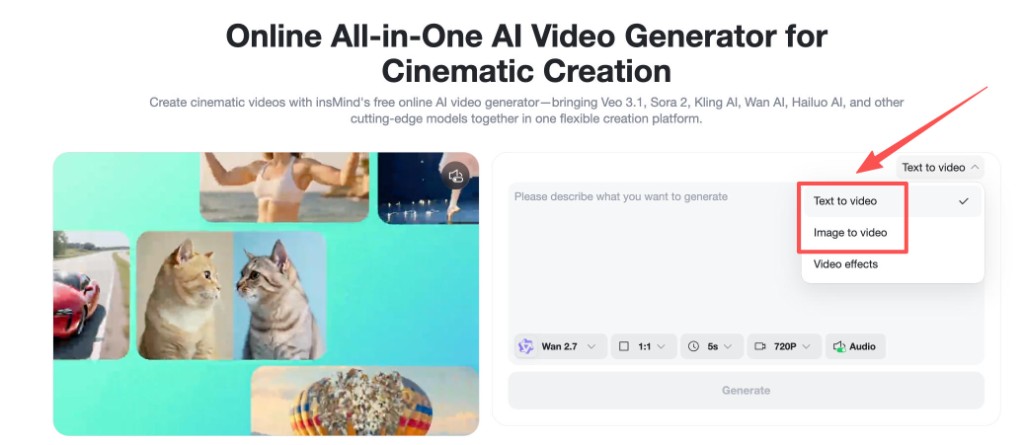
Choose Text to video or Image to video so the model knows whether to invent the first frame or respect your upload.
-
Write scene blocks with shot type, action, dialogue language, and sound design so Wan 2.7 can plan cuts inside one generation.
-
Select Wan 2.7, set aspect ratio, duration, resolution, and audio, then generate and download your MP4.
Table of Contents
- 01 Best Prompts for Wan 2.7: What Actually Changes the Output?
- 02 Why Structured Prompts Beat a Single Wall of Text
- 03 How to Get the Best Prompts for Wan 2.7 with insMind
- 04 Copy-Paste Wan 2.7 Prompt Template (Multi-Shot)
- 05 Forty-Plus Languages and Localized Dialogue
- 06 Tuning Duration, Ratio, and Audio for Story Clips
- 07 Frequently Asked Questions
- 08 Ship Your Next Wan 2.7 Storyboard Today
Best Prompts for Wan 2.7: What Actually Changes the Output?
Wan 2.7 shines when you treat the prompt like a micro screenplay. Name the goal (“cinematic short story with multiple shots”), then break the timeline into labeled scenes. Each scene should carry a camera grammar (“wide,” “medium,” “close-up”), blocking notes for actors or subjects, and a sound line so audio does not fight the visuals.
Generic adjectives (“epic,” “cinematic”) do not hurt, but they do not steer motion. Verbs do. Swap “the hero is sad” for “shoulders drop, eyes track rain on glass, voice low” and you give the model concrete motion targets. The same discipline helps when you want a wan ai video generator pass to feel intentional rather than like a mood board on shuffle.
If your storyline spans more than one emotional beat, say so up front. A single line such as “three-shot sequence, 10 seconds total” sets expectations for pacing and cut density. You can always generate a second clip that picks up where the first ended; reuse nouns and wardrobe words so continuity holds.
Why Structured Prompts Beat a Single Wall of Text
Models read top to bottom. When dialogue, lighting, and lens data live in one dense paragraph, early phrases win and late phrases fade. Structured prompts fix that by giving every creative decision its own line or bullet. Think director notes, not a blog rant.
For multi-shot work, explicit labels (“Scene 1,” “Scene 2”) act like invisible edit points. They encourage the system to plan transitions instead of smearing two ideas together. When you already have a hero frame, you can carry the same beat list into image to video so motion stays tied to production art.
Sound deserves the same structure. Split music, ambience, foley, and spoken lines. If you need footsteps or rain, say it beside the shot that should carry that texture. When audio is toggled on in the UI, those lines become instructions instead of wishful thinking.
How to Get the Best Prompts for Wan 2.7 with insMind
insMind’s online AI video workspace keeps text-to-video, image-to-video, and model selection in one flow. Below is the exact four-step path that matches the product UI: choose mode, write the prompt, configure Wan 2.7, then download.
Step 1: Choose Text to video or Image to video
Open the generator and pick a mode from the dropdown. Text to video is fastest when you only have a premise. Image to video is better when a poster, storyboard panel, or client still must stay pixel-true. Video effects sit in the same family of tools if you later want stylized templates, but for Wan 2.7 storytelling, stay on the core modes first.
Step 2: Enter a multi-scene prompt with dialogue and sound
Paste a structured prompt in the main text area. Lead with the creative brief, then list each scene with shot size, action, and optional quoted dialogue. Add a language line when you need localized speech; Wan-family models are built for global creators, so spelling out “Spanish (Spain)” or “Japanese (Tokyo-neutral)” reduces accent drift.
Longer prompts are fine if every line earns its place. If you are adapting a screenplay snippet, convert parentheticals into short visual clauses (“fingers tighten on strap” instead of “nervous”). For scripted social spots, you can also draft beats inside script to video ai workflows, then paste the refined block here.
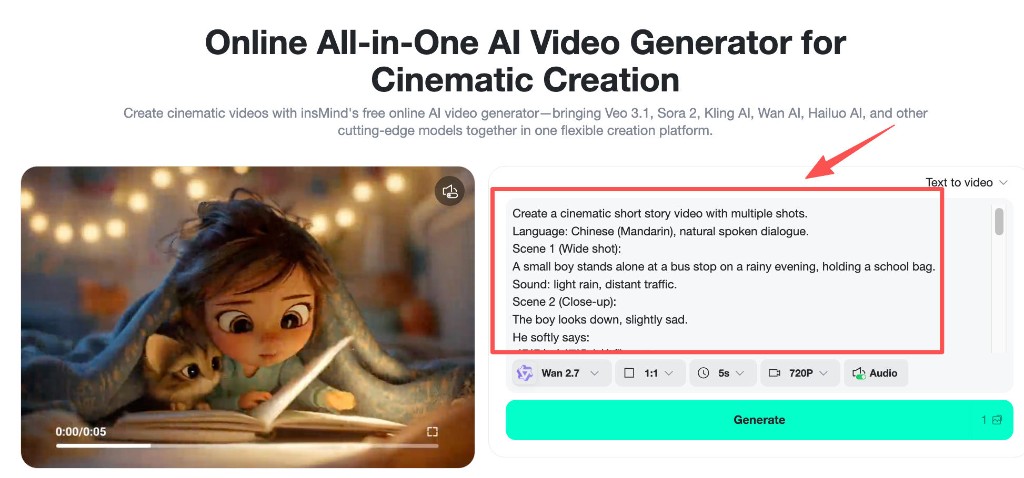
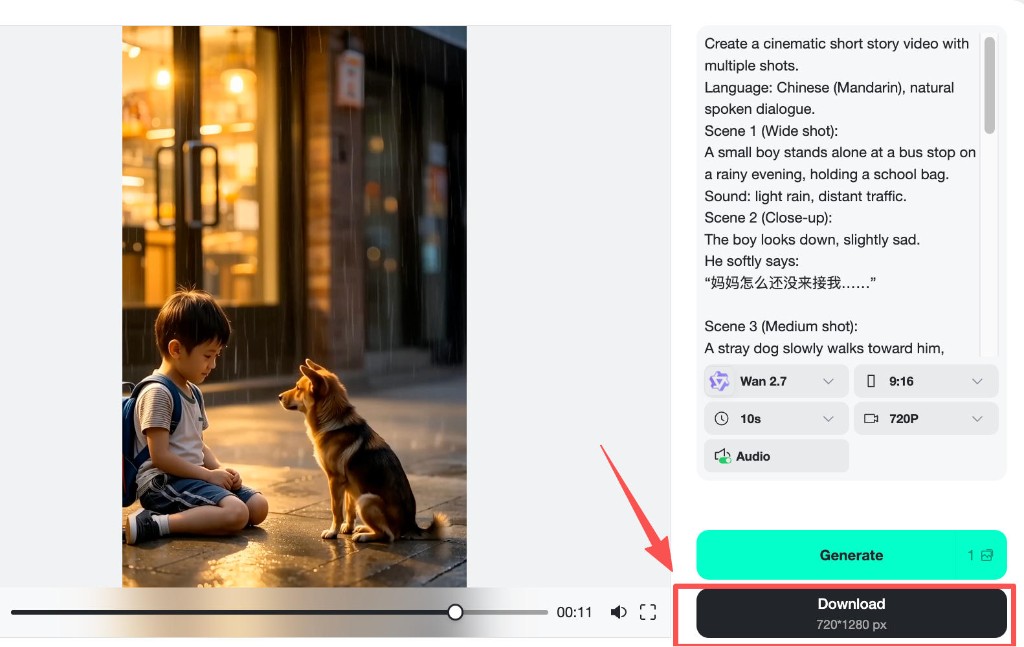
Step 3: Select Wan 2.7, set duration, ratio, resolution, audio, then Generate
In the settings row, choose Wan 2.7 from the model menu. Match aspect ratio to your distribution plan: 9:16 for vertical social, 1:1 for feeds that crop hard, 16:9 for presentations. Duration controls how many beats fit before a cut feels rushed; five seconds favors one gag, while ten seconds leaves room for a miniature arc.
Turn audio on when your prompt already specifies dialogue, ambience, or music character. If you mute audio, remove spoken lines from the prompt so lip motion does not fight the setting. When you need a broader toolbelt beyond a single model, the hub also behaves like an AI video generator that hosts Wan alongside other flagship options.
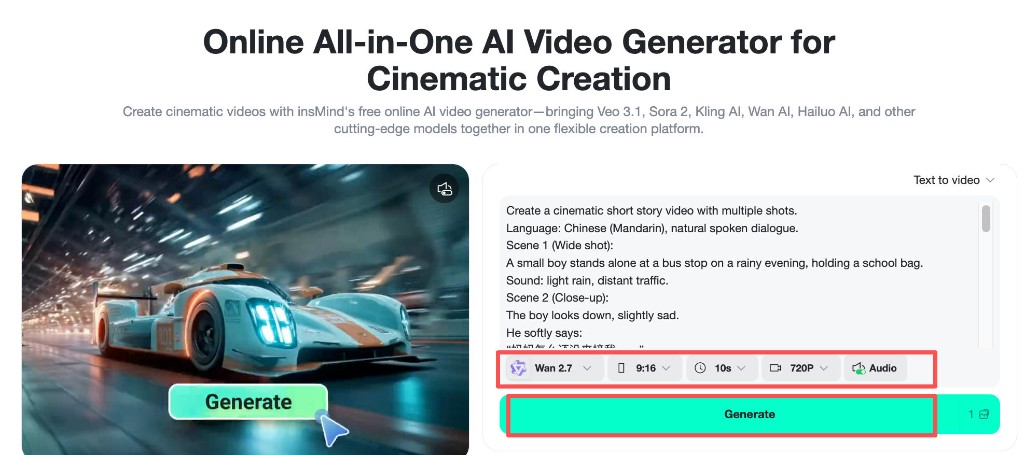
Step 4: Download your rendered clip
After the preview finishes, use Download to save the MP4. File names often include resolution; keep them organized by campaign or episode. If you need a cleaner mix, mute the baked track in an editor and lay licensed music underneath while preserving the picture cut you liked from Wan 2.7.
Copy-Paste Wan 2.7 Prompt Template (Multi-Shot)
Use the scaffold below as a starting point. Replace bracketed fields, keep the headings, and add or remove scenes until the total runtime matches your duration setting.
When you need a bilingual ad, duplicate the dialogue block per language instead of mixing both in one quotation. That keeps pronunciation cleaner and reduces the chance of mid-sentence code switching unless you ask for it on purpose.
Forty-Plus Languages and Localized Dialogue
Marketing teams often assume English-first prompts will magically localize. In practice, you should declare both the language and the register (“formal Hindi for a bank spot” versus “casual Hindi for a snack meme”). Wan 2.7 is positioned for creators who need broad language coverage—think forty-plus locales for narrative experiments—but you still need to steer pronunciation and idiom in text.
Pair language tags with cultural context when it changes blocking. A bow reads differently in Tokyo than a friendly greeting in Texas. If you are teaching language classes, ask for slower cadence and clear consonants. If you are chasing virality, allow quicker banter but specify breath breaks so lines do not overlap.
When dialogue must sync to mouth movement, keep sentences short and avoid tongue twisters. If the model drops a word, regenerate with simpler clauses instead of stacking conjunctions. For subtitles later, export the same text you placed in the prompt so caption timing stays faithful.
Tuning Duration, Ratio, and Audio for Story Clips
Duration is a creative constraint. Five seconds rewards one visual idea; ten seconds supports a setup, turn, and button. If your prompt lists four scenes but you only budget five seconds, expect merges or dropped beats. Either trim the script or raise the duration before you blame the model.
Aspect ratio changes composition. Vertical framing favors faces and single subjects; widescreen invites two-shots and environment reads. When converting a horizontal storyboard into 9:16, add explicit instructions (“reframe on faces,” “keep skyline visible”) so important props do not get cropped.
Audio toggles are not cosmetic. If you disable audio, delete music requests from the prompt to avoid orphaned lip flap. If you enable audio, specify relative loudness (“dialogue up, music bed down”) when mixing matters for comprehension.
Frequently Asked Questions
Does Wan 2.7 handle multiple shots in one generation?
Yes, when you label scenes and shot types clearly. Think of each labeled block as a beat the model can cover. If results feel fused, shorten each scene’s description, reduce the number of beats, or raise duration so motion can breathe.
Should I start with Text to video or Image to video?
Start with text when you need rapid exploration. Move to image-guided generation when brand colors, talent likeness, or product geometry must stay stable. You can always generate a still first, then animate it with the same structured prompt rewritten for motion emphasis.
How do I keep dialogue natural in non-English prompts?
State the language, region flavor, and pacing. Use short lines, avoid mixed metaphors, and proofread idioms. If a line is culturally sensitive, add a note about respectful tone. Regenerate small sections by tightening verbs instead of rewriting the entire prompt.
What if hands or faces look imperfect?
Reduce simultaneous actions, avoid extreme foreshortening, and describe hands with a simple task (“holds strap with both hands”). For faces, favor three-quarter angles over dead-on macro unless you need drama. If a shot fails twice, change the lens line instead of repeating identical text.
Can I chain clips for a longer story?
Absolutely. Export clip A, note the wardrobe and lighting phrases that worked, then open a new prompt that references the ending emotion as the starting beat for clip B. Consistent nouns beat synonyms (“navy peacoat” beats “dark jacket”).
Ship Your Next Wan 2.7 Storyboard Today
You now have the same workflow the insMind team surfaces in-product: pick a mode, write a structured multi-shot prompt with language and audio lines, dial Wan 2.7 settings, generate, and download. The best prompts for Wan 2.7 are not magic words; they are concise direction that respects runtime, ratio, and sound.
Ready to test a new beat? Open the generator, paste the template, swap in your characters, and run a ten-second pass with audio enabled. Which scene will you storyboard first—the wide establishing shot or the close-up that sells the emotion?
Ryan Barnett
I'm a tech enthusiast and writer who loves exploring AI, digital tools, and the latest tech trends. I break down complex topics to make them simple and useful for everyone.


