


Have you ever looked at an old family photograph and wished the people in it could smile, blink, or even speak? With AI photo animation, that is now possible. Modern AI tools can take a static portrait — even a grainy black-and-white photo from decades ago — and transform it into a short video with realistic facial motion, breathing, and even synchronized speech.
Whether you want to bring a grandparent's portrait to life for a family reunion, create a talking historical figure for a school project, or simply add motion to a treasured photograph, AI makes it surprisingly easy. The best part? You do not need any video editing skills or expensive software. You can animate old photos directly in your browser for free.
In this guide, we walk you through exactly how to animate old photos with AI using insMind — step by step, with tips for getting the most realistic results.
Table of Contents
What Is AI Photo Animation?
AI photo animation is a technology that uses artificial intelligence to add realistic motion to a still image. The AI analyzes the photo — detecting faces, body structure, and background elements — then generates a short video clip where the subject appears to move naturally.
Unlike basic slideshow effects or simple zoom-and-pan transitions, modern AI animation creates genuine facial expressions, head turns, eye blinks, breathing motion, and even synchronized lip movement when paired with audio. The result looks like real video footage rather than a manipulated image.
The technology works especially well with portrait photographs because AI models have been trained on millions of video frames showing how human faces and bodies move. This means the AI understands how to make a smile form naturally, how eyes shift when someone speaks, and how subtle head movements accompany conversation.
Why Animate Old Photos with AI?
Old photographs carry powerful emotional weight. They preserve moments from family history, capture people who are no longer with us, and document eras we can only imagine. But static images have limits — they freeze a single instant without showing the life and personality behind the expression.
AI animation changes that. Here are the most popular reasons people are using this technology:
-
Family memorials: Bring deceased relatives' portraits to life for tributes, funerals, or anniversary celebrations. Seeing a loved one appear to smile and breathe again is deeply moving.
-
Heritage projects: Historians and genealogists animate old family photos to make historical records more engaging and accessible for younger generations.
-
Educational content: Teachers animate historical figures for classroom presentations, making history feel immediate and personal.
-
Social media content: Creators turn vintage photos into viral short videos for TikTok, Instagram Reels, and YouTube Shorts.
-
Personalized gifts: Animated portraits make unique, emotionally resonant gifts for birthdays, holidays, and special occasions.
The emotional impact of seeing a static old photo suddenly come alive cannot be overstated. It is one of the most powerful applications of image-to-video AI technology available today.
How to Animate Old Photos with insMind (Step-by-Step)
insMind makes it easy to turn any portrait photo into an animated video — no video editing skills required. The entire process takes just a few minutes and works directly in your browser. Here is how to do it:
Step 1. Upload Your Portrait or Old Photo
Start by uploading the portrait photo you want to animate. insMind supports all common image formats and works with a wide range of photo types:
-
Black-and-white historical photographs
-
Family portraits from any era
-
Headshots and school photos
-
Anime and illustrated portraits
Once uploaded, the AI automatically analyzes face structure, facial landmarks, and background elements to prepare the image for animation.
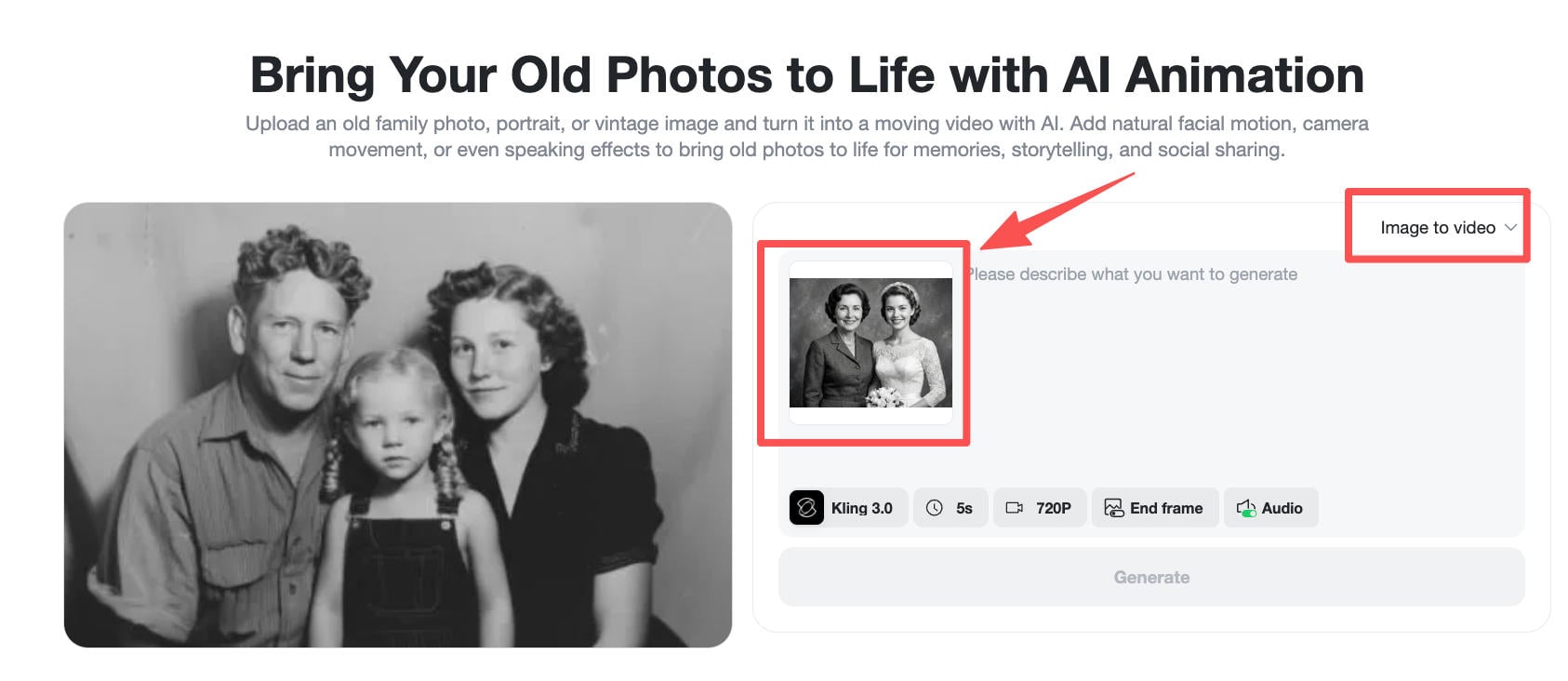
Step 2. Write Your Animation Prompt
Describe how you want the photo to move. This is where AI photo animation gets creative. You can request different types of motion:
-
Subtle motion: Slight head movement, eye blinking, gentle breathing — perfect for preserving the natural feel of old photographs.
-
Talking animation: Speech motion synchronized with audio, realistic lip movement, and matching facial expressions.
-
Expressive motion: Smiling, laughing, looking around — for more dynamic and emotional animations.
For old photos, a good prompt might be: “Maintain the original black and white faded texture of the old photo. The subject only made very slight breathing fluctuations in the original posture, with gentle eye movement. Retain particle noise and scratches.”
You can also choose the AI model (such as Kling 1.6 or Kling 3.0), video length, and animation strength to fine-tune the result.
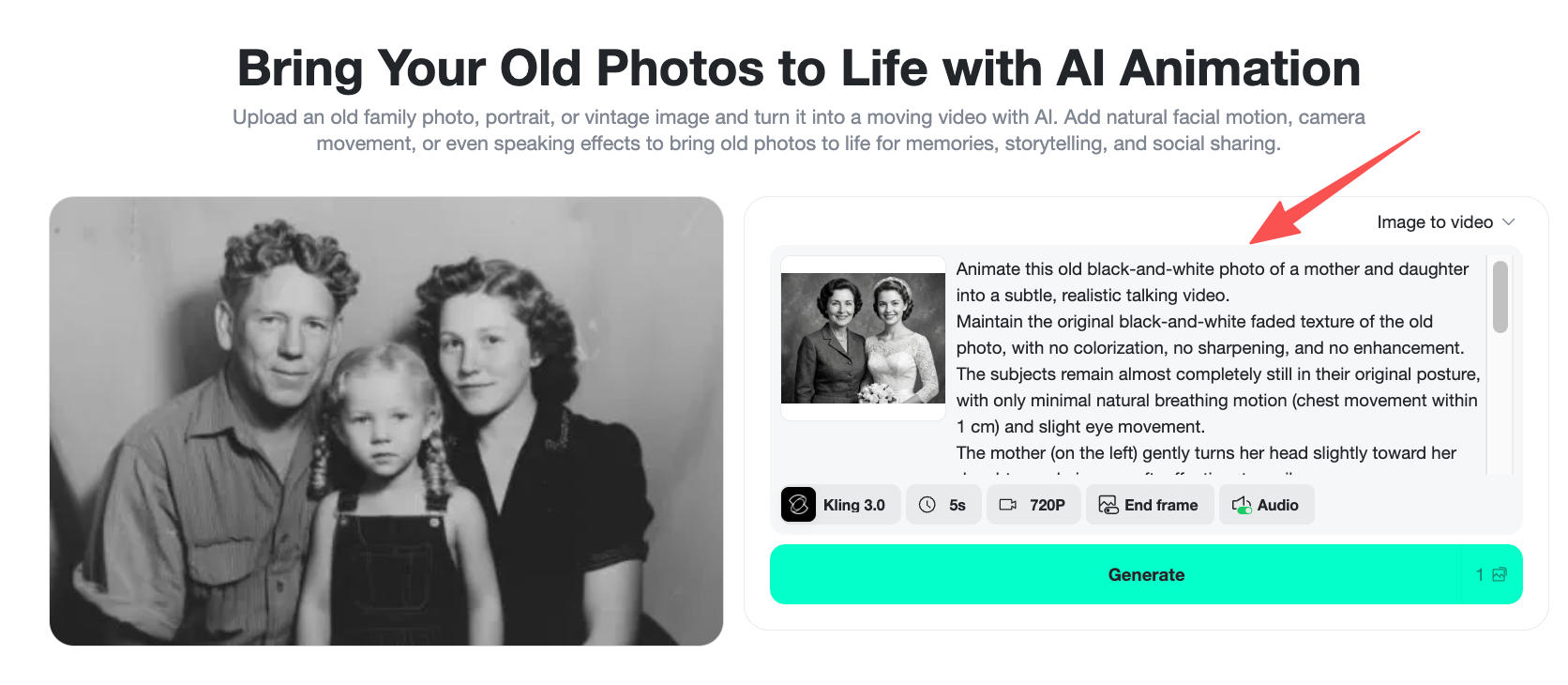
Step 3. Generate the Animation
Click Generate and let the AI work its magic. insMind processes the image through its animation engine, which:
-
Builds a 3D depth map of the face and body
-
Plans natural motion paths based on your prompt
-
Generates intermediate frames for smooth movement
-
Renders the final video with consistent texture and style
If you want the portrait to talk, select a model that supports audio generation (such as Kling 3.0 or Google Veo 3.1). The AI will synchronize lip movement with generated speech, creating a remarkably lifelike talking portrait.
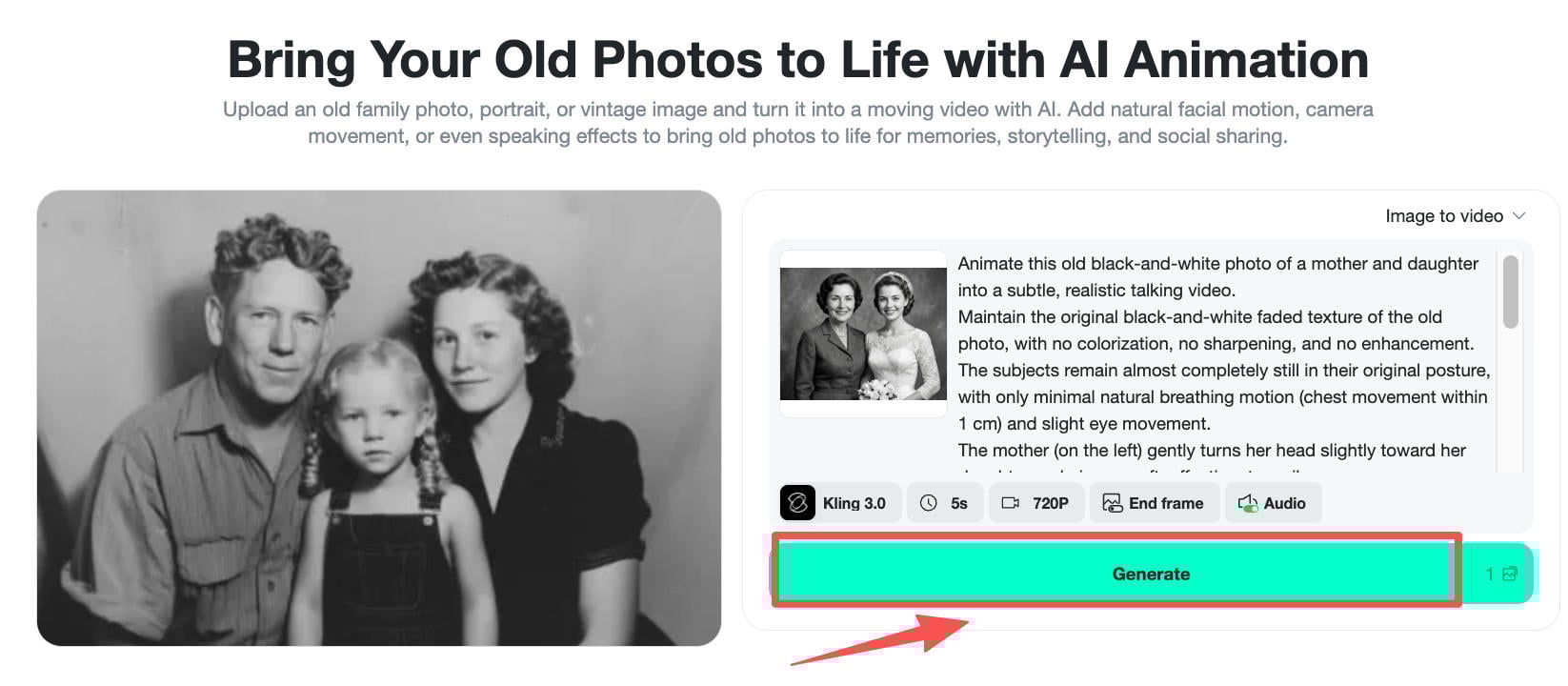
Step 4. Download and Share
Preview the animated video to make sure it looks right, then download it in high definition. You can share the animated portrait directly on social media, embed it in a presentation, or save it as a keepsake.
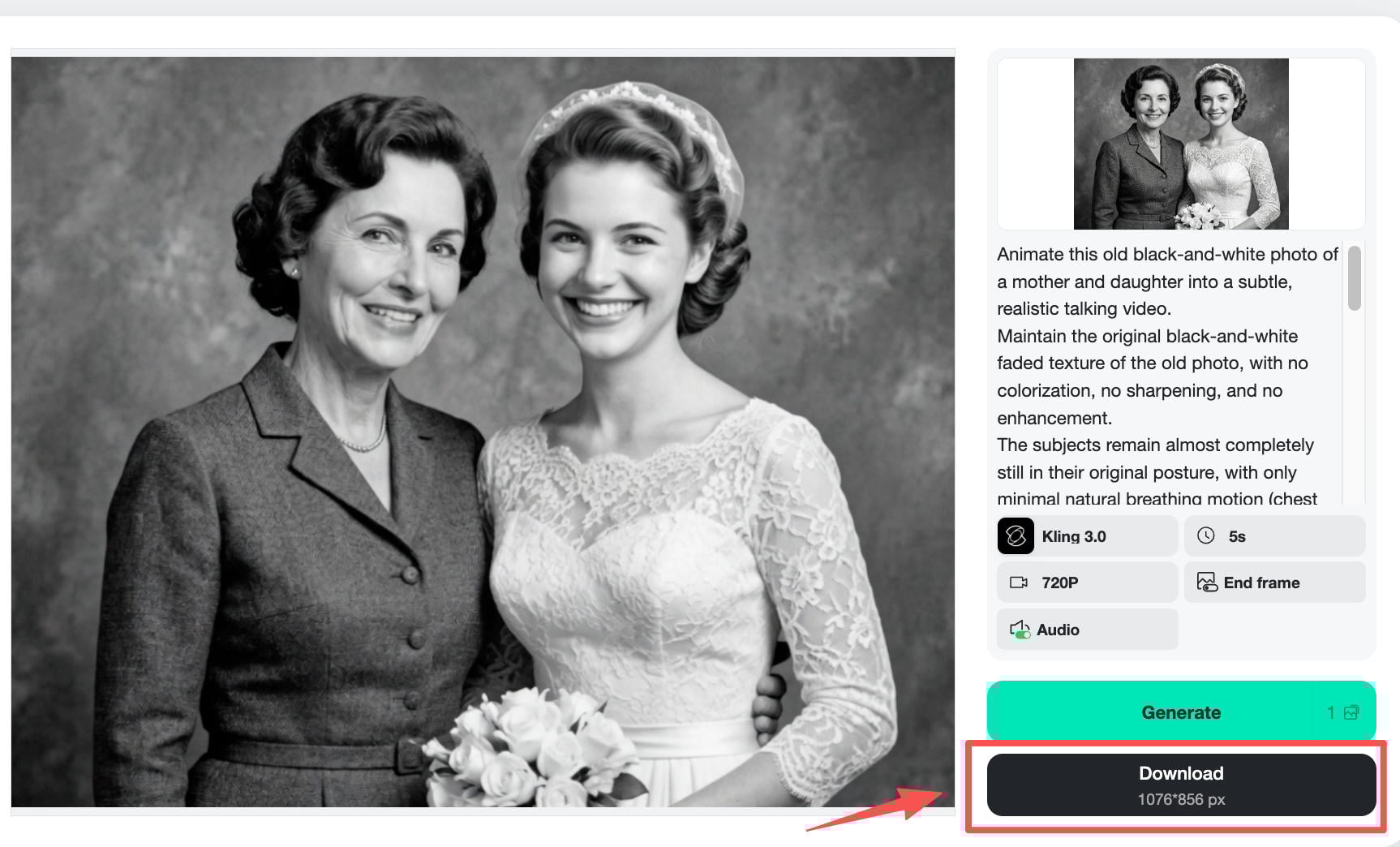
The entire process — from uploading to downloading — takes just a few minutes. No software installation, no technical knowledge, and no credit card required for your first animations.
Best Use Cases for AI Photo Animation
AI photo animation is not just a novelty — it has real, meaningful applications across personal and professional contexts. Here are the most popular ways people are using this technology:
Family History and Genealogy
Genealogists are using AI to animate ancestors' portraits for family tree presentations and heritage documentaries. A static daguerreotype from the 1800s becomes a living, breathing person — making distant ancestors feel real and relatable to younger family members.
Memorial Videos
One of the most emotionally powerful applications is creating memorial videos for funerals, anniversaries, and remembrance events. Animating a loved one's photograph and adding their voice (or a generated voice reading their words) creates a deeply personal tribute.
Education and Museums
Museums and schools use animated portraits to create interactive exhibits where historical figures “speak” to visitors. Imagine Abraham Lincoln's portrait explaining the Gettysburg Address, or a World War II veteran describing their experience — all generated from a single photograph.
Social Media and Content Creation
Animated old photos consistently go viral on TikTok and Instagram. The emotional reaction people have when seeing old family photos come to life makes this content highly shareable. Creators use insMind's AI video generator to produce these clips quickly and in formats optimized for vertical video platforms.
Digital Art and Creative Projects
Artists and designers animate illustrated portraits, anime characters, and digital artwork to add motion and life to their creations. The text-to-video capabilities in modern AI tools make it easy to experiment with different animation styles.
Tips for Better AI Photo Animation Results
Want to get the most realistic animation from your old photos? Follow these tips:
-
Use the highest resolution available. Scan old photos at 300 DPI or higher. The more detail the AI has to work with, the better the animation will look.
-
Choose photos with clear faces. The AI needs to detect facial features accurately. Photos where the face is clearly visible (front-facing or slight angle) produce the best results.
-
Keep prompts specific but simple. Instead of requesting complex actions, describe subtle, natural movements: “slight head turn, gentle smile, soft eye blink.” Less is more with old photos.
-
Preserve the original aesthetic. For vintage photos, include instructions like “maintain original black and white texture” and “retain film grain and scratches” to keep the historical feel authentic.
-
Start with low animation strength. A 50% strength setting creates subtle, natural motion. Going too high can produce unnatural distortions, especially on aged or damaged photos.
-
Try different AI models. Each model handles animation differently. Kling 1.6 works well for subtle motion, while Kling 3.0 adds audio support for talking portraits.
Frequently Asked Questions
Can I animate a black-and-white photo without colorizing it?
Yes. By including “maintain original black and white texture” in your prompt, the AI will animate the photo while preserving its vintage appearance — including grain, scratches, and sepia tones.
How long are the animated videos?
Most AI photo animations generate 3 to 10 second clips. On insMind, the default is 5 seconds, which is ideal for social media sharing and personal use. You can adjust the duration in the video settings.
Can the AI make the person in the photo talk?
Yes. If you select a model that supports audio (like Kling 3.0 or Google Veo 3.1), you can add text that the AI will convert to speech with synchronized lip movements. This works well for memorial messages, greetings, and educational content.
Does the photo need to show the full face?
The AI works best with photos where the face is clearly visible. Front-facing portraits and slight angles produce the most realistic animations. Side profiles and heavily obscured faces may result in less accurate motion.
Is it free to animate old photos on insMind?
Yes. insMind offers free credits for new users, so you can try AI photo animation at no cost. Additional credits are available through affordable subscription plans if you need more.
Start Animating Your Photos Today
AI photo animation has made it possible for anyone to bring old photographs to life — no special skills, no expensive software, and no waiting. Whether it is a faded family portrait from the 1940s or a childhood school photo, the AI can add natural motion that makes the image feel alive again.
Ready to try it yourself? Upload your first photo to insMind and watch it come to life in minutes. The results might just bring a tear to your eye.

Sarah Michelle
I'm a freelance writer with a passion for editing and designing photos. Here at insMind, I strive to educate users on image creativity, photography, and enhancing product photos to help grow their businesses.
Keep reading

How to Use Seedance 2.5 for AI Videos
Learn how to use Seedance 2.5 for text-to-video and image-to-video, write stronger prompts, guide motion with references, and review results.

How to Make a Creepy Voice for Horror Content Step by Step
Learn how to make a creepy voice for horror videos, podcasts, and games with insMind.

How to Remove TikTok Watermark: 4 Easy Steps for Clean Videos
Learn how to remove TikTok watermark from videos in four practical steps with insMind.

Top 10 Seedance 2.5 Alternatives for AI Video in 2026
Compare top Seedance 2.5 alternatives and learn how to create AI videos with insMind.

Seedance 2.5 vs. MiniMax H3: Which AI Video Model Should You Use?
Compare Seedance 2.5 and MiniMax H3 for AI video creation.

30 Instagram Reels Prompts You Can Copy and Try
Copy-ready Instagram Reels prompts for products, fashion, creators, travel, food, pets, and lifestyle videos.

How to Write Instagram Reels Prompts for AI Videos
Learn to write Instagram Reels prompts for polished AI videos, product clips, creator posts, and lifestyle content.

30 TikTok Video Prompts You Can Copy and Try
Copy-ready TikTok video prompts for ads, creators, products, fashion, pets, travel, and more.

How to Create an AI Micro-drama: A Step-by-Step Guide
Learn how to create an AI micro-drama with insMind.

How to Create a Short Film Using AI in 2026
Learn how to create a short film using AI with insMind.

Instagram Reel Ads: Examples, Specs, Sizes, and Best Practices
Learn Instagram Reel ad specs, examples, safe zones, and best practices.

YouTube Ads Best Practices: How to Create Video Ads
Learn YouTube ads best practices and create video ads with insMind.

YouTube Channel Trailer Examples: 15 Inspiring Ideas for Your Channel
Explore YouTube channel trailer examples and create a polished trailer with insMind.

15 Best YouTube Ad Examples and Templates to Inspire Your Next Campaign
Explore YouTube ad examples and templates, then create video ads with insMind.

How to Make a Hype Video with AI: The Easy Guide
Learn how to make a hype video with AI using insMind.

Instagram Ad Templates for Feed, Stories, Reels, and Carousel Ads
Learn Instagram ad templates for Feed, Stories, Reels, and Carousel Ads.

Facebook Video Ad Specs: Sizes, Formats, and Lengths for 2026
Learn Facebook video ad specs, sizes, formats, and lengths for 2026, then make ad-ready videos with insMind fast.

How to Create Facebook Video Templates for Posts, Ads, Covers, and Live Video
Learn how to use Facebook video templates for posts, ads, covers, and live video with insMind.

Instagram Ad Examples: 15 Creative Ideas That Convert
Explore 15 Instagram ad examples and learn how to make them with insMind.

Instagram Ad Sizes and Specs: Complete 2026 Guide
Find Instagram ad sizes, specs, ratios, and dimensions for every major placement.

10+ Video Resume Examples with Scripts for Every Career Stage
Explore video resume examples and scripts, then create a polished video resume with insMind.

How to Make a Sports Hype Video with AI: A 4-Step Guide
Learn how to make a sports hype video with AI.

YouTube Ad Specs for 2026: Sizes, Formats, and Lengths
YouTube ad specs for sizes, formats, dimensions, and lengths, plus a four-step insMind workflow.

30 Best Grok Imagine Video Prompts You Can Copy and Try
Copy 30 Grok Imagine video prompts and learn how to write better prompts for creative AI videos.

50 Scroll-Stopping AI Brainrot Prompts for Viral Meme Videos
Copy 50 scroll-stopping AI brainrot prompts for chaotic meme videos.

How to Turn Any Photo into a Brainrot Meme Video
Learn how to turn any photo into a brainrot meme video with AI.

How to Make a Retirement Video with AI
Learn how to make a retirement video with AI.

How to Make Your Own Graduation Video from Photos with AI
Learn how to make a graduation video from photos with AI.

How to Make Your Own Outro Video
Learn how to make your own outro video with insMind.

Higgsfield vs Pollo AI: Which Video Platform Fits You?
Compare Higgsfield vs Pollo AI for cinematic control, model choice, ease of use, and pricing.

Pollo AI Review 2026: Features, Pros, Cons, and Verdict
Read our Pollo AI review for 2026 and explore its features, pricing, strengths, limitations, ideal users, and practical tips for better results.

How to Create Cute Baby Talking Videos from Photos
Learn how to create baby talking videos from photos with text, audio, and AI lip sync.

How to Make Your Own Talking Avatar with AI
Learn how to make your own talking avatar with AI from a portrait and script.

Seedance 2.0 Mini vs Seedance 2.0: Which Model Should You Use?
Compare Seedance 2.0 Mini and Seedance 2.0 for AI video creation.

How to Create Talking Animal Videos from Photos That Steal the Show
Learn how to create talking animal videos from photos with AI.

How to Turn a Character Image into a Consistent AI Video
Learn how to turn a character image into a consistent AI video with insMind.

10 Krea AI Alternatives for Creating and Editing AI Videos in 2026
Compare the best Krea AI alternatives for creating and editing AI videos, including insMind, Runway, Kling AI, Luma, Pika, VEED, and more.

Seedance 2.0 Mini Prompts to Copy: 20 Video Ideas
Copy Seedance 2.0 Mini prompts for cinematic AI videos with insMind.

Seedance 2.0 vs Seedance 2.5: What Changed?
Compare Seedance 2.0 and Seedance 2.5 with examples, prompts, and insMind workflow.

10 Best Pollo AI Alternatives for AI Video Creation in 2026
Compare the best Pollo AI alternatives for AI video creation, including insMind, Runway, Kling AI, Luma, Pika, VEED, and more.

How to Make an AI Video of Yourself That Actually Feels Like You
Create a realistic AI video of yourself from a photo and script.

How to Turn Old Photos into a Beautiful Tribute Video with AI
Turn old photos and memories into beautiful AI tribute videos.

How to Make a Daily Vlog with AI in Minutes
Create daily AI vlogs from photos, prompts, or ideas in minutes.

How to Create 2026 FIFA World Cup Highlights with AI
Create 2026 FIFA World Cup highlights, fan clips, and football videos with AI.

Best AI Video Extender for Creators: Top Tools Compared
Compare the best AI video extender tools for creators in 2026 and learn how to make short videos longer with insMind.

How to Edit YouTube Videos Faster with AI
Edit YouTube videos faster with AI background and style tools.

How to Create Training Videos with AI: A Complete Guide for Beginners
Create clear training videos from images and prompts with AI.

Create Product Reveal Videos with an AI Unboxing Video Maker
Learn how to create AI unboxing videos for product reveals, UGC, teasers, and ecommerce demos.

Create Smooth AI Video Transitions with Kling Start/End Frame
Learn how to create smooth AI video transitions with Kling Start/End Frame.

What Can You Choose for the Best InVideo Alternatives in 2026?
Compare the best InVideo alternatives and see why insMind is a strong AI video generator for creators and marketers.

10 Best Animaker Alternatives in 2026: New Trends in AI Video Creation
Compare the best Animaker alternatives for AI video creation, including free and open-source picks.

10 Best HeyGen Alternatives in 2026: Create AI Videos with More Freedom
Compare the best HeyGen alternatives for AI video creation, including free and open-source picks.

How to Make a Faceless YouTube Channel with AI
Make a faceless YouTube channel with AI tools, scripts, video ideas, and insMind.

Best CapCut Alternatives: 8 AI Video Editors Compared
Compare the best CapCut alternatives for iPhone, Android, PC, and AI video editing.

How Ecommerce Brands Replace Products in Videos with AI
Replace products in ecommerce videos with AI for ads, listings, and creative testing.

How to Change Video Background Without Green Screen: Step-by-Step Guide
Learn how to change video backgrounds without a green screen using simple AI editing steps.

How to Seamlessly Replace Objects in Videos with AI
Step-by-step guide on replace objects in videos with AI: how it works, best practices, and how to do it free with insMind.

How to Identify AI-Generated Videos: A Comprehensive Guide
Learn how to identify AI-generated videos using expert tips and insMind's tools for authenticity verification.

Can AI Really Edit Videos For You? A Deep Dive Into AI Video Editing
Discover how AI can edit videos effectively, using insMind and other top tools. Learn workflows, compare features, and explore future trends.

Crafting Viral Bigfoot AI Videos: A Step-by-Step Guide
Create viral Bigfoot AI videos with insMind. Learn how to optimize for TikTok and YouTube, avoid common mistakes, and more.

Discover the Versatility of Happy Horse 1.0 for AI Video Creation
Happy Horse 1.0 review explores AI video generation, integration with insMind, and practical applications for content creators.

Seedance 2.0 vs. Happy Horse 1.0: Which AI Video Generator Fits Your Needs?
Discover the differences between Seedance 2.0 and Happy Horse 1.0. Learn which AI video generator suits your needs best.

How to Make Educational Videos for Kids with AI (4 Easy Steps)
Write a structured script, choose model and audio, generate, and download—a step-by-step guide to making AI educational videos for kids with prompt templates.

Best AI Prompts for Explainer Videos (Proven Templates)
Four proven AI prompt templates for explainer videos—presenter, product demo, faceless brand, and tutorial—plus how to use insMind in 3 steps.

Best AI Explainer Video Generator for Business (2026 Guide)
Choose text-to-video or image-to-video, configure model and audio, generate and download—a complete 2026 guide to AI explainer videos for business with insMind.

Best Prompts for Wan 2.7: Multi-Shot Guide for Cinematic AI Video
Choose text or image mode, write scene-block prompts for Wan 2.7, set duration and audio, then download—plus 40+ language narrative tips.

How to Create Kids Videos with AI: A Parent-Friendly Guide
Upload art or start from text, write kid-safe prompts, pick Google Veo 3.1, generate and download—steps for parents and teachers.

From Script to Screen: How to Create Engaging Story Videos with AI Tools
Learn how to create story videos with AI: split scripts into scenes, optional reference images, generate clips in insMind, then merge. No pro editor required to start.

How to Make a Baby Dance Video with AI: Step-by-Step Guide
Turn a baby photo into a cute AI dance clip. Upload, write a motion prompt, pick model and duration, generate—no editing skills needed.

How to Make a Cat Dance Video with AI: Step-by-Step Guide
Turn a cat photo into a funny dance clip with AI image to video. Upload, write a motion prompt, generate, and download—no editing skills.

Best AI Tool for Pet Dance Videos (2026 Compared)
Compare top AI pet dance video tools with real screenshots, pros and cons, and a tested insMind image-to-video workflow plus copy-ready prompt.

Top 20 AI Fruit Video Prompts to Copy & Paste
Discover top AI fruit video prompts for creating engaging, trendy videos. Perfect for TikTok and other platforms, these prompts inspire creative content.

Funny AI Video Prompts That Work (Tested Examples)
Get 20+ tested funny AI video prompts that actually make people laugh. Copy-paste prompts for TikTok, Reels, and YouTube Shorts with step-by-step instructions.

Affordable AI Video Solutions for E-commerce Startups
Discover affordable AI video solutions for e-commerce startups. Learn about budget-friendly tools and maximize ROI with AI-generated content.

Transforming Marketing with AI Video Ads
Discover how AI video ads are transforming online marketing with personalized, efficient, and creative solutions. Learn techniques and examples.

Mastering Cinematic Ad Creation with Seedance 2.0
Create cinematic ads with Seedance 2.0, a powerful AI tool for video advertisements. Learn how to make stunning video ads using Seedance 2.0.

Mastering Viral Video Creation with Seedance 2.0
Discover how to create viral videos using Seedance 2.0 with tips, prompts, and insights on social media trends.

Close-Up Shot: Definition, Story Uses & Tighter Framing
What is a close-up shot? Definition, when to use tight framing for emotion and detail, and tips for shooting cleaner inserts on any camera.

YouTube Equipment for Beginners: Gear, AI Video & Your First Upload (2026)
Beginner YouTube equipment: priority order for mic, light, and camera; clear audio on a budget; phone vs dedicated camera; Shorts and 16:9 basics.

How to Create Anime Videos with AI (Step-by-Step Guide)
Learn how to create anime videos with AI step by step. Use text-to-video and image-to-video to generate stunning anime animations with insMind.

How to Make Viral Funny Videos with AI in 5 Minutes
Learn how to make viral funny videos with AI in minutes. Step-by-step guide to creating hilarious TikTok and Instagram clips using insMind AI funny video generator.

How to Create Talking Old Photo Videos with AI
Learn how to animate old photos with AI. Turn vintage portraits into talking videos with realistic motion using insMind free photo animation tool.

7 Best Sora 2 Alternatives for AI Video Generation in 2026
Discover the best Sora 2 alternatives for AI video generation. Compare insMind, Runway, Kling AI, Pika, and more to find the right tool for your needs.

AI Prompts for TikTok Video Generator: Complete Guide
Discover the best AI prompts for TikTok video generation. 20+ ready-to-use prompts plus a step-by-step guide to creating viral TikTok content with AI.

How to Upscale Anime Video to 4K with AI (Step-by-Step)
Learn how to upscale anime video to 4K using AI. Step-by-step guide to enhancing low-res anime with sharper lines and cleaner colors.

AI Marketing Video Generator: Create Promo Videos from Text
Learn how to turn text into professional marketing videos using AI. Step-by-step guide to creating promo videos in minutes.

Text-to-Video AI Ranked: Which Generator Wins in 2026?
Compare the 7 best text-to-video AI generators in 2026 including insMind, Sora 2, Runway, Kling AI, Pika, and more.

Animate Anime Images with AI: Turn Static Art into Dynamic Anime Videos
Learn how to animate anime images with AI. Turn static anime art into stunning animated videos easily.

How to Remove Kling Watermark from AI Videos
Explore the best ways to remove Kling AI watermark. Compare editing methods and discover watermark-free Kling generation options.

AI Video Editor: Edit Videos Instantly with Prompts
Use insMind AI Video Editor and prompts to edit videos, remove objects, change backgrounds and more.

Control the Narrative: Create Cinematic AI Videos with Start & End Frames
From start to finish, take control of AI video storytelling with Start & End Frames.

How to Create a Stranger Things Transition Video (Step-by-Step Guide)
Create a Stranger Things–style Upside Down transition with AI in just a few steps using insMind.

Transform Your Ideas: Generate Videos from Text Instantly
Turn text into videos in seconds with InsMind's AI—ideal for social media, ads, and presentations. No editing skills required.

Tralalero Tralala: How to Animate the Italian Shark Meme with AI Flair
Animate the viral “Tralalero Tralala” Italian Shark meme with AI for fun, shareable content.

Top TikTok Memes 2025: 'Tung Tung Tung Sahur' & Viral Trends You Can't Miss
2025 TikTok trends: AI-generated Italian Brainrot memes and creepy Tung Tung Tung Sahur dominate viral humor.