


Want to turn a dramatic idea into a short vertical series without hiring actors, renting a set, or learning a heavy editing suite? That is exactly why AI micro-dramas are becoming such a practical format for creators in 2026.
A strong micro-drama is not just a random short video. It has a hook, a character goal, a conflict, a twist, and a reason to watch the next episode. With insMind's AI Drama Generator for Short and Micro-dramas, you can move from a story idea to a storyboard and then to a 9:16 video workflow inside one beginner-friendly process.
This guide shows you how to create an AI micro-drama, plan a high-quality short-form drama series, and use insMind to produce clips that feel built for TikTok, Reels, Shorts, and other vertical video feeds.
Table of Contents
- 01What Is an AI Micro-drama?
- 02How to Plan a High-Quality Micro-drama
- 03Micro-drama Script Template
- 04Story Ideas You Can Turn into Micro-dramas
- 05Prompts for Viral Short-Form Drama Series
- 06Professional Production Standards
- 07Publishing Checklist for a Micro-drama Series
- 08How to Create an AI Micro-drama with insMind
- 09FAQs About AI Micro-dramas
What Is an AI Micro-drama?
An AI micro-drama is a short dramatic video episode created with AI support. It is usually vertical, fast-paced, emotionally direct, and designed as part of a series rather than a one-off clip. Instead of relying on a full filming crew, you use AI to shape the script, storyboard, characters, scenes, and generated video clips.
The format works because it compresses classic TV drama into a mobile-first structure. Every second has a job: catch attention, build tension, reveal a secret, or end on a cliffhanger. If you want to Create Short and Micro-dramas Online, the real challenge is not only generating nice visuals. It is keeping the story tight enough that viewers understand the stakes instantly.
How to Plan a High-Quality Micro-drama
Before you open any AI tool, decide what kind of emotional engine your episode will use. Is it betrayal, revenge, secret identity, forbidden romance, workplace rivalry, family conflict, or a supernatural twist? A clear emotional engine makes the AI generation process easier because every prompt can point in the same direction.
Use this quick structure before you generate:
| Segment | Purpose | Example Direction |
|---|---|---|
| 0-3 seconds | Hook | A line, look, or action that creates instant curiosity. |
| 3-20 seconds | Setup | Introduce the main character, desire, and pressure. |
| 20-55 seconds | Escalation | Add an obstacle, lie, confrontation, or reveal. |
| Final 5-10 seconds | Cliffhanger | End before the answer arrives, so viewers want episode two. |
Want to know How to Create a High-Quality Micro-drama? Build a mini show bible. Keep a short note for each character's age, outfit, hairstyle, personality, relationship, and speaking style. Then use that same description across your scripts and visual prompts. For consistent character shots, you can also explore ai character animation when you want a still character reference to move naturally.
Micro-drama Script Template
A good AI micro-drama begins with a script that is easy for both viewers and AI tools to understand. Do not write a full television scene first. Write a compact production brief that tells the AI who is involved, what is at stake, what changes, and where the episode should stop.
Use this episode template when you want a fast but structured first draft:
Episode title: [short title]. Genre: [revenge romance, office betrayal, family secret, thriller]. Main character: [name, age, appearance, goal]. Opponent: [name, relationship, pressure]. Opening hook: [one shocking line or image]. Four scenes: [setup], [conflict], [twist], [cliffhanger]. Visual style: vertical cinematic drama, close-ups, expressive reactions, realistic lighting.
| Script Beat | What to Write | AI Prompt Tip |
|---|---|---|
| Hook line | One sentence that makes viewers ask a question. | Use direct dialogue: "You were never meant to find this." |
| Character pressure | What the main character may lose right now. | Name the relationship: boss, ex, sister, rival, investor. |
| Visual clue | An object or action that proves something changed. | Make it filmable: letter, ring, phone alert, signed contract. |
| Twist | A reveal that reverses what viewers assumed. | Keep it simple enough to understand without long exposition. |
| Cliffhanger | The episode ends before the answer arrives. | Close on a face, a door opening, or an unfinished sentence. |
Here is a short example: "A junior designer is fired for stealing a concept. As she packs her desk, she finds her late mother's initials on the original sketch hidden in the CEO's private folder. The CEO walks in and says, 'If you open that file, you will know why your mother disappeared.'" This gives the AI a character, a conflict, a visual clue, and a cliffhanger in one compact brief.
Story Ideas You Can Turn into Micro-dramas
Need a premise that works quickly? Micro-drama ideas should be easy to understand from the first scene and emotional enough to carry multiple episodes.
Secret Identity
A quiet employee is secretly the heir to the company, but someone is trying to expose them first.
Revenge Romance
Two former lovers meet again after one becomes successful, and neither knows who betrayed whom.
Workplace Rivalry
A designer discovers her boss stole an idea that connects to a family secret.
Family Reveal
A hidden letter changes who owns the house, the business, or the inheritance.
Supernatural Twist
A character receives messages from tomorrow and has only one minute to prevent a disaster.
Creator Series
A personal brand uses fictional mini episodes to dramatize product problems and transformations.
Prompts for Viral Short-Form Drama Series
Wondering How to Create Viral Short-Form Drama Series with AI? Start with prompts that are specific enough for story, not just visuals. The best prompts include character identity, relationship tension, setting, camera style, and the reveal you want viewers to remember.
Create a 60-second vertical AI micro-drama episode about [main character], who wants [goal], but [opponent/secret] blocks them. Use an emotional hook in the first 3 seconds, 4 short scenes, cinematic close-ups, clear dialogue beats, and a cliffhanger ending.
Break this micro-drama into 4 scenes for a 9:16 short video. For each scene, include location, character action, camera angle, emotion, dialogue cue, and transition to the next scene.
Create episode two using the same protagonist, wardrobe, hairstyle, and visual style. Continue from the previous cliffhanger, add one new clue, reveal one hidden motive, and end before the confrontation is resolved.
If you want to create a scene from a written description, a text to video ai workflow is useful for testing alternate openings before you commit to a full series.
Professional Production Standards
If you want your AI micro-drama to feel professional, treat it like a small production pipeline rather than a one-prompt experiment. The goal is repeatability. A creator should be able to make episode two with the same tone, character logic, visual rules, and pacing discipline as episode one.
A professional micro-drama workflow usually includes five documents or checkpoints:
| Production Asset | What It Contains | Why It Improves Quality |
|---|---|---|
| Series Bible | Premise, genre, audience, emotional promise, recurring conflict | Keeps every episode inside the same story world. |
| Character Sheet | Appearance, outfit, voice, relationship map, hidden motive | Reduces character drift across AI generations. |
| Episode Beat Sheet | Hook, setup, escalation, twist, cliffhanger | Protects pacing and prevents filler scenes. |
| Visual Style Guide | Lighting, camera language, color mood, location rules | Makes the series feel intentional instead of random. |
| Review Checklist | Continuity, mobile framing, caption space, ending impact | Catches quality issues before publishing. |
Use Retention Thinking, Not Just Visual Quality
A beautiful AI video can still fail if the story does not create a viewer question. For short-form drama, judge every scene by the question it creates. The opening should make viewers ask, "What happened?" The middle should make them ask, "Who is lying?" The ending should make them ask, "What happens next?"
Use these professional review metrics before you publish:
- Hook clarity: Can a new viewer understand the conflict within three seconds?
- Scene economy: Does every scene add new information or emotional pressure?
- Continuity: Do characters, clothes, locations, and props stay consistent?
- Mobile readability: Are faces, clues, and captions clear on a phone screen?
- Cliffhanger strength: Does the final beat create a specific unanswered question?
Direct the AI Like a Small Crew
Professional prompts separate departments. Instead of one long command, give the AI a writer's note, director's note, cinematography note, and editor's note. This makes your instruction easier to follow and easier to revise.
Writer's note: The protagonist is accused of stealing, but she is actually protecting her mother's secret. Director's note: Keep the tone tense and emotional, with close-up reactions. Cinematography note: Use a vertical frame, soft office lighting, slow push-ins, and clean over-the-shoulder shots. Editor's note: Keep scenes short, end before the confrontation is resolved, and preserve caption space at the lower third.
This kind of structured prompt is especially helpful when you generate a series. You can keep the director and cinematography notes stable, then change only the episode conflict and cliffhanger.
Plan Rights, Brand Safety, and Commercial Use
If the micro-drama is for marketing, paid ads, client work, or a monetized channel, keep the production clean. Use original story ideas, owned or licensed images, cleared music, and fictional characters unless you have permission to use a real person's likeness. Avoid implying endorsement from brands, celebrities, or real public figures.
Also review claims inside the story. Product-led micro-dramas can be powerful, but the plot should not make unsupported medical, financial, legal, or performance claims. A dramatic story can still be commercially responsible.
Publishing Checklist for a Micro-drama Series
A micro-drama is usually stronger as a series than as a single clip. Before you publish episode one, plan at least three episodes so your first cliffhanger has somewhere to go. You do not need to generate all episodes immediately, but you should know the central secret, the next reveal, and the final emotional payoff.
| Before Publishing | What to Check | Fix If Needed |
|---|---|---|
| Opening frame | Can viewers understand the situation in one second? | Start later in the conflict or use a stronger reaction shot. |
| Captions | Will dialogue and key reveals be readable on mobile? | Leave safe space and avoid hiding text over faces. |
| Episode title | Does it create curiosity without explaining everything? | Use a question, accusation, or secret-based phrase. |
| Thumbnail moment | Is there a frame with a face, clue, or dramatic object? | Regenerate or adjust the final scene if every frame is flat. |
| Next episode bridge | Does the last beat naturally lead to episode two? | Add an unresolved message, visitor, file, or confrontation. |
For a weekly publishing rhythm, create a small production board with columns for premise, script, storyboard, generated video, subtitles, thumbnail, and published link. Move each episode through the board instead of treating every clip as a separate experiment. This keeps the story consistent and makes it easier to test which hooks, genres, and cliffhangers get the best retention.
If you are building a brand or creator channel, save every winning prompt. Over time, you will build your own prompt library for office drama, romance drama, thriller drama, product-story drama, and character reveal episodes.
How to Create an AI Micro-drama with insMind
If you are searching for How to Make a Micro-drama Series with AI, insMind gives you a focused starting point. Instead of jumping between a script tool, a storyboard tool, and a separate video generator, you can start with a drama idea and let the AI agent help turn it into a vertical short drama workflow.
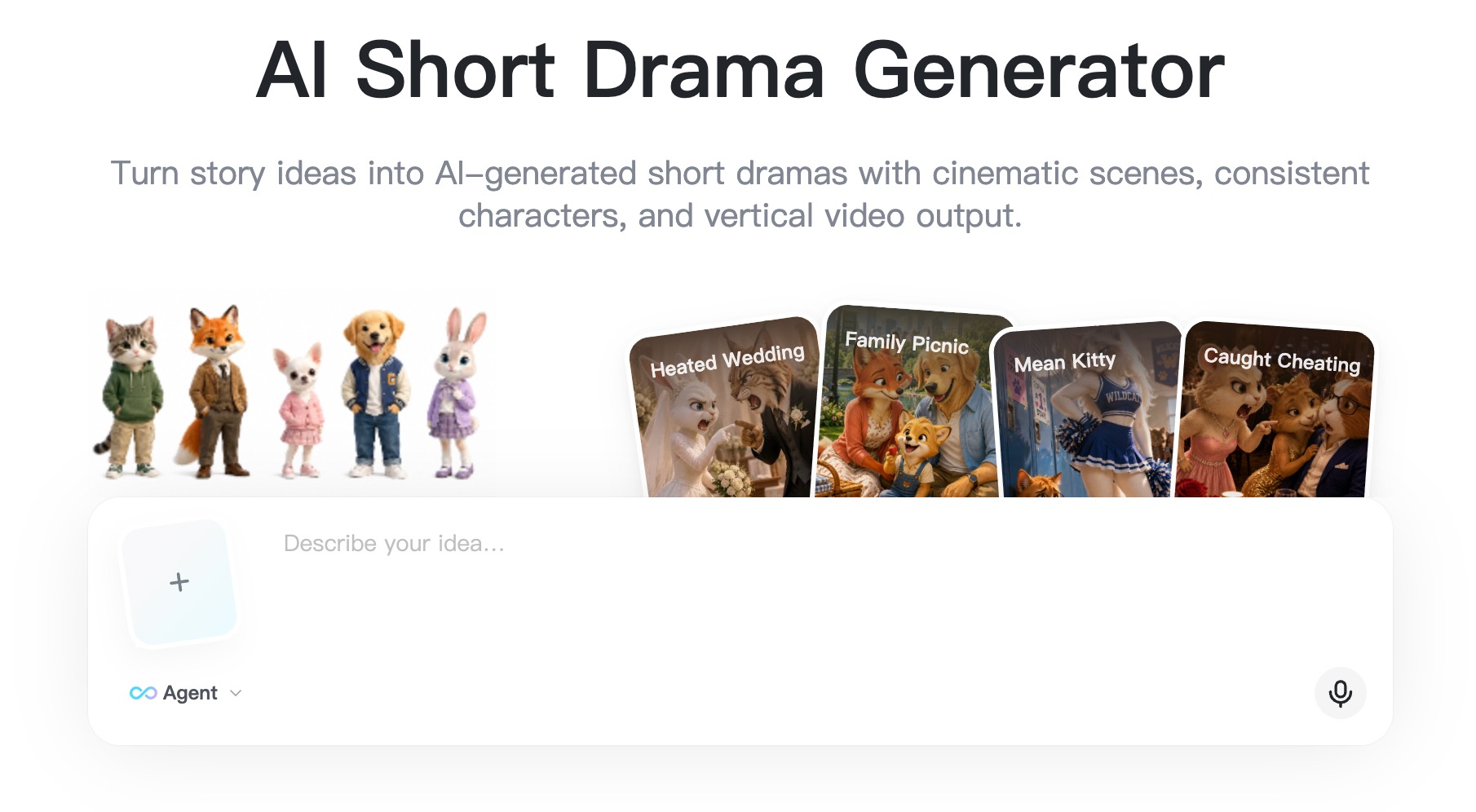
Step 1: Open the Short Drama Generator
Go to insMind's short drama generator page and start a new AI micro-drama project. Think of this first screen as your creative brief: you are telling the tool what kind of story world, genre, and emotional tone you want to create. Before you type, decide the format: one episode, a teaser, or the first chapter of a longer series.
For a first test, keep the idea small. One protagonist, one opponent, one location, and one reveal is enough. A focused premise usually generates cleaner storyboards than a prompt that tries to include a full cast, multiple timelines, and too many secrets at once.
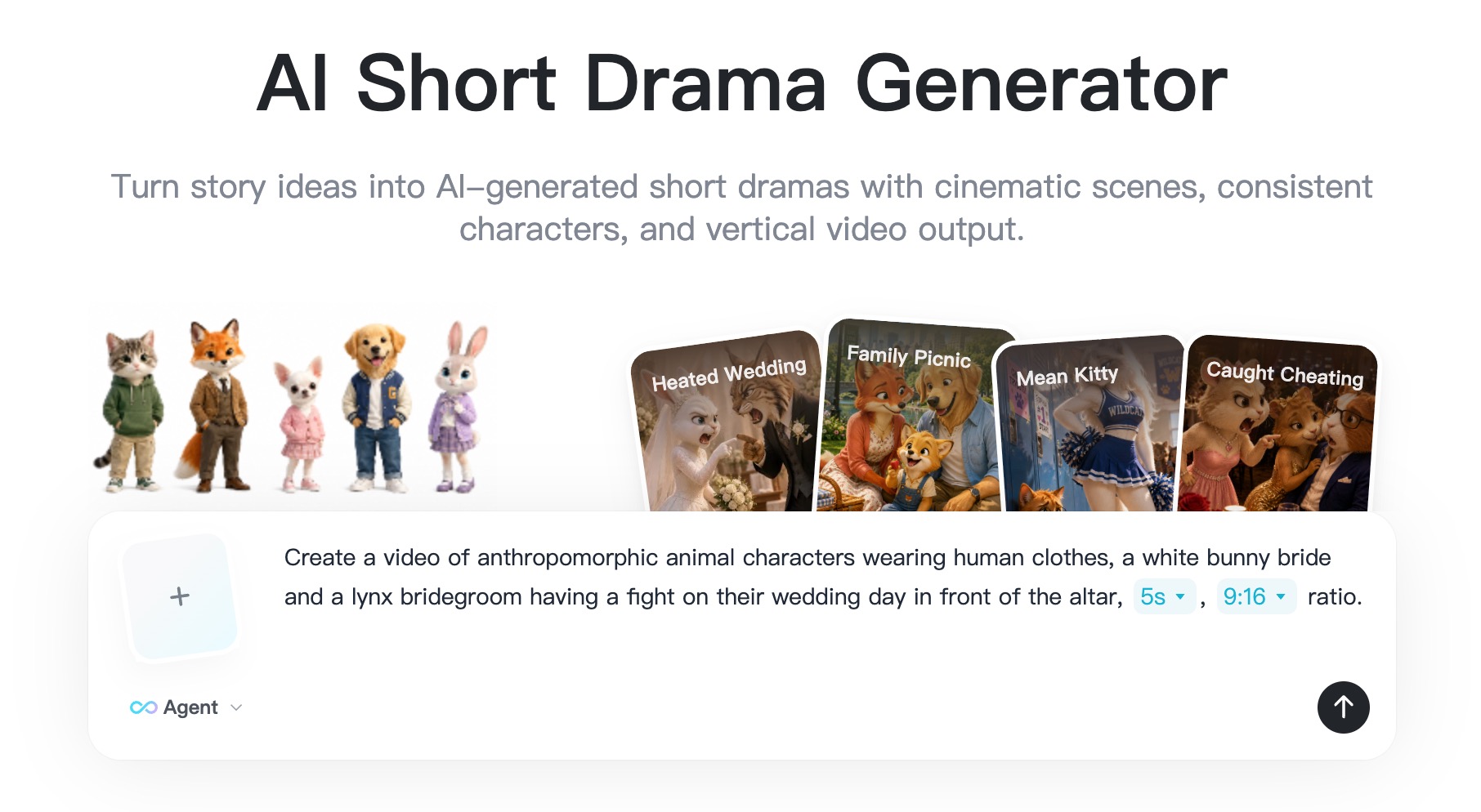
Step 2: Enter Your Story Idea
Write a concise idea in the prompt box. For example: "A young designer discovers her boss stole her mother's final sketchbook, but the sketchbook hides a clue to a secret inheritance." Good prompts include the main character, conflict, mood, and desired vertical drama style.
If you already have a script, summarize it into a clear premise before sending it to the AI agent. For script-first workflows, a related script to video ai process can help you think in scenes instead of loose paragraphs.
A stronger prompt usually includes these details: genre, target length, protagonist description, relationship conflict, setting, visual mood, camera style, and cliffhanger. If your prompt only says "make a dramatic love story," the result may feel generic. If your prompt says "vertical luxury office revenge drama with close-up reactions and a contract reveal," the AI has a clearer production direction.
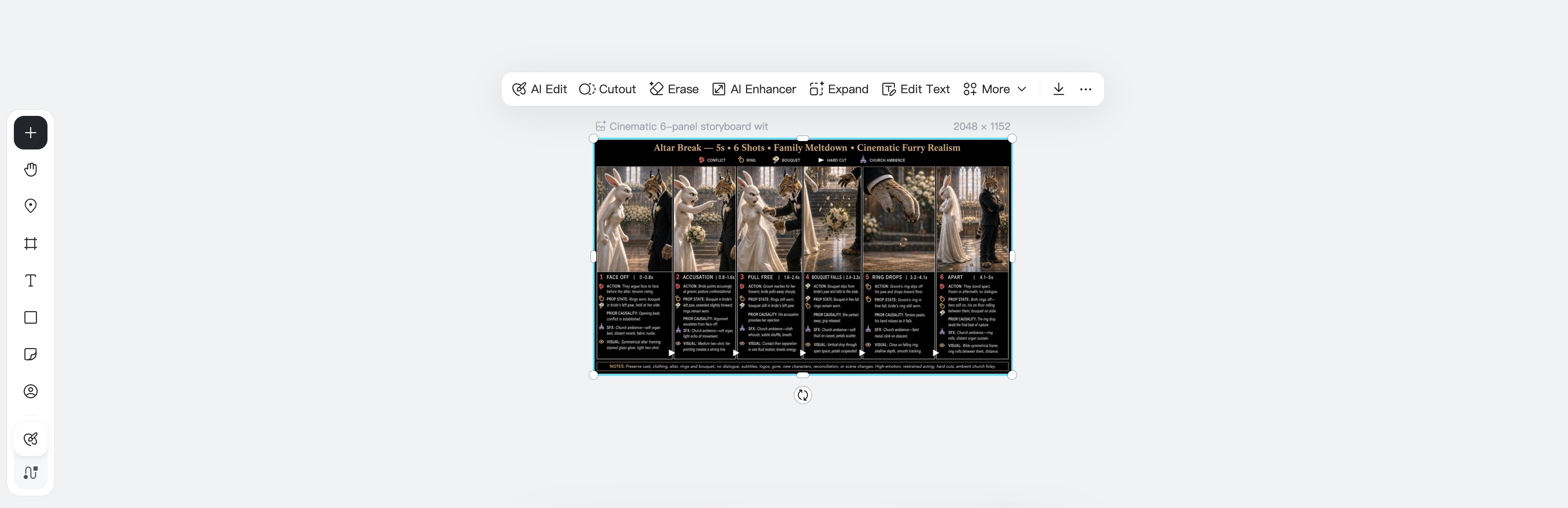
Step 3: Review the AI Storyboard
After you submit the idea, review the generated storyboard. Check whether the opening is sharp, the conflict is clear, and the ending has a real cliffhanger. If a scene feels slow, rewrite it before generating video. Micro-dramas reward speed, so every shot should either reveal character, increase pressure, or set up the next twist.
Use the storyboard review like a mini director's pass. Ask: does scene one stop the scroll? Does scene two explain the relationship? Does scene three change the power balance? Does scene four make viewers want episode two? If one scene repeats information, cut it or replace it with a stronger visual clue.
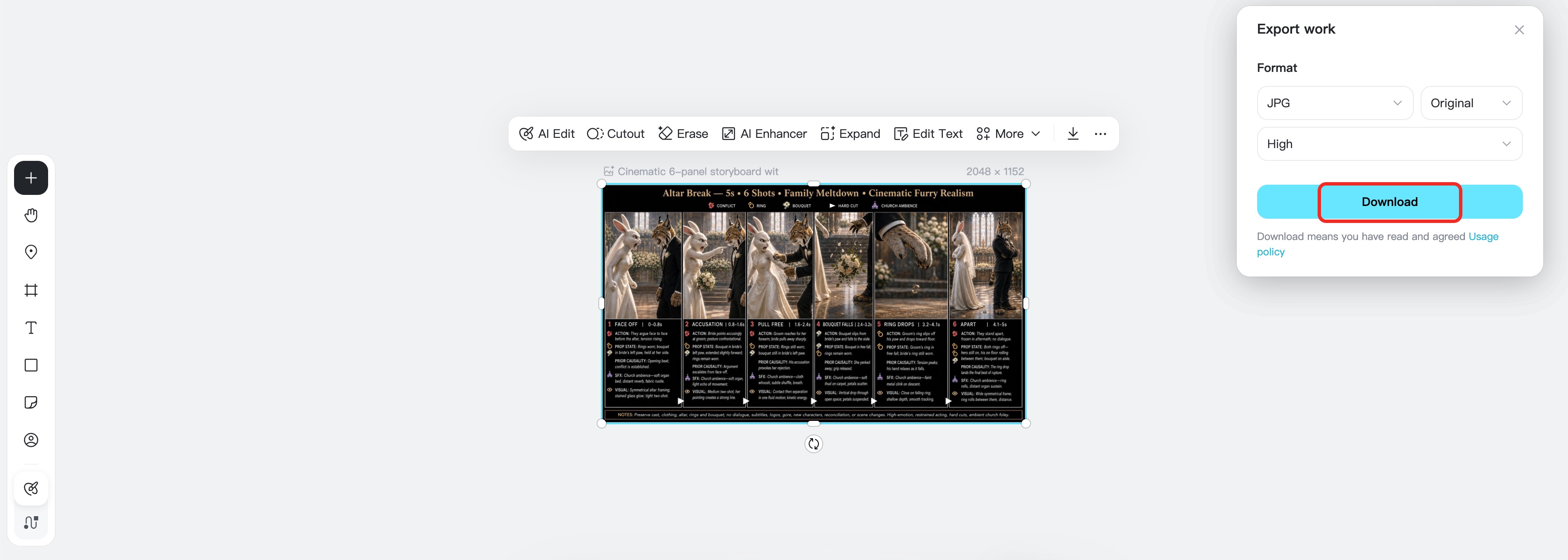
Step 4: Export or Download the Finished Work
Once the storyboard or generated short drama result looks right, use the export panel to download your work. Choose the format and quality you need, then save the file for editing, review, or publishing.
Before publishing, check the result on a phone-size screen. Make sure faces are readable, captions would have room, the main object is not cropped, and the final frame lands clearly. If the ending feels too soft, revise the last storyboard beat before exporting another version.
FAQs About AI Micro-dramas
How to Create micro-drama content if I have no filming experience?
Start with a simple premise, then use AI to draft scenes, review the storyboard, and generate a vertical video. You do not need a camera crew for a first test episode.
How long should an AI micro-drama episode be?
Many creators start with 45-90 seconds because that length gives enough room for a hook, conflict, reveal, and cliffhanger. The right length depends on your platform and audience retention.
What makes a micro-drama different from a normal short video?
A normal short video may be a joke, tutorial, or visual moment. A micro-drama depends on serialized story, character tension, emotional stakes, and a reason to watch the next episode.
Can insMind work as an AI Drama Generator for Short and Micro-dramas?
Yes. insMind's short drama generator is designed to help you turn a story idea into storyboarded scenes and a vertical short drama video workflow.
What are the best AI tools for generating short drama videos 2026?
Look for tools that support story input, storyboard review, vertical video generation, and fast iteration. For micro-drama-specific creation, insMind is a strong option because the workflow is built around short drama production.

Ryan Barnett
I'm a freelance writer with a passion for editing and designing photos. Here at insMind, I strive to educate users on image creativity, photography, and enhancing product photos to help grow their businesses.
Keep reading

How to Use Seedance 2.5 for AI Videos
Learn how to use Seedance 2.5 for text-to-video and image-to-video, write stronger prompts, guide motion with references, and review results.

How to Make a Creepy Voice for Horror Content Step by Step
Learn how to make a creepy voice for horror videos, podcasts, and games with insMind.

How to Remove TikTok Watermark: 4 Easy Steps for Clean Videos
Learn how to remove TikTok watermark from videos in four practical steps with insMind.

Top 10 Seedance 2.5 Alternatives for AI Video in 2026
Compare top Seedance 2.5 alternatives and learn how to create AI videos with insMind.

Seedance 2.5 vs. MiniMax H3: Which AI Video Model Should You Use?
Compare Seedance 2.5 and MiniMax H3 for AI video creation.

30 Instagram Reels Prompts You Can Copy and Try
Copy-ready Instagram Reels prompts for products, fashion, creators, travel, food, pets, and lifestyle videos.

How to Write Instagram Reels Prompts for AI Videos
Learn to write Instagram Reels prompts for polished AI videos, product clips, creator posts, and lifestyle content.

30 TikTok Video Prompts You Can Copy and Try
Copy-ready TikTok video prompts for ads, creators, products, fashion, pets, travel, and more.

How to Create an AI Micro-drama: A Step-by-Step Guide
Learn how to create an AI micro-drama with insMind.

How to Create a Short Film Using AI in 2026
Learn how to create a short film using AI with insMind.

Instagram Reel Ads: Examples, Specs, Sizes, and Best Practices
Learn Instagram Reel ad specs, examples, safe zones, and best practices.

YouTube Ads Best Practices: How to Create Video Ads
Learn YouTube ads best practices and create video ads with insMind.

YouTube Channel Trailer Examples: 15 Inspiring Ideas for Your Channel
Explore YouTube channel trailer examples and create a polished trailer with insMind.

15 Best YouTube Ad Examples and Templates to Inspire Your Next Campaign
Explore YouTube ad examples and templates, then create video ads with insMind.

How to Make a Hype Video with AI: The Easy Guide
Learn how to make a hype video with AI using insMind.

Instagram Ad Templates for Feed, Stories, Reels, and Carousel Ads
Learn Instagram ad templates for Feed, Stories, Reels, and Carousel Ads.

Facebook Video Ad Specs: Sizes, Formats, and Lengths for 2026
Learn Facebook video ad specs, sizes, formats, and lengths for 2026, then make ad-ready videos with insMind fast.

How to Create Facebook Video Templates for Posts, Ads, Covers, and Live Video
Learn how to use Facebook video templates for posts, ads, covers, and live video with insMind.

Instagram Ad Examples: 15 Creative Ideas That Convert
Explore 15 Instagram ad examples and learn how to make them with insMind.

Instagram Ad Sizes and Specs: Complete 2026 Guide
Find Instagram ad sizes, specs, ratios, and dimensions for every major placement.

10+ Video Resume Examples with Scripts for Every Career Stage
Explore video resume examples and scripts, then create a polished video resume with insMind.

How to Make a Sports Hype Video with AI: A 4-Step Guide
Learn how to make a sports hype video with AI.

YouTube Ad Specs for 2026: Sizes, Formats, and Lengths
YouTube ad specs for sizes, formats, dimensions, and lengths, plus a four-step insMind workflow.

30 Best Grok Imagine Video Prompts You Can Copy and Try
Copy 30 Grok Imagine video prompts and learn how to write better prompts for creative AI videos.

50 Scroll-Stopping AI Brainrot Prompts for Viral Meme Videos
Copy 50 scroll-stopping AI brainrot prompts for chaotic meme videos.

How to Turn Any Photo into a Brainrot Meme Video
Learn how to turn any photo into a brainrot meme video with AI.

How to Make a Retirement Video with AI
Learn how to make a retirement video with AI.

How to Make Your Own Graduation Video from Photos with AI
Learn how to make a graduation video from photos with AI.

How to Make Your Own Outro Video
Learn how to make your own outro video with insMind.

Higgsfield vs Pollo AI: Which Video Platform Fits You?
Compare Higgsfield vs Pollo AI for cinematic control, model choice, ease of use, and pricing.

Pollo AI Review 2026: Features, Pros, Cons, and Verdict
Read our Pollo AI review for 2026 and explore its features, pricing, strengths, limitations, ideal users, and practical tips for better results.

How to Create Cute Baby Talking Videos from Photos
Learn how to create baby talking videos from photos with text, audio, and AI lip sync.

How to Make Your Own Talking Avatar with AI
Learn how to make your own talking avatar with AI from a portrait and script.

Seedance 2.0 Mini vs Seedance 2.0: Which Model Should You Use?
Compare Seedance 2.0 Mini and Seedance 2.0 for AI video creation.

How to Create Talking Animal Videos from Photos That Steal the Show
Learn how to create talking animal videos from photos with AI.

How to Turn a Character Image into a Consistent AI Video
Learn how to turn a character image into a consistent AI video with insMind.

10 Krea AI Alternatives for Creating and Editing AI Videos in 2026
Compare the best Krea AI alternatives for creating and editing AI videos, including insMind, Runway, Kling AI, Luma, Pika, VEED, and more.

Seedance 2.0 Mini Prompts to Copy: 20 Video Ideas
Copy Seedance 2.0 Mini prompts for cinematic AI videos with insMind.

Seedance 2.0 vs Seedance 2.5: What Changed?
Compare Seedance 2.0 and Seedance 2.5 with examples, prompts, and insMind workflow.

10 Best Pollo AI Alternatives for AI Video Creation in 2026
Compare the best Pollo AI alternatives for AI video creation, including insMind, Runway, Kling AI, Luma, Pika, VEED, and more.

How to Make an AI Video of Yourself That Actually Feels Like You
Create a realistic AI video of yourself from a photo and script.

How to Turn Old Photos into a Beautiful Tribute Video with AI
Turn old photos and memories into beautiful AI tribute videos.

How to Make a Daily Vlog with AI in Minutes
Create daily AI vlogs from photos, prompts, or ideas in minutes.

How to Create 2026 FIFA World Cup Highlights with AI
Create 2026 FIFA World Cup highlights, fan clips, and football videos with AI.

Best AI Video Extender for Creators: Top Tools Compared
Compare the best AI video extender tools for creators in 2026 and learn how to make short videos longer with insMind.

How to Edit YouTube Videos Faster with AI
Edit YouTube videos faster with AI background and style tools.

How to Create Training Videos with AI: A Complete Guide for Beginners
Create clear training videos from images and prompts with AI.

Create Product Reveal Videos with an AI Unboxing Video Maker
Learn how to create AI unboxing videos for product reveals, UGC, teasers, and ecommerce demos.

Create Smooth AI Video Transitions with Kling Start/End Frame
Learn how to create smooth AI video transitions with Kling Start/End Frame.

What Can You Choose for the Best InVideo Alternatives in 2026?
Compare the best InVideo alternatives and see why insMind is a strong AI video generator for creators and marketers.

10 Best Animaker Alternatives in 2026: New Trends in AI Video Creation
Compare the best Animaker alternatives for AI video creation, including free and open-source picks.

10 Best HeyGen Alternatives in 2026: Create AI Videos with More Freedom
Compare the best HeyGen alternatives for AI video creation, including free and open-source picks.

How to Make a Faceless YouTube Channel with AI
Make a faceless YouTube channel with AI tools, scripts, video ideas, and insMind.

Best CapCut Alternatives: 8 AI Video Editors Compared
Compare the best CapCut alternatives for iPhone, Android, PC, and AI video editing.

How Ecommerce Brands Replace Products in Videos with AI
Replace products in ecommerce videos with AI for ads, listings, and creative testing.

How to Change Video Background Without Green Screen: Step-by-Step Guide
Learn how to change video backgrounds without a green screen using simple AI editing steps.

How to Seamlessly Replace Objects in Videos with AI
Step-by-step guide on replace objects in videos with AI: how it works, best practices, and how to do it free with insMind.

How to Identify AI-Generated Videos: A Comprehensive Guide
Learn how to identify AI-generated videos using expert tips and insMind's tools for authenticity verification.

Can AI Really Edit Videos For You? A Deep Dive Into AI Video Editing
Discover how AI can edit videos effectively, using insMind and other top tools. Learn workflows, compare features, and explore future trends.

Crafting Viral Bigfoot AI Videos: A Step-by-Step Guide
Create viral Bigfoot AI videos with insMind. Learn how to optimize for TikTok and YouTube, avoid common mistakes, and more.

Discover the Versatility of Happy Horse 1.0 for AI Video Creation
Happy Horse 1.0 review explores AI video generation, integration with insMind, and practical applications for content creators.

Seedance 2.0 vs. Happy Horse 1.0: Which AI Video Generator Fits Your Needs?
Discover the differences between Seedance 2.0 and Happy Horse 1.0. Learn which AI video generator suits your needs best.

How to Make Educational Videos for Kids with AI (4 Easy Steps)
Write a structured script, choose model and audio, generate, and download—a step-by-step guide to making AI educational videos for kids with prompt templates.

Best AI Prompts for Explainer Videos (Proven Templates)
Four proven AI prompt templates for explainer videos—presenter, product demo, faceless brand, and tutorial—plus how to use insMind in 3 steps.

Best AI Explainer Video Generator for Business (2026 Guide)
Choose text-to-video or image-to-video, configure model and audio, generate and download—a complete 2026 guide to AI explainer videos for business with insMind.

Best Prompts for Wan 2.7: Multi-Shot Guide for Cinematic AI Video
Choose text or image mode, write scene-block prompts for Wan 2.7, set duration and audio, then download—plus 40+ language narrative tips.

How to Create Kids Videos with AI: A Parent-Friendly Guide
Upload art or start from text, write kid-safe prompts, pick Google Veo 3.1, generate and download—steps for parents and teachers.

From Script to Screen: How to Create Engaging Story Videos with AI Tools
Learn how to create story videos with AI: split scripts into scenes, optional reference images, generate clips in insMind, then merge. No pro editor required to start.

How to Make a Baby Dance Video with AI: Step-by-Step Guide
Turn a baby photo into a cute AI dance clip. Upload, write a motion prompt, pick model and duration, generate—no editing skills needed.

How to Make a Cat Dance Video with AI: Step-by-Step Guide
Turn a cat photo into a funny dance clip with AI image to video. Upload, write a motion prompt, generate, and download—no editing skills.

Best AI Tool for Pet Dance Videos (2026 Compared)
Compare top AI pet dance video tools with real screenshots, pros and cons, and a tested insMind image-to-video workflow plus copy-ready prompt.

Top 20 AI Fruit Video Prompts to Copy & Paste
Discover top AI fruit video prompts for creating engaging, trendy videos. Perfect for TikTok and other platforms, these prompts inspire creative content.

Funny AI Video Prompts That Work (Tested Examples)
Get 20+ tested funny AI video prompts that actually make people laugh. Copy-paste prompts for TikTok, Reels, and YouTube Shorts with step-by-step instructions.

Affordable AI Video Solutions for E-commerce Startups
Discover affordable AI video solutions for e-commerce startups. Learn about budget-friendly tools and maximize ROI with AI-generated content.

Transforming Marketing with AI Video Ads
Discover how AI video ads are transforming online marketing with personalized, efficient, and creative solutions. Learn techniques and examples.

Mastering Cinematic Ad Creation with Seedance 2.0
Create cinematic ads with Seedance 2.0, a powerful AI tool for video advertisements. Learn how to make stunning video ads using Seedance 2.0.

Mastering Viral Video Creation with Seedance 2.0
Discover how to create viral videos using Seedance 2.0 with tips, prompts, and insights on social media trends.

Close-Up Shot: Definition, Story Uses & Tighter Framing
What is a close-up shot? Definition, when to use tight framing for emotion and detail, and tips for shooting cleaner inserts on any camera.

YouTube Equipment for Beginners: Gear, AI Video & Your First Upload (2026)
Beginner YouTube equipment: priority order for mic, light, and camera; clear audio on a budget; phone vs dedicated camera; Shorts and 16:9 basics.

How to Create Anime Videos with AI (Step-by-Step Guide)
Learn how to create anime videos with AI step by step. Use text-to-video and image-to-video to generate stunning anime animations with insMind.

How to Make Viral Funny Videos with AI in 5 Minutes
Learn how to make viral funny videos with AI in minutes. Step-by-step guide to creating hilarious TikTok and Instagram clips using insMind AI funny video generator.

How to Create Talking Old Photo Videos with AI
Learn how to animate old photos with AI. Turn vintage portraits into talking videos with realistic motion using insMind free photo animation tool.

7 Best Sora 2 Alternatives for AI Video Generation in 2026
Discover the best Sora 2 alternatives for AI video generation. Compare insMind, Runway, Kling AI, Pika, and more to find the right tool for your needs.

AI Prompts for TikTok Video Generator: Complete Guide
Discover the best AI prompts for TikTok video generation. 20+ ready-to-use prompts plus a step-by-step guide to creating viral TikTok content with AI.

How to Upscale Anime Video to 4K with AI (Step-by-Step)
Learn how to upscale anime video to 4K using AI. Step-by-step guide to enhancing low-res anime with sharper lines and cleaner colors.

AI Marketing Video Generator: Create Promo Videos from Text
Learn how to turn text into professional marketing videos using AI. Step-by-step guide to creating promo videos in minutes.

Text-to-Video AI Ranked: Which Generator Wins in 2026?
Compare the 7 best text-to-video AI generators in 2026 including insMind, Sora 2, Runway, Kling AI, Pika, and more.

Animate Anime Images with AI: Turn Static Art into Dynamic Anime Videos
Learn how to animate anime images with AI. Turn static anime art into stunning animated videos easily.

How to Remove Kling Watermark from AI Videos
Explore the best ways to remove Kling AI watermark. Compare editing methods and discover watermark-free Kling generation options.

AI Video Editor: Edit Videos Instantly with Prompts
Use insMind AI Video Editor and prompts to edit videos, remove objects, change backgrounds and more.

Control the Narrative: Create Cinematic AI Videos with Start & End Frames
From start to finish, take control of AI video storytelling with Start & End Frames.

How to Create a Stranger Things Transition Video (Step-by-Step Guide)
Create a Stranger Things–style Upside Down transition with AI in just a few steps using insMind.

Transform Your Ideas: Generate Videos from Text Instantly
Turn text into videos in seconds with InsMind's AI—ideal for social media, ads, and presentations. No editing skills required.

Tralalero Tralala: How to Animate the Italian Shark Meme with AI Flair
Animate the viral “Tralalero Tralala” Italian Shark meme with AI for fun, shareable content.

Top TikTok Memes 2025: 'Tung Tung Tung Sahur' & Viral Trends You Can't Miss
2025 TikTok trends: AI-generated Italian Brainrot memes and creepy Tung Tung Tung Sahur dominate viral humor.