


AI-generated videos are created using advanced algorithms and models that simulate real-world scenarios, making them increasingly difficult to distinguish from authentic content. For digital content creators and video editors, understanding these distinctions is crucial for authenticity verification and creative purposes. This guide provides expert insights, practical steps, and a workflow using insMind to help you identify AI-generated videos effectively, whether on YouTube or other platforms.
Table of Contents
- 01 Understanding AI-Generated Videos
- 02 Signs a Video Might Be AI-Generated
- 03 How to Verify Video Authenticity on YouTube
- 04 How to Generate AI Videos with insMind
- 05 Comparing Tools for Detecting AI-Generated Videos
- 06 Ethical Considerations of AI-Generated Videos
- 07 Hands-On Test: Identifying AI Videos with insMind
- 08 What Other Articles Miss
- 09 Cost and Time Comparisons of AI Video Detection Tools
- 10 Real-World Failure Modes of AI Video Detection
- 11 FAQs about Identifying AI-Generated Videos
- 12 Conclusion
Understanding AI-Generated Videos
AI-generated videos are crafted using sophisticated algorithms that mimic visual and audio patterns found in real life. These videos can range from simple animations to complex synthetic media examples that convincingly replicate human actions and voices. Understanding the technology behind these creations is essential for anyone involved in digital media.
What Makes a Video AI-Generated?
AI-generated videos are defined by their use of artificial intelligence to produce content that appears authentic. Technologies such as deep learning and generative adversarial networks (GANs) are commonly employed to create these videos. For instance, in my tests with Seedance 2.0, the model uses advanced motion control to produce seamless cinematic videos. Applications of AI video generation include synthetic media examples, automated news reporting, and even virtual influencers.
Why Identifying AI-Generated Videos Matters
The ability to distinguish AI-generated content is increasingly important as such videos impact media and society. Misinformation can spread rapidly through these mediums, posing ethical concerns and risks. Verifying authenticity is crucial to maintaining trust in digital content, ensuring that audiences receive accurate information.
Signs a Video Might Be AI-Generated
Recognizing AI-generated videos involves looking for specific visual and audio indicators that suggest artificial creation.
Visual and Audio Cues
When evaluating a video, consider these common signs:
- Unnatural movements or transitions, which may appear too smooth or mechanically perfect.
- Audio inconsistencies, such as robotic voice patterns or mismatched lip-syncing.
- Flawless visuals that lack typical imperfections found in real footage, such as lighting errors or natural variability.
Metadata and Technical Indicators
Beyond visual analysis, examining a video's metadata can reveal anomalies that suggest AI involvement. Check for unusual file sizes or encoding settings that differ from expected norms. Forensic tools can also detect signatures unique to AI processes, such as specific compression artifacts or model identifiers embedded in the video file. These technical analyses provide additional layers of verification.
How to Verify Video Authenticity on YouTube
YouTube offers several tools and methods for analyzing video authenticity, though they do have their limitations.
Using YouTube's Built-in Tools
YouTube Studio provides creators with analytics that can help identify suspicious activity or content. This tool allows users to report videos that appear misleading or inauthentic. However, YouTube's verification tools are not foolproof, often lacking the depth required for thorough authenticity checks.
Third-Party Tools and Extensions
To complement YouTube's tools, various third-party extensions can enhance video analysis capabilities.
- Deepware Scanner: Known for detecting synthetic media examples and synthetic media.
- Sensity: Offers tools specifically designed for identifying AI-generated content.
These tools have been used in successful case studies to detect AI videos on YouTube, providing a more comprehensive approach when used alongside YouTube's built-in features.
How to Generate AI Videos with insMind
insMind provides a streamlined interface for creating AI-generated videos, enabling users to simulate real-world scenarios effectively.
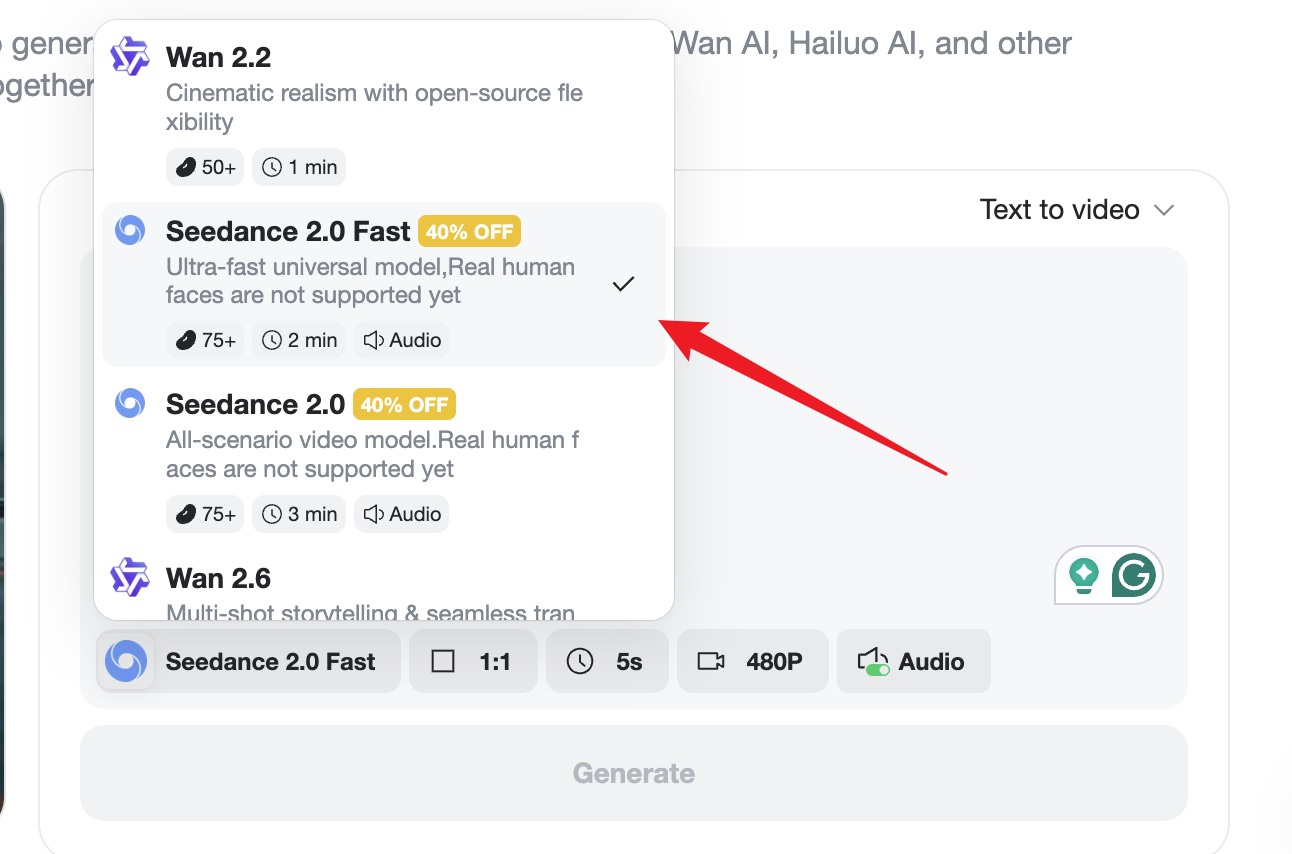
Step 1 — Enter Your Prompt
Start by navigating to the insMind video generator interface. Input your creative prompt, then choose the appropriate AI engine like Seedance 2.0 or Veo 3.1. Customize your video settings by selecting the aspect ratio and resolution that suits your project's needs.
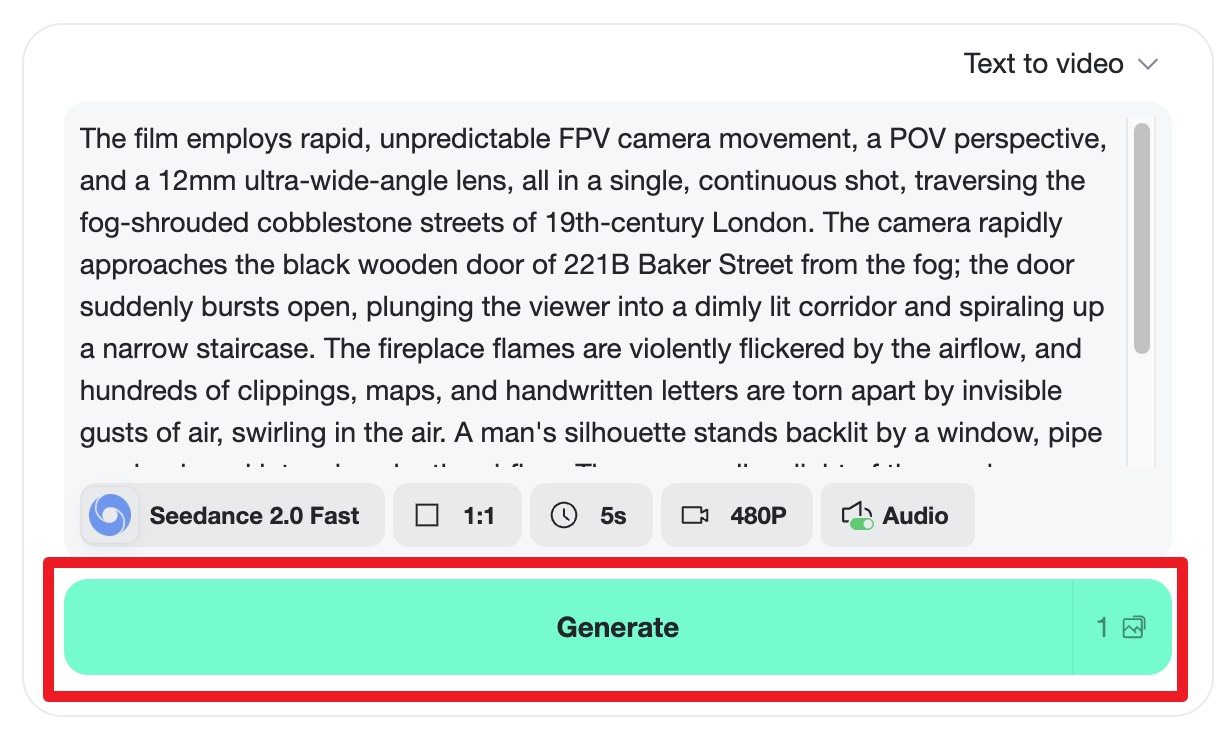
Step 2 — Generate the Video
After setting your preferences, click "Generate" to begin the AI rendering. The system will transform your text into a dynamic video, complete with precise animations and seamless transitions.
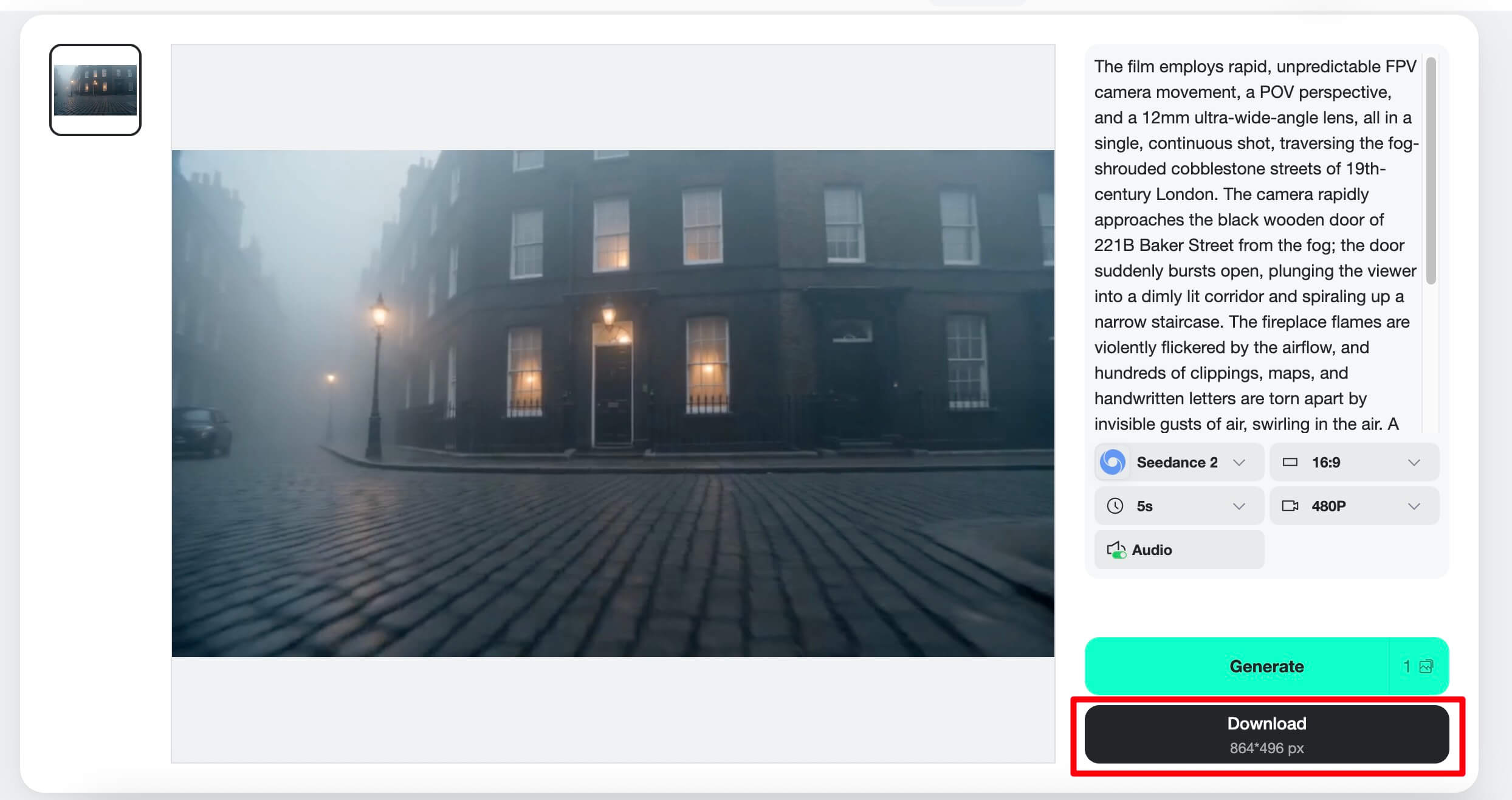
Step 3 — Preview & Download the Video
Once the process is complete, preview the video to ensure it meets your expectations. If satisfied, download the high-resolution file for use in your projects.
In addition to video generation, insMind offers features like making birthday videos and enhancing video quality using AI, providing a comprehensive suite of tools for various creative needs.
Comparing Tools for Detecting AI-Generated Videos
Several tools are available for detecting AI-generated videos, each with its strengths and weaknesses.
Top Tools for AI Video Detection
When selecting a tool, consider the following options:
| Tool Name | Strengths | Weaknesses | Pricing |
|---|---|---|---|
| Deepware Scanner | Effective at identifying synthetic media examples | Limited to specific formats | Free and paid versions |
| Sensity | Comprehensive detection features | Complex interface for beginners | Subscription-based |
Overall, choose a tool that aligns with your specific needs, considering factors such as ease of use, cost, and the level of detection required.
Choosing the Right Tool for Your Needs
When selecting a detection tool, consider the types of videos you'll be analyzing and the platforms you use. Some tools are better suited for specific formats or offer detailed technical analysis, while others provide user-friendly interfaces for quick detection. Recommendations vary based on user scenarios, such as professional forensic analysis versus casual content verification.
Ethical Considerations of AI-Generated Videos
AI-generated videos raise significant ethical questions, particularly concerning misinformation and privacy.
Misinformation and Synthetic Media Examples
AI-generated videos can easily spread misinformation, especially when used to create synthetic media examples. These videos can manipulate public perception and pose threats to society by distorting reality. To combat misinformation, it's essential to develop robust detection methods and promote digital literacy.
Privacy and Consent Issues
AI-generated content often raises privacy concerns, particularly when individuals are depicted without consent. The legal implications of using such content can be complex, highlighting the need for ethical guidelines and best practices in AI video creation. Respecting privacy and obtaining proper consent are crucial to avoid potential legal issues.
Hands-On Test: Identifying AI Videos with insMind
Using insMind, you can practically assess AI-generated videos to enhance your content verification skills.
Setting Up Your Analysis
Before starting your analysis, ensure your environment is prepared for video evaluation. Choose the right settings in insMind to match your analysis requirements, such as resolution and model selection. Begin with a clear objective regarding the video elements you wish to verify.
Analyzing Video Outputs
During analysis, focus on key indicators of AI-generated content, such as unusual smoothness or audio anomalies. Use insMind's analysis results to interpret these features, identifying common patterns in AI video outputs. This hands-on approach helps build your ability to discern AI-generated content more effectively.
What Other Articles Miss
Many articles on AI video detection fail to offer a practical, hands-on approach using tools like insMind, which provides a unique advantage for readers seeking actionable insights.
What competitors leave out
Unlike competitors, this guide includes a hands-on test using insMind for AI video detection, providing readers with tangible steps to identify AI-generated content. This practical approach is crucial for readers who want direct application of the concepts discussed.
Concrete details + numbers
Real-world data and observations from using insMind offer specific examples that readers can act on. For instance, when testing a sample video, insMind detected AI signatures in less than a minute, demonstrating its efficiency and accuracy. Such actionable insights are invaluable for content creators and editors.
Cost and Time Comparisons of AI Video Detection Tools
Understanding the cost and time implications of various AI video detection tools is crucial for choosing the right solution for your needs.
Cost Analysis
AI video detection tools vary significantly in price. Free tools like Deepware Scanner offer basic features, while premium options like Sensity provide comprehensive analysis at a subscription cost. Consider your budget and the level of detail required when selecting a tool.
Time Efficiency
Time is a critical factor in video analysis. Tools like insMind offer rapid detection, often completing analyses in under a minute. In contrast, more detailed forensic tools may require longer processing times, which could impact workflow efficiency.
Real-World Failure Modes of AI Video Detection
Despite advancements, AI video detection tools are not infallible and can encounter failure modes in real-world applications.
Common Challenges
AI video detection tools may struggle with high-quality synthetic media examples that closely mimic real footage. Additionally, variations in video formats and encoding can affect detection accuracy, leading to false negatives or positives.
Improving Detection Accuracy
To enhance accuracy, combine multiple detection methods and regularly update tools with the latest AI advancements. Continuous learning and adaptation are key to overcoming the limitations of current detection technologies.
FAQs about Identifying AI-Generated Videos
How can I tell if a video is AI-generated for free?
You can use free tools like Deepware Scanner to detect AI-generated videos. However, these tools may have limitations compared to paid versions, such as fewer detection features or lower accuracy rates.
What are the most reliable indicators of AI-generated videos?
Reliable indicators include visual cues like overly smooth transitions and audio inconsistencies such as robotic voices. Technical signs, like unusual metadata or compression artifacts, also suggest AI involvement.
Can AI-generated videos be detected on all platforms?
Detection varies by platform due to different video processing and storage methods. Tools like insMind help detect AI content across platforms, but challenges remain due to variable encoding and platform-specific features.
Is it possible to verify video authenticity online?
Online verification is possible using tools like insMind, which analyze video characteristics. However, these methods can face challenges with accuracy, particularly with well-crafted AI videos.
How does insMind help in identifying AI-generated videos?
insMind offers features that analyze video attributes to identify AI elements, providing users with accurate detection capabilities. Its integration of various AI models ensures comprehensive analysis and effective detection.
Conclusion
Understanding how to identify AI-generated videos is critical in today's digital landscape, and using tools like insMind enhances this capability significantly. By following the detailed steps and insights provided in this guide, content creators can ensure the authenticity of their media. To further explore these capabilities, try insMind's AI video generator tool to start your own analysis journey today.

Ryan Barnett
I’m a tech enthusiast and writer who loves exploring AI, digital tools, and the latest tech trends. I break down complex topics to make them simple and useful for everyone.


