


Want better AI videos without spending half an hour rewriting one sentence? These 30 Grok Imagine video prompts give you practical starting points for cinematic scenes, product ads, social clips, fantasy stories, and playful animal videos. You can copy a prompt as written, replace the subject, or use its structure to build an original idea.
The best results come from clear direction, not from piling up random adjectives. A useful prompt tells the model what the subject does, how the camera moves, what the scene looks and feels like, and what viewers should hear. You can try the examples below with the Grok Imagine video generator, then adapt the subject, motion, camera, and sound for your own project.
Table of Contents
- 01 What Makes a Good Grok Imagine Video Prompt?
- 02 10 Cinematic Grok Imagine Video Prompts
- 03 10 Product and Social Media Grok Imagine Prompts
- 04 10 Fun, Fantasy, and Animal Grok Imagine Prompts
- 05 How to Create Videos with Grok Imagine on insMind
- 06 Tips for Getting Better Grok Imagine Results
- 07 Common Prompt Mistakes to Avoid
- 08 Frequently Asked Questions
- 09 Try Your Next Grok Imagine Prompt
What Makes a Good Grok Imagine Video Prompt?
A strong video prompt works like a compact creative brief. Start with the subject and one readable action. Add the setting, camera behavior, lighting, pace, visual style, and sound. If you begin with an image, tell the model what must remain consistent, such as the face, product shape, clothing, color, or composition.
Use this reusable formula:
Subject + action + setting + camera movement + lighting and style + sound + preservation notes + unwanted-result controls
For example, “Animate this cat” is vague. A better instruction is: “Animate the orange aviator cat piloting the red airplane through bright clouds, natural scarf and fur movement, smooth side-tracking camera, playful engine sounds and upbeat orchestral music, preserve the goggles, cockpit, and aircraft design.”
If you want to experiment beyond one model, an AI video generator can also help you compare creative directions. The important part is keeping each instruction visible and specific instead of asking for several unrelated scenes at once.
10 Cinematic Grok Imagine Video Prompts
These prompts focus on visual storytelling, controlled camera movement, atmosphere, and sound. Adjust the duration and framing to match your final channel.
1. Neon City Motorcycle Chase
A lone rider speeds through a rain-soaked neon city at midnight, water spraying from the tires, glowing signs reflecting across the street, smooth low-angle tracking camera, brief slow motion around a sharp corner, cinematic cyberpunk lighting, pulsing electronic music, realistic motion, no warped motorcycle parts or unreadable text.
2. Desert Explorer at Sunrise
A traveler in a weathered coat walks across enormous desert dunes at sunrise, wind lifting fine sand around their boots, wide establishing shot that slowly pushes closer, warm golden light, epic adventure-film color grade, distant wind and soft orchestral music, preserve the traveler's outfit and natural body proportions.
3. Astronaut Finds a Hidden Forest
An astronaut steps through a rocky cave and discovers a glowing forest on an alien planet, floating spores drift through the air, slow over-the-shoulder camera reveal, blue and emerald lighting, cinematic science-fiction realism, quiet breathing inside the helmet and mysterious ambient sound, no sudden cuts or distorted hands.
4. Vintage Train Through Snow
A classic steam train travels through a snow-covered mountain valley, smoke rolling naturally above the cars, aerial camera sweeping from the front to a wide side view, soft winter sunlight, detailed period-film look, rhythmic wheels and distant whistle, preserve the train structure and continuous track direction.
5. Detective Enters a Jazz Club
A 1940s detective opens the door to a smoky underground jazz club, musicians and guests turn subtly toward the entrance, slow dolly-in from behind, moody amber lighting and deep shadows, film-noir texture, muted trumpet and room ambience, realistic faces, no flickering furniture.
6. Castle Above the Clouds
A vast stone castle rises above a moving sea of clouds as morning light reaches its towers, camera begins close to a carved balcony and pulls back into a grand aerial reveal, majestic fantasy realism, birds crossing the distance, wind and restrained orchestral score, stable architecture, no melting walls.
7. Samurai in a Bamboo Storm
A samurai stands calmly in a bamboo forest during a heavy storm, robe and leaves moving in strong wind, circular camera move that ends in a close-up, dramatic green-gray lighting, cinematic historical style, rain, thunder, and a low drum pulse, preserve the sword and costume details.
8. Underwater Temple Discovery
A diver swims toward an ancient underwater temple covered in coral, schools of fish separate as the diver approaches, smooth forward camera movement, sun rays passing through clear blue water, realistic underwater physics, muffled bubbles and deep ambient sound, no duplicated limbs or floating equipment.
9. Space Station Window Reveal
A scientist walks toward a giant space-station window as Earth slowly appears beyond it, camera follows from the side and gently rotates toward the view, clean realistic lighting, quiet mechanical ambience and emotional piano, preserve the station geometry, no abrupt scene changes.
10. Rooftop Dance at Golden Hour
Two dancers perform a synchronized routine on a city rooftop at golden hour, fabric and hair move naturally in the breeze, smooth crane shot descending into a medium tracking shot, warm cinematic light, energetic percussion synchronized with their movement, natural anatomy and consistent clothing.
10 Product and Social Media Grok Imagine Prompts
For commercial clips, describe the product's movement and the camera separately. Product identity matters more than visual chaos, so specify which shape, label placement, color, and material must remain unchanged.
11. Luxury Perfume Reveal
Animate the perfume bottle on black polished stone as a narrow beam of light moves across the glass, subtle mist curls around the base, slow camera push-in with a gentle orbit, premium studio lighting, elegant cinematic style, soft glass chime and ambient music, preserve the bottle shape, cap, color, and label placement.
12. Skincare Water Splash Ad
A skincare bottle stands on a pale stone platform while clear water rises into a graceful splash behind it, slow rotation of the bottle, macro camera details, bright clean beauty lighting, refreshing commercial style, soft water and airy music, preserve packaging colors and proportions, no extra products or distorted text.
13. Sneaker Street Launch
The uploaded sneaker lands gently on a wet urban street as colored lights sweep across its surface, camera circles from heel to toe, energetic commercial pacing, crisp reflections, bass hit and subtle city ambience, preserve the sole, laces, logo position, and material texture, no duplicated shoes.
14. Coffee Morning Reel
A ceramic coffee cup sits beside a sunny window while steam forms a soft spiral, a hand turns the cup slightly and morning light shifts across the table, close-up handheld camera with natural movement, cozy lifestyle look, birds outside and quiet café music, no deformed fingers or changing cup design.
15. Jewelry Sparkle Close-Up
A gold necklace rests on dark velvet as the pendant slowly turns toward the light, macro camera glides across the chain and settles on the gemstone, luxurious high-contrast lighting, refined ad style, delicate metallic chime, preserve every stone and chain link, no morphing jewelry.
16. Smartphone Feature Teaser
A smartphone floats above a clean gradient background and rotates once as light reveals the camera lenses and thin edges, smooth centered camera, minimal premium technology-ad style, subtle electronic sound design, preserve all hardware proportions and colors, no invented interface text or extra buttons.
17. Food Delivery Social Ad
A colorful meal box opens on a kitchen counter and fresh ingredients appear in a fast but smooth sequence, overhead camera transitions into a close-up, bright appetizing light, upbeat social-ad pacing, crisp packaging sounds and cheerful music, preserve the food appearance, no floating utensils or unreadable labels.
18. Fashion Outfit Walk
Animate the model taking three confident steps through a clean studio, fabric moves naturally and the outfit remains unchanged, vertical full-body tracking shot, soft fashion lighting, polished editorial style, subtle runway beat, preserve face, garment construction, colors, and accessories, natural hands and feet.
19. Travel Bag Packing Clip
An open travel bag sits on a bright bed as neatly arranged essentials move into place one by one, overhead camera with smooth stop-motion-inspired pacing, clean lifestyle colors, light zipper and fabric sounds, preserve each item's design, no duplicates or objects passing through one another.
20. Book Launch Teaser
The featured book stands on a wooden desk while pages turn gently and warm light reveals the cover, slow side-to-front camera move, thoughtful cinematic mood, quiet page sounds and soft piano, preserve the cover artwork and book dimensions, no altered title or extra lettering.
10 Fun, Fantasy, and Animal Grok Imagine Prompts
Playful ideas still need boundaries. Keep the main joke or transformation simple, then use camera and sound to make it memorable. When you start from a photo, you can turn image into video while asking the model to preserve the subject's recognizable features.
21. Aviator Cat Adventure
Animate the orange aviator cat piloting the red airplane for 10 seconds through bright clouds, scarf and fur moving naturally in the wind as it looks toward the horizon and adjusts the controls, smooth side-tracking camera, playful engine sounds, rushing air, and upbeat orchestral music, preserve the cat, goggles, cockpit, and aircraft design.
22. Corgi Runs a Bakery
A cheerful corgi wearing a tiny baker hat kneads dough in a cozy bakery, flour puffs into the air with each paw movement, medium camera push-in followed by a close-up of the finished bread, warm storybook lighting, playful kitchen sounds, preserve the dog's coat pattern and natural anatomy.
23. Frog Conducts an Orchestra
A small green frog in a formal suit conducts a grand orchestra beside a pond, dramatic arm movements synchronized with the musicians, camera moves from the orchestra to a heroic close-up, whimsical cinematic style, lively classical music and evening insects, no extra limbs or changing costume.
24. Dragon Makes Tea
A friendly red dragon carefully prepares tea in a tiny cottage, uses a controlled puff of fire to warm the kettle, slow cozy camera pan, warm fantasy lighting, crackling fire and gentle acoustic music, preserve the dragon's face and scale pattern, no destructive flames or warped objects.
25. Penguin Disco Party
A group of penguins performs a synchronized disco routine on an icy stage, colorful lights reflecting across the snow, energetic wide shot with quick but smooth push-ins, joyful retro style, upbeat disco music and flipper claps, consistent penguin count and natural movement.
26. Raccoon Night Market Chef
A raccoon chef rapidly prepares noodles at a glowing night-market stall, steam rises around hanging lanterns, handheld documentary camera with food close-ups, vibrant cinematic realism, sizzling pan and busy market ambience, preserve the raccoon's markings and cooking tools, no extra paws.
27. Tiny Robot Grows a Garden
A palm-sized robot plants one glowing seed in a barren room and a miniature garden grows around it, camera slowly circles as leaves unfold, hopeful science-fiction style, soft green light, delicate mechanical sounds and uplifting music, stable robot design, no abrupt cuts.
28. Wizard's Failed Spell
An elderly wizard confidently casts a spell in a library, but every book sprouts tiny wings and flies around the room, camera follows one book before returning to the wizard's surprised face, playful fantasy lighting, fluttering pages and comic orchestral music, natural hands, stable room layout.
29. Hamster Space Mission
A brave hamster in a miniature spacesuit pilots a tiny spacecraft through an asteroid field, cockpit controls glow as the hamster steers, dynamic over-the-shoulder camera and exterior cutaway, colorful animated realism, radio beeps and adventurous music, preserve suit and character details.
30. Knight Orders Fast Food
A medieval knight rides up to a modern drive-through window and carefully orders a meal without removing the helmet, smooth side-tracking camera, realistic evening lighting with comic timing, horse sounds and awkward intercom audio, preserve armor and horse anatomy, no brand logos or unreadable text.
How to Create Videos with Grok Imagine on insMind
insMind gives you one place to turn a written concept or an existing image into a generated clip. Follow these four steps, then refine one variable at a time if the first result is not quite right.
Step 1: Add a Prompt or Image
Start with text when you want to build a completely new scene. Upload a clear image when you want to animate an existing subject, product, character, or composition. Choose a source with a readable subject and enough space for the intended movement.
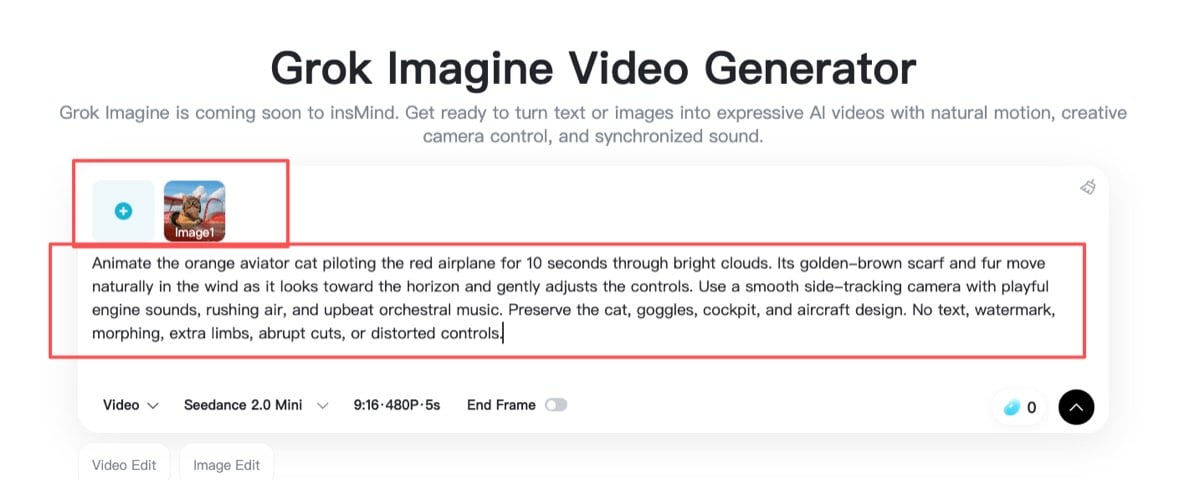
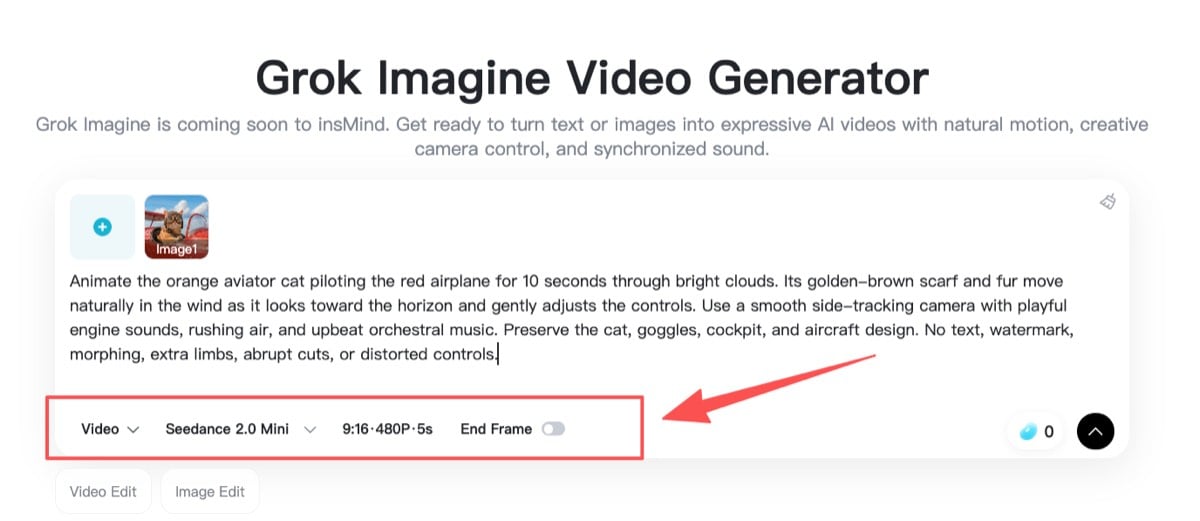
Step 2: Configure the Video and Describe the Motion
Choose the available model, duration, aspect ratio, resolution, and other output settings. In the prompt, describe the main action, camera movement, mood, visual style, and desired sound. If you upload an image, identify the elements that should remain consistent.
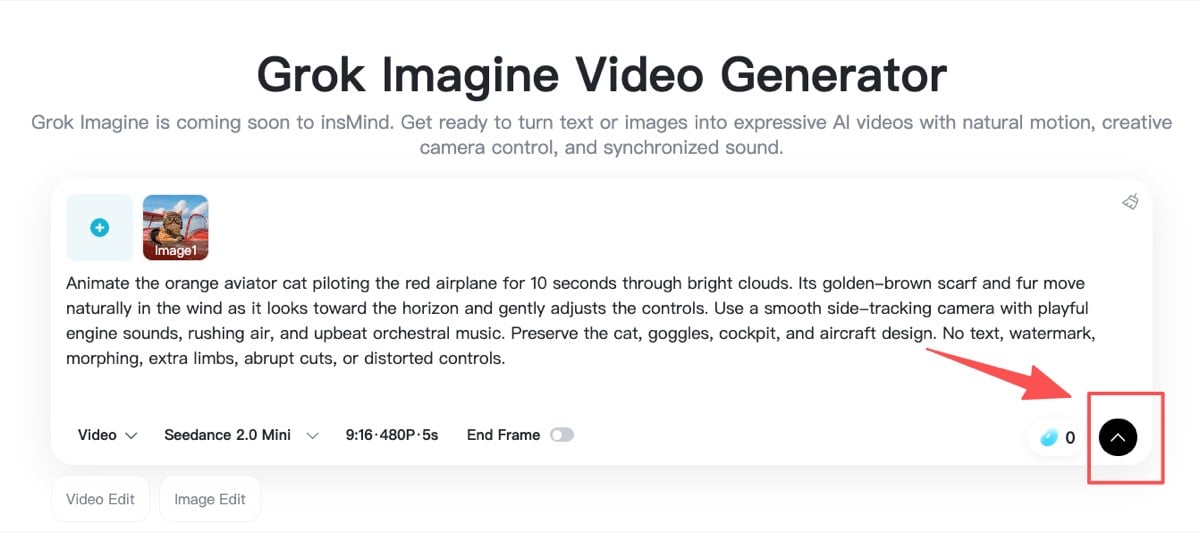
Step 3: Generate Your AI Video
Review your prompt for conflicting directions, then click generate. Grok Imagine will interpret the subject, action, camera, atmosphere, music, ambience, or scene-specific effects as one coordinated clip. A focused prompt usually gives the model a clearer path than several competing actions.
Step 4: Preview and Download
Watch the complete clip before downloading it. Check subject consistency, motion, framing, sound, and unwanted artifacts. If something is off, change the relevant instruction instead of rewriting everything. Generate again, compare the versions, and download the one that best fits your post, campaign, concept, or creative project.
Tips for Getting Better Grok Imagine Results
First, give the subject one primary action. “Walks toward the camera and waves” is easier to stage than a long chain of unrelated events. For multi-shot storytelling, create separate clips and edit them together later.
Second, use camera terms with a clear purpose. A push-in builds attention, a tracking shot follows motion, an orbit reveals form, and a wide establishing shot introduces a setting. Avoid combining every camera move in one short clip.
Third, be explicit about consistency. For image-based generation, mention the face, product, outfit, colors, logo placement, and composition you want preserved. This is especially useful when using a text to video AI workflow alongside reference images and brand assets.
Finally, describe sound as part of the scene. Name the ambience, music style, voice, or effects you want, and explain when an important sound should happen. If the scene is purely visual, ask for restrained ambience rather than unrelated music.
Common Prompt Mistakes to Avoid
Do not rely on broad requests such as “make it cinematic” without describing the camera, light, and action. Avoid contradictory directions like “locked camera” and “fast orbit” in the same shot. Too many visual styles can also compete with one another.
Be careful with readable text. Generative video may struggle to keep long labels or signs stable, so preserve existing packaging where possible and avoid requesting new paragraphs of on-screen copy. For products, describe what must not change. For people and animals, add simple controls such as natural anatomy, consistent clothing, and no duplicated limbs.
Most importantly, refine strategically. If the movement is wrong, change the action sentence. If the framing is wrong, change the camera instruction. Small targeted edits make it easier to learn which wording improves the result.
Frequently Asked Questions
What is the best structure for a Grok Imagine video prompt?
Use a subject, action, setting, camera direction, lighting or visual style, and sound. When starting from an image, add preservation notes and a short list of unwanted outcomes.
Can I copy these Grok Imagine prompts exactly?
Yes. You can paste them as starting points, but replacing the subject, setting, duration, and style will make the results more relevant to your project. Keep only the controls that fit your scene.
How long should a Grok Imagine prompt be?
There is no single perfect length. One focused paragraph is usually enough to define a short clip. Clarity and compatible instructions matter more than adding extra words.
Can Grok Imagine create videos from images?
The insMind workflow lets you begin with text or upload a clear image when you want to animate an existing composition. Describe the intended movement and identify which visual details should remain consistent.
Why does my AI video look different from the prompt?
The prompt may be vague, overloaded, or internally inconsistent. Simplify the action, choose one camera move, preserve important details explicitly, and refine only the instruction connected to the problem.
Try Your Next Grok Imagine Prompt
A useful prompt does more than describe a beautiful picture. It gives the scene a subject, movement, camera, mood, and sound that work together. Pick one of the 30 examples above, personalize the details, and use the first result to guide a focused revision. Ready to see your idea move?

Sid Buckley
I'm a professional writer and amateur photographer, and I author insightful articles at insMind to help you integrate AI into compelling image creation.
Keep reading

How to Use Seedance 2.5 for AI Videos
Learn how to use Seedance 2.5 for text-to-video and image-to-video, write stronger prompts, guide motion with references, and review results.

How to Make a Creepy Voice for Horror Content Step by Step
Learn how to make a creepy voice for horror videos, podcasts, and games with insMind.

How to Remove TikTok Watermark: 4 Easy Steps for Clean Videos
Learn how to remove TikTok watermark from videos in four practical steps with insMind.

Top 10 Seedance 2.5 Alternatives for AI Video in 2026
Compare top Seedance 2.5 alternatives and learn how to create AI videos with insMind.

Seedance 2.5 vs. MiniMax H3: Which AI Video Model Should You Use?
Compare Seedance 2.5 and MiniMax H3 for AI video creation.

30 Instagram Reels Prompts You Can Copy and Try
Copy-ready Instagram Reels prompts for products, fashion, creators, travel, food, pets, and lifestyle videos.

How to Write Instagram Reels Prompts for AI Videos
Learn to write Instagram Reels prompts for polished AI videos, product clips, creator posts, and lifestyle content.

30 TikTok Video Prompts You Can Copy and Try
Copy-ready TikTok video prompts for ads, creators, products, fashion, pets, travel, and more.

How to Create an AI Micro-drama: A Step-by-Step Guide
Learn how to create an AI micro-drama with insMind.

How to Create a Short Film Using AI in 2026
Learn how to create a short film using AI with insMind.

Instagram Reel Ads: Examples, Specs, Sizes, and Best Practices
Learn Instagram Reel ad specs, examples, safe zones, and best practices.

YouTube Ads Best Practices: How to Create Video Ads
Learn YouTube ads best practices and create video ads with insMind.

YouTube Channel Trailer Examples: 15 Inspiring Ideas for Your Channel
Explore YouTube channel trailer examples and create a polished trailer with insMind.

15 Best YouTube Ad Examples and Templates to Inspire Your Next Campaign
Explore YouTube ad examples and templates, then create video ads with insMind.

How to Make a Hype Video with AI: The Easy Guide
Learn how to make a hype video with AI using insMind.

Instagram Ad Templates for Feed, Stories, Reels, and Carousel Ads
Learn Instagram ad templates for Feed, Stories, Reels, and Carousel Ads.

Facebook Video Ad Specs: Sizes, Formats, and Lengths for 2026
Learn Facebook video ad specs, sizes, formats, and lengths for 2026, then make ad-ready videos with insMind fast.

How to Create Facebook Video Templates for Posts, Ads, Covers, and Live Video
Learn how to use Facebook video templates for posts, ads, covers, and live video with insMind.

Instagram Ad Examples: 15 Creative Ideas That Convert
Explore 15 Instagram ad examples and learn how to make them with insMind.

Instagram Ad Sizes and Specs: Complete 2026 Guide
Find Instagram ad sizes, specs, ratios, and dimensions for every major placement.

10+ Video Resume Examples with Scripts for Every Career Stage
Explore video resume examples and scripts, then create a polished video resume with insMind.

How to Make a Sports Hype Video with AI: A 4-Step Guide
Learn how to make a sports hype video with AI.

YouTube Ad Specs for 2026: Sizes, Formats, and Lengths
YouTube ad specs for sizes, formats, dimensions, and lengths, plus a four-step insMind workflow.

30 Best Grok Imagine Video Prompts You Can Copy and Try
Copy 30 Grok Imagine video prompts and learn how to write better prompts for creative AI videos.

50 Scroll-Stopping AI Brainrot Prompts for Viral Meme Videos
Copy 50 scroll-stopping AI brainrot prompts for chaotic meme videos.

How to Turn Any Photo into a Brainrot Meme Video
Learn how to turn any photo into a brainrot meme video with AI.

How to Make a Retirement Video with AI
Learn how to make a retirement video with AI.

How to Make Your Own Graduation Video from Photos with AI
Learn how to make a graduation video from photos with AI.

How to Make Your Own Outro Video
Learn how to make your own outro video with insMind.

Higgsfield vs Pollo AI: Which Video Platform Fits You?
Compare Higgsfield vs Pollo AI for cinematic control, model choice, ease of use, and pricing.

Pollo AI Review 2026: Features, Pros, Cons, and Verdict
Read our Pollo AI review for 2026 and explore its features, pricing, strengths, limitations, ideal users, and practical tips for better results.

How to Create Cute Baby Talking Videos from Photos
Learn how to create baby talking videos from photos with text, audio, and AI lip sync.

How to Make Your Own Talking Avatar with AI
Learn how to make your own talking avatar with AI from a portrait and script.

Seedance 2.0 Mini vs Seedance 2.0: Which Model Should You Use?
Compare Seedance 2.0 Mini and Seedance 2.0 for AI video creation.

How to Create Talking Animal Videos from Photos That Steal the Show
Learn how to create talking animal videos from photos with AI.

How to Turn a Character Image into a Consistent AI Video
Learn how to turn a character image into a consistent AI video with insMind.

10 Krea AI Alternatives for Creating and Editing AI Videos in 2026
Compare the best Krea AI alternatives for creating and editing AI videos, including insMind, Runway, Kling AI, Luma, Pika, VEED, and more.

Seedance 2.0 Mini Prompts to Copy: 20 Video Ideas
Copy Seedance 2.0 Mini prompts for cinematic AI videos with insMind.

Seedance 2.0 vs Seedance 2.5: What Changed?
Compare Seedance 2.0 and Seedance 2.5 with examples, prompts, and insMind workflow.

10 Best Pollo AI Alternatives for AI Video Creation in 2026
Compare the best Pollo AI alternatives for AI video creation, including insMind, Runway, Kling AI, Luma, Pika, VEED, and more.

How to Make an AI Video of Yourself That Actually Feels Like You
Create a realistic AI video of yourself from a photo and script.

How to Turn Old Photos into a Beautiful Tribute Video with AI
Turn old photos and memories into beautiful AI tribute videos.

How to Make a Daily Vlog with AI in Minutes
Create daily AI vlogs from photos, prompts, or ideas in minutes.

How to Create 2026 FIFA World Cup Highlights with AI
Create 2026 FIFA World Cup highlights, fan clips, and football videos with AI.

Best AI Video Extender for Creators: Top Tools Compared
Compare the best AI video extender tools for creators in 2026 and learn how to make short videos longer with insMind.

How to Edit YouTube Videos Faster with AI
Edit YouTube videos faster with AI background and style tools.

How to Create Training Videos with AI: A Complete Guide for Beginners
Create clear training videos from images and prompts with AI.

Create Product Reveal Videos with an AI Unboxing Video Maker
Learn how to create AI unboxing videos for product reveals, UGC, teasers, and ecommerce demos.

Create Smooth AI Video Transitions with Kling Start/End Frame
Learn how to create smooth AI video transitions with Kling Start/End Frame.

What Can You Choose for the Best InVideo Alternatives in 2026?
Compare the best InVideo alternatives and see why insMind is a strong AI video generator for creators and marketers.

10 Best Animaker Alternatives in 2026: New Trends in AI Video Creation
Compare the best Animaker alternatives for AI video creation, including free and open-source picks.

10 Best HeyGen Alternatives in 2026: Create AI Videos with More Freedom
Compare the best HeyGen alternatives for AI video creation, including free and open-source picks.

How to Make a Faceless YouTube Channel with AI
Make a faceless YouTube channel with AI tools, scripts, video ideas, and insMind.

Best CapCut Alternatives: 8 AI Video Editors Compared
Compare the best CapCut alternatives for iPhone, Android, PC, and AI video editing.

How Ecommerce Brands Replace Products in Videos with AI
Replace products in ecommerce videos with AI for ads, listings, and creative testing.

How to Change Video Background Without Green Screen: Step-by-Step Guide
Learn how to change video backgrounds without a green screen using simple AI editing steps.

How to Seamlessly Replace Objects in Videos with AI
Step-by-step guide on replace objects in videos with AI: how it works, best practices, and how to do it free with insMind.

How to Identify AI-Generated Videos: A Comprehensive Guide
Learn how to identify AI-generated videos using expert tips and insMind's tools for authenticity verification.

Can AI Really Edit Videos For You? A Deep Dive Into AI Video Editing
Discover how AI can edit videos effectively, using insMind and other top tools. Learn workflows, compare features, and explore future trends.

Crafting Viral Bigfoot AI Videos: A Step-by-Step Guide
Create viral Bigfoot AI videos with insMind. Learn how to optimize for TikTok and YouTube, avoid common mistakes, and more.

Discover the Versatility of Happy Horse 1.0 for AI Video Creation
Happy Horse 1.0 review explores AI video generation, integration with insMind, and practical applications for content creators.

Seedance 2.0 vs. Happy Horse 1.0: Which AI Video Generator Fits Your Needs?
Discover the differences between Seedance 2.0 and Happy Horse 1.0. Learn which AI video generator suits your needs best.

How to Make Educational Videos for Kids with AI (4 Easy Steps)
Write a structured script, choose model and audio, generate, and download—a step-by-step guide to making AI educational videos for kids with prompt templates.

Best AI Prompts for Explainer Videos (Proven Templates)
Four proven AI prompt templates for explainer videos—presenter, product demo, faceless brand, and tutorial—plus how to use insMind in 3 steps.

Best AI Explainer Video Generator for Business (2026 Guide)
Choose text-to-video or image-to-video, configure model and audio, generate and download—a complete 2026 guide to AI explainer videos for business with insMind.

Best Prompts for Wan 2.7: Multi-Shot Guide for Cinematic AI Video
Choose text or image mode, write scene-block prompts for Wan 2.7, set duration and audio, then download—plus 40+ language narrative tips.

How to Create Kids Videos with AI: A Parent-Friendly Guide
Upload art or start from text, write kid-safe prompts, pick Google Veo 3.1, generate and download—steps for parents and teachers.

From Script to Screen: How to Create Engaging Story Videos with AI Tools
Learn how to create story videos with AI: split scripts into scenes, optional reference images, generate clips in insMind, then merge. No pro editor required to start.

How to Make a Baby Dance Video with AI: Step-by-Step Guide
Turn a baby photo into a cute AI dance clip. Upload, write a motion prompt, pick model and duration, generate—no editing skills needed.

How to Make a Cat Dance Video with AI: Step-by-Step Guide
Turn a cat photo into a funny dance clip with AI image to video. Upload, write a motion prompt, generate, and download—no editing skills.

Best AI Tool for Pet Dance Videos (2026 Compared)
Compare top AI pet dance video tools with real screenshots, pros and cons, and a tested insMind image-to-video workflow plus copy-ready prompt.

Top 20 AI Fruit Video Prompts to Copy & Paste
Discover top AI fruit video prompts for creating engaging, trendy videos. Perfect for TikTok and other platforms, these prompts inspire creative content.

Funny AI Video Prompts That Work (Tested Examples)
Get 20+ tested funny AI video prompts that actually make people laugh. Copy-paste prompts for TikTok, Reels, and YouTube Shorts with step-by-step instructions.

Affordable AI Video Solutions for E-commerce Startups
Discover affordable AI video solutions for e-commerce startups. Learn about budget-friendly tools and maximize ROI with AI-generated content.

Transforming Marketing with AI Video Ads
Discover how AI video ads are transforming online marketing with personalized, efficient, and creative solutions. Learn techniques and examples.

Mastering Cinematic Ad Creation with Seedance 2.0
Create cinematic ads with Seedance 2.0, a powerful AI tool for video advertisements. Learn how to make stunning video ads using Seedance 2.0.

Mastering Viral Video Creation with Seedance 2.0
Discover how to create viral videos using Seedance 2.0 with tips, prompts, and insights on social media trends.

Close-Up Shot: Definition, Story Uses & Tighter Framing
What is a close-up shot? Definition, when to use tight framing for emotion and detail, and tips for shooting cleaner inserts on any camera.

YouTube Equipment for Beginners: Gear, AI Video & Your First Upload (2026)
Beginner YouTube equipment: priority order for mic, light, and camera; clear audio on a budget; phone vs dedicated camera; Shorts and 16:9 basics.

How to Create Anime Videos with AI (Step-by-Step Guide)
Learn how to create anime videos with AI step by step. Use text-to-video and image-to-video to generate stunning anime animations with insMind.

How to Make Viral Funny Videos with AI in 5 Minutes
Learn how to make viral funny videos with AI in minutes. Step-by-step guide to creating hilarious TikTok and Instagram clips using insMind AI funny video generator.

How to Create Talking Old Photo Videos with AI
Learn how to animate old photos with AI. Turn vintage portraits into talking videos with realistic motion using insMind free photo animation tool.

7 Best Sora 2 Alternatives for AI Video Generation in 2026
Discover the best Sora 2 alternatives for AI video generation. Compare insMind, Runway, Kling AI, Pika, and more to find the right tool for your needs.

AI Prompts for TikTok Video Generator: Complete Guide
Discover the best AI prompts for TikTok video generation. 20+ ready-to-use prompts plus a step-by-step guide to creating viral TikTok content with AI.

How to Upscale Anime Video to 4K with AI (Step-by-Step)
Learn how to upscale anime video to 4K using AI. Step-by-step guide to enhancing low-res anime with sharper lines and cleaner colors.

AI Marketing Video Generator: Create Promo Videos from Text
Learn how to turn text into professional marketing videos using AI. Step-by-step guide to creating promo videos in minutes.

Text-to-Video AI Ranked: Which Generator Wins in 2026?
Compare the 7 best text-to-video AI generators in 2026 including insMind, Sora 2, Runway, Kling AI, Pika, and more.

Animate Anime Images with AI: Turn Static Art into Dynamic Anime Videos
Learn how to animate anime images with AI. Turn static anime art into stunning animated videos easily.

How to Remove Kling Watermark from AI Videos
Explore the best ways to remove Kling AI watermark. Compare editing methods and discover watermark-free Kling generation options.

AI Video Editor: Edit Videos Instantly with Prompts
Use insMind AI Video Editor and prompts to edit videos, remove objects, change backgrounds and more.

Control the Narrative: Create Cinematic AI Videos with Start & End Frames
From start to finish, take control of AI video storytelling with Start & End Frames.

How to Create a Stranger Things Transition Video (Step-by-Step Guide)
Create a Stranger Things–style Upside Down transition with AI in just a few steps using insMind.

Transform Your Ideas: Generate Videos from Text Instantly
Turn text into videos in seconds with InsMind's AI—ideal for social media, ads, and presentations. No editing skills required.

Tralalero Tralala: How to Animate the Italian Shark Meme with AI Flair
Animate the viral “Tralalero Tralala” Italian Shark meme with AI for fun, shareable content.

Top TikTok Memes 2025: 'Tung Tung Tung Sahur' & Viral Trends You Can't Miss
2025 TikTok trends: AI-generated Italian Brainrot memes and creepy Tung Tung Tung Sahur dominate viral humor.