


Creating viral content is often more art than science, but with the right tools and techniques, you can significantly increase your chances of success. Seedance 2.0, accessible via the insMind platform, offers incredible capabilities for crafting attention-grabbing videos that resonate across social media. In this article, I’ll guide you through the essentials of using Seedance 2.0 to make your videos pop.
Quick Verdict
Seedance 2.0 is a powerful tool for anyone looking to create polished, cinematic videos that have the potential to go viral. Its ability to maintain consistent character motion and precise control over video elements makes it stand out. While the platform is intuitive, mastering the art of viral content creation requires creativity and a keen eye on current trends.
| Pros | Cons |
| High-quality, stable videos | Learning curve for beginners |
| Easy integration with insMind | Requires trend awareness |
| Rich set of tools and models | Time-consuming to perfect prompts |
Table of Contents
Why Seedance 2.0 is Perfect for Viral Videos
Seedance 2.0 excels at creating videos with consistent motion and character stability, two crucial elements for engaging and professional-looking content. Its advanced AI capabilities provide cinematic precision, making it ideal for social media where first impressions matter. The model's ability to generate videos with smooth transitions and fluid motion captures audience attention and keeps them engaged.
What sets Seedance 2.0 apart is its reference-based control, which allows creators to recreate specific styles or trends with minimal effort. This feature is particularly useful when trying to replicate successful viral trends or themes. The model's ability to handle different aspect ratios and resolutions ensures that your videos are optimized for various platforms, be it Instagram, TikTok, or YouTube.
Moreover, Seedance 2.0's integration with the insMind platform means you can easily access a variety of tools and models, giving you the flexibility to experiment with different video styles and techniques. This versatility is essential when aiming to produce content that stands out in a crowded digital space. In my experience, using Seedance 2.0 has significantly streamlined my video production process, allowing me to focus more on creative aspects.
Tips for Creating Viral Content with Seedance 2.0
One of the best ways to create viral content is by staying updated on current social media trends. Spend time exploring platforms like TikTok and Instagram to identify what types of videos are gaining traction. Once you've identified a trend, use Seedance 2.0 to replicate similar styles or themes, adding your unique twist to make it your own.
Another tip is to focus on storytelling. People connect with stories, and Seedance 2.0 allows you to create videos with a strong narrative arc. Use its cinematic motion control to enhance emotional beats in your story, keeping viewers engaged from start to finish. Experiment with different camera angles and lighting effects to add depth and drama to your content.
Lastly, pay attention to your video's pacing. Viral videos often have a dynamic and engaging rhythm. Seedance 2.0 allows you to control video pacing by adjusting the speed of transitions and the duration of each scene. In my tests, fine-tuning these elements can make a significant difference in how viewers perceive and interact with your content.
How to Use Seedance 2.0 on insMind
Using Seedance 2.0 on the insMind platform is straightforward yet powerful, offering flexibility and control. Here's a step-by-step guide to get you started.
Step 1: Access the Interface
Start by heading to the Seedance 2.0 page on insMind. Depending on your project requirements, you can toggle between the "Text to Video" or "Image to Video" modes. This choice will set the stage for your creative vision.
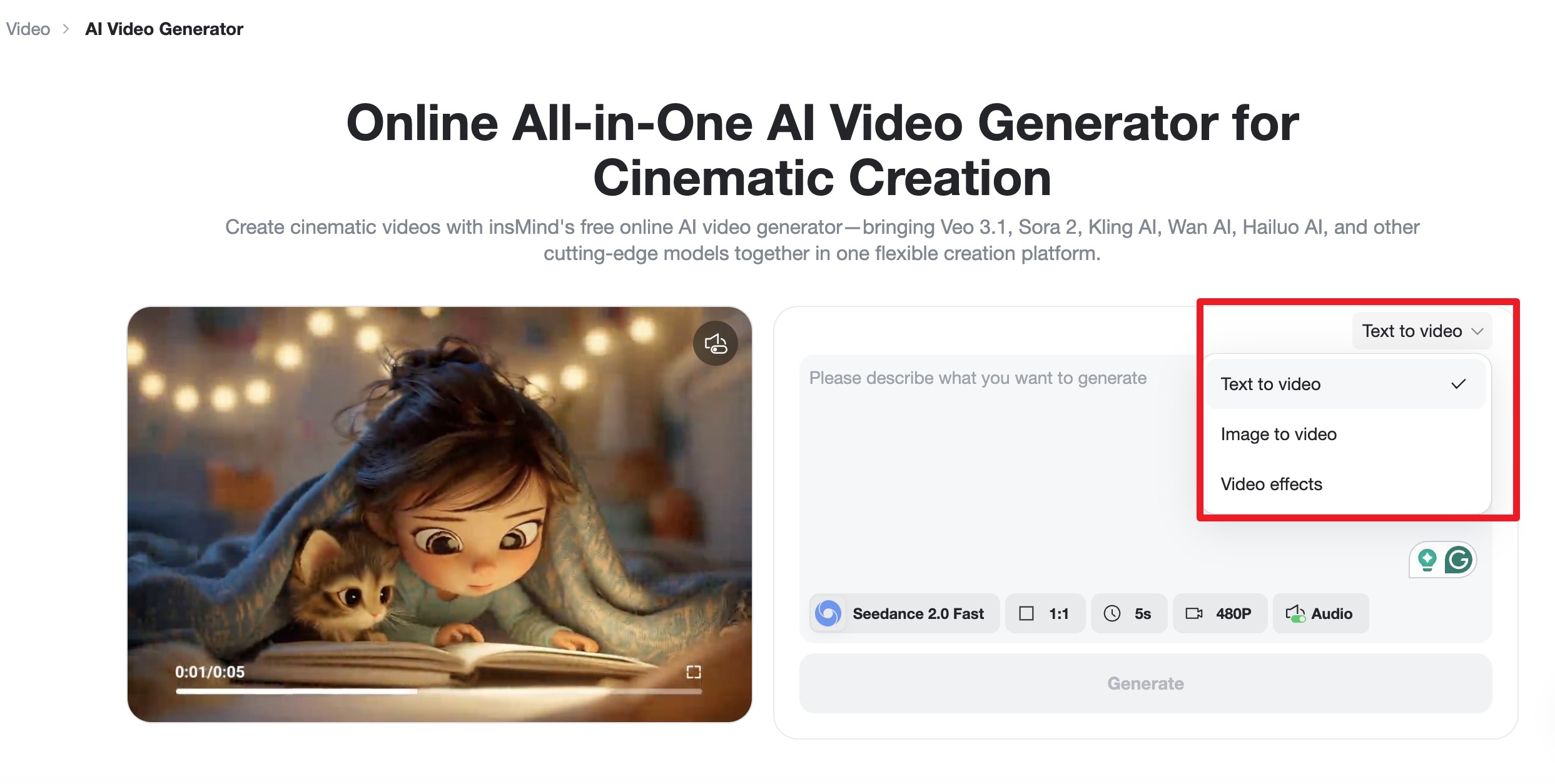
Step 2: Choose Your AI Model
In the model picker, select Seedance 2.0 or the Seedance 2.0 Fast. You can adjust the aspect ratio, resolution, and duration to match your chosen platform. This customization ensures your video looks perfect wherever it's shared.
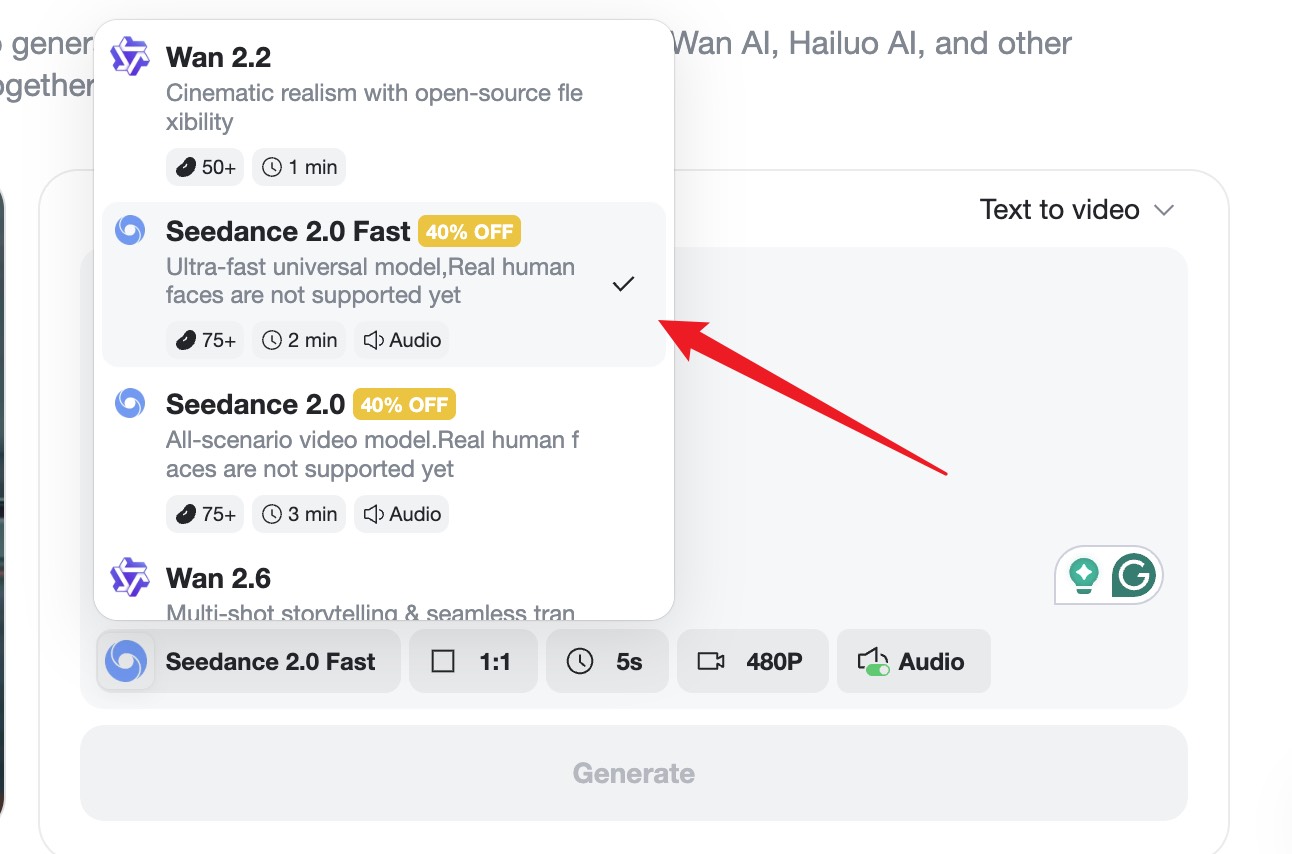
Step 3: Ignite the Generation
Enter your descriptive prompt or upload a reference image to guide the AI. Clicking "Generate" will process your input, delivering a customized video with fluid motion and clear visuals.
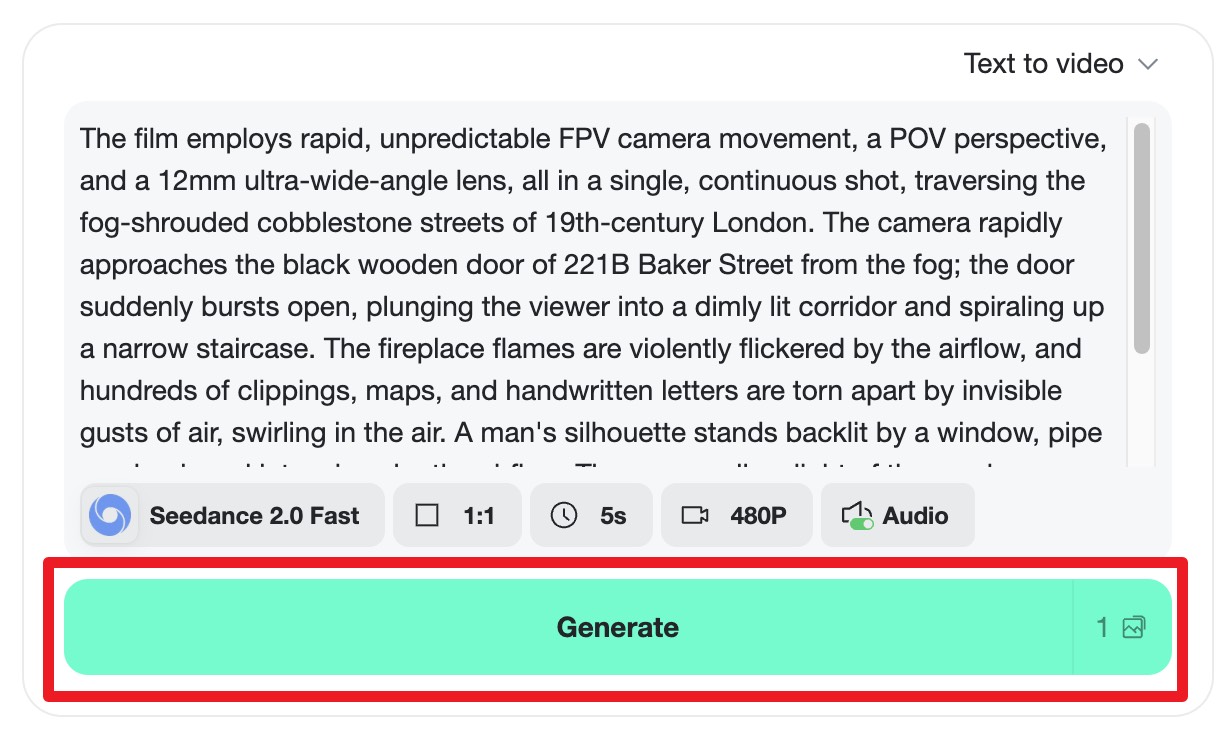
Step 4: Preview and Export
Preview the final result to ensure it meets your expectations. If satisfied, click "Download" to export your video in high resolution, ready for sharing and promotion.
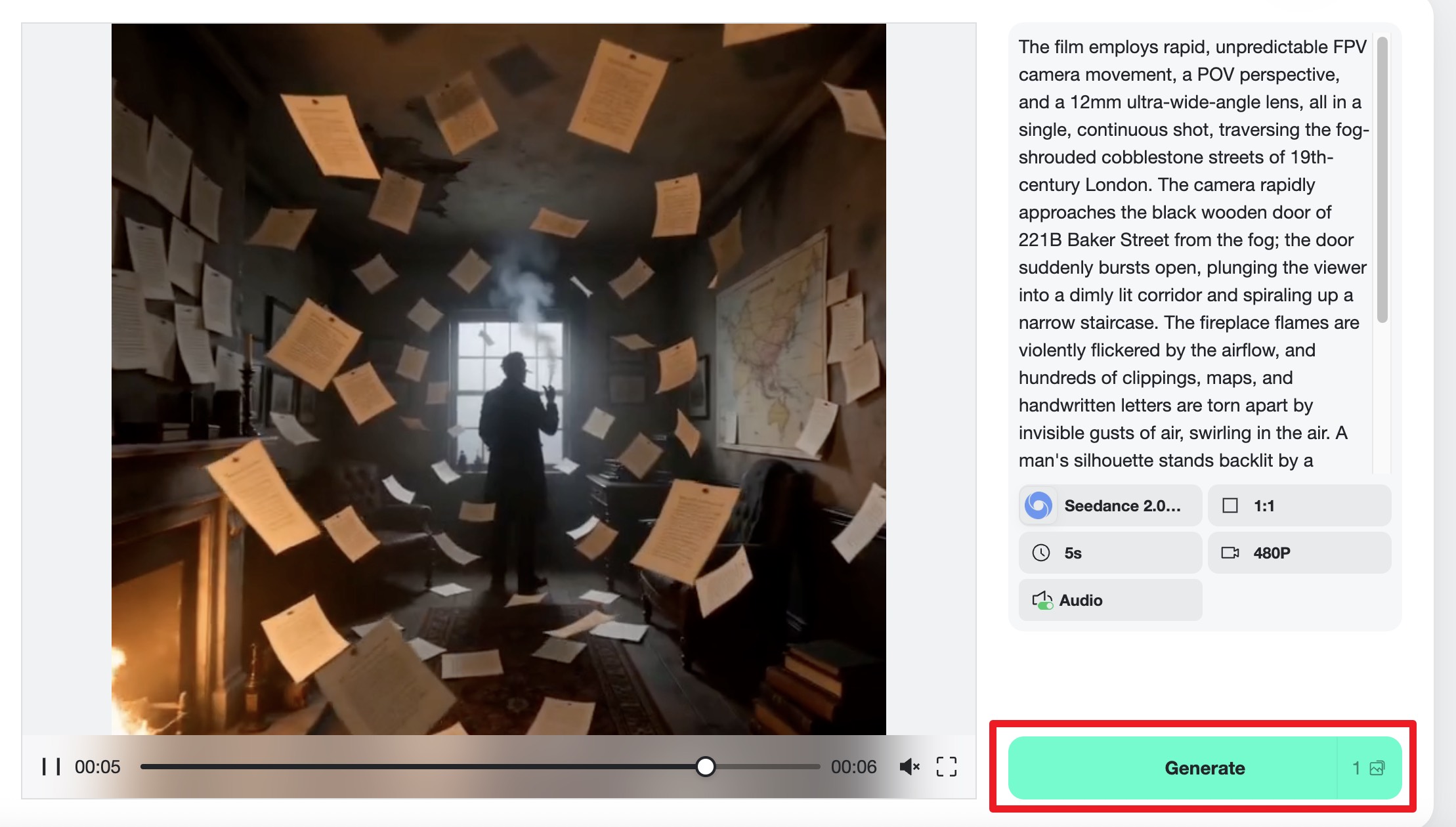
Beyond Seedance 2.0, you can also try Google Veo 3.1 for more creative flexibility, or use insMind's text-to-video tool to generate clips from scripts. These tools expand your creative toolkit, making it easier to find the perfect format for your project.
Viral Content Prompts with Seedance 2.0
Crafting the right prompt is crucial for generating viral content with Seedance 2.0. Here are some excellent prompts you can use directly to create engaging videos:
Aesthetic & Lifestyle
"Golden hour light streaming through sheer curtains into a minimalist bedroom, dust particles floating in the air, slow camera pan across linen bedding and a steaming cup of coffee on a wooden nightstand, warm tones, dreamy atmosphere."
"An urban rooftop garden at dusk, fairy lights twinkling, people mingling with drinks in hand, city skyline in the background, upbeat and lively mood."
Product Showcase
"A matte black skincare bottle rotating slowly on a reflective surface, water droplets cascading down the glass, soft studio lighting with teal accent glow, luxury product commercial feel, extreme close-up details."
"Sleek sports car speeding along a coastal highway at sunset, camera tracking from side as waves crash against rocks, vibrant colors and dynamic motion."
Cinematic Narrative
"A lone hiker at the peak of a mountain at sunrise, panoramic view of the valley below, camera slowly zooming out to capture the vastness, epic and inspiring soundtrack."
"A bustling city street in the rain, pedestrians with umbrellas, reflections of neon lights in puddles, slow-motion close-ups of raindrops hitting the ground."
Understanding Social Media Trends
To create truly viral content, it's essential to understand current social media trends. These trends can fluctuate rapidly, so keeping an eye on platforms like TikTok, Instagram, and YouTube is vital. Analyze popular hashtags, challenges, and memes to see what resonates with audiences.
Incorporating trending audio tracks and effects can also boost your video's visibility. Seedance 2.0 allows for seamless integration of audio and visual elements, helping your content align with current trends. Experiment with different combinations to see what draws the most engagement.
Finally, consider the timing of your posts. Viral content often benefits from being posted at peak usage times, ensuring maximum visibility. Using analytics tools available on most social media platforms can help you determine the best times to post based on your audience's activity patterns.
FAQs about Creating Viral Content
What makes a video go viral?
Viral videos typically have engaging content, high emotional appeal, and are often aligned with current trends. They captivate viewers quickly and encourage sharing, which exponentially increases their reach.
How can Seedance 2.0 help in creating viral content?
Seedance 2.0 provides tools for creating high-quality, stable videos with cinematic precision. It allows for creative flexibility and integration of trending styles, which are crucial for capturing audience attention and driving virality.
Can Seedance 2.0 be used for professional projects?
Yes, Seedance 2.0 is designed for both amateur and professional projects. Its reference-based control and high-quality output make it suitable for commercial use, including marketing and promotional videos.
What platforms work best with Seedance 2.0 videos?
Seedance 2.0 videos are versatile and can be optimized for various platforms, including Instagram, TikTok, and YouTube. Its tools ensure videos meet platform-specific aspect ratios and resolutions for optimal engagement.
How do I track the success of my viral content?
Success can be tracked using analytics tools provided by social media platforms. Metrics like views, shares, comments, and engagement rates are key indicators of a video's viral success.
Conclusion
Creating viral content with Seedance 2.0 is both an art and a science. By leveraging its robust features and staying attuned to social media trends, you can craft videos that capture attention and inspire sharing. Start your journey with Seedance 2.0 today and unlock the potential of your creative visions.

Jayson Harrington
I am the Chief Editor of insMind. I provide tips and skills to help users design better photos with insMind, whether for e-commerce, social media, or any other use.
Keep reading

How to Use Seedance 2.5 for AI Videos
Learn how to use Seedance 2.5 for text-to-video and image-to-video, write stronger prompts, guide motion with references, and review results.

How to Make a Creepy Voice for Horror Content Step by Step
Learn how to make a creepy voice for horror videos, podcasts, and games with insMind.

How to Remove TikTok Watermark: 4 Easy Steps for Clean Videos
Learn how to remove TikTok watermark from videos in four practical steps with insMind.

Top 10 Seedance 2.5 Alternatives for AI Video in 2026
Compare top Seedance 2.5 alternatives and learn how to create AI videos with insMind.

Seedance 2.5 vs. MiniMax H3: Which AI Video Model Should You Use?
Compare Seedance 2.5 and MiniMax H3 for AI video creation.

30 Instagram Reels Prompts You Can Copy and Try
Copy-ready Instagram Reels prompts for products, fashion, creators, travel, food, pets, and lifestyle videos.

How to Write Instagram Reels Prompts for AI Videos
Learn to write Instagram Reels prompts for polished AI videos, product clips, creator posts, and lifestyle content.

30 TikTok Video Prompts You Can Copy and Try
Copy-ready TikTok video prompts for ads, creators, products, fashion, pets, travel, and more.

How to Create an AI Micro-drama: A Step-by-Step Guide
Learn how to create an AI micro-drama with insMind.

How to Create a Short Film Using AI in 2026
Learn how to create a short film using AI with insMind.

Instagram Reel Ads: Examples, Specs, Sizes, and Best Practices
Learn Instagram Reel ad specs, examples, safe zones, and best practices.

YouTube Ads Best Practices: How to Create Video Ads
Learn YouTube ads best practices and create video ads with insMind.

YouTube Channel Trailer Examples: 15 Inspiring Ideas for Your Channel
Explore YouTube channel trailer examples and create a polished trailer with insMind.

15 Best YouTube Ad Examples and Templates to Inspire Your Next Campaign
Explore YouTube ad examples and templates, then create video ads with insMind.

How to Make a Hype Video with AI: The Easy Guide
Learn how to make a hype video with AI using insMind.

Instagram Ad Templates for Feed, Stories, Reels, and Carousel Ads
Learn Instagram ad templates for Feed, Stories, Reels, and Carousel Ads.

Facebook Video Ad Specs: Sizes, Formats, and Lengths for 2026
Learn Facebook video ad specs, sizes, formats, and lengths for 2026, then make ad-ready videos with insMind fast.

How to Create Facebook Video Templates for Posts, Ads, Covers, and Live Video
Learn how to use Facebook video templates for posts, ads, covers, and live video with insMind.

Instagram Ad Examples: 15 Creative Ideas That Convert
Explore 15 Instagram ad examples and learn how to make them with insMind.

Instagram Ad Sizes and Specs: Complete 2026 Guide
Find Instagram ad sizes, specs, ratios, and dimensions for every major placement.

10+ Video Resume Examples with Scripts for Every Career Stage
Explore video resume examples and scripts, then create a polished video resume with insMind.

How to Make a Sports Hype Video with AI: A 4-Step Guide
Learn how to make a sports hype video with AI.

YouTube Ad Specs for 2026: Sizes, Formats, and Lengths
YouTube ad specs for sizes, formats, dimensions, and lengths, plus a four-step insMind workflow.

30 Best Grok Imagine Video Prompts You Can Copy and Try
Copy 30 Grok Imagine video prompts and learn how to write better prompts for creative AI videos.

50 Scroll-Stopping AI Brainrot Prompts for Viral Meme Videos
Copy 50 scroll-stopping AI brainrot prompts for chaotic meme videos.

How to Turn Any Photo into a Brainrot Meme Video
Learn how to turn any photo into a brainrot meme video with AI.

How to Make a Retirement Video with AI
Learn how to make a retirement video with AI.

How to Make Your Own Graduation Video from Photos with AI
Learn how to make a graduation video from photos with AI.

How to Make Your Own Outro Video
Learn how to make your own outro video with insMind.

Higgsfield vs Pollo AI: Which Video Platform Fits You?
Compare Higgsfield vs Pollo AI for cinematic control, model choice, ease of use, and pricing.

Pollo AI Review 2026: Features, Pros, Cons, and Verdict
Read our Pollo AI review for 2026 and explore its features, pricing, strengths, limitations, ideal users, and practical tips for better results.

How to Create Cute Baby Talking Videos from Photos
Learn how to create baby talking videos from photos with text, audio, and AI lip sync.

How to Make Your Own Talking Avatar with AI
Learn how to make your own talking avatar with AI from a portrait and script.

Seedance 2.0 Mini vs Seedance 2.0: Which Model Should You Use?
Compare Seedance 2.0 Mini and Seedance 2.0 for AI video creation.

How to Create Talking Animal Videos from Photos That Steal the Show
Learn how to create talking animal videos from photos with AI.

How to Turn a Character Image into a Consistent AI Video
Learn how to turn a character image into a consistent AI video with insMind.

10 Krea AI Alternatives for Creating and Editing AI Videos in 2026
Compare the best Krea AI alternatives for creating and editing AI videos, including insMind, Runway, Kling AI, Luma, Pika, VEED, and more.

Seedance 2.0 Mini Prompts to Copy: 20 Video Ideas
Copy Seedance 2.0 Mini prompts for cinematic AI videos with insMind.

Seedance 2.0 vs Seedance 2.5: What Changed?
Compare Seedance 2.0 and Seedance 2.5 with examples, prompts, and insMind workflow.

10 Best Pollo AI Alternatives for AI Video Creation in 2026
Compare the best Pollo AI alternatives for AI video creation, including insMind, Runway, Kling AI, Luma, Pika, VEED, and more.

How to Make an AI Video of Yourself That Actually Feels Like You
Create a realistic AI video of yourself from a photo and script.

How to Turn Old Photos into a Beautiful Tribute Video with AI
Turn old photos and memories into beautiful AI tribute videos.

How to Make a Daily Vlog with AI in Minutes
Create daily AI vlogs from photos, prompts, or ideas in minutes.

How to Create 2026 FIFA World Cup Highlights with AI
Create 2026 FIFA World Cup highlights, fan clips, and football videos with AI.

Best AI Video Extender for Creators: Top Tools Compared
Compare the best AI video extender tools for creators in 2026 and learn how to make short videos longer with insMind.

How to Edit YouTube Videos Faster with AI
Edit YouTube videos faster with AI background and style tools.

How to Create Training Videos with AI: A Complete Guide for Beginners
Create clear training videos from images and prompts with AI.

Create Product Reveal Videos with an AI Unboxing Video Maker
Learn how to create AI unboxing videos for product reveals, UGC, teasers, and ecommerce demos.

Create Smooth AI Video Transitions with Kling Start/End Frame
Learn how to create smooth AI video transitions with Kling Start/End Frame.

What Can You Choose for the Best InVideo Alternatives in 2026?
Compare the best InVideo alternatives and see why insMind is a strong AI video generator for creators and marketers.

10 Best Animaker Alternatives in 2026: New Trends in AI Video Creation
Compare the best Animaker alternatives for AI video creation, including free and open-source picks.

10 Best HeyGen Alternatives in 2026: Create AI Videos with More Freedom
Compare the best HeyGen alternatives for AI video creation, including free and open-source picks.

How to Make a Faceless YouTube Channel with AI
Make a faceless YouTube channel with AI tools, scripts, video ideas, and insMind.

Best CapCut Alternatives: 8 AI Video Editors Compared
Compare the best CapCut alternatives for iPhone, Android, PC, and AI video editing.

How Ecommerce Brands Replace Products in Videos with AI
Replace products in ecommerce videos with AI for ads, listings, and creative testing.

How to Change Video Background Without Green Screen: Step-by-Step Guide
Learn how to change video backgrounds without a green screen using simple AI editing steps.

How to Seamlessly Replace Objects in Videos with AI
Step-by-step guide on replace objects in videos with AI: how it works, best practices, and how to do it free with insMind.

How to Identify AI-Generated Videos: A Comprehensive Guide
Learn how to identify AI-generated videos using expert tips and insMind's tools for authenticity verification.

Can AI Really Edit Videos For You? A Deep Dive Into AI Video Editing
Discover how AI can edit videos effectively, using insMind and other top tools. Learn workflows, compare features, and explore future trends.

Crafting Viral Bigfoot AI Videos: A Step-by-Step Guide
Create viral Bigfoot AI videos with insMind. Learn how to optimize for TikTok and YouTube, avoid common mistakes, and more.

Discover the Versatility of Happy Horse 1.0 for AI Video Creation
Happy Horse 1.0 review explores AI video generation, integration with insMind, and practical applications for content creators.

Seedance 2.0 vs. Happy Horse 1.0: Which AI Video Generator Fits Your Needs?
Discover the differences between Seedance 2.0 and Happy Horse 1.0. Learn which AI video generator suits your needs best.

How to Make Educational Videos for Kids with AI (4 Easy Steps)
Write a structured script, choose model and audio, generate, and download—a step-by-step guide to making AI educational videos for kids with prompt templates.

Best AI Prompts for Explainer Videos (Proven Templates)
Four proven AI prompt templates for explainer videos—presenter, product demo, faceless brand, and tutorial—plus how to use insMind in 3 steps.

Best AI Explainer Video Generator for Business (2026 Guide)
Choose text-to-video or image-to-video, configure model and audio, generate and download—a complete 2026 guide to AI explainer videos for business with insMind.

Best Prompts for Wan 2.7: Multi-Shot Guide for Cinematic AI Video
Choose text or image mode, write scene-block prompts for Wan 2.7, set duration and audio, then download—plus 40+ language narrative tips.

How to Create Kids Videos with AI: A Parent-Friendly Guide
Upload art or start from text, write kid-safe prompts, pick Google Veo 3.1, generate and download—steps for parents and teachers.

From Script to Screen: How to Create Engaging Story Videos with AI Tools
Learn how to create story videos with AI: split scripts into scenes, optional reference images, generate clips in insMind, then merge. No pro editor required to start.

How to Make a Baby Dance Video with AI: Step-by-Step Guide
Turn a baby photo into a cute AI dance clip. Upload, write a motion prompt, pick model and duration, generate—no editing skills needed.

How to Make a Cat Dance Video with AI: Step-by-Step Guide
Turn a cat photo into a funny dance clip with AI image to video. Upload, write a motion prompt, generate, and download—no editing skills.

Best AI Tool for Pet Dance Videos (2026 Compared)
Compare top AI pet dance video tools with real screenshots, pros and cons, and a tested insMind image-to-video workflow plus copy-ready prompt.

Top 20 AI Fruit Video Prompts to Copy & Paste
Discover top AI fruit video prompts for creating engaging, trendy videos. Perfect for TikTok and other platforms, these prompts inspire creative content.

Funny AI Video Prompts That Work (Tested Examples)
Get 20+ tested funny AI video prompts that actually make people laugh. Copy-paste prompts for TikTok, Reels, and YouTube Shorts with step-by-step instructions.

Affordable AI Video Solutions for E-commerce Startups
Discover affordable AI video solutions for e-commerce startups. Learn about budget-friendly tools and maximize ROI with AI-generated content.

Transforming Marketing with AI Video Ads
Discover how AI video ads are transforming online marketing with personalized, efficient, and creative solutions. Learn techniques and examples.

Mastering Cinematic Ad Creation with Seedance 2.0
Create cinematic ads with Seedance 2.0, a powerful AI tool for video advertisements. Learn how to make stunning video ads using Seedance 2.0.

Mastering Viral Video Creation with Seedance 2.0
Discover how to create viral videos using Seedance 2.0 with tips, prompts, and insights on social media trends.

Close-Up Shot: Definition, Story Uses & Tighter Framing
What is a close-up shot? Definition, when to use tight framing for emotion and detail, and tips for shooting cleaner inserts on any camera.

YouTube Equipment for Beginners: Gear, AI Video & Your First Upload (2026)
Beginner YouTube equipment: priority order for mic, light, and camera; clear audio on a budget; phone vs dedicated camera; Shorts and 16:9 basics.

How to Create Anime Videos with AI (Step-by-Step Guide)
Learn how to create anime videos with AI step by step. Use text-to-video and image-to-video to generate stunning anime animations with insMind.

How to Make Viral Funny Videos with AI in 5 Minutes
Learn how to make viral funny videos with AI in minutes. Step-by-step guide to creating hilarious TikTok and Instagram clips using insMind AI funny video generator.

How to Create Talking Old Photo Videos with AI
Learn how to animate old photos with AI. Turn vintage portraits into talking videos with realistic motion using insMind free photo animation tool.

7 Best Sora 2 Alternatives for AI Video Generation in 2026
Discover the best Sora 2 alternatives for AI video generation. Compare insMind, Runway, Kling AI, Pika, and more to find the right tool for your needs.

AI Prompts for TikTok Video Generator: Complete Guide
Discover the best AI prompts for TikTok video generation. 20+ ready-to-use prompts plus a step-by-step guide to creating viral TikTok content with AI.

How to Upscale Anime Video to 4K with AI (Step-by-Step)
Learn how to upscale anime video to 4K using AI. Step-by-step guide to enhancing low-res anime with sharper lines and cleaner colors.

AI Marketing Video Generator: Create Promo Videos from Text
Learn how to turn text into professional marketing videos using AI. Step-by-step guide to creating promo videos in minutes.

Text-to-Video AI Ranked: Which Generator Wins in 2026?
Compare the 7 best text-to-video AI generators in 2026 including insMind, Sora 2, Runway, Kling AI, Pika, and more.

Animate Anime Images with AI: Turn Static Art into Dynamic Anime Videos
Learn how to animate anime images with AI. Turn static anime art into stunning animated videos easily.

How to Remove Kling Watermark from AI Videos
Explore the best ways to remove Kling AI watermark. Compare editing methods and discover watermark-free Kling generation options.

AI Video Editor: Edit Videos Instantly with Prompts
Use insMind AI Video Editor and prompts to edit videos, remove objects, change backgrounds and more.

Control the Narrative: Create Cinematic AI Videos with Start & End Frames
From start to finish, take control of AI video storytelling with Start & End Frames.

How to Create a Stranger Things Transition Video (Step-by-Step Guide)
Create a Stranger Things–style Upside Down transition with AI in just a few steps using insMind.

Transform Your Ideas: Generate Videos from Text Instantly
Turn text into videos in seconds with InsMind's AI—ideal for social media, ads, and presentations. No editing skills required.

Tralalero Tralala: How to Animate the Italian Shark Meme with AI Flair
Animate the viral “Tralalero Tralala” Italian Shark meme with AI for fun, shareable content.

Top TikTok Memes 2025: 'Tung Tung Tung Sahur' & Viral Trends You Can't Miss
2025 TikTok trends: AI-generated Italian Brainrot memes and creepy Tung Tung Tung Sahur dominate viral humor.