


 Ryan Barnett·May 09, 2026
Are you looking to elevate your video editing skills? Discover how to replace objects in videos with AI effortlessly. With insMind's innovative tools, video editing becomes a breeze. Whether you're a seasoned editor or a beginner, our AI-driven features ensure seamless and professional results in moments. Let's dive into the world of AI video object replacement and explore its transformative potential.
Table of Contents
What is AI Video Object Replacement?
AI video object replacement is a cutting-edge technology that allows users to seamlessly swap objects within a video. By utilizing advanced algorithms, AI can detect, analyze, and replace objects while maintaining the video's natural flow. This technology is revolutionizing the way videos are edited, offering unprecedented flexibility and creativity. Try the background changer for a quick start.
Why does this matter? In today's fast-paced digital world, the ability to quickly and easily alter video content is invaluable. From marketers to content creators, everyone can benefit from using AI tools to enhance their visual storytelling. With AI, you can achieve professional-grade results without extensive editing skills. If you want to try a hands-on fre ai video editor, explore the dedicated page.
Imagine having the power to seamlessly replace objects in a video without anyone noticing. This is the magic of AI video object replacement. By leveraging advanced machine learning algorithms, AI can identify and track objects throughout a video, allowing you to replace them with new visuals. This technology opens up a world of possibilities for content creators, marketers, and filmmakers who need to adapt visual content to different audiences or contexts. For instance, a brand can replace a product in an advertisement to better fit regional preferences without reshooting the entire video.
For example, a travel agency might use AI video object replacement to update video content with new destinations or updated branding. This not only saves time but also reduces costs associated with traditional video editing and reshooting. The AI's ability to understand context and maintain the video's flow ensures that the end result is natural and cohesive. As this technology continues to evolve, its applications will expand, offering even more creative solutions for industries ranging from entertainment to education.
Imagine you're watching a classic movie, but suddenly, the outdated props are replaced with modern gadgets. This is the magic of AI video object replacement. By leveraging deep learning algorithms, AI can seamlessly integrate new objects into existing footage. This technology isn't just about aesthetics; it's about revolutionizing content creation. For filmmakers, this means no longer being constrained by what's available during shooting. They can enhance storytelling by adding elements that were previously unimaginable. This capability is also invaluable for advertisers who wish to update their campaigns without reshooting everything, saving both time and resources.
Why AI Video Object Replacement Matters
Have you ever wished to change an element in your video without reshooting? AI video object replacement makes it possible. This feature is not only a time-saver but also a cost-effective solution for producing high-quality content. With AI, you can replace outdated logos, update product images, or experiment with creative elements effortlessly.
The benefits extend beyond convenience. By leveraging AI, you can maintain consistency across your marketing campaigns, ensuring that all visual content aligns with your brand's current image. This capability is crucial for brands looking to stay relevant in a competitive market.
Statistics show that video content drives 1200% more shares than text and images combined. This highlights the importance of having engaging and relevant video material. AI video object replacement matters because it allows creators to keep their video content fresh and relevant without the need for costly and time-consuming reshoots. By using AI, companies can quickly adapt their video marketing strategies to changing trends or consumer preferences, ensuring that their content remains impactful and aligned with their branding goals.
Imagine a scenario where a global brand needs to tailor its advertising campaign for different markets. AI video object replacement allows them to swap out products, logos, or even text within the video to suit local tastes and languages. This not only makes the content more relatable but also increases engagement and conversion rates. The ability to dynamically alter video content in this way can be a game-changer for brands looking to maintain a competitive edge in diverse markets.
For example, consider the advertising industry, where staying relevant is key. With AI video object replacement, brands can swiftly update their commercials with the latest products or trends without the need for a complete reshoot. This adaptability not only saves costs but also ensures that marketing materials remain fresh and engaging. Additionally, educational content creators can use this technology to update instructional videos with the most current data or visuals, enhancing learning experiences without starting from scratch. The ability to quickly adapt content to suit various cultural or regional contexts further underscores the transformative potential of this technology.
How to Replace Objects in Videos with insMind
Replacing objects in videos with insMind is straightforward and efficient. Our AI-powered tool simplifies the process, allowing you to focus on creativity. Follow these steps to achieve flawless video edits.
For those new to video editing, the process of replacing objects in videos with insMind is straightforward and intuitive. Start by uploading your video file into the platform. The AI will automatically analyze the video, identifying objects that can be replaced. Next, select the object you wish to replace and choose or upload the new object you want to insert. The AI seamlessly integrates the new object into the video, ensuring that lighting, shadows, and perspective match the original scene.
Consider a scenario where you need to update a promotional video with a new product model. With insMind, you can easily replace the old model with the new one without any noticeable change in the video’s quality. This process is not only efficient but also allows for quick iterations, enabling you to test different versions of your video content to see which one resonates best with your audience. The platform supports various file formats, ensuring compatibility with most video projects.
Step 1: Upload the video you want to edit to the insMind AI object replacer
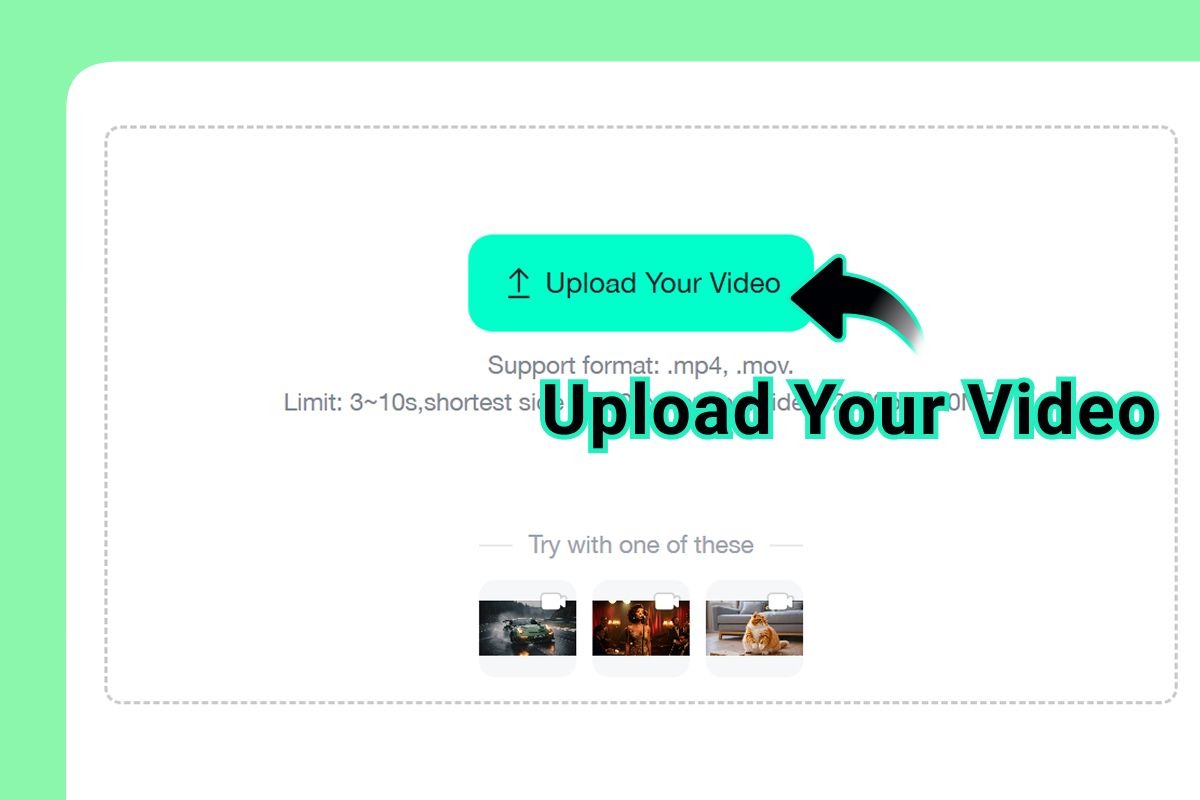
Upload the video you want to edit to the insMind AI object replacer. Ensure your footage is clear for optimal results.
Step 2: Describe the object you want to replace and what it should become in the prompt box
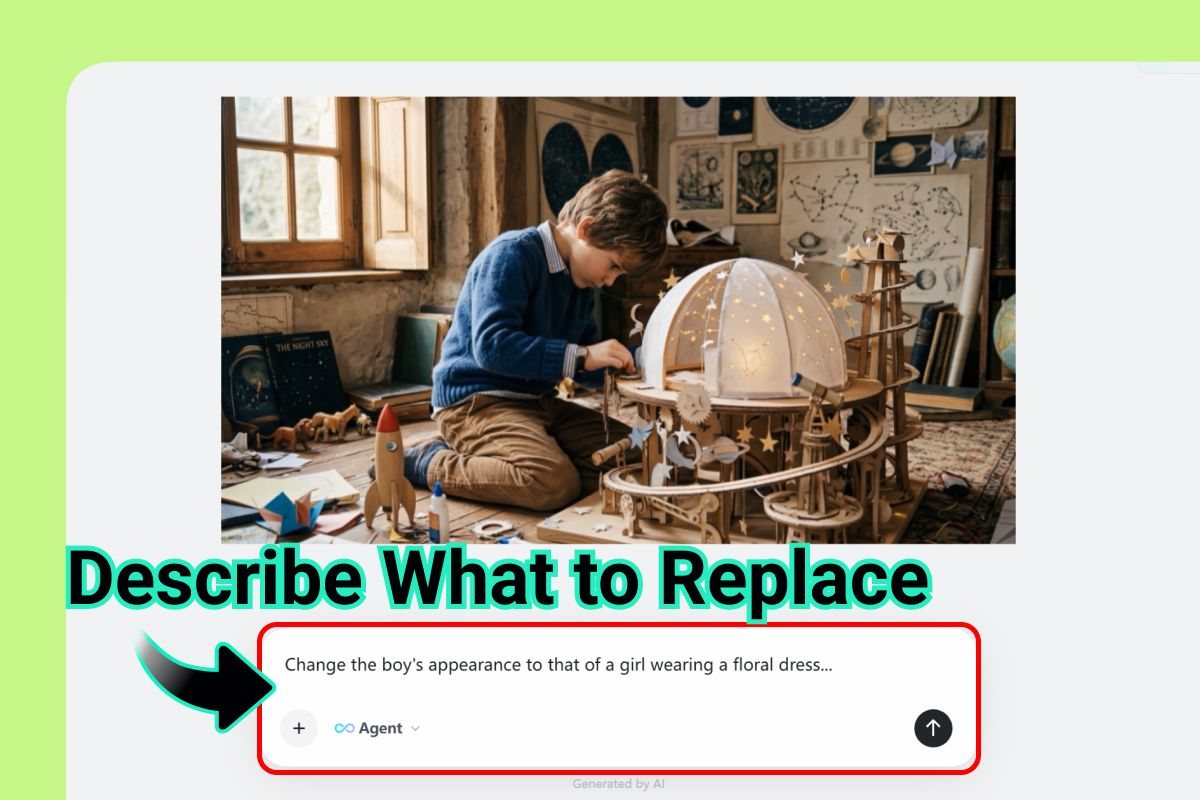
Describe the object you want to replace and what it should become in the prompt box. The more detailed, the better.
Step 3: Generate the edited video and preview the AI object replacement result
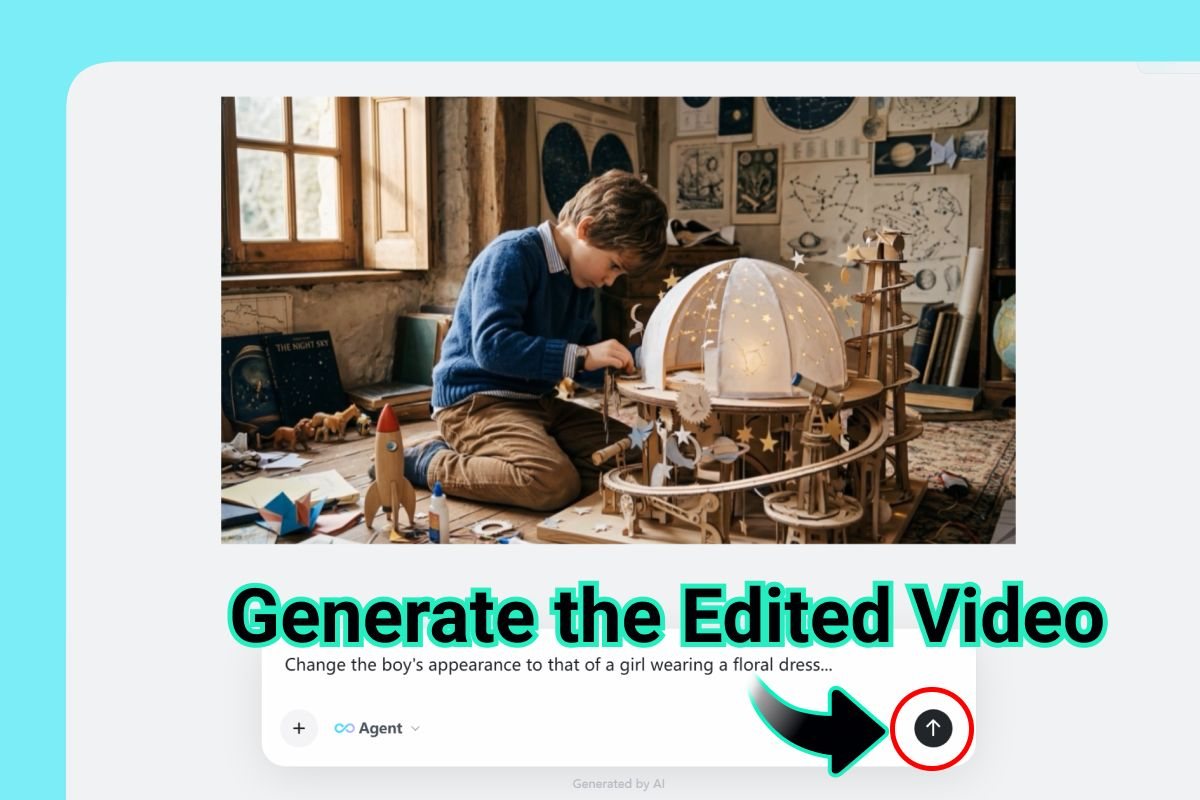
Generate the edited video and preview the AI object replacement result. Make adjustments if necessary.
Step 4: Download the finished video once the replacement looks natural
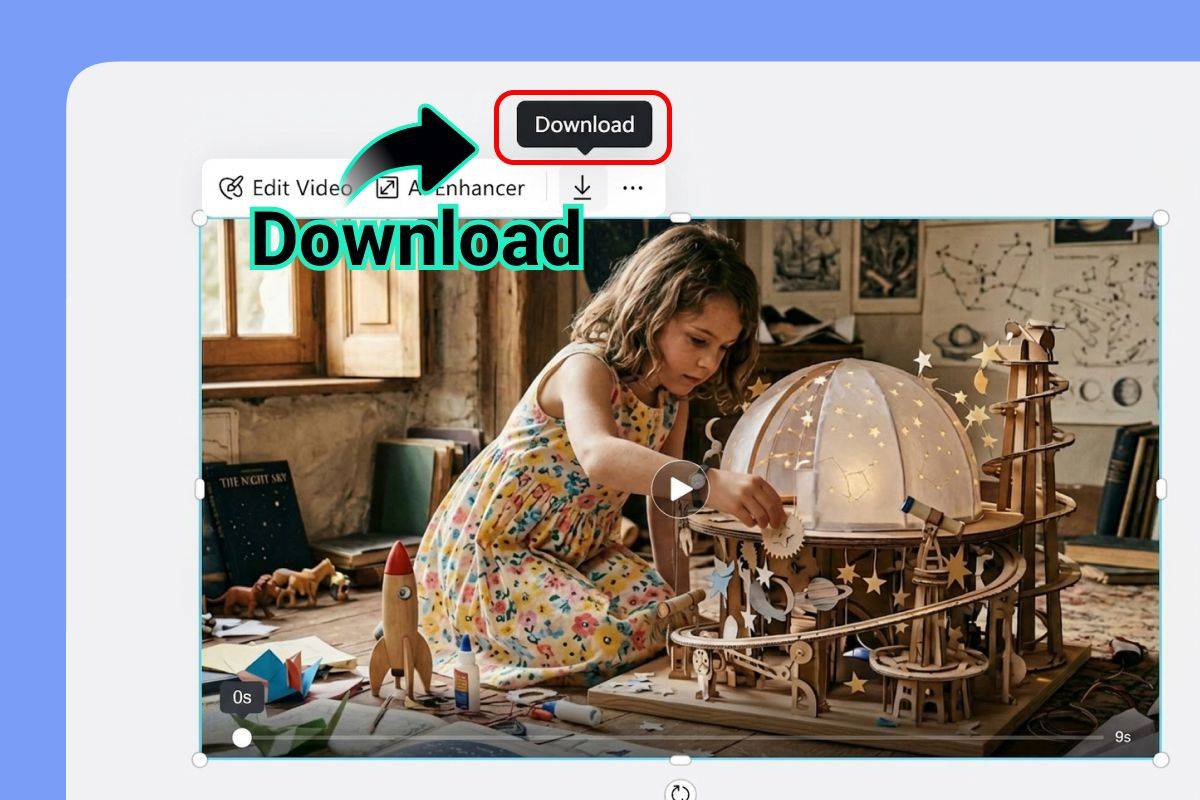
Download the finished video once the replacement looks natural. Enjoy your seamlessly edited content.
Tips for Better Results
To achieve the best results when replacing objects in videos, consider these tips. First, ensure that the video quality is high. AI performs better with clear, sharp footage. Second, be specific in your object descriptions. The more detailed your prompt, the more accurate the AI's output will be.
Additionally, preview the changes before finalizing the edit. This step allows you to make adjustments as needed, ensuring that the replacement looks natural. Lastly, experiment with different objects to find the best fit for your video.
For optimal results when using AI video object replacement, consider the quality of the original video footage. High-resolution videos with good lighting and clear object outlines yield the best outcomes. The AI relies on these details to accurately replace objects without compromising the video’s integrity. Additionally, consistent background and minimal motion blur enhance the AI's ability to seamlessly blend new objects into the scene, maintaining the video's natural look and feel.
Another tip is to experiment with different object placements and sizes. Sometimes, subtle adjustments can make a significant difference in how the new object fits into the video. For instance, if you're replacing a logo on a moving vehicle, ensure that the new logo aligns correctly with the vehicle's movement. This attention to detail can prevent distractions and ensure the viewer's focus remains on the intended message. Regularly reviewing and refining your edits will help you achieve the most professional and polished results.
Consider lighting consistency as a critical factor for achieving seamless AI video object replacements. Inconsistent lighting can make the new objects appear out of place, breaking the illusion of reality. Use tools to adjust lighting in post-production or ensure that the lighting conditions during the initial shoot are replicable. Additionally, pay attention to the scale and perspective of the new objects. If the scale is off, it can disrupt the viewer's experience and reduce the video's impact. By maintaining consistent lighting and correct scaling, you can significantly enhance the quality of your final output.
Common Mistakes to Avoid
Even with powerful AI tools, some common mistakes can hinder your video editing process. One frequent error is using low-quality video footage. This can lead to inaccurate object detection and replacement.
Another mistake is failing to fully describe the object you wish to replace. Providing insufficient details can result in unsatisfactory edits. Lastly, neglecting to preview the final output can lead to unnoticed errors. Always review your video before downloading.
One common mistake is not accounting for the object's interaction with its environment. For instance, if an object casts a shadow or reflects light, the replacement object must do the same. Failing to replicate these interactions can make the edit obvious and detract from the video's overall quality. Always check the lighting and shadows in the original video and ensure that the replacements match these elements for a seamless integration.
Another pitfall is over-relying on AI without manual adjustments. While AI is powerful, it may not always get every detail perfect. It's crucial to review the AI's work and make any necessary tweaks manually. For example, if the replaced object appears slightly out of place, adjusting its position or size can improve the final result. By combining AI's efficiency with human oversight, you can achieve edits that are both quick and visually stunning.
One frequent error is neglecting the importance of context. When replacing objects, it's crucial to ensure that the new elements fit within the story and setting of the video. For instance, replacing a vintage car with a futuristic vehicle in a historical drama can confuse the audience and detract from the narrative. Another mistake is over-relying on technology without manual adjustments. While AI is powerful, it still requires human oversight to ensure the final product meets creative standards. Always review the output and make necessary tweaks to align with your vision, balancing technology with artistic intent.
Frequently Asked Questions
Can AI replace any object in a video?
AI can replace most objects, but the results depend on the video quality and the clarity of the object.
Is AI video object replacement expensive?
Using insMind, AI video object replacement is affordable and often free, making it accessible for all users.
Do I need video editing skills to use AI replacers?
No, insMind's AI video replacer is designed for users without extensive editing skills, offering intuitive tools.
How long does it take to replace objects in a video?
The time varies depending on video length and complexity, but insMind processes edits quickly and efficiently.
What file formats are supported for upload?
insMind supports various formats, including MP4, AVI, and MOV, ensuring flexibility for your video editing needs.
Can I replace multiple objects in one video?
Yes, insMind allows you to replace multiple objects within the same video, enhancing your creative possibilities.
Is there a limit to the number of edits I can make?
With insMind, you can make multiple edits, allowing you to perfect your video content without restrictions.
Ready to Get Started?
Incorporating AI into your video editing process opens up a world of possibilities. By using insMind's AI video replacer, you can effortlessly transform your content, ensuring it remains fresh and engaging. Whether you're updating old footage or experimenting with new ideas, AI provides the tools you need to succeed.
Ready to take your video editing to the next level? Start exploring the potential of AI video object replacement today. With insMind, you have the power to create stunning videos that captivate and engage your audience. Don't wait—transform your video content with AI now.
Visit our AI video editor to explore more features and elevate your editing skills. With insMind, professional video editing is within your reach.
Ryan Barnett
I'm a tech enthusiast and writer who loves exploring AI, digital tools, and the latest tech trends. I break down complex topics to make them simple and useful for everyone.
Keep reading

How to Use Seedance 2.5 for AI Videos
Learn how to use Seedance 2.5 for text-to-video and image-to-video, write stronger prompts, guide motion with references, and review results.

How to Make a Creepy Voice for Horror Content Step by Step
Learn how to make a creepy voice for horror videos, podcasts, and games with insMind.

How to Remove TikTok Watermark: 4 Easy Steps for Clean Videos
Learn how to remove TikTok watermark from videos in four practical steps with insMind.

Top 10 Seedance 2.5 Alternatives for AI Video in 2026
Compare top Seedance 2.5 alternatives and learn how to create AI videos with insMind.

Seedance 2.5 vs. MiniMax H3: Which AI Video Model Should You Use?
Compare Seedance 2.5 and MiniMax H3 for AI video creation.

30 Instagram Reels Prompts You Can Copy and Try
Copy-ready Instagram Reels prompts for products, fashion, creators, travel, food, pets, and lifestyle videos.

How to Write Instagram Reels Prompts for AI Videos
Learn to write Instagram Reels prompts for polished AI videos, product clips, creator posts, and lifestyle content.

30 TikTok Video Prompts You Can Copy and Try
Copy-ready TikTok video prompts for ads, creators, products, fashion, pets, travel, and more.

How to Create an AI Micro-drama: A Step-by-Step Guide
Learn how to create an AI micro-drama with insMind.

How to Create a Short Film Using AI in 2026
Learn how to create a short film using AI with insMind.

Instagram Reel Ads: Examples, Specs, Sizes, and Best Practices
Learn Instagram Reel ad specs, examples, safe zones, and best practices.

YouTube Ads Best Practices: How to Create Video Ads
Learn YouTube ads best practices and create video ads with insMind.

YouTube Channel Trailer Examples: 15 Inspiring Ideas for Your Channel
Explore YouTube channel trailer examples and create a polished trailer with insMind.

15 Best YouTube Ad Examples and Templates to Inspire Your Next Campaign
Explore YouTube ad examples and templates, then create video ads with insMind.

How to Make a Hype Video with AI: The Easy Guide
Learn how to make a hype video with AI using insMind.

Instagram Ad Templates for Feed, Stories, Reels, and Carousel Ads
Learn Instagram ad templates for Feed, Stories, Reels, and Carousel Ads.

Facebook Video Ad Specs: Sizes, Formats, and Lengths for 2026
Learn Facebook video ad specs, sizes, formats, and lengths for 2026, then make ad-ready videos with insMind fast.

How to Create Facebook Video Templates for Posts, Ads, Covers, and Live Video
Learn how to use Facebook video templates for posts, ads, covers, and live video with insMind.

Instagram Ad Examples: 15 Creative Ideas That Convert
Explore 15 Instagram ad examples and learn how to make them with insMind.

Instagram Ad Sizes and Specs: Complete 2026 Guide
Find Instagram ad sizes, specs, ratios, and dimensions for every major placement.

10+ Video Resume Examples with Scripts for Every Career Stage
Explore video resume examples and scripts, then create a polished video resume with insMind.

How to Make a Sports Hype Video with AI: A 4-Step Guide
Learn how to make a sports hype video with AI.

YouTube Ad Specs for 2026: Sizes, Formats, and Lengths
YouTube ad specs for sizes, formats, dimensions, and lengths, plus a four-step insMind workflow.

30 Best Grok Imagine Video Prompts You Can Copy and Try
Copy 30 Grok Imagine video prompts and learn how to write better prompts for creative AI videos.

50 Scroll-Stopping AI Brainrot Prompts for Viral Meme Videos
Copy 50 scroll-stopping AI brainrot prompts for chaotic meme videos.

How to Turn Any Photo into a Brainrot Meme Video
Learn how to turn any photo into a brainrot meme video with AI.

How to Make a Retirement Video with AI
Learn how to make a retirement video with AI.

How to Make Your Own Graduation Video from Photos with AI
Learn how to make a graduation video from photos with AI.

How to Make Your Own Outro Video
Learn how to make your own outro video with insMind.

Higgsfield vs Pollo AI: Which Video Platform Fits You?
Compare Higgsfield vs Pollo AI for cinematic control, model choice, ease of use, and pricing.

Pollo AI Review 2026: Features, Pros, Cons, and Verdict
Read our Pollo AI review for 2026 and explore its features, pricing, strengths, limitations, ideal users, and practical tips for better results.

How to Create Cute Baby Talking Videos from Photos
Learn how to create baby talking videos from photos with text, audio, and AI lip sync.

How to Make Your Own Talking Avatar with AI
Learn how to make your own talking avatar with AI from a portrait and script.

Seedance 2.0 Mini vs Seedance 2.0: Which Model Should You Use?
Compare Seedance 2.0 Mini and Seedance 2.0 for AI video creation.

How to Create Talking Animal Videos from Photos That Steal the Show
Learn how to create talking animal videos from photos with AI.

How to Turn a Character Image into a Consistent AI Video
Learn how to turn a character image into a consistent AI video with insMind.

10 Krea AI Alternatives for Creating and Editing AI Videos in 2026
Compare the best Krea AI alternatives for creating and editing AI videos, including insMind, Runway, Kling AI, Luma, Pika, VEED, and more.

Seedance 2.0 Mini Prompts to Copy: 20 Video Ideas
Copy Seedance 2.0 Mini prompts for cinematic AI videos with insMind.

Seedance 2.0 vs Seedance 2.5: What Changed?
Compare Seedance 2.0 and Seedance 2.5 with examples, prompts, and insMind workflow.

10 Best Pollo AI Alternatives for AI Video Creation in 2026
Compare the best Pollo AI alternatives for AI video creation, including insMind, Runway, Kling AI, Luma, Pika, VEED, and more.

How to Make an AI Video of Yourself That Actually Feels Like You
Create a realistic AI video of yourself from a photo and script.

How to Turn Old Photos into a Beautiful Tribute Video with AI
Turn old photos and memories into beautiful AI tribute videos.

How to Make a Daily Vlog with AI in Minutes
Create daily AI vlogs from photos, prompts, or ideas in minutes.

How to Create 2026 FIFA World Cup Highlights with AI
Create 2026 FIFA World Cup highlights, fan clips, and football videos with AI.

Best AI Video Extender for Creators: Top Tools Compared
Compare the best AI video extender tools for creators in 2026 and learn how to make short videos longer with insMind.

How to Edit YouTube Videos Faster with AI
Edit YouTube videos faster with AI background and style tools.

How to Create Training Videos with AI: A Complete Guide for Beginners
Create clear training videos from images and prompts with AI.

Create Product Reveal Videos with an AI Unboxing Video Maker
Learn how to create AI unboxing videos for product reveals, UGC, teasers, and ecommerce demos.

Create Smooth AI Video Transitions with Kling Start/End Frame
Learn how to create smooth AI video transitions with Kling Start/End Frame.

What Can You Choose for the Best InVideo Alternatives in 2026?
Compare the best InVideo alternatives and see why insMind is a strong AI video generator for creators and marketers.

10 Best Animaker Alternatives in 2026: New Trends in AI Video Creation
Compare the best Animaker alternatives for AI video creation, including free and open-source picks.

10 Best HeyGen Alternatives in 2026: Create AI Videos with More Freedom
Compare the best HeyGen alternatives for AI video creation, including free and open-source picks.

How to Make a Faceless YouTube Channel with AI
Make a faceless YouTube channel with AI tools, scripts, video ideas, and insMind.

Best CapCut Alternatives: 8 AI Video Editors Compared
Compare the best CapCut alternatives for iPhone, Android, PC, and AI video editing.

How Ecommerce Brands Replace Products in Videos with AI
Replace products in ecommerce videos with AI for ads, listings, and creative testing.

How to Change Video Background Without Green Screen: Step-by-Step Guide
Learn how to change video backgrounds without a green screen using simple AI editing steps.

How to Seamlessly Replace Objects in Videos with AI
Step-by-step guide on replace objects in videos with AI: how it works, best practices, and how to do it free with insMind.

How to Identify AI-Generated Videos: A Comprehensive Guide
Learn how to identify AI-generated videos using expert tips and insMind's tools for authenticity verification.

Can AI Really Edit Videos For You? A Deep Dive Into AI Video Editing
Discover how AI can edit videos effectively, using insMind and other top tools. Learn workflows, compare features, and explore future trends.

Crafting Viral Bigfoot AI Videos: A Step-by-Step Guide
Create viral Bigfoot AI videos with insMind. Learn how to optimize for TikTok and YouTube, avoid common mistakes, and more.

Discover the Versatility of Happy Horse 1.0 for AI Video Creation
Happy Horse 1.0 review explores AI video generation, integration with insMind, and practical applications for content creators.

Seedance 2.0 vs. Happy Horse 1.0: Which AI Video Generator Fits Your Needs?
Discover the differences between Seedance 2.0 and Happy Horse 1.0. Learn which AI video generator suits your needs best.

How to Make Educational Videos for Kids with AI (4 Easy Steps)
Write a structured script, choose model and audio, generate, and download—a step-by-step guide to making AI educational videos for kids with prompt templates.

Best AI Prompts for Explainer Videos (Proven Templates)
Four proven AI prompt templates for explainer videos—presenter, product demo, faceless brand, and tutorial—plus how to use insMind in 3 steps.

Best AI Explainer Video Generator for Business (2026 Guide)
Choose text-to-video or image-to-video, configure model and audio, generate and download—a complete 2026 guide to AI explainer videos for business with insMind.

Best Prompts for Wan 2.7: Multi-Shot Guide for Cinematic AI Video
Choose text or image mode, write scene-block prompts for Wan 2.7, set duration and audio, then download—plus 40+ language narrative tips.

How to Create Kids Videos with AI: A Parent-Friendly Guide
Upload art or start from text, write kid-safe prompts, pick Google Veo 3.1, generate and download—steps for parents and teachers.

From Script to Screen: How to Create Engaging Story Videos with AI Tools
Learn how to create story videos with AI: split scripts into scenes, optional reference images, generate clips in insMind, then merge. No pro editor required to start.

How to Make a Baby Dance Video with AI: Step-by-Step Guide
Turn a baby photo into a cute AI dance clip. Upload, write a motion prompt, pick model and duration, generate—no editing skills needed.

How to Make a Cat Dance Video with AI: Step-by-Step Guide
Turn a cat photo into a funny dance clip with AI image to video. Upload, write a motion prompt, generate, and download—no editing skills.

Best AI Tool for Pet Dance Videos (2026 Compared)
Compare top AI pet dance video tools with real screenshots, pros and cons, and a tested insMind image-to-video workflow plus copy-ready prompt.

Top 20 AI Fruit Video Prompts to Copy & Paste
Discover top AI fruit video prompts for creating engaging, trendy videos. Perfect for TikTok and other platforms, these prompts inspire creative content.

Funny AI Video Prompts That Work (Tested Examples)
Get 20+ tested funny AI video prompts that actually make people laugh. Copy-paste prompts for TikTok, Reels, and YouTube Shorts with step-by-step instructions.

Affordable AI Video Solutions for E-commerce Startups
Discover affordable AI video solutions for e-commerce startups. Learn about budget-friendly tools and maximize ROI with AI-generated content.

Transforming Marketing with AI Video Ads
Discover how AI video ads are transforming online marketing with personalized, efficient, and creative solutions. Learn techniques and examples.

Mastering Cinematic Ad Creation with Seedance 2.0
Create cinematic ads with Seedance 2.0, a powerful AI tool for video advertisements. Learn how to make stunning video ads using Seedance 2.0.

Mastering Viral Video Creation with Seedance 2.0
Discover how to create viral videos using Seedance 2.0 with tips, prompts, and insights on social media trends.

Close-Up Shot: Definition, Story Uses & Tighter Framing
What is a close-up shot? Definition, when to use tight framing for emotion and detail, and tips for shooting cleaner inserts on any camera.

YouTube Equipment for Beginners: Gear, AI Video & Your First Upload (2026)
Beginner YouTube equipment: priority order for mic, light, and camera; clear audio on a budget; phone vs dedicated camera; Shorts and 16:9 basics.

How to Create Anime Videos with AI (Step-by-Step Guide)
Learn how to create anime videos with AI step by step. Use text-to-video and image-to-video to generate stunning anime animations with insMind.

How to Make Viral Funny Videos with AI in 5 Minutes
Learn how to make viral funny videos with AI in minutes. Step-by-step guide to creating hilarious TikTok and Instagram clips using insMind AI funny video generator.

How to Create Talking Old Photo Videos with AI
Learn how to animate old photos with AI. Turn vintage portraits into talking videos with realistic motion using insMind free photo animation tool.

7 Best Sora 2 Alternatives for AI Video Generation in 2026
Discover the best Sora 2 alternatives for AI video generation. Compare insMind, Runway, Kling AI, Pika, and more to find the right tool for your needs.

AI Prompts for TikTok Video Generator: Complete Guide
Discover the best AI prompts for TikTok video generation. 20+ ready-to-use prompts plus a step-by-step guide to creating viral TikTok content with AI.

How to Upscale Anime Video to 4K with AI (Step-by-Step)
Learn how to upscale anime video to 4K using AI. Step-by-step guide to enhancing low-res anime with sharper lines and cleaner colors.

AI Marketing Video Generator: Create Promo Videos from Text
Learn how to turn text into professional marketing videos using AI. Step-by-step guide to creating promo videos in minutes.

Text-to-Video AI Ranked: Which Generator Wins in 2026?
Compare the 7 best text-to-video AI generators in 2026 including insMind, Sora 2, Runway, Kling AI, Pika, and more.

Animate Anime Images with AI: Turn Static Art into Dynamic Anime Videos
Learn how to animate anime images with AI. Turn static anime art into stunning animated videos easily.

How to Remove Kling Watermark from AI Videos
Explore the best ways to remove Kling AI watermark. Compare editing methods and discover watermark-free Kling generation options.

AI Video Editor: Edit Videos Instantly with Prompts
Use insMind AI Video Editor and prompts to edit videos, remove objects, change backgrounds and more.

Control the Narrative: Create Cinematic AI Videos with Start & End Frames
From start to finish, take control of AI video storytelling with Start & End Frames.

How to Create a Stranger Things Transition Video (Step-by-Step Guide)
Create a Stranger Things–style Upside Down transition with AI in just a few steps using insMind.

Transform Your Ideas: Generate Videos from Text Instantly
Turn text into videos in seconds with InsMind's AI—ideal for social media, ads, and presentations. No editing skills required.

Tralalero Tralala: How to Animate the Italian Shark Meme with AI Flair
Animate the viral “Tralalero Tralala” Italian Shark meme with AI for fun, shareable content.

Top TikTok Memes 2025: 'Tung Tung Tung Sahur' & Viral Trends You Can't Miss
2025 TikTok trends: AI-generated Italian Brainrot memes and creepy Tung Tung Tung Sahur dominate viral humor.