


A perfectly timed photo can capture meaningful memories, but even the best shots can be ruined by a simple blink. Closed eyes are one of the most common issues in portraits, group photos, and candid snapshots. Whether it's a family photo, a travel selfie, or a professional headshot, a single blink can make an otherwise great image look awkward or unusable. Fortunately, advances in AI photo editing now make it easy to open eyes in photos without needing professional editing skills. Instead of retaking photos or spending hours in complex editing software, users can rely on AI tools that intelligently reconstruct natural-looking open eyes. In this article, we'll explore why this problem happens, how AI technology solves it, and how you can quickly fix closed eyes using tools like insMind.
Table of Contents
Part 1: Why People Search for Ways to Open Eyes in Photos
Blinking is a natural human reflex that occurs every few seconds, which means it's surprisingly easy for cameras to capture someone mid-blink. This becomes especially noticeable in group photos where at least one person often ends up with closed eyes.
There are several common situations where this issue appears. Bright sunlight or camera flash can cause people to squint or blink unintentionally. Fast smartphone cameras can capture the exact moment someone blinks, even when they appear to be looking normally. In spontaneous moments such as weddings, birthday parties, or travel photos, photographers may only have one chance to take the shot.
Because of this, people frequently search online for ways to fix closed eyes in photos. Retaking the photo is not always possible, especially when the moment has already passed. Editing the image becomes the best solution, but traditional editing methods can be complicated for beginners.
Part 2: Traditional Editing vs AI Eye Correction
Before AI tools became widely available, fixing closed eyes required advanced editing skills. Professional editors often duplicated open eyes from another photo and carefully blended them into the original image. This process required precise alignment, lighting adjustments, and color matching to avoid unnatural results.
While effective, this approach takes time and experience. It also depends on having another photo of the same person with open eyes from a similar angle. For most casual users, these requirements make traditional editing impractical.
AI eye correction tools simplify the entire process. Instead of manually editing every detail, modern AI algorithms analyze facial features, detect closed eyelids, and generate realistic open eyes that match the person's face. The technology ensures that lighting, angle, and facial expression remain consistent with the original photo. This allows anyone to fix blinking problems quickly without needing professional software.
Part 3: How to Open Eyes in Photos with insMind
If you want a quick and reliable way to fix closed eyes in a photo, insMind offers a powerful AI-based solution. The Open Eyes in Photo tool uses advanced facial recognition and image generation technology to create natural-looking open eyes that match the subject's original appearance.
The process is simple and beginner-friendly.
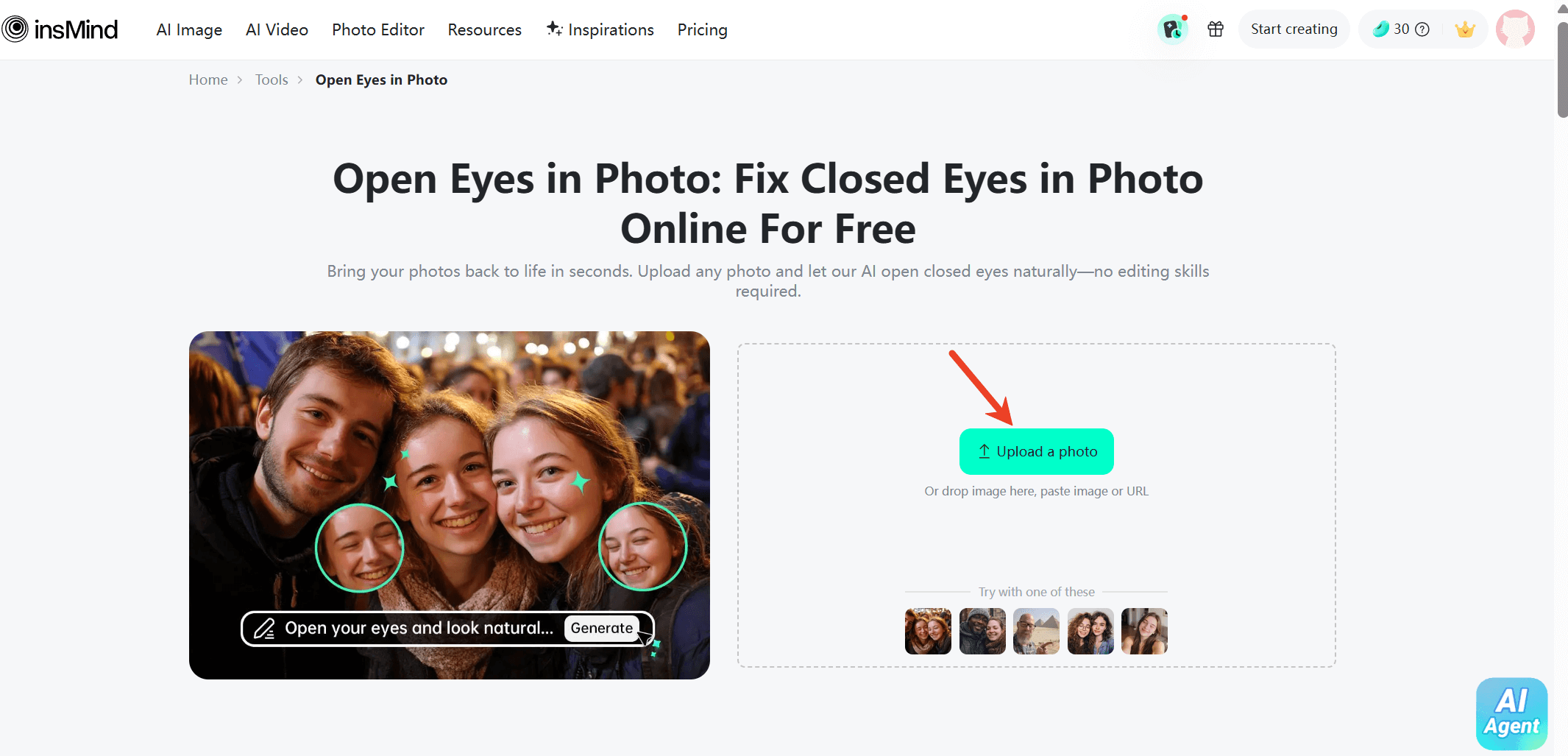
Step 1: Upload your Image
Upon accessing the insMind's "open eyes in photo" website, upload the photo where someone's eyes are closed. The platform supports common image formats and works well with portraits, selfies, and group photos.
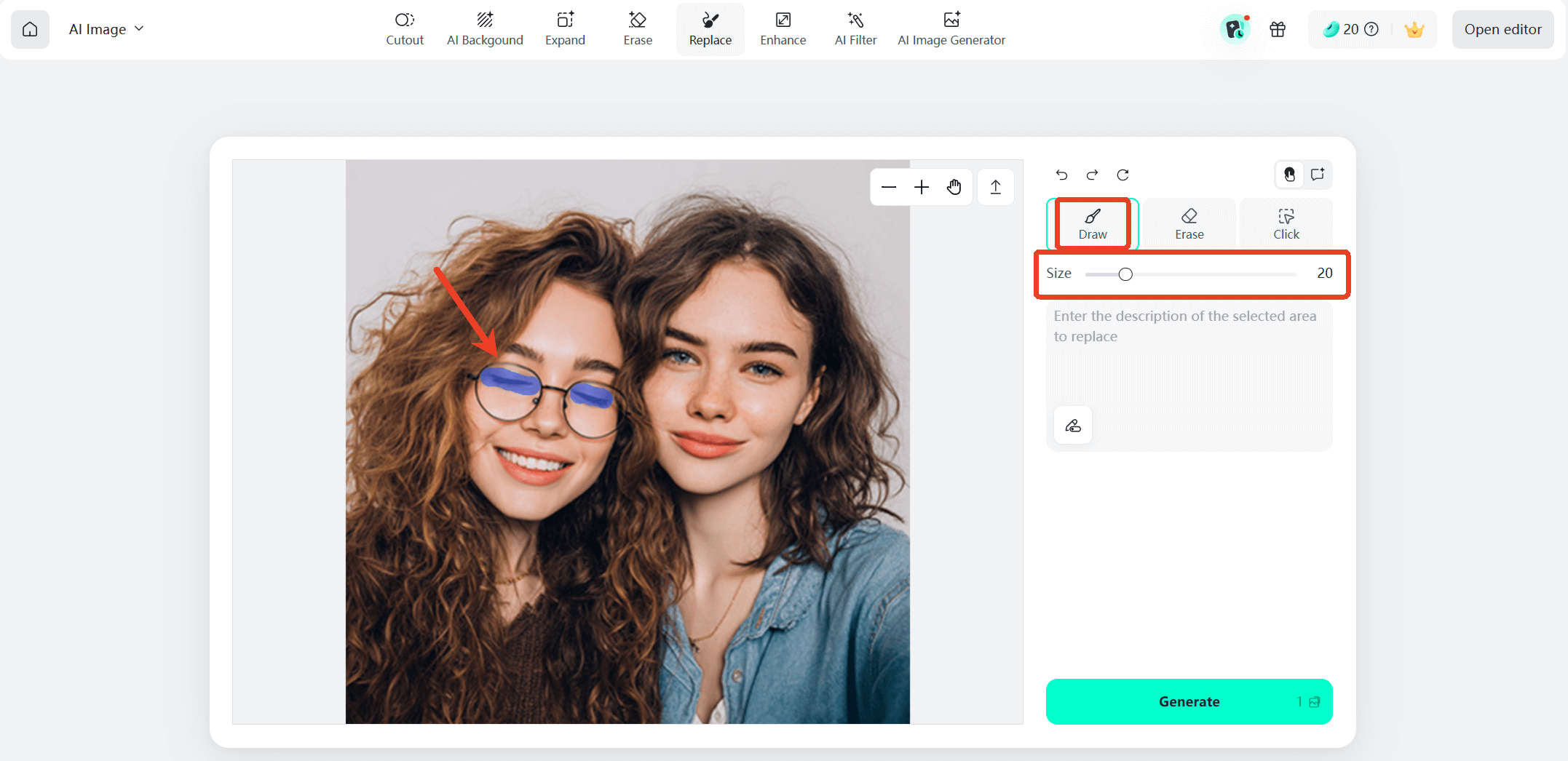
Step 2: Select the Eye Area
Mark the area around the eyes that you want to fix for more accurate results.
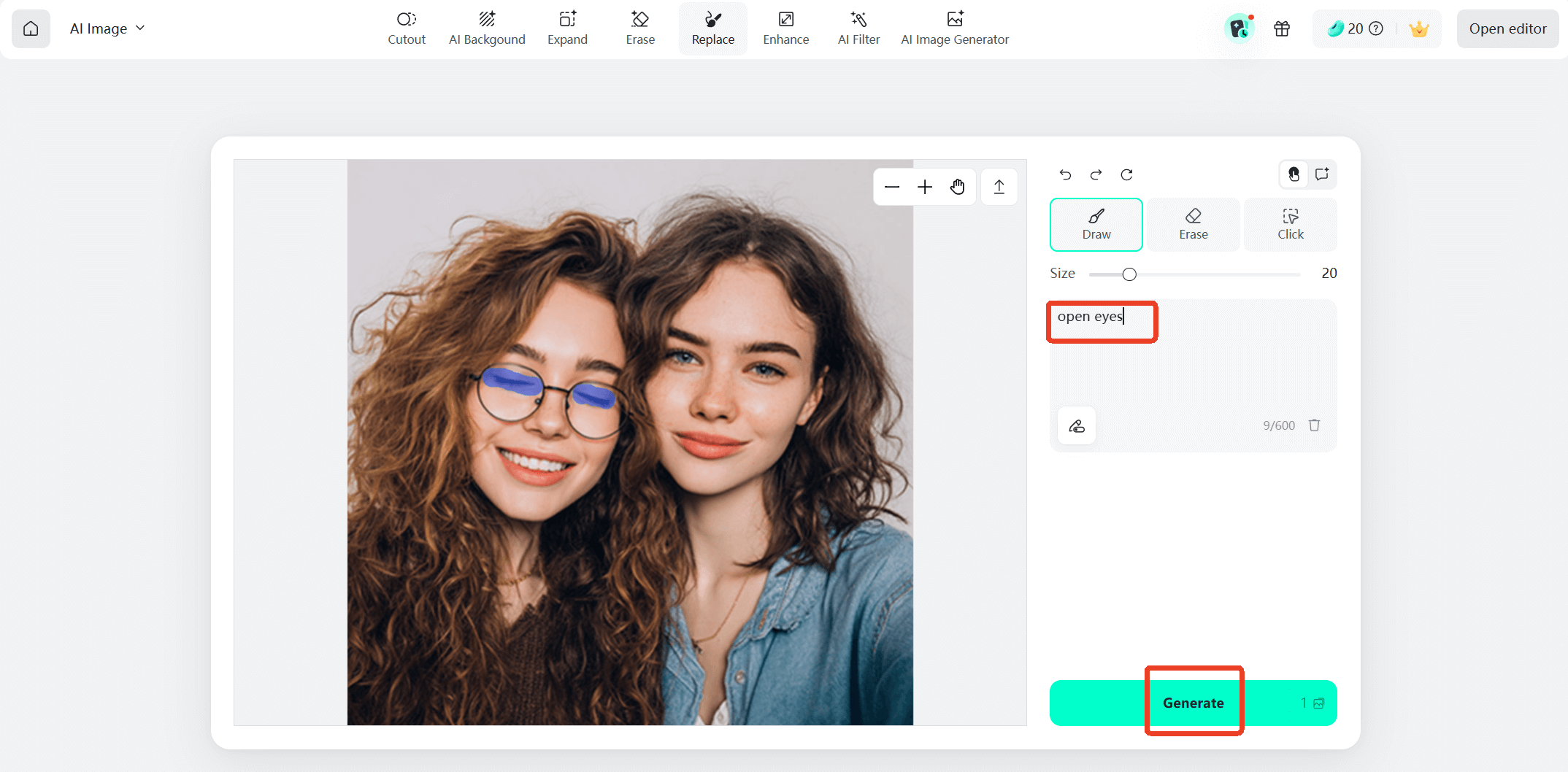
Step 3: Enter the Prompt
Type in the prompt "open eyes" and click the "Generate" button to let the AI work its magic.
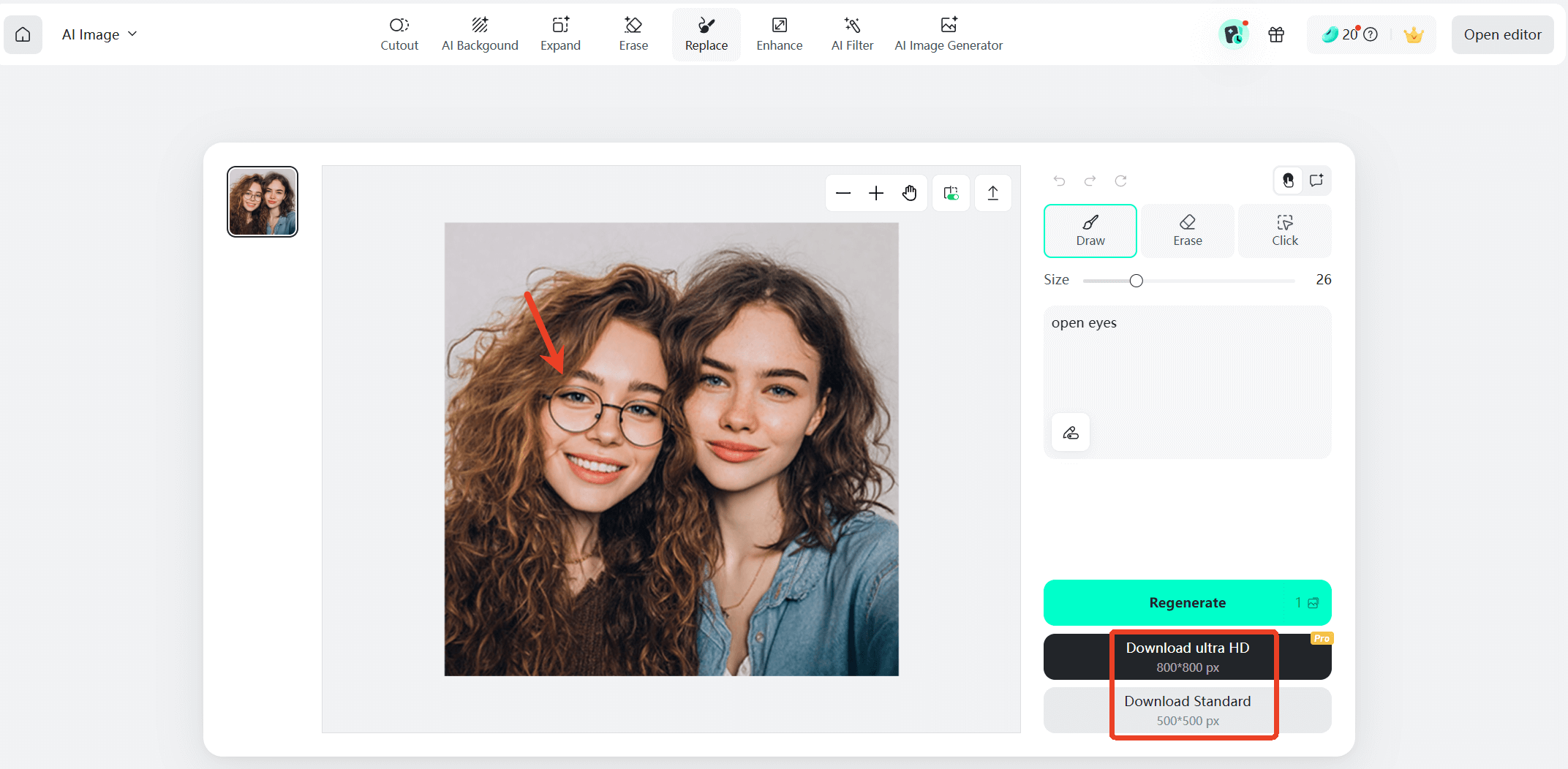
Step 4: Preview and Download
You can preview the corrected image instantly. If you're satisfied with the result, simply download the improved photo and share it wherever you like.
Moreover, opening closed eyes is one way to improve portraits. InsMind also offer additional eye-related tools that help refine facial details and experiment with creative looks.
For example, insMind includes several eye enhancement features:
- Virtual glasses try on – experiment with different glasses styles without wearing real frames
- Eye color changer – preview how you would look with different eye colors
- Red eye remover – correct the red pupil effect often caused by camera flash (The red-eye effect occurs when a camera flash reflects off the back of the eye, producing red pupils in photos taken in low-light conditions.)
By combining these tools with AI eye correction, users can refine portraits quickly and create polished images without professional editing skills.
Part 4: When AI Eye Editing Is Especially Useful
AI eye correction tools are useful in many everyday situations. One of the most common cases is group photography, where coordinating everyone's expressions is nearly impossible. Even professional photographers encounter photos where one person blinks at the wrong moment.
The technology is also helpful for social media creators who want to maintain polished and visually appealing images. Influencers, marketers, and content creators often rely on AI editing tools to quickly fix small imperfections before posting.
Another common scenario is restoring old photos. When digitizing older pictures, some images may show partially closed eyes due to camera limitations at the time. AI tools can help improve these photos while keeping their original character intact.
By solving these problems automatically, AI editing tools help users preserve meaningful moments that would otherwise be discarded.
Conclusion
Closed eyes in photos are a small but frustrating problem that can affect even the best images. Fortunately, modern AI technology has made it possible to fix this issue quickly and naturally. Instead of relying on complex editing techniques, users can now restore blinking photos with just a few clicks.
Tools like insMind's Open Eyes in Photo feature demonstrate how accessible AI photo editing has become. With its simple workflow and realistic results, anyone can turn a nearly perfect photo into a polished final image.
As AI editing technology continues to evolve, fixing small imperfections like closed eyes will become even faster and more precise. With the right tools, you can rescue valuable photos and ensure every captured moment looks its best.

Jayson Harrington
I am the Chief Editor of insMind. I provide tips and skills to help users design better photos with insMind, whether for e-commerce, social media, or any other use.


