
Passport Size Images vs Regular Photos: Everything You Need to Know


In our day-to-day lives, we use photos for different use cases, whether your reason is for official documentation or creative expression. Passport photos are strict and have to be according to the guidelines and regular photos are a bit flexible in artistic and personal context.
Modern tools like the insMind Passport Photo Maker make navigating the requirements of both easier than ever. To get what you're looking for, you need to know the details of each type. Are you putting that image on paper or posting it on social media?
With this extensive guide, you can learn the basics of a passport photo and have success taking both regular photos and passport photos.
Table of Contents
Part 1: The Essentials of Passport Photos
A passport photo is a specific type of photograph to be used for official identity. Passport photos help keep things consistent and adherent to that legal standard, no matter if you are applying for a passport, visa, or government ID.
They speed up identification, helping to ensure consistency on official records. Passport photos are quite different from casual pictures in that dimensions, background, and position are all important things to get right.
Key Characteristics of Passport Photos
A passport photo has specific characteristics to meet the standards internationally which are listed below:
· The size of passport photos varies between countries. For instance: passport photos in some parts of the world need to be 2x2 inches. Though the dimensions are a little different, usually 35x45 mm, in some other parts.
· This means passport pictures should not feature any patterns or a busy background to draw attention solely to the face of the subject. Sometimes you can just be rejected for photos based on whether there are shadows or patterns. So, the background colors usually used are white or light blue.
· The face has to be neutral; both eyes open and looking directly into the camera. Strictly prohibited qualities include tilting the head and using exaggerated expressions.
· The lens must be clean. If a hat or sunglasses are worn on the face in the photo, that accessory should be removed.
Common Errors to Avoid
When capturing passport photos, it is important to avoid the following mistakes to achieve perfect results:
· Improper lighting can create unwanted shadows and can lead to a lower-quality in the photo. It's about getting even lighting that feels soft at the same time.
· Don’t wear bright or reflective clothing that blends into the background. The best attire is solid, non-white.
· Each country has its specs. Ignoring these may mean that you get rejected, meaning time and money have been wasted.
With these mistakes avoided, your passport photos will turn out to be perfect in terms of quality and meeting every official requirement.
Part 2: Understanding Regular Photos
Normal images are regular photos, taken for personal, personal, and creative goals. In other words, they aren't rigidly guideline-bound, and they're often used to document moments, tell stories, or display artistic skill.
Key Features of Regular Photos
Below are the key features of regular photos that you must know:
· Experimentation and improvement are made easier with regular photos because they allow us to experiment with angles, poses, lighting, and composition. It's also possible to boost the visual appearance through props and filters.
· In contrast to passport photos backgrounds across regular photos can be wildly varied from outdoors to indoor vibrant environments.
· Filters, color grading, and retouching give us the tools to adapt regular pictures to any cliche or theme.
Cultural and Creative Significance
Regular photos capture the moments, emotions, and cultural expressions. For storytelling, they are critical from family portraits to artistic projects. Yet, most of the time, when these personal touches are added to these photos they become downright cherished keepsakes.
Part 3: Passport Photo vs. Regular Photo Tips
Whenever you are taking pictures, you need to get professional results. Whether you need a passport photo or a regular photo, this section covers tips and tricks to follow for either case.
Passport Photo Tips
Let us get started with tips that you need to follow to capture amazing passport photos:
· For clarity and compliance, use soft even lighting, and a plain background. Don't be in direct sunlight, that'll give you harsh shadows.
· If it’s an overhead camera, then point it up and place it about 3 to 5 feet away from the lens.
· Shoulders relaxed and keep your head straight. This means that when you wear them in solid contrasting colors, the face will stand out.
With insMind, you can Enhance Your Passport Photos.
insMind Passport Photo Maker simplifies creating compliant passport photos. Here’s how to use it:
Step-by-Step Guide
Below are all the steps you need to follow to use insMind passport photo maker online:
Step 1: Access the Tool:
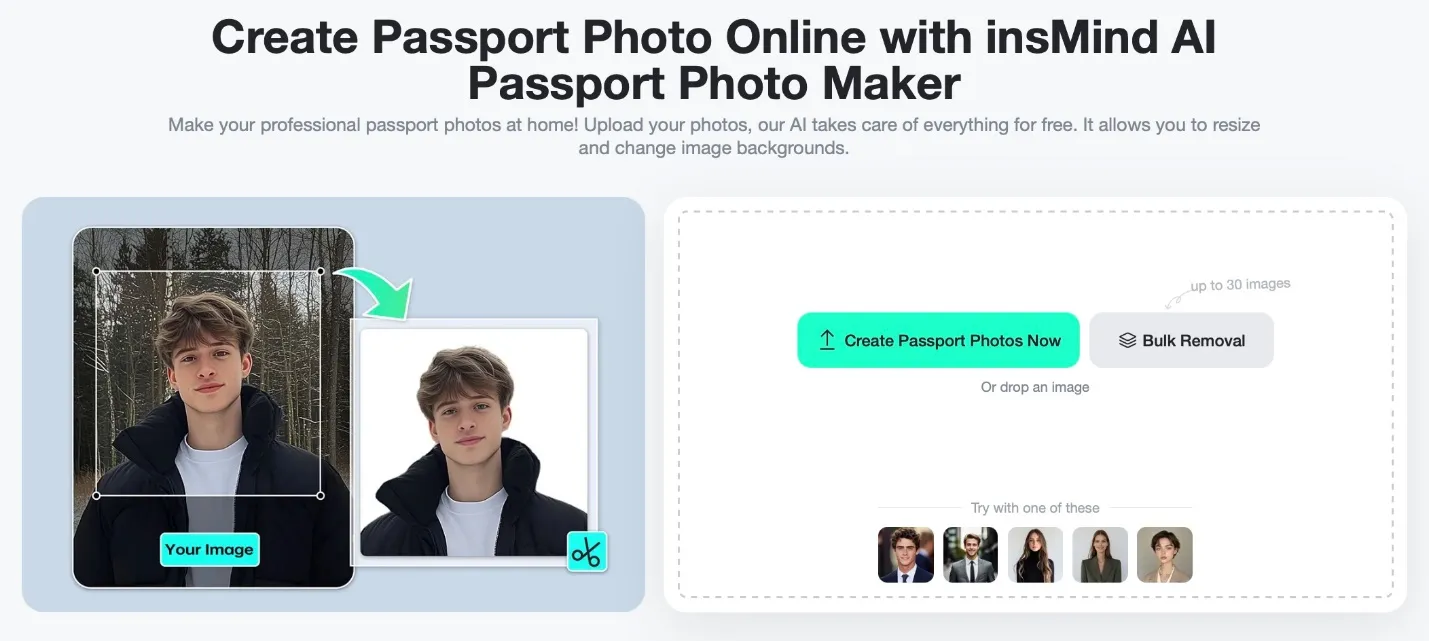
Head over to insMind Passport Photo Maker online on your browser.
Step 2: Upload Your Photo:
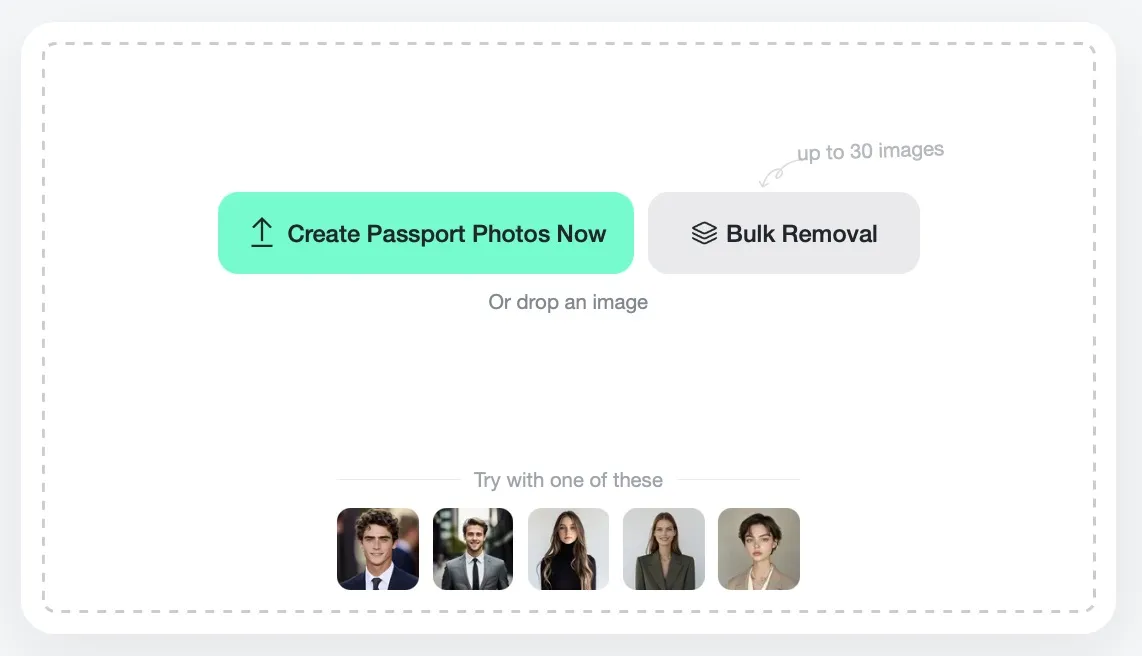
Select an image that has good light and a clear view of your face. Drag and drop it to your browser window to upload it to insMind.
Step 3: Adjust the Background:
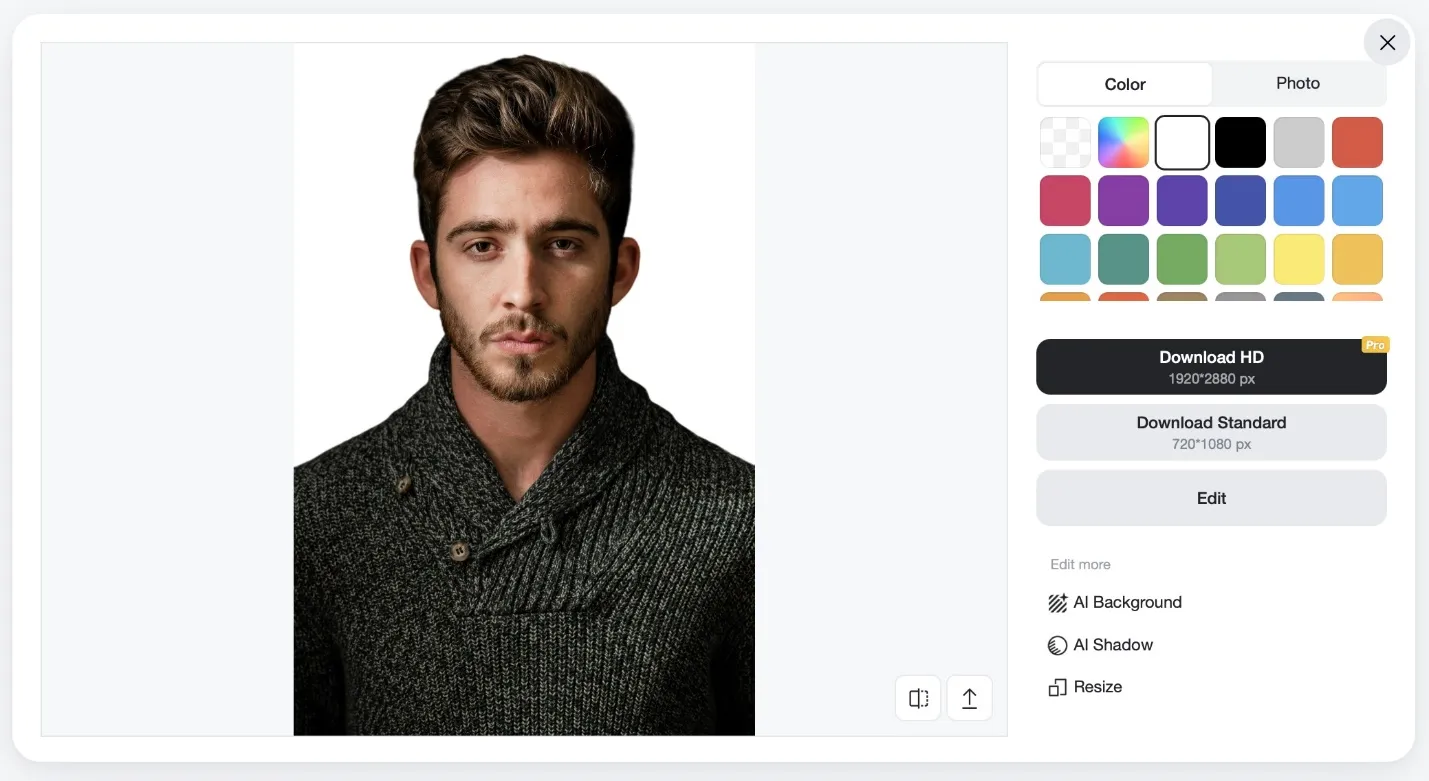
The background of your image is removed and replaced automatically by the tool with a transparent background. You can set it to any color by clicking on it.
Step 4: Crop to Size:
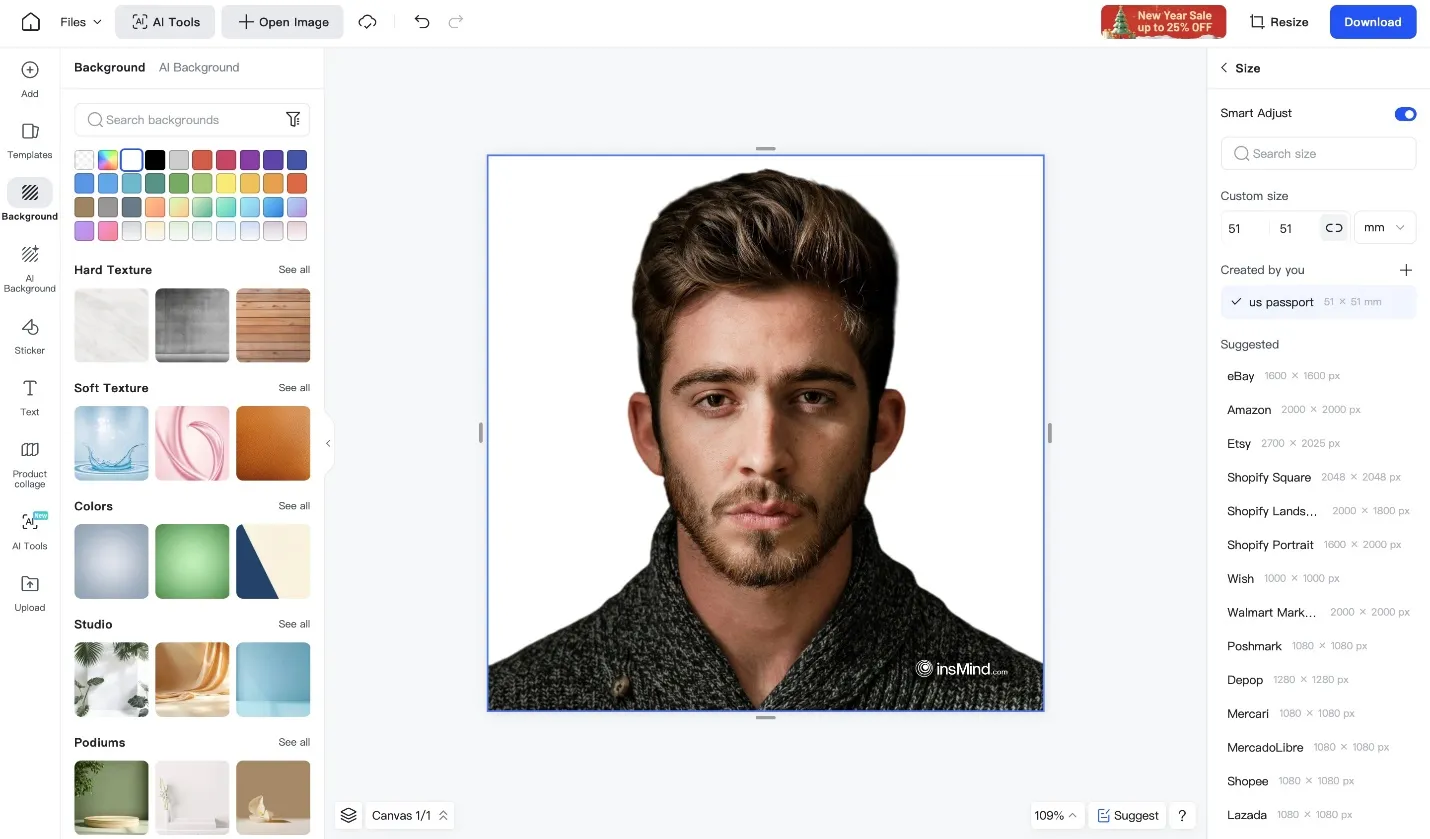
Click the Resize button to use the tool in a way to lets the dimensions apply based on the passport or ID you want.
Step 5: Download the Photo:
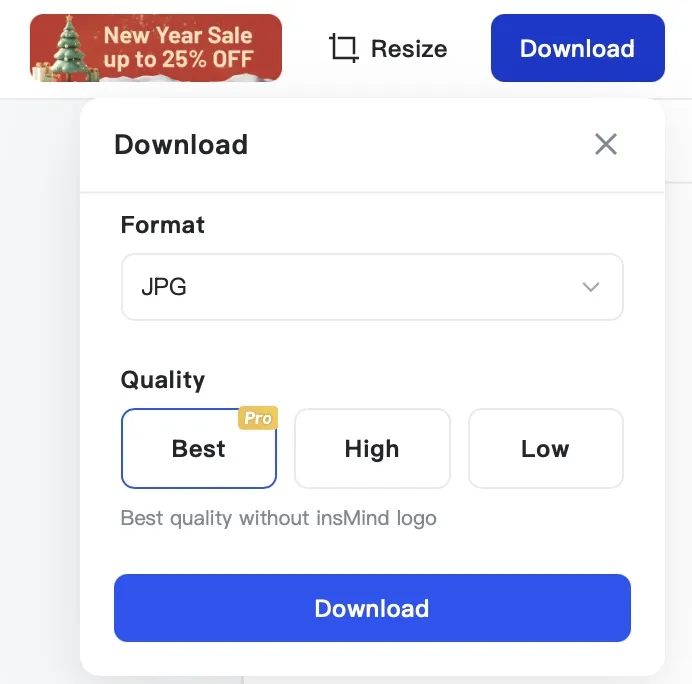
Put your final JPEG or PNG format high-resolution picture and download it on your device for sharing and storing it.
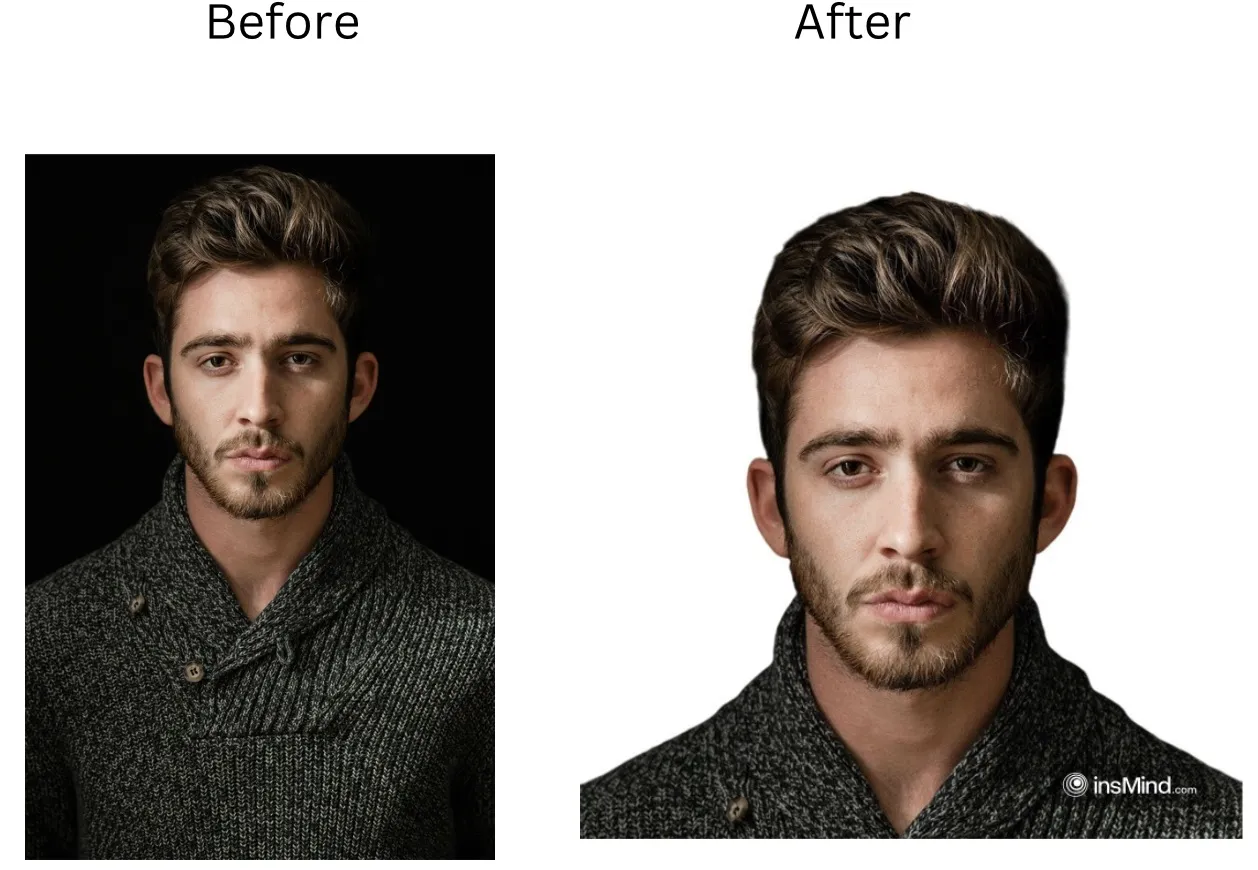
This process involves automatic background removal, cropping, and size adjustment features from insMind to convert your images into perfect passport photos.
Regular Photo Tips
Now that you are done with your passport photos, let us get into the tips for creating g stunning regular photos like professionals:
· Angles, perspectives, and poses are all playthings and are all important to creating visually appealing compositions.
· Use natural and artificial lighting to combine to get what amounts to unique effects like soft glows or dramatic shadows.
· Editing enriches colors, adds artistic filters, fixes the imperfections, and turns ordinary into extraordinary.
How to Adapt Your Approach
Photographing with passport photos requires that you make concessions to one style to accommodate the other. Getting passport photos right matters for precision; properly complying with sizes, backgrounds, and facial expressions for legal standards for passport photos.
On the other hand, taking regular photos lends itself to self-expression, and experimenting with angles, lighting, and filters to show personality and artistic vision. When to put rules first, and when to value creativity so you hit the mark, while saving the photo's integrity and expressive heart, whether official or just fun.
Part 4: FAQs
· What is the most common size requirement for passport photos?
In the U.S. passport photos are usually 2x2 inches; in the UK, they are 35x45 mm.You can convert photo to passport size with insMind photo editor tool.
· Can I take a passport photo using my smartphone?
Yes! With a modern smartphone and tools such as insMind Passport Photo Maker, you can create high-quality passport photos using your smartphone camera.
· How do regular photos differ from passport photos in terms of composition?
Photos for a regular person invoke their creativity while passport photos enforce following strict official guidelines. Meeting these guidelines will ensure that the image meets international standards for documents and professional usage.
· Is there a photo editor that can help create passport-compliant photos?
Yes. The insMind Passport Photo creator with size adjustment, background removal, and alignment tools.
· What are some editing tips for regular photos?
Tools to adjust brightness, and contrast and apply unique filters to make your regular photos shine. However, when editing your regular photos, aim to make them appear as natural as possible as over-editing will result in fake-looking images.
· Can I use a regular photo as a passport photo with edits?
Regular photos can be converted to passport-compliant images using insMind with proper adjustments to size and background. You must make sure that your posture, expressions, and facial accessories are compliant with the passport photo requirements stated by your government.
Part 5: Common Mistakes When Creating Photos
When creating your images, you can make a lot of mistakes from the capturing phase to editing and uploading. So, in this section, we have highlighted some common mistakes that must be avoided by you at all costs for the best results.
1. Distorting the Image
Up-sizing or down-sizing a photograph means stretching or compressing it so that it is no longer in proportion. Keep the same quality always for visual integrity even when reducing the image size.
2. Using Low-Resolution Images
When you resize, images look pixelated at low resolution. So, start with a high-quality picture for clarity and sharpness in post-editing. Removing this simple mistake can make your images look crystal clear even after they are compressed by social media platforms after uploading.
3. Over-Cropping the Image
Crop too much and you can remove a crucial part in a passport photo. Keep the subject centered and framed correctly always.
4. Choosing The Wrong File Format
File formats matter. They are light and load faster, and PNGs keep their classier quality. Choosing between formats is easy using tools like insMind. So, it is crucial to always choose the format between JPEG and PNG according to your use case.
Conclusion
Taking photos for official and personal purposes doesn’t have to be difficult. Knowing the difference between passport and regular photos, and using apps like the insMind Passport Photo Maker, you will get accurate and creative shots every time.
Whatever method you follow, whether it's to use the images for some official documents or for your personal social media accounts, these techniques are sure to lead to photos coming ahead of your needs, every single time. With insMind, there is no need to hire a professional for simple photos as with the power of your smartphone camera combined, you can make stunning images.

Ryan Barnett
I'm a freelance writer with a passion for editing and designing photos. Here at insMind, I strive to educate users on image creativity, photography, and enhancing product photos to help grow their businesses.
Keep reading

How to Translate Comics Using AI: A Complete Guide
Learn how to translate comics using AI tools, maintain art style, and understand cultural nuances with this detailed guide.

Discover the Trending AI Fruit Image Prompts You Can Use Today
Explore the trend of AI fruit prompts image and learn how to create stunning visuals with insMind's AI image generator.

How to Open Eyes in Photo with AI: Fix Closed Eyes in Seconds
Learn how to open eyes in a photo using AI tools. Fix blinking and closed eyes instantly with insMind and improve portraits in just a few clicks.

How to Change Cabinet Color Using AI: A Smarter Way to Visualize Your Kitchen Makeover.
See how to change kitchen cabinet color digitally before repainting. Compare cabinet finishes and visualize your design risk-free.

Remove Hat from Photo Online Free: Quick & Easy AI Tool
Here's a quick guide on how to remove a hat from your photo online in seconds.

How to Change Eyebrow Color in Photos Online with AI
Use insMind's AI Eyebrow Filter feature to change eyebrow color in portraits online.

How to Change Beard Color in Photos Online with AI
Learn how to change beard color in photos online with insMind's AI Image Generator.

5 Headshot Poses: How to Look Confident and Professional in Any Photo
Learn the best headshot poses for men and women to look confident, professional, and camera-ready in any profile photo.

Festive Christmas Makeup Ideas for 2025: Easy, Eye-Catching, and Fun Holiday Looks
With insMind's Nano Banana Pro, you can preview and find the perfect Christmas makeup before you try it.

Quick Guide: How to Change the Date of a Photo Without Losing Quality
Explore the guide for 2 effective methods for date changing in photos.

Erase the Past: How to Remove Ex from Photo Online with AI
Remove an ex from a photo online using AI. insMind helps you erase a former partner from pictures instantly and keep a clean background.

Free Online Camera Angle AI- Change 360° angles of Images
This article introduces how to use Camera Angle AI to create captivating 360° visuals and dynamic perspectives.

What is a Caricature? Amplifying Personality Through Art
Discover how AI tools can help you create unique caricatures that express personality and creativity

Create a Winning AI Resume Photo: Skip the Photoshoot
This article introduces how to use an AI Headshot Generator to create a professional portrait, saving you time and offering a variety of style choices.

AI Background Remover for Graphic Designers: Remove Objects from Background
This article introduces how to use AI Background Remover to precisely remove backgrounds and enhance the image altogether.

Partial Background Removal: How to Remove a Part of an Image Background
This article introduces how to remove or replace image backgrounds like a pro for a perfect shot.

Create 5120x1080 Instagram Reels: Your Step-by-Step Guide
This article introduces how to create 5120 x 1080 Instagram Reels to make your wide content unique and stand out.

10 Prompts Using Nano Banana to Create Vintage Retro-Style Images: The Ultimate Guide
This article introduces how to use Nano Banana prompts to create stunning vintage retro-style images, offering an ultimate guide for aesthetic photo generation.

Poshmark Success in 2025: Tips & Tools to Sell Fast and Profit
This article introduces how to master Poshmark selling using the latest rules and AI photo editors.

How to Sell on Etsy: Common Pain Point sand Useful Tips & Tools to Sell Faster
This article introduces how to master the top-selling tools for a thriving Etsy shop with AI Photo Editor.

20 Creative Birthday Card Ideas to Make Anyone Smile
Discover creative birthday card ideas for loved ones! From DIY crafts to AI-designed templates, make every celebration extra special.

Sharpen Your Screens: AI Screenshot Enhancer for Perfect Clarity
InsMind's AI screenshot enhancer sharpens blurry images, improves text clarity, and boosts resolution instantly for professional-quality results.

AI Selfie Enhancer: Retouch Portrait with Ease
AI Selfie Enhancer: Instantly retouch portraits, fix blur, lighting, and skin for stunning, natural-looking photos effortlessly.

Erase and Replace Made Easy: How to Replace Object in Your Photo with AI
insMind's AI Replace tool instantly removes unwanted photo elements and swaps them with AI-generated objects, offering effortless, high-quality image editing.

E-Commerce Image Resizing Made Easy: One Click for All Platforms
Instantly resize product images for all e-commerce platforms in one click with insMind's smart batch tool.

From Blurry to Brilliant: Transform Low-Quality Photos with AI Image Enhancer
Turn low-res photos into stunning HD images effortlessly using AI-powered enhancement.

Uncrop AI Breakthrough: Seamlessly Restore Lost Edges to Any Photo
AI Uncropping transforms tight photos into full scenes effortlessly with insMind's advanced tool, enhancing creativity and visual appeal.

How to Add Stunning AI-Generated Backgrounds to Your Photos Online
AI Background Changer simplifies photo editing with instant, high-quality background changes for all users.

Fix Cropped Photos Fast: Free AI Image Expansion Tool for Beginners
AI Image Expender effortlessly enlarges photos while maintaining quality—perfect for social media, printing, and design projects.

Erase Backgrounds Online: Best Ways to Use a Background Remover
Learn how to easily remove image backgrounds with insMind for eCommerce, ID photos, signatures, and more.

Create Your Dream Closet Using Virtual Clothes Try-On
Explore outfit ideas and build your perfect wardrobe with AI-powered virtual clothes try-on—easy, fun, and free to use.

How to Stitch Two Photos Together Without Any Design Skills
Learn how to stitch two photos together easily using the insMind Photo Stitcher. No need for prior design skills or professional knowledge to use it.

Perfect Hairstyles for Your Next Big Event: Try on Virtually with insMind
Find the perfect hairstyle for weddings, proms and parties. Try on different looks virtually to see what suits you best before the big day.

Free AI Age Filter: See What You'll Look Like at Any Age with insMind
Use our free AI age filter to see what you'll look like at any age. Try realistic age progression effects instantly online with just one photo.

Timeless Hairstyles for Women Over 50: Celebrate Your Unique Style
Discover timeless hairstyles for women over 50 and find the perfect look to match your unique style with the help of insMind's virtual tools and expert tips.

Get Inspired: 5 Creative Sticker Design Ideas from Photos
Discover fun ways to use a sticker maker to add stickers to photos and create unique, custom designs effortlessly. Try it for free with insMind!

Top AI Tools for Retouching Portrait Pictures Online in 2025
Retouch portraits online free with 2025's top AI tools, especially recommend to use insMind AI Face Enhancer.

How to Erase Text from a Photo: Using Photoshop and an Easier Way
Learn step-by-step how to remove text in Photoshop plus a quicker alternative method.

How to Remove Watermark from Photo in Photoshop and Easier Way
Learn how to remove watermarks in Photoshop and explore insMind for an easier online alternative.

How to Create Professional LinkedIn Profile Picture & Background
Enhance your LinkedIn profile with a standout avatar and custom background. Create professional, eye-catching visuals in seconds using insMind’s easy tools!

Aesthetic Instagram Bio Ideas: Crafting a Beautiful Profile
Elevate your Instagram bio with creative ideas and tools to design a stunning profile that truly stands out.

Instagram Bio Ideas for Boys: Personalized Profiles Revolutionize Your Instagram Presence
Discover creative Instagram bio ideas for boys and tools from insMind to transform your profile. Enhance your photos easily!

How to Add and Customize Your TikTok Profile Picture
Discover how to add a profile picture on TikTok or get an invisible profile picture. Enhance your profile with insMind's tools in minutes!

How to Remove Background from Icon
Discover how you can remove background from icons with useful tools. Compare these tools’ key features and choose the suitable background remover.

Instagram Bio Ideas for Girls: Tips and Tools to Elevate Your Profile
Discover creative Instagram bio ideas for girls and tools from insMind to transform your profile. Enhance your presence with our helpful tips!

How to Create Perfect Xiaohongshu Content: A Complete Guide for RedNote
Master the art of creating engaging Xiaohongshu content with this complete guide! Learn tips, strategies, and techniques to succeed.

Xiaohongshu Template Size Guide: Perfect Dimensions for Photos and Videos in 2025
Discover perfect Xiaohongshu template dimensions for 2025. Optimize photos, videos, and content to captivate your audience effortlessly!

The Best Photo Editor for Xiaohongshu (REDnote) - insMind
Want to know about the trendy Xiaohongshu? Explore the article to understand what Xiaohongshu is and discover the best photo editing tool for its images.

Best 4 Uncrop AI Tools to Transform Your Photos in 2025
Explore the best 4 uncrop AI tools of 2025 that can magically transform your photos by restoring and enhancing their original size and quality.

Top 5 AI Photo Filters in 2025: Instantly Transform Your Photos!
Discover the top 5 AI photo filters of 2025 that can instantly transform your photos into stunning works of art!

Passport Size Images vs Regular Photos: Everything You Need to Know
Learn the key differences between passport photos and regular photos.Let you easily cope with various official and personal needs.

Top 10 AI Image Watermark Remover
Find the best AI watermark remover tools to clean your photos. Explore free image watermark removers that make removing watermarks quick and easy.

How to Fix Pixelated Images with Photoshop and Online Tools
Discover how to restore image clarity like a pro! Learn step-by-step methods to fix pixelated images using Photoshop and easy online tools.

How To Make Your Photos Stand Out in Instagram
Learn how to make how to make your photos stand out in Instagram with expert tips on personalized backgrounds, custom images, and advanced tools like insMind for filters, stickers, and more.

Enhance Your Images with insMind's Stunning Image Overlay Effects
Unlock creativity with insMind's Image Overlay Effects! Effortlessly layer colors, textures, and more to give your photos a new look.

Black Friday Banner Ideas and Inspiring Examples
Elevate your Black Friday marketing with stunning banner ideas that capture attention and drive sales!

Boost Your Black Friday Visuals with Stunning Templates
Prepare your Black Friday campaign to shine with stunning visuals that will captivate shoppers and boost your sales. Learn how to transform your product photos with the latest tools, enhance your visuals

Top 10 Free Background Remover Tools to Erase Background
Looking for the best ways to erase backgrounds effortlessly? This guide reviews the most effective free tools for removing backgrounds, perfect for anyone looking to enhance their images.

How to Unblur Text: 10 Free Ways to Make Blurry Text Clear in 2025
Are you struggling to read blurry text in your images or documents? In this article,we explore effective techniques and tools to enhance text clarity.

Best Holiday Instagram Captions in 2025: Top Ideas & Photo Tips
Make your holiday memories unforgettable with the best Instagram captions and photo tips of 2025!

Enhance Your Photos: 8 Top Free AI Image Enhancers in 2025
Discover the top eight AI tools that make photo enhancement fast, easy, and free.These powerful tools can sharpen details, boost resolution, and bring out vibrant colors, giving your images a professional touch.

AI Image Extenders in 2025: 10 Best Tools to Uncrop and Expand Photos
Discover the top 10 AI-powered image extenders of 2025! See how these top-rated tools can transform your creative process and elevate image quality.

How to Create a Black Friday Sale Banner with Free Templates: A Comprehensive Guide
How to create a compelling Black Friday banner? Make your Black Friday sale banner stand out using modern design styles and ideas.

Top 10 Black Friday Software & App Deals 2025 Best Buy
This article will cater to find the best 2025 Black Friday deals on app and software. We have gathered the top 10 tools with Black Friday discounts.

Amazon Black Friday Strategy 2025: Complete Guide for Sellers and Vendors
Looking for the best Amazon Black Friday sale guide? This article will guide you on the best steps you can take to increase your customers.

Creative Ideas to Capture Stunning Mirror Selfies
Looking to upgrade your mirror selfie game? Discover creative ways to capture stunning mirror selfies that stand out.

Halloween Costume Ideas Plus Tips for 2025
Discover unique costume ideas for men and women, along with essential tips to help you stand out this spooky season. Let’s make this Halloween unforgettable!

Portrait vs Landscape: Every Difference You Need to Know
Wondering whether to choose portrait or landscape orientation for your next project? This article breaks down the key differences between the two.

Elevate Your Profile: 10 Unique Picture Ideas for Any Use
Discover 10 unique ideas that blend professionalism with personality, helping you stand out whether it's for work or personal branding.

Top 10 AI Clothing Models to Boost Your Online Sales
Discover a cost-effective solution to boost your business by exploring the top 10 AI clothing models you can use to build your clothing business.

Top 5 Best Free AI Photo Editors for Amazon
Are you wondering what the best Amazon photo editor for creating a product image is? Explore free AI photo editor for Amazon from our comprehensive guide.

Amazon Image Requirements and Size - The Latest 2025 New Rules
Discover the latest Amazon image requirements for 2025 with our comprehensive guide. We will help you ensure that your product images meet Amazon's standards.

Etsy Image Size and Requirements 2025 New Rules
Stay updated with the 2025 Etsy image size and requirements. Learn how to optimize your product images for better engagement and increased sales.

Boost Your Product Photos: Expert Tips for Adding Shadows to Images
Boost product photos by adding shadows online. Follow expert tips to enhance image depth and appeal effortlessly.

Boosting eCommerce ROI: Top 10 Tips to Increase ROI in 2025
Read this article to discover 10 effective strategies to boost eCommerce ROI. And enhance product photos effortlessly with insMind for higher conversions.

Learn the Basics for eCommerce Photo Editing- Free and Easy!
Discover everything you need to know about eCommerce photo editing, the best services, apps, and successful tips.

How To Remove White Background From Logo
Want a professional logo that stands out? Learn how to remove white background from logo and build trust with your clients. Discover how insMind makes it easy.

How To Remove Black Background Online From Image?
Learn how to remove black background from an image online with our easy-to-follow guide.

5 Best Background Replacers Available in the Market
Do you want to improve your product photos visually? Read this article to learn about different background replacers and pick the best one for your needs.

A Complete Guide to Replace Background in Photoshop & Its Free Alternative
Are you looking for a way to replace the background in Photoshop with the most optimum method? Check out this guide, which discusses all the relevant information.

Top 10 AI Background Changers Every Photographer Should Know
Do you want to add a new life to dull images? Go through this article to learn about the top AI background changers available in the market.

Enhance Your LinkedIn Profile Photo with Professional Tips
Elevate your LinkedIn profile photo with expert tips from insMind. Stand out professionally with ease!

How to Create Marketing Material with Background Remover
Learn to craft impactful marketing visuals using insMind's Background Remover. Enhance your brand effortlessly!

How to Effectively Add Black Backgrounds in Product Photography
Learn to add black backgrounds in product photography to enhance visual impact and focus.

How to Create a Transparent Background for E-commerce
Master creating transparent backgrounds for e-commerce with our quick and effective tutorial at insMind.

Best 10 Creative Ideas for Pet Photography
Explore the top 10 creative and unique ideas to capture stunning pet photography moments.

Boost Sales: Upgrade Product Photos for Shopify, Amazon, Etsy
Increase online sales by enhancing product photos for major e-commerce platforms.

10 Creative Clothing Photography Tips for Standout Product Shots
Elevate your brand with 10 creative clothing photography tips for standout product shots. Capture attention and drive sales success!

Discover the Top 10 Photo Background Remover Tools of 2025
Explore 2025's top 10 photo background remover tools. Find the perfect software to seamlessly erase backgrounds and enhance your images.

Image Resize: How To Change Image Size Easily
Learn to resize your image easily with our step-by-step guide. Quick tips for perfect sizing on any platform.

How to Make Your Logo Transparent in 2 Easy Ways
Discover quick and easy methods to make your logo transparent. Perfect for beginners and professionals alike - enhance your brand now!

How to Make the Background of a Picture Transparent?
Learn to easily make your picture backgrounds transparent with our guide, perfect for enhancing website and product or profile images.

3 Easy and Free Ways to Remove Unwanted White Backgrounds
Discover 3 easy, free methods to remove white backgrounds from images, perfect for enhancing photos without any hassle or cost.

How to Change Background Color on Instagram Story?
Discover the most effective online tool for changing the background color of your Instagram story. This method requires no app or software installation.