


The complex and time-consuming process of photo editing is now a thing of the past. Having clean and attention-grabbing images is essential whether you are a content creator or an e-commerce retailer. With AI technology, you don't need to be a design expert to make your images stunning. The insMind AI Background Changer allows anyone to replace the backgrounds of photos in a few seconds.
It uses advanced AI to locate the edges of subjects and lighting to do natural-looking background changes. This blog discusses the steps involved in using this powerful AI to enhance visual content with no Photoshop needed.
Table of Contents
Part 1. Why Your Photo Backgrounds Might Be Ruining the Shot
No matter what kind of photo you want: a selfie for social media or a product picture, the background can ruin it or make it look fantastic.
The following are the most common problems that people have with their backgrounds:
Distracting or cluttered backgrounds
Messy rooms, photobombers, or extra items in the image can make a great picture look bad.
Inconsistent branding for business/product images
Companies find it difficult to maintain the aesthetics of product shots due to inconsistent backgrounds.
Lack of seasonal or professional context
Social media influencers can make the perfect pose, but their background can be ruined because of so many people at the back or trash on the beach.
Methods such as Photoshop or mobile editing applications are both complex and time-consuming to operate for non-designers. That is where background editing tools using AI enter the scene.
Part 2. Free AI Background Generator That Will Instantly Transform Your Photos
The insMind AI Background Changer is an easy-to-use online solution that can erase and replace the backgrounds of photos. It works in a smart way with intelligent detection of the background and subject. It satisfies both beginner and advanced level users, and it includes features like:
Easy interface and AI background generation
insMind offers a very user-friendly interface with minimal manual input, powered by AI background generation.
Focus on quality and resolution
The insMind AI Background Changer not only focuses on the effect of image generation, but also on the quality of the images. Its background has high resolution and the generated pictures are realistic.
Suitable for various scenarios and requirements
This AI tool is not designed specifically for one use case. It is a multi-purpose background changer that works on portraits as well as product images and more.
Free to use on your first try
To make it accessible to everyone, insMind offers the first try with high-quality results for free. You can sign up and get free credits to experience AI power.
Part 3. insMind's AI Background Changer – Step-by-Step Guide
Our AI background changer online does not require any graphics expertise. It is easy to use and takes only a few clicks and minimal user input.
Here is how you can get started with it and generate stunning results in no time:
Step 1: Go to the AI background generator
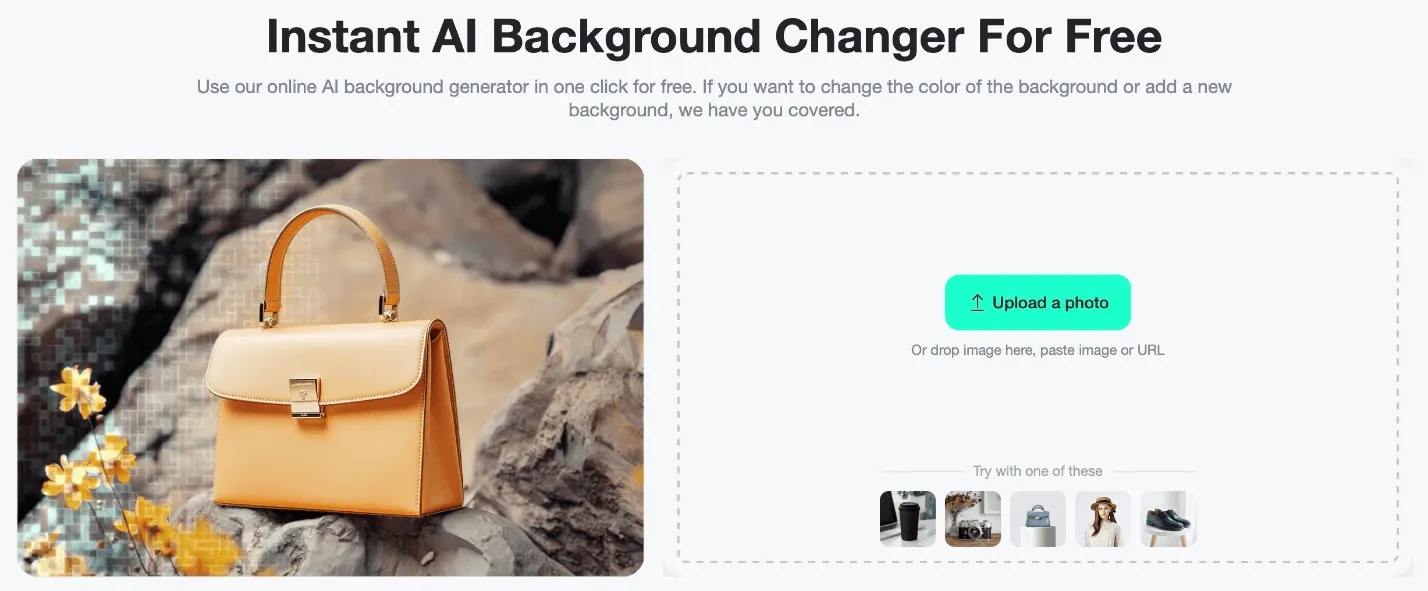
Open your browser and head to the insMind background generator tool. It works online and needs no downloading, so you can use it on any device.
Step 2: Upload Your Photo and Let AI Do the Magic
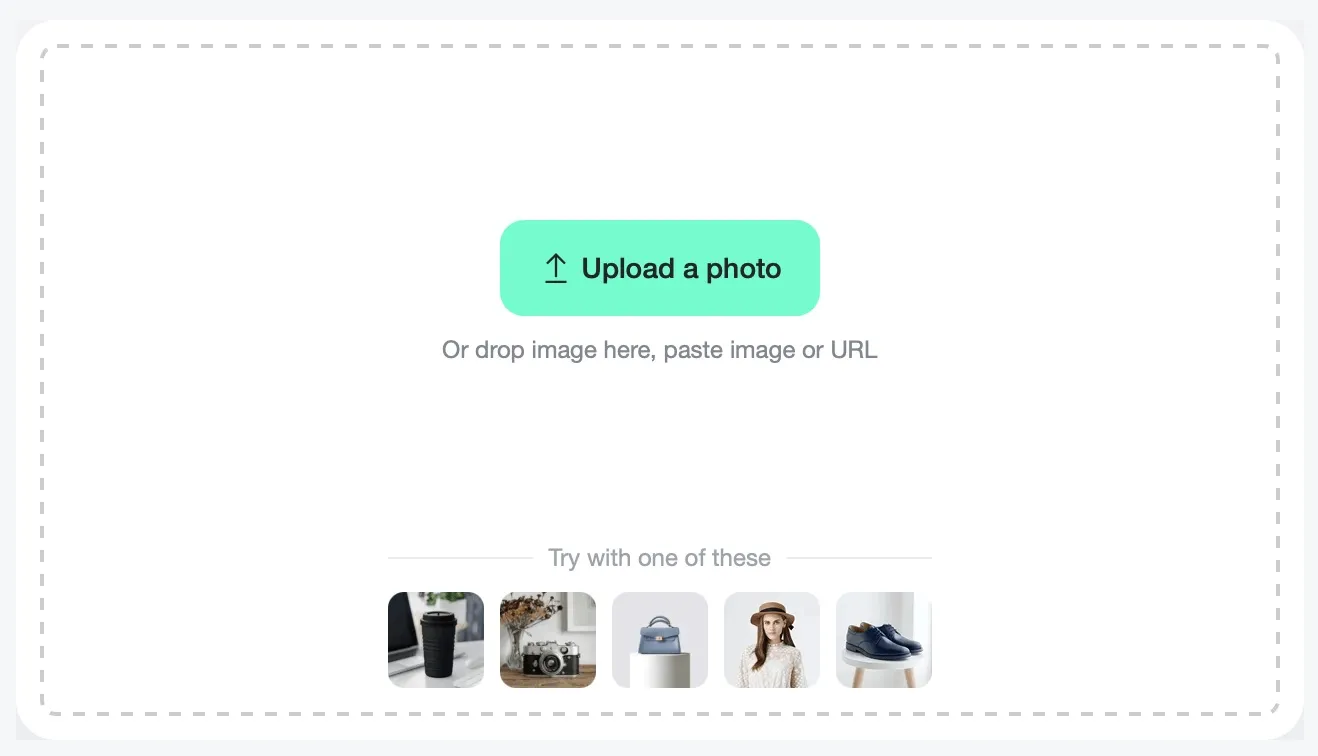
Click "Upload a Photo" to add your image whose background needs to be replaced. Now, AI will automatically detect the main subject, and you will have different background options to choose from.
Step 3: Choose and Apply Your Perfect AI-Generated Background
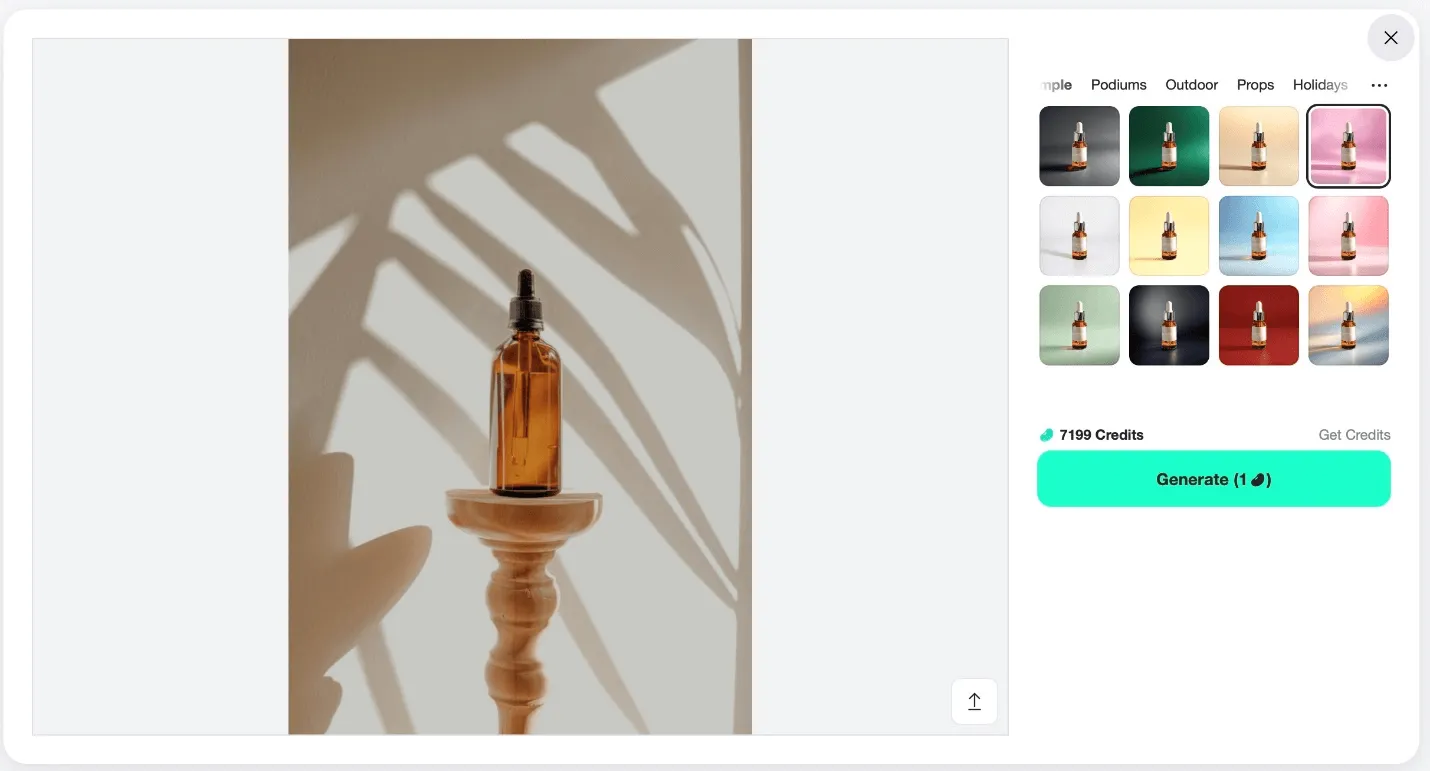
insMind offers multiple background categories, and each one has several background options. Simply click to select the background that you want on your image and click "Generate".
Step 4: Download Your Stunning New Image in Seconds
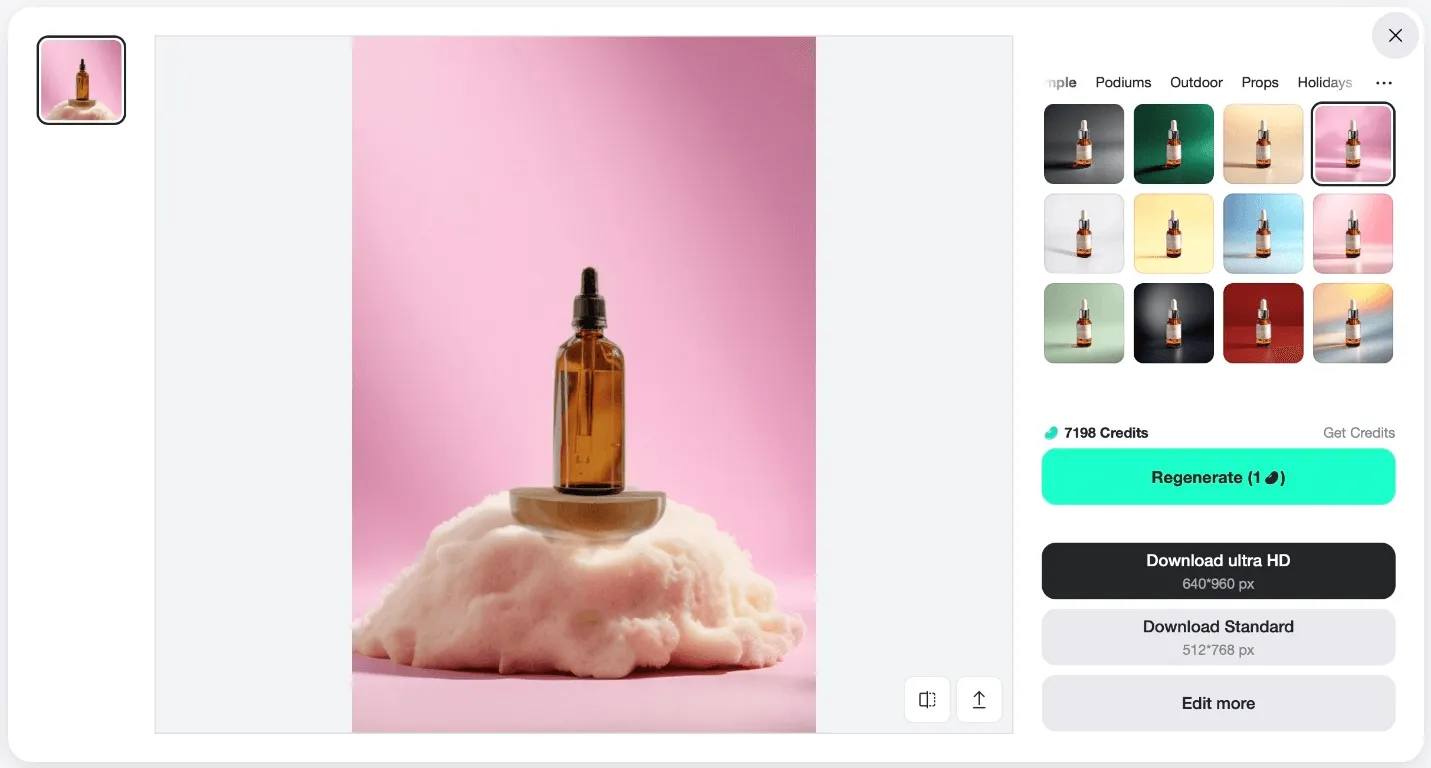
You will have your image generated within seconds. Simply click "Download" to save that image on your offline storage, whether you are on a computer or a smartphone.
Part 4. insMind's AI Background Changer Meets All Your Requirements
AI background generators aren't only entertaining, they are also practical. Whether you are a brand, creator, or an ordinary user, the insMind AI Background Changer ensures easy addition of a background to photo content to suit various purposes. This is how it is already being used within various industries.
For small businesses showcasing products with seasonal or themed backgrounds
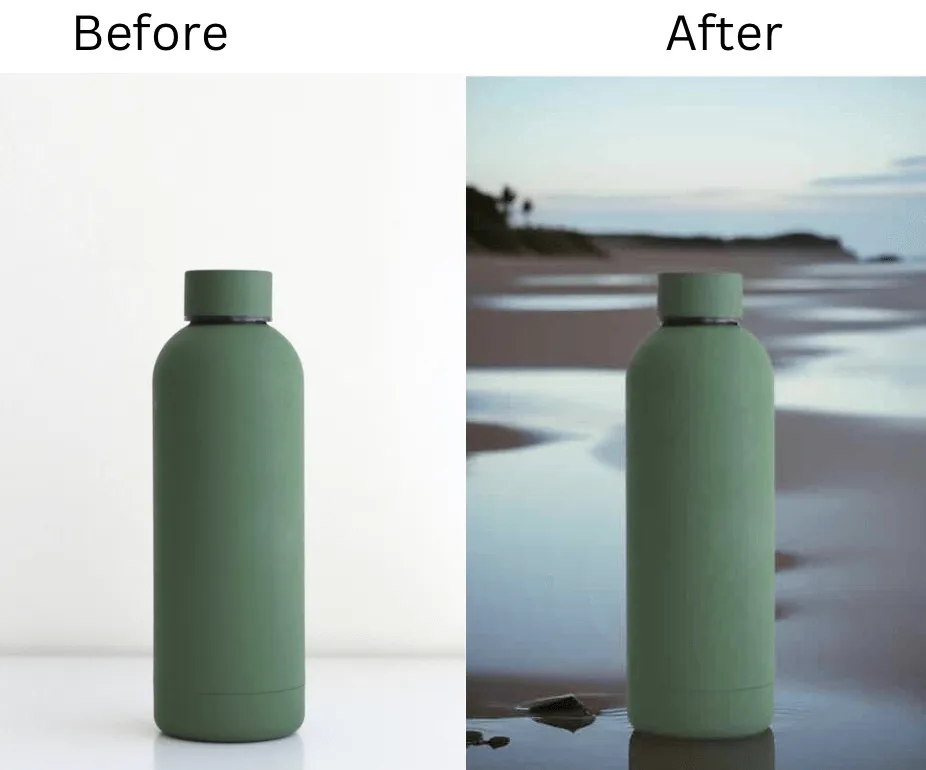
The entrepreneurs in the small business world recognize that a first impression lasts forever. By using an AI background generator offered by insMind, you can apply custom themes to your product shots to fit holidays, seasons, or promotions without the physical backdrops or costly rigs.
Hence, you may create an image of a product with a background, such as a fireplace or a snow-covered store window, on Christmas. In the case of summer campaigns, replace the beach or tropical image. It is a background swapping tool that allows you to refresh your listings frequently to suit the mood or season of your campaign.
Ensure that you do not leave out a lot of space in your pictures or use frames where the content is not evenly distributed. It is because the AI background generator is the most effective when your subject is centered, with clean and clear cropping and without distracting edges.
Clean Up Product Images with a Transparent, Black, or Pink Background in One Click
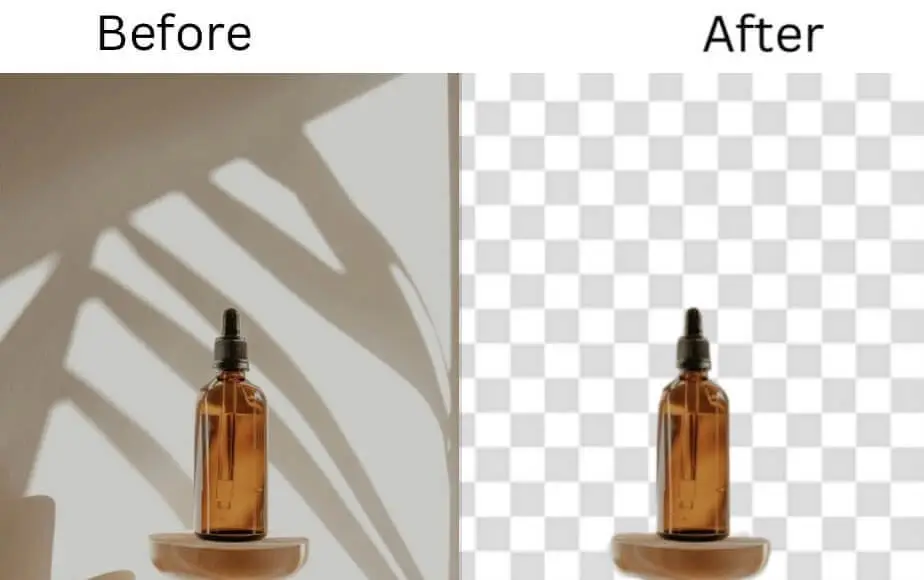
When you sell in a shop like Shopify, Amazon, Etsy, or eBay, then consistency is key. Bidders anticipate clear images and those that have a transparent background or solid coloring to bring out the product. The AI background changer in insMind allows you to apply the background easily, either in pink, white, black, or even a transparent background.
The insMind's AI background generator photo tool will quickly process high-quality backgrounds for your product photography and keep your listing consistent and professional.
Create Professional ID Photos with Required Backgrounds Using AI
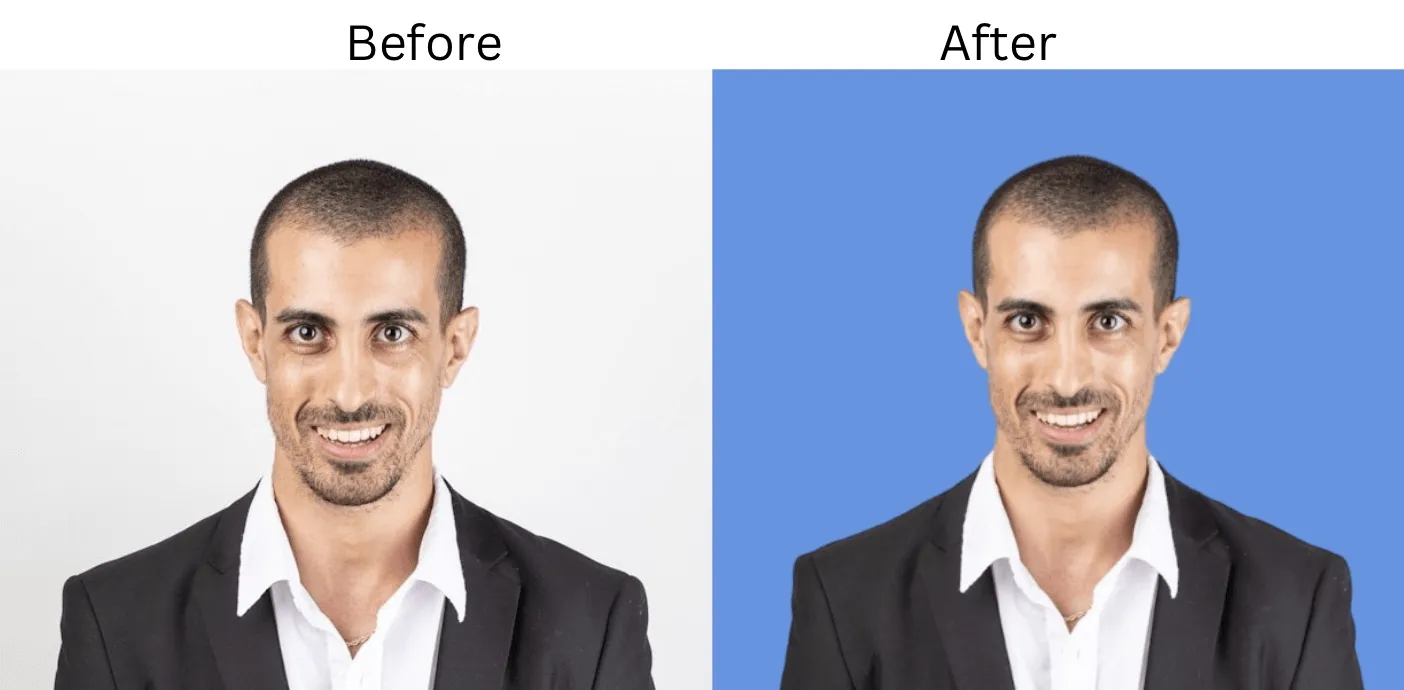
Creating photos for passports or visas often involves a visit to a photo shop. Otherwise, you need to manually edit photos using complicated software like Photoshop. Using insMind, you only need one click to add a blue background to any photo or add any other color background, so there is no problem of creating ID photos in a standard image format.
When you are making photos to use in school IDs, resumes, formal applications, and travel documents, this background generator will make sure that the photo you are printing fits the format correctly. Smooth edges of subjects and even lighting will make your ID photos professional. It works regardless of the phone camera used and requires no technical image editing experience.
Expand Your Aesthetic with AI Uncrop Image & Background Tools
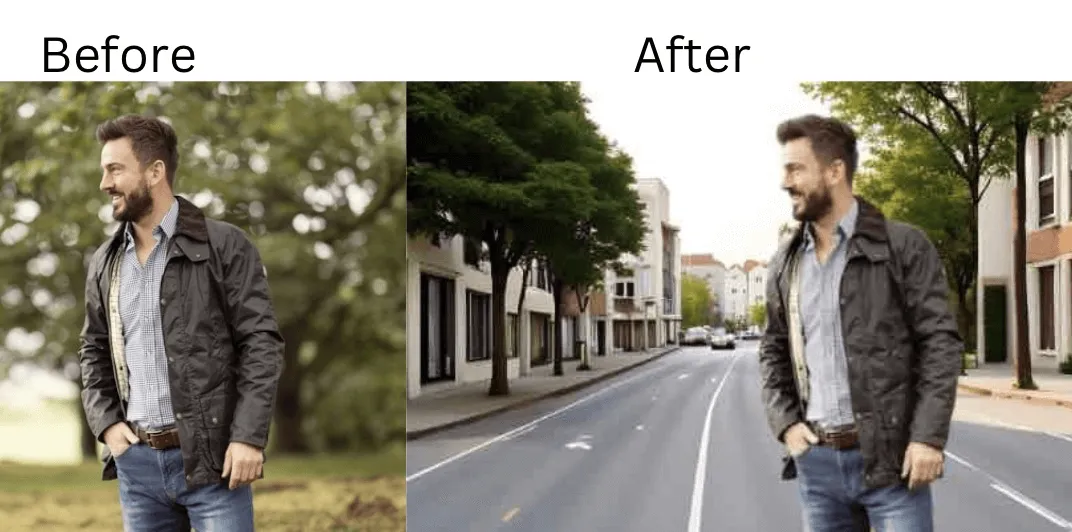
Creators and influencers constantly need to look for ways to improve their content. Sometimes the picture that you took is a certain pose that you like, but the background is not that nice. That is where insMind fits in. The AI Uncrop Image feature will help you broaden the frame of your picture.
It is perfect for the platforms where image aspect ratio and size matter. Once you uncrop your image to the right size, change the dull or cluttered background. Convert it to a breathtaking mountainous horizon, sunset, cafeous environment, or an urbanistic background using the AI background generator.
Whether you are using on-brand visuals on an aesthetic Pinterest board or the thumbnail on a YouTube video, this combo will allow you to move past filters and create unique and eye-catching images that blend with your lifestyle brand.
Conclusion
You can create quality content without being a professional designer because tools such as the AI Background Changer on insMind make it easy to choose from high-quality image backgrounds. As a businessperson, creator, or casual user, these AI features assist you in making ordinary photos into high-end visuals in a few clicks.

Ryan Barnett
I'm a tech enthusiast and writer who loves exploring AI, digital tools, and the latest tech trends. I break down complex topics to make them simple and useful for everyone.
Keep reading

How to Translate Comics Using AI: A Complete Guide
Learn how to translate comics using AI tools, maintain art style, and understand cultural nuances with this detailed guide.

Discover the Trending AI Fruit Image Prompts You Can Use Today
Explore the trend of AI fruit prompts image and learn how to create stunning visuals with insMind's AI image generator.

How to Open Eyes in Photo with AI: Fix Closed Eyes in Seconds
Learn how to open eyes in a photo using AI tools. Fix blinking and closed eyes instantly with insMind and improve portraits in just a few clicks.

How to Change Cabinet Color Using AI: A Smarter Way to Visualize Your Kitchen Makeover.
See how to change kitchen cabinet color digitally before repainting. Compare cabinet finishes and visualize your design risk-free.

Remove Hat from Photo Online Free: Quick & Easy AI Tool
Here's a quick guide on how to remove a hat from your photo online in seconds.

How to Change Eyebrow Color in Photos Online with AI
Use insMind's AI Eyebrow Filter feature to change eyebrow color in portraits online.

How to Change Beard Color in Photos Online with AI
Learn how to change beard color in photos online with insMind's AI Image Generator.

5 Headshot Poses: How to Look Confident and Professional in Any Photo
Learn the best headshot poses for men and women to look confident, professional, and camera-ready in any profile photo.

Festive Christmas Makeup Ideas for 2025: Easy, Eye-Catching, and Fun Holiday Looks
With insMind's Nano Banana Pro, you can preview and find the perfect Christmas makeup before you try it.

Quick Guide: How to Change the Date of a Photo Without Losing Quality
Explore the guide for 2 effective methods for date changing in photos.

Erase the Past: How to Remove Ex from Photo Online with AI
Remove an ex from a photo online using AI. insMind helps you erase a former partner from pictures instantly and keep a clean background.

Free Online Camera Angle AI- Change 360° angles of Images
This article introduces how to use Camera Angle AI to create captivating 360° visuals and dynamic perspectives.

What is a Caricature? Amplifying Personality Through Art
Discover how AI tools can help you create unique caricatures that express personality and creativity

Create a Winning AI Resume Photo: Skip the Photoshoot
This article introduces how to use an AI Headshot Generator to create a professional portrait, saving you time and offering a variety of style choices.

AI Background Remover for Graphic Designers: Remove Objects from Background
This article introduces how to use AI Background Remover to precisely remove backgrounds and enhance the image altogether.

Partial Background Removal: How to Remove a Part of an Image Background
This article introduces how to remove or replace image backgrounds like a pro for a perfect shot.

Create 5120x1080 Instagram Reels: Your Step-by-Step Guide
This article introduces how to create 5120 x 1080 Instagram Reels to make your wide content unique and stand out.

10 Prompts Using Nano Banana to Create Vintage Retro-Style Images: The Ultimate Guide
This article introduces how to use Nano Banana prompts to create stunning vintage retro-style images, offering an ultimate guide for aesthetic photo generation.

Poshmark Success in 2025: Tips & Tools to Sell Fast and Profit
This article introduces how to master Poshmark selling using the latest rules and AI photo editors.

How to Sell on Etsy: Common Pain Point sand Useful Tips & Tools to Sell Faster
This article introduces how to master the top-selling tools for a thriving Etsy shop with AI Photo Editor.

20 Creative Birthday Card Ideas to Make Anyone Smile
Discover creative birthday card ideas for loved ones! From DIY crafts to AI-designed templates, make every celebration extra special.

Sharpen Your Screens: AI Screenshot Enhancer for Perfect Clarity
InsMind's AI screenshot enhancer sharpens blurry images, improves text clarity, and boosts resolution instantly for professional-quality results.

AI Selfie Enhancer: Retouch Portrait with Ease
AI Selfie Enhancer: Instantly retouch portraits, fix blur, lighting, and skin for stunning, natural-looking photos effortlessly.

Erase and Replace Made Easy: How to Replace Object in Your Photo with AI
insMind's AI Replace tool instantly removes unwanted photo elements and swaps them with AI-generated objects, offering effortless, high-quality image editing.

E-Commerce Image Resizing Made Easy: One Click for All Platforms
Instantly resize product images for all e-commerce platforms in one click with insMind's smart batch tool.

From Blurry to Brilliant: Transform Low-Quality Photos with AI Image Enhancer
Turn low-res photos into stunning HD images effortlessly using AI-powered enhancement.

Uncrop AI Breakthrough: Seamlessly Restore Lost Edges to Any Photo
AI Uncropping transforms tight photos into full scenes effortlessly with insMind's advanced tool, enhancing creativity and visual appeal.

How to Add Stunning AI-Generated Backgrounds to Your Photos Online
AI Background Changer simplifies photo editing with instant, high-quality background changes for all users.

Fix Cropped Photos Fast: Free AI Image Expansion Tool for Beginners
AI Image Expender effortlessly enlarges photos while maintaining quality—perfect for social media, printing, and design projects.

Erase Backgrounds Online: Best Ways to Use a Background Remover
Learn how to easily remove image backgrounds with insMind for eCommerce, ID photos, signatures, and more.

Create Your Dream Closet Using Virtual Clothes Try-On
Explore outfit ideas and build your perfect wardrobe with AI-powered virtual clothes try-on—easy, fun, and free to use.

How to Stitch Two Photos Together Without Any Design Skills
Learn how to stitch two photos together easily using the insMind Photo Stitcher. No need for prior design skills or professional knowledge to use it.

Perfect Hairstyles for Your Next Big Event: Try on Virtually with insMind
Find the perfect hairstyle for weddings, proms and parties. Try on different looks virtually to see what suits you best before the big day.

Free AI Age Filter: See What You'll Look Like at Any Age with insMind
Use our free AI age filter to see what you'll look like at any age. Try realistic age progression effects instantly online with just one photo.

Timeless Hairstyles for Women Over 50: Celebrate Your Unique Style
Discover timeless hairstyles for women over 50 and find the perfect look to match your unique style with the help of insMind's virtual tools and expert tips.

Get Inspired: 5 Creative Sticker Design Ideas from Photos
Discover fun ways to use a sticker maker to add stickers to photos and create unique, custom designs effortlessly. Try it for free with insMind!

Top AI Tools for Retouching Portrait Pictures Online in 2025
Retouch portraits online free with 2025's top AI tools, especially recommend to use insMind AI Face Enhancer.

How to Erase Text from a Photo: Using Photoshop and an Easier Way
Learn step-by-step how to remove text in Photoshop plus a quicker alternative method.

How to Remove Watermark from Photo in Photoshop and Easier Way
Learn how to remove watermarks in Photoshop and explore insMind for an easier online alternative.

How to Create Professional LinkedIn Profile Picture & Background
Enhance your LinkedIn profile with a standout avatar and custom background. Create professional, eye-catching visuals in seconds using insMind’s easy tools!

Aesthetic Instagram Bio Ideas: Crafting a Beautiful Profile
Elevate your Instagram bio with creative ideas and tools to design a stunning profile that truly stands out.

Instagram Bio Ideas for Boys: Personalized Profiles Revolutionize Your Instagram Presence
Discover creative Instagram bio ideas for boys and tools from insMind to transform your profile. Enhance your photos easily!

How to Add and Customize Your TikTok Profile Picture
Discover how to add a profile picture on TikTok or get an invisible profile picture. Enhance your profile with insMind's tools in minutes!

How to Remove Background from Icon
Discover how you can remove background from icons with useful tools. Compare these tools’ key features and choose the suitable background remover.

Instagram Bio Ideas for Girls: Tips and Tools to Elevate Your Profile
Discover creative Instagram bio ideas for girls and tools from insMind to transform your profile. Enhance your presence with our helpful tips!

How to Create Perfect Xiaohongshu Content: A Complete Guide for RedNote
Master the art of creating engaging Xiaohongshu content with this complete guide! Learn tips, strategies, and techniques to succeed.

Xiaohongshu Template Size Guide: Perfect Dimensions for Photos and Videos in 2025
Discover perfect Xiaohongshu template dimensions for 2025. Optimize photos, videos, and content to captivate your audience effortlessly!

The Best Photo Editor for Xiaohongshu (REDnote) - insMind
Want to know about the trendy Xiaohongshu? Explore the article to understand what Xiaohongshu is and discover the best photo editing tool for its images.

Best 4 Uncrop AI Tools to Transform Your Photos in 2025
Explore the best 4 uncrop AI tools of 2025 that can magically transform your photos by restoring and enhancing their original size and quality.

Top 5 AI Photo Filters in 2025: Instantly Transform Your Photos!
Discover the top 5 AI photo filters of 2025 that can instantly transform your photos into stunning works of art!

Passport Size Images vs Regular Photos: Everything You Need to Know
Learn the key differences between passport photos and regular photos.Let you easily cope with various official and personal needs.

Top 10 AI Image Watermark Remover
Find the best AI watermark remover tools to clean your photos. Explore free image watermark removers that make removing watermarks quick and easy.

How to Fix Pixelated Images with Photoshop and Online Tools
Discover how to restore image clarity like a pro! Learn step-by-step methods to fix pixelated images using Photoshop and easy online tools.

How To Make Your Photos Stand Out in Instagram
Learn how to make how to make your photos stand out in Instagram with expert tips on personalized backgrounds, custom images, and advanced tools like insMind for filters, stickers, and more.

Enhance Your Images with insMind's Stunning Image Overlay Effects
Unlock creativity with insMind's Image Overlay Effects! Effortlessly layer colors, textures, and more to give your photos a new look.

Black Friday Banner Ideas and Inspiring Examples
Elevate your Black Friday marketing with stunning banner ideas that capture attention and drive sales!

Boost Your Black Friday Visuals with Stunning Templates
Prepare your Black Friday campaign to shine with stunning visuals that will captivate shoppers and boost your sales. Learn how to transform your product photos with the latest tools, enhance your visuals

Top 10 Free Background Remover Tools to Erase Background
Looking for the best ways to erase backgrounds effortlessly? This guide reviews the most effective free tools for removing backgrounds, perfect for anyone looking to enhance their images.

How to Unblur Text: 10 Free Ways to Make Blurry Text Clear in 2025
Are you struggling to read blurry text in your images or documents? In this article,we explore effective techniques and tools to enhance text clarity.

Best Holiday Instagram Captions in 2025: Top Ideas & Photo Tips
Make your holiday memories unforgettable with the best Instagram captions and photo tips of 2025!

Enhance Your Photos: 8 Top Free AI Image Enhancers in 2025
Discover the top eight AI tools that make photo enhancement fast, easy, and free.These powerful tools can sharpen details, boost resolution, and bring out vibrant colors, giving your images a professional touch.

AI Image Extenders in 2025: 10 Best Tools to Uncrop and Expand Photos
Discover the top 10 AI-powered image extenders of 2025! See how these top-rated tools can transform your creative process and elevate image quality.

How to Create a Black Friday Sale Banner with Free Templates: A Comprehensive Guide
How to create a compelling Black Friday banner? Make your Black Friday sale banner stand out using modern design styles and ideas.

Top 10 Black Friday Software & App Deals 2025 Best Buy
This article will cater to find the best 2025 Black Friday deals on app and software. We have gathered the top 10 tools with Black Friday discounts.

Amazon Black Friday Strategy 2025: Complete Guide for Sellers and Vendors
Looking for the best Amazon Black Friday sale guide? This article will guide you on the best steps you can take to increase your customers.

Creative Ideas to Capture Stunning Mirror Selfies
Looking to upgrade your mirror selfie game? Discover creative ways to capture stunning mirror selfies that stand out.

Halloween Costume Ideas Plus Tips for 2025
Discover unique costume ideas for men and women, along with essential tips to help you stand out this spooky season. Let’s make this Halloween unforgettable!

Portrait vs Landscape: Every Difference You Need to Know
Wondering whether to choose portrait or landscape orientation for your next project? This article breaks down the key differences between the two.

Elevate Your Profile: 10 Unique Picture Ideas for Any Use
Discover 10 unique ideas that blend professionalism with personality, helping you stand out whether it's for work or personal branding.

Top 10 AI Clothing Models to Boost Your Online Sales
Discover a cost-effective solution to boost your business by exploring the top 10 AI clothing models you can use to build your clothing business.

Top 5 Best Free AI Photo Editors for Amazon
Are you wondering what the best Amazon photo editor for creating a product image is? Explore free AI photo editor for Amazon from our comprehensive guide.

Amazon Image Requirements and Size - The Latest 2025 New Rules
Discover the latest Amazon image requirements for 2025 with our comprehensive guide. We will help you ensure that your product images meet Amazon's standards.

Etsy Image Size and Requirements 2025 New Rules
Stay updated with the 2025 Etsy image size and requirements. Learn how to optimize your product images for better engagement and increased sales.

Boost Your Product Photos: Expert Tips for Adding Shadows to Images
Boost product photos by adding shadows online. Follow expert tips to enhance image depth and appeal effortlessly.

Boosting eCommerce ROI: Top 10 Tips to Increase ROI in 2025
Read this article to discover 10 effective strategies to boost eCommerce ROI. And enhance product photos effortlessly with insMind for higher conversions.

Learn the Basics for eCommerce Photo Editing- Free and Easy!
Discover everything you need to know about eCommerce photo editing, the best services, apps, and successful tips.

How To Remove White Background From Logo
Want a professional logo that stands out? Learn how to remove white background from logo and build trust with your clients. Discover how insMind makes it easy.

How To Remove Black Background Online From Image?
Learn how to remove black background from an image online with our easy-to-follow guide.

5 Best Background Replacers Available in the Market
Do you want to improve your product photos visually? Read this article to learn about different background replacers and pick the best one for your needs.

A Complete Guide to Replace Background in Photoshop & Its Free Alternative
Are you looking for a way to replace the background in Photoshop with the most optimum method? Check out this guide, which discusses all the relevant information.

Top 10 AI Background Changers Every Photographer Should Know
Do you want to add a new life to dull images? Go through this article to learn about the top AI background changers available in the market.

Enhance Your LinkedIn Profile Photo with Professional Tips
Elevate your LinkedIn profile photo with expert tips from insMind. Stand out professionally with ease!

How to Create Marketing Material with Background Remover
Learn to craft impactful marketing visuals using insMind's Background Remover. Enhance your brand effortlessly!

How to Effectively Add Black Backgrounds in Product Photography
Learn to add black backgrounds in product photography to enhance visual impact and focus.

How to Create a Transparent Background for E-commerce
Master creating transparent backgrounds for e-commerce with our quick and effective tutorial at insMind.

Best 10 Creative Ideas for Pet Photography
Explore the top 10 creative and unique ideas to capture stunning pet photography moments.

Boost Sales: Upgrade Product Photos for Shopify, Amazon, Etsy
Increase online sales by enhancing product photos for major e-commerce platforms.

10 Creative Clothing Photography Tips for Standout Product Shots
Elevate your brand with 10 creative clothing photography tips for standout product shots. Capture attention and drive sales success!

Discover the Top 10 Photo Background Remover Tools of 2025
Explore 2025's top 10 photo background remover tools. Find the perfect software to seamlessly erase backgrounds and enhance your images.

Image Resize: How To Change Image Size Easily
Learn to resize your image easily with our step-by-step guide. Quick tips for perfect sizing on any platform.

How to Make Your Logo Transparent in 2 Easy Ways
Discover quick and easy methods to make your logo transparent. Perfect for beginners and professionals alike - enhance your brand now!

How to Make the Background of a Picture Transparent?
Learn to easily make your picture backgrounds transparent with our guide, perfect for enhancing website and product or profile images.

3 Easy and Free Ways to Remove Unwanted White Backgrounds
Discover 3 easy, free methods to remove white backgrounds from images, perfect for enhancing photos without any hassle or cost.

How to Change Background Color on Instagram Story?
Discover the most effective online tool for changing the background color of your Instagram story. This method requires no app or software installation.