


In the ever-evolving world of AI animation, two models stand out for their exceptional capabilities: Seedance 2.0 and Veo 3.1. If you've been exploring options for creating stunning, high-quality animations, you've probably come across these names. But when it comes to choosing between them, which one truly delivers on its promises? In this detailed comparison, we’ll explore the features, performance, and user experience of both tools to help you make an informed decision.
Quick Verdict: Seedance 2.0 vs Veo 3.1
Both Seedance 2.0 and Veo 3.1 offer powerful AI animation capabilities, but they shine in different areas. Seedance 2.0 excels in creating stable, cinematic videos with precise motion control, making it ideal for professional and commercial projects. Veo 3.1, on the other hand, offers a broader range of creative tools and flexibility, perfect for artists seeking diverse stylistic options. Below is a quick summary of their strengths:
| Feature | Seedance 2.0 | Veo 3.1 |
|---|---|---|
| Stability & Precision | High | Moderate |
| Creative Flexibility | Moderate | High |
| User Interface | Intuitive | Flexible |
| Performance | Faster | Variable |
Table of Contents
- 01 What Seedance 2.0 Brings to the Table
- 02 Understanding Veo 3.1's Features
- 03 Using Seedance 2.0 & Veo 3.1 on insMind
- 04 Feature Comparison: Seedance 2.0 vs Veo 3.1
- 05 User Experience with Seedance 2.0 and Veo 3.1
- 06 Performance Analysis: Which AI Tool is Faster?
- 07FAQs about Seedance 2.0 and Veo 3.1
- 08Conclusion
What Seedance 2.0 Brings to the Table
Seedance 2.0 is a comprehensive AI model designed for cinematic video creation. Specifically built for creating stable, cinematic videos, Seedance 2.0 stands out with its sophisticated motion control and precise character consistency. This makes it particularly suitable for commercial use where quality and predictability are paramount.
The model operates by allowing users to input either text descriptions or reference images to generate videos that boast seamless motion and clear visual details. A significant advantage of Seedance 2.0 is its speed — it processes inputs quickly, which is a boon for creators working on tight deadlines. Additionally, the model's intuitive interface ensures that even beginners can produce professional-grade content without a steep learning curve.
Another highlight is Seedance 2.0's ability to offer predictable results. By leveraging a library of video inspirations and viral prompts, users can select a style or concept they like and replicate it reliably. This feature reduces the number of trial-and-error attempts, saving both time and resources. Consequently, Seedance 2.0 is not just a tool but a robust solution for video creators who value efficiency and consistency.
Understanding Veo 3.1's Features
Google Veo 3.1 is another powerful AI animation model available on the insMind platform. It is designed to cater to a broader range of creative needs, offering flexibility and a wide array of stylistic choices. Unlike Seedance 2.0, which focuses on cinematic stability, Veo 3.1 provides more artistic freedom, making it an excellent choice for artists and content creators looking to experiment with different styles and effects.
Veo 3.1's user interface is designed for flexibility, allowing creators to customize their animations with a variety of settings. Users can adjust everything from color schemes to motion paths, which means the sky's the limit when it comes to creativity. This flexibility, however, comes at a trade-off with processing speed, which can vary depending on the complexity of the project.
Artists who value creative expression over predictability will find Veo 3.1 especially appealing. Its ability to render complex animations with unique effects opens up opportunities for experimentation, although it may require a bit more patience and trial to achieve the desired outcomes. For those looking for a tool that lets them push creative boundaries, Veo 3.1 is a strong contender.
Using Seedance 2.0 & Google Veo 3.1 on insMind
Getting started with Seedance 2.0 or Google Veo 3.1 on the insMind platform is straightforward, thanks to its user-friendly interface. Here's a step-by-step guide to help you navigate the process:
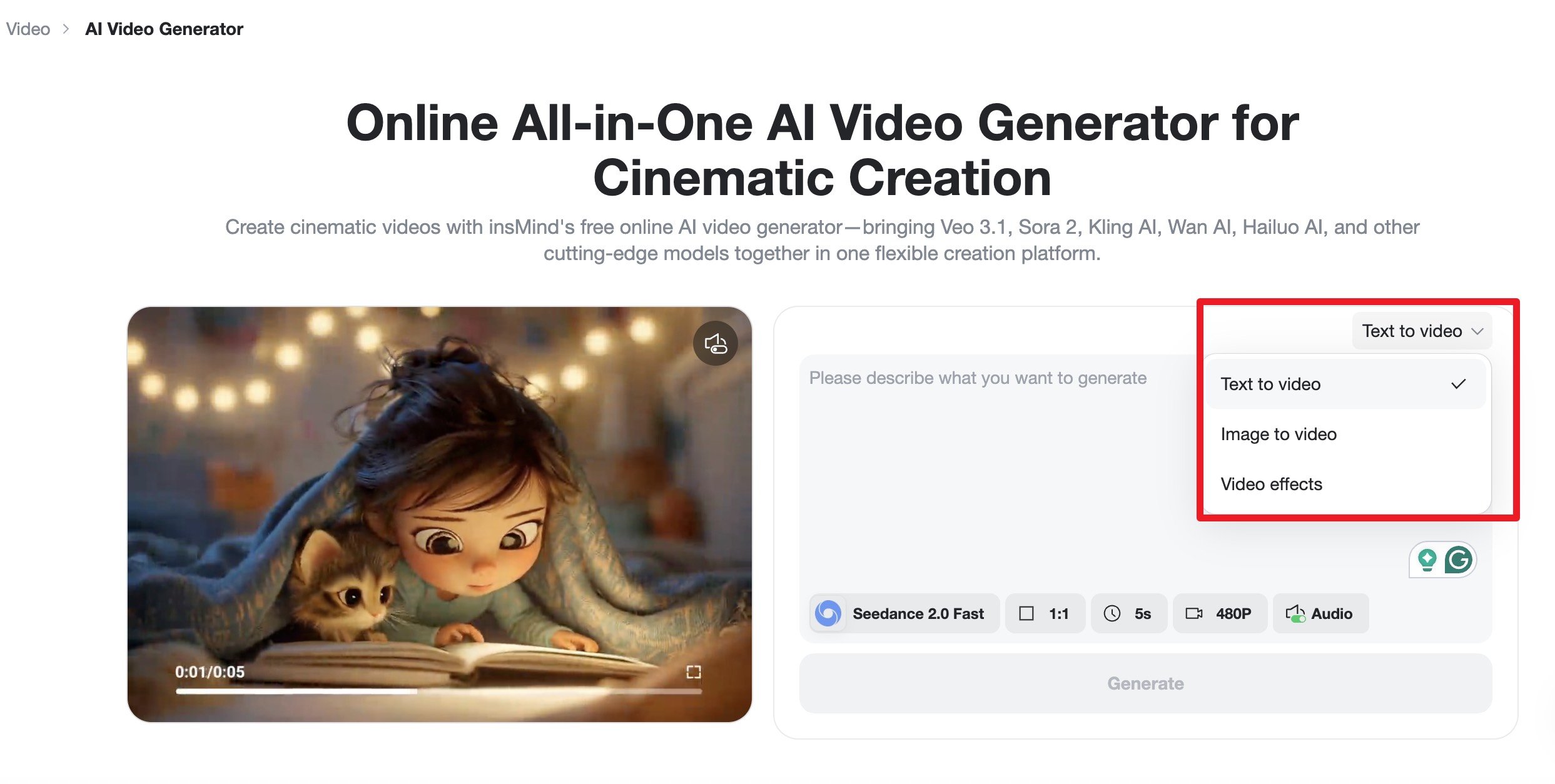
Step 1: Access the Interface
Begin by visiting the Seedance 2.0 or the Google Veo 3.1 page on insMind. You'll want to decide if you're starting from a text or an image — both approaches offer unique creative advantages. This step ensures you have the right base for your project.
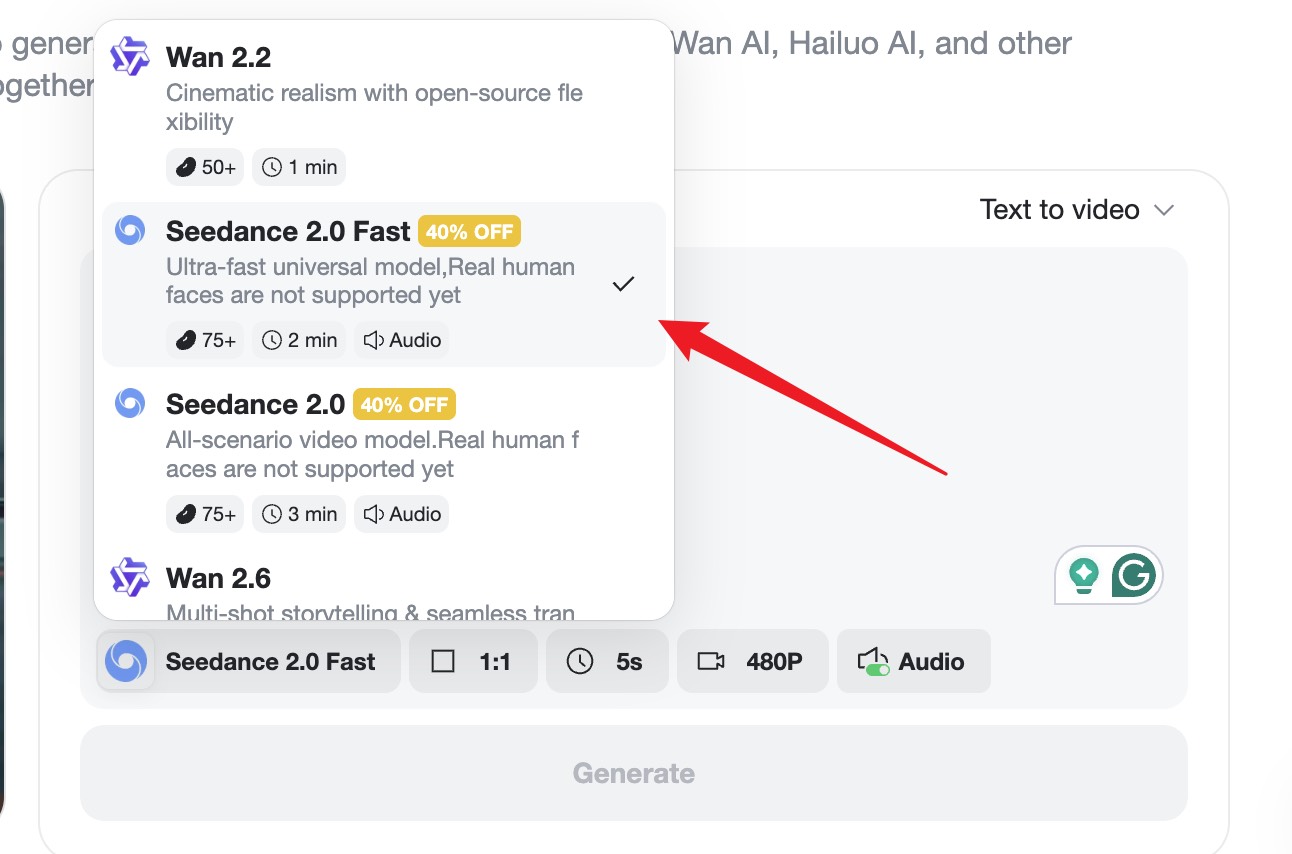
Step 2: Choose Your AI Model
On the insMind interface, you can select from various models including Seedance 2.0 and Veo 3.1. For this workflow, choose Seedance 2.0. Adjust settings like aspect ratio, resolution, and duration to fit your specific needs.
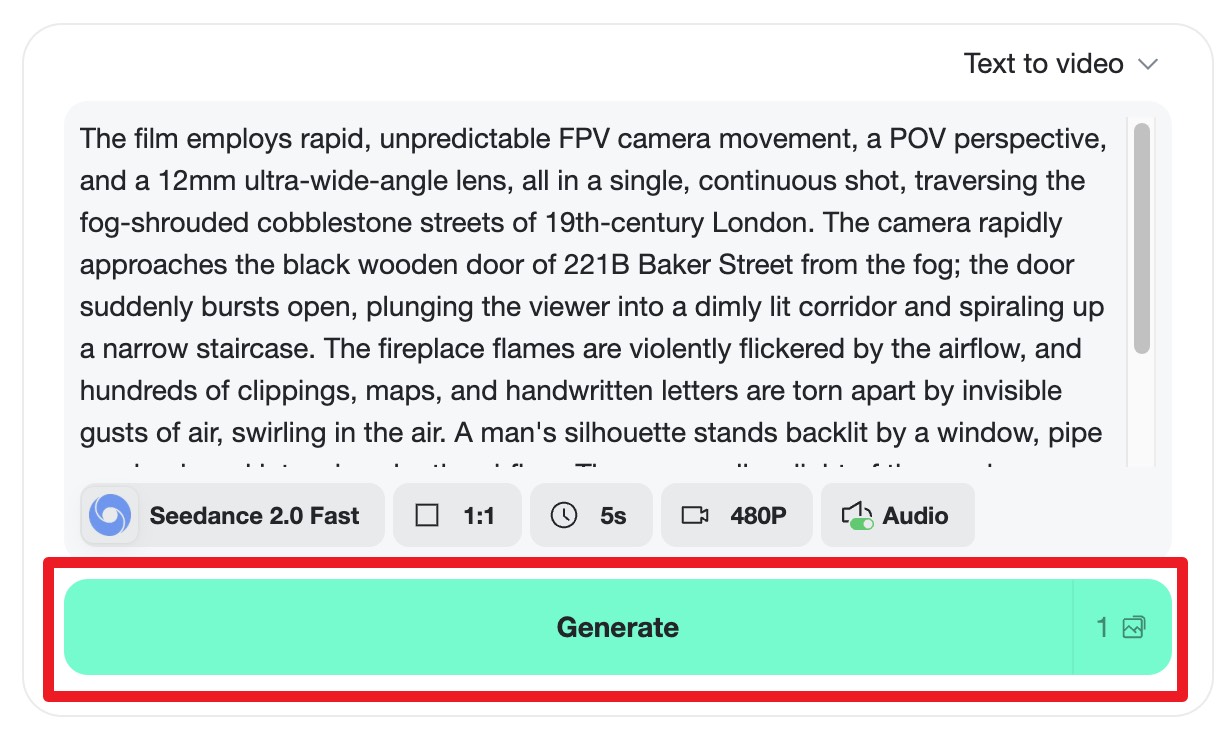
Step 3: Ignite the Generation
Input your descriptive prompt or upload a reference image to guide the AI. Then, hit "Generate" to watch Seedance 2.0 work its magic. The model will quickly render a video that balances fluidity with high-quality visuals.
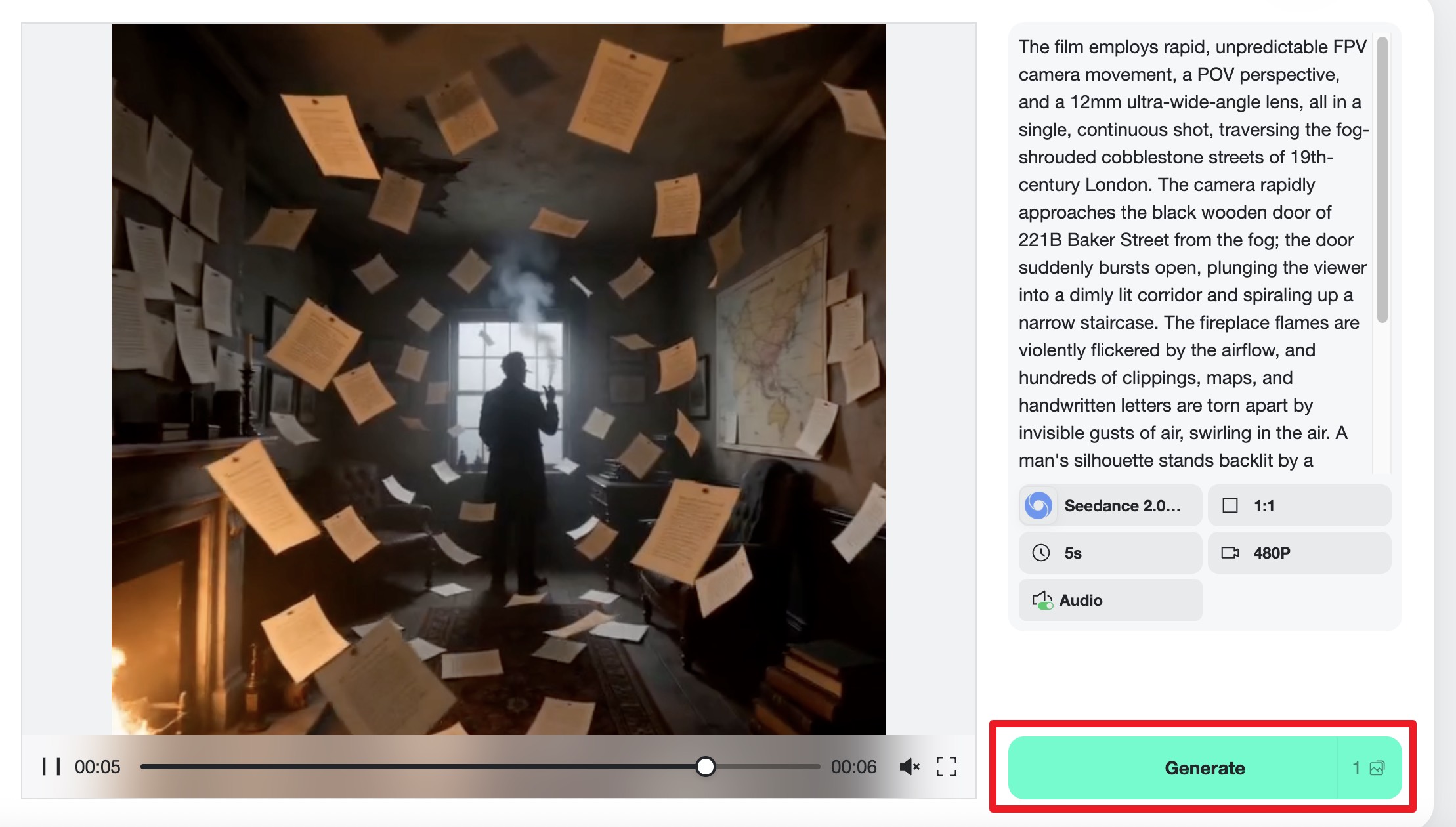
Step 4: Preview and Export
Once generated, preview your animation to ensure it meets your expectations. If satisfied, click "Download" to save your creation in high resolution, ready for any platform you choose.
Feature Comparison: Seedance 2.0 vs Veo 3.1
When it comes to features, both Seedance 2.0 and Veo 3.1 offer unique strengths that cater to different needs. Seedance 2.0 is tailored for those looking for precision and stability. Its motion control capabilities ensure that videos are smooth and characters maintain consistent appearances throughout.
Veo 3.1, in contrast, offers a more flexible toolkit. It allows for a wider range of styles and effects, giving artists the freedom to explore more creative avenues. However, this can sometimes result in longer processing times, especially for complex animations. The choice between these models often boils down to whether you prioritize speed and reliability or creative freedom and variety.
In practical terms, if your project demands a polished, professional finish and you need it fast, Seedance 2.0 is your best bet. If you’re willing to spend more time exploring creative styles, Veo 3.1 might be the model for you. This versatility in options is what makes the insMind platform so appealing, as it supports both models to cater to a wide range of users.
User Experience with Seedance 2.0 and Veo 3.1
Having tested both models extensively, I can say that the user experience with Seedance 2.0 is streamlined and intuitive. The interface is designed to minimize the learning curve, which means you can start creating high-quality content almost immediately. The prompts and settings are clear, making it easy to achieve the desired results with minimal adjustments.
On the other hand, Veo 3.1 offers a different kind of experience. While it provides more creative options, it also demands a bit more patience as users navigate through its extensive features. It's less about instant results and more about exploring possibilities, which can be both exciting and challenging for users who enjoy experimenting with new styles.
Overall, the choice of model can significantly impact the creative process. Seedance 2.0 is ideal for users who prefer a straightforward, efficient workflow, while Veo 3.1 caters to those who enjoy a more exploratory approach. Whichever model you choose, insMind ensures a supportive platform for your creative needs.
Performance Analysis: Which AI Tool is Faster?
Speed is a crucial factor for many creators, and in this regard, Seedance 2.0 holds a significant edge. Its algorithms are optimized for fast processing, which means you can generate videos quickly without compromising on quality. This is particularly beneficial for commercial projects where time is of the essence.
Veo 3.1, while offering a broader range of creative possibilities, can be slower depending on the complexity of the animation. Complex scenes or intricate effects may require more processing time, which is a trade-off for its creative flexibility. For projects where time isn't a primary concern, this is a manageable compromise.
In scenarios where multiple iterations are needed, Seedance 2.0's speed is invaluable. You can test various prompts and settings in a short amount of time, making it a favorite among creators who demand efficiency. For those who prioritize creative exploration over speed, Veo 3.1 remains a strong option.
FAQs about Seedance 2.0 and Veo 3.1
What is Seedance 2.0 best used for?
Seedance 2.0 is best used for creating stable, high-quality cinematic videos. Its precise motion control makes it ideal for professional and commercial projects where consistency and speed are crucial.
How does Veo 3.1 differ from Seedance 2.0?
Veo 3.1 offers more creative flexibility with a broader range of styles and effects, catering to artists who want to experiment. Seedance 2.0 focuses on stability and speed, providing a more predictable output.
Can I use both models on insMind?
Yes, you can use both Seedance 2.0 and Veo 3.1 on the insMind platform. It allows you to switch between models based on your project requirements, providing flexibility in your creative process.
Is there a learning curve with these AI tools?
Seedance 2.0 is designed to be user-friendly with a minimal learning curve, making it accessible for beginners. Veo 3.1 requires a bit more exploration due to its extensive features, which can be rewarding for experienced users.
Which model is faster in rendering videos?
Seedance 2.0 generally offers faster rendering times due to its optimized algorithms, making it suitable for projects with tight deadlines. Veo 3.1 may take longer due to its complex creative features.
Conclusion
In the battle between Seedance 2.0 and Veo 3.1, the choice ultimately depends on your specific needs. Seedance 2.0 is perfect for those who prioritize speed and stability, while Veo 3.1 is ideal for creative exploration. Whichever you choose, the insMind platform provides a robust environment for bringing your animations to life. Ready to start creating? Try Seedance 2.0 now and see the difference for yourself!

Sid Buckley
I’m a professional writer and amateur photographer, and I author insightful articles at insMind to help you integrate AI into compelling image creation.


![5 Best AI Kissing Video Generators of 2025 [Tested]](https://images.insmind.com/market-operations/market/side/8b445afb685e4957b11238f3ebad2b2b/1756093193517.jpg?x-oss-process=image/resize,w_690,h_460,type_6/interlace,1,image/format,webp "5 Best AI Kissing Video Generators of 2025 [Tested]")


![Top 5 AI Baby Podcast Generators in 2025 [Reviewed & Tested]](https://images.insmind.com/market-operations/market/side/9ed5a89e85ab457a9e8faace7bb25258/1750317475287.jpg?x-oss-process=image/resize,w_690,h_460,type_6/interlace,1,image/format,webp "Top 5 AI Baby Podcast Generators in 2025 [Reviewed & Tested]")


![Exploring the 10 Best AI Photo Editors for Your Needs [2025]](https://images.insmind.com/market-operations/market/side/05ccfa0da4d64b43ba07065f731cf586/1724393978325.jpg?x-oss-process=image/resize,w_690,h_460,type_6/interlace,1,image/format,webp "Exploring the 10 Best AI Photo Editors for Your Needs [2025]")


![Top 10 Face Swap Apps to Enhance Your Photo [Online, iOS, Android, Windows, Mac]](https://images.insmind.com/market-operations/market/side/e604368a99ee4a0fbf045e5dd42dca41/1723095740207.jpg?x-oss-process=image/resize,w_690,h_460,type_6/interlace,1,image/format,webp "Top 10 Face Swap Apps to Enhance Your Photo [Online, iOS, Android, Windows, Mac]")


