


Creativity can sometimes put you on a stall, but now Nano Banana Pro prompts are here to break through it. These prompts guide your thinking, giving you just the right way to turn your ideas into completely formed concepts. Essentially, these prompts don't just suggest an idea; they encourage you to experiment with fresh perspectives and produce impactful content.
To explore new directions and overcome mental blocks, the guide below covers the hottest Nano Banana Pro prompts. Not only that, you're fully guided by a stepwise tutorial to make the most of these prompts in insMind.
Table of Contents
Part 1. 50+ Hottest Nano Banana Pro Prompts to Copy
If you're searching for ways to supercharge your creativity, the curated list of hottest Nano Banana Pro prompts can help you do so:
1. Product Photos Prompts
The product photo prompt helps create studio-quality, sales-ready images of your item with realistic lighting and reflections. Notably, it keeps the product sharp while allowing you to change backgrounds to match the brand style.
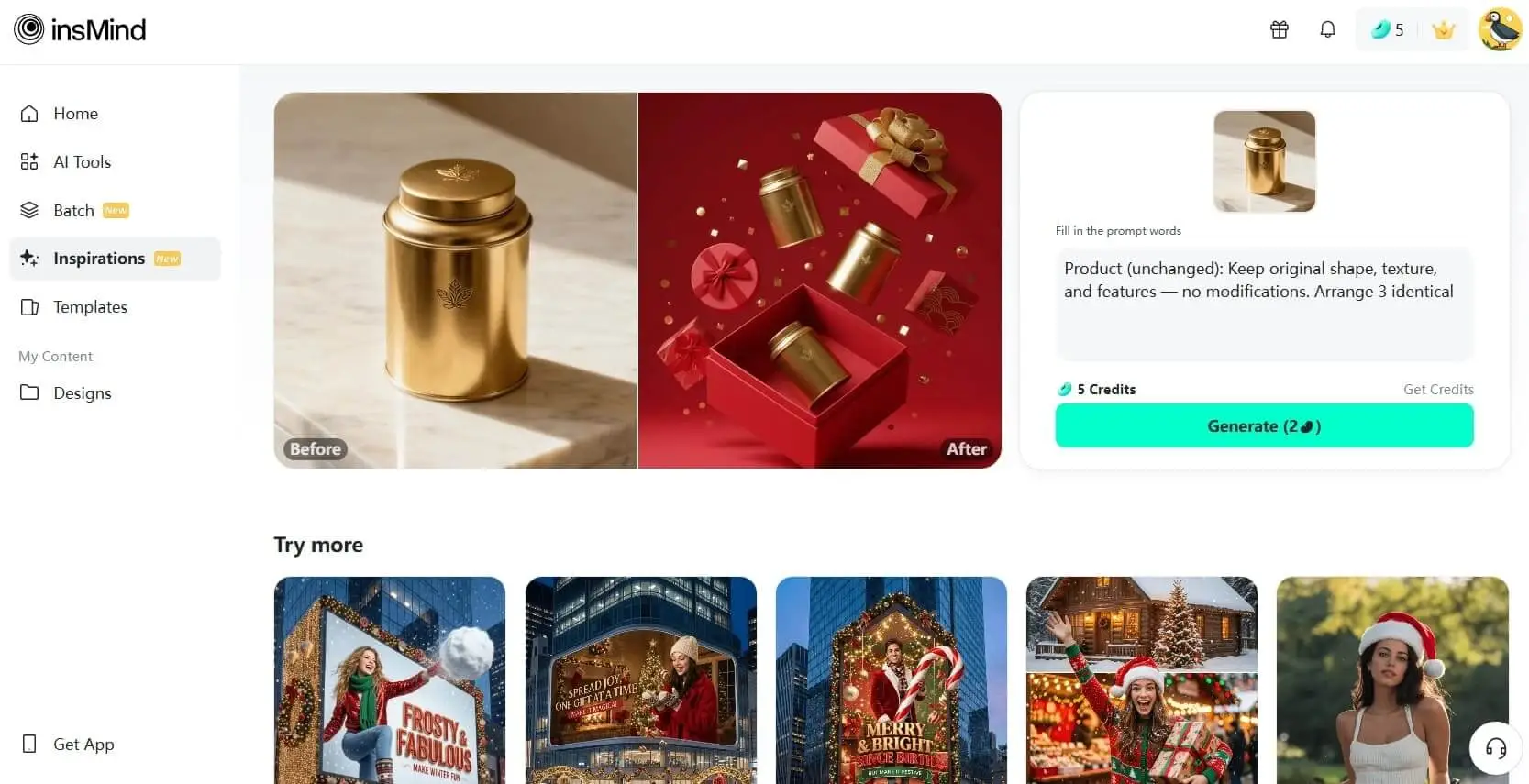
Prompt:
- Product (unchanged): Keep original shape, texture, and features — no modifications. Arrange 3 identical products in an upward staggered hanging layout(No wire suspension): 1 inside the box, 2 above the box (creates visual hierarchy and depth).
Main gift box: Rectangular flat shape; red inner bottom exposed. Place the box tilted in the lower part of the frame, showing a "just opened" lively posture. Separate the lid from the box body: lid rises upward and spreads to the right (near the box’s right corner), decorated with a magnificent 3D golden large bowknot (exquisite texture).
Side accessories: 2 small gift boxes — 1 circular (with red bowknot), 1 square (with wave pattern decoration).
Color scheme: Mainly red, accented with gold (strong festive atmosphere).The long side of the box is in contact with the ground.
Decorations: Scattered golden small squares and circular ornaments around the gift boxes (dynamic, adds vitality and depth).
Background: Uniform solid red (simple yet impactful).
Style: Ultra-realistic high-end product photography — cold bright light, clean highlights, film-like depth effect.
Atmosphere: Thick festive revelry + luxury. - Use the product from the uploaded photo exactly as it appears — keep its shape, colors, and proportions unchanged.
Create a top-down Christmas product showcase.
Place the product on opened Christmas wrapping paper, and make the product occupy a larger portion of the frame as the main visual focus.
Scene setting: an indoor Christmas tree positioned in the upper-left corner; beneath it, Christmas gifts are casually piled in an uneven, natural stack — not symmetrical.
Add warm Christmas atmosphere: soft string lights, a cozy Christmas carpet with subtle holiday patterns, scattered ribbons, gentle warm glow.
Ensure the product integrates naturally into the environment and remains the most prominent element. - Use the product from the uploaded image exactly as it appears.
Place it on a subtle rotating display turntable on a European-style dining table with a Christmas tablecloth.
Scatter deep-green holly leaves and bright red berries on both the table and turntable.
Tie a small Christmas bow or ribbon on the product.
Indoor dining-room scene with a very blurry Christmas tree decorated with lights in the background.
Warm festive lighting, clean composition, strong product focus, high-resolution e-commerce photography. - {
"scene": {
"type": "aerial_drone_view",
"perspective": "top-down, looking directly at the object from above",
"background": {
"type": "urban_cityscape",
"lighting": "realistic daylight with natural shadows and reflections"
}
},
"subject": {
"object_type": "large_luxury_shopping_bag",
"material": "smooth, premium leather or high-quality glossy finish",
"details": {
"logo": "golden 'InsMind' embossed",
"contents": "filled with products from user-uploaded images",
"suspension": "hanging from a wide silk ribbon under a drone"
},
"lighting": "soft and realistic highlights and shadows on the surface",
"texture": "highly detailed, tactile, realistic reflections"
},
"composition": {
"framing": "ultra high-quality, professional, cinematic composition",
"focus": "shopping bag in sharp detail, cityscape slightly blurred",
"quality": "ultra-detailed, photorealistic, high-resolution rendering"
}
} -
Use the animal from Image 1 as the subject.
Use the tall product from Image 2 as the giant object.A bright, clean European-style living room corner with warm tones, soft textures, and elegant home décor.
Top-down (slightly high-angle) perspective. Soft, bright ambient lighting.The animal from Image 1 stands upright on its hind legs, lifting its front paws to hold and cling onto the super-enlarged, vertically standing product from Image 2 (the product should be significantly taller than the animal).
The animal slightly turns its head toward the camera, looking directly into the lens with a lively, natural, energetic expression.The product from Image 2 must receive lighting, reflections, shadows, and ambient bounce light consistent with the European-style living room, ensuring it visually blends into the environment naturally and convincingly.
Clear textures, gentle color palette, warm atmosphere, natural shadows, harmonious scale contrast.
Cute, fresh, soft-Japanese aesthetic blended with a European interior setting.
High-resolution render, no additional characters, no extra props unless necessary for realism.This is an EDIT using the subjects from the uploaded images:
– The animal identity, fur, and posture must follow Image 1.
– The product appearance, material, and shape must strictly follow Image 2, with environmental lighting integration.
– Background is new (European-style living room).
– Keep composition consistent with a warm lifestyle photo.
2. Manga and Comic Prompts
It's a single-photo prompt that transforms a single uploaded image into professional manga or comic artwork. It focuses on consistent line work, shading, and panel-ready composition so the output feels like a real manga frame.
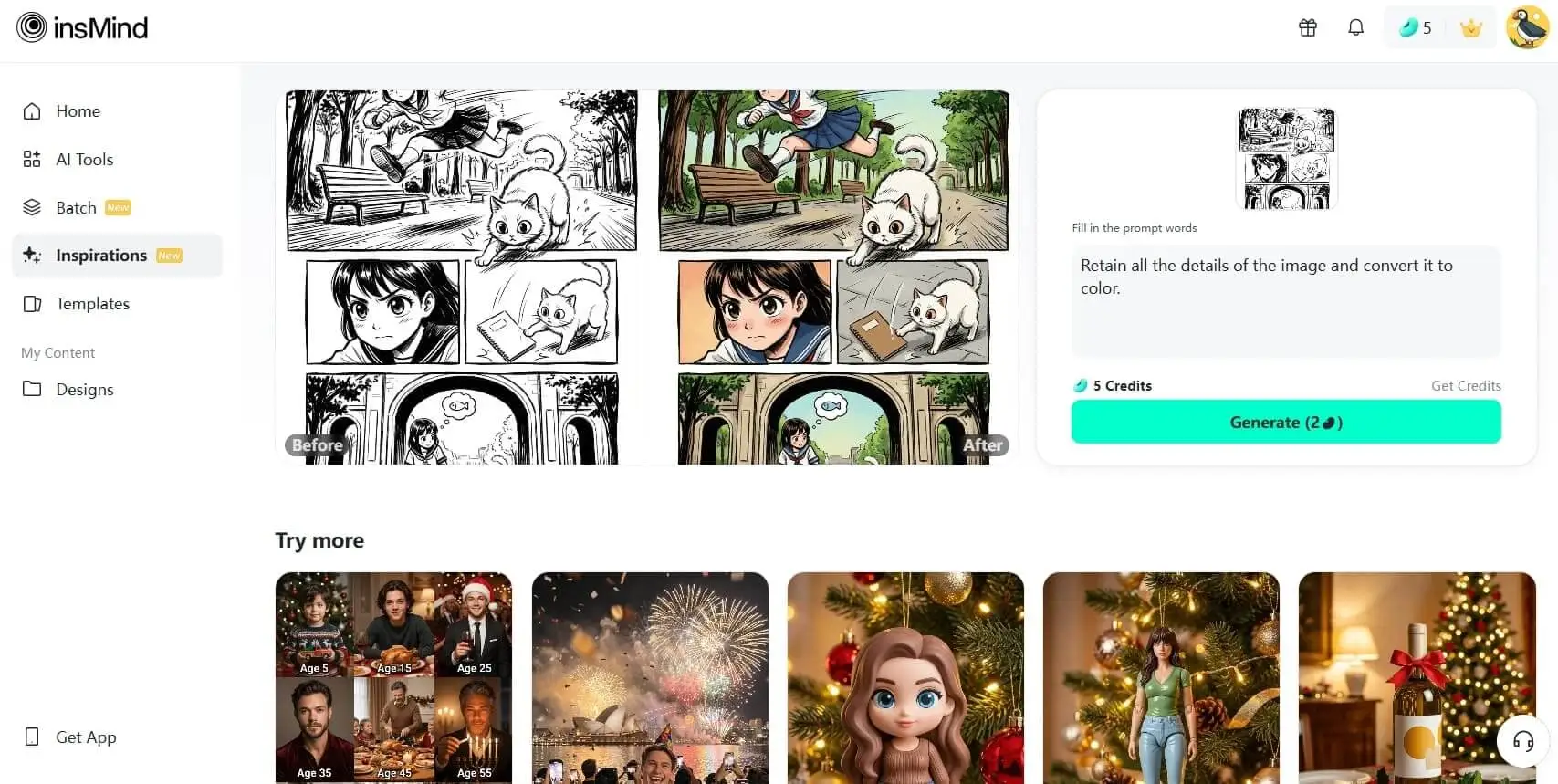
- Retain all the details of the image and convert it to color.
- A funny, 4-panel, black and white comic strip about a golden retriever dog named Buster and its owner, depicting common dog-owner struggles. Panel 1: Buster proudly presents the owner with a destroyed TV remote/cables, claiming it's "Art." Panel 2: Buster lies on the owner's lap, blocking the keyboard while the owner tries to work. Panel 3: Buster (wearing a cape) tries to stealthily steal a bag of treats from the sleeping owner. Panel 4: A loving moment where Buster licks the owner's face, with the owner calling him a "furry menace."
- A close-up, mid-air shot of a teenage male superhero with messy black hair and glowing blue eyes. He is wearing a sleek, high-tech cybernetic suit (black and neon blue accents). He is executing a powerful flying kick towards an unseen enemy. Use dynamic speed lines radiating from his foot and sharp, explosive visual effects around the impact point. The style should be classic shonen manga, high contrast, and highly detailed line art, cinematic lighting, black and white with minimal screen tones.
- A full-color, wide panel depicting two friends sitting on a park bench under a large, blooming cherry blossom tree at sunset. One character (female, red scarf) is laughing genuinely while looking at the other (male, reading a worn book). The lighting is warm and golden, with soft shadows. The background should be slightly blurred (bokeh effect) to focus on the characters. Style is modern webtoon/slice-of-life comic, clean linework, soft color palette, detailed environment.
- An establishing shot (wide-angle, full body) of a lone, armored female bounty hunter standing on the edge of a desolate, rust-colored canyon on an alien planet. Her armor is weathered and scarred. She is looking up at a massive, abandoned alien structure partially buried in the sand, with two dimly glowing green moons in the dark, nebula-filled sky. Style: Hyper-detailed, realistic comic book art, cinematic composition, heavy shadows, and deep saturated colors, graphic novel aesthetic.
3. Handwritten Annotations on
Another most talked Nano Banana Pro prompt is used to overlay handwritten-style technical annotation directly onto an existing image. When used, it adds chalk-like notes, arrows, and measurement lines that match the object's perspective and structure in the scene.
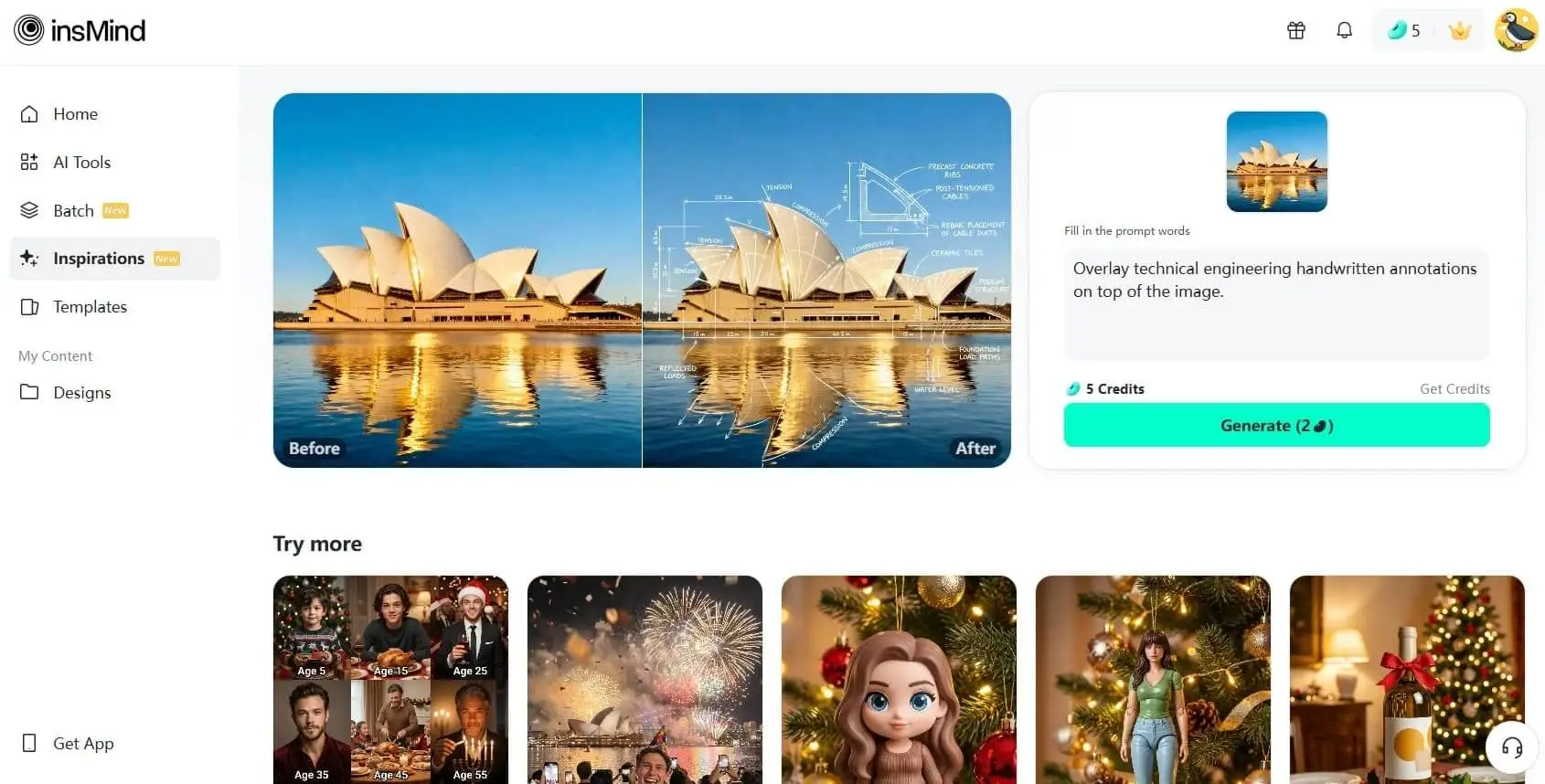
- Overlay technical engineering handwritten annotations on top of the image.
Use white chalk-style handwriting and clean technical sketch lines.
Include labels, arrows, dimensions, forces, engineering diagrams, and cross-sections.
Style: blueprint-like doodles, hand-drawn schematics, minimalistic, precise but casual.
Do NOT modify the original photo; only overlay the drawings.
Match the perspective and structure of the objects in the image, as real engineering notes.
Examples of annotations: tension/compression diagrams, dimensions, cable cross-sections,
force vectors, structural notes, materials, load paths, geometry measurements.
Make handwriting look like an engineering notebook: thin white stroke, subtle glow. - A highly detailed, cross-section blueprint of a liquid-fueled rocket engine thrust chamber. The image should appear to be a faded, large-format print on archival paper. Overlay the blueprint with handwritten annotations in bright red ink, including circled components, arrows indicating flow direction changes, and specific technical notes like 'Verify $T_{max}$ limits' and 'Increase $\phi$ by 1.2 mm'. The style should mimic a realistic engineering document review.
- A monochromatic photograph of a massive suspension bridge cable anchorage system taken on a foggy day. Overlaid on the photo are messy, hastily scribbled notes in bold blue permanent marker. Annotations must include arrows pointing to specific corrosion points, circled stress concentration zones, and short phrases like 'Crack length 4 cm' and 'Urgent NDT required' written in a rough, quick style.
- A clean, crisp digital schematic diagram of a complex quadruped robot's motor control circuit (PID loop), featuring numerous ICs, resistors, and capacitors. The schematic is overlaid with meticulous, multi-colored handwritten notes. Use green pen for proposed component swaps ('Swap R11 for 10k $\Omega$'), black pen for standard calculations ('Gain $\approx 4.5$'), and yellow highlighter to mark entire sections needing redesign (e.g., the power regulation module). The handwriting should be small and precise.
- A stylized contour map and drilling plan for a large commercial foundation site. The base image is a faded, large-format topographical survey. Overlaid are thick, deliberate pencil annotations (with smudging and erasure marks visible). Notes include marked-up borehole locations (e.g., 'Borehole D-7'), estimates of soil bearing capacity ('$q_{all} \approx 250$ kPa'), and large, decisive $\text{'X'}$ marks over rejected sections of the plot. The texture should suggest the drawing was handled heavily in the field.
4. 4×4 Grid Starting With the 1880s
It creates a 4×4 grid that visually steps through time, starting from the 1880s and moving decade by decade. Each tile retains the same subject but updates the clothing, hairstyle, accessories, and background to reflect fashion.
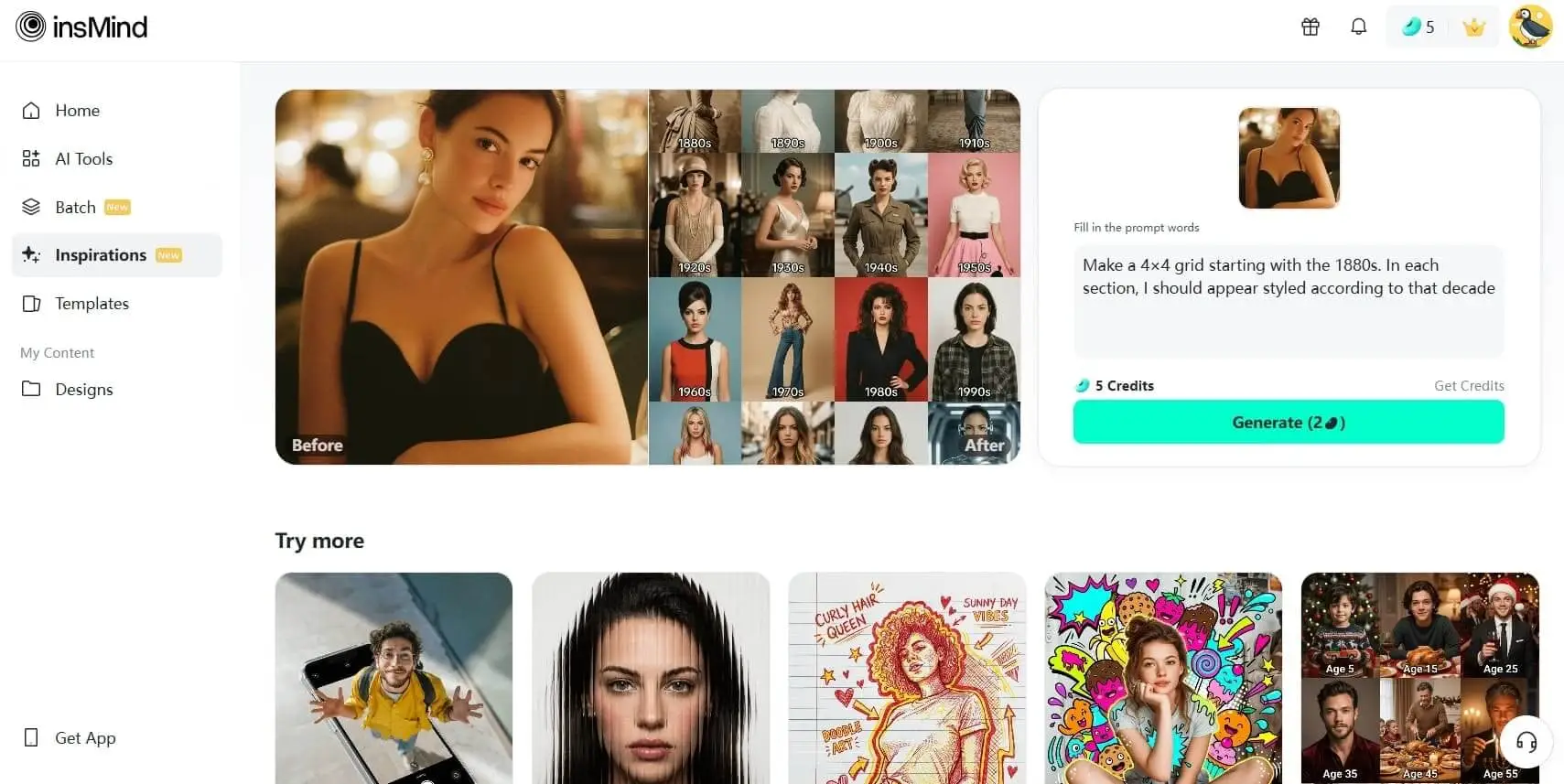
- Make a 4×4 grid starting with the 1880s. In each section, I should appear styled according to that decade (clothing, hairstyle, facial hair, accessories). Use colors, background, & film style accordingly.he aspect ratio of the picture is 3:4
- A photorealistic 3x3 grid collage showing the lifecycle of a handsome man with dark wavy hair and warm eyes, celebrating various holidays throughout his life.
Top Left (Age 5): A cute young boy in a knitted Christmas sweater holding a toy truck in front of a decorated tree.
Top Middle (Age 15): A teenage boy with longer hair sitting at a festive dinner table, smiling.
Top Right (Age 25): A young adult male in a suit wearing a Santa hat, holding a drink at a holiday party.
Middle Left (Age 35): A stylish portrait of the man with a beard, wearing a burgundy velvet shirt, looking confident.
Middle Center (Age 45): The man carving a turkey at a family Thanksgiving dinner.
Middle Right (Age 55): The man with greying hair lighting a Menorah, looking dignified.
Bottom Left (Age 65): The man with silver hair holding a grandchild in front of a Christmas tree.
Bottom Center (Age 75): The elderly man outdoors in a spring setting, perhaps looking for Easter eggs, wearing a beige sweater.
Bottom Right (Age 85): The very old man sitting in an armchair by a fireplace, holding a wrapped gift, looking happy.
Style: Cinematic lighting, high resolution, 8k, highly detailed, ensuring the facial features remain recognizable as the same person aging naturally across all panels. Label each panel with white text at the bottom: 'Age 5', 'Age 15', etc -
Use each person in the uploaded photo exactly as they appear — keep every individual’s face, hair, race, pose, and proportions unchanged.
Do not add or remove anyone. Keep the exact number of people from the original image.
Create a vertical 4K (2160×3840) triptych with three equal horizontal frames showing all original subjects together.Overall Look & Mood
A quiet snowy daytime scene with soft sunlight filtering through a misty forest. Falling snow glows in the light.
Shot on 35mm film with direct flash — visible grain, light haze, crisp analog winter feel.
Colors: daylight whites, pale blues, soft skin warmth.Frame 1 – Over-the-Shoulder
View from slightly behind, showing backs and side profiles.
Winter coats (dark gray, brown, navy, plaid) with bright scarves (red, burgundy, cobalt).
Flash freezes snowflakes; sunlight adds soft rim light.
Background: sunlit misty trees with drifting snow.Frame 2 – Full Body
Slightly elevated angle on a snow-covered forest path.
All stand facing top-left; some may hold small winter bouquets (white, lilac, neutral).
Coat texture, scarves, and footprints glow under sunlight + flash.
Sunbeams through snowy trees add depth and analog softness.Frame 3 – Close-Up
Tight portraits focusing on eyes and calm expressions (warmth, nostalgia, gentle sorrow).
Shallow depth: sharp eyes, diffused snowy forest behind them.Technical & Style
35mm film, ISO 400, f/2.8, 1/180s, flash ON.
Lighting: daylight + flash.
Texture: fine film grain, no smoothing.
Color tone: cold daylight shadows, clean whites, natural skin.
Output: realistic analog snowy daytime triptych with all original people unchanged. -
Generate a cohesive 3x3 grid cinematic contact sheet featuring 9 distinct, photorealistic camera shots of the subject(s) from the input image.
Location & Setting:
Set the scene at the following coordinates: Latitude: 55.7558° N, Longitude: 37.6173° E.
The environment must accurately reflect the specific location, local time, and weather.Emotional Theme:
The overall emotional theme for the 9 shots is: [fun / joy / bittersweet / calm / curious / determined etc. – write the desired emotion here].
Each shot should subtly reinforce this theme.Style & Emotion:
The 9 shots must maintain a consistent, dramatic, and emotionally profound mood.
Subject's facial expressions must dynamically adapt to the narrative emphasis of each unique perspective, while strongly conveying the overall Emotional Theme.9 Shot Coverage (Focus on Content & Angle):
Full Environment View: Subject small in a vast, atmospheric environment.
Full Body Shot: Entire subject visible, emphasizing presence against the backdrop.
Mid-Body Shot: Knees-up view, capturing an emotionally charged stance.
Upper Body Shot: Waist-up; focus on expressive posture and interaction.
Expressive Chest-Up Shot: Chest-up; close framing that highlights the gaze and emotion.
Tight Face Shot: Close-up on the face, clearly conveying a specific, unstated emotion.
Macro Detail Shot: Extreme close-up on hands, texture, or eyes, revealing a narrative element.
Upward Gaze Shot: Looking up from below (worm's eye view); emphasizing quiet power or resolve.
Downward Gaze Shot: Looking down from above (bird's eye view); suggesting reflection or vulnerability.
Strict Constraints:
Maintain strict consistency (same subject, clothes, lighting) across all 9 panels.
Depth of field must shift realistically (bokeh in close-ups).
Absolutely NO text, logos, labels, watermarks, symbols, numbers, letters, or typography should appear in any of the 9 generated images. - Create a single page photo collection from a high-end Japanese photobook scan featuring 5 photos of a woman at the location with latitude and longitude 35.31721720077321, 139.5357227423284, matching the local current time atmosphere and real-time weather. Make the specified character blend in naturally as if sightseeing at that location. Arrange the 5 photos in varying sizes with a beautifully designed, album-style layout, without showing any photobook or album background—only the single curated photo page. Do not display any explicit year, date, or timestamp; only reflect the atmosphere.
5. Brand Visual Prompt
From Sketch to Product prompts you to transform a rough logo or character sketch into a complete branded visual system. This one retains the sketch's core idea but shows how the design appears on a real object, such as packaging.
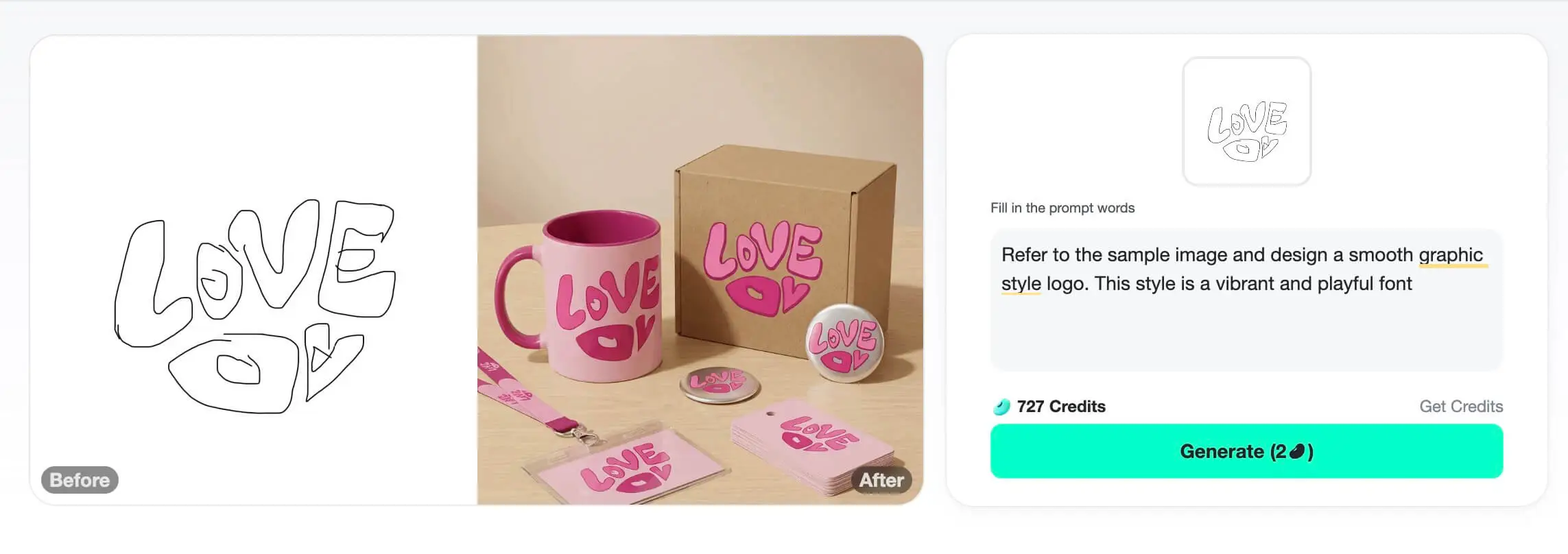
- Refer to the sample image and design a smooth graphic style logo. This style is a vibrant and playful font illustration deeply rooted in the retro aesthetics of the 1960s and 1970s, inspired by sketches. Its most distinctive feature is a rhythmic, psychedelic font with soft, round and smooth letter forms. Do not copy the sketch exactly, but draw inspiration from it. The letters are slightly distorted, stretched and compressed, discarding rigid structures, and smoothly integrated together to form a coherent and easily recognizable shape. This technique is called "text graphics", ingeniously combining text and image, and the shape of the text intuitively reflects its meaning. This design is a clever visual pun, making the information easy to understand and remember. The color scheme reinforces the retro feel, using a simple two-tone scheme, with the pink theme fitting the theme of love. This choice enhances the work's nostalgic charm. The overall effect presents a fantastical nostalgic feeling and ingenious graphic design. It has a bold yet acceptable style, through the perfect fusion of shapes and text, conveying simple and positive information, creating a pleasant visual effect.
Refer to this pattern logo, which is printed on cups, boxes, badges, lanyards and badges. The main visual color is pink, presenting a practical and durable modern style. Finally, display all the products together. -
A full-frame VOGUE magazine cover filling the entire image, presented edge-to-edge. The cover is in high-fashion black-and-white with a refined female portrait; only her lips remain vividly red and glossy. The top displays the bold title “VOGUE.”
At the center of the magazine, a vertical tear splits the cover open.
The tear’s edges are extremely rough, jagged, and uneven, with thick fibers, torn layers, and irregular contours — the look of paper violently hand-ripped, not cleanly cut.
The opening closely follows the shape of the lipstick, but remains chaotic and organically torn.From this vertical tear, an oversized, dramatically large version of the reference lipstick bursts outward.
The lipstick does not obey realistic scale — it is intentionally huge, dominating the frame.
Give the lipstick strong perspective, with the tip angled forward like a bullet head shooting at a slight upward angle toward the viewer.
Half of the lipstick remains inside the dark, deep shadowed tear; the other half explodes outward, creating powerful momentum and visual impact.Emphasize the contrast between the elegant fashion cover and the brutally torn rupture with a massive, forward-thrusting lipstick breaking through it.
- Referring to this pattern LOGO, the brand name is "Cherry", and print this LOGO on fire stamps, sticky notes, paper bricks, coasters, keychains, and paper cards. The main visual color is cherry red, presenting a modern, refined and cohesive style. Finally, display all the products together.
- Create a colored 3D model of the cartoon character from the uploaded lineart. Show three distinct views side by side: front view, back view, and left side view. Each view fully visible and separate. Preserve the original lineart's shape, proportions, and details. Bright, vivid colors, smooth 3D shading, clean lines. Pure white background. High-resolution, detailed, no distortion, accurate proportions.
- Taking the skin care products in the picture as elements, design a packaging box. The skin care products are placed right beside the packaging box, and both the packaging box and the skin care products stand on the table. The picture is mainly in light green tones, with a solid background and a high-end texture.
6. AI Photo Editing Prompts
One of the hottest Nano Banana Pro prompts that converts your image with targeted, natural-language instructions. This single prompt handles complex edits in one flow, like changing background, removing objects, and adding impressive effects.
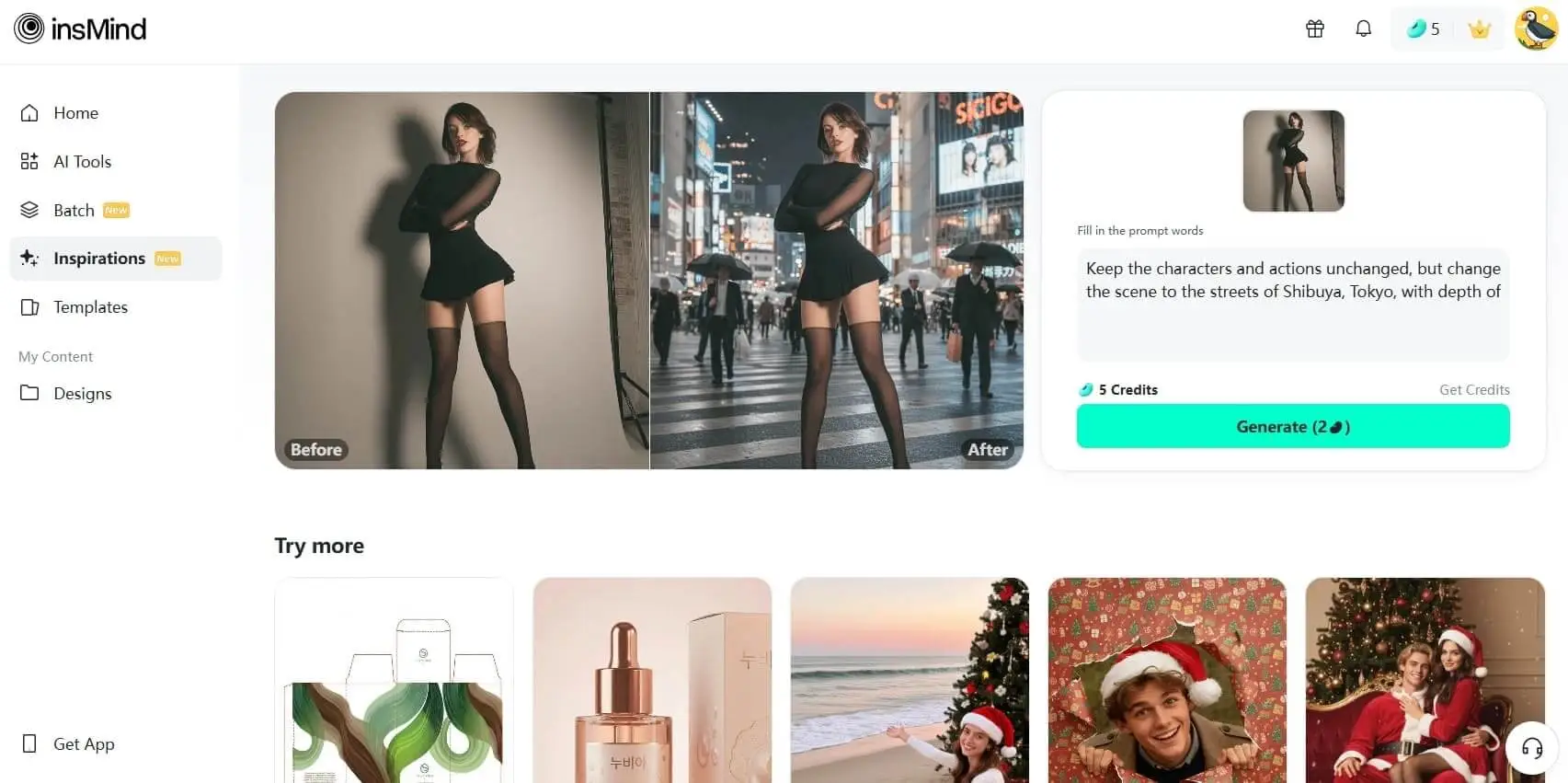
- Keep the characters and actions unchanged, but change the scene to the streets of Shibuya, Tokyo, with depth of field and blurred background
- Place the furniture from the uploaded image as the central focus in a close-up view of a realistic living room. Preserve the furniture's shape, color, texture, and details. Modern, well-lit living room, minimal and clean background, uncluttered environment, natural lighting, realistic perspective, high-resolution, ultra-detailed, materials clearly visible. Furniture fills the frame, remains the main visual center, no distortion, no floating objects.
- Based on the six patterns generated from the reference picture, six irregular-shaped silicone coasters are produced and placed on a bright table indoors, randomly stacked. At the same time, each silicone coaster can be displayed
- Based on the IP image in the picture, generate its front, back and side, and merge these three pictures into one at the same time
- Referring to this pattern LOGO, the brand name is "Hiker", and the pattern logo is printed on packaging bags, headscarves, manuals, metal cards, lanyards, and badges. The main visual color is vibrant orange, featuring a functionalist and durable modern style. Finally, display all the products together.
7. Ads Creation Prompts
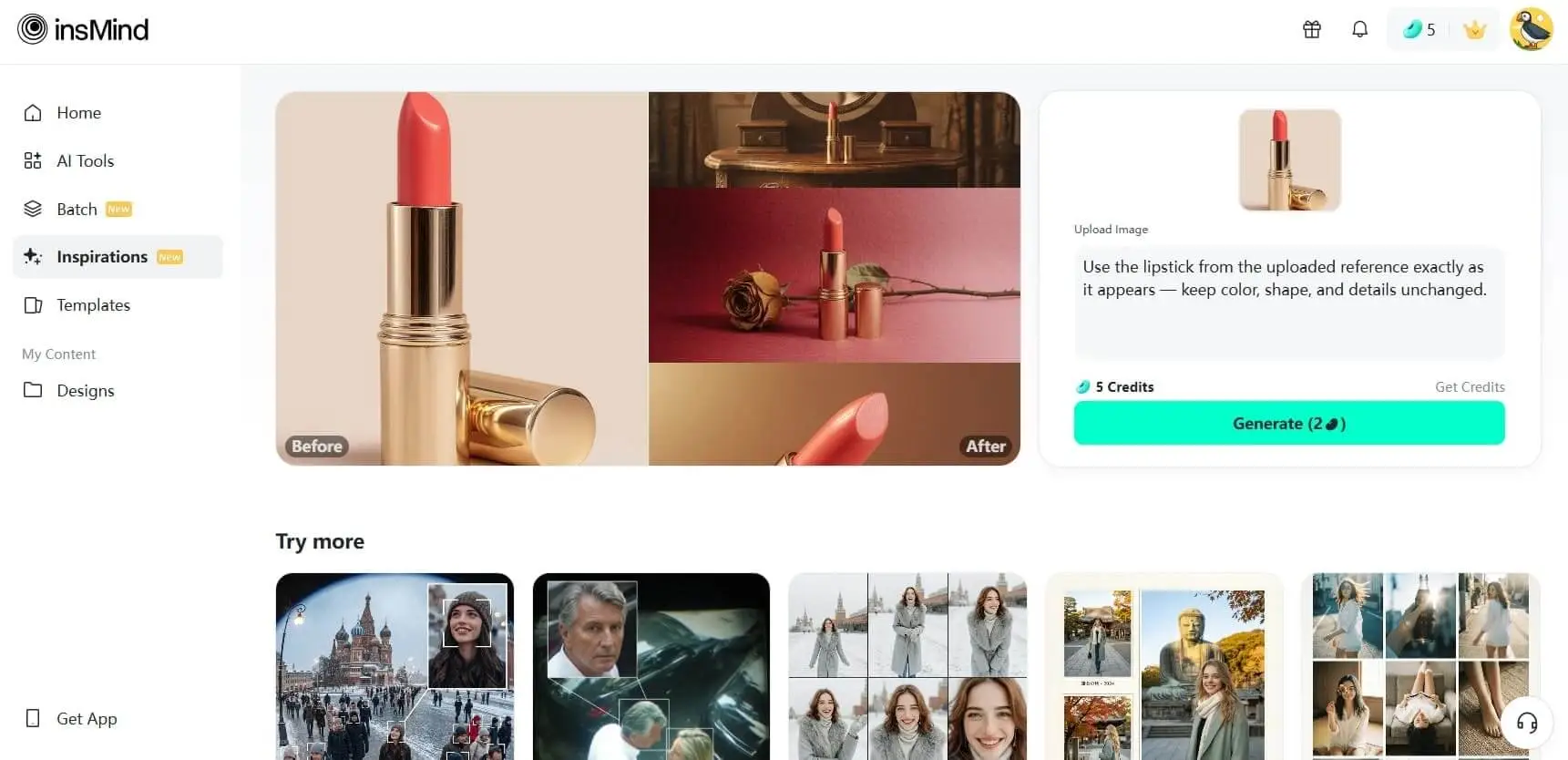
A SingleImageRatio 3:4 Nano prompt type used for ad creatives in the popular 3:4 vertical format for social feeds. It helps you generate a single, polished ad image where the product is clearly centered, background and props are styled for your brand.
-
Use the lipstick from the uploaded reference exactly as it appears — keep color, shape, and details unchanged. Generate a vertical 4K (2160×3840) triptych: three equal horizontal panels forming one cohesive artistic story with the lipstick as the main subject.
Overall Mood: Medieval European vintage cinematic atmosphere, warm caramel-brown and soft pink gradient tones, elegant and nostalgic, subtle analog film grain.
Frame 1 – Distant Wide Shot with Mirror Reflection: Capped lipstick upright on a vintage vanity, viewed from far behind. Human side profile appears only in the mirror, small and highly blurred, keeping full attention on the lipstick. Warm diffused light highlights the lipstick; soft shadows create cinematic depth.
Frame 2 – Mid-Shot on Fabric: Lipstick uncapped, standing upright on a soft gradient red-to-pink wool fabric, side view. A complete dried rose with stem lying on its side beside the lipstick. No cap visible. Soft light emphasizes texture of lipstick and fabric, creating a refined, retro feel.
Frame 3 – Extreme Close-Up on Solid Background: Lipstick angled diagonally, tight focus on bullet showing velvet-cut surface and fine details. Background: warm solid color complementing lipstick tone. Directional warm light enhances texture, giving luxurious vintage cinematic quality.
Technical & Style: Analog 35mm film style, ISO 400, f/2.8, soft film grain. Color palette: warm caramel-brown, soft pink, muted medieval tones. Output: authentic, artistic, vintage cinematic triptych, keeping the lipstick exactly as in the reference.
- Use the subject from the uploaded photo and transform it into a 1/7–scale premium ornament. Preserve the original shape, structure, and details of the product exactly as in the uploaded image (do not remove lids, change openings, or alter any design elements). Render it realistically with smooth, high-quality textures, clearly toy-like but not lifelike human skin. Hang this ornament on an indoor Christmas tree using a wide silk ribbon or string, ensuring it blends naturally with the branches. The scene should be warm and festive, filled with golden lights, ornaments, and a cozy Christmas glow. Ensure the product feels like a high-end collectible, fully integrated with the environment, with the image clean, clear, and focused on the ornament.
-
Use the nano pro model to generate a Christmas tree formed by deep green ribbons spiraling upward with smooth curves and a glossy, dimensional texture. Decorate the tree with the beauty products from the user-uploaded image, preserving their original appearance, colors, packaging, and printed details without alteration.
Add silver Christmas balls, heart-shaped ornaments, a vintage pocket watch, and red-and-white candy canes as additional festive elements. The background should be a clean, rich red tone that feels premium and vibrant. Use soft, bright lighting to highlight the ribbon texture and showcase the beauty products clearly. Maintain a centered, balanced composition with a modern, celebratory visual style.
- Place the cartoon character from the uploaded image onto multiple objects: stickers, washi tape, lanyard, T-shirt, and badges. All items are placed naturally on a bright, clean desk with realistic lighting. Preserve the character's style, colors, and details. High-resolution, ultra-realistic, clear textures of all materials, natural shadows and reflections, objects proportionally accurate, no distortion, character fully visible on all items.
- Keep the main body of the hamburger. Generate 1 product marketing poster and let your creativity run wild
8. High Angle CCTV Surveillance Shot
To turn a normal scene into a high-angle CCTV-style surveillance shot, you can use the hottest Nano Banana Pro prompt. This one adds characteristic surveillance aesthetics, slight grain, and keeps people or elements clearly recognized.
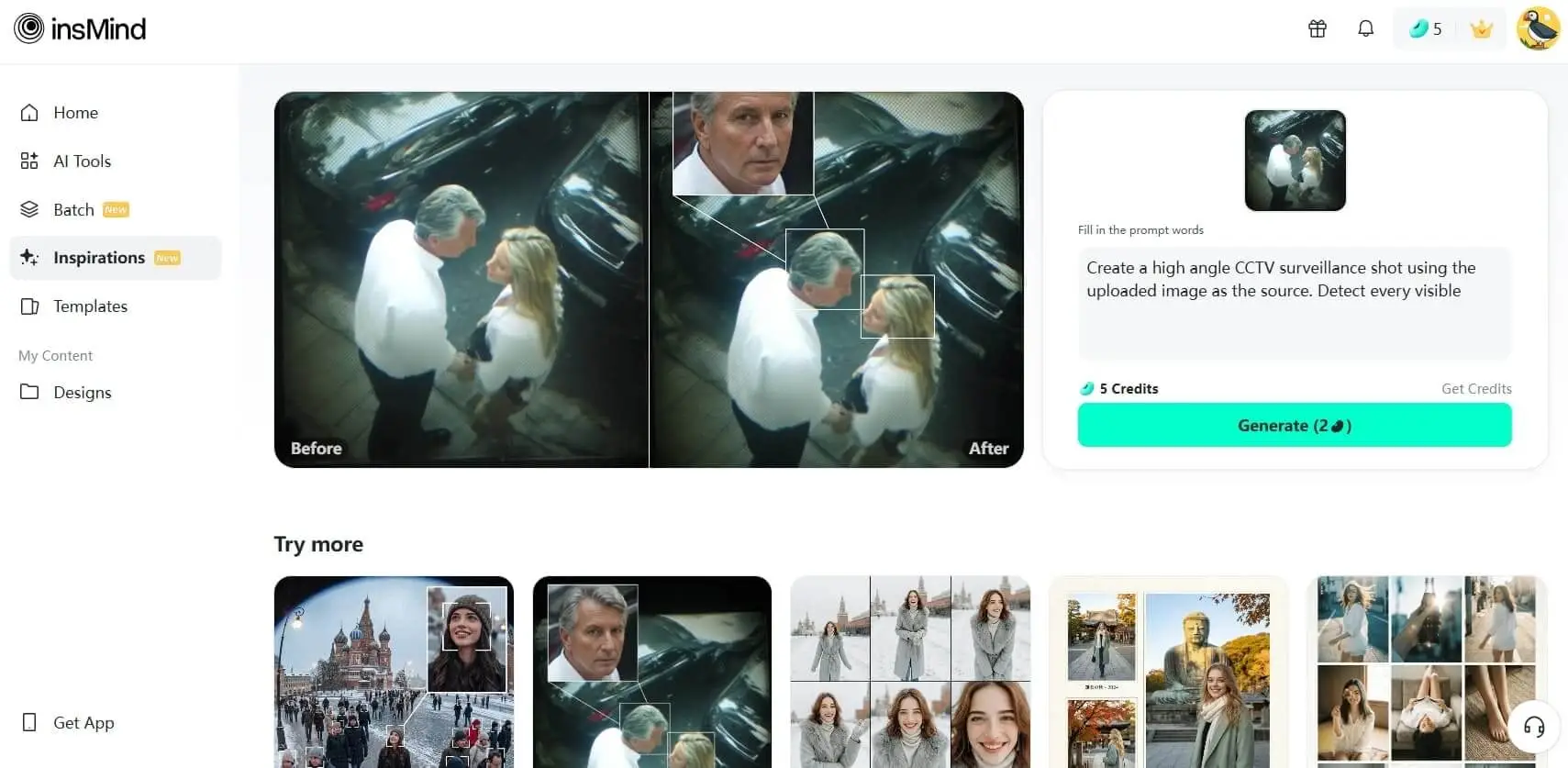
- Create a high angle CCTV surveillance shot using the uploaded image as the source. Detect every visible person in the image and automatically draw a white rectangular bounding box around each face. For the most prominent person, add a large zoom in inset: a sharp, enhanced close-up of their face displayed in a floating rectangular frame connected with a thin white line.Keep the main image slightly noisy and security camera like (soft grain, slight distortion, muted colors), while the zoom in face box should be clearer, brighter, and more detailed. No text, no timestamps, no overlays except the boxes and connecting line. Maintain the original scene layout, angle, and environment of the uploaded image.
-
Create an image at the location with latitude and longitude 21.28° N, -157.83° W that matches the local current time atmosphere and real-time weather. Make the specified character blend in naturally as if sightseeing at that location, with clothing appropriate to the local time and weather, rather than matching the uploaded image. There are many tourists of various nationalities.
“Based on the uploaded image, generate a high-angle CCTV surveillance camera–style image with an ultra-wide-angle lens (horizontal field of view ≥110°), producing a fisheye/mirror-like visual effect. Draw white face-detection frames on each person’s face, zoom in on the most noticeable person’s face and display it in a separate frame connected by a line. Add noise and distortion to the main image, while keeping the zoomed-in frame clean and sharp. Do not include any text or timestamps. Ratio: 3:4
- Comical selfie with an extreme fisheye lens, exaggerated nose and cheeks, circular bubble frame, flattering soft light, vibrant grading, slight vignetting, background outside fisheye is pure black, no text
9. 1/7–Scale Commercial Figure Ornament
You can turn a character or person from your photo into a realistic collectible figurine with this 1/7-scale commercial figure prompt. It renders a detailed 3D-style on a small display base with lighting that highlights the sculpted details.
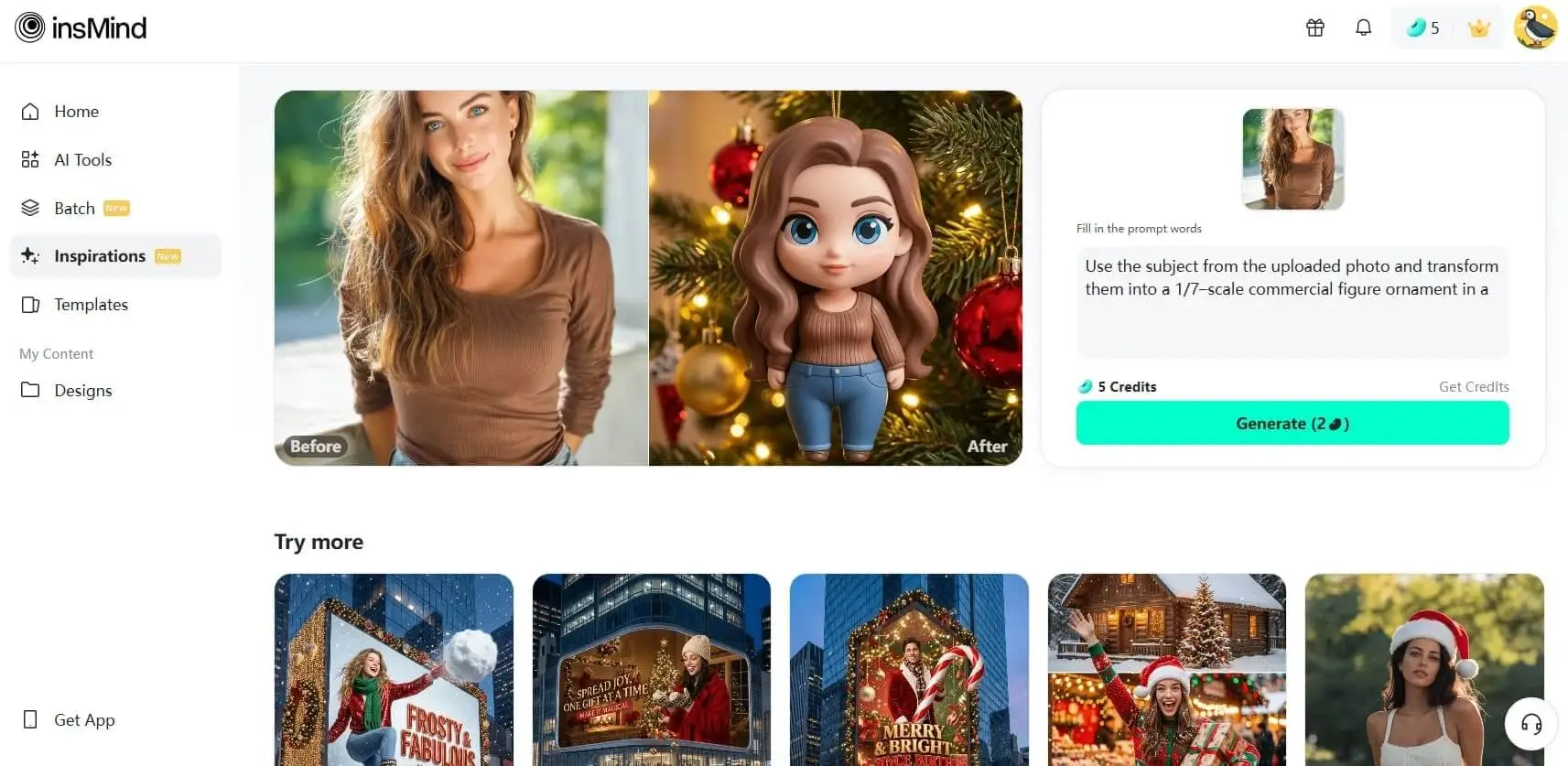
- Use the subject from the uploaded photo and transform them into a 1/7–scale commercial figure ornament in a silicone Disney Chibi style. Keep the pose, hairstyle, clothing, and proportions recognizable, but render the figure with exaggerated cute Chibi features—large head, expressive eyes, and simplified, rounded proportions. The material should look like soft silicone with smooth, slightly glossy surfaces, clearly toy-like, not lifelike human skin. Hang this 1/7 Chibi figure ornament on an indoor Christmas tree using a thin golden string like a Christmas bauble. The scene is warm and festive, filled with golden lights, ornaments, and a cozy Christmas glow. Ensure the figure feels like a premium collectible toy, integrated naturally with the tree branches, with the image clean, clear, and focused on the ornament.
- Use the subject from the uploaded photo and transform them into a 1/18–scale commercial collectible action figure, fully articulated. Keep the pose, hairstyle, clothing, and proportions recognizable. Render the figure in high-gloss molded plastic, with smooth, shiny surfaces and precise sculpting typical of premium collectible figures. Hang this 1/18 action figure on an indoor Christmas tree using a thin golden string like a Christmas bauble. The scene is warm and festive, filled with golden lights, ornaments, and a cozy Christmas glow. Ensure the figure has a strong toy-like presence, integrated naturally with the tree branches, and keep the image clean, clear, and focused on the ornament.
-
Transform the subject from the user-uploaded photo into a giant, highly creative and dreamy picture-book style felt-art sculpture placed at the center of the scene.
The sculpture must feature rich felt texture, dense fibers, handcrafted wool-felt aesthetics, soft edges, vibrant colors, and whimsical cartoon proportions.Keep the subject’s original outfit exactly the same as in the uploaded photo.
Place the real subject (same appearance and outfit) standing beside the giant sculpture, looking up and admiring it — creating a clear scale contrast between the oversized felt sculpture and the real human subject.
Surround the sculpture with professional exhibition stanchions (museum-style barriers), not fences.
Background: a bright, modern art gallery with clean lighting.
On the gallery walls, display framed artworks derived from the subject — dreamy, creative, felt-inspired illustrations that visually extend or reinterpret the subject’s form, colors, or personality. These wall artworks should match the whimsical picture-book felt-art style.No text. Studio-quality render, warm tones, dreamy atmosphere, high-detail felt material.
- Close-up photo of a small plush keychain of the subject from the user-uploaded image, held gently between two fingers, made of soft felt or fuzzy material, cartoon-style proportions, embroidered face with simple expressive features, character designed to resemble the uploaded subject, attached to a shiny silver keyring, neutral beige background, shallow depth of field, soft natural lighting, highly detailed texture, cute and handcrafted aesthetic, studio photography, 1:1 aspect ratio.
10. Posters with Clear Text
For poster designs where typography needs to be sharp and readable, and images include clear text, such prompts are used. This one balances visual impact with clean space for headlines and brand elements, where your message is easy to read at a glance.
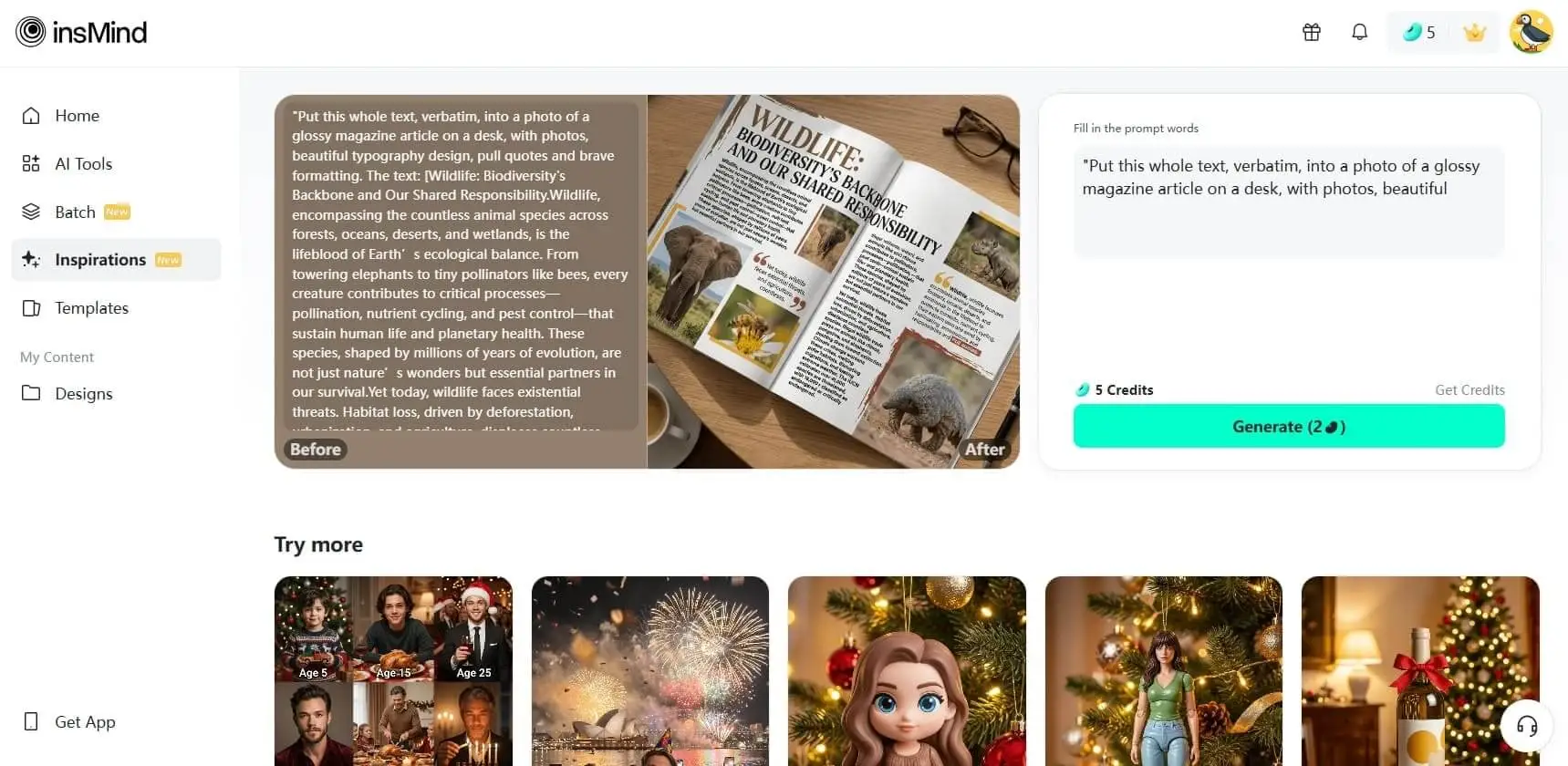
- Put this whole text, verbatim, into a photo of a glossy magazine article on a desk, with photos, beautiful typography design, pull quotes and brave formatting. The text: [Wildlife: Biodiversity's Backbone and Our Shared Responsibility.Wildlife, encompassing the countless animal species across forests, oceans, deserts, and wetlands, is the lifeblood of Earth’s ecological balance. From towering elephants to tiny pollinators like bees, every creature contributes to critical processes—pollination, nutrient cycling, and pest control—that sustain human life and planetary health. These species, shaped by millions of years of evolution, are not just nature’s wonders but essential partners in our survival.Yet today, wildlife faces existential threats. Habitat loss, driven by deforestation, urbanization, and agriculture, displaces countless species. Illegal wildlife trade preys on animals like rhinos, pangolins, and elephants, pushing them toward extinction. Climate change worsens these crises, melting polar habitats, disrupting migrations, and fueling extreme weather. The IUCN estimates over 41,000 species are threatened, with 16,000+ classified as endangered or critically endangered.]
- A minimalist, high-quality graphic design poster. Centered in the middle is the word 'BREATHE' in a bold, clean, black Sans-Serif typeface. The background is a solid, soft off-white textured paper. Above the text, a single, delicate line-art illustration of a eucalyptus leaf in sage green. High resolution, professional printing aesthetic, sharp edges on the lettering, no distortion.
- A Swiss-style typographic poster with a vibrant red background. The main text reads 'DESIGN EXPO 2025' in massive, heavy white Helvetica font, oriented vertically on the left side. Smaller, crisp white text at the bottom right reads 'CITY HALL / OCT 12-14'. Use a clear grid layout, sharp geometric shapes, and high contrast. The text must be perfectly rendered and legible.
Part 2. Tips for Writing a Good Nano Banana Pro Prompt
Regardless of what you're creating, the provided tips for Nano Banana Pro prompts will surely help you write more impactful:
- Be Clear and Specific: Every prompt should have a clear goal, whether you're creating a story or designing a professional image. Stating the purpose upfront guides the tool to produce content that aligns perfectly with your needs.
- Include Relevant Context: Context enriches your prompts, so incorporate background, target audience details, and the scenario you're working on. Eventually, this will help the AI deliver more accurate and meaningful results as per your requirements.
- Set the Style and Tone: Whether you prefer formal, playful, or minimalist, try to specify the tone first. Nano Banana Pro adapts easily when the tone is well-defined and you're clear about the vibe, resulting in cohesive outputs.
- Keep the Structure Organized: If your prompt includes several requirements, break them into clear, easy-to-read, short points. An organized structure prevents confusion, maintains flow, and boosts overall accuracy, especially for more complex prompts.
- Add Constraints and Requirements: When you need something to meet a specific word count, color palette, or format, include it in your prompt. These constraints maintain the tool's focus and help ensure the final output aligns with your specific vision.
Part 3. How to Use Nano Banana Pro Prompts on insMind
To utilize the hottest Nano Banana Pro prompts, pair them with a platform like insMind designed for smooth, intuitive creativity. It offers multiple modes for professional image creation, including Nano Banana Pro, Nano Banana, and Recraft. Most importantly, you may enhance your image once it has been transformed per your instructions.
Before saving the final generation, adjust the aspect ratio to match your platform's requirements. Provided below is a comprehensive guideline that will help you navigate Nano Banana Pro prompts in insMind with confidence:
Step 1. Access the Nano Banana Pro Tool and Insert Image
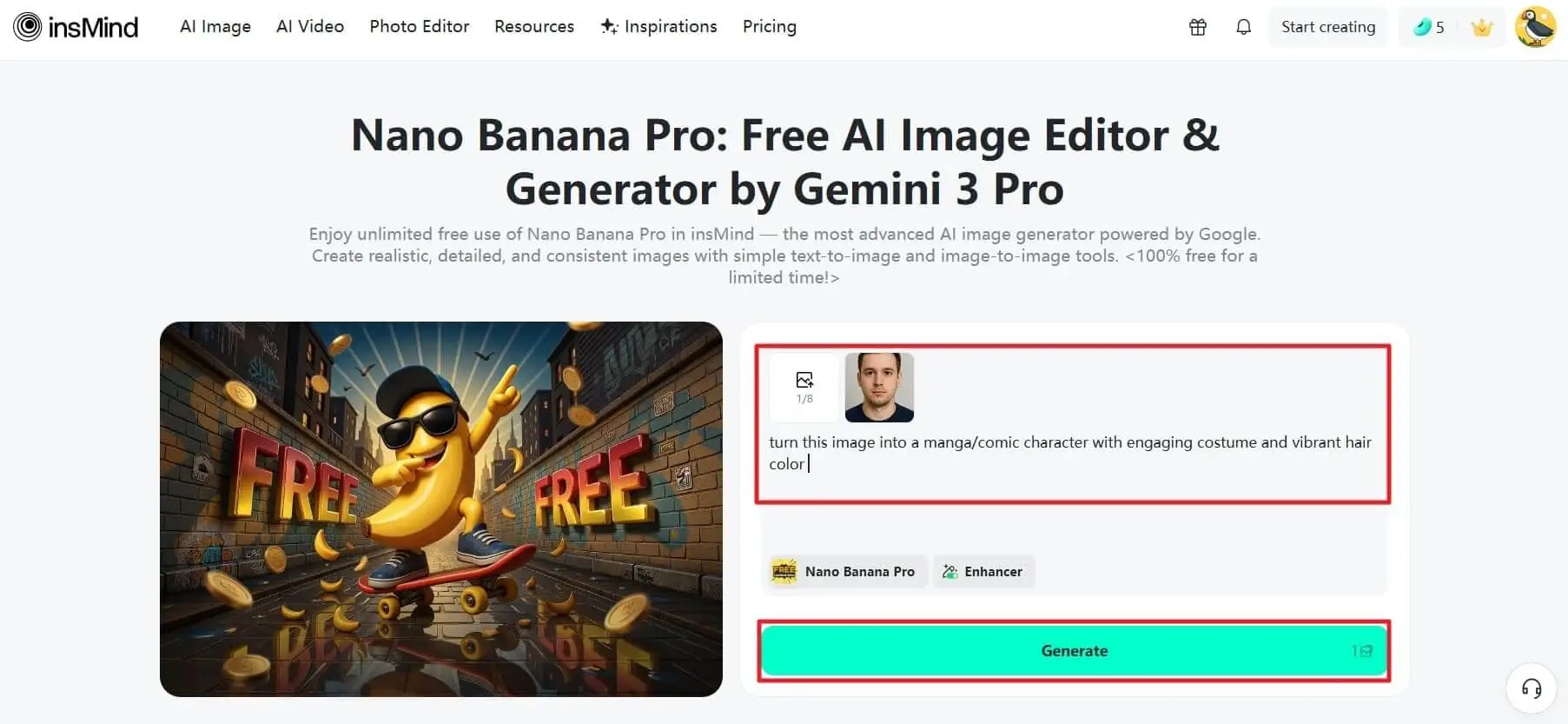
At first, access the main page for Nano Banana Pro and press the "Upload Image" button to insert a picture. Here, type a detailed, well-structured prompt and click the "Generate" button to proceed.
Step 2. Proceed to the Download & Save Your Final Version
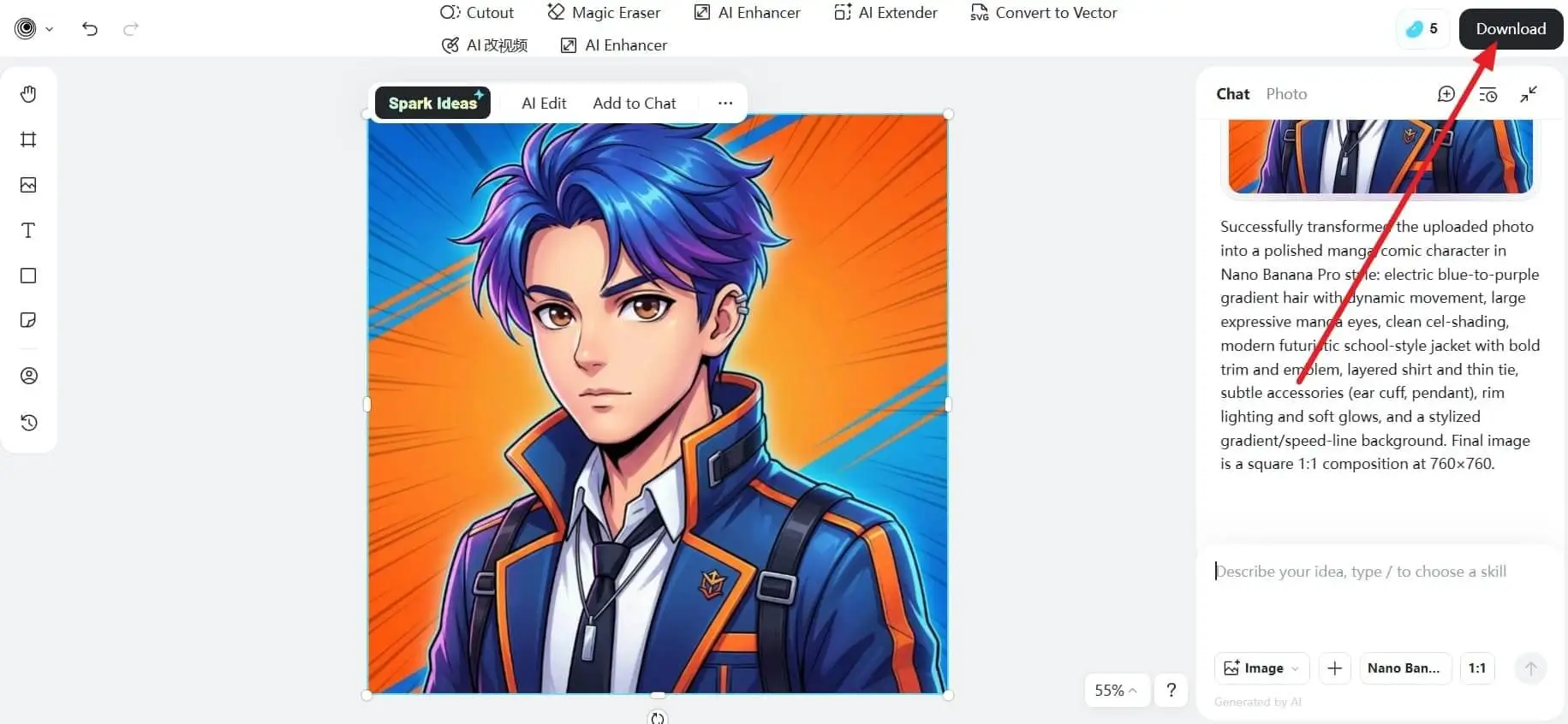
Once your character is generated, hit the "Download" button to get your image saved on your device.
Conclusion
In conclusion, Nano Banana Pro prompts provide clear guidance, direction, and creative support to help you organize your scattered ideas. However, when used in insMind, the process becomes even smoother, making brainstorming and content creation much simpler. Together, they form a workflow that consistently produces professional outputs with fewer creative blocks.
Keep reading

4 Best AI Video Tools for Multilingual Ads in 2026
Compare AI tools for localized video ads, lip sync, dubbing, and new market-specific creatives, plus a practical review checklist.

5 Best AI Video Generators for Marketing in 2026
Compare five AI video generators for product ads, presenter videos, cinematic clips, and campaign testing, with practical selection tips.

Dreamina AI Review: How Good Is It for Images and Videos?
Is Dreamina AI any good? Explore its image generator, video creation, AI avatars, strengths, limitations, and alternatives in this detailed review.

Flova AI Review: Is It Really Worth Using in 2026?
Is Flova AI worth using? Explore its video creation features, character consistency, pricing, limitations, and the best alternative for creators.

Higgsfield AI Review: What I Saw in a Studio Slide Demo
A close look at Higgsfield's Studio Slide image-to-video example: what happens to the subject, where the effect works, and where I'd be careful.

5 Best AI Voice Generators in 2026: Free & Paid Picks
Compare five leading AI voice generators for creators, marketers, podcasts, videos, and business narration.

Best Text to Speech Tools: 8 Picks for Natural AI Voices
Compare eight text to speech tools for natural AI voices, videos, learning, and business projects.

7 Best AI Avatar Makers in 2026: Top Tools Compared
Compare seven AI avatar makers for business, social, anime, and 3D profiles.

Best AI Audio Generators: 7 Tools for Voice Content in 2026
Compare seven AI audio generators for voice content, creative projects, and developer workflows.

Grok Imagine vs Veo: Which One Should You Use in 2026?
Compare Grok Imagine and Veo to choose the right AI video model for your workflow.

New Seedance 2.1 and Mini: Better Quality, Lower Price
Seedance 2.1 and Seedance 2.0 Mini updates, pricing, and insMind workflow.

Best AI Video Color Correction Tools for Fast Video Enhancement
Compare AI video color correction tools and fix video color online.

Top AI Highlight Video Maker Tools to Create Stunning Clips in 2026
Compare AI highlight video maker tools and create stunning clips with AI.

Make Your Vacation Photos Move with an AI Travel Video Maker
Turn travel photos into cinematic AI videos, Reels, and vacation clips.

How to Get More YouTube Subscribers for Free
Learn how to get more YouTube subscribers on YouTube for free with small-channel tactics, Shorts, thumbnails, playlists, analytics, and AI workflows.

How to Get More Views on YouTube: A Practical 2026 Growth Strategy
Learn how to get more views on YouTube with a practical strategy for topics, titles, thumbnails, Shorts, retention, analytics, and safer growth.

Best AI UGC Video Generator for TikTok Ads: Boost Engagement Fast
Step-by-step guide on Best AI UGC Video Generator for TikTok Ads: how it works, best practices, and how to do it free with insMind.

Seedance 2.0 vs Veo 3.1: Which AI Animation Tool Is Right for You?
Explore the strengths of Seedance 2.0 vs Veo 3.1 in animation, focusing on features, performance, and user experience.

Top 10 AI Meme Video Generators in 2026 (Free and Paid)
Compare the top 10 AI meme video generators for TikTok, Instagram Reels, and YouTube Shorts. Find the best free and paid tools to create viral meme videos with AI.

Best Seedance 2.0 Prompts: 5 Copy-Paste Examples for AI Video Creation
Discover 5 Seedance 2.0 prompt examples and learn how to create smoother, more cinematic AI videos with better control.

Seedance 2.0 Alternatives: 8 AI Video Models Worth Trying in 2026
Explore 8 Seedance 2.0 alternatives and learn how to choose the right AI video model for social content, ads, and storytelling.

Top 10 ID Card Maker Prompts to Create ID Cards Online
Discover the trending prompts to generate ID card photos.

How to Go Linve in Instagram (The Ultimate Guide in 2026)
Discover exactly how to do live video instagram broadcasts. We cover the setup steps, engagement tips, and how to use insMind AI to create stunning videos.

5 Hottest Nano Banana 2 Prompts to Create Stunning AI Images
Looking for the best Nano Banana 2 prompts? Discover 5 trending prompts and generate stunning AI images using insMind’s Nano Banana 2 AI Image Generator.

Nano Banana 2 vs Nano Banana Pro: Which AI Image Model Should You Use?
Discover the key differences between Nano Banana 2 and Nano Banana Pro. Compare features, pricing, and best use cases for each model.

AI Attractiveness Test: Discover Your Beauty Score with AI
Curious about your beauty score? Try the AI attractiveness test to analyze facial symmetry and proportions instantly using insMind’s AI tool.

Mocking SpongeBob Meme: Meaning, Origin, and How to Make It
Discover what the Mocking SpongeBob meme means, where it came from, why it went viral, and how to make your own version step by step.

Seedance 2.0 Review: Multimodal Control and Real-World Testing in 2026
Seedance 2.0 review with feature breakdown, pricing overview, and side-by-side comparison with Kling, Sora, Veo, and Wan AI video models.

Seedance 2.0 vs Kling 3.0: Which AI Video Generator Wins?
Seedance 2.0 or Kling 3.0 ? We compare both AI video generators on features, speed, and quality so you can pick the right model fast.

Is PixVerse AI Worth Using in 2026? Full Review, Pros & Cons Explained
An in-depth PixVerse AI review covering features, strengths, limitations, and how to use PixVerse on insMind for lower cost and more models.

30 Funny Text Meme Ideas That Will Make Anyone Laugh Instantly
Introduce 30 funny text meme ideas and learn how to generate meme images with insMind AI Image Generator.

Top 10 AI Discord Banner Ideas for Personalized Profiles
Your Discord banner sets the first impression. With AI Discord banner generator, you can create personalized banners in minutes.

Top 10 Discord Avatar Maker Ideas with AI
Your Discord profile picture is your personality. With AI avatar makers, you can create a unique avatar in seconds.

Top 10 Realistic Celebrity Selfie AI Prompts
Discover how celebrity AI image generators create realistic selfies. Learn how prompts turn photos into convincing celebrity-style images fast and easily.

Top 5 Local/Open-Source AI Image Generators in 2026
Discover the top 5 local/open-source AI image generators in 2026.

What Are Agent Skills? Everything You Need to Know
Introduce what are agent skills and how agent skills improve productivity.

Top 10 AI Collage Prompts for 3-Grid & 9-Grid Photos
Create professional 3-Grid and 9-Grid photo collages in seconds with our free AI generator. Upload images and let AI handle layout perfectly.

Top 10 Best AI Animation Tools in 2026 for Creators and Marketers
Discover the top AI animation tools in 2026, including text-to-video, image-to-video, and full AI video generators.

Top 10 AI Christmas Card Ideas for Custom Holiday Cards
Explore 10 AI-powered Christmas card ideas to create personalized holiday cards that feel festive, thoughtful, and easy to share with everyone.

Top 10 Christmas Elf AI Transformations to Try This Season
Create fun Christmas elf photos with AI. Turn yourself, family, kids, or pets into playful elves and share festive portraits this holiday season.

Top 10 Turn Me Into a Santa Ideas to Try This Christmas
Use AI to turn yourself into Santa this Christmas and create festive photos with a AI Santa Filter that are perfect for sharing, cards, and holiday laughs.

OpenArt Review: Honest Experience Using an AI Image Creator
Learn everything about OpenArt AI image generator in this article.

Kling O1 Prompt Bank: Everything you need to know
Learn everything about the Kling O1 Prompt Bank, including tips, examples, and AI video prompts.

Kling 2.6 Overview: Features, Benefits, and How to Use it Professionally
Explore Kling 2.6, the native audio-visual AI video model that creates videos with voice and sound in one seamless workflow.

50+ Hottest Nano Banana Pro Prompts for Viral Image Effects
Go through the guide to uncover the hottest list of Nano Banana Pro prompts to copy and use them as guided.

Nano Banana Pro vs. Seedream 4.0: How to Choose the Better One
Nano Banana 2 vs. Seedream 4.0? The clash between innovation and intelligence is outlined in the article below, with key differences and a guide on how to use it.

Black Friday Memes: The Funniest Internet Trend Taking Over Every Year
Explore the rise of Black Friday memes and learn how to create your own viral, funny posts with AI.

Zootopia Selfie: Turn Yourself into a Zootopia Character with AI
Transform your photo into a fun, animated Zootopia-style character instantly with AI.

Top 5 AI Video Generators in 2025: Create Stunning Videos with AI
Explore the best AI video generators of 2025 to create stunning, high-quality videos effortlessly. Learn more on insMind!

Top 5 Best Sora 2 AI Alternatives in 2025
Are you looking for some reliable Sora 2 AI alternatives? Here is a detailed guide with top 5 best Sora AI alternatives you can try in 2025.

Top Luma AI Alternatives for Video Creation
Are you searching for some reliable Luma AI alternatives that can generate high-quality AI videos? Here is a detailed guide that can help you.

Top 5 Hailuo AI Alternatives For Quality Video Generation
In this article, we'll provide you with the top 5 options for the best Hailuo AI Alternative so you can create your videos more quickly, easily, and with better quality.

Top 5 Veo 3 Alternatives: Best AI Video Generators You Can Try
Are you searching for the Veo 3 alternatives? Here is a guide with top 5 Veo 3 alternatives you can consider using according to your needs and budget.

Top 80 Attitude Captions for Instagram: Express your Personality
This article provides 80 powerful attitude captions to boost your Instagram engagement.

Nano Banana Tested, Complete Gemini 2.5 Flash Image Review
I have tested Nano Banana, and its AI image edits feel magical. Its realistic edits with consistency prove why it's the future of AI creativity.

Top 10 PixVerse AI Alternatives: Turn Image & Text to Amazing Videos
Top PixVerse AI alternatives for creating amazing videos from text or images, with insMind as the top pick.

Top 10 Kling AI Alternatives for Smarter AI Video Generation
Top 10 Kling AI alternatives for smarter, faster, and more accessible AI video generation.

Top 10 Best AI Art Generators in 2025: Features, Tips & Use Cases
Discover the best AI art generator tools for 2025

I Tested Higgsfield AI, Here is My Real Opinion
Higgsfield AI promises cinematic-level image and video creation. Read my hands-on review, test results, and verdict before you try it yourself.

Top 10 Most Popular Halloween PFP Ideas in 2025
Looking for an aesthetic Halloween PFP? Find the best spooky and fun ideas, plus tips to design eye‑catching profile pictures for the 2025 Halloween season.

5 Best Kling AI Alternatives for Fast HD Video Creation
Discover the best Kling AI alternative options for 2025. Ideal for creators needing fast, HD video generation without the hassle, and affordable for everyone.

Top 10 Female Anime Characters You Need to Know About
Explore the top 10 female anime characters, their charm, and learn how to turn yourself into a cute anime drawing with a reliable AI-powered tool.

Understand the Starbucks Logo Meaning and Get Inspired
If you don’t understand Starbucks logo meaning, read this article. It provides how it came to be and what makes it stand out from the other coffees.

Why a Red Logo Could Be the Perfect Choice for Your Brand?
If you are looking to expand your brand name, choose a red logo. This article highlights the different reasons why companies should go for it, and more.

Top 10 Trending Family Tattoo Ideas in 2025
Want to immortalize your family name or moments, but can't decide which one to get? Go through the top 10 family tattoo ideas in this article.

What Color is Mauve - Everything You Need to Know about Mauve
Learn what color mauve really is, its hex code, meaning, and how to style it.

10 Customizable Aesthetic Phone Wallpaper Ideas in 2025
Looking to upgrade your iPhone wallpaper aesthetic? Explore 10 customizable design ideas and learn how to create your stunning backgrounds using easy tools.

Best 10 Coverup Tattoo Ideas to Hide Regret with Style
Looking to hide or transform an old tattoo? Explore creative cover-up tattoo ideas, from floral designs to AI-powered previews, that help you turn ink into art.

Top 5 AI Pixel Art Generators in 2025: Instantly Make Pixel Art Online
Generate pixel art instantly with AI in 2025! Top 5 tools compared—insMind leads for speed and creativity.

Top 8 Kawaii Chibi Character Makers: Create Your Avatars
Are you looking for a good chibi maker to create the cutest avatars or stickers? Read this article to find the best 8 chibi avatar makers.

Top 5 AI Simpsons Character Generators: Transform Your Face into Yellow Toon Style
AI-powered Simpsons avatar maker: Instantly cartoonize any photo in classic yellow style!

Top 6 AI Tattoo Removal Tools: Erase Tattoos from Photos
Easily remove tattoos from any photo with the best AI tools. Fast, realistic, and perfect for clean edits.
![Top 5 AI Baby Podcast Generators in 2025 [Reviewed & Tested]](https://images.insmind.com/market-operations/market/side/9ed5a89e85ab457a9e8faace7bb25258/1750317475287.jpg?x-oss-process=image/resize,w_690,h_460,type_6/interlace,1,image/format,webp "Top 5 AI Baby Podcast Generators in 2025 [Reviewed & Tested]")
Top 5 AI Baby Podcast Generators in 2025 [Reviewed & Tested]
Discover the top 5 AI Baby Podcast generators and learn how they generate engaging content. Also, understand why this trend is all over social media.

10 Slimming Hairstyles for Round Faces—Try Them with AI!
Instantly try 10 slimming hairstyles for round faces using insMind's free AI tools. Discover flattering cuts that enhance your natural features.

Wolfcut: Details to Uncover Before You Decide a New Look
Choosing a Wolfcut becomes easier with face-based previews in real-time. Visualize your new hairstyle clearly and save results directly to your device.

20 Unique Trending Prom Hairstyles in 2025
Are you struggling to find the perfect prom hairstyle? Read this article and discover the top 20 prom hairstyles and trends that make a unique personality.

Embrace the Y3K Fashion with AI Tools
Discover Y3K fashion trends and create futuristic outfits with AI tools through any means of key aesthetic elements.

Virtual Hair Try-On: 5 Must-Have Styles of 2025 You Can Test Now
Preview 2025's trending hairstyles with virtual try-on tools before your salon visit. Try new looks online easily.

10 Best Baby Face Generators Online Free for Realistic Results
Explore lifelike baby predictions with best baby face generator online free. Upload photos, blend features, and simply see a glimpse of your future baby.

Try Before You Dye: Best Hair Color Try-On Tools in 2025
Discover top virtual hair color try-on apps for 2025. Find your perfect shade online—easy, fun, and free.

Top 5 Free Alternatives to GPT 4o Image Generation
Discover the top 5 free alternatives to GPT 4o for AI image generation. Explore tools to boost your creativity.

Top 10 Hair Color Trends 2025 for Men and Women
Discover 2025 hair color trends from dusty to bright skin tones. It is suitable for every hairstyle and season and perfect to refresh your look this year.

Top 25 Hair Trends of 2025: Styles to Look Out For!
Hair trends are always changing, and in 2025, fashion is at an all-time high. Here are the top 25 hair trends to study for the best and most unique look.

Top Ghibli AI Prompts to Create Fantasy-Style Images
Use these Ghibli-style prompts to create magical forests, cute characters, and fantasy cities. Learn how to use the insMind tool to bring your ideas to life.

Best Ghibli-Style Filters You Need to Try in 2025
Discover the best Studio Ghibli filter styles for photos and videos in 2025. Transform your content with dreamy, anime-inspired effects using insMind.

Ghibli vs. Pixar AI Styles: Find Out the Differences
Discover the trending Ghibli vs. Pixar AI art transformation, their differences, and how to use AI tools for the perfect transformation.

Top 5 Ghibli Style Image Generators in 2025
Looking for the best Ghibli AI image generator? We tested and reviewed the top 5 options—complete with pros and cons. Read on to find your perfect match!

Best Passport Photo Makers in 2025: Create Perfect ID Photos Online
Discover the best online passport photo makers of 2025. Create perfect ID photos quickly and easily.

5 Best Hairstyle Apps to Virtually Try New Haircuts and Colors
Want to try a new haircut without the risk? Discover the top 5 hairstyle apps that let you experiment with different haircuts, colors, and styles.

Top 5 Hair Color Apps to Try on Your New Look Virtually
Explore the top 5 hair color apps that let to try different shades and styles online to experiment with your look before making it a permanent change.

The Ultimate Guide to the Best 5 Discord Avatar Makers
Can't seem to find the idea avatar maker online? This article will offer the top 5 Discord avatar makers to make customized profile images on servers.

Pixelcut vs. Photoroom: Which One is Better?
Wondering which AI image editing tool is better? Compare Pixelcut vs. Photoroom in features, pricing, and find the best option for you.

Complete Walkthrough of Fooocus vs. Stable Diffusion
What is the best generator for an artist or professional? Read this article to find the best by looking at the Fooocus vs. Stable Diffusion comparison.

AIEase Review: Pros, Cons & A Smarter AI Editing Alternative
Go through an ultimate review to discover the pros, cons, and features of AIEase, and explore an AI-powered photo editor as a great alternative.

20+ Unique Valentine's Day Photo Ideas for Cherished Memories
Are you looking for Valentine's Day photo ideas to surprise your loved one? Explore this guide to learn the best options for crafting high-end images.

Unique Valentine's Day Gift Ideas for Creative Ways to Celebrate
Explore unique Valentine's Day gift ideas with insMind's unique digital gifts. Create custom gifts in just a few steps that will ultimately show you care.

Lemon8 vs. TikTok - What're the Differences?
Explore the Lemon8 vs. TikTok comparison, as well as their features and integration. Also, learn how an advanced editor can enhance your content creation.

A Must - Read! Lemon8 vs. Pinterest, Which One Is More Suitable for Your Content Sharing?
Which one is better, Lemon8 vs. Pinterest? Explore which platform is best for your sharing needs, find out the best photo editor for your content creation.

What is REDnote (Xiaohongshu) and Why Are TikTok Users Downloading It
Learn why TikTokers are going to Xiaohongshu, the alternative platform, as the ban approaches. Also, learn about a useful tool to create engaging images.

Discord Profile Picture Size and How to Make The Perfect Discord Profile Picture
Do you want to have a unique presence on Discord? Read this article and learn about the picture size and ways to create the best Discord profile picture.

Redbubble vs. Esty, Which Platform is Better for Sale
Which is right for you, Redbubble or Etsy? Explore the following informative article, and sort yourself related to Redbubble vs. Etsy queries.

Top 5 AI-Powered Christmas Card Maker
Discover 5 leading Christmas card makers to surprise your loved ones. Also, compare them regarding price, accuracy, and other terms to pick the best.

Top 10 Christmas Cards Ideas, Templates, and Wishes
Do you want to create the perfect Christmas card for your family and friends? Read this article to find the best 10 Christmas card ideas to get started.

An In-Depth Review of Reface AI: Features,Pricing,Prons &Cons
Are you thinking, "Is Reface AI worth the investment?" Check the article below, explore the expertise of Reface AI, and then find a cost-free solution.

Top 10 Profile Picture Ideas for Facebook, Instagram, Discord, TikTok and More
How can profile pictures be made more engaging? Run through the article below and reveal endless ideas for profile pictures to use on social media platforms.

Top 10 Creative Poster Ideas (With Ready-to-Use Templates)
Are you thinking about enhancing your poster design? Read the following article and expand your knowledge about top creative poster ideas.

How to Use Bing Image Creator to Uplift Your Creative Vision
Have you heard about Bing Image Creator? Read this article to learn how you can create stunning images using Microsoft Bing AI art generator.

Top 5 AI Clothing Model Tools to Save Your Cost and Time
Do you want to build your clothing brand but don't have the budget? Read this article to explore the best 5 AI clothing model tools and boost your brand.

5 Best Easy-to-use Online Photoshop Alternatives
Find Photoshop too complex to use? Discover the best free online alternatives to meet all your photo editing needs.

A Complete Overview of Lemon8: Features, Guide, & Insights into Its Popularity
What is Lemon8? How to create engaging posts on Lemon8? Read the article and learn everything about Lemon8, including its features, audience, guide, etc.

How to Effectively Use AI Generative Fill in Photoshop
Are you looking to discover the use of Photoshop AI generative fill? This article explores Photoshop AI in detail and its best alternative.

ThredUP vs. Poshmark - Which One is a Better E-Commerce Platform
Learn about the two best e-Commerce stores, ThredUP and Poshmark. This article will provide a complete guide on ThredUP vs. Poshmark.

Identifying the Differences Between Depop vs. Poshmark
Do you need to find the best e-Commerce store for your fashion needs? Go through this detailed guide on Depop vs. Poshmark to identify one.

What is AI Yearbook and How to Make One with AI
Are you looking to recreate your yearbook photos? Then, read this article to discover the best AI yearbook generators with comprehensive steps.

eBay Image Size and Requirements 2025 New Rules
Get informed about eBay image size and requirements for 2025 with our guide. Follow the new rules to improve your listings and attract more buyers effectively.

Finding the 10 Best Free Midjourney Alternatives - Complete Guide
Midjourney boasts the best-in-class AI integration. However, it is not the only application that offers realistic AI image generation. This article is ready to explore the ten best Midjourney alternatives.
![Exploring the 10 Best AI Photo Editors for Your Needs [2025]](https://images.insmind.com/market-operations/market/side/05ccfa0da4d64b43ba07065f731cf586/1724393978325.jpg?x-oss-process=image/resize,w_690,h_460,type_6/interlace,1,image/format,webp "Exploring the 10 Best AI Photo Editors for Your Needs [2025]")
Exploring the 10 Best AI Photo Editors for Your Needs [2025]
Want to make your images visually attractive? Read this guide to learn about the best AI photo editors providing features to create high-quality content.

The Best 5 Fotor Alternatives - The Ultimate List 2025
Looking for Fotor alternatives? This article will explore the five best applications to replace Fotor. Each application is unique in its features and performance. Compare our top picks in the comparison chart!

Top 5 AI Tools for Graphic Design
Do you want to uncover the best AI tool for designing? Discover the top 5 AI tools for graphic design that can boost creativity and streamline the design.

Facebook Profile Picture Size Guide: Make the Most of it
Optimize your online presence with insMind's Facebook Profile Picture Resizer. This guide ensures your picture is perfectly sized for maximum impact and engagement.

Top 100 Sad Bio Ideas for Instagram You Must Try
Discover 100 poignant Instagram bio ideas for a touch of melancholy. Express your deepest emotions with these creative and relatable snippets.

Top 5 Tools To Mix and Blend Images With AI Online
Looking for the right tool to mix multiple images with AI? Read this article to learn about the top 5 photo mixers and how to use them efficiently.

Free Online WhatsApp DP Converter without Losing Quality
Discover the best free online WhatsApp DP converter that preserves image quality, and learn how to convert your profile pictures with this top-rated tool.

The 5 Best Free AI Image Upscaler of 2025 - Complete Review
Finding the Free AI image upscaler? Our top pick is insMind- the AI genius for image enhancement. Fix your photos with AI within minutes.

50+ Best Birthday Wishes/Quotes/Messages for Grandson
Discover heartfelt and creative birthday wishes for your grandson by reading this article. You will find over 50 unique messages to make his special day memorable.

Say Your Love: 50+ Daughter-in-Law Birthday Wishes
Are you looking for heartfelt daughter-in-law birthday wishes? From sweet to funny, find the perfect message to celebrate her special day.

Uncover the 100+ AI Image Prompt Ideas for AI Art
Want to generate AI images for your campaign? Find out how makers use AI to create stunning campaigns with 100+ AI generator image prompt ideas for free.

Ultimate AI Image Generator Without Login: 3 Must-Try Tools
Do you want to create stunning visuals using advanced AI? Discover the best AI image generator without login or restrictions in this guide.

10 Twitter Bio Ideas in 2025 with Examples
Powerful Twitter bios turn account visitors into followers, and eventually followers into sales. Check out these resources and tips we've compiled to learn how to create an effective and interesting Twitter profile.

100+ Facebook Bio Ideas For You
Having a bio for Facebook is crucial for growing your social media following. See these 100+ Facebook bios ideas that complement both your personality and your brand.

Top 10 Best Free AI Image Generators From Text
Which AI image generator is the best? We study several factors, evaluate the advantages and disadvantages, and create a list of the top free AI image generators.

Top 10 AI Photo Effects Taking 2025 by Storm
Are you interested in transforming your pictures into stunning visuals using AI? Go through this guide to learn about the trending AI photo effects.

Top 5 Free Photo Collage Makers & Step-by-Step Guide
Looking for easy ways to create stunning photo collages? Explore the top free online photo collage makers and transform your photos effortlessly.

Explore Top 5 Free Mac Photo Editors for Professional Output
Do you want to upgrade the visual outlook of your dull photographs? Try these free Mac photo editors to improve the way your images look.

The Ultimate Guide to AI Photo Trend for Social Media
Are you interested in knowing about the famous AI photo trend on social media? Read this guide, which explains everything about it and the trending photo AI app.

Canva vs. Photoshop: What is the Best for Photo Editing?
The Canva vs. Photoshop debate continues among photo editors over which is the best. Discover which is the best photo editor for your needs.

Exploring the Meaning, History, Symbolism, and Code of Scarlet Color
Are you interested in learning about the famous scarlet color? Check out this guide to learn insights about it and how you can use this color in your photos.

Top 5 AI Selfie Generators to Turn Your Selfies Extraordinary
Do you want to make your selfie stunning effortlessly? Here are the top 5 free AI selfie generators that can help you.

Everything You Need to Know about the NYCxDESIGN 2025
If you're looking to join the NYCxDesign 2025 event and showcase your creativity, here is everything you need to know about the event.

6 Best Photoroom Alternatives You Can Try in 2025
Are you looking for a better and free Photoroom alternative? Read about the top 6 Photoroom similar apps to select the best photo editor.

GPT-4o vs GPT-4: Which One is Better?
Find everything you need to know about GPT-4o, including the comparison between GPT-4o and GPT-4.

10 Must-Try Canva Alternatives for Stunning Graphic Design
Looking for canva alternatives? Check out our top 10 picks!