


Celebrity-style content dominates feeds because it stops the scroll fast. A familiar face, a surprising motion, and a short dramatic beat can turn a simple post into something people want to watch, replay, and share. So, what if you could create that kind of content without a studio, a camera crew, or advanced editing skills? With insMind, you can use an AI celebrity video generator workflow to turn a still image into a dynamic clip in minutes.
This guide breaks down exactly how to create celebrity videos with AI, why this format works so well, and how to get stronger results with better prompts and cleaner source images. If you are a creator, meme page owner, marketer, or casual social user, this process can help you move faster. You do not need to learn complex editing timelines. You just need a good image, a clear idea, and the right image to video setup.
Table of Contents
- 01 What Are Celebrity Videos Created with AI?
- 02 Why Do AI Celebrity Videos Go Viral So Easily?
- 03 Who Can Benefit from This Workflow?
- 04 How to Plan a Better Celebrity Video Before You Generate
- 05 Tips for Better Results with Celebrity Image-to-Video Generation
- 06 Common Mistakes That Make AI Celebrity Videos Look Weak
- 07 How to How to Create Celebrity Videos with AI: Make Viral Videos in Minutes with insMind
- 08 Frequently Asked Questions
What Are Celebrity Videos Created with AI?
Celebrity videos created with AI are short animated clips generated from a still image and a text prompt. Instead of filming a real person, you start with a celebrity photo, describe the motion or mood you want, choose your settings, and let the system generate the video. The result can feel cinematic, playful, dramatic, or meme-ready, depending on the image and prompt you use.
Why does this matter now? Because attention is expensive, and speed wins. Social content moves fast, trends change daily, and audiences respond to recognizable visuals. When you can animate a celebrity photo into a polished clip quickly, you can test more ideas, react to trends sooner, and publish more consistently. That is why creators increasingly rely on create celebrity video with AI workflows instead of traditional editing alone.
-
A still image becomes a motion clip through AI generation.
-
A prompt guides the action, mood, and style of the final video.
-
Simple settings help control how the output looks and feels.
Why Do AI Celebrity Videos Go Viral So Easily?
Have you noticed how quickly people react to familiar faces online? Recognition creates instant interest. Viewers understand the reference in a split second, which lowers friction and raises curiosity. If the motion feels unexpected, funny, dramatic, or hyper-real, the clip earns even more watch time. That combination of recognition and surprise is exactly what helps short videos spread.
There is also a production advantage. Traditional video creation takes time, planning, and editing experience. AI shortens that path. You can test multiple ideas from one image, refine your prompt, adjust settings, and generate again. This speed makes experimentation practical. For trend-driven content, that matters a lot. The faster you can move from concept to upload, the better your chance of catching momentum while the topic still feels fresh.
-
Recognizable faces create immediate context.
-
Unexpected motion increases replay value.
-
Fast generation makes trend testing easier.
Who Can Benefit from This Workflow?
This guide is not only for entertainment creators. Social media managers can use celebrity-style clips for commentary, reaction content, or pop-culture tie-ins. Meme accounts can generate punchy visuals faster. Bloggers and publishers can create short supporting videos for entertainment topics. Even small brands can use this style carefully for trend participation, as long as they stay mindful of platform rules and usage considerations.
Are you a beginner? That is actually a good place to start. You do not need to master keyframes, masking, or motion graphics. With insMind, the process stays focused: upload a celebrity image, write a prompt, choose video settings, then generate and download. That simplicity makes it easier to spend your energy on the idea itself. When the concept is strong, the output has a much better chance of feeling shareable.
-
Creators can publish faster without a heavy editing workflow.
-
Marketers can test pop-culture content quickly.
-
Beginners can start with images instead of complex video timelines.
How to Plan a Better Celebrity Video Before You Generate
What makes one AI-generated celebrity clip feel flat while another feels instantly clickable? Usually, it comes down to planning. Before you upload anything, decide what the viewer should feel in the first two seconds. Should the celebrity look confident, surprised, glamorous, funny, or intense? A clear emotional direction helps you write a stronger prompt and choose a better source image.
It also helps to think in short scenes, not long stories. AI-generated clips often perform best when they focus on one strong action or mood. Instead of asking for too many things at once, keep the idea simple and visual. For example, aim for a dramatic head turn, a red-carpet vibe, a playful wink, or a cinematic close-up. If your source image needs more room around the subject, an ai image expander can help prepare a more flexible frame before you animate.
-
Choose one emotion or action for the clip.
-
Use a clear, high-quality celebrity image.
-
Keep the concept short, visual, and easy to understand.
Tips for Better Results with Celebrity Image-to-Video Generation
Want smoother, more convincing motion? Start with the image. A clear face, good lighting, and a clean composition usually produce better results than blurry or cluttered photos. Front-facing or slightly angled portraits often work well because facial features are easier for the model to interpret. If the image already feels dramatic or polished, the generated video tends to look stronger too.
Prompt quality matters just as much. Be specific about motion, mood, and style, but avoid stuffing too many commands into one sentence. Focus on one main action and a few supporting details. Then use the video settings to shape the final look. This is where a simple picture to video workflow becomes powerful. You are not just making movement. You are guiding tone, pacing, and visual impact.
-
Use sharp images with visible facial details.
-
Describe one main motion clearly in the prompt.
-
Adjust settings to match the mood you want.
Common Mistakes That Make AI Celebrity Videos Look Weak
The biggest mistake is trying to do too much in one generation. If you ask for multiple camera moves, complex actions, dramatic lighting changes, and emotional shifts all at once, the result can feel messy. Simpler prompts usually create cleaner motion. Another common issue is using a low-quality image. If the face is small, blurry, or covered, the output may lose realism or consistency.
Some users also ignore the importance of matching prompt and image. If the photo looks calm and formal, but your prompt asks for wild movement and exaggerated expression, the output may feel unnatural. The best results happen when the image already supports the idea. If your generated clip looks soft after export, a video enhancer can improve clarity for sharing, but the strongest fix is still better input from the start.
-
Do not overload the prompt with too many actions.
-
Avoid blurry, tiny, or obstructed celebrity images.
-
Make sure the image mood matches the prompt direction.
How to Use insMind for Image To Video?
Want to get started fast? Here’s the simplest way to do it inside insMind.
Step 1: First, upload a celebrity image into insMind
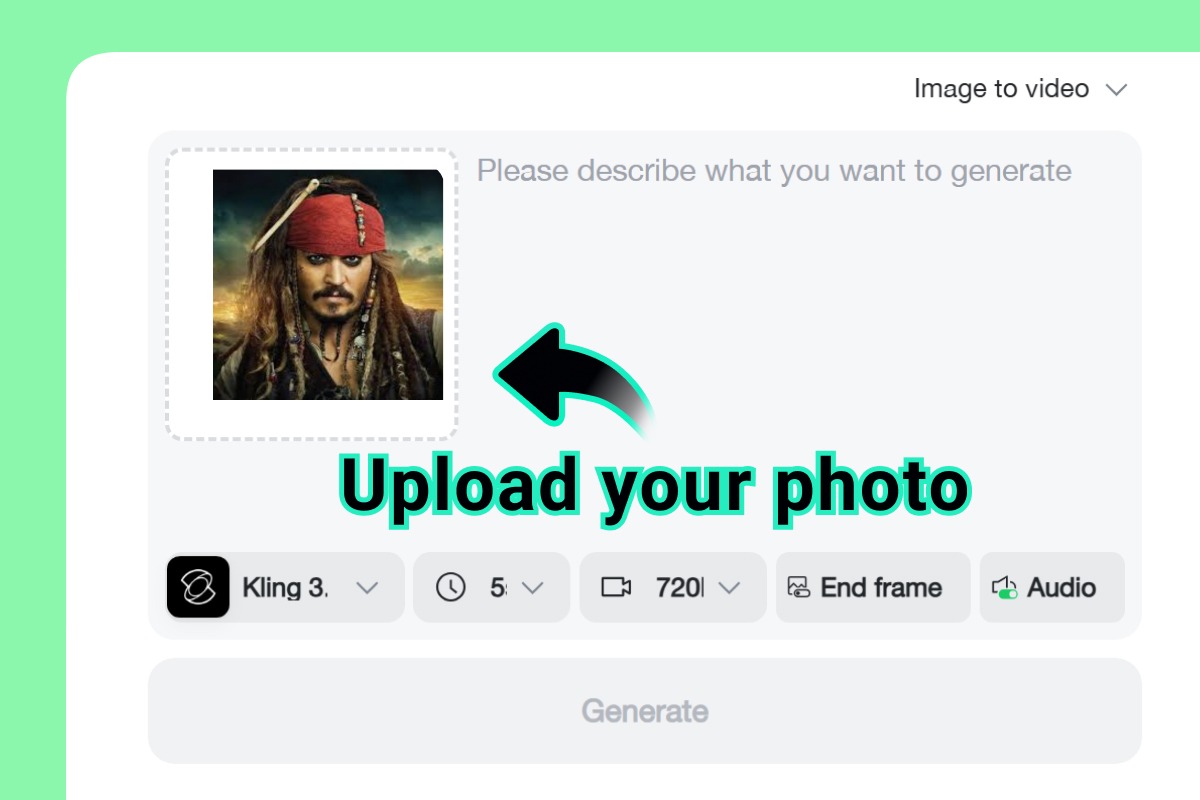
First, upload a celebrity image into insMind. Choose a photo with a clear face, strong lighting, and a composition that supports the mood you want. Portraits usually work best because the subject is easy to recognize and animate. If your goal is a dramatic or glamorous clip, start with an image that already feels polished. A strong source image gives insMind better visual information and helps the final motion look more convincing from the first generation.
Step 2: Next, enter your prompt in insMind and describe the motion you want to see
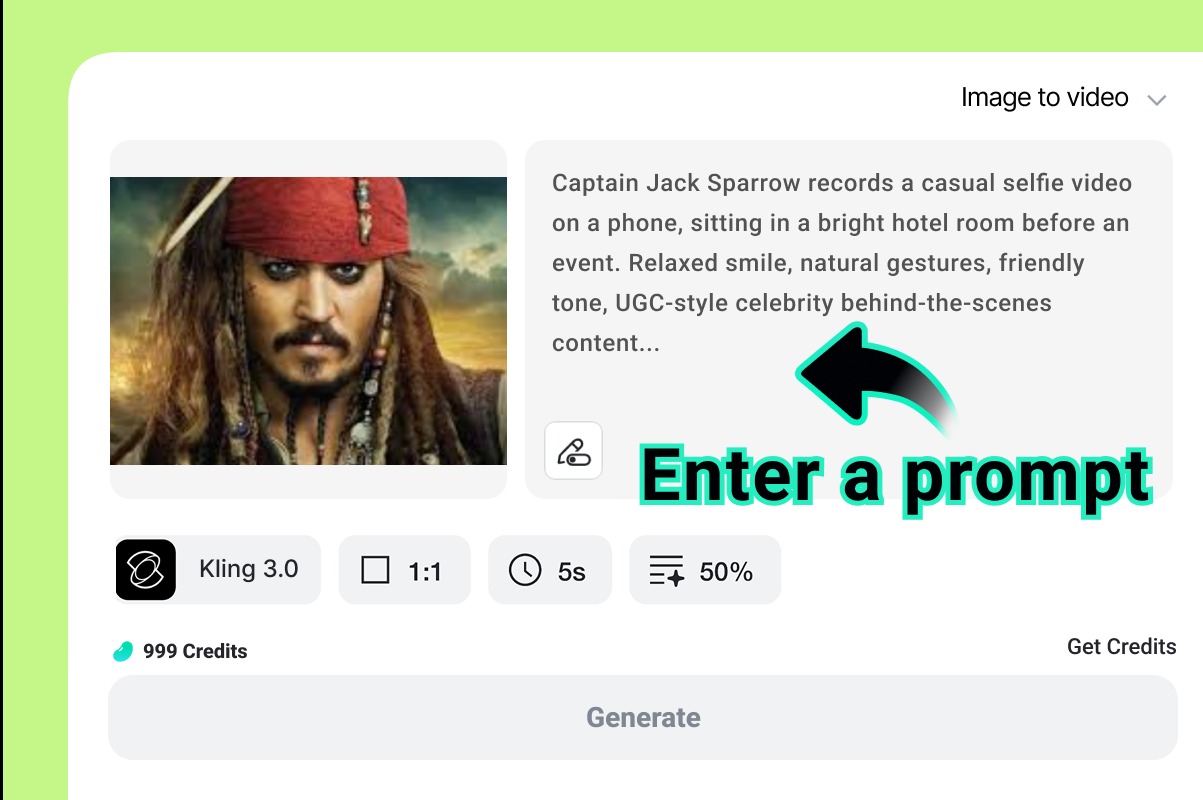
Next, enter your prompt in insMind and describe the motion you want to see. Keep it focused. Tell the system how the celebrity should move, what expression or vibe the clip should have, and what overall style you want. Then move to the video settings and choose the model parameters that fit your idea. This is the stage where you shape the output direction, so be intentional. A simple, clear prompt usually performs better than a crowded one.
Step 3: Finally, generate the video in insMind, review the result, and download the version you want to share
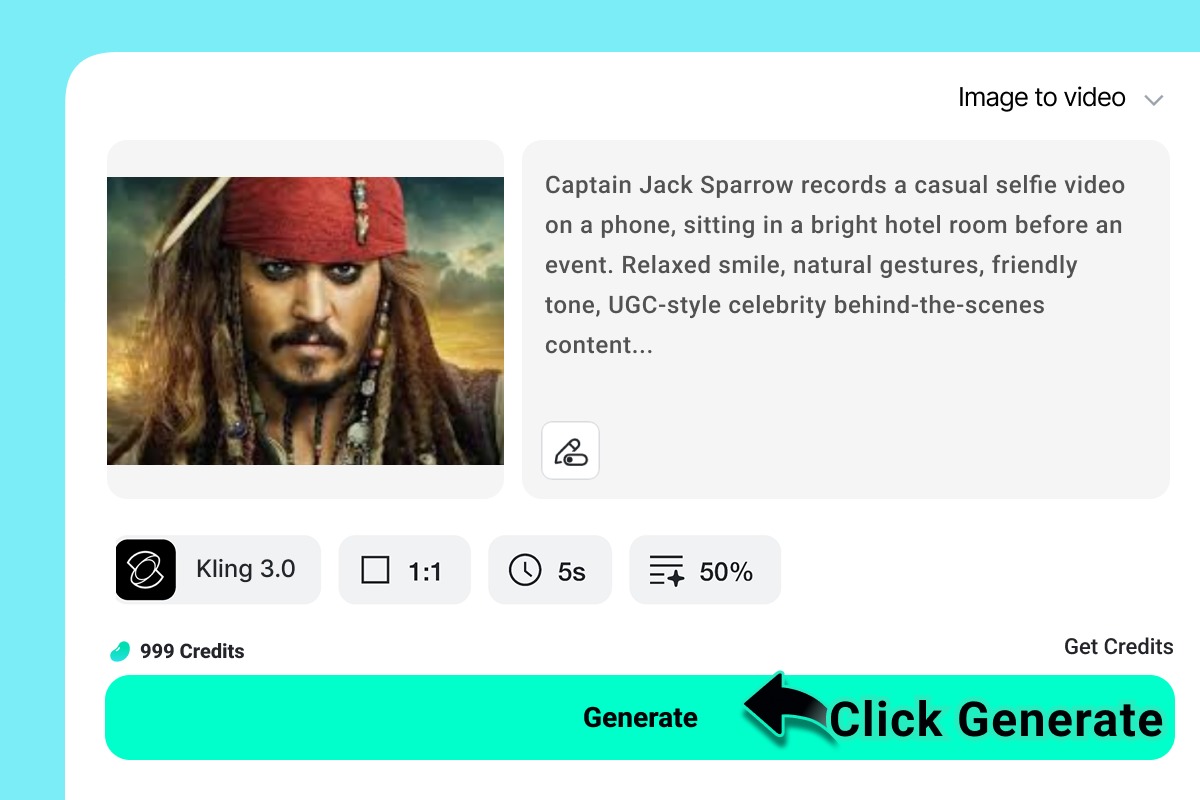
Finally, generate the video in insMind, review the result, and download the version you want to share. If the motion feels too busy or not dramatic enough, refine the prompt or settings and generate again. Small changes can make a big difference. Once you are happy with the clip, export it and prepare it for your platform. This fast animate celebrity photo AI process makes it easy to create short, trend-ready content without a long production cycle.
Frequently Asked Questions
Can beginners really create celebrity videos with AI without editing experience?
Yes. Beginners can create strong results because the workflow is simple and focused. You upload a celebrity image, write a prompt, choose video settings, then generate and download. You do not need timeline editing or motion design skills to start making short, shareable clips.
What kind of celebrity image works best for AI video generation?
A sharp, well-lit image with a clearly visible face usually works best. Try to use a photo with minimal blur, good contrast, and a clean composition. If the expression and framing already match your idea, the generated motion will usually look more natural and engaging.
How long does it take to make a celebrity video with AI?
In many cases, you can go from image upload to downloaded video in just a few minutes. The exact time depends on your prompt, settings, and how many versions you want to test. Faster iteration is one of the biggest advantages of AI-generated video workflows.
What should I write in my prompt for a more viral celebrity video?
Focus on one clear action, one mood, and one style direction. For example, describe a dramatic glance, a confident red-carpet pose, or a playful cinematic expression. Avoid asking for too many movements at once. Simpler prompts often create stronger, cleaner clips that feel more shareable.
Why does my AI celebrity video sometimes look unnatural or inconsistent?
This usually happens when the source image is low quality, the face is unclear, or the prompt asks for too much. Mismatch can also cause problems. If the image looks calm but the prompt demands extreme action, the result may feel off. Better inputs usually solve most issues.
Can I use image-to-video generation for social media content and short clips?
Absolutely. Short-form platforms are a natural fit for this format because quick, eye-catching visuals perform well there. AI-generated celebrity clips can work for reactions, entertainment posts, trend participation, and meme content, especially when the concept is easy to understand in the first few seconds.
Is it better to make one detailed prompt or test several simple prompts?
Testing several simple prompts is often the smarter approach. Short, focused prompts are easier to control and compare. When you generate multiple versions, you can quickly see which motion, tone, or style feels strongest. That makes optimization faster and helps you learn what works.
Ready to Get Started?
Creating celebrity videos with AI no longer has to feel technical or time-consuming. If you can choose a strong image and describe the motion you want, you can build attention-grabbing clips quickly. That is why this format is becoming so useful for creators, marketers, and trend-driven social accounts. It combines speed, flexibility, and visual impact in a way that fits how content works today.
The key is to keep your process simple. Start with a clear celebrity image. Write a focused prompt. Choose video settings that match your concept. Then generate, review, and download. When you work this way, you can test more ideas in less time and improve your results through quick iteration. If you are ready to turn still photos into scroll-stopping content, try insMind’s celebrity video generator AI workflow and start making viral-ready clips in minutes.
Sarah Michelle
I'm a freelance writer with a passion for editing and designing photos. Here at insMind, I strive to educate users on image creativity, photography, and enhancing product photos to help grow their businesses.


![How to Add Logo to Photos Online for Free [The Simplest Method]](https://static.xsbapp.com/market-operations/market/side/1718795949162.jpg?x-oss-process=image/resize,w_690,h_460,type_6/interlace,1,image/format,webp "How to Add Logo to Photos Online for Free [The Simplest Method]")
![How to Remove Tattoos from Photos [Ultimate Guide 2025]](https://static.xsbapp.com/market-operations/market/side/1718787534476.jpg?x-oss-process=image/resize,w_690,h_460,type_6/interlace,1,image/format,webp "How to Remove Tattoos from Photos [Ultimate Guide 2025]")


