


Turning a portrait photo into a video implies using AI to animate a still face with natural movement. With today's tools, you can use AI to make a photo move in a matter of a few steps. The system reads face, eyes, hair, and even small details and builds smooth motion that appears real. This works for people, pets, avatars, or any character you upload.
AI photo animation can also understand expressions, body language, and simple style cues in an image. That is why portrait-to-video tools are so natural to use. You can make someone smile, turn their head, wave, walk forward, or even dance. Many people enjoy animated portraits because they are fun, personal, and easy to share.
On insMind, the setup is rather simple. You upload a photo and select a model or effect, and the AI will take care of the motion for you. No video skills are needed.
Table of Contents
Why Turn a Portrait Photo into a Video with AI?
AI makes it easy to convert a photo to a video because it knows about the structure of a face, the direction of light, and the small details that compose an expression. When you upload a still image, the system reads these features and uses them to animate photo content with smooth, natural motion. This means that your portrait can smile, blink, turn, or move in nearly anything that you describe.
It does for more than just people, and it works for pets, drawings, and digital avatars. Many creators like this because animated portraits are fun, personal, and perfect for social posts, short stories, and as a creative project. They also make great gifts, greetings, and clips for characters to share online.
How to Turn a Portrait Photo into a Video on insMind
insMind offers you 2 easy ways to transform a standing picture into a moving video. You can choose your own prompt to make the animation, or have canned templates that you can use for ready-made results. Both use image-to-video AI technology, which reads faces, shapes, and lighting to create smooth, realistic movement.
Method 1 - Turn a Portrait Photo into a Video with a Prompt (Image to Video)
This method offers complete creative freedom. You explain what you want to see, and the photo-to-video AI system brings your idea to life with clear and natural movement.
Step 1: Upload a Portrait Photo
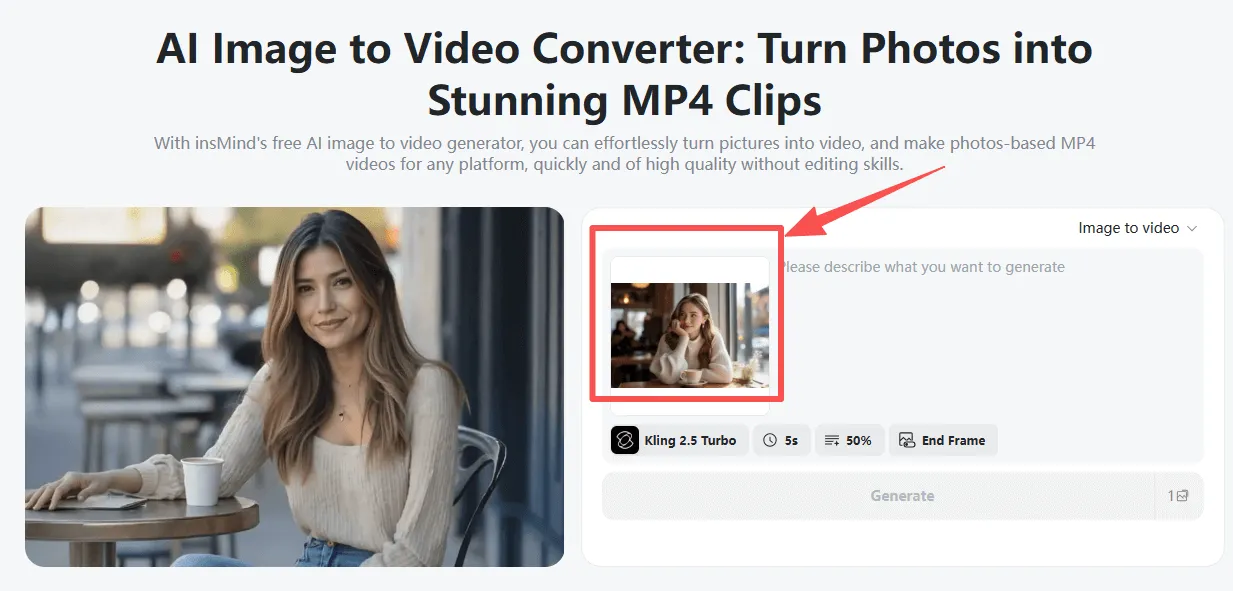
Front-facing images of a person or pet are best for clean motion.
Step 2: Add a Motion Prompt
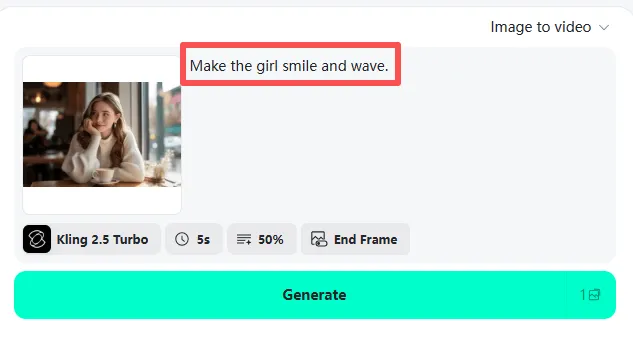
Give an easy prompt of what you want the portrait to execute. You can make simple or complex requests, such as -
- "Make a person smile and wave."
- "Make the portrait dance using the video."
- "Make the character walk away from the camera in a cinematic manner."
Your description informs the AI as it transforms the picture into a video.
Step 3: Pick an AI Video Model
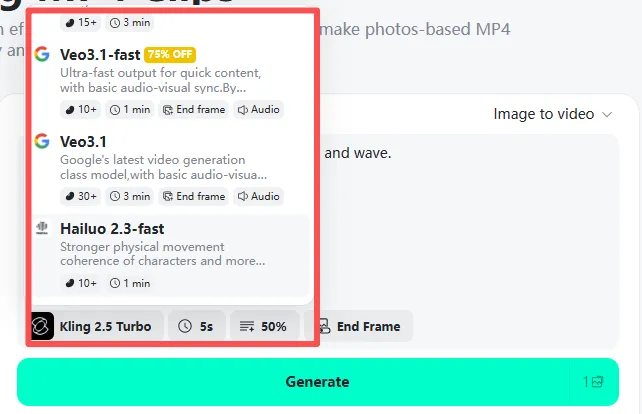
insMind supports a few advanced models, among which -
- Kling 2.5 Turbo
- Google Veo 3.1
- Sora 2
- Wan 2.5
- And more
Each model comes with different options of motion behavior, the level of detail, and style.
Step 4: Generate the Video
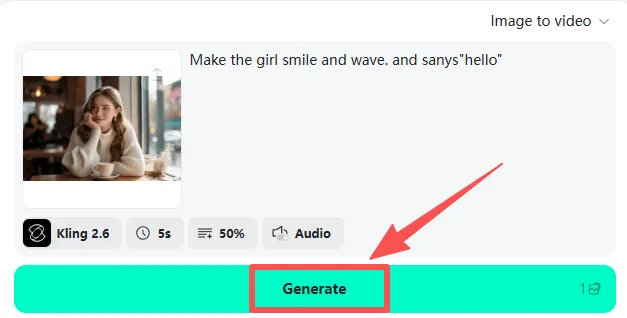
Click Generate. The AI reads the face, hair, light, and shape and brings the portrait to life with fluid movement.
Step 5: Preview & Download
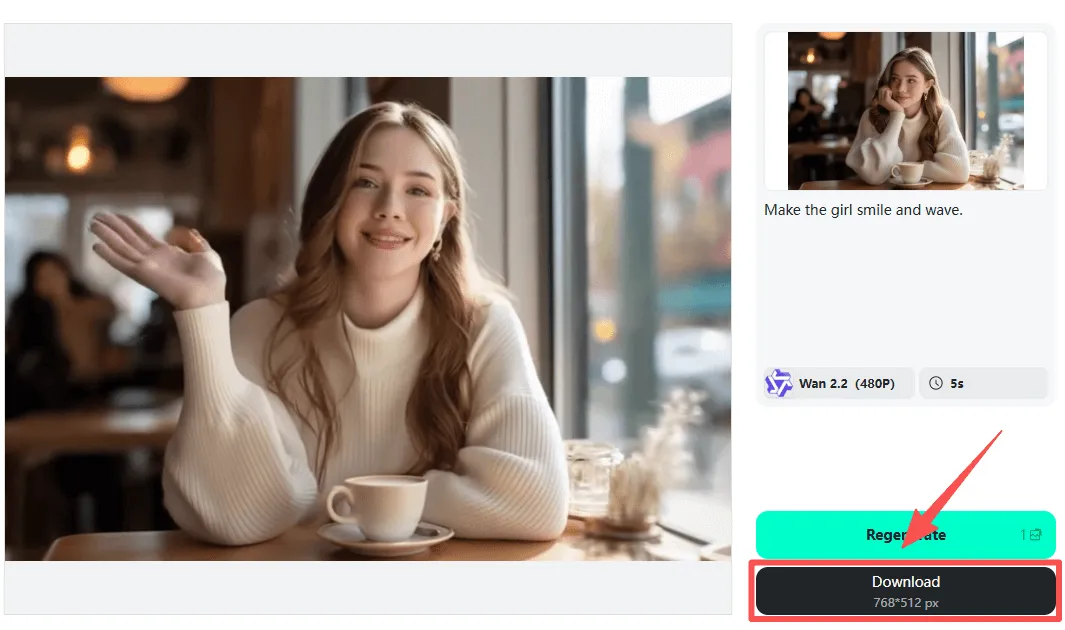
Review the animation and make changes, if necessary, and download your final video.
Method 2 - Turn a Portrait Photo into a Video using One-Click Templates
This way is a sure win for beginners or for anyone who would like to achieve fast and fun results without having to write them. insMind comes with a wide choice of AI video effects that can help to transform portraits into dynamic videos in an instant.
Step 1: Upload Your Photo
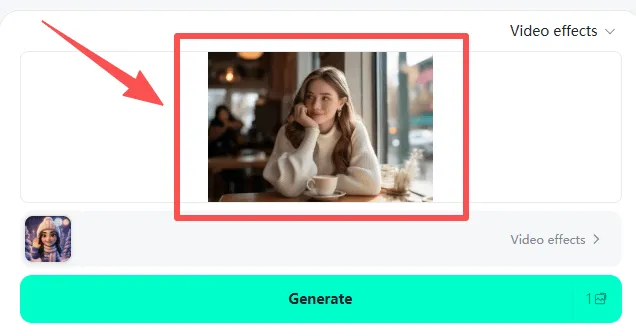
Upload a picture of you, a friend, a pet, or even a digital character.
Step 2: Pick an AI Video Effect
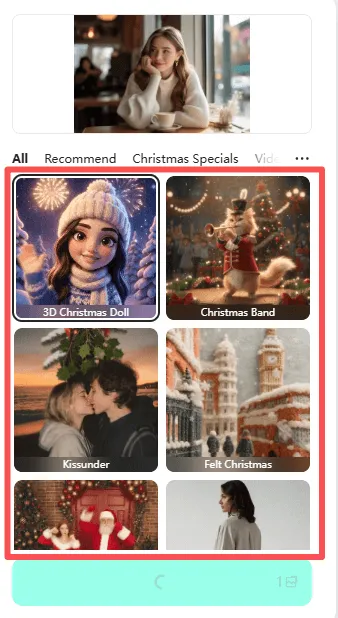
Pick from a lot of ready-made effects designed for AI photo animation and expressive storytelling. Popular categories include -
- AI Facial Expressions (Crying, Laughing, Surprised).
- AI Interactions (kiss, hug, dance, walk, fly, fight, celebrity selfie)
- AI Style Transfer 3D Figure, 3D Polaroid, Cartoon anime
- And more
Step 3: Generate Instantly
No prompt needed. The tool uses AI-animated photo technology to make your photo move in a natural, fun, or stylized way.
Step 4: Download & Share
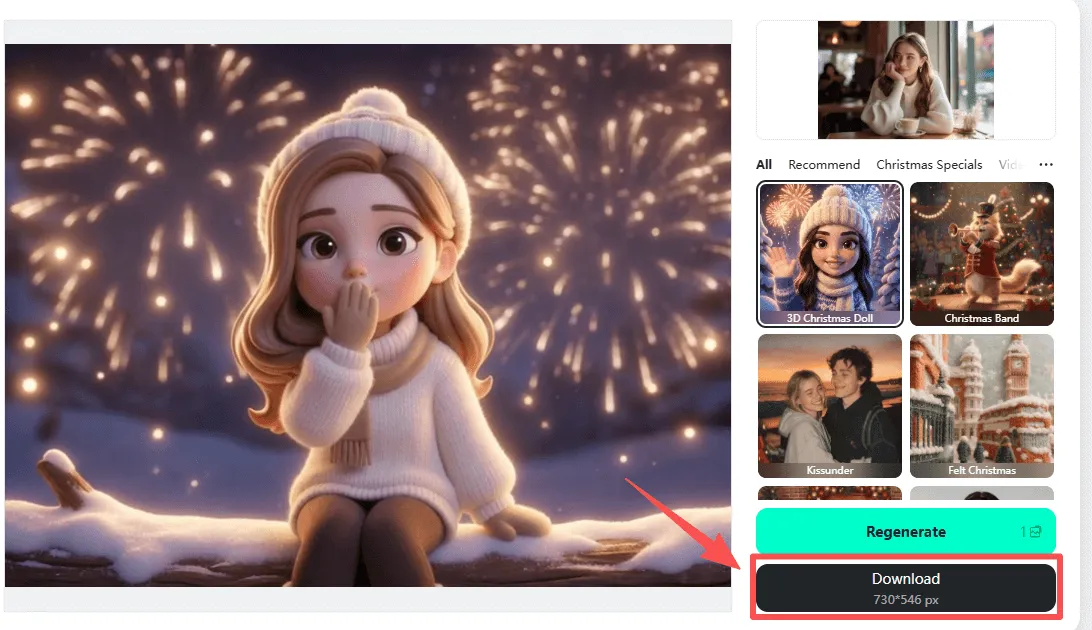
Export your animated portrait and post it on TikTok, Instagram, YouTube Shorts, or wherever you fancy.
Great for memes, greetings, reactions, storytelling, or quick creative content.
Creative Ideas to Animate a Portrait Photo
There are many fun and creative ways to bring a portrait photo to life with AI. With the help of just one picture, you can transform a basic moment into a lively, expressive video with a natural and full-of-personality feel.
Talking Avatars
Have your portrait talk, wink, or provide messages. Perfect for social posts, voice-over, or digital characters.
Pets Dancing
Turn your dog's, cat's, or any pet's photo into a cute dancing clip. The motion is made smooth and playful by AI.
Cartoon or Anime Selfies
Make a typical portrait look like a cartoon or anime video. Great for personal branding or fun internet profiles.
Cinematic Walk Cycles
Use artificial intelligence to generate smooth walk-forwards that look like they came from movies. Best for dramatic, stylish content.
Meme Reactions
Take a still face and make it funny (shocked, laughing, surprised, crying). A favorite for quick social memes.
Greeting or Holiday Videos
Create birthday wishes, Christmas greetings, or friendly messages using animated portraits.
Character Moments
Bring fictional characters or drawn avatars to life using subtle movement or full-body gestures.
All these notions demonstrate how easy it is to convert a portrait into a video and make the tools of photo-movement AI work for any imaginative purpose.
Why Use insMind Instead of Other Image-to-Video Tools?
insMind provides you with a faster, easier, and flexible way of animating portraits than most other tools. You do not need to download any software or install any heavy software. Everything is online using a fast image-to-video generator, so you can start creating immediately, on any device.
You also get access to multiple AI models in one place - like Kling, Veo, Sora, and more - and it gives you better motion, faces that look better, and more style choices. If you're a fan of writing prompts, insMind provides full prompt-based control. If you want to keep it simple, you can use one-click templates instead. Both of the methods work seamlessly for beginners and advanced creators.
insMind is also cloud-rendered in order to render videos quickly, so there's no wait on slow devices. And using it commercially, you can fully employ your animated photos in any ads, brand content, content for local clients, or social posts.
FAQs about image to video AI tool
How do I make a photo video using AI?
Upload a clear portrait to insMind, select a video model or template, add a prompt if required, and create your moving video in seconds.
Can AI bring a portrait photo to life, without money?
Yes. insMind provides free trials and free credits you can use to try the image-to-video tools for free.
Which is the best image-to-video AI tool?
insMind is one of the best as it supports a number of AI models, provides templates as well as prompts, and generates smooth, realistic motion.
Can I animate pet photos using AI?
Yes. insMind can animate pets just as people. Upload a pet's portrait, select a motion or a template, and create a fun moving clip.
I'm a tech enthusiast and writer who loves exploring AI, digital tools, and the latest tech trends. I break down complex topics to make them simple and useful for everyone.


![How to Add Logo to Photos Online for Free [The Simplest Method]](https://static.xsbapp.com/market-operations/market/side/1718795949162.jpg?x-oss-process=image/resize,w_690,h_460,type_6/interlace,1,image/format,webp "How to Add Logo to Photos Online for Free [The Simplest Method]")
![How to Remove Tattoos from Photos [Ultimate Guide 2025]](https://static.xsbapp.com/market-operations/market/side/1718787534476.jpg?x-oss-process=image/resize,w_690,h_460,type_6/interlace,1,image/format,webp "How to Remove Tattoos from Photos [Ultimate Guide 2025]")


