
How to Animate a Pet Photo with AI (Dog & Cat Friendly)
Create fun pet animations instantly with insMind.

AI has also made it possible to take a simple pet photo and turn it into a fun moving video. With the help of smart tools, you should make the pet photo move in a way that looks natural and full of personality. The system is able to read main features in the picture, such as face, fur, ears, and pose, and then creates smooth movements matching your pet's face. It works for dogs, cats, birds, or even small animals, so that anyone can convert their pet's picture to life.
People love using AI animate pet tools because they are very simple to make fun clips, cute memes, reaction videos, and sweet gifts to share with friends and family. These animated videos also work great on social media, and they only take a few seconds to create. With insMind, you do not require any editing skills whatsoever. The pet animation AI system takes the hard work out of all of this with easy steps.
Table of Contents
What Does It Mean to Animate a Pet Photo with AI?
AI allows you to create pet photo animation, a static image of your dog, cat, or any animal is transformed into a short moving video. The system uses this information by identifying the structure of the pet, its pose, lighting, and other important characteristics such as ears, eyes, and fur. Then, the AI animate pet model produces smooth and natural movement to suit your pet's appearance and personality.
It is not limited to actual pets, but can also be used to work with drawings, cartoons, or even stylized characters. The animation can be subtle, such as blinking or turning the head, or more expressive, such as walking and dancing or reacting to the camera. The major advantage is speed and ease. You get fun, lively, and expressive digital content in just seconds, and it's ready to share anywhere.
How to Animate a Pet Photo on insMind
Below you have the two ways by which you can turn a still pet photo into a moving video with insMind.
Method 1: Animate a Pet Photo by Using a Prompt (Image to Video)
The prompt-based approach allows you to have complete creative control over how your pet moves. Start by uploading a clear photo of your dog, cat, bird, or something small. The image-to-video pet engine works best with captures and videos taken for front-facing shots with easily identifiable features of the pet's face, ears, and body shape.
Step 1: Upload a Pet Photo
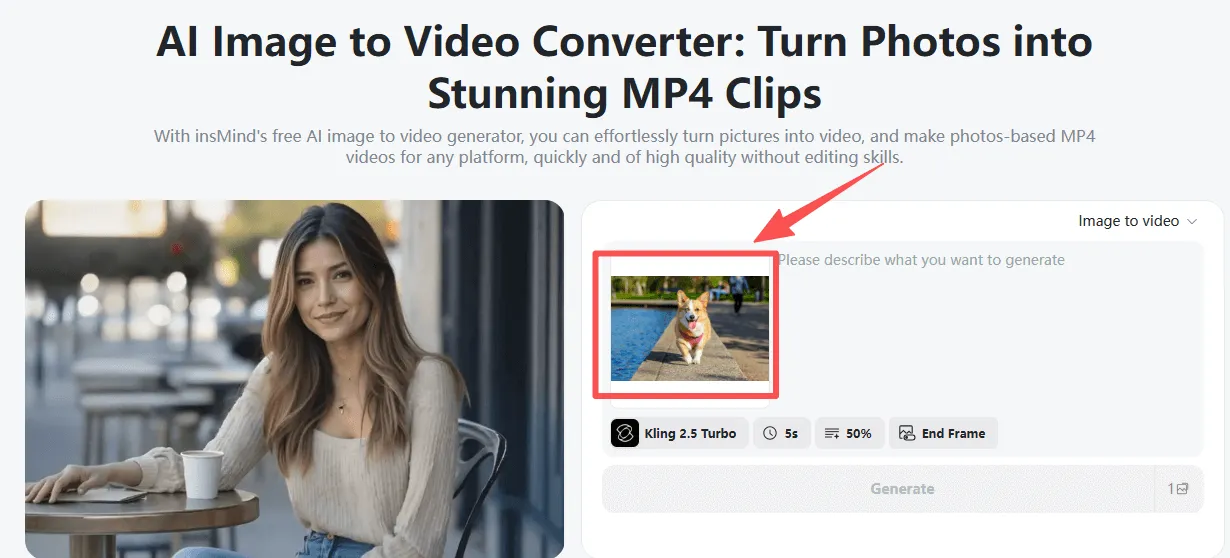
Select a clean portrait of your pet. Good lighting and recognizable features allow AI animation to look smoother.
Step 2: Add an Animation Prompt
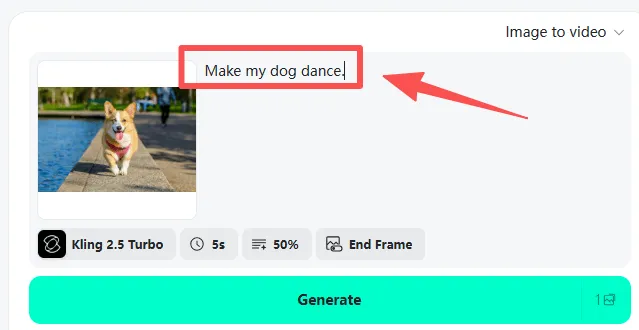
Write a short prompt as to what the pet should do, such as:
- "Make my dog dance."
- "Make my cat walk towards the camera."
- "Make my puppy wave a paw."
Step 3: Select an AI Video Model
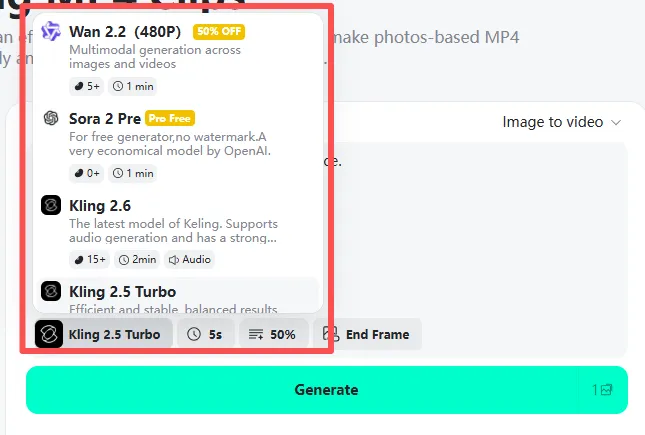
Pick from the required models such as Kling 2.5 Turbo, Veo 3.1, Sora 2, or Wan 2.5. Each model comes in a different animation style.
Step 4: Generate the Pet Video
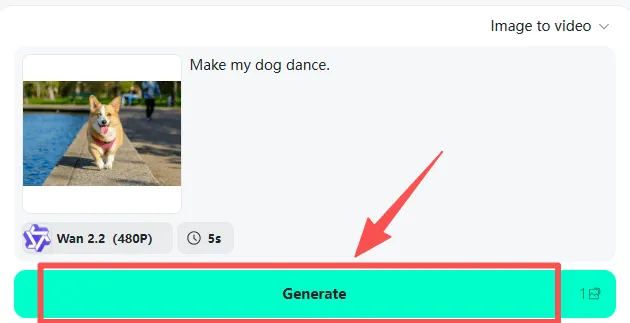
Click Generate. The pet photo-to-video AI analyzes the pet's structure and generates smooth, natural movement.
Step 5: Preview & Download
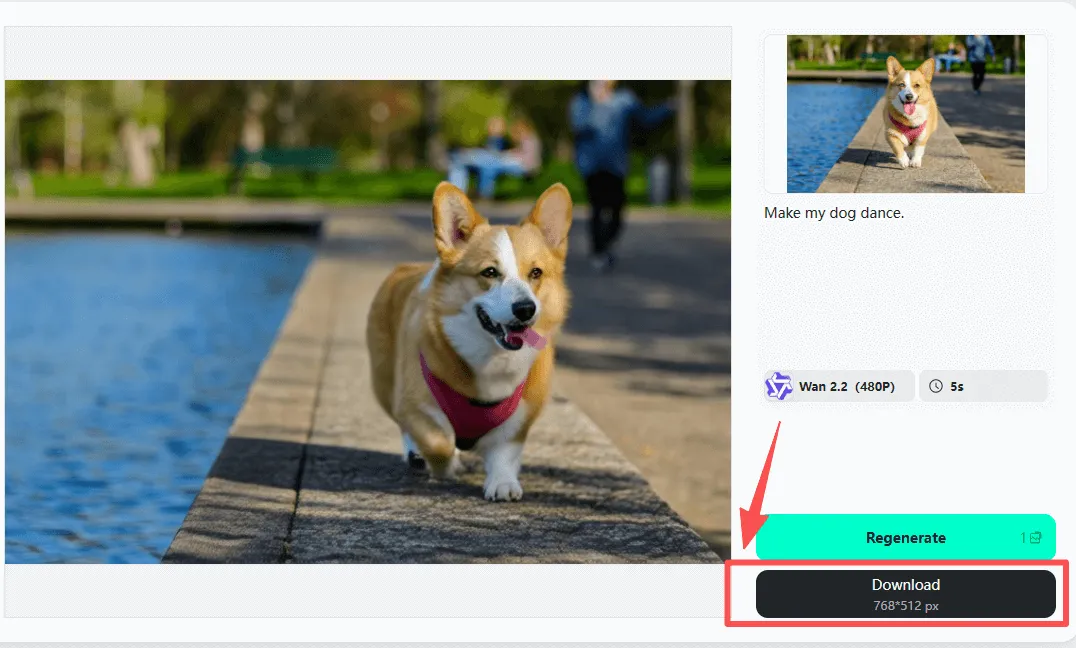
Watch the outcome, download the result, and share your revamped pet everywhere - TikTok, Instagram, YouTube Shorts, or with your friends.
This technique is ideal for situations when you need to turn a photo of a pet into a video of the pet with custom and accurate motion.
Method 2: Animate a Pet Photo with One-Click Templates
If you want to get results without writing prompts quickly, the template method is perfect for you.
Step 1: Upload Your Pet Photo
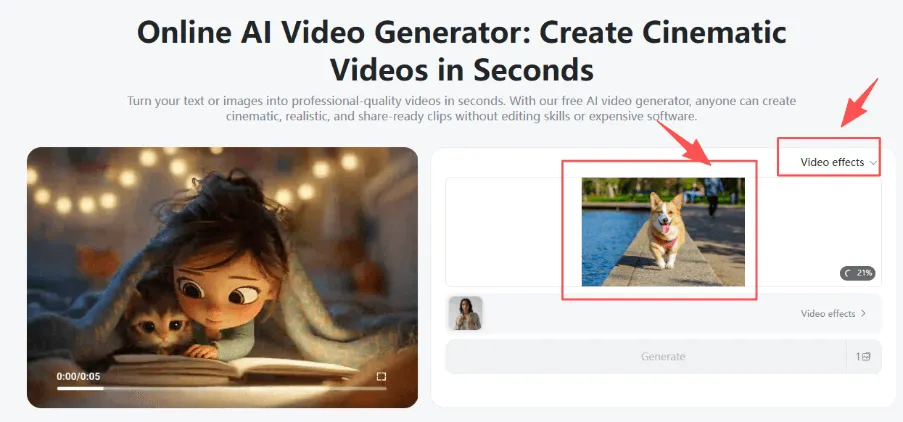
Select a picture of your dog, cat, or any pet. The AI prepares it instantly.
Step 2: Select your One Click AI Pet Effect
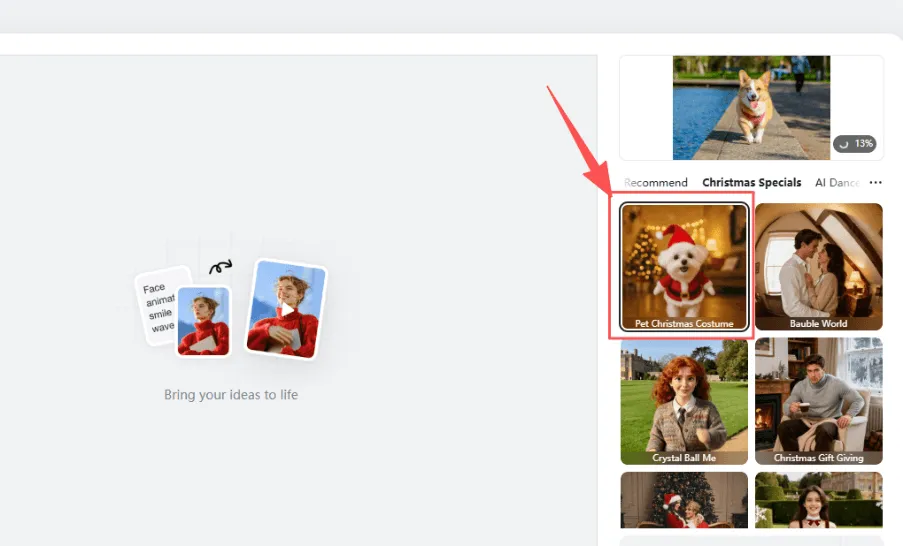
Choose from a range of pre-read effects such as:
- Artificial Intelligence Christmas pet transformation
- AI Pet to Human Generator
- Cat Cooking AI
- AI Pet Dress Up
- AI Catwalk Video Generator
- AI Video Generator for Animal Hug
These effects make it easy to create fun and unique effects.
Step 3: Generate Instantly
No prompt needed. The AI pet video generator automatically causes the pet photo to move depending on your choice of template.
Step 4: Download & Share
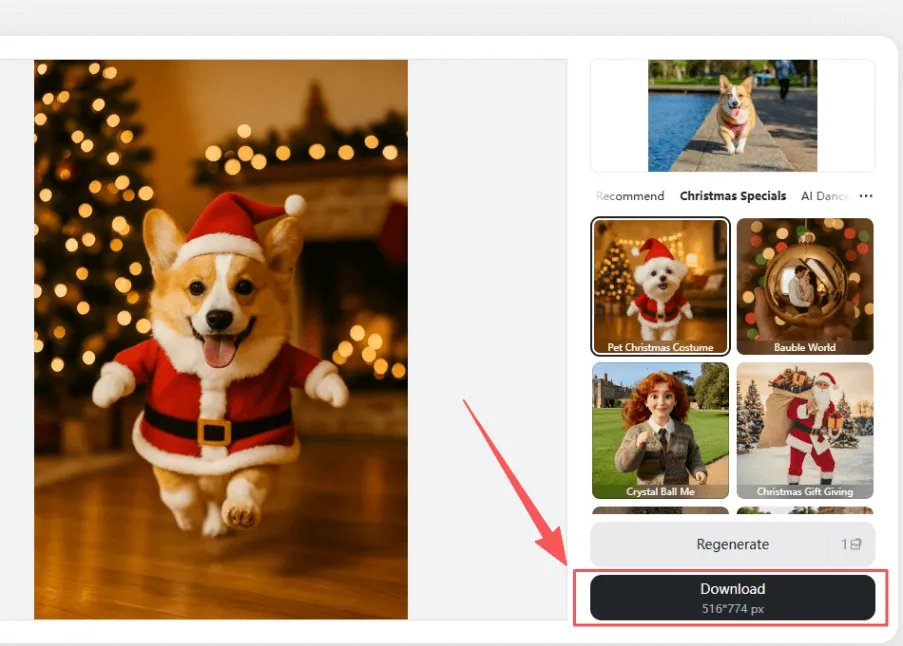
Get your animated pet video and share it on social or send it to your friends.
This method is best when you want quick, fun content with AI-animated pet technology- you don't need any learning curve for this.
Creative Ideas to Animate Pet Photos
Animating a pet photo opens the doors to fun, creative videos that are alive and full of personality. With AI, you can make a simple picture into something that feels like an expressive scene that is also entertaining. Here are some easy things you should do when you do pet photo content animation insMind.
Dancing Dog Animation
Turn a picture of a sitting dog into a fun music dancing animation. Great for TikTok, Reels, and funny pet edits.
Talking Cat Avatar or Meme
Have a cat "talk," react, or deliver a meme-like statement. Perfect for quick humor as well as viral moments using animated cat photo ideas.
Christmas Greeting Pet Video
Create a holiday-themed animation with costumes, snow, or lighting to share with family and friends.
Pet Runway Fashion Show
Animate your pet walking like a model on the runway, along with stylish movement and the camera.
Superhero Transformation
Turn your pet into a mini hero, flying, posing, or powering up.
Cooking Cat Short
A fun idea of your cat "cooking" in a tiny kitchen - super popular for memes.
Birthday Greeting Animation
Make a fun birthday message for your pet, moving or waving.
Pet POV Storytelling
Animate your pet as if it were the story's narrator in a short story or adventure.
Why Use insMind as Your AI Pet Video Generator?
No Software Needed
insMind is a fully online service, so there is no need to install anything. You can animate pet photos on desktop and mobile with ease.
Prompt + Template Options
Use detailed prompts for full control or go with one-click templates for instant results. Both styles are smooth functioning with any level of user.
Multiple Advanced AI Models
Choose from the best models such as Kling 2.5 Turbo, Veo 3.1, Sora 2, Wan 2.5, etc. Each model contributes to helping the AI pet video generator generate clear and natural movement.
Beginner-Friendly Interface
Everything is easy to work with, even if you've never used an AI tool before. Upload, select, and create in seconds.
Fast Cloud Rendering
insMind processes videos in the cloud, thus providing you with quick results without slowing down your device.
Commercial-Friendly Use
You can post your image-to-video pet animation on social media, business, and marketing content without any problems.
FAQs About Animating Pet Photos with AI
How do I give a pet life using AI?
Upload your pet photo to insMind, select a model or template, add a prompt if necessary, and the AI generates a moving video in seconds.
What is the Best Artificial Intelligence (AI) Tool for Animating Pets?
insMind is one of the best tools, as it offers prompts, one-click templates, and multiple AI models to enable smooth, natural pet animation.
Can I make my dog or cat go through animations for free?
Yes. insMind has free credits to give you an opportunity to try out simple AI-animated pet features before you move to higher-quality models.
How do I create a pet photo video?
Upload a photo, select a style or model, hit generate, and insMind transforms your pet photo to a video AI animation in an instant.
Can Access AI Pet Videos on TikTok?
Yes. You can download your pet video and post it directly on TikTok, Instagram, YouTube Shorts, or anywhere that you post content.
Conclusion
AI makes it easy for anyone to make pet pics come alive and make dogs, cats, etc. With both prompts and one-click templates, insMind lets you create fun, fast, and share-ready videos for social media or personal projects. Try it with any photo of a pet and see it move around.

Jayson Harrington
I am the Chief Editor of insMind. I provide tips and skills to help users design better photos with insMind, whether for e-commerce, social media, or any other use.


![How to Add Logo to Photos Online for Free [The Simplest Method]](https://static.xsbapp.com/market-operations/market/side/1718795949162.jpg?x-oss-process=image/resize,w_690,h_460,type_6/interlace,1,image/format,webp "How to Add Logo to Photos Online for Free [The Simplest Method]")
![How to Remove Tattoos from Photos [Ultimate Guide 2025]](https://static.xsbapp.com/market-operations/market/side/1718787534476.jpg?x-oss-process=image/resize,w_690,h_460,type_6/interlace,1,image/format,webp "How to Remove Tattoos from Photos [Ultimate Guide 2025]")


