


Scroll through YouTube, TikTok, or Instagram for a few minutes and you'll notice something interesting—people aren't just watching videos anymore. They're listening to them.
Soft cutting sounds. Gentle tapping. Slow, deliberate movements. That calming sensation you feel? That's ASMR.
ASMR (Autonomous Sensory Meridian Response) videos have become one of the most consistent high-engagement content formats online. From soap cutting and food slicing to knitting, packaging, and abstract visuals, ASMR content keeps viewers watching longer—and coming back for more.
The challenge? Traditional ASMR creation requires specialized microphones, quiet environments, and a lot of trial and error.
That's where AI ASMR video generators change the game.
With tools like insMind, creators can now make immersive AI ASMR videos using text prompts or images—no studio, no equipment, no experience required.
This guide will walk you through how to make AI ASMR videos step by step, including real examples using Google Veo 3.1 and Wan 2.6, plus ready-to-use prompts you can try immediately.
Table of Contents
- 01 What Is an AI ASMR Video?
- 02 Why AI ASMR Is Perfect for Beginners?
- 03 How to Make AI ASMR Videos with insMind (Step by Step)
- 04 Creating ASMR Videos with Google Veo 3.1 (Example)
- 05 Creating ASMR Videos with Wan 2.6 (Example)
- 06 Popular Use Cases for AI ASMR Videos
- 07 AI ASMR Video Generator FAQs
What Is an AI ASMR Video?
An AI ASMR video is a relaxing, sensory-focused video generated by artificial intelligence based on text prompts, images, or both.
Instead of recording real sounds and visuals, you describe:
-
The action (cutting, tapping, squeezing)
-
The material (soap, yarn, food, slime)
-
The mood (slow, gentle, satisfying)
-
The visual style (macro, cinematic, soft lighting)
The AI handles the rest—motion, pacing, and visual rhythm.
With an AI ASMR video generator, you can create:
-
Visual ASMR (slow, satisfying movements)
-
Abstract ASMR (textures, loops, patterns)
-
Stylized ASMR for TikTok and Shorts
-
Relaxing background videos for sleep or focus
Why AI ASMR Is Perfect for Beginners?
If you've ever thought:
-
“I want to make ASMR videos, but I don't have the gear”
-
“I don't know how to record good audio”
-
“I just want to test if ASMR works for my audience”
AI ASMR is built for you.
Key Advantages:
-
No microphone or camera needed
-
No editing skills required
-
Fast creation (minutes, not hours)
-
Easy experimentation with different styles
-
Lower cost and lower risk
With insMind's AI ASMR generator, you can focus on creativity—not technical setup.
How to Make AI ASMR Videos with insMind (Step by Step)
Step 1: Choose Your ASMR Creation Mode
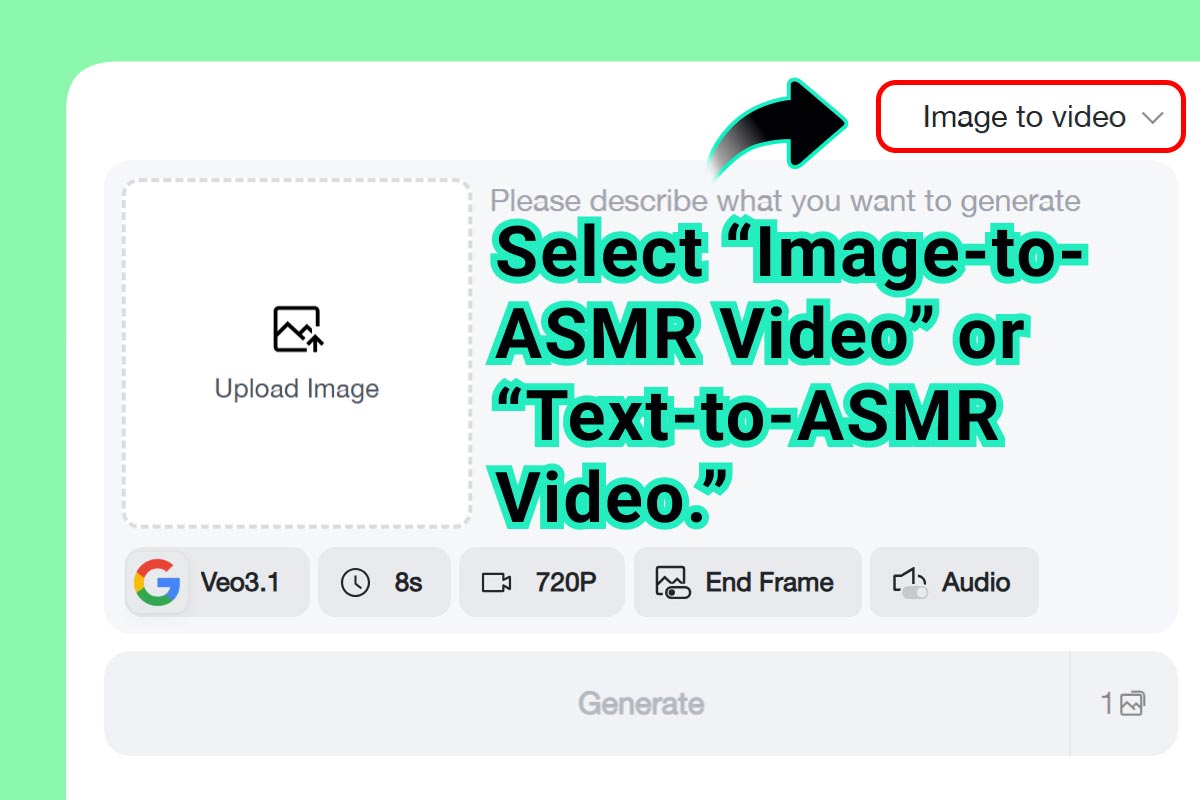
On insMind, you can start in two ways:
-
Text-to-Video (best for beginners)
-
Image-to-Video (best for physical or product-style ASMR)
If you're new, text-to-video is the easiest entry point.
Step 2: Write Your ASMR Prompt
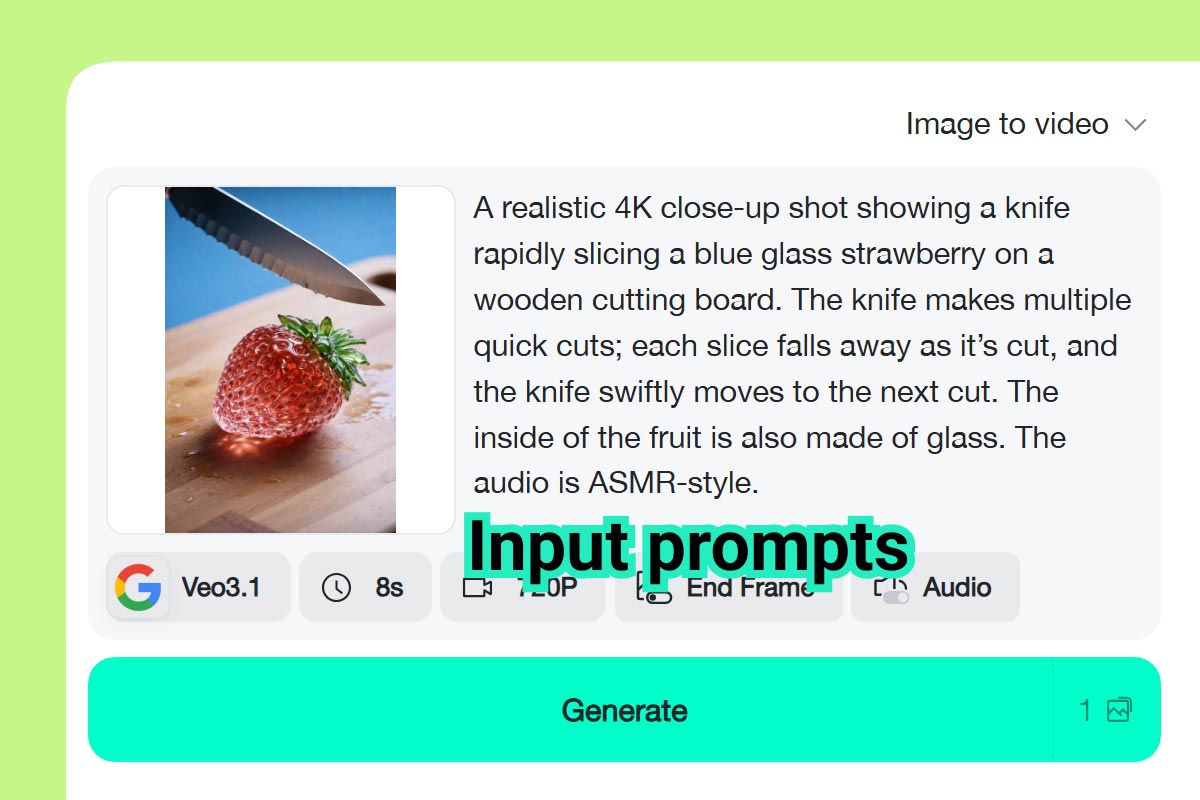
This is where the magic happens.
A strong ASMR prompt usually includes:
-
Action (slicing, tapping, cutting)
-
Material (soap, yarn, food)
-
Visual style (macro, close-up, cinematic)
-
Pace (slow, gentle, repetitive)
-
Mood (relaxing, satisfying, calming)
Don't overthink it. Simple prompts often work best.
Step 3: Select Your AI Model and Video Settings
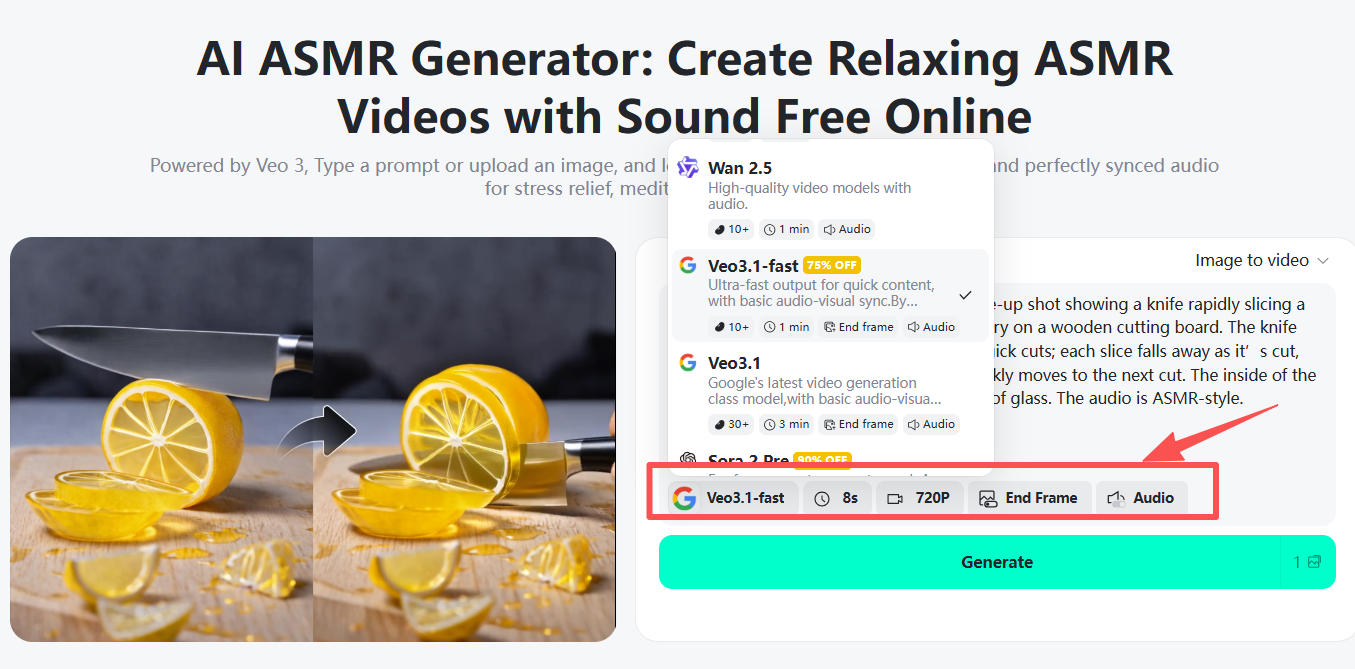
insMind supports multiple AI models for ASMR creation.
Recommended Models:
-
Google Veo 3.1 – realistic motion and cinematic quality
-
Wan 2.6 – stylized, playful, and creative visuals
You can also adjust:
-
Aspect ratio (9:16 for TikTok, 16:9 for YouTube)
-
Video duration
-
Resolution (HD or higher)
Step 4: Let AI Generate the Visuals and ASMR Feel
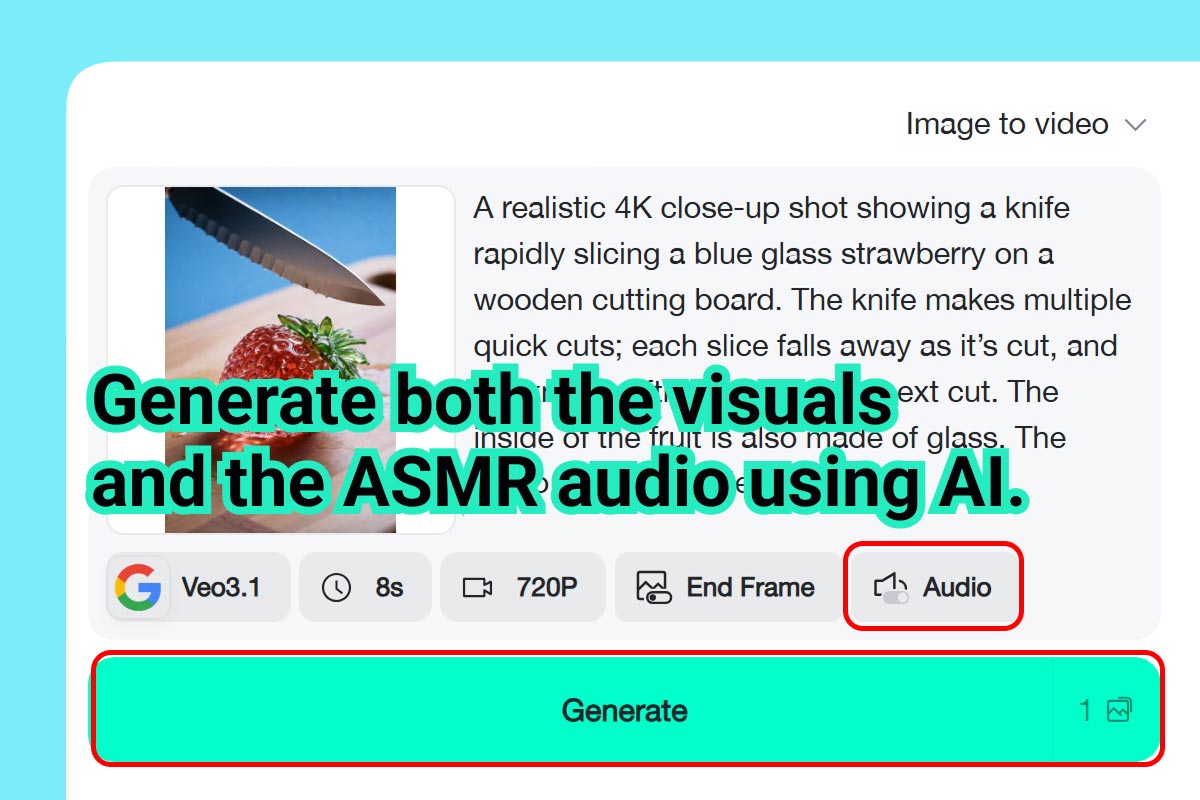
Once you click generate, insMind handles:
-
Motion flow
-
Visual pacing
-
Texture realism
-
ASMR-style timing
No editing. No timeline. Just generation.
Step 5: Download and Share
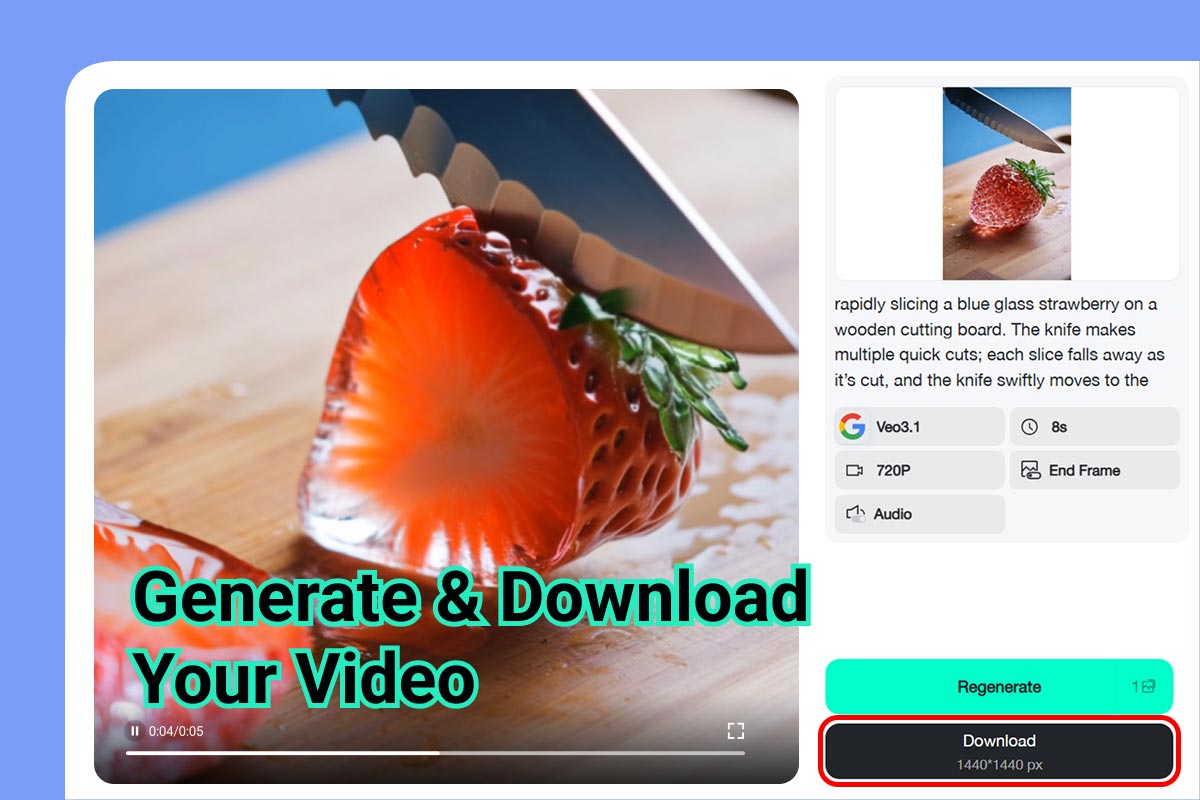
Download your video and post it directly to:
-
TikTok
-
YouTube
-
Instagram
-
Shorts and Reels
Many creators test multiple prompts to see what performs best.
Creating ASMR Videos with Google Veo 3.1 (Example)
Scenario: Soap Cutting ASMR
Prompt Example:
A macro close-up of hands slowly slicing a soft pastel soap bar, clean smooth cuts, relaxing rhythm, satisfying ASMR visuals, cinematic lighting, slow motion, ultra-detailed
Why Veo 3.1 Works Well:
-
Natural motion
-
High realism
-
Smooth transitions
-
Ideal for classic ASMR styles
Best for YouTube and calming long-form videos.
Creating ASMR Videos with Wan 2.6 (Example)
Scenario: Knitted Hamburger ASMR
Prompt Example:
A knitted hamburger being sliced slowly with a knife, soft yarn texture, playful ASMR visuals, exaggerated softness, colorful, smooth looping motion
Why Wan 2.6 Stands Out:
-
Stylized visuals
-
Fun, creative textures
-
Great for TikTok and Reels
-
Eye-catching loops
Perfect for experimental or viral ASMR content.
Popular Use Cases for AI ASMR Videos
1. Social Media Creators
Perfect for:
-
TikTok ASMR
-
YouTube Shorts
-
Instagram Reels
Short, loopable ASMR videos consistently perform well in feeds.
2. Relaxation & Wellness Content
AI ASMR videos work great for:
-
Sleep aids
-
Focus videos
-
Stress-relief visuals
-
Meditation backgrounds
3. Brand & Marketing Content
Brands use ASMR for:
-
Product texture showcases
-
Packaging reveals
-
Minimalist ads
-
Visually calming promotions
AI ASMR Video Generator FAQs: Everything Creators Want to Know
Can I create AI ASMR videos for free?
Yes. insMind offers a free trial that lets you create AI ASMR videos and explore key features before upgrading. It's perfect for beginners who want to test different ASMR styles, prompts, and AI models without any upfront commitment.
How do I make AI ASMR videos step by step?
To make AI ASMR videos with insMind:
-
Choose a creation mode (text-to-video or image-to-video).
-
Enter a detailed ASMR prompt describing the action, material, and mood.
-
Select an AI model such as Google Veo 3.1 or Wan 2.6.
-
Adjust video settings like duration and aspect ratio.
-
Generate and download your ASMR video.
This process works for both short-form social videos and longer relaxing content.
What's the best AI ASMR video generator for beginners?
For beginners, the best AI ASMR video generator is one that's prompt-based and browser-friendly. insMind is designed for creators with no technical background, offering simple controls, multiple AI models, and ready-to-use presets that make ASMR video creation fast and intuitive.
Do AI ASMR videos include sound?
Most AI ASMR videos focus on visual ASMR, such as slow motion and satisfying textures. However, some creators pair these visuals with ambient sounds or use an ASMR AI voice generator for soft narration. Visual-only ASMR performs very well on platforms like TikTok and YouTube Shorts.
What kind of prompts work best for AI ASMR?
The most effective AI ASMR prompts include:
-
A clear action (cutting, slicing, tapping)
-
A specific material (soap, yarn, food, slime)
-
Descriptive pacing (slow, smooth, repetitive)
-
A calming or satisfying mood
Simple, focused prompts usually produce the best ASMR-style results.
Can I use AI ASMR videos on TikTok and YouTube?
Yes. AI ASMR videos are commonly used on TikTok, YouTube, Instagram Reels, and Shorts. Short, loopable ASMR clips tend to perform especially well on social platforms, making them ideal for content creators looking to boost engagement.
Is AI ASMR good for monetization?
Many creators use AI ASMR videos to grow channels, increase watch time, and test content ideas before investing in full production. ASMR content can be monetized through ads, sponsorships, affiliate links, and brand collaborations once an audience is established.
What's the difference between Google Veo 3.1 and Wan 2.6 for ASMR?
-
Google Veo 3.1 is best for realistic, cinematic ASMR visuals with smooth motion and natural pacing.
-
Wan 2.6 excels at stylized, playful, and creative ASMR scenes, making it popular for TikTok-style content.
Both models are supported on insMind, allowing creators to experiment with different ASMR aesthetics.
Do I need editing skills to use an AI ASMR maker?
No. An AI ASMR maker like insMind eliminates the need for video editing skills. You simply enter a prompt, select settings, and let the AI handle motion, transitions, and visual flow.
Is AI-generated ASMR safe and allowed on social platforms?
Yes. AI-generated ASMR content follows standard content guidelines as long as it avoids restricted themes. Most AI ASMR videos focus on calming visuals and are widely accepted across social and video-sharing platforms.
Can I create ASMR videos from images?
Yes. With image-to-video mode, you can upload a still image and use AI to animate it into a relaxing ASMR-style video. This is especially useful for product shots, crafts, or texture-focused content.
Final Thoughts: Start Creating ASMR Without Barriers
ASMR doesn't need to be complicated. With AI, ASMR becomes about ideas, pacing, and feeling—not technical hurdles. Whether you're testing content, building a relaxation channel, or just exploring a new creative outlet, AI ASMR video generators make it easier than ever to start.

Jayson Harrington
I am the Chief Editor of insMind. I provide tips and skills to help users design better photos with insMind, whether for e-commerce, social media, or any other use.


![How to Add Logo to Photos Online for Free [The Simplest Method]](https://static.xsbapp.com/market-operations/market/side/1718795949162.jpg?x-oss-process=image/resize,w_690,h_460,type_6/interlace,1,image/format,webp "How to Add Logo to Photos Online for Free [The Simplest Method]")
![How to Remove Tattoos from Photos [Ultimate Guide 2025]](https://static.xsbapp.com/market-operations/market/side/1718787534476.jpg?x-oss-process=image/resize,w_690,h_460,type_6/interlace,1,image/format,webp "How to Remove Tattoos from Photos [Ultimate Guide 2025]")


