


Pets are a big part of our families, so it is fun, warm, and personal to create Christmas videos with pets. A pet Christmas video can be a video of your dog wearing a cute hat, your cat playing with ornaments, or it just has to be something cute to bring holiday joy. These videos are ideal for gifts, social media posts, Christmas cards, and even small brand promotions. People love to have pets around, especially on the holidays, as it makes everything friendly and loving.
With insMind, you can simply transform the image of your pet into a Christmas video - easily movable with a couple of clicks. It is a speedy photo-to-video tool. You do not need any experience in editing or fancy equipment. Simply upload the photo of your pet and select the style for Christmas, and insMind will do the rest. Anyone is able to create a cute video for a holiday in minutes - easy, fun, and it's got that Christmas Spirit.
Table of Contents
How to Make Pet Christmas Videos using insMind (Tutorial Step by Step)
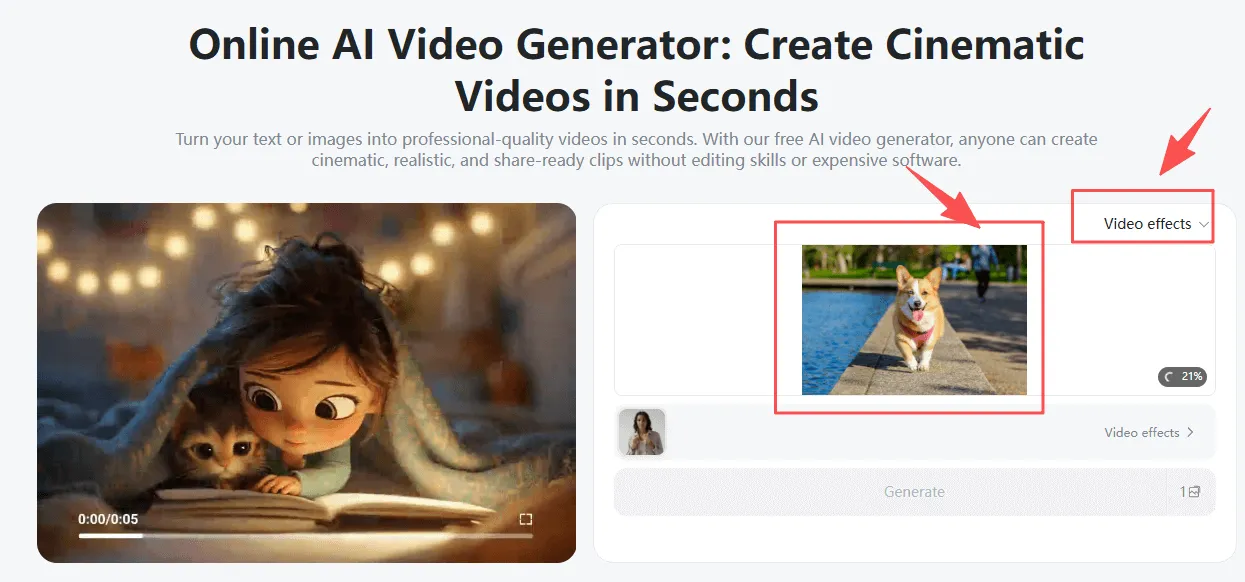
Step 1: Open the insMind AI Video Generator
First, go to the insMind AI Video Generator page. Here, you can upload the picture of your pet - it can be a dog, a cat, a rabbit, a bird, or any other furry friend. The tool makes it simple to learn how to make a photo video, even if you have never done anything with editing before. Just select your image, upload it, and you are good to go with making a fun Christmas video for your pet.
Step 2: Choose a Fun Video Template
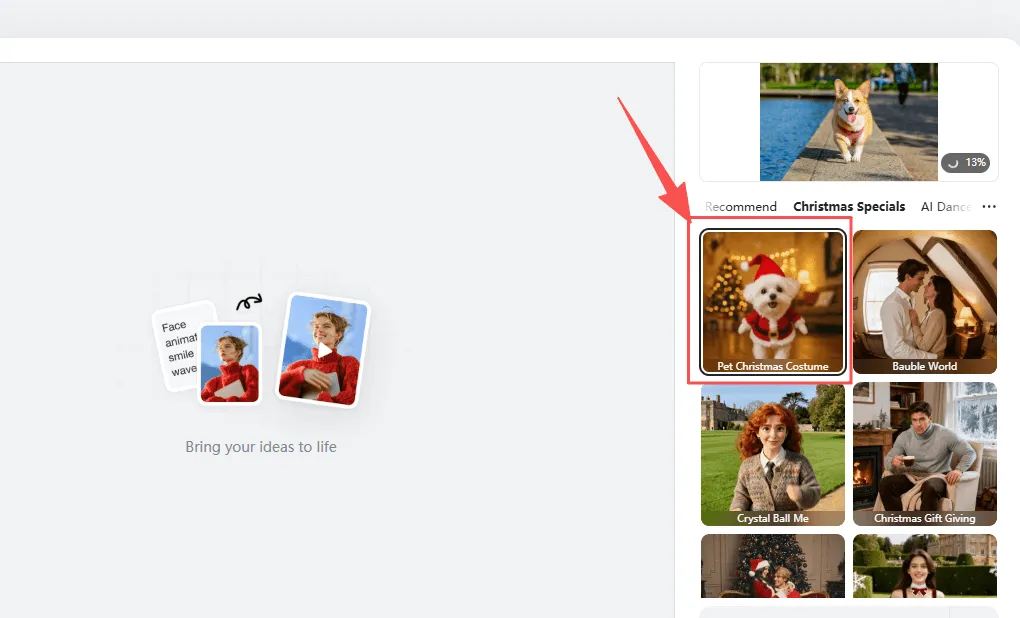
insMind has lots of Christmas-related templates that are made just for pets. You can choose the Pet Christmas Costume template that will dress your pet in a Christmas costume. The Dancing with Santa template is perfect for fun and happy videos to make people smile.
Cute Reindeer is great if you go for the soft, sweet look, and Santa's Gift Moment is the magic touch on it. Each template instantaneously transforms your picture into a video with easy animations to bring on bright holiday designs. These templates are great for quick little Christmas clips, which look fun and professional with almost no effort.
Step 3: Switch to Image to Video Mode to do Full Customization
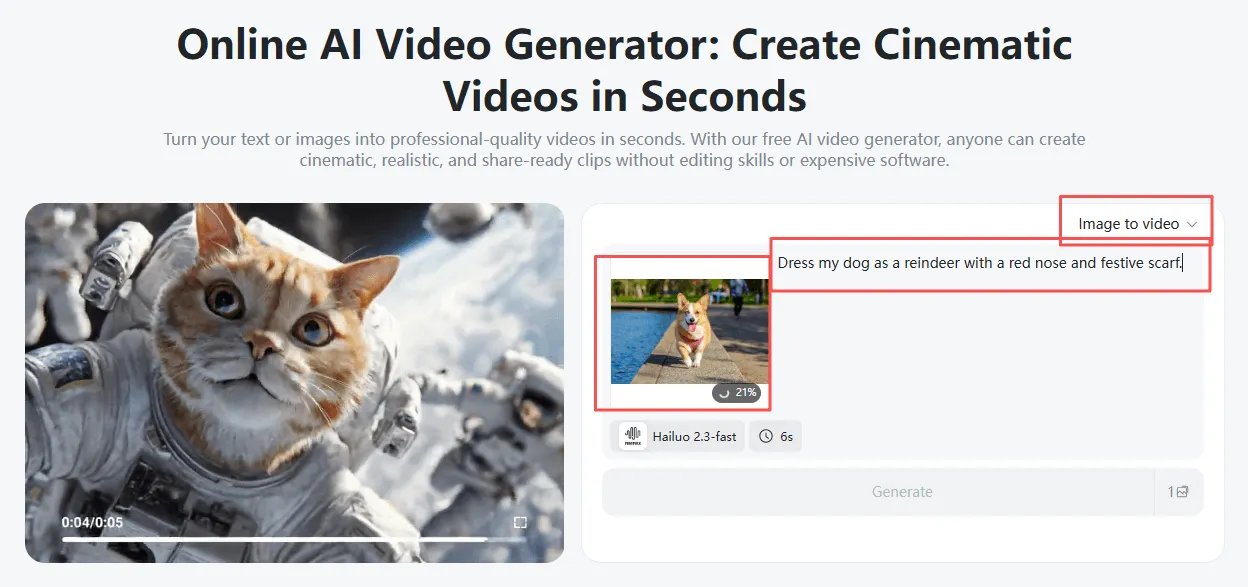
If you want to be even more creative, you can check out the image-to-video mode. Upload a photo of your pet, then use the custom prompt function to generate your own Christmas scene. You may come up with such prompts as "Dress my dog as a reindeer with a red nose and scarf" or "Put my cat in a Santa hat playing with Christmas ornaments."
This can allow one to develop a story that is cute around the pet. The image-to-video free option is good if you want to test out ideas and make the final version at a later time. You may also choose to use movement styles, such as small head turns, tail wiggles, or gentle walking. These options allow you to create some really fun, creative, and holiday videos (which go along with your pet's personality)
Step 4: Hit Generate
Once you've got all of it to look right, click Generate. The artificial intelligence makes your pet's Christmas video with neat actions and happy holiday vibes. No editing skills needed.
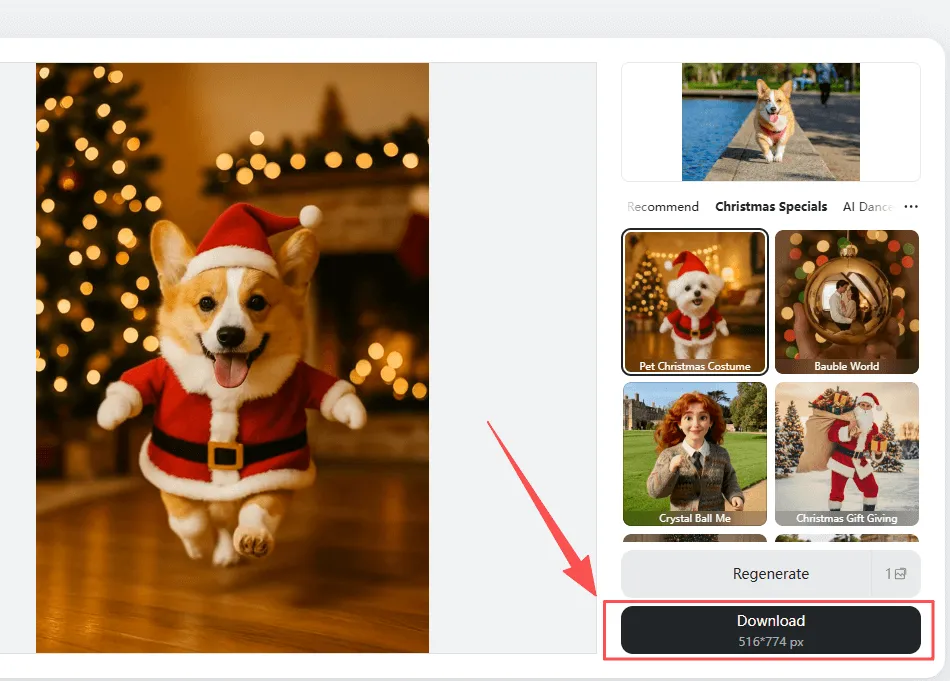
Step 5: Preview and Download
Watch the preview to be sure that you love the result. When you're happy with that, download the video and use it for gifts, holiday cards, social media posts, or messages to family members.
More Fun Video Effects & Templates for Family Christmas Videos
insMind has a big collection of Christmas effects that work perfectly with the image-to-video tools. These effects can make anything from a simple photo into an amusing, magical, moving Christmas clip. You can take a picture of a pet, family members, or even a product, and insMind will turn it into a festive scene in a matter of seconds.
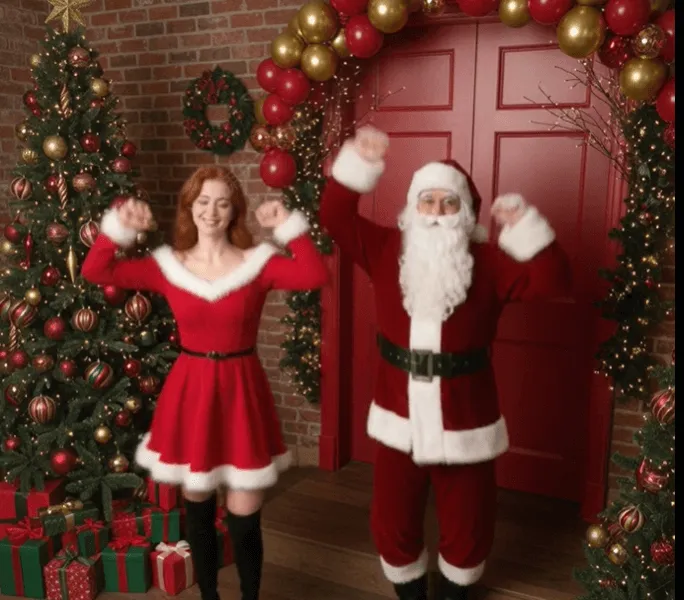
Dancing with Santa
This effect causes your pet or family member to dance in happiness right next to Santa. It's funny, bright, and great for kids and social media.
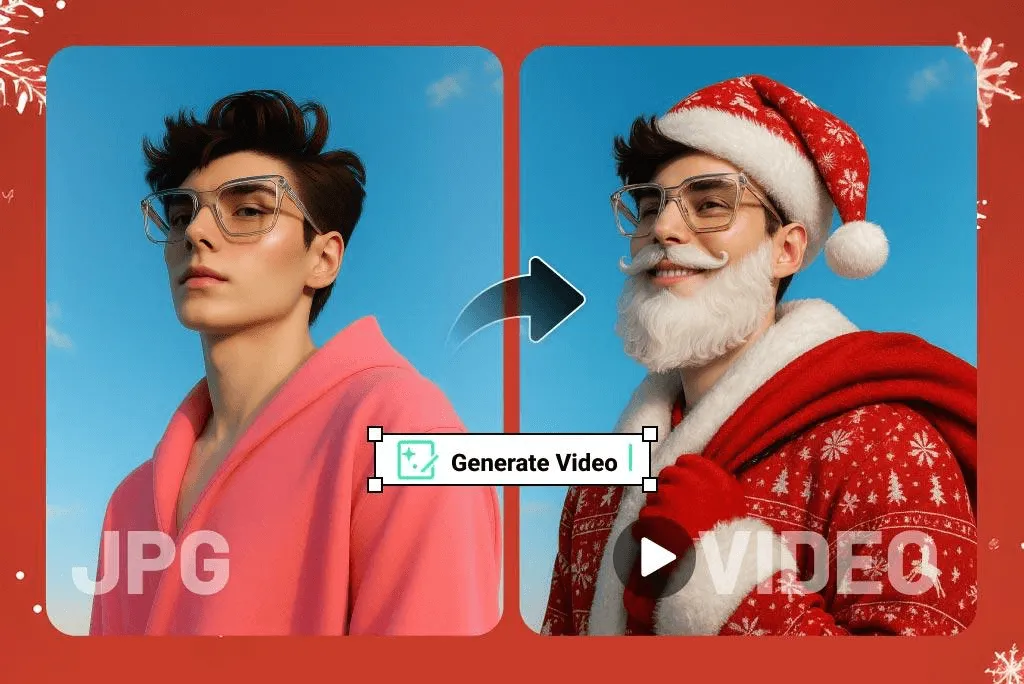
Santa's Costume
This effect is used to add Santa-style outfits, warm red clothing, and cute holiday accessories. It makes any picture happy and very Christmas-y already.
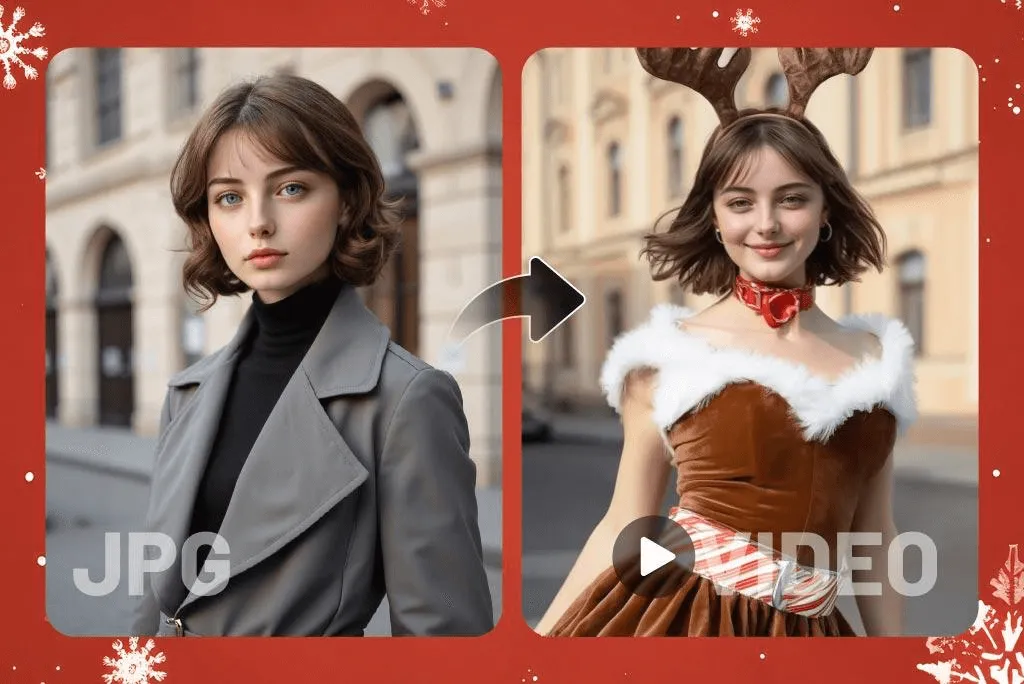
Cute Reindeer
Add antlers, a glowing red nose, or soft snowflakes for a sweet look that your friends will love for the holiday.
Christmas Girl
Perfect for portraits, making your photo look cozy with Christmas color, bright, and soft holiday light.
Cute Christmas Sing
This type of effect makes your photo look like you are singing a Christmas song. It's ideal for cards or for making short greeting videos.
Santa's Gift Moment
Creates a magic scene with floating presents, sparkles, and warm glowing lights.
All these templates help to turn a photo into a video instantly, and they are perfect for Christmas cards, Social posts, family gifts, and funny videos that you can share online.
Use Cases: The Best Places to Use AI to Generate Pet Christmas Videos
Social Media Holiday Posts
Pet Christmas videos receive tons of likes/comments. People love to see animals doing cute or funny things, especially around the holiday season.
Christmas Greeting Clips
Instead of sending a regular message, you can send a greeting in which your pet says "Merry Christmas" or dances with Santa.
Fun Videos for Kids
Children love pet costumes, singing, or appearing with Santa. These videos are ideal for family fun.
Gift Ideas for Gift Giving to Family
A custom Christmas video of a pet makes a nice and memorable gift. It tells you that you put thought and love into it.
Product Promotions for the Pet Stores
Pet shops can use the videos to show toys, treats, or outfits in a cute and friendly manner.
Holiday Advertisements for Animal Brands
Brands can use moving pet videos to grab attention and bring the Christmas cheer.
Influencer Engagement Boosts
Influencers can identify with the festive period and post their videos with their pets in order to generate more views and followers.
These videos are making it so easy, when you take around any picture and then turn it into a video, and they help beginners to know exactly how to make a video using the photo without even knowing how to edit.
FAQs about AI Santa Transformation
FAQ 1: How do I upload my pet's photo?
Click the upload button in the insMind page and select the photo you want.
FAQ 2: In the video, can I make my pet wear some custom outfits?
Yes, you can add prompts for hats, scarves, reindeer antlers, and more.
FAQ 3: Can I select different Christmas backgrounds?
Yes, you can choose snowy landscapes, warm rooms, bright lights, or magical forests.
FAQ 4: Is image to video free insMind?
insMind offers free options to try and then upgrade to.
FAQ 5: Are there other video effects for pets that I can use?
Yes, there are a lot of cute, funny, and creative effects.
FAQ 6: Do I need editing experience?
No, everything is made up for beginners.
FAQ 7: Can I take old pet photos and convert them into a video?
Yes, even older or simple photos are great!
FAQ 8: Does it work for any pet type?
Yes, cats, dogs, rabbits, birds, hamsters, and more.
insMind makes it easy to use your pet's photo to create a fun Christmas video. With the simple use of photo-to-video tools, anyone can make cute holiday clips in minutes. Or try it out and let your pet be the star of Christmas!

Ryan Barnett
I'm a tech enthusiast and writer who loves exploring AI, digital tools, and the latest tech trends. I break down complex topics to make them simple and useful for everyone.


