
How to Create Seamless AI Video Transitions with the Start-End Frame Generator
Try Start-End Frame Generator Free

What if you could take just two images and instantly turn them into a smooth, cinematic video — no editing, no animation software, just AI magic?
That's exactly what insMind's AI Video Start-End Frame Generator does. It bridges the gap between static photos, transforming them into flowing, lifelike motion. Whether you're creating content for marketing, social media, storytelling, or education, this AI video transition generator helps you produce professional-quality results in minutes.
By combining start and end frames, the AI understands the story between them and automatically generates the motion that connects the two. The process feels effortless — yet the results look like a professionally edited short clip.
Table of Contents
- 01 What Is an AI Video Start-End Frame Generator?
- 02 How to Transform Two Images into a Cinematic Video: A Step-by-Step Guide
- 03 What Makes insMind AI Start-End Frame Generator So Powerful?
- 04 How You Can Use the AI Start-End Frame Video Generator
- 05 Pro Tips to Level Up Your AI Start-End Frame Videos
- 06 Why Creators Love the AI Start-End Frame Generator
- 07 Final Thoughts
What Is an AI Video Start-End Frame Generator?
An AI start-to-end video generator is an advanced tool that uses artificial intelligence to analyze two images — a starting frame and an ending frame — and create the “in-between” motion that connects them. Think of it as AI filling in the gaps between two moments, bringing your story to life frame by frame.
This process, sometimes called image-to-video transition AI, relies on deep learning models trained to understand objects, depth, perspective, lighting, and style. The result is a natural, visually consistent animation that mimics real-world camera motion or cinematic transitions.
Unlike traditional animation or manual editing, the AI handles everything — motion estimation, frame interpolation, and style continuity — so you can focus on creativity instead of technical complexity.
How to Transform Two Images into a Cinematic Video: A Step-by-Step Guide
Creating your first AI start and end frame video is incredibly simple. Here's how to get started:
Step 1: Upload Two Images
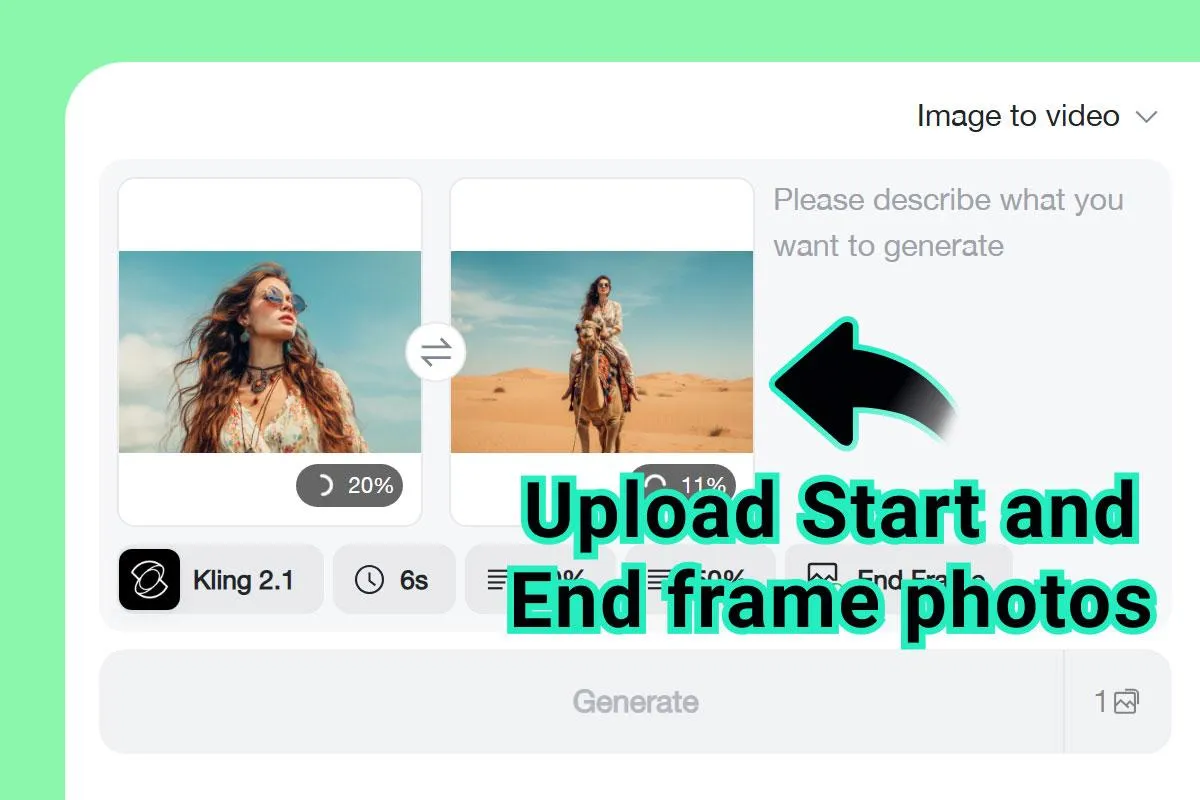
Choose your start and end frames — these could be two photos showing different moments, angles, or moods. For example:
● A product before and after an upgrade
● A landscape at sunrise and sunset
● A character at the beginning and end of a scene
You can even upload a single image as your end frame, and let the AI generate motion leading up to it — perfect for building anticipation or storytelling sequences.
Step 2: Enter a Prompt
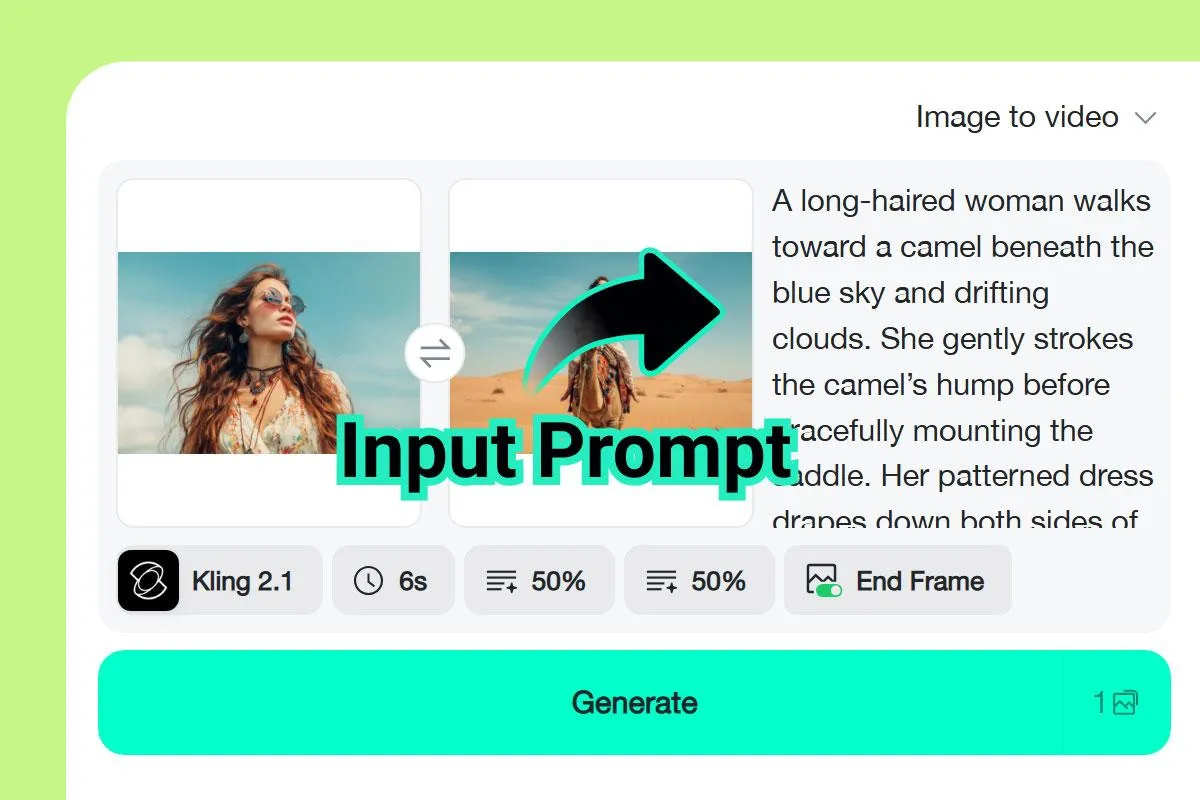
Add a short text prompt to guide the AI. For example: “Slow cinematic zoom through sunset clouds”, “Dynamic transition between portraits with natural lighting”, “Smooth pan across a futuristic city skyline”.
The AI uses your prompt to adjust movement, pacing, and visual effects, giving you a custom image-to-video transition that matches your creative vision.
Step 3: Adjust Video Settings
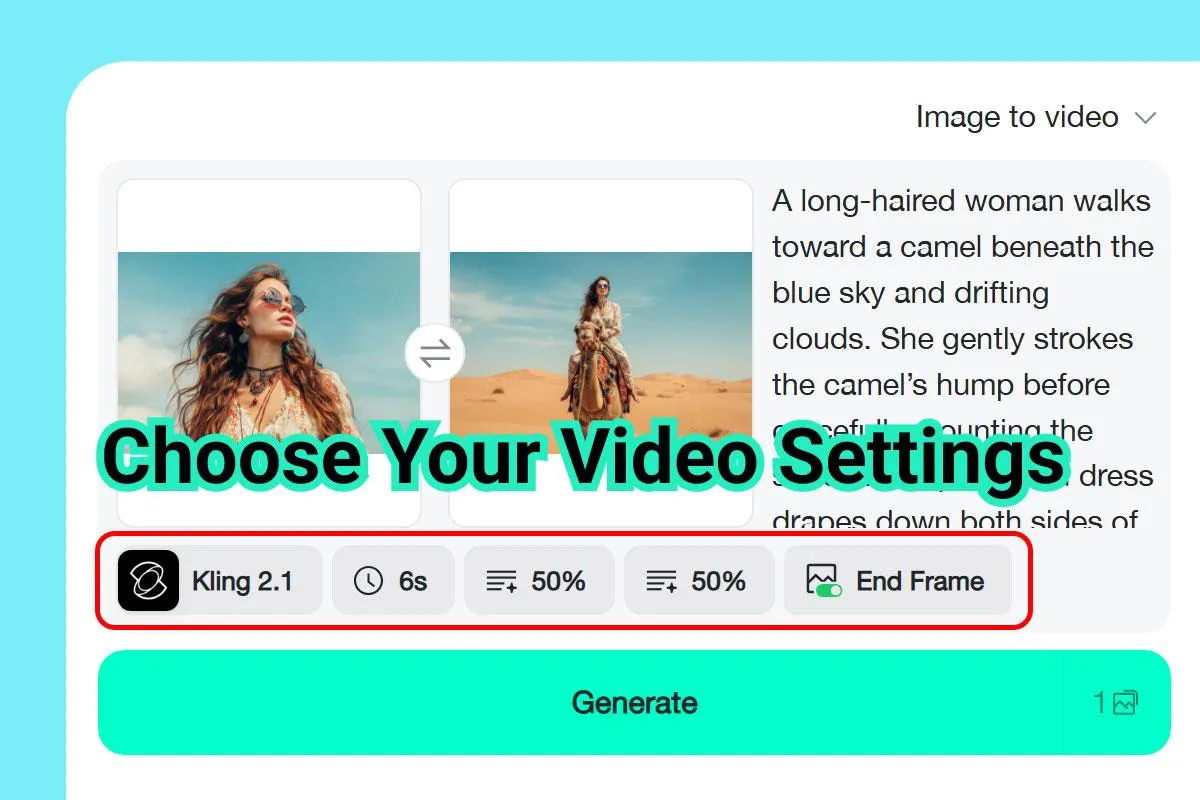
Before generating, customize your video settings to match your creative goals.
You can:
● Choose an AI Model: Pick between Kling 2.1 for cinematic smoothness or Veo 3.1 for creative, detailed motion.
● Set Video Duration: Control how long your transition lasts — from short, snappy cuts to extended cinematic sequences.
● Select Aspect Ratio: Fit your output for platforms like Instagram, YouTube, or TikTok.
Step 4: Generate & Download the Transition Video
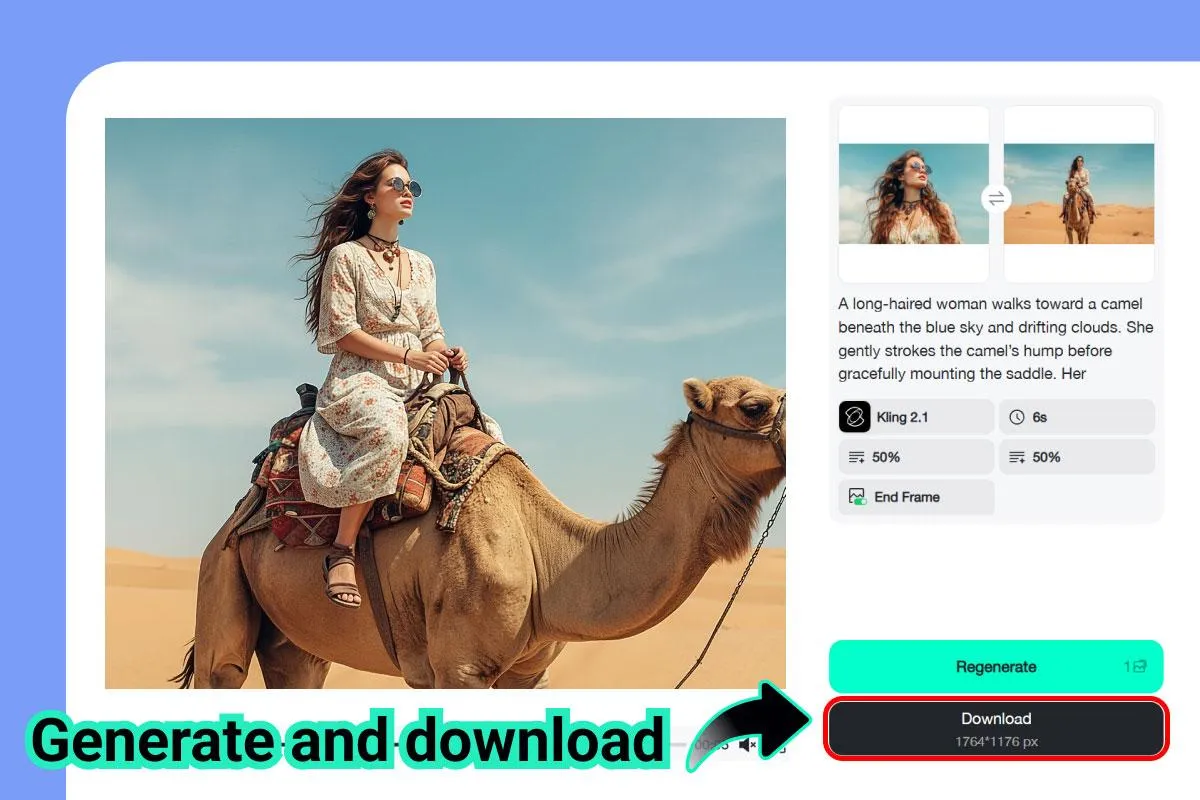
Once you click “Generate,” the AI gets to work. It analyzes both frames'details — background, lighting, object placement, and color tones — then fills in the missing frames with logical motion.
After generation, preview your video. You can make tweaks or regenerate using another model for a different visual effect. When satisfied, download your AI-generated video in HD — ready for sharing across platforms like Instagram, YouTube, or TikTok.
What Makes insMind AI Start-End Frame Generator So Powerful?
● Seamless AI Transitions
Smooth, natural motion between start and end images.
● Powered by Kling 2.1 & Veo 3.1
Advanced models for realistic animation and motion generation.
● Image-to-Video Flexibility
Create motion from two photos or even a single frame.
● Context-Aware AI
Preserves subject structure, lighting, and composition
● Fast, One-Click Creation
No editing skills needed; just upload, generate, and download.
● Custom Motion Styles
Describe cinematic, artistic, realistic animation and more styles in the prompt.
● HD Export Quality
Download videos in high resolution with natural color rendering.
● Cross-Device Friendly
Works on desktop, tablet, or mobile with a seamless workflow.
How You Can Use the AI Start-End Frame Video Generator
From creators to marketers, everyone can turn still images into motion with this AI tool. Here are some inspiring ways to bring your visuals to life.
1. Product Showcases
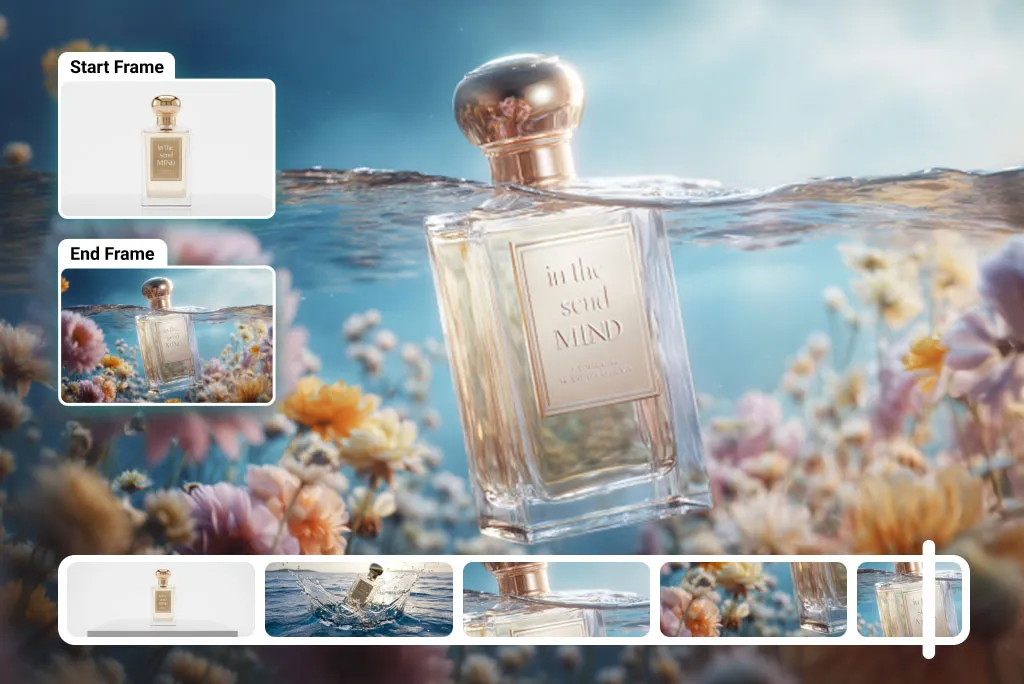
Highlight transformations, upgrades, or design reveals by transitioning between product images.
2. Before-and-After Videos
Perfect for fitness, beauty, renovation, or photography storytelling.
3. Social Media Reels
Create eye-catching content that stands out with dynamic start-to-end transitions.
4. Marketing Campaigns
Add cinematic movement to ads or promotional visuals to boost engagement.
5. Travel & Nature Videos
Turn two photos of a landscape into a breathtaking moving sequence.
6. Animation & Storyboarding
Quickly visualize transitions between scenes during pre-production.
7. Educational & Presentation Videos
Animate concepts or visuals to keep audiences engaged.
8. Personal Creativity & Digital Art
Experiment with AI video transitions just for fun or artistic expression.
Pro Tips to Level Up Your AI Start-End Frame Videos
● Choose Visually Related Images
The more consistent your start and end frames are in composition and lighting, the smoother the transition.
● Experiment with Models
Kling 2.1 may deliver cinematic flow, while Veo 3.1 might excel in fine motion or artistic blending.
● Use HD Images
Higher resolution images help the AI understand finer details, producing more realistic transitions.
● Try Reverse Motion
Curious about how to make a video start from the end? Swap your frames and let the AI generate the reverse motion — it's a great creative trick for storytelling!
● Adjust Motion Style
Use different prompts or model settings to control animation intensity, depth, and pacing.
Why Creators Love the AI Start-End Frame Generator
Traditional video editing often demands time, experience, and expensive tools. With AI, that barrier disappears. The AI video start and end frame generator empowers anyone — from marketers to photographers — to craft dynamic visuals in minutes.
It also fits seamlessly into broader creative workflows. You can use it to:
● Generate intro or outro transitions for your content
● Connect static brand visuals with cinematic flow
● Enrich storytelling through smooth, emotion-driven motion
The simplicity of use doesn't limit creativity — it enhances it. Whether you're producing short-form videos for social media or cinematic sequences for storytelling, this AI start-to-end video generator offers endless possibilities.
The Future of AI-Generated Video Transitions
AI-driven creativity is reshaping how we approach video production. As models like Kling and Veo evolve, we're moving closer to a future where anyone can generate video from two images as easily as editing a photo.
The AI start-end frame video generator isn't just a tool — it's a creative partner. It democratizes animation and gives everyone the power to tell stories that move — literally.
Final Thoughts
The ability to generate video transitions from two still frames is transforming visual storytelling. With insMind's AI Video Generator, you can produce professional, cinematic motion in just a few clicks — all powered by next-generation AI.
So whether you're a content creator, brand marketer, or visual storyteller, now's the time to explore how AI can elevate your creativity.

Ryan Barnett
I'm a tech enthusiast and writer who loves exploring AI, digital tools, and the latest tech trends. I break down complex topics to make them simple and useful for everyone.


