


Anime art is everywhere — from fan illustrations flooding social media to AI-generated characters dominating TikTok and Instagram.
But static anime images only tell half the story. What if your favorite anime fan art could actually move? What if that character could blink, smile, or let the wind carry their hair across the frame?
With AI-powered animation tools, that’s now a reality. You can animate anime images in seconds — no animation skills, no frame-by-frame drawing, and no expensive software required.
Whether you’re a digital artist, cosplay creator, manga fan, or content creator, AI makes anime animation accessible to everyone. Tools like insMind let you upload any anime image, describe the motion you want, and generate a smooth, high-quality animated video in minutes.
Let’s walk through exactly how it works — and how you can start today.
Table of Contents
- 01 What Does “Animating Anime Images with AI” Mean?
- 02 Why Creators Are Animating Anime Art with AI
- 03 What Types of Anime Images Work Best?
- 04 How to Animate Anime Images with insMind (Step-by-Step)
- 05 Tips for Getting the Best Anime Animations
- 06 Creative Ideas: What to Animate
- 07 Frequently Asked Questions
What Does “Animating Anime Images with AI” Mean?
AI anime animation takes a static 2D anime image and generates realistic motion from it. Instead of manually drawing each frame, the AI:
-
Analyzes the image composition and art style
-
Identifies characters, backgrounds, and scene elements
-
Generates natural-looking movement based on your text prompt
-
Produces a smooth MP4 video while preserving the original art style
The result looks like a professionally animated clip — created from a single still image.
This works across all anime styles: Shonen, Shoujo, Ghibli-inspired, chibi, cel-shaded, watercolor, and more.
Why Creators Are Animating Anime Art with AI
Anime fans and digital creators have been quick to adopt AI animation. Here’s why it’s become so popular.
Social Media Engagement
Animated anime clips consistently outperform static images on TikTok, Instagram Reels, and X. Motion naturally catches attention while scrolling — and anime content already has a massive, engaged audience online.
Fan Art Showcases
Artists can bring their illustrations to life by adding wind effects, flowing hair, or subtle facial expressions that make characters feel truly alive.
Visual Storytelling
A single animated scene tells a story that a static image can’t. Add a character turning around, raindrops falling, or a dramatic camera zoom to create emotional impact.
Content Creation at Scale
Anime-style animated videos work great for:
-
YouTube Shorts intros and outros
-
Visual novel-style storytelling
-
Music video backgrounds
-
Streaming overlays and alerts
-
Animated wallpapers and profile content
Zero Learning Curve
You don’t need animation skills. Upload, write a prompt, generate — that’s the entire workflow.
What Types of Anime Images Work Best?
Not every image animates equally well. Here’s what produces the best results.
High-Resolution Character Art
Clean, high-res images with well-defined character outlines animate most smoothly. Details like individual hair strands and clothing folds give the AI more visual information to work with.
Simple to Mid-Complexity Backgrounds
Images with clean backgrounds or moderate scene detail tend to produce better results than extremely busy compositions.
Full-Body or Upper-Body Shots
Poses that show the character’s body give the AI room to create natural movement — like hair flowing, clothing shifting, or expressive arm gestures.
Expressive Faces
Close-up portraits with visible facial features work beautifully for subtle animations like blinking, smiling, or shifting gaze direction.
Quick Tips for Source Images
-
Use PNG or JPG format
-
Aim for at least 1024px on the longest side
-
Avoid heavily compressed or pixelated images
-
Characters with distinct outlines from the background work best
How to Animate Anime Images with insMind
Here’s the step-by-step process using insMind’s Image to Video tool.
Step 1: Open the Image to Video Tool and Upload Your Anime Image
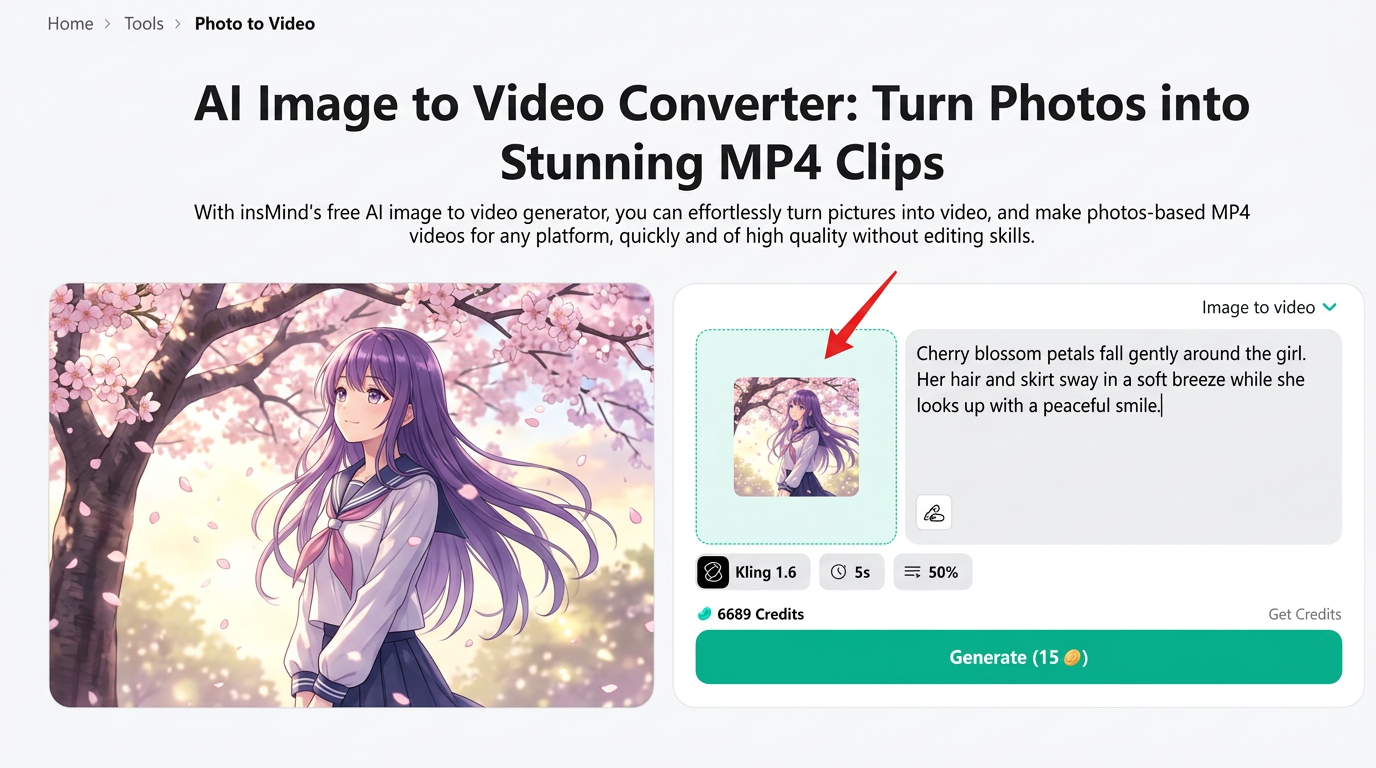
Go to the insMind Image to Video tool.
Click “Upload Image” and select your anime artwork. You can upload:
-
Original anime illustrations
-
AI-generated anime art
-
Fan art and digital paintings
-
Manga-style character images
The image loads instantly and appears in the preview panel.
Step 2: Write a Prompt Describing the Animation and Adjust Settings
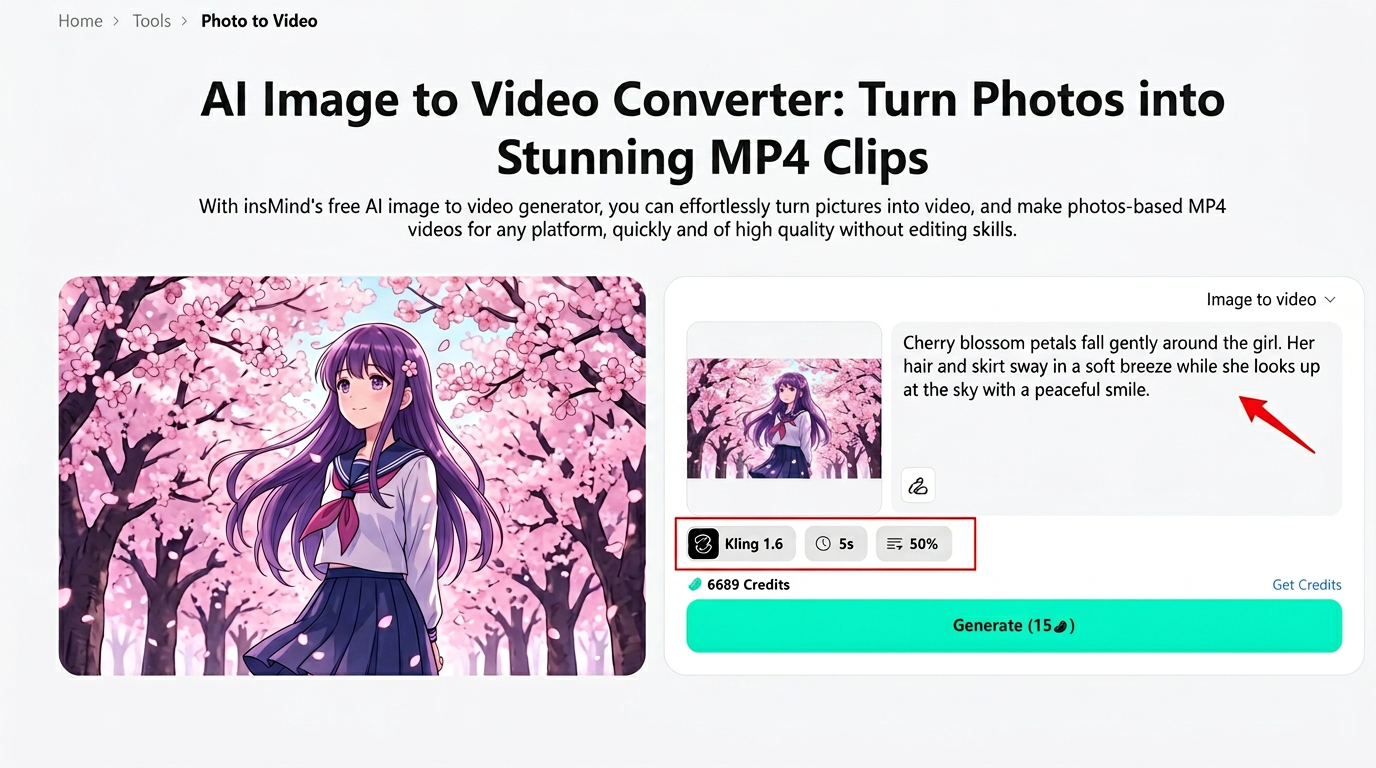
This is where the magic happens. Describe exactly how you want your anime character to move.
Great prompt examples for anime:
-
“The girl’s hair flows gently in the wind while cherry blossoms fall around her”
-
“The character turns their head slowly and smiles softly”
-
“Rain falls on the scene while the character holds an umbrella, looking up at the sky”
-
“The dragon spreads its wings and takes flight into the clouds”
You can also fine-tune the settings:
-
AI Model: Choose from options like Kling 2.6 for high-quality anime motion
-
Duration: Set video length (5 or 10 seconds is ideal for anime clips)
-
Motion Intensity: Control how much movement appears (50% is a solid starting point for anime)
Step 3: Click Generate
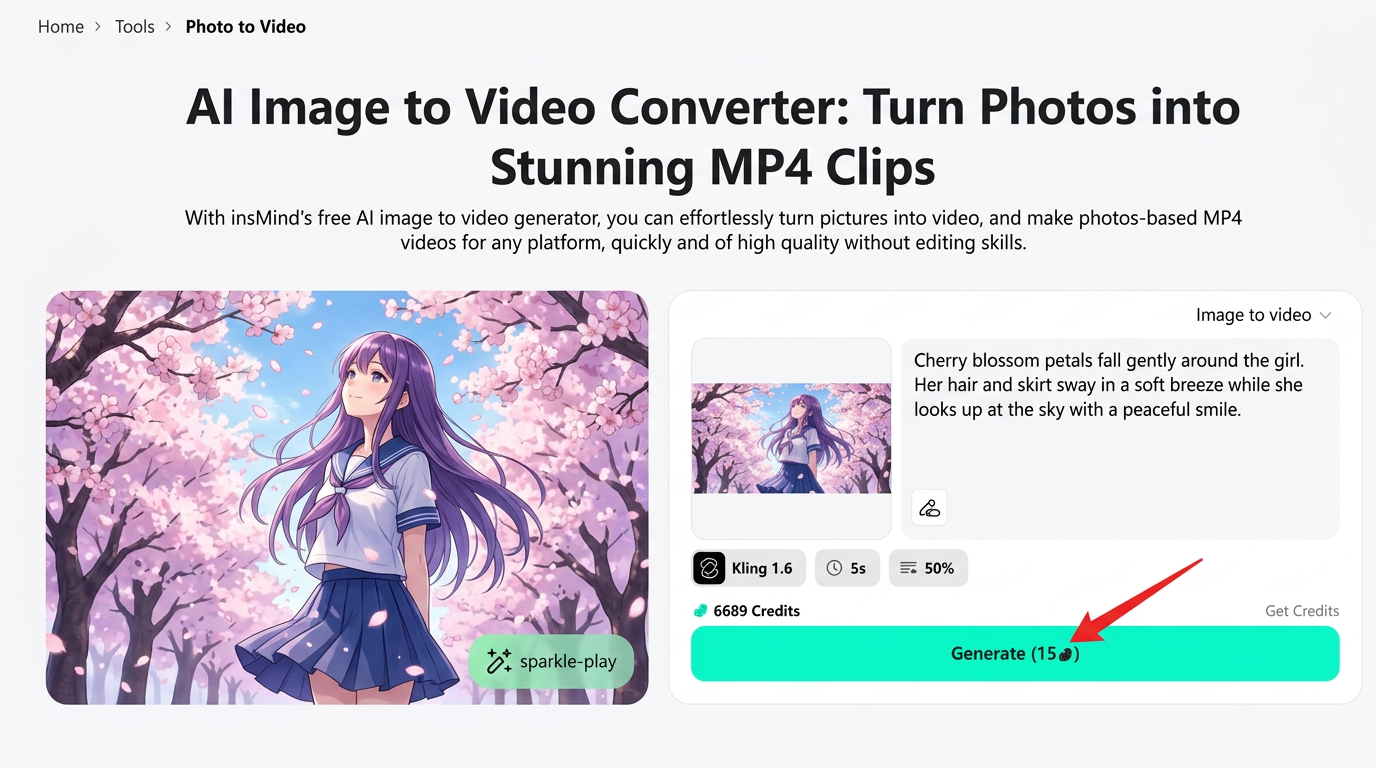
Hit the green “Generate” button. The AI processes your image and prompt, typically completing in under a minute.
The interface shows your credit balance and cost per generation, so you always know what to expect.
Step 4: Preview and Download Your Animated Anime Video
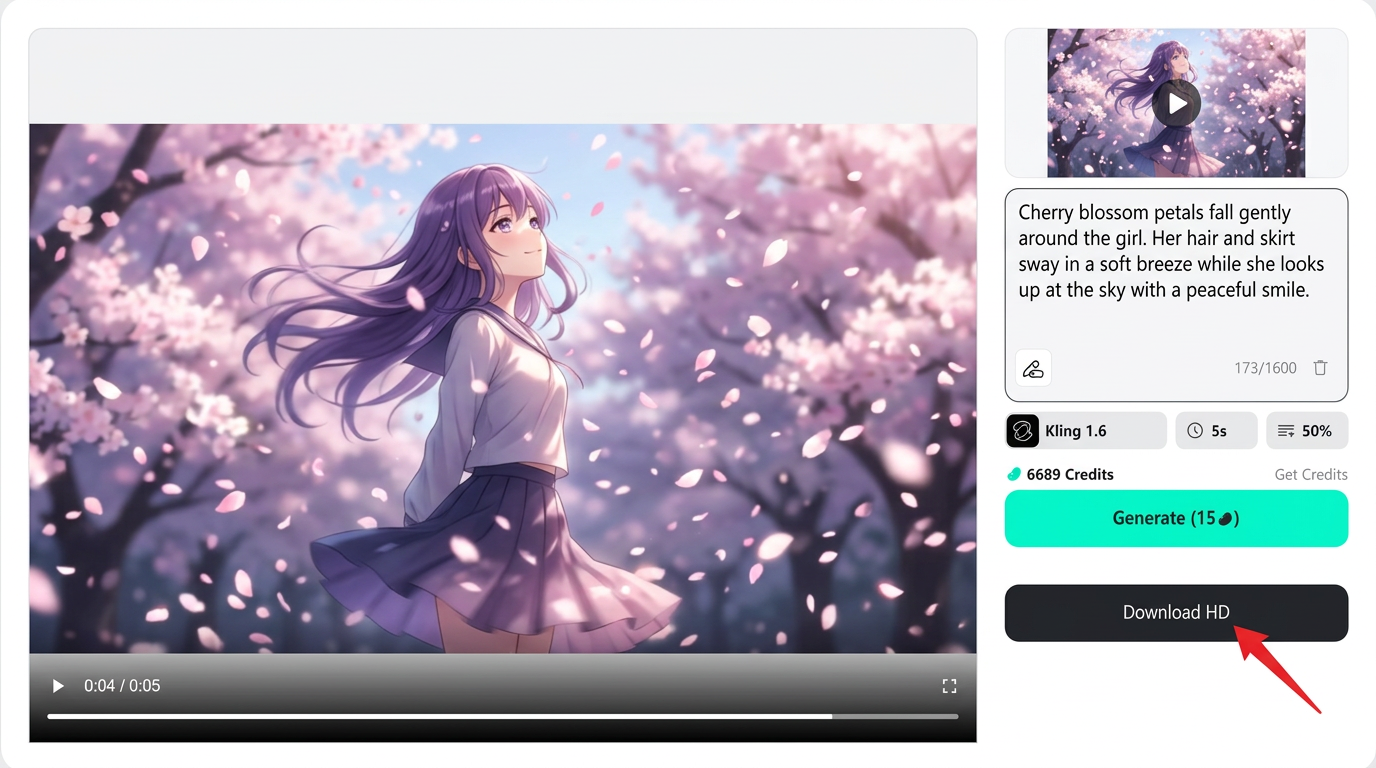
Your animated anime clip appears in the preview player. Watch it to check the motion quality.
If you’re happy with the result, click “Download HD” to save the MP4 file. You can also:
-
Re-generate with a different prompt for alternative animations
-
Adjust motion intensity and try again
-
Use the same image with different prompts to create multiple versions
The downloaded video is ready for social media, your portfolio, or any creative project.
Tips for Getting the Best Anime Animations
Be Specific with Prompts
Vague prompts like “make it move” produce generic results. Instead, describe the exact motion: “hair sways left while the character blinks twice and tilts her head right.”
Match Motion to Art Style
Gentle, flowing movements suit watercolor and Ghibli-style art. Dynamic, fast motion works better for Shonen action scenes.
Start with 50% Motion Intensity
Too much motion can distort delicate anime line work. Start at 50% and increase only if the result feels too subtle.
Use Short Durations First
Five-second clips are ideal for testing. You’ll get results faster and can iterate before committing to longer animations.
Keep Backgrounds Simple
Characters animate more cleanly against simple or softly detailed backgrounds. Extremely busy backgrounds can compete with the character motion and reduce quality.
Creative Ideas: What to Animate
Need inspiration? Here are popular anime animation ideas that work especially well with AI:
-
Hair and clothing physics — Wind effects on long hair and flowing garments
-
Weather effects — Rain, snow, cherry blossoms, fireflies around your character
-
Emotional expressions — A character smiling, crying, or looking surprised
-
Action sequences — Drawing a sword, casting a spell, or powering up
-
Scene transitions — Day-to-night shifts, clouds moving, water rippling
-
Eye animations — Blinking, glowing eyes, or pupils shifting focus
These effects are what make AI-animated anime go viral on social platforms. The more intentional your prompt, the more cinematic the result.
Frequently Asked Questions
Can I animate any anime image with AI?
Yes. AI animation works with most anime styles — from chibi to realistic, cel-shaded to watercolor. High-resolution images with clear character outlines produce the best results.
Will the AI change my anime art style?
No. Modern AI animation tools like insMind preserve your original art style while adding motion. The colors, line work, and aesthetic remain consistent throughout the animation.
How long are the animated clips?
Most tools generate 3–10 second clips. For anime, 5-second clips are the sweet spot — long enough to showcase smooth movement without losing visual quality.
Is AI anime animation free?
insMind offers a free trial, then purchase more as needed for continued use.
What AI models work best for anime?
Models like Kling 2.6 excel at preserving 2D anime aesthetics while adding natural-looking motion. Different models produce different styles of movement — experiment to find your preference.
Bring Your Anime Art to Life
Static anime images are beautiful. Animated anime images are unforgettable.
With AI tools like insMind, the gap between a still illustration and a living, breathing animation is just a few clicks. No animation degree. No expensive software. Just your art, a prompt, and a few seconds of patience.
Upload your favorite anime image today and watch it come alive.

Ryan Barnett
I'm a tech enthusiast and writer who loves exploring AI, digital tools, and the latest tech trends. I break down complex topics to make them simple and useful for everyone.


