


Struggling to create TikTok videos that actually go viral? You're not alone — with millions of clips uploaded every day, standing out on TikTok requires more than just hitting record. The secret weapon creators and brands are turning to in 2026 is AI prompts for TikTok videos.
An AI prompt is a simple text description that tells an AI video generator exactly what kind of video to create — from dreamy aesthetic loops to punchy product demos. Instead of spending hours filming and editing, you write a few sentences and let AI handle the production, motion, lighting, and transitions.
In this complete guide, you'll discover 20+ ready-to-use prompts for every TikTok niche, learn how to generate videos step by step with insMind, and pick up expert tips for writing prompts that produce scroll-stopping content. Whether you're a creator, marketer, or small business owner, this guide will transform the way you make TikTok videos.
Table of Contents
- 01 What Are AI Prompts for TikTok Videos?
- 02 20+ Best AI Prompts for TikTok Videos
- 03 How to Create TikTok Videos with AI Prompts Using insMind
- 04 Tips for Writing Better TikTok Video Prompts
- 05 What Makes a TikTok Video Prompt Go Viral?
- 06 Frequently Asked Questions
- 07 Start Creating TikTok Videos with AI Today
What Are AI Prompts for TikTok Videos?
An AI prompt for TikTok video is a text description you write to tell an AI video generator exactly what kind of video to produce. Think of it as a creative brief — you describe the scene, mood, camera movement, and style, and the AI turns your words into a fully animated video clip.
Prompts can range from simple one-liners to detailed multi-sentence descriptions. The more specific your prompt, the closer the output matches your vision. A basic prompt might be "sunset over the ocean," while a detailed one could describe camera angles, color grading, and specific visual effects.
There are several types of prompts you can use for TikTok content:
-
Scene descriptions: Paint a picture of what the viewer should see — setting, subjects, colors, and atmosphere
-
Style directives: Specify the visual aesthetic — cinematic, anime, vintage film, neon cyberpunk, or soft pastel
-
Camera instructions: Define movement like slow zoom, dolly in, tracking shot, or dramatic pan
-
Mood and emotion cues: Set the tone with words like dreamy, energetic, suspenseful, or cozy
Understanding these building blocks helps you craft prompts that consistently produce TikTok-ready content — no filming or editing required.
20+ Best AI Prompts for TikTok Videos
Ready to start creating? Here are over 20 AI prompts for viral TikTok videos, organized by popular content categories. Copy any of these directly into insMind's text-to-video tool and generate your video in seconds.
Aesthetic & Lifestyle
"Golden hour light streaming through sheer curtains into a minimalist bedroom, dust particles floating in the air, slow camera pan across linen bedding and a steaming cup of coffee on a wooden nightstand, warm tones, dreamy atmosphere."
"A girl walking through a field of lavender at sunset, flowing white dress catching the breeze, soft bokeh background, cinematic slow motion, pastel color grading, gentle camera tracking shot."
"Cozy rainy day scene: close-up of raindrops hitting a window, warm indoor lighting, a hand wrapping around a ceramic mug, lo-fi aesthetic, slow zoom out revealing a bookshelf and fairy lights."
"Overhead shot of a marble desk with aesthetic stationery — journals, pens, dried flowers — hands arranging items in a satisfying flat lay, soft natural light, ASMR-style gentle movements."
Product Showcase
"A matte black skincare bottle rotating slowly on a reflective surface, water droplets cascading down the glass, soft studio lighting with teal accent glow, luxury product commercial feel, extreme close-up details."
"Pair of white sneakers dropping onto a clean surface in slow motion, dynamic bounce effect, urban concrete background, dramatic side lighting, streetwear brand energy, camera circles around the shoes."
"A gold necklace floating and spinning mid-air against a soft pink gradient background, sparkling light reflections, jewelry commercial style, smooth 360-degree rotation, macro lens detail."
Storytelling & POV
"POV: You open an old wooden door and step into a magical garden filled with glowing flowers and floating lanterns, enchanted forest atmosphere, slow dolly forward, mystical fog, fantasy color palette."
"First-person view of walking through a neon-lit Tokyo alley at night, rain-soaked pavement reflecting colorful signs, cyberpunk aesthetic, handheld camera shake, immersive urban exploration."
"A mysterious letter appears on a desk, camera zooms into the handwritten text, ink still wet, candlelight flickering, dark academia aesthetic, dramatic shadows, suspenseful mood."
Nature & Travel
"Aerial drone shot soaring over turquoise ocean waves crashing against white sand beaches, tropical island paradise, cinematic wide angle, golden sunset light painting the clouds pink and orange."
"Time-lapse of the Northern Lights dancing across a starry Arctic sky, snow-covered pine trees in the foreground, ethereal green and purple hues, slow camera tilt upward, breathtaking natural wonder."
"A winding mountain road disappearing into morning fog, aerial tracking shot following the curves, autumn foliage in vibrant reds and golds, peaceful and serene, nature documentary cinematography."
Food & Recipe
"Melted chocolate pouring in slow motion over a stack of fresh strawberries, extreme close-up, studio lighting with warm tones, food photography style, satisfying drip effect, shallow depth of field."
"Overhead shot of hands assembling a colorful poke bowl — rice, salmon, avocado, edamame — each ingredient placed precisely, bright natural kitchen lighting, fresh and healthy aesthetic."
"A latte art pour in macro close-up, creamy milk swirling into espresso forming a perfect rosetta pattern, coffee shop ambiance, warm morning light, barista POV, smooth and satisfying."
Funny & Trending
"A cat sitting at a tiny desk wearing reading glasses, pretending to type on a miniature laptop, office background with stacked papers, comedic corporate energy, dramatic zoom-in on the cat's serious face."
"Split-screen expectation vs. reality: left side shows a perfect Instagram-worthy breakfast spread, right side shows burnt toast and spilled coffee, comedic timing, exaggerated reactions, relatable humor."
"A tiny hamster navigating an elaborate obstacle course made of cardboard and popsicle sticks, dramatic action movie angles, epic slow-motion jumps, suspenseful camera work, triumphant finish."
How to Create TikTok Videos with AI Prompts Using insMind
Now that you have a library of prompts, let's walk through exactly how to create TikTok videos with AI using insMind. The entire process takes just a few minutes — no editing software or technical skills required.
Step 1: Choose Your Input Mode & Enter Your Prompt
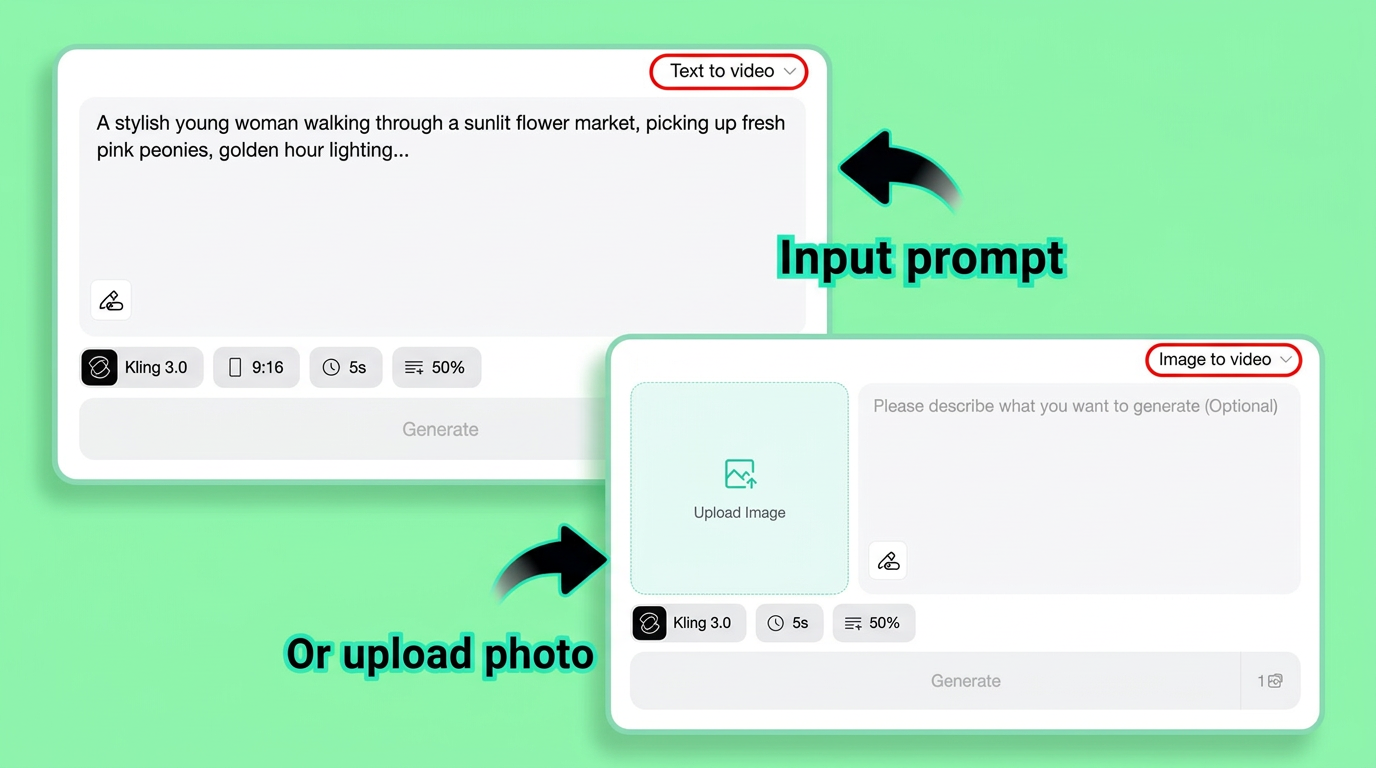
Head to insMind's AI video generator and select your input mode. You have two options: Text to Video lets you describe your scene entirely with words, while Image to Video lets you turn images into videos by uploading a photo as the starting frame.
For text-to-video, paste or type one of the prompts from above (or write your own). Be descriptive — include the scene, mood, camera movement, and visual style you want. The prompt box supports detailed descriptions, so don't hold back on specifics.
Step 2: Configure TikTok Video Settings
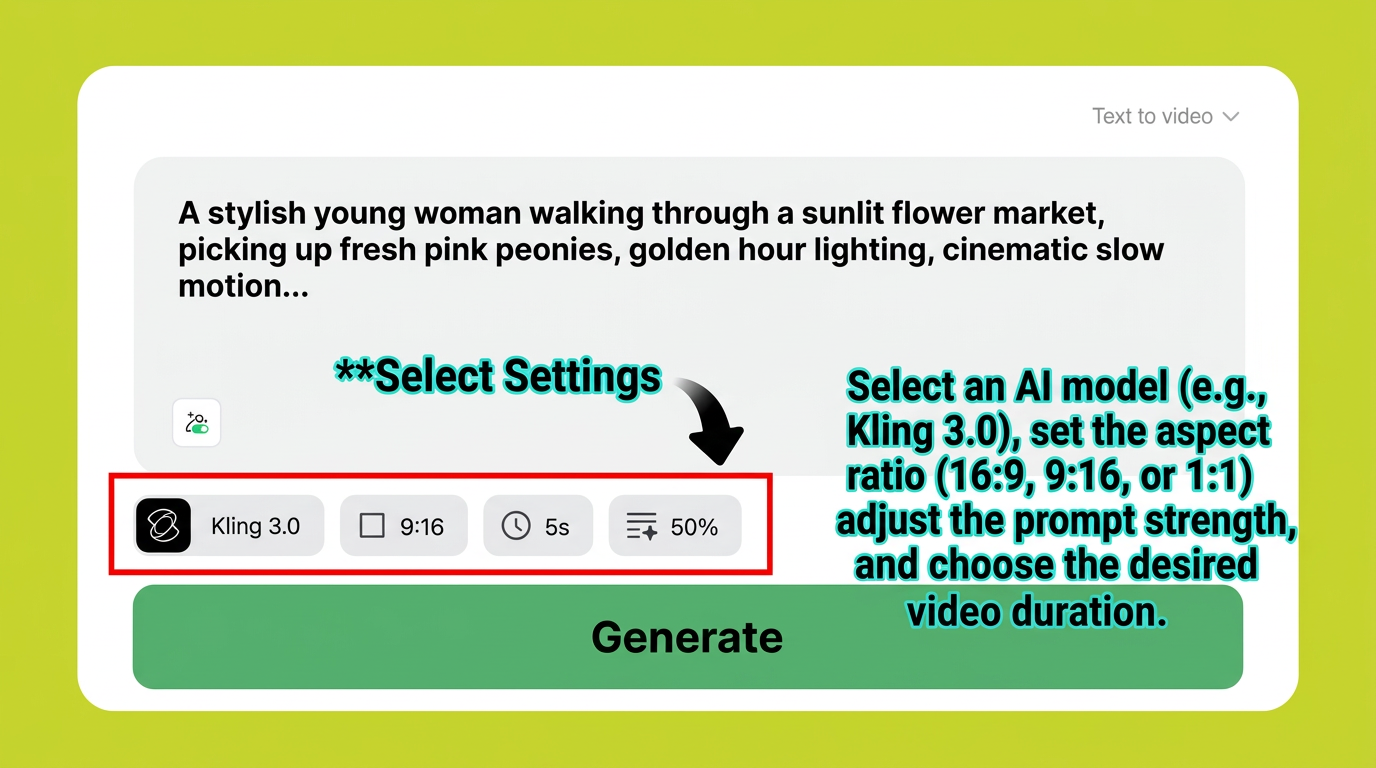
Before generating, dial in the settings that matter for TikTok content:
-
Aspect Ratio: Select 9:16 — this is TikTok's native vertical format and ensures your video fills the entire screen
-
AI Model: Choose Kling 3.0 for the highest visual quality and most realistic motion
-
Duration: Set the video length — 5 to 10 seconds works perfectly for TikTok hooks and loops
-
Prompt Strength: Adjust how closely the AI follows your text description — higher values mean stricter adherence to your prompt
These settings ensure your output is optimized for TikTok right from the start — no need to crop or resize later.
Step 3: Click Generate
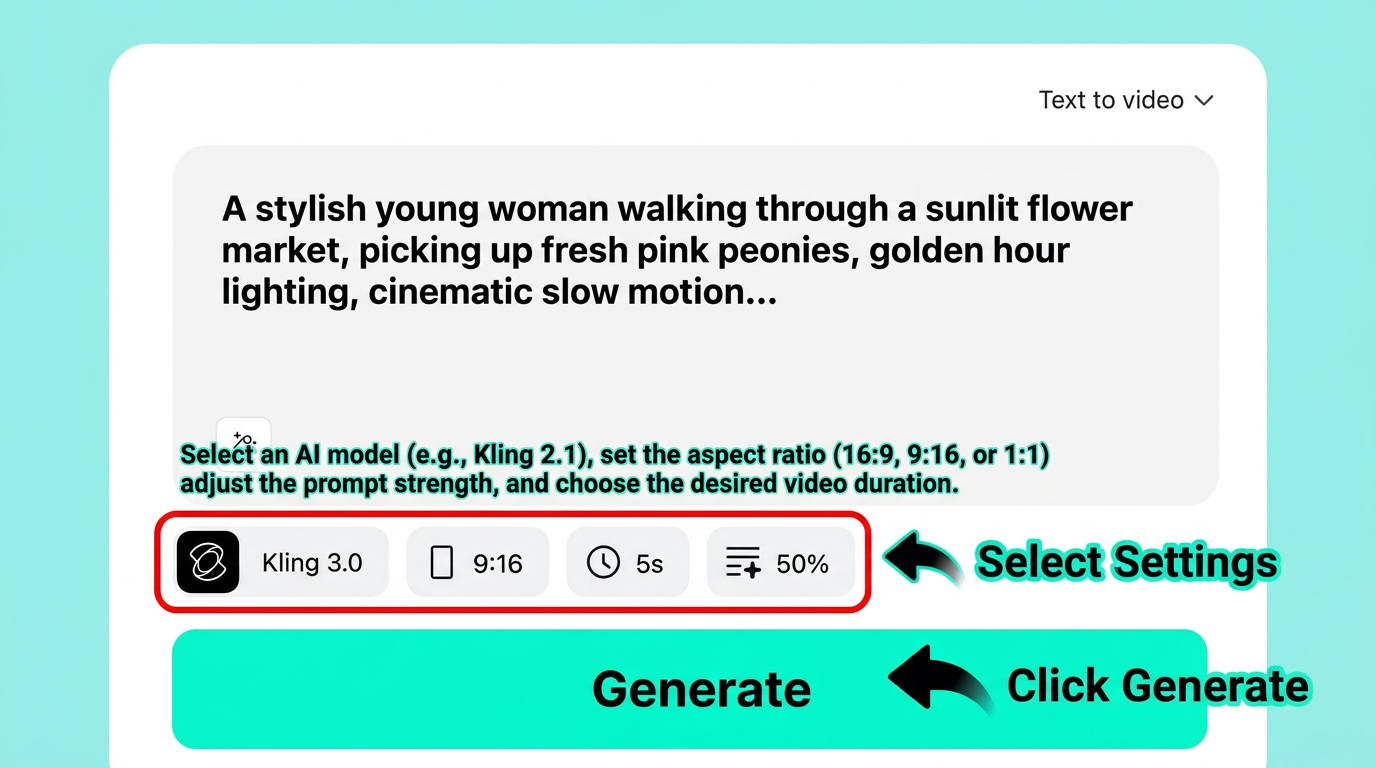
Hit the Generate button and let insMind's AI engine do the work. The platform processes your prompt and settings, then renders a fully animated video clip complete with motion, lighting, and camera movement — all based on your text description.
Generation typically takes just seconds. You'll see a progress indicator while the AI builds your video frame by frame.
Step 4: Download Your TikTok Video
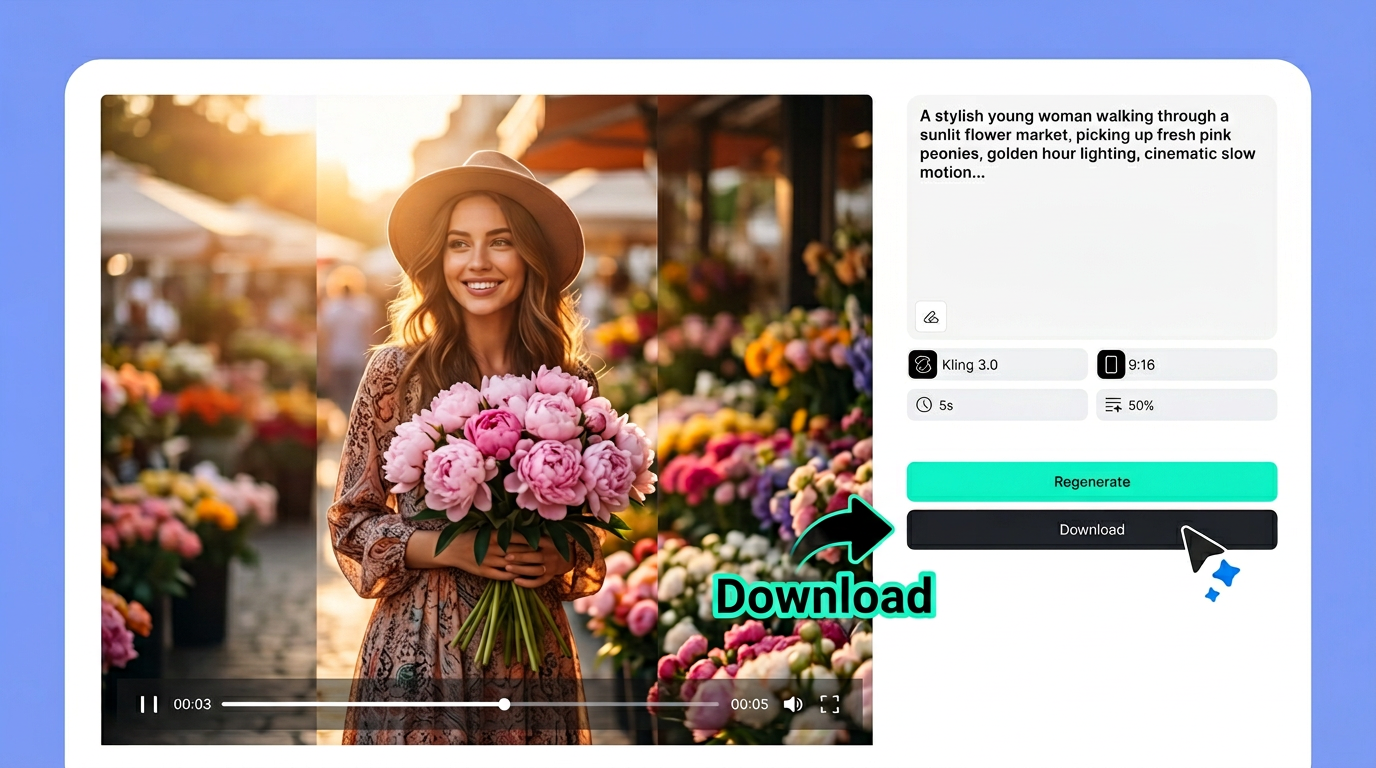
Once generation is complete, preview the video right in your browser. If you love the result, click Download to save the video in high quality, ready to upload directly to TikTok. If you want a different take, modify your prompt or adjust the settings and hit Regenerate.
Your video is exported in 9:16 vertical format — perfectly sized for TikTok's full-screen experience. No additional editing, cropping, or converting required.
Tips for Writing Better TikTok Video Prompts
Your prompt is the blueprint for your video. A vague prompt produces generic results; a detailed one produces scroll-stopping content. Here are six tips to level up your AI TikTok video generator prompts:
Be specific about the scene. Instead of writing "a beach," try "turquoise waves gently lapping against white sand, a single palm tree swaying, drone aerial shot pulling back slowly." The more visual detail you include, the closer the AI gets to your vision.
Specify camera movement. TikTok thrives on dynamic visuals. Use terms like "slow zoom in," "dolly out," "tracking shot," "whip pan," or "360-degree orbit" to give your videos cinematic energy.
Include lighting and mood. Words like "golden hour glow," "neon-lit," "moody shadows," "soft diffused light," or "dramatic backlighting" drastically change the feel of your video. Lighting sets the emotional tone viewers respond to.
Keep vertical format in mind. When describing scenes, think about composition in 9:16. Center your subject vertically, and avoid wide landscape compositions that won't translate well to TikTok's tall screen. You can also use these same prompts to create YouTube Shorts since they share the same vertical format.
Use trending aesthetics. TikTok audiences love recognizable visual styles. Reference trends like "dark academia," "cottagecore," "Y2K," "clean girl," or "cyberpunk" to tap into what's already performing well on the platform.
Iterate and refine. Your first prompt rarely produces the perfect video. Generate, review, then tweak your description. Adjust camera angles, swap lighting styles, or add details you missed. With an AI video editor, you can also fine-tune the output after generation for even more control.
What Makes a TikTok Video Prompt Go Viral?
Going viral on TikTok isn't random — it follows patterns. When writing AI prompts, keep these viral triggers in mind:
Hook in the first 3 seconds. TikTok's algorithm rewards watch time. Prompt for an opening that immediately grabs attention — a dramatic zoom, unexpected reveal, or visually striking image. If viewers don't stop scrolling in the first moment, nothing else matters.
Trigger an emotional response. The most-shared TikTok videos make people feel something — awe, nostalgia, humor, curiosity, or satisfaction. Include emotional cues in your prompt: "breathtaking," "satisfying," "unexpected twist," or "heartwarming moment."
Lean into trending aesthetics. Videos that match current visual trends get boosted by the algorithm. Reference popular styles in your prompts — right now, dreamy soft-focus, neon cyberpunk, and vintage film grain are all performing well.
Create unexpected transitions. Prompt for visual surprises — a scene that morphs into something completely different, or a dramatic shift in perspective. TikTok viewers love the element of surprise, and it drives rewatches.
Make it relatable. The most viral content connects with everyday experiences. Prompts that describe universally recognizable moments — morning coffee rituals, that Monday feeling, or weekend adventures — resonate with broad audiences and encourage shares.
Frequently Asked Questions
What are the best AI prompts for TikTok videos?
The best prompts are specific, visual, and include details about the scene, camera movement, lighting, and mood. For example, instead of "a sunset video," write "golden hour sunset over calm ocean, slow drone pullback, warm orange and pink tones, cinematic wide angle." Lifestyle, product showcase, nature, and trending aesthetic prompts tend to perform especially well on TikTok.
Can I use AI to create TikTok videos for free?
Yes. Platforms like insMind offer free access to their AI video generator, so you can start creating TikTok content at no cost. The free tier lets you experiment with prompts, generate videos, and download results. Premium plans unlock higher resolution, longer duration, and access to advanced AI models like Kling 3.0.
What aspect ratio should I use for TikTok?
TikTok uses a 9:16 vertical aspect ratio. This fills the entire phone screen and provides the most immersive viewing experience. Always select 9:16 in your AI video generator settings before creating TikTok content. This same ratio also works for Instagram Reels and YouTube Shorts.
Do I need video editing skills to use AI TikTok generators?
Not at all. AI video generators like insMind handle the entire production process — from animation and lighting to camera movement and color grading. You simply write a text prompt describing what you want, configure a few settings, and the AI produces a finished, download-ready video. No editing software or technical experience required.
How do I make my AI-generated TikTok videos go viral?
Focus on three things: a strong hook in the first 3 seconds, trending visual aesthetics, and emotional resonance. Write prompts that create immediate visual impact — dramatic zooms, unexpected reveals, or stunning scenery. Match current TikTok trends in your style choices, and aim for content that triggers curiosity, awe, humor, or satisfaction. Posting consistently and using relevant hashtags also helps the algorithm surface your content.
Start Creating TikTok Videos with AI Today
You now have everything you need to start creating stunning TikTok videos with AI — a library of 20+ ready-to-use prompts, a step-by-step workflow, and expert tips for writing descriptions that produce viral-worthy content.
The best part? You don't need a camera, editing software, or production budget. With insMind's AI video generator, all it takes is a well-crafted prompt and a few clicks. Whether you're building a brand, growing your following, or just having fun, AI-powered TikTok creation is the fastest way to produce professional content in 2026.
Ryan Barnett
I'm a tech enthusiast and writer who loves exploring AI, digital tools, and the latest tech trends. I break down complex topics to make them simple and useful for everyone.


