


To create Instagram Reels with AI, start with the idea and hook before you open any generator. AI can help you turn prompts, images, and product concepts into vertical videos faster, but the Reel still needs a clear reason for people to stop, watch, and share.
This guide shows a practical workflow for planning, generating, editing, and testing AI Instagram Reels. You will learn how to write better prompts, choose the right video format, make AI output feel native to Instagram, and use insMind to create Reels from text or images without starting from a blank timeline.
Table of Contents
- 01Quick Verdict: AI Speeds Up Reels, But the Idea Still Wins
- 02What Makes an Instagram Reel Work in 2026
- 03Plan Each AI Reel Around One Audience and One Action
- 04Write Hook-First Scripts Before Using an AI Reel Maker
- 05Choose the Right AI Instagram Reels Workflow
- 06How to Create Instagram Reels with AI Using insMind
- 07Make AI-Generated Reels Look Native on Instagram
- 08Optimize Instagram Reels for Format, Captions, and Covers
- 09Create More Viral Instagram Reels by Testing Variants
- 10AI Instagram Reels Mistakes to Avoid
- 11FAQs about Creating Instagram Reels with AI
- 12Conclusion
Quick Verdict: AI Speeds Up Reels, But the Idea Still Wins
AI can help you create Instagram Reels faster, especially when you need short clips, product motion, visual concepts, or social media variants. But AI does not replace the creative decision that matters most: what should make someone stop scrolling in the first second?
Treat AI as a production system. Use it to generate video options, test hooks, animate still images, and build more Reels from one idea. The best results still come from clear audience insight, platform-native pacing, readable captions, and a payoff that matches the hook.
What Makes an Instagram Reel Work in 2026
A strong Instagram Reel usually has five parts: a first-frame hook, a clear visual subject, fast enough pacing, readable text or captions, and a reason to watch again or take action. AI can generate the visuals, but the structure still needs to come from you.
Instagram Reels are built for vertical viewing. Instagram's help center says Reels can be uploaded with aspect ratios between 1.91:1 and 9:16, but full-screen Reels are naturally designed around vertical 9:16 composition. That means the subject, key text, and movement should sit in a mobile-safe area rather than near the edges.
| Reel Element | What to Plan | AI Prompt Clue |
|---|---|---|
| Hook | What viewers see or read first | "Start with a bold first frame showing..." |
| Motion | How the scene changes every few seconds | "Quick camera push, clean transition..." |
| Text | Short captions that support the story | "Leave safe space for captions..." |
Plan Each AI Reel Around One Audience and One Action
Before you generate a Reel, decide who it is for and what it should do. A beauty brand might want saves for a routine. A software company might want clicks to a tutorial. A creator might want comments, shares, or profile visits.
Keep each Reel to one promise. Do not ask one 10-second video to explain a product, tell a story, deliver a tutorial, and sell an offer at the same time. The tighter the job, the easier it is to prompt AI and edit the result.
- Awareness Reel: Show a surprising before-and-after, trend, or visual reveal.
- Education Reel: Teach one useful tip in three quick beats.
- Product Reel: Show the outcome first, then the feature that creates it.
- Community Reel: Ask a simple question that invites comments.
Write Hook-First Scripts Before Using an AI Reel Maker
The fastest way to waste an AI reel maker is to enter a vague prompt. Instead, write a mini script first. A good Reel script does not need to be long. It needs a hook, two or three visual beats, and a payoff.
Use this structure:
- Hook: "Your Reels look AI-generated because..."
- Beat 1: Show the common mistake.
- Beat 2: Show the better version.
- Payoff: Give one rule viewers can use today.
Then convert it into a prompt. Include the subject, scene, visual style, pacing, aspect ratio, and text-safe composition. For example: "Create a vertical 9:16 Instagram Reel showing a creator comparing a generic AI clip with a native-looking Reel. Bright studio desk, fast cuts, bold caption space, friendly creator education style."
Choose the Right AI Instagram Reels Workflow
There are three common AI workflows for Instagram Reels. Choose based on what you already have.
| Workflow | Use It When | Best Reel Type |
|---|---|---|
| Text to video | You have a script or concept but no footage | Tips, stories, explainer clips |
| Image to video | You already have a product image, portrait, or design | Product motion, before-and-after, character clips |
| Template or effect | You want faster trend-style production | Social trends, reactions, entertainment |
For script-first ideas, a text to video tool is the cleaner path. For product, fashion, profile, or visual identity content, an image to video generator gives the AI a stronger reference.
How to Create Instagram Reels with AI Using insMind
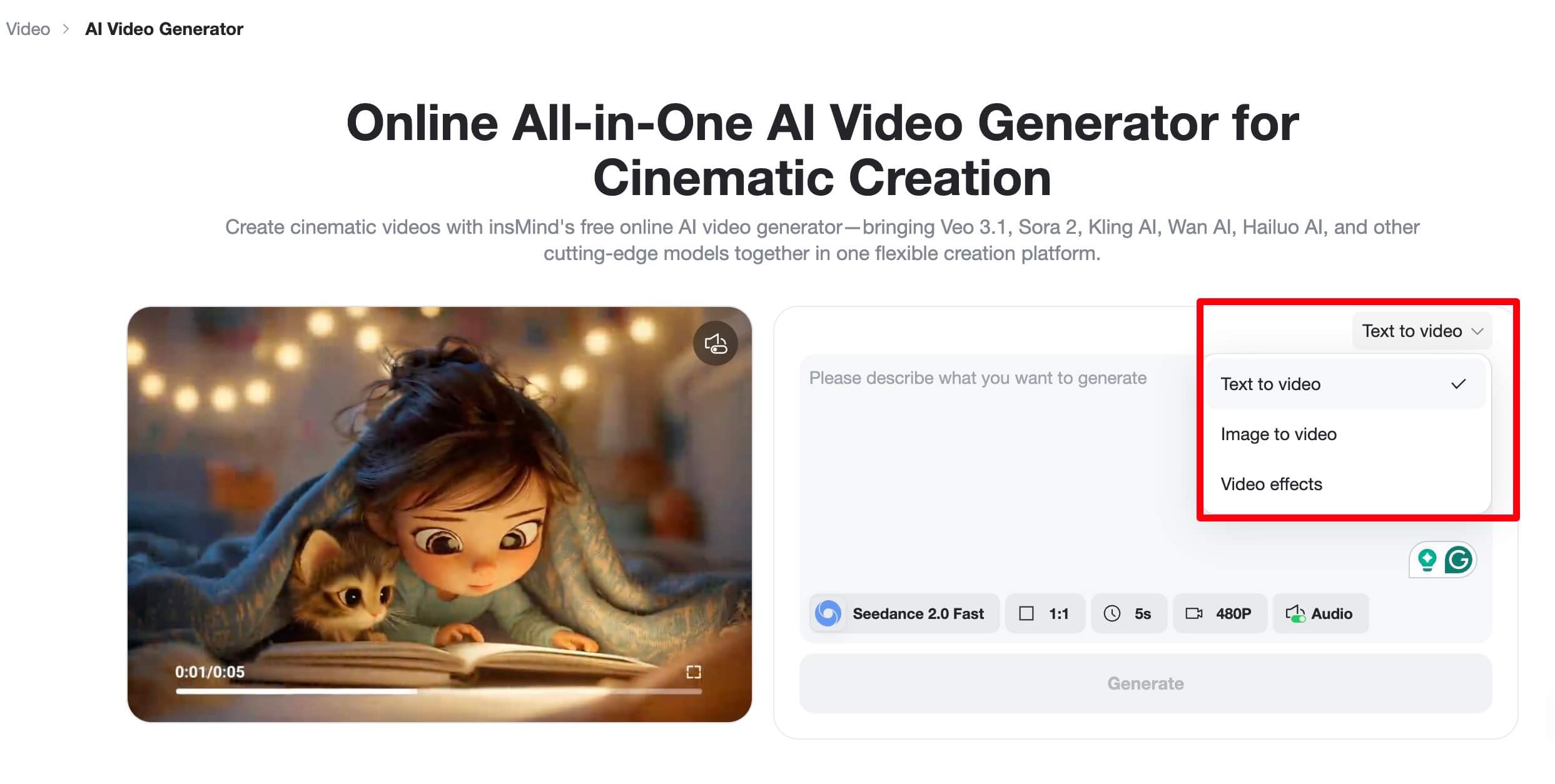
The AI video generator in insMind lets you create short videos from text or images, choose the right settings, and download the result for Instagram. Its official workflow has three steps: enter a text prompt or upload an image, choose video settings, then generate, preview, and download.
Step 1 - Enter a Text Prompt or Upload Your Image
Start by deciding whether the Reel should come from text or an image. For text-to-video, type a detailed prompt that describes the idea, scene, style, and hook. For image-to-video, upload a high-quality product photo, portrait, or design first, then add a prompt that explains how the image should move.
Step 2 - Choose Video Settings
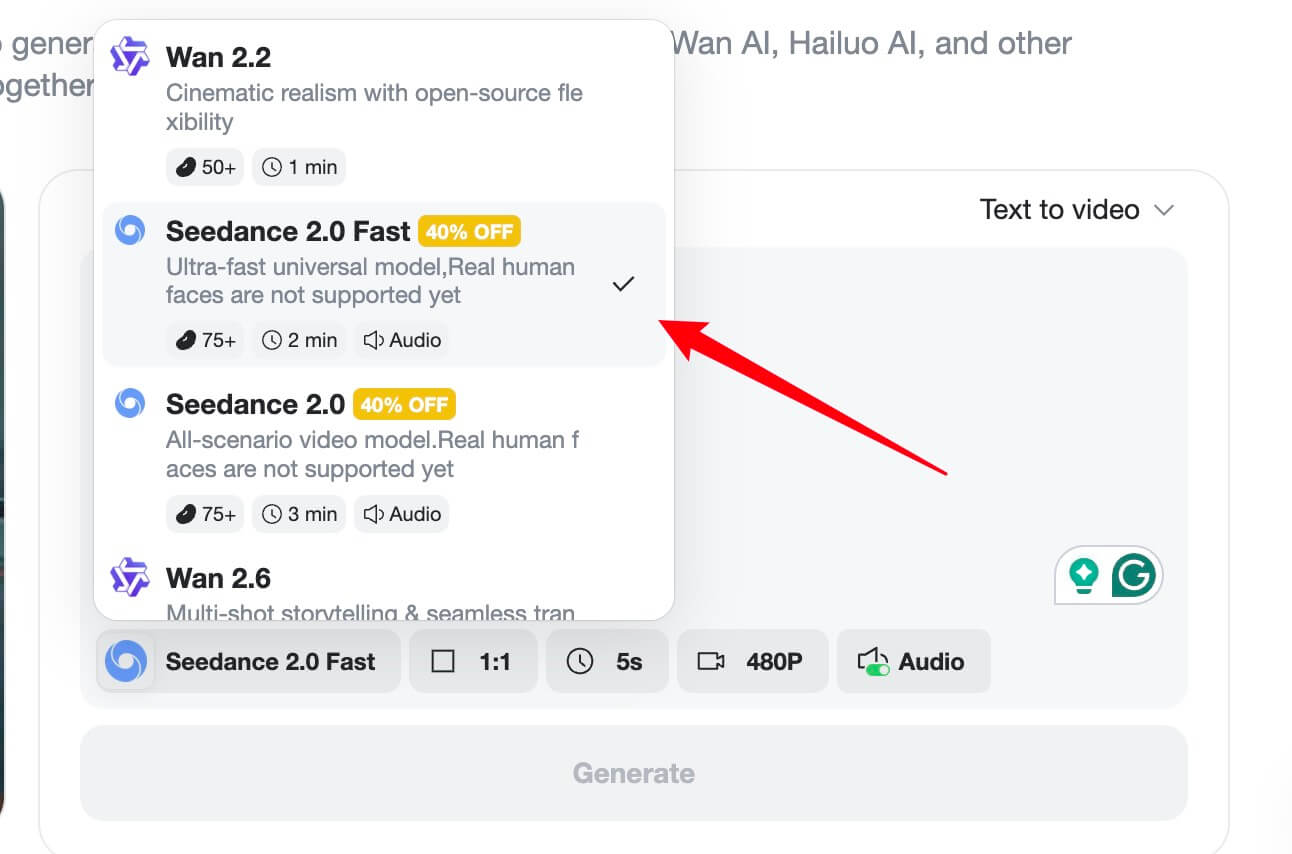
Customize the video by selecting the AI model, aspect ratio, video length, and prompt strength. For Instagram Reels, choose a vertical setup when available, keep the subject centered, and leave safe space for captions, profile controls, and interface overlays.
Step 3 - Generate, Preview, and Download the Video
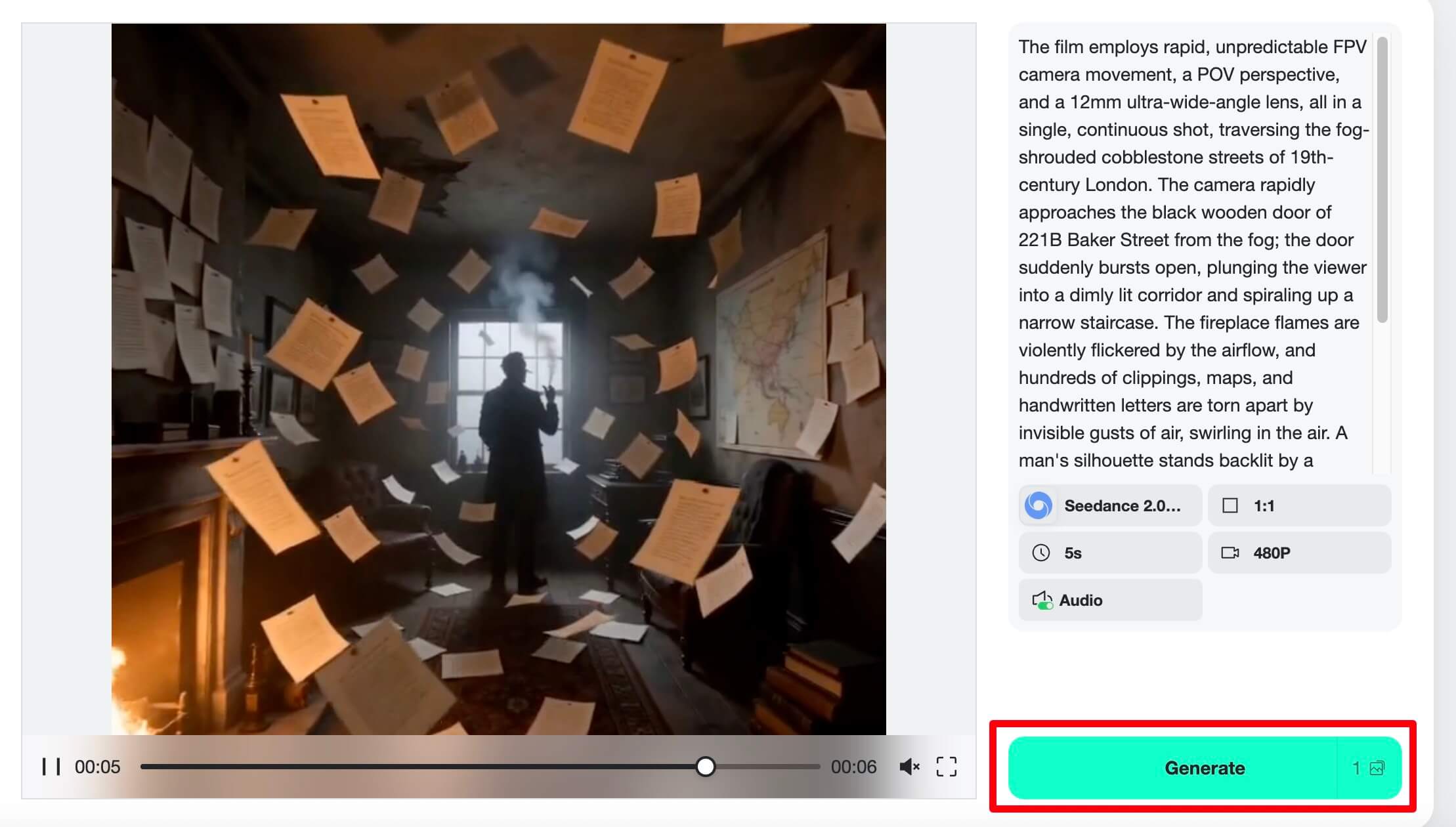
Click Generate to create the Reel draft. Preview it like a viewer would: first frame, motion, clarity, and ending. If the first second is unclear, adjust the prompt or settings. When the clip works, download the video and add final captions, cover text, audio, or publishing details before posting to Instagram.
Make AI-Generated Reels Look Native on Instagram
A Reel looks native when it feels like it belongs in the feed, not like a polished ad dropped into a casual space. Use tighter framing, simple text, natural motion, and one clear visual idea.
The best AI Reel does not announce that it was made with AI. It makes the viewer understand the idea faster.
Avoid overloading the frame with tiny text, complex prompts, or too many transitions. Instagram is fast, but clarity still wins. If your Reel needs explanation, put the explanation in the caption or follow-up Reel rather than forcing every detail into one clip.
Optimize Instagram Reels for Format, Captions, and Covers
After downloading your AI video, optimize it for Instagram. Use a vertical composition, keep important text away from the bottom controls, and choose a cover that makes sense when shown in your profile grid.
- Caption text: Use short lines that support the video, not full paragraphs.
- Cover frame: Pick a clear moment with readable subject and contrast.
- Audio: Match the mood, but do not let music hide the message.
- Hashtags: Use a few relevant tags instead of stuffing broad tags.
- CTA: Ask for one action: save, comment, visit profile, or watch part two.
Create More Viral Instagram Reels by Testing Variants
You cannot guarantee a viral Instagram Reel, but you can create more chances to learn. AI is useful because it lets you test variants faster: different openings, camera moves, product angles, color moods, and caption lines.
For one idea, create three versions. Version A can start with the final result. Version B can start with the problem. Version C can start with a surprising visual. Post them across a series, compare retention and shares, then build the next batch from the winner.
AI Instagram Reels Mistakes to Avoid
The first mistake is prompting for "viral" instead of giving the AI a concrete scene. Viral is not a visual direction. Describe the audience, hook, movement, and style.
The second mistake is ignoring platform composition. A beautiful horizontal AI clip can still fail as a Reel if the subject is cropped badly or captions sit under the Instagram UI.
The third mistake is publishing generic AI clips that do not connect to your brand or audience. Use the AI reel maker to express your idea faster, not to replace the idea itself.
FAQs about Creating Instagram Reels with AI
Can I create Instagram Reels with AI from only text?
Yes. Use a text-to-video workflow when you have a script, story, or visual concept but no footage. The prompt should describe the scene, motion, mood, aspect ratio, and caption-safe composition.
What is the best format for Instagram Reels?
Vertical 9:16 is the safest format for full-screen Reels. Instagram accepts a wider range of aspect ratios, but vertical composition usually fits the viewing experience best.
Can AI Instagram Reels go viral?
They can, but AI is only one part of the result. Hook quality, audience fit, pacing, sound, caption clarity, and timing all matter. Use AI to test more strong ideas, not to skip creative planning.
Is an AI reel maker better than a normal Instagram video maker?
An AI reel maker is better when you need to create new visuals from prompts or animate images. A normal editor is still useful for final captions, trimming, audio timing, and publishing details.
Should I use AI-generated captions inside the video?
Use captions when they make the message clearer. Keep them short, readable, and away from areas where Instagram controls may cover the screen.
Conclusion
AI makes Instagram Reels easier to produce, but the best results still come from sharp ideas. Start with a hook, plan the visual beats, generate a vertical draft, then polish the Reel for captions, cover, and native platform feel.
Once you have a repeatable workflow, use AI to test more versions of the same idea. That is where the real speed advantage appears: not one random clip, but a system for making better Reels more often.


![How to Add Logo to Photos Online for Free [The Simplest Method]](https://static.xsbapp.com/market-operations/market/side/1718795949162.jpg?x-oss-process=image/resize,w_690,h_460,type_6/interlace,1,image/format,webp "How to Add Logo to Photos Online for Free [The Simplest Method]")
![How to Remove Tattoos from Photos [Ultimate Guide 2025]](https://static.xsbapp.com/market-operations/market/side/1718787534476.jpg?x-oss-process=image/resize,w_690,h_460,type_6/interlace,1,image/format,webp "How to Remove Tattoos from Photos [Ultimate Guide 2025]")


