


Can an AI voice tool turn your script into audio you would actually publish? This ElevenLabs review looks at the features, subscription costs, and practical trade-offs that matter before you commit to a paid plan.
ElevenLabs lets you turn text into speech, choose different voices, and adjust how they sound. You can type what you want to say instead of recording every sentence yourself. The question is whether the voices, settings, and monthly credits are worth the price for you.
Below, we look at what ElevenLabs can do, what to listen for when trying a voice, and how to create speech with insMind. The feature and pricing details come from official pages; we have not run a side-by-side listening test.
Table of Contents
- 01 Is ElevenLabs Worth It?
- 02 What Is ElevenLabs, and What Can It Do?
- 03 ElevenLabs Review: Key Features and Controls
- 04 User Experience: What to Check Before Exporting
- 05 ElevenLabs Pricing and Value for Money
- 06 ElevenLabs Strengths and Limitations
- 07 How to Generate AI Voice with insMind
- 08 Frequently Asked Questions
- 09 Final Verdict: Is ElevenLabs Right for You?
Is ElevenLabs Worth It?
ElevenLabs is worth considering if you want more voice choices and settings than a basic text reader offers. You can explore different tones, adjust how a voice reads your text, and create a custom voice. Whether it is worth paying for depends on how much those options improve your audio.
Start with what you want to make. A large voice library is useful only if you find a voice that reads your words well. Voice cloning matters if you want new recordings to sound like you; you may not need it for a quick narration.
Before subscribing, generate a short passage containing your hardest words. Include a name, a number, a question, and a sentence with a natural pause. Then listen to the complete passage. That small check tells you more about suitability than a polished five-second sample.
If you simply want to hear your script aloud, try text to speech on insMind. Paste your words, choose a voice, and listen for clear pronunciation and a comfortable pace.
What Is ElevenLabs, and What Can It Do?
ElevenLabs is an AI voice tool. Its text-to-speech tool reads your written text aloud. You can also clone a voice and try other audio features. To create a recording, enter your text, select a voice, generate the speech, and listen to the result.
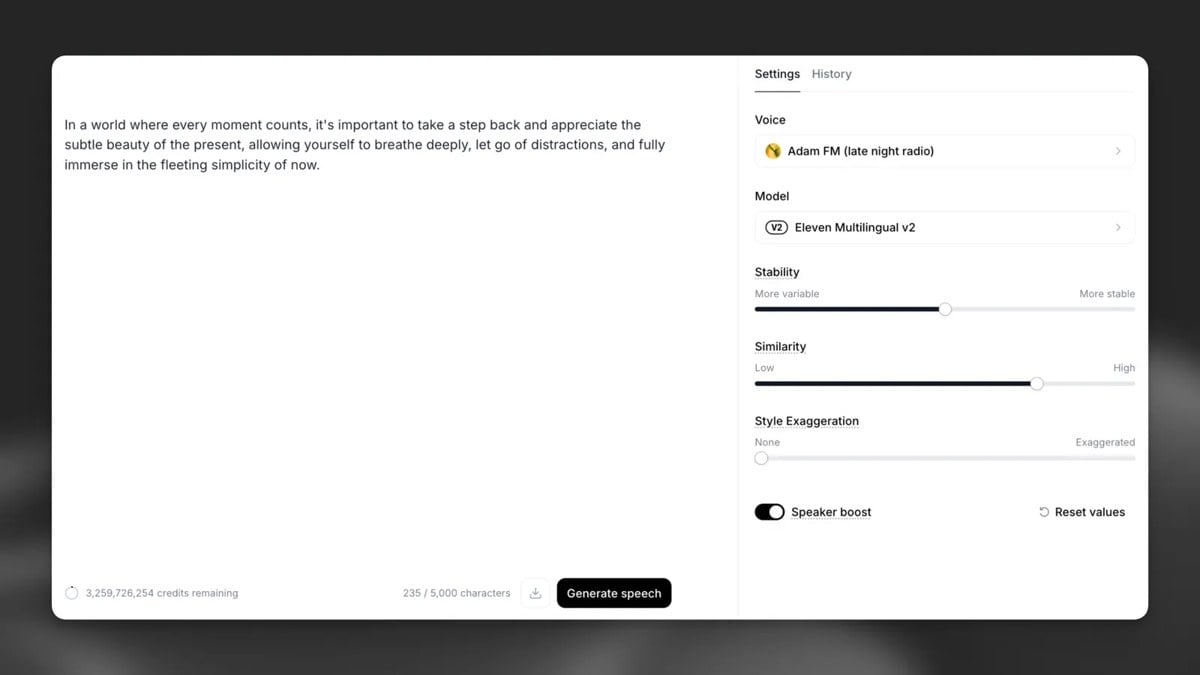
Getting your words into an audio file is just the start. You will also want to check how the voice sounds: does it pause in the right places, emphasize the right words, and keep a steady tone from beginning to end?
Focus on the features you will actually use. Turning speech into text, creating sound effects, and changing a recorded voice are different tasks. Having more options does not necessarily make it easier to create a narration you like.
ElevenLabs Review: Key Features and Controls
Text-to-Speech and Voice Selection
ElevenLabs offers a voice library and lets you create speech in your browser. You can choose a voice before generating the audio instead of relying on one default narrator. That variety makes it easier to find a sound you like.
A useful way to judge voice selection is to compare the same passage across a small shortlist. Keep the wording unchanged and listen for articulation, warmth, and emphasis. Avoid changing the script and the voice together, because you will lose track of which change improved the audio.
Save your preferred version with a descriptive filename. Including the voice name and script version makes it easier to return to a successful result when you revise the text later.
Voice Settings and Pronunciation
The official speech generation guide describes settings such as speed, stability, similarity, and style exaggeration. Available controls depend on the selected model. The guide also covers punctuation and pronunciation techniques, including alternative spellings.
Treat these controls as adjustments to test individually. Make one change, regenerate a short section, and compare it with the previous version. Moving several sliders together can make an improvement difficult to reproduce.
Pronunciation deserves a separate pass. Listen carefully to abbreviations, dates, and unfamiliar names. If a word sounds wrong, fix that issue before generating the full script. A voice can sound pleasant while still saying an important term incorrectly.
Models and Language Support
The model you choose affects which languages you can use and how the voice sounds. The current model documentation lists Eleven v4 and Eleven v3 alongside Multilingual v2 and Flash v2.5. These models support different languages and text lengths, and some put more emphasis on speed or expression.
Check the language support for your chosen model rather than relying on one headline number. Check the model you plan to use and listen to the exact language you need. A strong English preview does not establish how your translated script will sound.
To compare voices fairly, use a checked translation and ask a fluent speaker to listen. Listen for sentence stress as well as individual words. Understandable audio and comfortable listening are related, but they are not the same standard.
Instant and Professional Voice Cloning
ElevenLabs distinguishes between Instant Voice Cloning and Professional Voice Cloning. The former uses a short recording, while the latter requires a more involved setup. They take different amounts of time and audio to set up.
The Professional Voice Cloning guide recommends substantial clean training audio and includes voice verification and fine-tuning. It should not be treated as a one-click process with an immediately guaranteed result.
Decide whether you want the audio to sound like a specific person before spending time setting up a clone. A ready-made voice may be enough for clear narration. You can also explore AI voice cloning on insMind if you want to create speech with your own voice.
User Experience: What to Check Before Exporting
How should you evaluate a voice beyond the first impression? Listen at normal playback speed, through the device your audience is likely to use, and without reading along. Following the script on screen can make an unclear word seem more understandable than it really is.
First, check that nothing is missing. Make sure every sentence is present and no phrase repeats unexpectedly. Next, check clarity: can you understand the names, numbers, and transitions on the first listen? Finally, check pacing across the entire passage.
For longer text, compare the opening, middle, and ending. Pay attention to changes in volume or tone between generated sections. If you plan to combine multiple clips, leave room for natural pauses at the joins rather than cutting every breath tightly.
Keep a copy of the final script alongside the audio. When a sentence changes, you can identify exactly which section you need to generate again. A simple revision habit can save more time than searching endlessly for a different voice.
Check both how long the audio takes to generate and how it sounds. Speed alone will not tell you whether a recording is ready to share. Listen to your own text with your chosen voice and settings before downloading the final version.
ElevenLabs Pricing and Value for Money
What does ElevenLabs cost? It offers a Free plan and several paid plans with different monthly credits and features. The official pricing page shown below was checked November 4, 2026. Introductory offers and annual billing can differ; taxes are excluded.
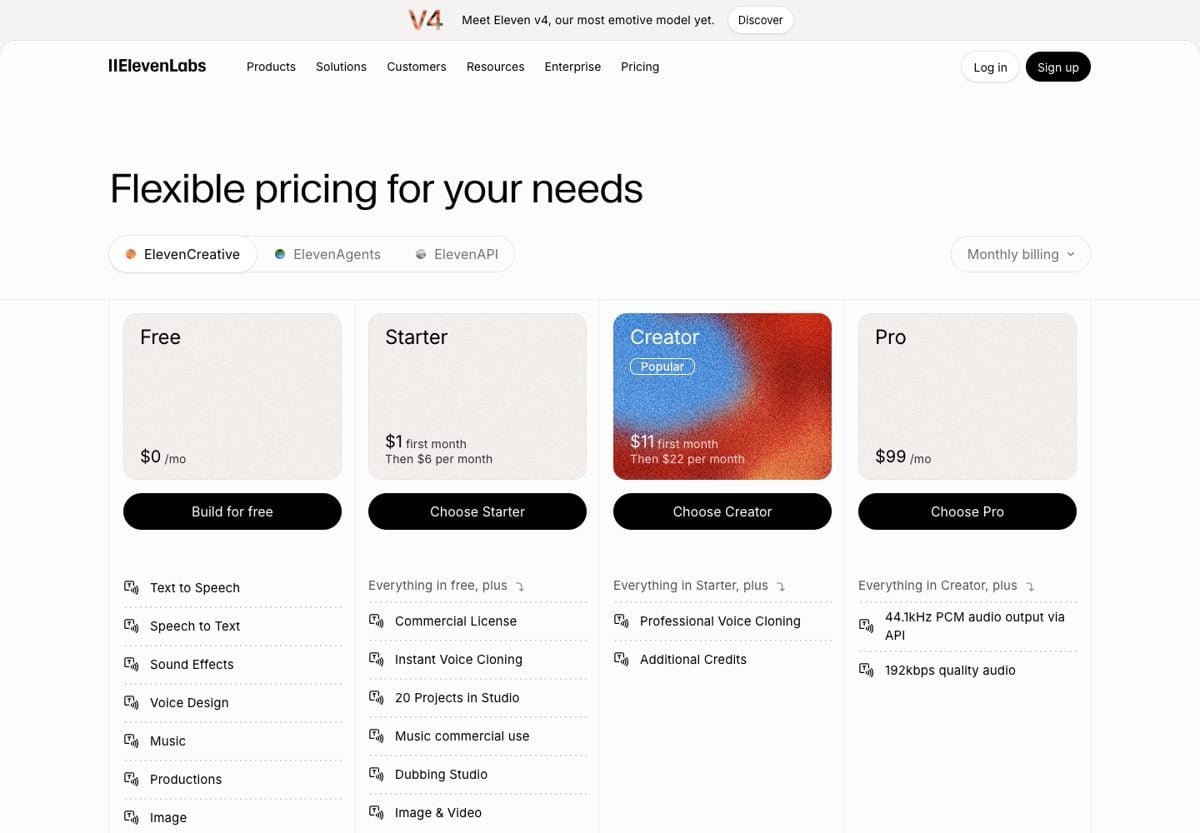
Starter adds a commercial license and Instant Voice Cloning; Creator adds Professional Voice Cloning. The audio tools draw from the same credit balance, and each feature or model can use credits differently. A set number of credits does not always give you the same number of audio minutes.
To judge value, estimate the amount of audio you expect to keep, then allow room for revisions. A subscription can look sufficient when you count only final scripts and feel restrictive once you include pronunciation fixes and alternate takes.
Try making one short recording from start to finish. Note how long you spend fixing it and how many credits you use. This gives you a clearer idea of whether a paid plan will cover the audio you want to make.
ElevenLabs Strengths and Limitations
ElevenLabs gives you plenty of voices and settings to try in one place. You will still need to choose a voice, clean up your script, and keep an eye on your credits.
Pros
- Different voices and models to try
- Ready-made voices and voice cloning in one place
- Free monthly credits to try your own script
Cons
- Retries and other audio features use the same credits
- Professional cloning requires additional preparation
- Pronunciation and pacing still need manual review
Think about what takes you the most time. If you keep re-recording small script changes, AI speech may help. If your script needs a lot of rewriting, work on the wording first. A different voice tool will not make unclear writing easier to follow.
Before trying more voices, decide what you want to hear: correct pronunciation, natural pauses, and a tone that fits your script. When you find a version that sounds right, save it rather than generating more takes without a clear reason.
How to Generate AI Voice with insMind
Want to turn your script into speech online? With insMind, you can paste your text, choose a voice and language, generate the audio, and download it. Here is how to get started.
Step 1: Add Your Script
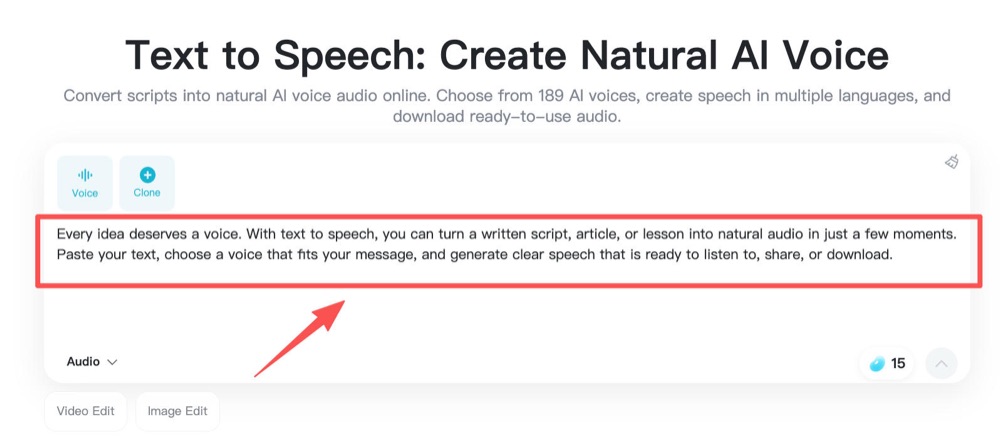
Open insMind Text to Speech and paste the words you want spoken. Remove editing notes, unfinished sentences, and headings that should not be read aloud. Use punctuation where a listener needs a pause.
Start with a short section when the script contains unusual names or terminology. Check spelling before generating so you can evaluate the voice without avoidable text errors. Save a copy of your script so you can edit it later.
Step 2: Choose a Voice and Language
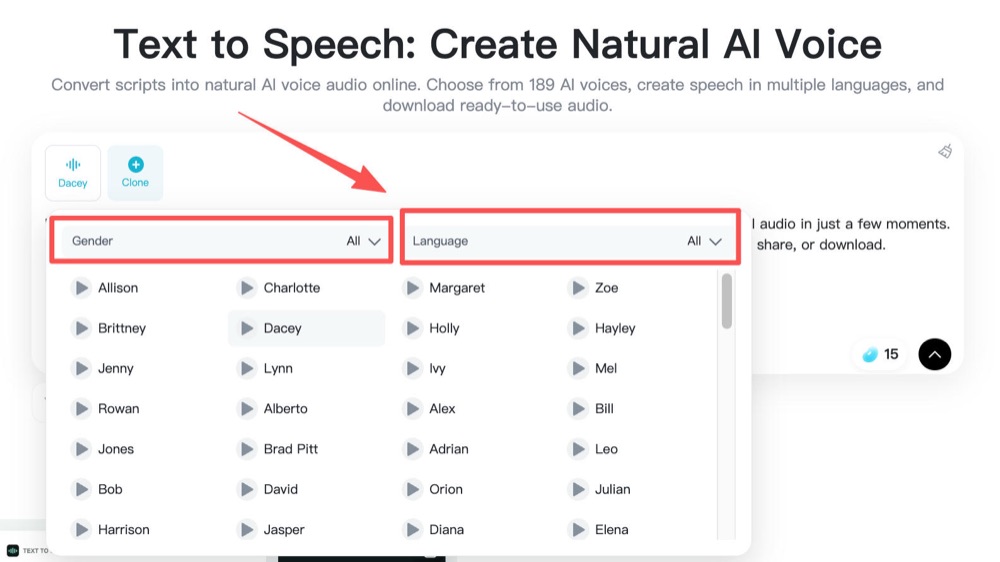
Choose the language you need and a voice that suits your script. The AI voice generator page is a useful starting point for exploring insMind’s voice options.
Listen for clear articulation and a tone that suits the full script. A dramatic sound can be appealing in a short preview but distracting over a longer passage. Choose the voice you can comfortably listen to for the entire recording.
Step 3: Generate Your AI Voice
Generate the speech once the script and voice selection are ready. Keep the first version as a reference, then revise only the wording or voice choice that needs attention.
If the passage feels crowded, split long sentences and remove unnecessary phrases before trying again. Keep the original meaning intact. The goal is to make the message easier to hear while maintaining the information your audience needs.
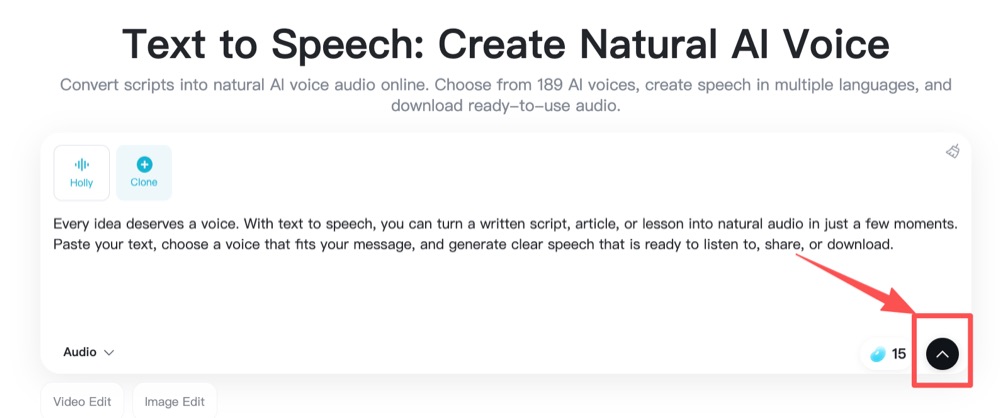
Step 4: Preview and Download the Audio
Play the generated result from beginning to end. Check pronunciation, sentence endings, and pauses before downloading. If the narration accompanies visuals, compare its timing with the actual sequence rather than judging the audio in isolation.
Download the version you like and give it a filename you will recognize. Ready to narrate another script? You can create a voiceover online with insMind whenever you need a new recording.
Frequently Asked Questions
Is ElevenLabs free to use?
ElevenLabs offers a Free plan with monthly credits. Check which features are included and how much audio you can make. Some options are only available on paid plans.
Is ElevenLabs worth paying for?
It can be worth paying for if you like the voices and can get a good recording without too many retries. Try your own text first and check how much time and how many credits it takes. Choose based on the audio you can make, not just the number of features.
Is voice cloning the same as text to speech?
No. Text to speech reads written words aloud. Voice cloning lets you create new speech that sounds like a particular voice. You can use a ready-made AI voice without creating a clone.
Does this review include a hands-on audio benchmark?
No. This article explains the features and prices listed on official pages and suggests what to listen for when trying a voice. We have not scored voices in a listening test or measured how quickly they generate audio.
How can I make AI narration sound more natural?
Write for listening, choose a suitable voice, and review the full recording. Shorten sentences that feel rushed and check unfamiliar words separately. Fix one issue at a time so you can tell which change improves the result.
Final Verdict: Is ElevenLabs Right for You?
ElevenLabs is worth a look if you enjoy trying different voices and want more say in how your narration sounds. Start with a script you would actually use, listen to the result, and see how much editing it needs before deciding whether to pay.
For your next recording, start with a clear message and a small passage you can evaluate carefully. Ready to hear your script aloud? Open insMind Text to Speech, choose a voice, and preview the result before downloading your audio.

Ryan Barnett
I'm a tech enthusiast and writer who loves exploring AI, digital tools, and the latest tech trends. I break down complex topics to make them simple and useful for everyone.
Keep reading

Artguru Review: Can It Make Blurry Photos Clearer?
Read this Artguru review to understand one-click photo enhancement, upscaling, and limits. Learn what to check and how to improve a photo with insMind.

Vidu Q4 Review: Features, Strengths, and What to Expect
Explore this Vidu Q4 review for image references, motion, native audio, and practical limits. Learn what to check and how to animate a photo with insMind.

ElevenLabs Review: Features, Pricing, and Is It Worth It?
Read our ElevenLabs review to explore AI voice features, pricing, strengths, and limits. Learn what to check before paying and create voice audio online.

4 Best AI Video Tools for Multilingual Ads in 2026
Compare AI tools for localized video ads, lip sync, dubbing, and new market-specific creatives, plus a practical review checklist.

5 Best AI Video Generators for Marketing in 2026
Compare five AI video generators for product ads, presenter videos, cinematic clips, and campaign testing, with practical selection tips.

Dreamina AI Review: How Good Is It for Images and Videos?
Is Dreamina AI any good? Explore its image generator, video creation, AI avatars, strengths, limitations, and alternatives in this detailed review.

Flova AI Review: Is It Really Worth Using in 2026?
Is Flova AI worth using? Explore its video creation features, character consistency, pricing, limitations, and the best alternative for creators.

Higgsfield AI Review: What I Saw in a Studio Slide Demo
A close look at Higgsfield's Studio Slide image-to-video example: what happens to the subject, where the effect works, and where I'd be careful.

5 Best AI Voice Generators in 2026: Free & Paid Picks
Compare five leading AI voice generators for creators, marketers, podcasts, videos, and business narration.

Best Text to Speech Tools: 8 Picks for Natural AI Voices
Compare eight text to speech tools for natural AI voices, videos, learning, and business projects.

7 Best AI Avatar Makers in 2026: Top Tools Compared
Compare seven AI avatar makers for business, social, anime, and 3D profiles.

Best AI Audio Generators: 7 Tools for Voice Content in 2026
Compare seven AI audio generators for voice content, creative projects, and developer workflows.

Grok Imagine vs Veo: Which One Should You Use in 2026?
Compare Grok Imagine and Veo to choose the right AI video model for your workflow.

New Seedance 2.1 and Mini: Better Quality, Lower Price
Seedance 2.1 and Seedance 2.0 Mini updates, pricing, and insMind workflow.

Best AI Video Color Correction Tools for Fast Video Enhancement
Compare AI video color correction tools and fix video color online.

Top AI Highlight Video Maker Tools to Create Stunning Clips in 2026
Compare AI highlight video maker tools and create stunning clips with AI.

Make Your Vacation Photos Move with an AI Travel Video Maker
Turn travel photos into cinematic AI videos, Reels, and vacation clips.

How to Get More YouTube Subscribers for Free
Learn how to get more YouTube subscribers on YouTube for free with small-channel tactics, Shorts, thumbnails, playlists, analytics, and AI workflows.

How to Get More Views on YouTube: A Practical 2026 Growth Strategy
Learn how to get more views on YouTube with a practical strategy for topics, titles, thumbnails, Shorts, retention, analytics, and safer growth.

Best AI UGC Video Generator for TikTok Ads: Boost Engagement Fast
Step-by-step guide on Best AI UGC Video Generator for TikTok Ads: how it works, best practices, and how to do it free with insMind.

Seedance 2.0 vs Veo 3.1: Which AI Animation Tool Is Right for You?
Explore the strengths of Seedance 2.0 vs Veo 3.1 in animation, focusing on features, performance, and user experience.

Top 10 AI Meme Video Generators in 2026 (Free and Paid)
Compare the top 10 AI meme video generators for TikTok, Instagram Reels, and YouTube Shorts. Find the best free and paid tools to create viral meme videos with AI.

Best Seedance 2.0 Prompts: 5 Copy-Paste Examples for AI Video Creation
Discover 5 Seedance 2.0 prompt examples and learn how to create smoother, more cinematic AI videos with better control.

Seedance 2.0 Alternatives: 8 AI Video Models Worth Trying in 2026
Explore 8 Seedance 2.0 alternatives and learn how to choose the right AI video model for social content, ads, and storytelling.

Top 10 ID Card Maker Prompts to Create ID Cards Online
Discover the trending prompts to generate ID card photos.

How to Go Linve in Instagram (The Ultimate Guide in 2026)
Discover exactly how to do live video instagram broadcasts. We cover the setup steps, engagement tips, and how to use insMind AI to create stunning videos.

5 Hottest Nano Banana 2 Prompts to Create Stunning AI Images
Looking for the best Nano Banana 2 prompts? Discover 5 trending prompts and generate stunning AI images using insMind’s Nano Banana 2 AI Image Generator.

Nano Banana 2 vs Nano Banana Pro: Which AI Image Model Should You Use?
Discover the key differences between Nano Banana 2 and Nano Banana Pro. Compare features, pricing, and best use cases for each model.

AI Attractiveness Test: Discover Your Beauty Score with AI
Curious about your beauty score? Try the AI attractiveness test to analyze facial symmetry and proportions instantly using insMind’s AI tool.

Mocking SpongeBob Meme: Meaning, Origin, and How to Make It
Discover what the Mocking SpongeBob meme means, where it came from, why it went viral, and how to make your own version step by step.

Seedance 2.0 Review: Multimodal Control and Real-World Testing in 2026
Seedance 2.0 review with feature breakdown, pricing overview, and side-by-side comparison with Kling, Sora, Veo, and Wan AI video models.

Seedance 2.0 vs Kling 3.0: Which AI Video Generator Wins?
Seedance 2.0 or Kling 3.0 ? We compare both AI video generators on features, speed, and quality so you can pick the right model fast.

Is PixVerse AI Worth Using in 2026? Full Review, Pros & Cons Explained
An in-depth PixVerse AI review covering features, strengths, limitations, and how to use PixVerse on insMind for lower cost and more models.

30 Funny Text Meme Ideas That Will Make Anyone Laugh Instantly
Introduce 30 funny text meme ideas and learn how to generate meme images with insMind AI Image Generator.

Top 10 AI Discord Banner Ideas for Personalized Profiles
Your Discord banner sets the first impression. With AI Discord banner generator, you can create personalized banners in minutes.

Top 10 Discord Avatar Maker Ideas with AI
Your Discord profile picture is your personality. With AI avatar makers, you can create a unique avatar in seconds.

Top 10 Realistic Celebrity Selfie AI Prompts
Discover how celebrity AI image generators create realistic selfies. Learn how prompts turn photos into convincing celebrity-style images fast and easily.

Top 5 Local/Open-Source AI Image Generators in 2026
Discover the top 5 local/open-source AI image generators in 2026.

What Are Agent Skills? Everything You Need to Know
Introduce what are agent skills and how agent skills improve productivity.

Top 10 AI Collage Prompts for 3-Grid & 9-Grid Photos
Create professional 3-Grid and 9-Grid photo collages in seconds with our free AI generator. Upload images and let AI handle layout perfectly.

Top 10 Best AI Animation Tools in 2026 for Creators and Marketers
Discover the top AI animation tools in 2026, including text-to-video, image-to-video, and full AI video generators.

Top 10 AI Christmas Card Ideas for Custom Holiday Cards
Explore 10 AI-powered Christmas card ideas to create personalized holiday cards that feel festive, thoughtful, and easy to share with everyone.

Top 10 Christmas Elf AI Transformations to Try This Season
Create fun Christmas elf photos with AI. Turn yourself, family, kids, or pets into playful elves and share festive portraits this holiday season.

Top 10 Turn Me Into a Santa Ideas to Try This Christmas
Use AI to turn yourself into Santa this Christmas and create festive photos with a AI Santa Filter that are perfect for sharing, cards, and holiday laughs.

OpenArt Review: Honest Experience Using an AI Image Creator
Learn everything about OpenArt AI image generator in this article.

Kling O1 Prompt Bank: Everything you need to know
Learn everything about the Kling O1 Prompt Bank, including tips, examples, and AI video prompts.

Kling 2.6 Overview: Features, Benefits, and How to Use it Professionally
Explore Kling 2.6, the native audio-visual AI video model that creates videos with voice and sound in one seamless workflow.

50+ Hottest Nano Banana Pro Prompts for Viral Image Effects
Go through the guide to uncover the hottest list of Nano Banana Pro prompts to copy and use them as guided.

Nano Banana Pro vs. Seedream 4.0: How to Choose the Better One
Nano Banana 2 vs. Seedream 4.0? The clash between innovation and intelligence is outlined in the article below, with key differences and a guide on how to use it.

Black Friday Memes: The Funniest Internet Trend Taking Over Every Year
Explore the rise of Black Friday memes and learn how to create your own viral, funny posts with AI.

Zootopia Selfie: Turn Yourself into a Zootopia Character with AI
Transform your photo into a fun, animated Zootopia-style character instantly with AI.

Top 5 AI Video Generators in 2025: Create Stunning Videos with AI
Explore the best AI video generators of 2025 to create stunning, high-quality videos effortlessly. Learn more on insMind!

Top 5 Best Sora 2 AI Alternatives in 2025
Are you looking for some reliable Sora 2 AI alternatives? Here is a detailed guide with top 5 best Sora AI alternatives you can try in 2025.

Top Luma AI Alternatives for Video Creation
Are you searching for some reliable Luma AI alternatives that can generate high-quality AI videos? Here is a detailed guide that can help you.

Top 5 Hailuo AI Alternatives For Quality Video Generation
In this article, we'll provide you with the top 5 options for the best Hailuo AI Alternative so you can create your videos more quickly, easily, and with better quality.

Top 5 Veo 3 Alternatives: Best AI Video Generators You Can Try
Are you searching for the Veo 3 alternatives? Here is a guide with top 5 Veo 3 alternatives you can consider using according to your needs and budget.

Top 80 Attitude Captions for Instagram: Express your Personality
This article provides 80 powerful attitude captions to boost your Instagram engagement.

Nano Banana Tested, Complete Gemini 2.5 Flash Image Review
I have tested Nano Banana, and its AI image edits feel magical. Its realistic edits with consistency prove why it's the future of AI creativity.

Top 10 PixVerse AI Alternatives: Turn Image & Text to Amazing Videos
Top PixVerse AI alternatives for creating amazing videos from text or images, with insMind as the top pick.

Top 10 Kling AI Alternatives for Smarter AI Video Generation
Top 10 Kling AI alternatives for smarter, faster, and more accessible AI video generation.

Top 10 Best AI Art Generators in 2025: Features, Tips & Use Cases
Discover the best AI art generator tools for 2025

I Tested Higgsfield AI, Here is My Real Opinion
Higgsfield AI promises cinematic-level image and video creation. Read my hands-on review, test results, and verdict before you try it yourself.

Top 10 Most Popular Halloween PFP Ideas in 2025
Looking for an aesthetic Halloween PFP? Find the best spooky and fun ideas, plus tips to design eye‑catching profile pictures for the 2025 Halloween season.

5 Best Kling AI Alternatives for Fast HD Video Creation
Discover the best Kling AI alternative options for 2025. Ideal for creators needing fast, HD video generation without the hassle, and affordable for everyone.

Top 10 Female Anime Characters You Need to Know About
Explore the top 10 female anime characters, their charm, and learn how to turn yourself into a cute anime drawing with a reliable AI-powered tool.

Understand the Starbucks Logo Meaning and Get Inspired
If you don’t understand Starbucks logo meaning, read this article. It provides how it came to be and what makes it stand out from the other coffees.

Why a Red Logo Could Be the Perfect Choice for Your Brand?
If you are looking to expand your brand name, choose a red logo. This article highlights the different reasons why companies should go for it, and more.

Top 10 Trending Family Tattoo Ideas in 2025
Want to immortalize your family name or moments, but can't decide which one to get? Go through the top 10 family tattoo ideas in this article.

What Color is Mauve - Everything You Need to Know about Mauve
Learn what color mauve really is, its hex code, meaning, and how to style it.

10 Customizable Aesthetic Phone Wallpaper Ideas in 2025
Looking to upgrade your iPhone wallpaper aesthetic? Explore 10 customizable design ideas and learn how to create your stunning backgrounds using easy tools.

Best 10 Coverup Tattoo Ideas to Hide Regret with Style
Looking to hide or transform an old tattoo? Explore creative cover-up tattoo ideas, from floral designs to AI-powered previews, that help you turn ink into art.

Top 5 AI Pixel Art Generators in 2025: Instantly Make Pixel Art Online
Generate pixel art instantly with AI in 2025! Top 5 tools compared—insMind leads for speed and creativity.

Top 8 Kawaii Chibi Character Makers: Create Your Avatars
Are you looking for a good chibi maker to create the cutest avatars or stickers? Read this article to find the best 8 chibi avatar makers.

Top 5 AI Simpsons Character Generators: Transform Your Face into Yellow Toon Style
AI-powered Simpsons avatar maker: Instantly cartoonize any photo in classic yellow style!

Top 6 AI Tattoo Removal Tools: Erase Tattoos from Photos
Easily remove tattoos from any photo with the best AI tools. Fast, realistic, and perfect for clean edits.

Top 5 AI Baby Podcast Generators in 2025 [Reviewed & Tested]
Discover the top 5 AI Baby Podcast generators and learn how they generate engaging content. Also, understand why this trend is all over social media.

10 Slimming Hairstyles for Round Faces—Try Them with AI!
Instantly try 10 slimming hairstyles for round faces using insMind's free AI tools. Discover flattering cuts that enhance your natural features.

Wolfcut: Details to Uncover Before You Decide a New Look
Choosing a Wolfcut becomes easier with face-based previews in real-time. Visualize your new hairstyle clearly and save results directly to your device.

20 Unique Trending Prom Hairstyles in 2025
Are you struggling to find the perfect prom hairstyle? Read this article and discover the top 20 prom hairstyles and trends that make a unique personality.

Embrace the Y3K Fashion with AI Tools
Discover Y3K fashion trends and create futuristic outfits with AI tools through any means of key aesthetic elements.

Virtual Hair Try-On: 5 Must-Have Styles of 2025 You Can Test Now
Preview 2025's trending hairstyles with virtual try-on tools before your salon visit. Try new looks online easily.

10 Best Baby Face Generators Online Free for Realistic Results
Explore lifelike baby predictions with best baby face generator online free. Upload photos, blend features, and simply see a glimpse of your future baby.

Try Before You Dye: Best Hair Color Try-On Tools in 2025
Discover top virtual hair color try-on apps for 2025. Find your perfect shade online—easy, fun, and free.

Top 5 Free Alternatives to GPT 4o Image Generation
Discover the top 5 free alternatives to GPT 4o for AI image generation. Explore tools to boost your creativity.

Top 10 Hair Color Trends 2025 for Men and Women
Discover 2025 hair color trends from dusty to bright skin tones. It is suitable for every hairstyle and season and perfect to refresh your look this year.

Top 25 Hair Trends of 2025: Styles to Look Out For!
Hair trends are always changing, and in 2025, fashion is at an all-time high. Here are the top 25 hair trends to study for the best and most unique look.

Top Ghibli AI Prompts to Create Fantasy-Style Images
Use these Ghibli-style prompts to create magical forests, cute characters, and fantasy cities. Learn how to use the insMind tool to bring your ideas to life.

Best Ghibli-Style Filters You Need to Try in 2025
Discover the best Studio Ghibli filter styles for photos and videos in 2025. Transform your content with dreamy, anime-inspired effects using insMind.

Ghibli vs. Pixar AI Styles: Find Out the Differences
Discover the trending Ghibli vs. Pixar AI art transformation, their differences, and how to use AI tools for the perfect transformation.

Top 5 Ghibli Style Image Generators in 2025
Looking for the best Ghibli AI image generator? We tested and reviewed the top 5 options—complete with pros and cons. Read on to find your perfect match!

Best Passport Photo Makers in 2025: Create Perfect ID Photos Online
Discover the best online passport photo makers of 2025. Create perfect ID photos quickly and easily.

5 Best Hairstyle Apps to Virtually Try New Haircuts and Colors
Want to try a new haircut without the risk? Discover the top 5 hairstyle apps that let you experiment with different haircuts, colors, and styles.

Top 5 Hair Color Apps to Try on Your New Look Virtually
Explore the top 5 hair color apps that let to try different shades and styles online to experiment with your look before making it a permanent change.

The Ultimate Guide to the Best 5 Discord Avatar Makers
Can't seem to find the idea avatar maker online? This article will offer the top 5 Discord avatar makers to make customized profile images on servers.

Pixelcut vs. Photoroom: Which One is Better?
Wondering which AI image editing tool is better? Compare Pixelcut vs. Photoroom in features, pricing, and find the best option for you.

Complete Walkthrough of Fooocus vs. Stable Diffusion
What is the best generator for an artist or professional? Read this article to find the best by looking at the Fooocus vs. Stable Diffusion comparison.

AIEase Review: Pros, Cons & A Smarter AI Editing Alternative
Go through an ultimate review to discover the pros, cons, and features of AIEase, and explore an AI-powered photo editor as a great alternative.

20+ Unique Valentine's Day Photo Ideas for Cherished Memories
Are you looking for Valentine's Day photo ideas to surprise your loved one? Explore this guide to learn the best options for crafting high-end images.

Unique Valentine's Day Gift Ideas for Creative Ways to Celebrate
Explore unique Valentine's Day gift ideas with insMind's unique digital gifts. Create custom gifts in just a few steps that will ultimately show you care.

Lemon8 vs. TikTok - What're the Differences?
Explore the Lemon8 vs. TikTok comparison, as well as their features and integration. Also, learn how an advanced editor can enhance your content creation.

A Must - Read! Lemon8 vs. Pinterest, Which One Is More Suitable for Your Content Sharing?
Which one is better, Lemon8 vs. Pinterest? Explore which platform is best for your sharing needs, find out the best photo editor for your content creation.

What is REDnote (Xiaohongshu) and Why Are TikTok Users Downloading It
Learn why TikTokers are going to Xiaohongshu, the alternative platform, as the ban approaches. Also, learn about a useful tool to create engaging images.

Discord Profile Picture Size and How to Make The Perfect Discord Profile Picture
Do you want to have a unique presence on Discord? Read this article and learn about the picture size and ways to create the best Discord profile picture.

Redbubble vs. Esty, Which Platform is Better for Sale
Which is right for you, Redbubble or Etsy? Explore the following informative article, and sort yourself related to Redbubble vs. Etsy queries.

Top 5 AI-Powered Christmas Card Maker
Discover 5 leading Christmas card makers to surprise your loved ones. Also, compare them regarding price, accuracy, and other terms to pick the best.

Top 10 Christmas Cards Ideas, Templates, and Wishes
Do you want to create the perfect Christmas card for your family and friends? Read this article to find the best 10 Christmas card ideas to get started.

An In-Depth Review of Reface AI: Features,Pricing,Prons &Cons
Are you thinking, "Is Reface AI worth the investment?" Check the article below, explore the expertise of Reface AI, and then find a cost-free solution.

Top 10 Profile Picture Ideas for Facebook, Instagram, Discord, TikTok and More
How can profile pictures be made more engaging? Run through the article below and reveal endless ideas for profile pictures to use on social media platforms.

Top 10 Creative Poster Ideas (With Ready-to-Use Templates)
Are you thinking about enhancing your poster design? Read the following article and expand your knowledge about top creative poster ideas.

How to Use Bing Image Creator to Uplift Your Creative Vision
Have you heard about Bing Image Creator? Read this article to learn how you can create stunning images using Microsoft Bing AI art generator.

Top 5 AI Clothing Model Tools to Save Your Cost and Time
Do you want to build your clothing brand but don't have the budget? Read this article to explore the best 5 AI clothing model tools and boost your brand.

5 Best Easy-to-use Online Photoshop Alternatives
Find Photoshop too complex to use? Discover the best free online alternatives to meet all your photo editing needs.

A Complete Overview of Lemon8: Features, Guide, & Insights into Its Popularity
What is Lemon8? How to create engaging posts on Lemon8? Read the article and learn everything about Lemon8, including its features, audience, guide, etc.

How to Effectively Use AI Generative Fill in Photoshop
Are you looking to discover the use of Photoshop AI generative fill? This article explores Photoshop AI in detail and its best alternative.

ThredUP vs. Poshmark - Which One is a Better E-Commerce Platform
Learn about the two best e-Commerce stores, ThredUP and Poshmark. This article will provide a complete guide on ThredUP vs. Poshmark.

Identifying the Differences Between Depop vs. Poshmark
Do you need to find the best e-Commerce store for your fashion needs? Go through this detailed guide on Depop vs. Poshmark to identify one.

What is AI Yearbook and How to Make One with AI
Are you looking to recreate your yearbook photos? Then, read this article to discover the best AI yearbook generators with comprehensive steps.

eBay Image Size and Requirements 2025 New Rules
Get informed about eBay image size and requirements for 2025 with our guide. Follow the new rules to improve your listings and attract more buyers effectively.

Finding the 10 Best Free Midjourney Alternatives - Complete Guide
Midjourney boasts the best-in-class AI integration. However, it is not the only application that offers realistic AI image generation. This article is ready to explore the ten best Midjourney alternatives.

Exploring the 10 Best AI Photo Editors for Your Needs [2025]
Want to make your images visually attractive? Read this guide to learn about the best AI photo editors providing features to create high-quality content.

The Best 5 Fotor Alternatives - The Ultimate List 2025
Looking for Fotor alternatives? This article will explore the five best applications to replace Fotor. Each application is unique in its features and performance. Compare our top picks in the comparison chart!

Top 5 AI Tools for Graphic Design
Do you want to uncover the best AI tool for designing? Discover the top 5 AI tools for graphic design that can boost creativity and streamline the design.

Facebook Profile Picture Size Guide: Make the Most of it
Optimize your online presence with insMind's Facebook Profile Picture Resizer. This guide ensures your picture is perfectly sized for maximum impact and engagement.

Top 100 Sad Bio Ideas for Instagram You Must Try
Discover 100 poignant Instagram bio ideas for a touch of melancholy. Express your deepest emotions with these creative and relatable snippets.

Top 5 Tools To Mix and Blend Images With AI Online
Looking for the right tool to mix multiple images with AI? Read this article to learn about the top 5 photo mixers and how to use them efficiently.

Free Online WhatsApp DP Converter without Losing Quality
Discover the best free online WhatsApp DP converter that preserves image quality, and learn how to convert your profile pictures with this top-rated tool.

The 5 Best Free AI Image Upscaler of 2025 - Complete Review
Finding the Free AI image upscaler? Our top pick is insMind- the AI genius for image enhancement. Fix your photos with AI within minutes.

50+ Best Birthday Wishes/Quotes/Messages for Grandson
Discover heartfelt and creative birthday wishes for your grandson by reading this article. You will find over 50 unique messages to make his special day memorable.

Say Your Love: 50+ Daughter-in-Law Birthday Wishes
Are you looking for heartfelt daughter-in-law birthday wishes? From sweet to funny, find the perfect message to celebrate her special day.

Uncover the 100+ AI Image Prompt Ideas for AI Art
Want to generate AI images for your campaign? Find out how makers use AI to create stunning campaigns with 100+ AI generator image prompt ideas for free.

Ultimate AI Image Generator Without Login: 3 Must-Try Tools
Do you want to create stunning visuals using advanced AI? Discover the best AI image generator without login or restrictions in this guide.

10 Twitter Bio Ideas in 2025 with Examples
Powerful Twitter bios turn account visitors into followers, and eventually followers into sales. Check out these resources and tips we've compiled to learn how to create an effective and interesting Twitter profile.

100+ Facebook Bio Ideas For You
Having a bio for Facebook is crucial for growing your social media following. See these 100+ Facebook bios ideas that complement both your personality and your brand.

Top 10 Best Free AI Image Generators From Text
Which AI image generator is the best? We study several factors, evaluate the advantages and disadvantages, and create a list of the top free AI image generators.

Top 10 AI Photo Effects Taking 2025 by Storm
Are you interested in transforming your pictures into stunning visuals using AI? Go through this guide to learn about the trending AI photo effects.

Top 5 Free Photo Collage Makers & Step-by-Step Guide
Looking for easy ways to create stunning photo collages? Explore the top free online photo collage makers and transform your photos effortlessly.

Explore Top 5 Free Mac Photo Editors for Professional Output
Do you want to upgrade the visual outlook of your dull photographs? Try these free Mac photo editors to improve the way your images look.

The Ultimate Guide to AI Photo Trend for Social Media
Are you interested in knowing about the famous AI photo trend on social media? Read this guide, which explains everything about it and the trending photo AI app.

Canva vs. Photoshop: What is the Best for Photo Editing?
The Canva vs. Photoshop debate continues among photo editors over which is the best. Discover which is the best photo editor for your needs.

Exploring the Meaning, History, Symbolism, and Code of Scarlet Color
Are you interested in learning about the famous scarlet color? Check out this guide to learn insights about it and how you can use this color in your photos.

Top 5 AI Selfie Generators to Turn Your Selfies Extraordinary
Do you want to make your selfie stunning effortlessly? Here are the top 5 free AI selfie generators that can help you.

Everything You Need to Know about the NYCxDESIGN 2025
If you're looking to join the NYCxDesign 2025 event and showcase your creativity, here is everything you need to know about the event.

6 Best Photoroom Alternatives You Can Try in 2025
Are you looking for a better and free Photoroom alternative? Read about the top 6 Photoroom similar apps to select the best photo editor.

GPT-4o vs GPT-4: Which One is Better?
Find everything you need to know about GPT-4o, including the comparison between GPT-4o and GPT-4.

10 Must-Try Canva Alternatives for Stunning Graphic Design
Looking for canva alternatives? Check out our top 10 picks!