


Are you searching for alternatives to Veo 3 because you find it expensive, difficult to use, or not accessible? You are not alone. Many people love the video creation quality of Veo 3, but find it not practical for day-to-day needs like social media shorts, ads, or quick animations.
The good news is that there are other tools that are a lot easier and cost-efficient. In the article, we will list down the top 5 options you can try, and then at the end, you can decide which one is the best fit, so you can create amazing videos without the headache.
Ok, let's get started.
Table of Contents
Where alternatives beat Veo 3
Veo 3 video generator is powerful without a doubt, but it's not likely to be a popular choice for the majority of users. Many creators run into similar barriers: price, availability, and a high learning curve for starters. This is why it often feels more comfortable to suggest alternatives.
Here is the reason alternatives outperform Veo 3:
● Price: Most of the alternatives are some combination of free or a fraction of the price, which will likely make it easier to use for daily projects.
● Accessibility: Many of the alternatives have no access restrictions, compared to Veo 3, and therefore are available to much more potential users.
● Ease of use: Alternatives make simplicity a focal point, so you can create videos without having to learn and remember all the settings.
● Speed: Most often, they can render video outputs quicker than Veo 3, which is helpful for social media or short content needs.
● Flexibility: Some can also do some image to video or text to video, combined in the same space, which makes for more flexibility to have all the options without switching programs.
This is why so many people prefer exploring other options. You get more freedom, less hassle, and still end up with videos that look professional.
Top 5 Veo 3 Alternatives You Can Try
Here are the top 5 alternatives to Veo 3 that you must try in 2025:
1.) insMind AI Video Generator
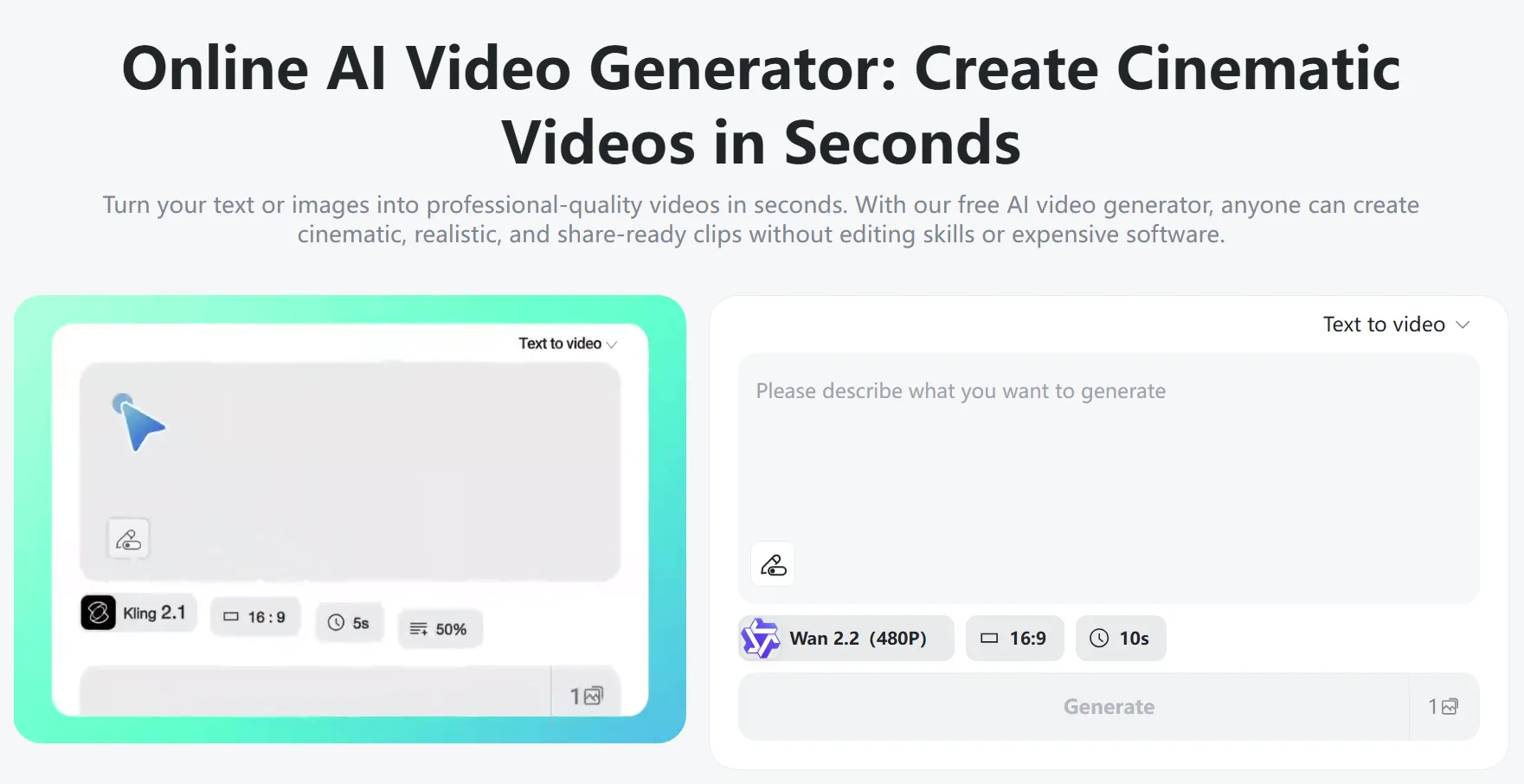
insMind AI Video Generator turn your ideas, whether they're text-based or image-based, into cinematic and realistic videos in just seconds. You don't need to have any kind of editing experience. It can generate professional output, including animation and motion for static photos. With its library of effects and templates, creators, marketers, and educators can quickly produce content ready to share.
Key Features:
● Supports workflows for both text-to-video and image-to-video.
● Broader library of effects and templates for instant stylized videos, like: dancing, hug, kissing, inflate, muscle, spin, etc.
● Customizable settings so you can choose the aspect ratio, length of the video, AI model, and the strength of the prompts.
● Most output is generated within seconds, and usually under a minute.
● Accessibility through web browser + mobile app so creators can work anywhere.
● Free tools / free-trial options so you can kick the tires without cost.
How to Use insMind AI Video Generator
Step 1: Enter Text Prompt or Upload Your Image
Choose text-to-video or image-to-video. For text, type a detailed prompt. For image, upload a high-quality photo then add a prompt—the more specific, the better your AI video matches your vision.

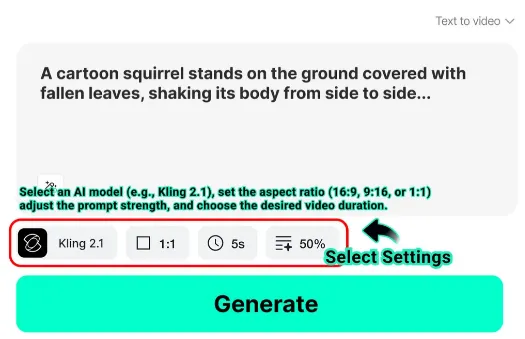
Step 2: Adjust Settings
Customize via AI model, platform-matching aspect ratio, video length, and prompt strength—ensure output fits your creative and professional needs.
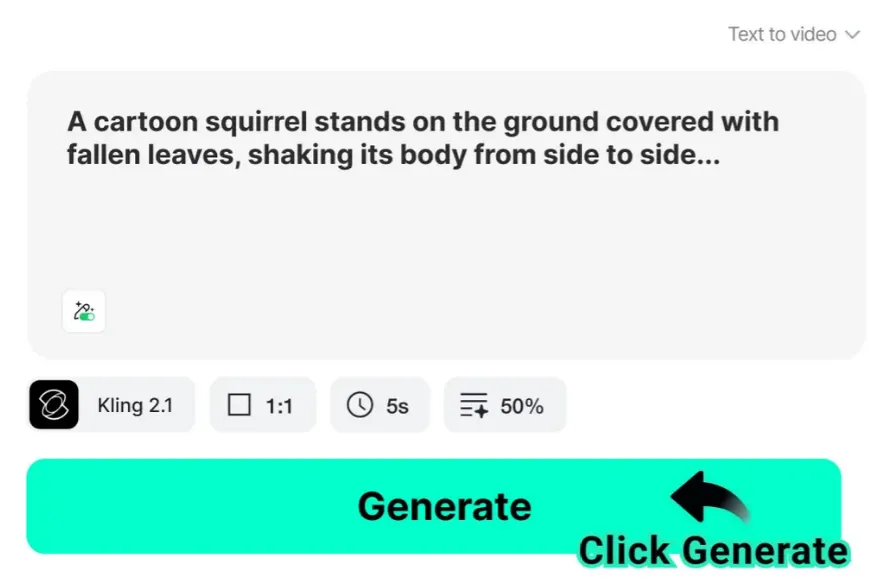
Step 3: Generate videos
Click "Generate" and let the AI create your video in seconds.
Step 4: Preview and Download
Once the video is ready, preview, adjust if needed, finalize, then download the high-quality video for sharing.

2.) ImagineArt
ImagineArt is a creative AI video generation platform created for artists, content creators, and businesses who want to transform a simple idea into an engaging piece of video. ImagineArt is all about customization, allowing users to control style, motion, and storytelling. Whether you're starting with idea text prompts or with a still image, ImagineArt will allow you flexibility in creating a compelling, visually stunning piece of work.
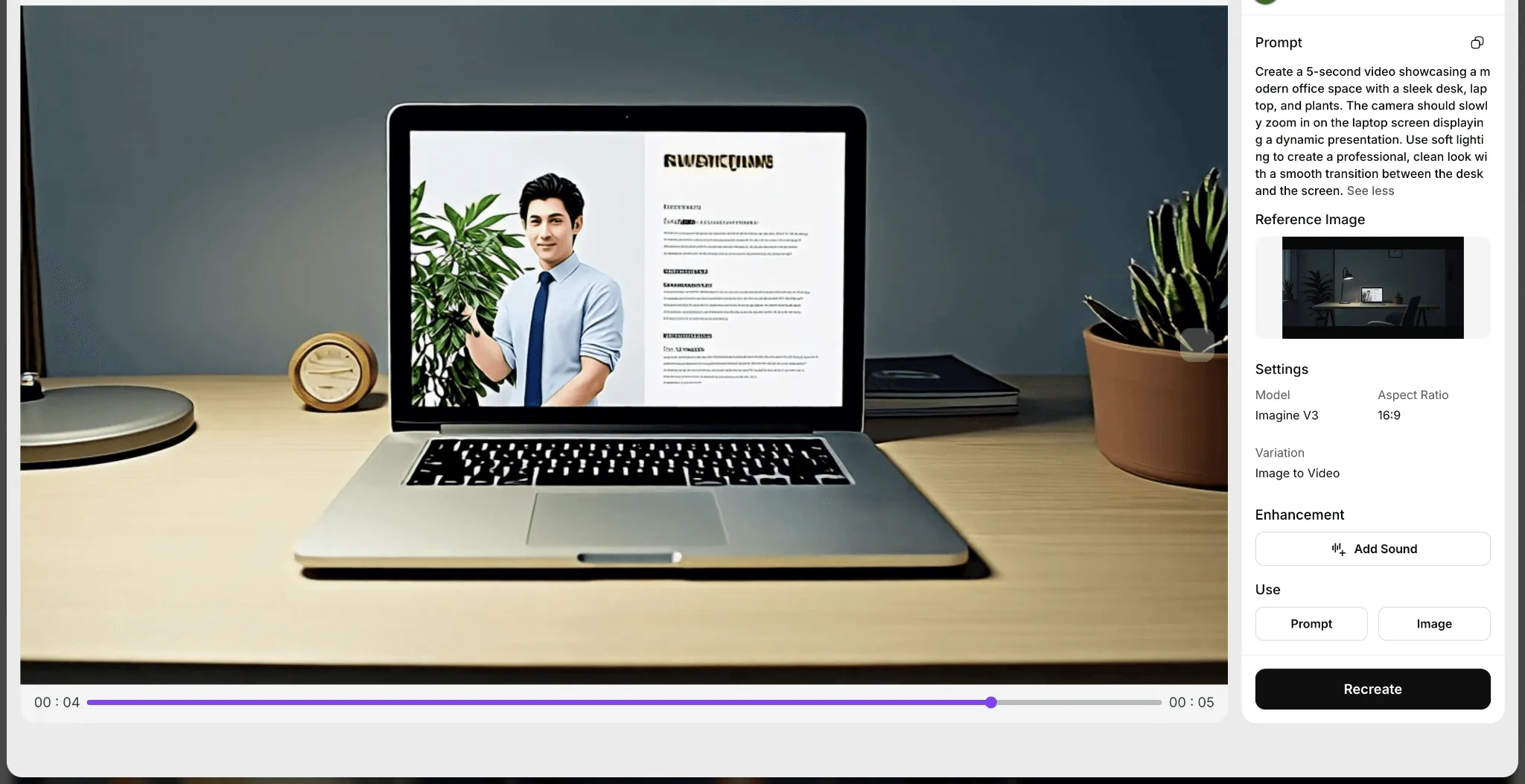
The platform offers a user-friendly interface built for anyone, even if you're a novice and want to generate engaging, professional-quality videos without any technical experience.
Compared to the Veo 3 tool, ImagineArt applies more personalization to the design and style, which is what makes it an extra special platform for storytelling projects, animation projects, or even branded content.
3.) OpenAI Sora
OpenAI Sora is a highly capable video model made to produce realistic videos from text prompts. It is known for its ability to realistically simulate movement and physics, and compositions and details about the environment, producing videos that feel true and cinematic. It is capable of replicating complex scenarios with swapping characters, camera angles, and backgrounds.

While Veo 3 can produce high-quality outputs as well, Sora is particularly good at simulating a refined realism. Sora is a compelling choice for professionals working with film concepts, commercials, or research projects. The software is still evolving, but the advanced simulation moniker in a model makes Sora a promising alternative to the output from Veo 3.
If you're interested in exploring similar advanced AI video creation, try Sora 2 on insMind— a next-generation text-to-video generator designed to bring your creative ideas to life with cinematic realism.
4.) Runway Gen-3 Alpha
Runway Gen-3 Alpha is the latest video model generated by Runway with speed, creativity, and flexibility, used for creating videos from both text and image inputs, with added control over camera movement, style, and storytelling. The model is built with improvements in real-time rendering, so it is much faster than previous video generations.
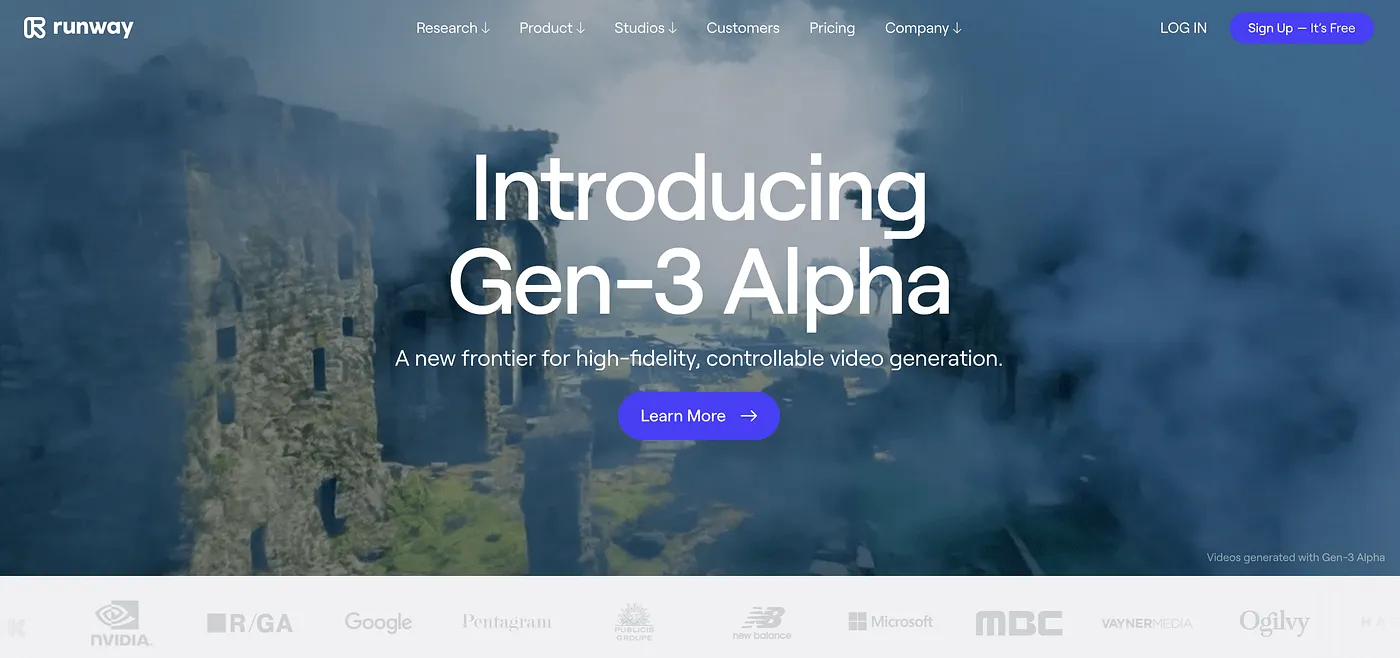
Unlike Veo 3, which can sometimes feel restrictive in creative control, Gen-3 Alpha has many tools available so the user can explore cinematic shots and stylistic effects, making it an excellent tool for creators, marketers, and filmmakers seeking high-quality customizable videos without deep technical knowledge.
5.) Adobe Firefly Video
The application and service of Adobe Firefly Video extends the use of the Firefly suite to the creation of video projects and things similar to it, while working seamlessly with Adobe's creative ecosystem, including Premiere Pro and After Effects. Adobe Firefly Video can create and edit video content from natural text prompts to make video content, in addition to enhancing the experience using similar prompts for things like content generation, scenes, and style changes with a few clicks or prompts.
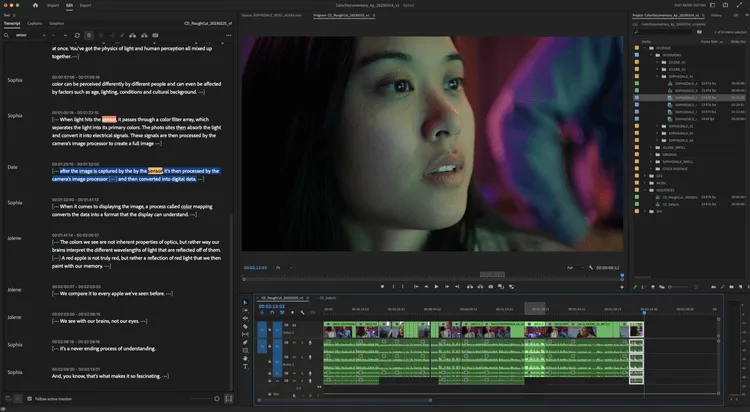
The biggest difference between Adobe Firefly and Veo 3 is that Adobe Firefly video integrates deeply into Adobe's online workspace so creators can comfortably navigate between the AI process of generating the desired content and the sophisticated and multi-layered editing tools available.
In short, Adobe Firefly Video provides an AI assistance process as well, while keeping in mind the sophistication of professional editors and creators seeking efficiency and overall control of Apple Inc. product functionality.
Conclusion
If you are looking for an alternative to Veo 3, the obvious answer is insMind AI Video Generator, as it combines the powers of text-to-video and image-to-video features all within one platform that is still easy to use for anyone who would like to create high-end and professional quality video content.
With its user-friendly tools, fast processing, and creative flexibility, insMind helps you turn ideas into stunning results without hassle. Whether you're a beginner or an experienced creator, it's the most reliable choice to replace Veo 3 and take your video projects to the next level.

Ryan Barnett
I'm a tech enthusiast and writer who loves exploring AI, digital tools, and the latest tech trends. I break down complex topics to make them simple and useful for everyone.


![5 Best AI Kissing Video Generators of 2025 [Tested]](https://images.insmind.com/market-operations/market/side/8b445afb685e4957b11238f3ebad2b2b/1756093193517.jpg?x-oss-process=image/resize,w_690,h_460,type_6/interlace,1,image/format,webp "5 Best AI Kissing Video Generators of 2025 [Tested]")


![Top 5 AI Baby Podcast Generators in 2025 [Reviewed & Tested]](https://images.insmind.com/market-operations/market/side/9ed5a89e85ab457a9e8faace7bb25258/1750317475287.jpg?x-oss-process=image/resize,w_690,h_460,type_6/interlace,1,image/format,webp "Top 5 AI Baby Podcast Generators in 2025 [Reviewed & Tested]")


![Exploring the 10 Best AI Photo Editors for Your Needs [2025]](https://images.insmind.com/market-operations/market/side/05ccfa0da4d64b43ba07065f731cf586/1724393978325.jpg?x-oss-process=image/resize,w_690,h_460,type_6/interlace,1,image/format,webp "Exploring the 10 Best AI Photo Editors for Your Needs [2025]")


![Top 10 Face Swap Apps to Enhance Your Photo [Online, iOS, Android, Windows, Mac]](https://images.insmind.com/market-operations/market/side/e604368a99ee4a0fbf045e5dd42dca41/1723095740207.jpg?x-oss-process=image/resize,w_690,h_460,type_6/interlace,1,image/format,webp "Top 10 Face Swap Apps to Enhance Your Photo [Online, iOS, Android, Windows, Mac]")


