


Christmas is one of the largest seasons for shopping, gifting, and sharing some fun time. Brands, creators, and online sellers all need eye-catching videos to stand out in this busy time. Christmas ads help people ignore their products more quickly, trust a brand more quickly, and experience more holiday warmth. But making videos in the holiday rush can consume a lot of time, and a lot of creators need a faster way to make fresh content each and every day.
This is where AI tools make a big difference. With insMind, anyone can make bright festive videos from simple ideas, photos, or product shots in a few clicks. You could use tools such as photo to video to transform your holiday pictures into moving Christmas ads. insMind makes it easy for beginners, small businesses, and big brands to create a happy, ready-to-post Christmas promo without any stress.
Table of Contents
Why Use insMind for Christmas Ad & Promo Video Production
insMind is a great tool to use to create Christmas ads because you have a lot of creative options all in one place. You are given the choice of a few video models, including Google Veo 3.1, Sora 2, Wan 2.5, Hailuo 2.3, and Kling 2.5. Each model has its style, so you will be able to find the one that will suit your idea for Christmas in the best way - cute and cozy, funny, magical, or professional.
insMind also has easy 1-click Christmas templates, such as dancing characters, Santa costumes, reindeer costumes, etc. These templates that help you create fast videos without having to write very long prompts. All you have to do is upload a picture and let the effect take care of the rest.
You can create videos using text-to-video, image-to-video, or effect themes. This makes it ideal for brands, influencers, and small shops that want high-quality content quickly for the holidays. If you have product photos, you can make photos into a video in seconds. If you only have a single picture, then use the image-to-video converter to bring it to life.
For creators who would like simple tools, insMind also has image-to-video free functions that will be easy to try without worries. With all these things available, anyone can produce festive, brilliantly-performed Christmas promo videos in minutes.
How to Create a Christmas Ad/Promo Video with insMind (Step-by-Step Tutorial)
Step 1: Open an insMind AI Video Generator
To get started, go to the insMind website and go to the main AI Video Generator. You can enter via the AI Video Generator, Text-to-Video, or Image-to-Video pages - all deposit into the same simple area of creation. Once in there, you will find a clean layout of easy buttons to begin your Christmas ad. You do not need editing skills or special tools. Just select what you consider to create, and insMind takes you step by step.
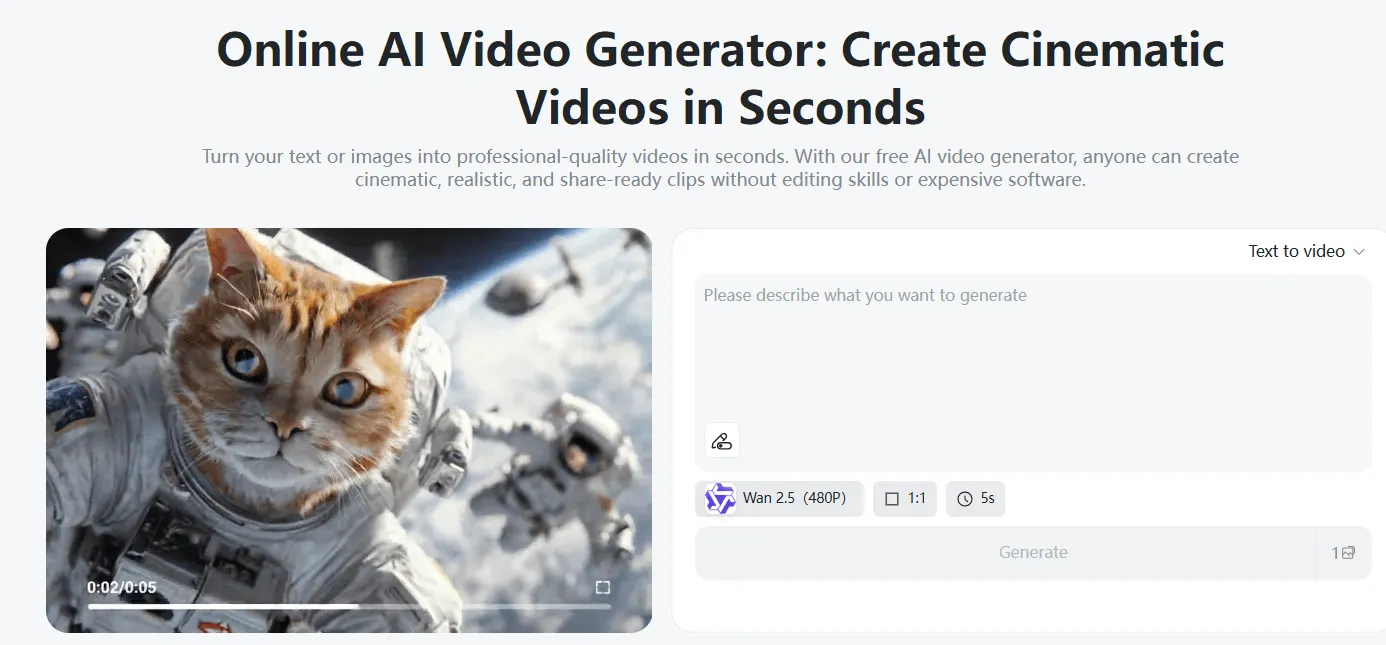
Step 2: Choose the Video Model Based on Your Creative Needs
insMind provides you with several video models so you can fit into your Christmas style.
- Google Veo 3.1- great for cinematic, ad quality with nice smooth holiday lighting.
- Sora 2 is best for anime, dreamy looks, watercolor, and creative Christmas storytelling.
- Wan 2.5 is ideal for lip sync Christmas greetings, videos of Santa talking, or human-style presenters.
- Hailuo 2.3 makes artistic, soft, magical, and holiday moments.
- Kling 2.5 produces lively motion, good for fun and fast Christmas promos.
You can also select your aspect ratio - 9:16 for TikTok/Reels, 16:9 for YouTube, or 1:1 for ads. Specify your length and choose your video quality. These are simple choices to play a part in creating the perfect look for Christmas.
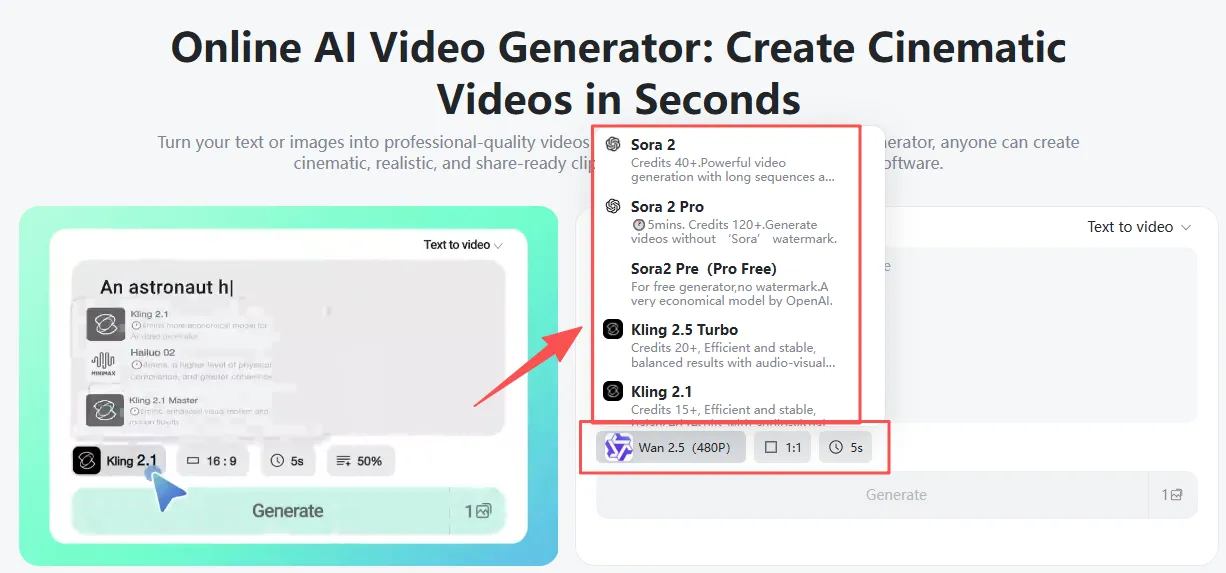
Step 3: Choose Your Creation Mode
insMind offers you three possibilities to create your video:
Text-to-Video
Type in a brief Christmas idea, such as "a cozy room with gifts and lights," and insMind transforms it into a moving scene.
Image-to-Video
Upload a picture of your product, a picture of Santa, or any holiday photo. This tool helps you to learn how to make a photo a video easily. You can use image to video, photo to video, or images to video to transform still pictures into entertaining video clips for Christmas. Add a brief prompt for movement, as in "soft snow falling."
Video Templates
Choose from fun, pre-made Christmas effects like Dancing with Santa, Cute Reindeer, Santa’s Costume, Christmas Girl, Pet Christmas Costume, and more. With the AI Santa Transformation feature, simply upload a picture, apply your preferred style, and instantly turn it into a festive holiday video.
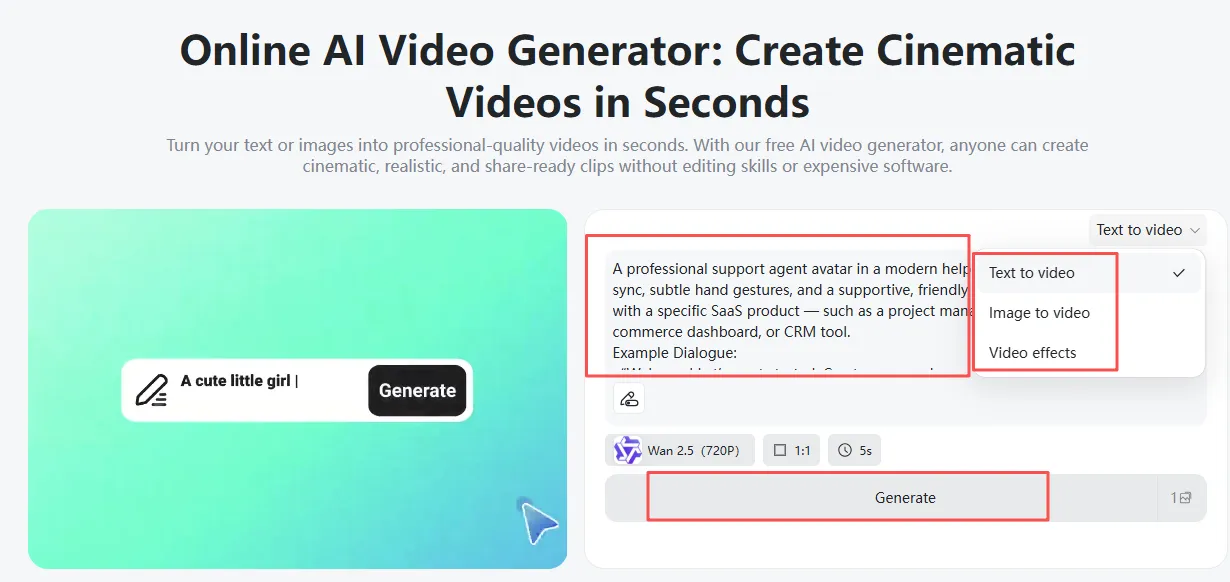
Step 4: Preview and Download
After generating, watch the preview to ensure that the Christmas mood, motion, and style are as per your idea. If you are satisfied with it, click download. Your video is now ready to go on social media, ads, or a holiday greeting post.
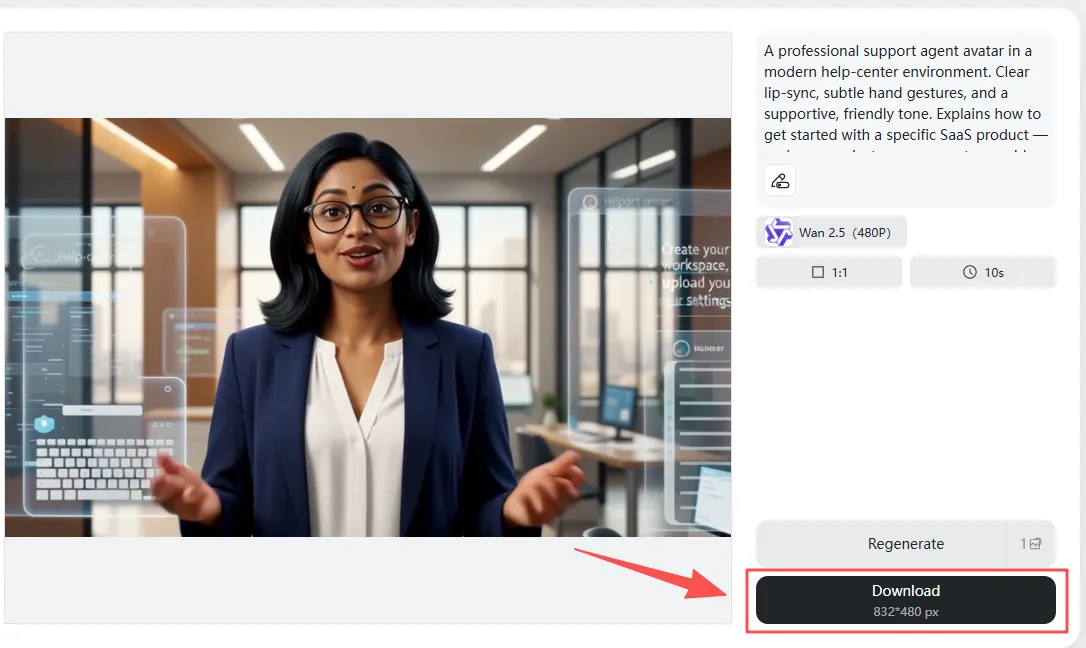
Use Cases for AI Christmas Ad/Promo Videos
E-Commerce Product Promotion
Online shops can showcase the Christmas products with an appearance as bright and friendly as insMind. You can upload a picture of the product and use the pic to video tool to help make it move and more exciting. The image-to-video converter helps to turn some simple images into holiday videos that stand out.
Prompt
A shining Christmas table with soft lights displaying a holiday gift collection.
Christmas Greeting Video: Brand
Brands and teams can wish their audience a warm and happy holiday. You can upload a picture of your team or just a portrait and let insMind use it to make a sweet Christmas greeting.
Prompt
A friendly person in a cozy room in winter, saying 'Merry Christmas' with soft snow falling behind him or her.
Social Media Christmas Reels/TikTok
Creators can, in a matter of time, create some fun and playful Christmas videos for TikTok or Reels. insMind also provides the image to video free, so you can test some ideas of your own. A moment to turn photos into a video makes the posting of holidays simple and fast.
Prompt
A fun children's kind Christmas dance with lights and sparkles.
Christmas Sale Countdown Video
Stores can add to the excitement for holiday discounts by creating countdowns in the form of videos. These clips help remind the customers of special Christmas offers.
Prompt
A burning time counter with floating snowflakes and Christmas sale bright red text.
Christmas Cartoon/Anime Story
insMind is also good for cute or magical Christmas stories, in particular in the cartoon or anime style.
Prompt
A Christmas girl walking in a snowy town filled with lights and gifts.
FAQs about AI Christmas Ad & Promo Videos
FAQ 1: Do I need editing skills to make an AI Christmas promo video?
No, insMind is simple, guided, and easy for them as beginners.
FAQ 2: Can I make lip-sync Christmas greetings?
Yes, you can take the WAN 2.5 Model and use talking Christmas videos.
FAQ 3: Can I use Christmas templates and not write a prompt?
Yes, the Christmas templates work instantly via one click.
FAQ 4: Can I upload product photos to change photos to videos?
Yes, insMind accepts all types of photos, including product shots.
FAQ 5: Is it possible to convert an image to a video for free on insMind?
There are free choices available so that you can test the tools.
FAQ 6: Does insMind work for brands and small shops?
Yes, it is great for all businesses, large and small.
With insMind, it’s easy to create fun and festive Christmas ads that stand out. Simply turn your ideas, photos, or sketches into bright, holiday-themed clips using the AI Christmas Video Generator. Try it out and bring your Christmas stories to life in just a few seconds.

Sid Buckley
I'm a professional writer and amateur photographer, and I author insightful articles at insMind to help you integrate AI into compelling image creation.


![How to Add Logo to Photos Online for Free [The Simplest Method]](https://static.xsbapp.com/market-operations/market/side/1718795949162.jpg?x-oss-process=image/resize,w_690,h_460,type_6/interlace,1,image/format,webp "How to Add Logo to Photos Online for Free [The Simplest Method]")
![How to Remove Tattoos from Photos [Ultimate Guide 2025]](https://static.xsbapp.com/market-operations/market/side/1718787534476.jpg?x-oss-process=image/resize,w_690,h_460,type_6/interlace,1,image/format,webp "How to Remove Tattoos from Photos [Ultimate Guide 2025]")


