


In the world of AI image generation, two models stand out for content creators: GPT Image 2 and Nano Banana 2. These tools offer advanced capabilities for generating stunning visuals, but they cater to different needs. Whether you're a digital marketer looking to enhance your brand's visuals or a content creator seeking the perfect tool for your next project, understanding the strengths and limitations of each model is crucial.
In this article, we'll delve into a side-by-side comparison of GPT Image 2 and Nano Banana 2, exploring their features, performance, and practical applications. With this guide, you'll gain insights into which tool best suits your creative needs, and how to effectively use these models through the insMind platform.
Table of Contents
Understanding GPT Image 2 and Nano Banana 2
For content creators, GPT Image 2 and Nano Banana 2 are pivotal tools for generating high-quality images. Understanding their core features and capabilities can significantly influence your choice between them.
Overview of GPT Image 2
GPT Image 2 is celebrated for its ability to produce 4K images with impeccable text quality. Designed by OpenAI, this model excels in creating visuals where text accuracy is crucial, such as in marketing materials or UI designs. In my experience, GPT Image 2 is unmatched in generating print-ready images with realistic layouts. Its advanced understanding of prompts allows it to interpret complex scenes, making it ideal for detailed and professional-quality outputs.
Overview of Nano Banana 2
Nano Banana 2, on the other hand, shines in style transfer and image blending, making it a favorite for projects that demand creative flair. It offers robust features for content creators looking to experiment with visual styles and artistic effects. This model is particularly effective in transforming reference images, applying unique artistic touches that are hard to achieve manually. The strength of Nano Banana 2 lies in its ability to seamlessly integrate multiple styles into a single image, providing creators with a wide array of visual possibilities.
Comparing GPT Image 2 and Nano Banana 2
When comparing GPT Image 2 and Nano Banana 2, it’s essential to look at their features and performance metrics to determine which model aligns best with your creative objectives.
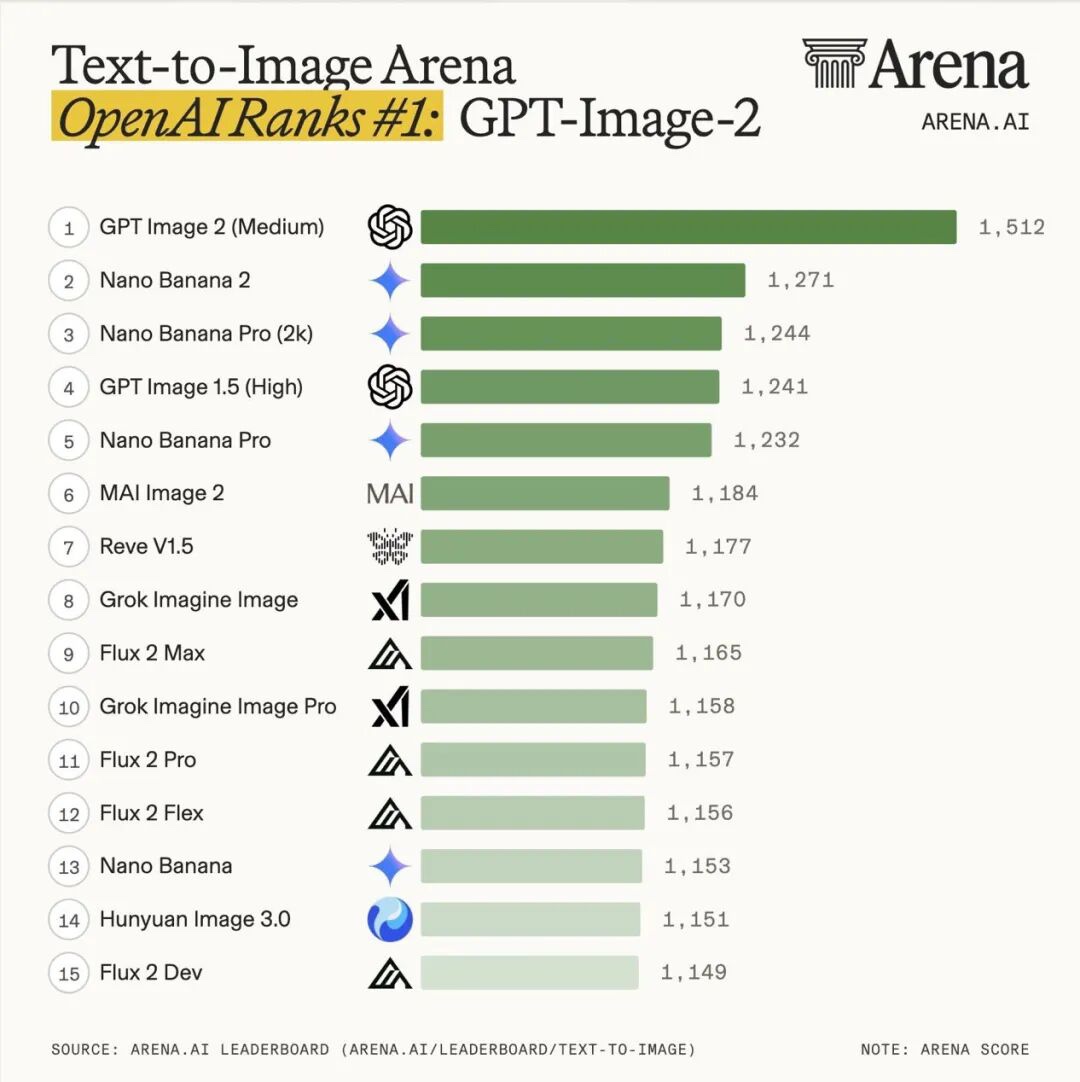
Feature Comparison
Below is a side-by-side comparison of the key features of GPT Image 2 and Nano Banana 2. This table highlights their unique tools and effects.
| Feature | GPT Image 2 | Nano Banana 2 |
|---|---|---|
| Image Resolution | 4K | High |
| Text Accuracy | Excellent | Moderate |
| Style Transfer | Basic | Advanced |
| Image Blending | Limited | Extensive |
| Processing Speed | Fast | Moderate |
For creators needing precise text in high-resolution images, GPT Image 2 is the superior choice. However, if style variety and blending are your priorities, Nano Banana 2 offers more flexibility.
Performance and Quality
Performance and quality are crucial when choosing an AI image generator. Here’s how each model fares:
- GPT Image 2 delivers exceptional image quality and resolution, with an efficient processing speed that supports high-demand workflows.
- Nano Banana 2 provides good quality, with particular strengths in artistic rendering and style blending, though its speed is moderate compared to GPT Image 2.
- Users often praise GPT Image 2 for its clarity and text integration, while Nano Banana 2 receives high marks for creativity and style diversity.
In terms of raw output quality, GPT Image 2 takes the lead, but Nano Banana 2 excels in creative performance, making it the preferred choice for artistic projects.
Comparing GPT Image 2 and Nano Banana 2 with Real Output
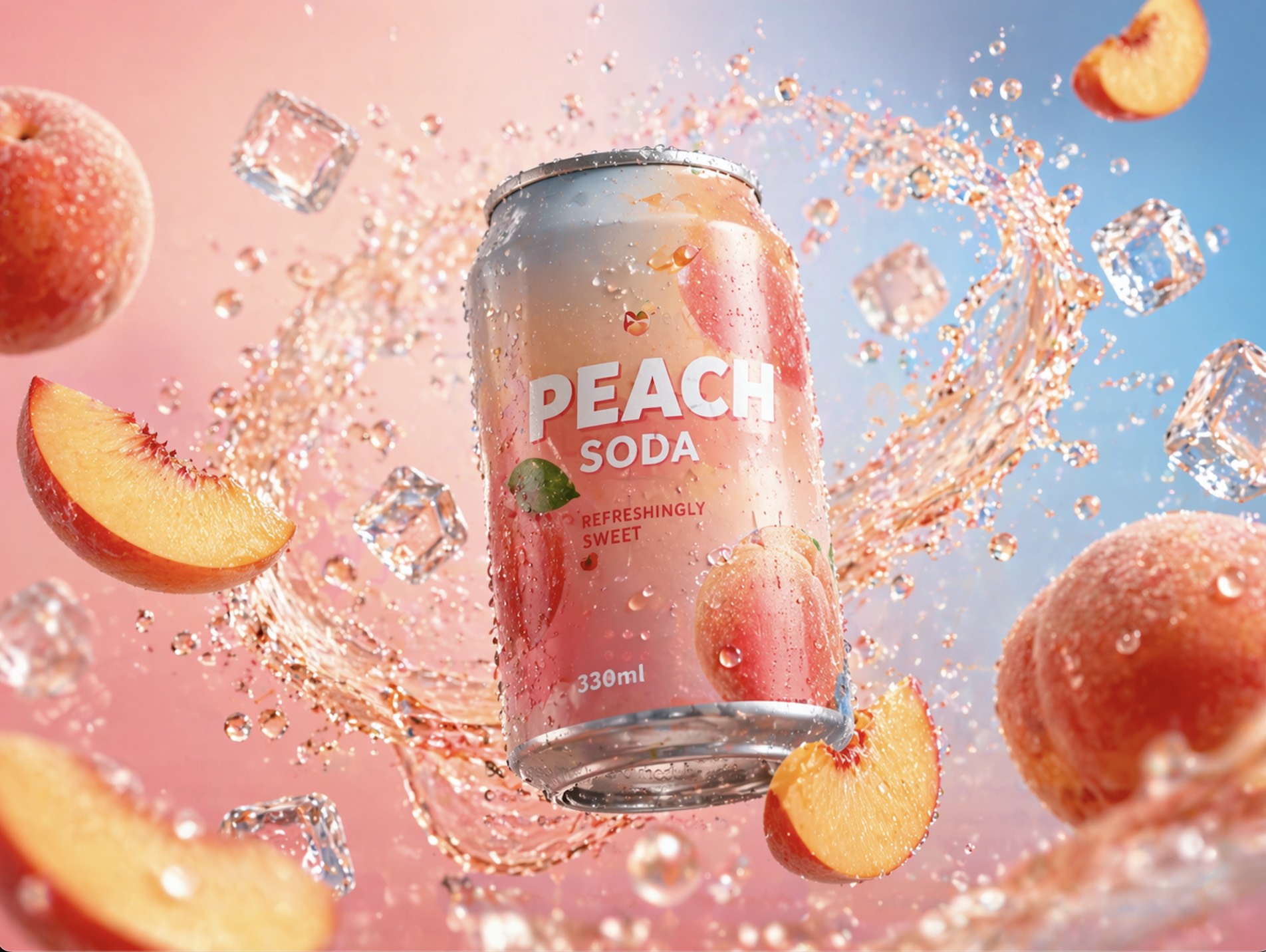
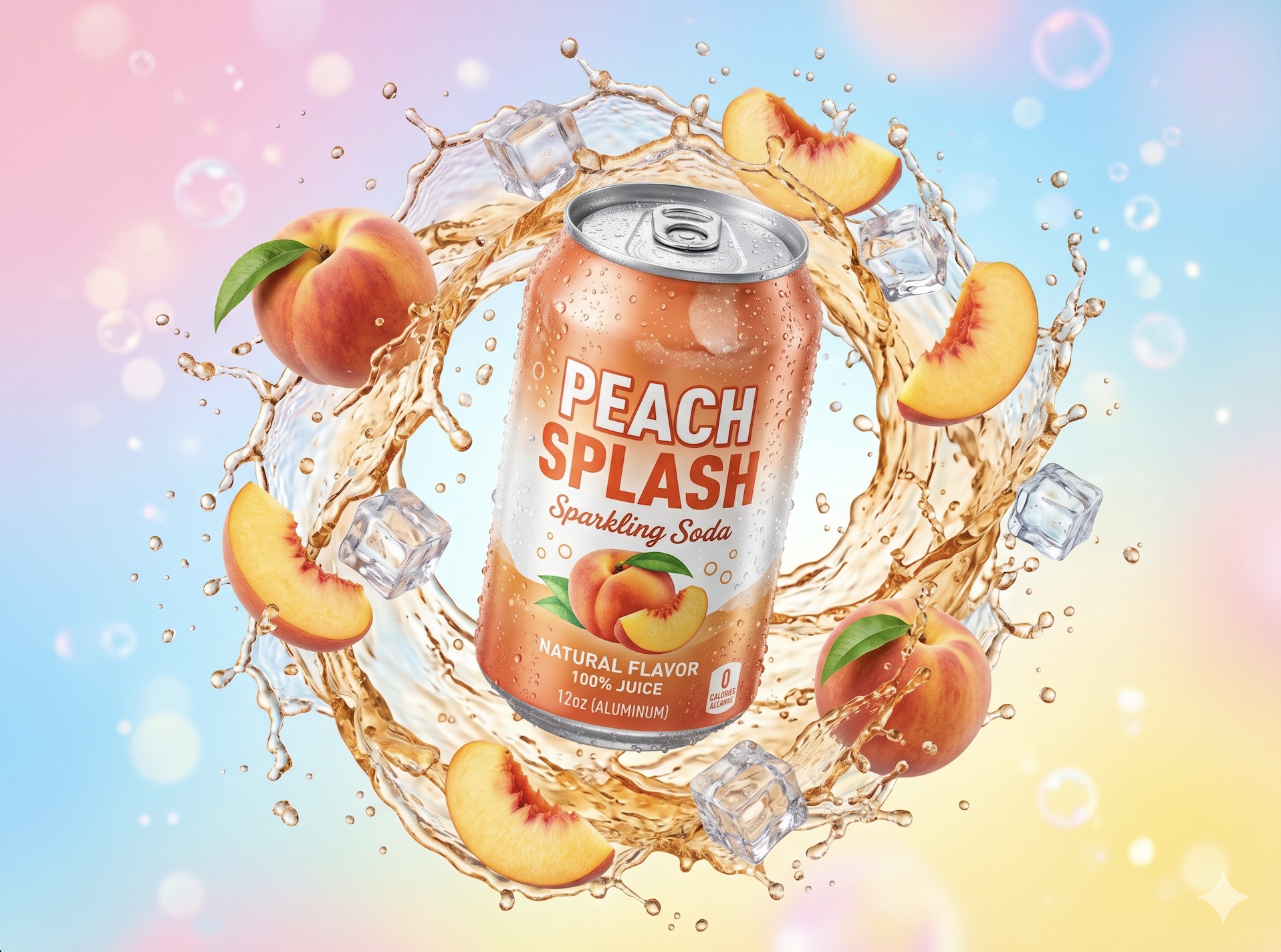
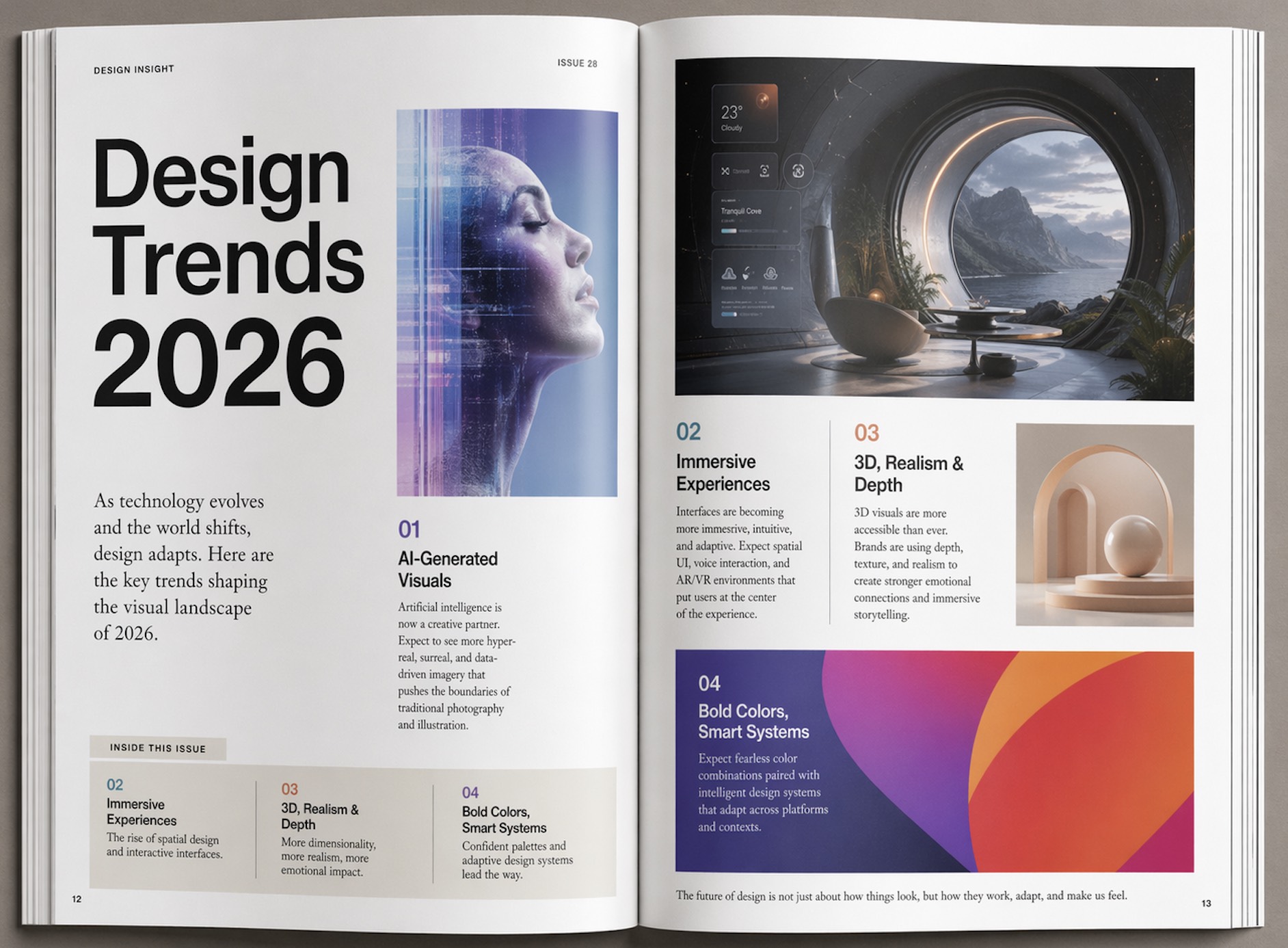
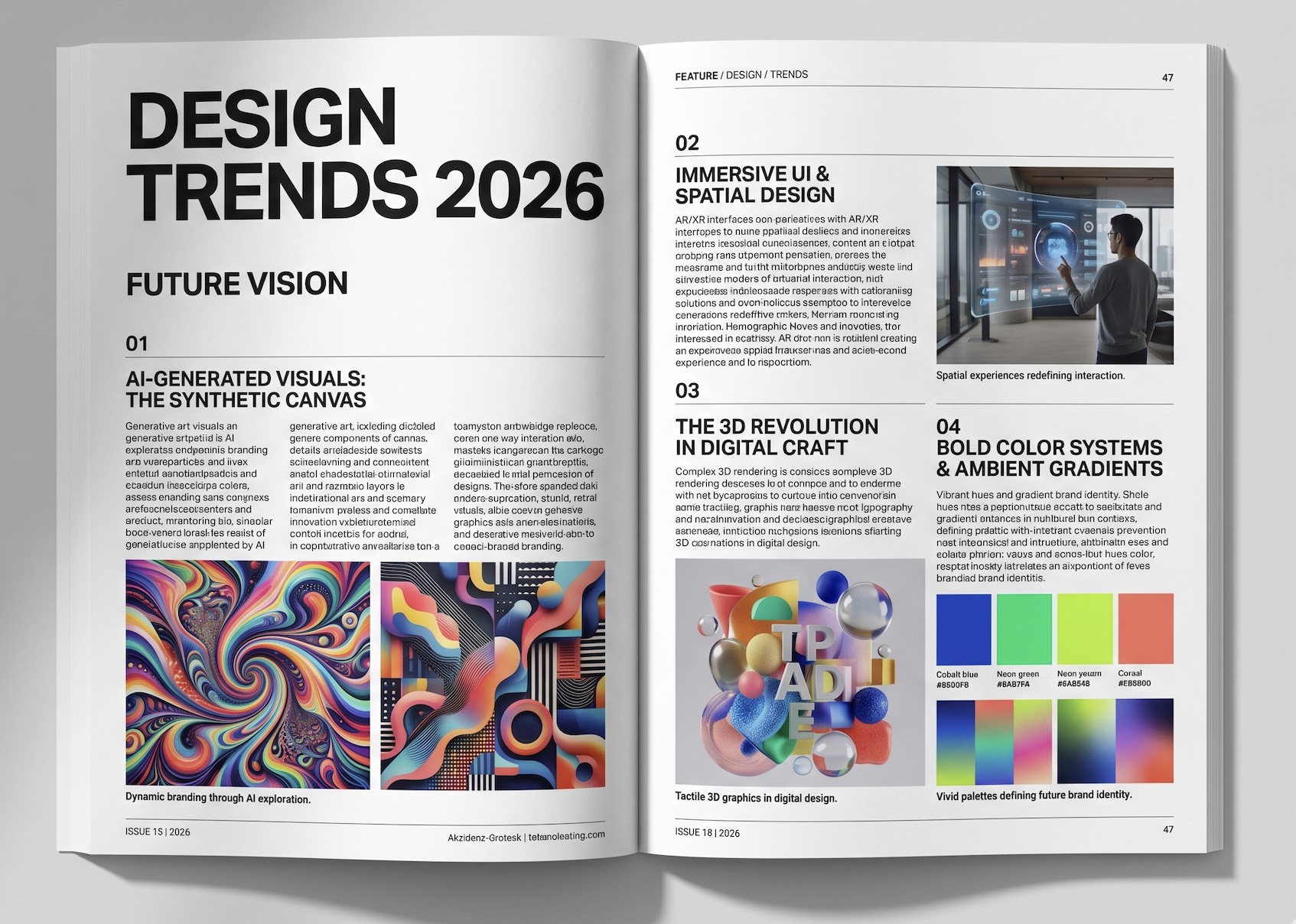
Here are a few side-by-side examples comparing GPT Image 2 and Nano Banana Pro using the same prompts. See how each model handles text, layout, and scene details, and decide for yourself which produces better, more realistic results.
Comparison Example 1:
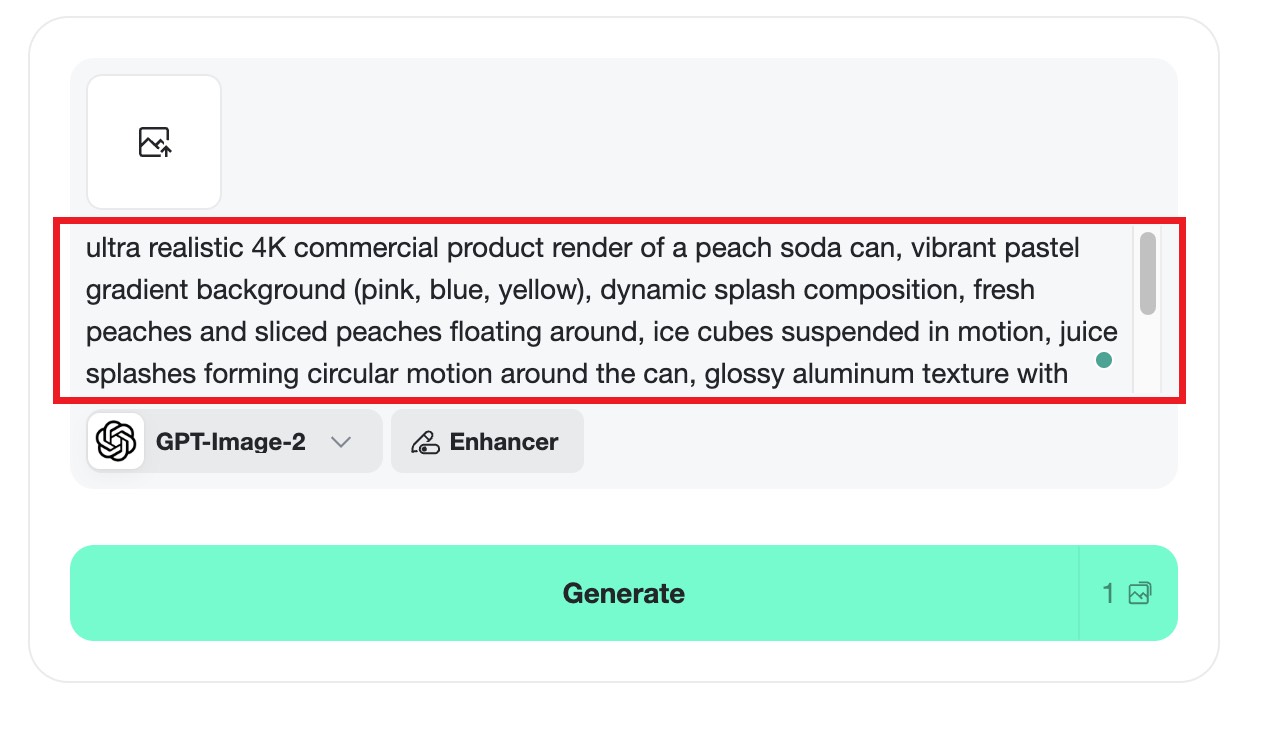
Prompt: ultra realistic 4K commercial product render of a peach soda can, vibrant pastel gradient background (pink, blue, yellow), dynamic splash composition, fresh peaches and sliced peaches floating around, ice cubes suspended in motion, juice splashes forming circular motion around the can, glossy aluminum texture with water droplets, soft studio lighting with reflections, high contrast, depth of field, hyper-detailed, advertising style, clean composition, energetic and refreshing mood, sharp focus, cinematic lighting --ar 4:3
GPT Image 2 Output:
Nano Banana 2 Output:
Comparison Example 2:
Prompt: A premium editorial magazine layout about "Design Trends 2026", highly polished graphic design, modern Swiss grid layout, clean margins, perfect typography hierarchy, bold headline "Design Trends 2026", realistic magazine page with readable text blocks, captions, and section headers, showcasing future design trends like AI-generated visuals, immersive UI, 3D graphics, and bold color systems, minimal yet sophisticated style, soft shadows, natural lighting, ultra high detail, realistic print texture, professional magazine photography style, 4:3 aspect ratio
GPT Image 2 Output:
Nano Banana 2 Output:
Practical Use Cases for Content Creators
Understanding when to use GPT Image 2 versus Nano Banana 2 can make a significant difference in your content creation process. Here are scenarios where each model excels.
When to Use GPT Image 2
GPT Image 2 is perfect for projects that require high-definition visuals with accurate text. It’s especially beneficial for marketers who need polished, professional-quality images for ads and promotional materials. I’ve seen it used effectively in creating product visuals where text readability is crucial. For instance, a cosmetics brand could use GPT Image 2 to generate sharp, vibrant imagery for their online store, ensuring product descriptions are legible and aesthetically pleasing.
When to Use Nano Banana 2
Nano Banana 2 is ideal for artistic endeavors where creativity and style are paramount. It’s particularly useful in projects involving style transfer and image interpretation, such as creating artwork or enhancing photographs with artistic effects. An example of its application could be a digital artist using Nano Banana 2 to transform a series of landscape photos into impressionistic paintings, adding a unique touch to their portfolio.
How to Create Stunning Images with insMind
Leveraging the insMind platform can simplify the process of generating images with GPT Image 2 and Nano Banana 2. Here's a step-by-step guide.
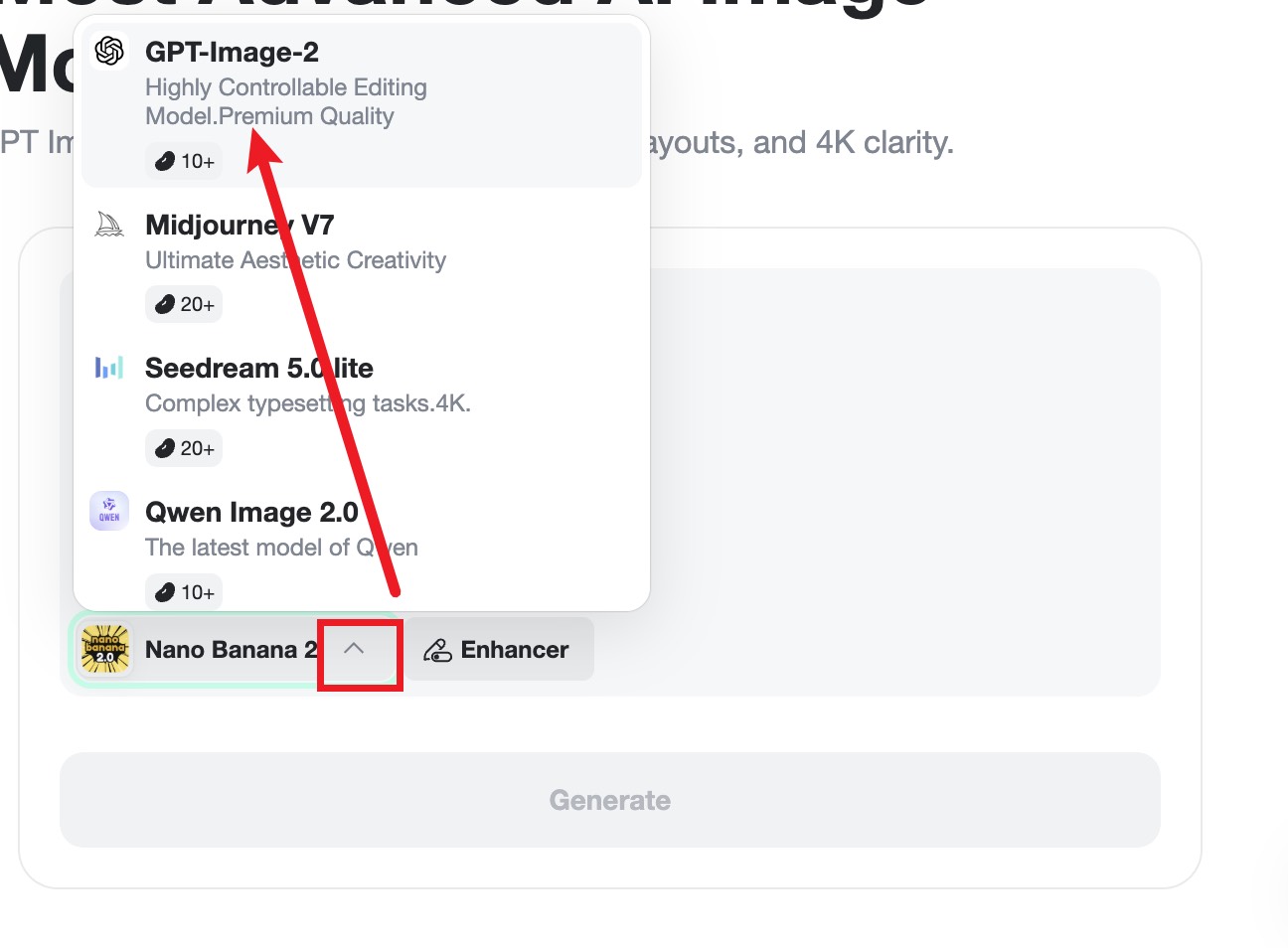
Step 1: Select AI Image Model
On the insMind interface, you can choose from a variety of models, including GPT Image 2 and Nano Banana 2. Select the one that best fits your project's needs—whether it’s high-resolution clarity or artistic blending.
Step 2: Enter Your Prompt or Upload Your Photo
Describe the image you envision or upload a reference photo. This step is crucial for editing, style transfer, or blending, allowing you to provide the tool with a clear direction or inspiration.
Step 3: Generate the Image
Click the generate button and watch as the AI brings your vision to life. You can monitor the process and make adjustments if needed to ensure the final image meets your expectations.
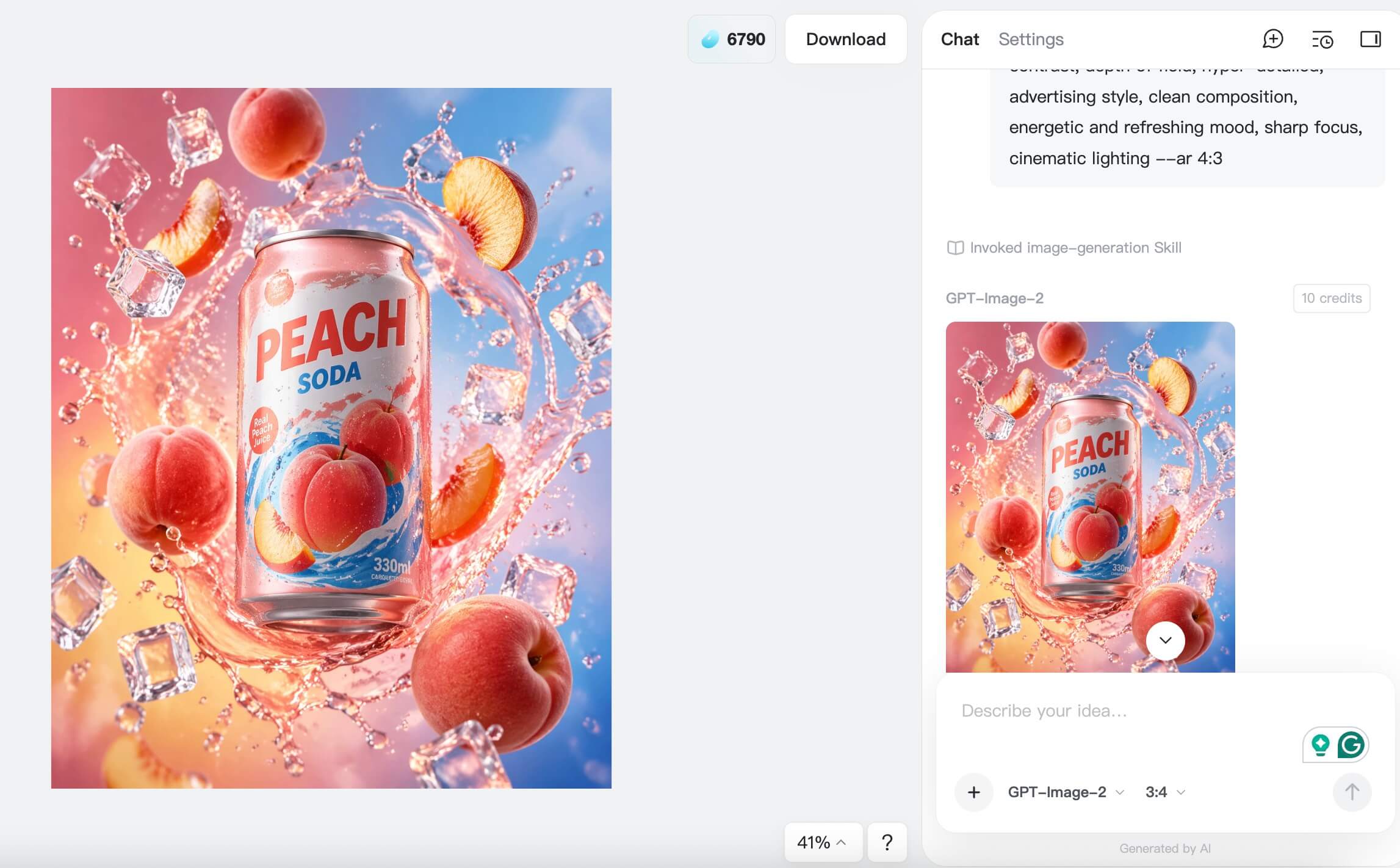
Step 4: Download the Image
Once satisfied with the result, download your image. Consider additional editing or enhancements if necessary to perfect your project.
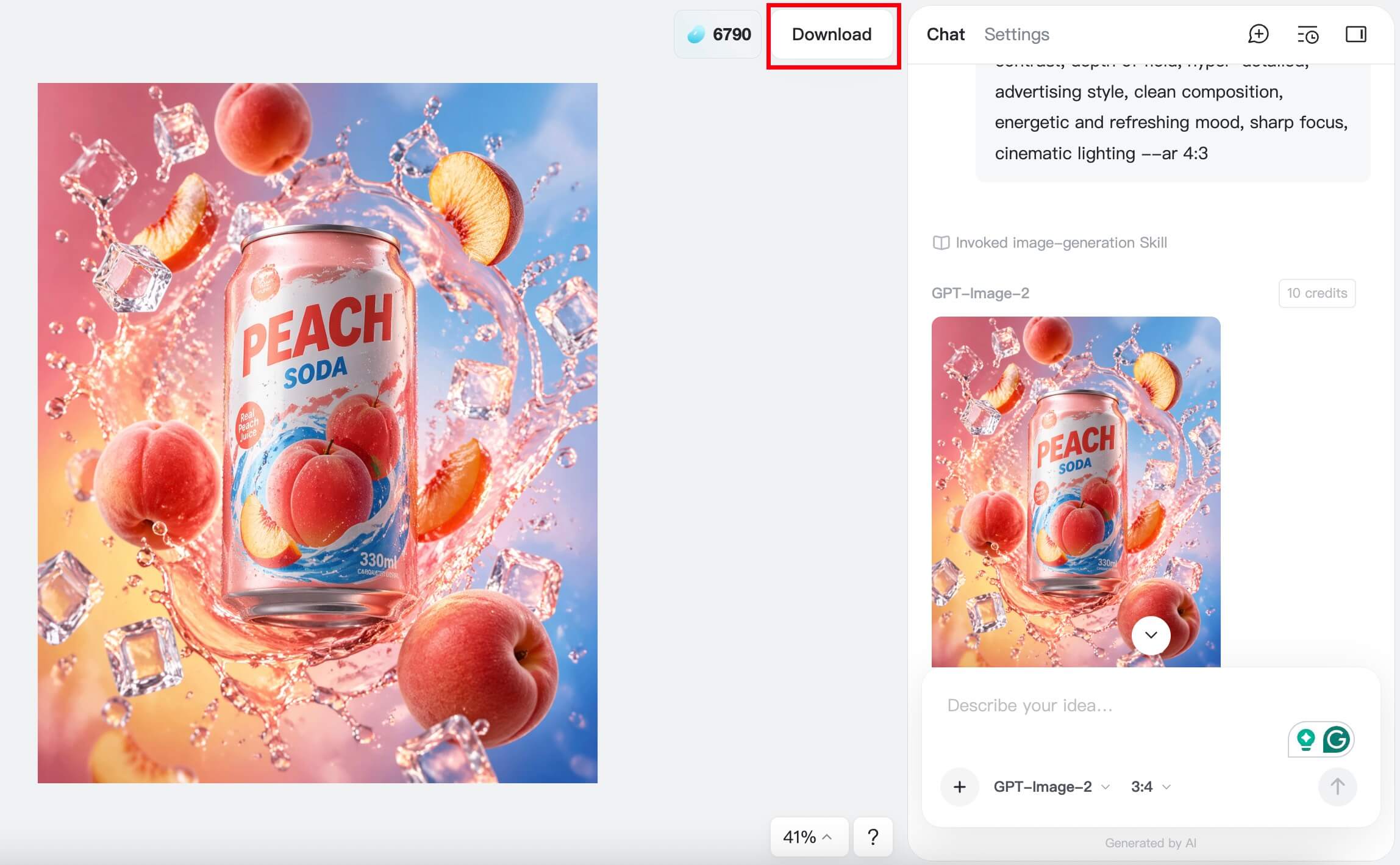
Aside from image generation, insMind offers a variety of other tools, such as Nano Banana AI and Nano Banana Pro, which can further enhance your creative projects with unique features and effects.
Choosing the Right Tool for Your Needs
Deciding between GPT Image 2 and Nano Banana 2 depends on several factors. Here's what you should consider.
Factors to Consider
When selecting an AI image model, evaluate these critical factors:
- Project requirements: Define what kind of image quality and style you need.
- Budget constraints: Assess the cost-effectiveness of each model.
- Desired features and effects: Identify the specific capabilities necessary for your project.
Final Recommendations
For projects focused on sharp, text-heavy visuals, GPT Image 2 is your go-to tool. Its ability to render 4K images with precise text makes it ideal for professional marketing materials. Conversely, Nano Banana 2 is perfect for creative projects that require style experimentation and artistic flair. Choose Nano Banana 2 if your work involves blending multiple artistic styles or transforming photographs into unique artworks.
FAQs about GPT Image 2 vs Nano Banana 2
What is the primary difference between GPT Image 2 and Nano Banana 2?
The main difference lies in their capabilities: GPT Image 2 excels at producing 4K images with accurate text, while Nano Banana 2 is better suited for creative projects involving style transfer and image blending.
Which model is better for high-resolution marketing images?
GPT Image 2 is the better choice for high-resolution marketing images due to its ability to produce 4K visuals with precise text integration, ideal for professional marketing materials.
Can Nano Banana 2 handle text as well as GPT Image 2?
Nano Banana 2 is not as strong in text accuracy as GPT Image 2. It focuses more on artistic style transfer and blending than on producing images with precise text.
Is insMind the only platform to use these models?
insMind is one of the platforms where you can access both GPT Image 2 and Nano Banana 2, offering an integrated environment to use these models effectively for your projects.
How does the processing speed differ between the two models?
GPT Image 2 generally has a faster processing speed, making it suitable for time-sensitive projects, while Nano Banana 2's speed is moderate, focusing more on creativity and style manipulation.
Conclusion
Choosing between GPT Image 2 and Nano Banana 2 depends on your specific needs. If you require high-resolution images with accurate text, GPT Image 2 is ideal. For creative projects that demand style versatility, Nano Banana 2 offers the artistic flexibility you need. Experiment with both on insMind to find the best fit for your projects.

Jayson Harrington
I am the Chief Editor of insMind. I provide tips and skills to help users design better photos with insMind, whether for e-commerce, social media, or any other use.


