


Have you ever wondered what you'd look like if you dropped a few kilos, just to satisfy a moment of curiosity? Many people think about this, and it is completely normal. With new AI tools, this idea, in a simple and fun way, has become a new trend. They let you see a slimmer version of yourself created in seconds. So, if you are curious to know what would I look like skinny, you are in the right place. You don't need any special editing skills for this.
Table of Contents
Key Takeaways
Before we start, here is a simple summary of what this article will help you understand. Have a quick look at the main points to learn what to expect from this guide. This guide will show you how the AI skinny filter works and how you can try it too.
- What is AI skinny filter and why people use it
- How it helps women and men in different ways
- What you can expect when you try the tool
- A clear step-by-step guide to using insMind
- Helpful tips to make your results look natural
What is AI Skinny Filter and Why People Use It
When you see all the new editing trends online, you might wonder how people make their photos look slimmer so quickly. AI skinny filters are behind the scenes. It is a smart tool that reads your photo, understands your body shape or face shape, and makes soft changes without you doing anything difficult.
AI checks Intelligent identification of facial features, such as cheekbones and jawlines, in order to soft contour and naturally slim faces. Small waist without distortion or atrophy, since the AI applies algorithms to make changes appear proportional and they do not distort the background.
On TikTok and Instagram, this trend has grown very fast. Some normal videos with skinny filter reach millions of views, and many creators have tried this filter to show lighter jawlines, softer waistlines, and small refinements, testing how it would look on them just for fun and curiosity.
There are many AI skinny filters available online, and they give good results, but using them can be a bit tricky. Some tools are hard to understand, and some change your photo in a way that does not look natural. And, when it comes to safety and privacy, not every website or app feels fully secure.
The insMind skinny filter solves this puzzle for everyone. It keeps the process simple, safe, and easy to follow, even if you are new to editing. You can try it even if you have never edited a photo before.
For Women: Refine, Experiment, and Have Fun
It's simple to understand the reason behind the increasing use of AI skinny filters among women. For many women, it is not only about a desire to look thinner. It is more about exploring how small and simple changes can affect their style, makeup, or the confidence they feel when they look at a skimmer version of themselves. It is like a soft curiosity.

Think about moments when you see your photo and notice a rounder cheek or a baby-face look. You may wonder how your face might look with a little less volume. Or maybe you want to preview a cleaner jawline or a soft cheek contour like you see in beauty photos online. The filter lets you try these ideas safely, without altering your actual face.
This kind of AI tool also gives a fun space for experimenting. You can quickly check how different hairstyles look with a slimmer face. Want to try out a side part, long waves, or a short bob to see how they look? Test how different necklines or outfits match your face shape before a photoshoot or special event.
What the AI Skinny Filter Can Help You Do
- Soft contouring and natural facial slimming by intelligently detecting facial landmarks like cheekbones and jawlines.
- Gentle waistline balance without distortion, as the AI uses algorithms to ensure changes look proportional and don't warp the background.
- Easy side-by-side comparison to test looks using intuitive sliders that give you real-time visual feedback, ensuring you can decide exactly what feels right.
Women mostly use the skinny filter on their faces and for fashion, but guys tend to use it to look more muscular and fit. We'll get to that next.
For Men: Sharper Lines and Fitness Visualization
This filter can be equally popular among men as it allows them to envision their fitness progress. It is often quite difficult to spot small changes when you are working out or following a diet plan. Most AI apps provide the option of lightly slimming the waist, arms, or upper body, to give you a small sneak preview of future version of yourself. This little visual boost can help you stay more focused, attentive, and inspired.
Additionally, the filter can be great for profile pictures. Men may use it to enhance their photos for work or dating apps. A more defined jawline and well-aligned shoulders can give the impression of a more confident and put-together photo. You can also see how various outfits would look on a slimmer figure and then decide whether to buy them or not, which is very convenient.
AI accomplishes all these tasks naturally. It understands your facial features and body type, and then it simply enhances them without creating any weird lines or giving a fake effect. The background of your photo remains clean, and your proportions stay real. Any man who wants to try out a little experiment can do it in a simple, quick, and hassle-free way.
Step-by-Step: How to Use the AI Skinny Filter
Curious how you might look with a slimmer, more toned shape? Try the insMind AI skinny filter. It can reshape your photo and show your transformation in just seconds. Here's a simple guide to get started effortlessly.
1. Open the AI Skinny Filter Page
Visit insMind's AI Skinny Filter tool. This is your canvas where you easily create a slim, skinny version of yourself just the way you want.
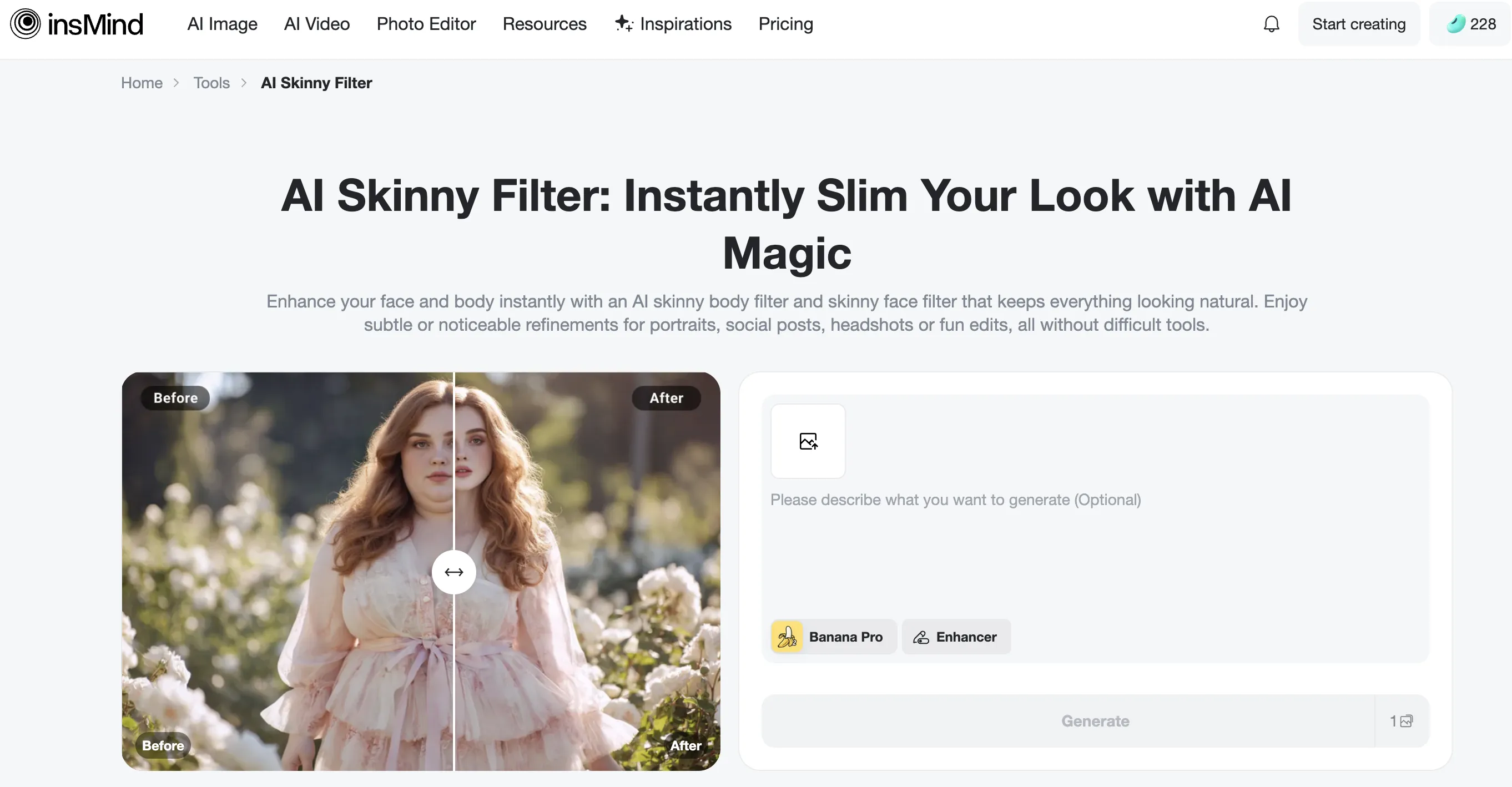
2. Upload Your Photo
Choose a clear face or full-body photo you want to transform into a slim, fit, or skinny version.
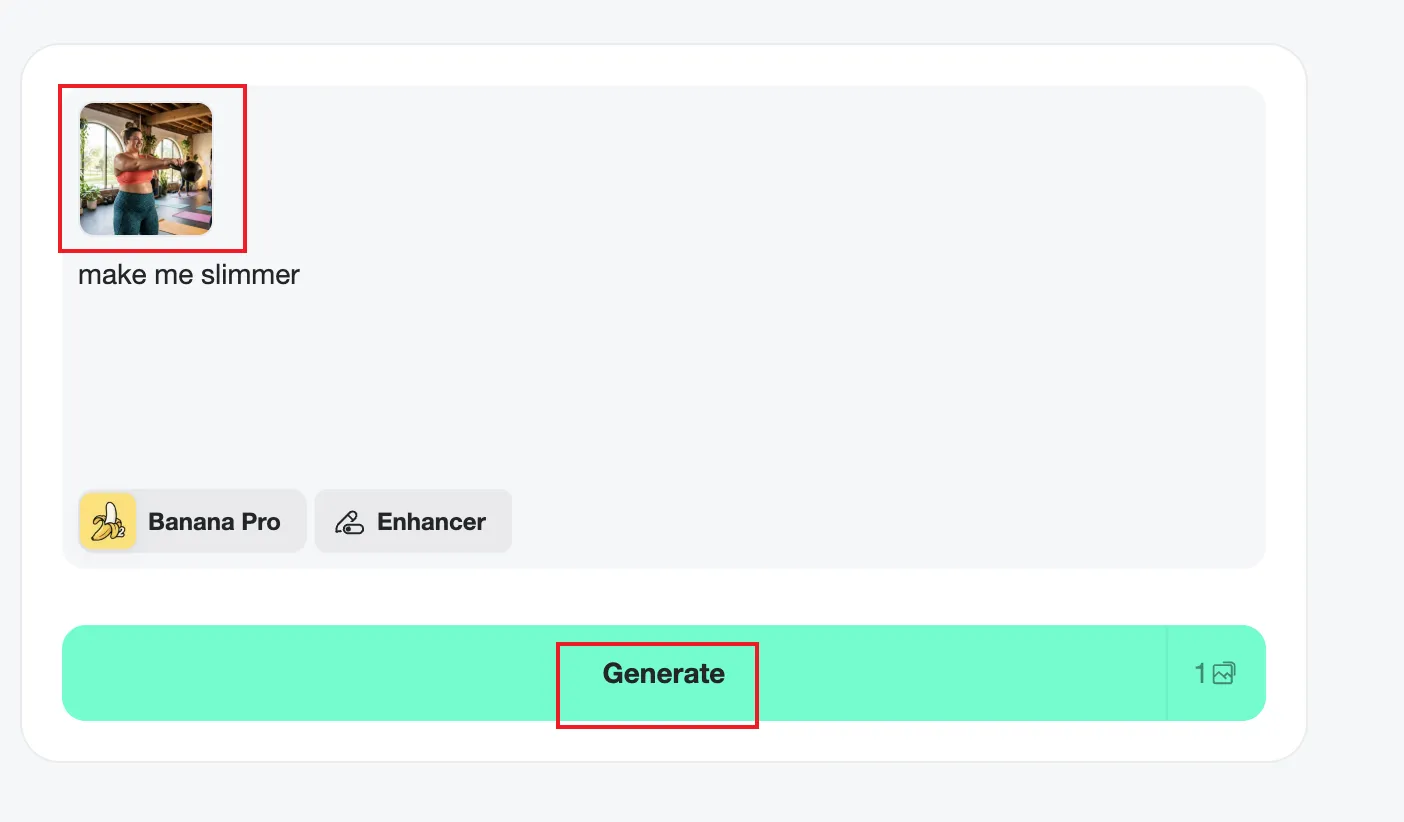
Or you can simply upload your photo in the Agent interface, which is the page you enter when you click "Generate" on the AI Skinny Filter page.
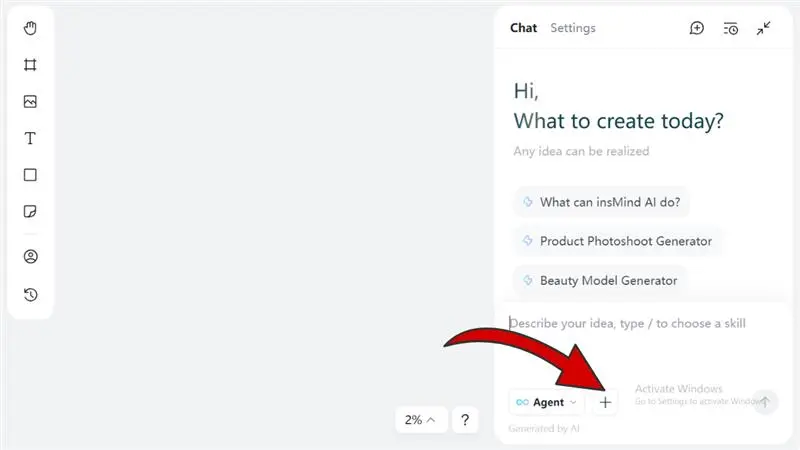
3. Enter Your Prompt
Type in instructions for the skinny filter, like "make me slim, toned, and fit," to guide the AI and shape your transformation.
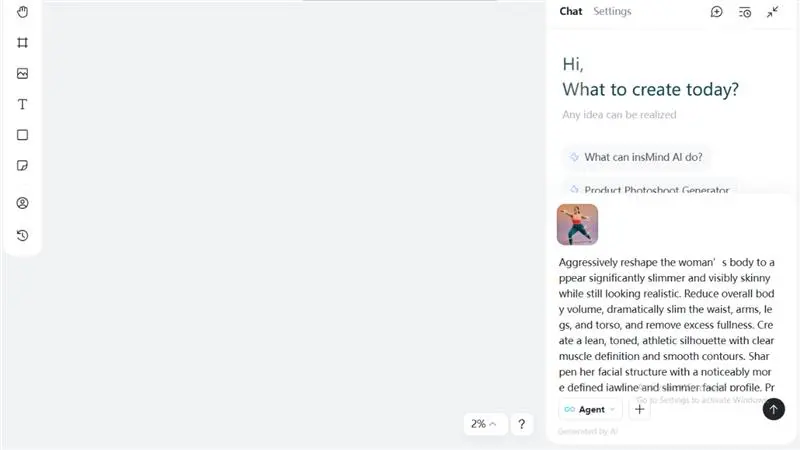
4. Generate & Preview
Hit the generate (up arrow) button and watch the AI create your slim, toned version. Check the preview and see your transformation instantly.
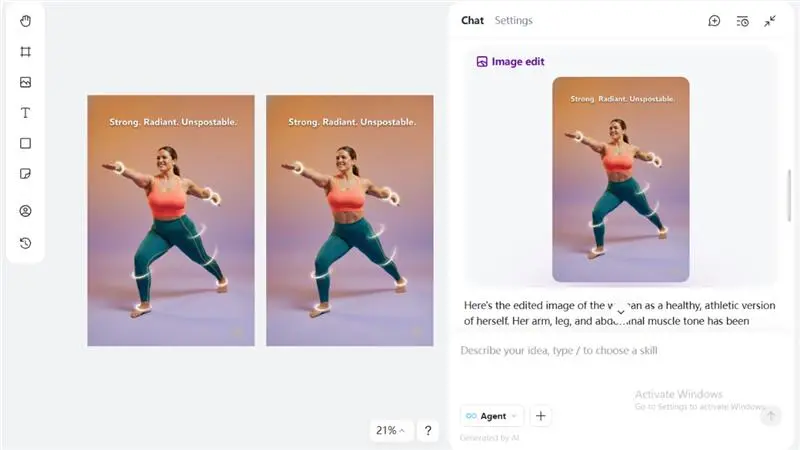
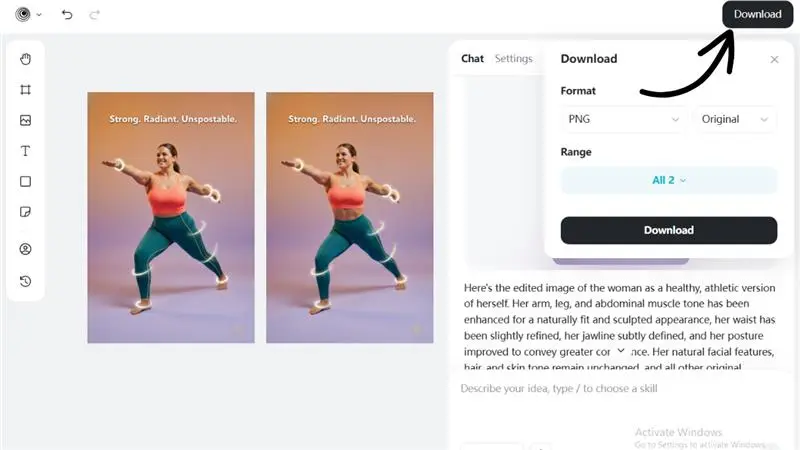
5. Download & Share
Once you're happy with your slim, toned transformation, download the image to your device and share it with friends or on social media.
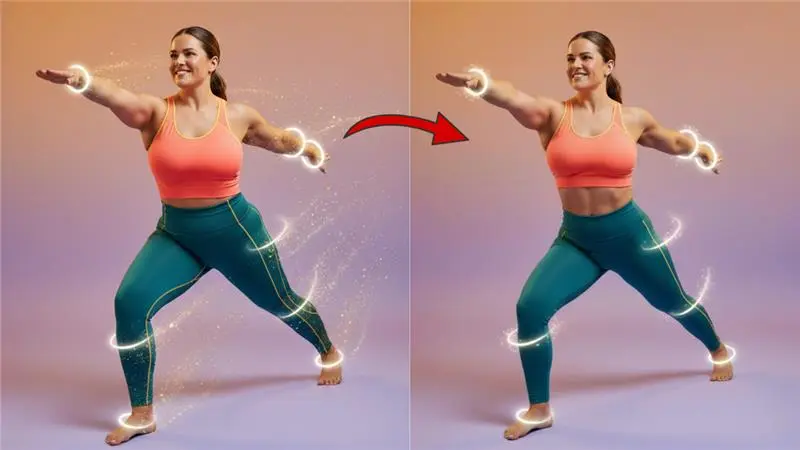
Final Result
Tips for Better, More Natural Results
Soft and realistic results happen when the photo is clear. Try to stand in even lighting so the AI reads your features correctly. A neutral background helps the AI detect your outline without confusion. Keep your posture straight and your face relaxed. This makes the transformation smooth and believable.
Use Mild Edits
Start with subtle slimming intensity. Small changes look much more realistic than extreme edits.
Choose the Right Photo
High-resolution, recent images work best for clear results.
Style Tips for Women
Test different makeup looks and hairstyles to complement the slimmer appearance.
Style Tips for Men
Experiment with beard styles or haircuts to match the refined and athletic look.
Once you have seen your preview, remember it is just a tool for fun, creativity, and confidence.
Conclusion
Using an AI skinny filter can be great and quite simple to figure out how your appearance would change in a different way. At insMind, you can refine your prompts to get the desired facial and body requirements, and it's completely safe. It's a cool way to help you try out new styles, become your own source of inspiration, or keep your motivation up. If a thinner face, a more defined look, or a symmetrical body figure is all that you want, insMind is the perfect tool for you, not only hassle-free but also innovative.

Sarah Michelle
I'm a freelance writer with a passion for editing and designing photos. Here at insMind, I strive to educate users on image creativity, photography, and enhancing product photos to help grow their businesses.


![How to Add Logo to Photos Online for Free [The Simplest Method]](https://static.xsbapp.com/market-operations/market/side/1718795949162.jpg?x-oss-process=image/resize,w_690,h_460,type_6/interlace,1,image/format,webp "How to Add Logo to Photos Online for Free [The Simplest Method]")
![How to Remove Tattoos from Photos [Ultimate Guide 2025]](https://static.xsbapp.com/market-operations/market/side/1718787534476.jpg?x-oss-process=image/resize,w_690,h_460,type_6/interlace,1,image/format,webp "How to Remove Tattoos from Photos [Ultimate Guide 2025]")


