


People nowadays love to watch short, fun, and clear videos. Creators in teaching, in business, and also in marketing all desire the ability to make talking videos that are easy to understand and that can illustrate ideas in an easy manner. But creating a talking video that moves the voice in harmony with the lips can be very difficult. Many tools do not align the mouth correctly, and if they need to be corrected with the hand, the process takes a lot of time.
This is where the Wan 2.5 AI Video Generator on insMind really comes in handy. The Wan 2.5 video generator produces smooth talking videos that fit the voice and mouth in the beginning. It is like having a friendly helper who does the hard work for you. You get clean, clear talking videos without having to use any special skills.
With insMind and Wan 2.5 AI video generator online, anyone can produce a talking clip, which will appear natural. It also works well as an Artificial Intelligence video generator that comes with the sound in time feature, so your video always looks real and easy to understand.
Table of Contents
How to Create Lip-Sync (AI Talking) Videos on insMind Using Wan 2.5
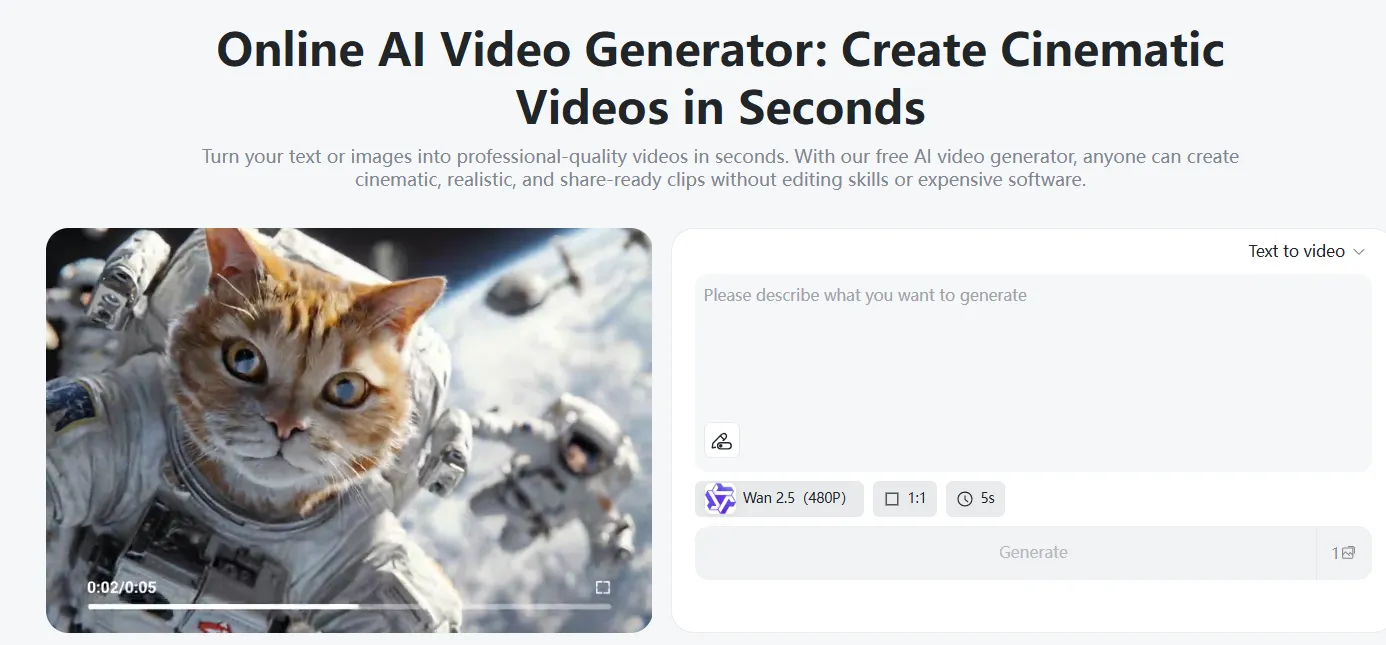
Step 1: Launch the insMind AI Video Generator
Go to insMind and choose the AI Video Generator tool. You can visit the AI Video Generator page, Text-to-Video page, or the Image-to-Video page. All three pages can be used to help you make a talking clip. Once the page has loaded, you will see simple options to get started. The tool is friendly to beginners, and the talking AI video generator works in a couple of clicks.
Step 2: Choose the Wan 2.5 Model & Configuration
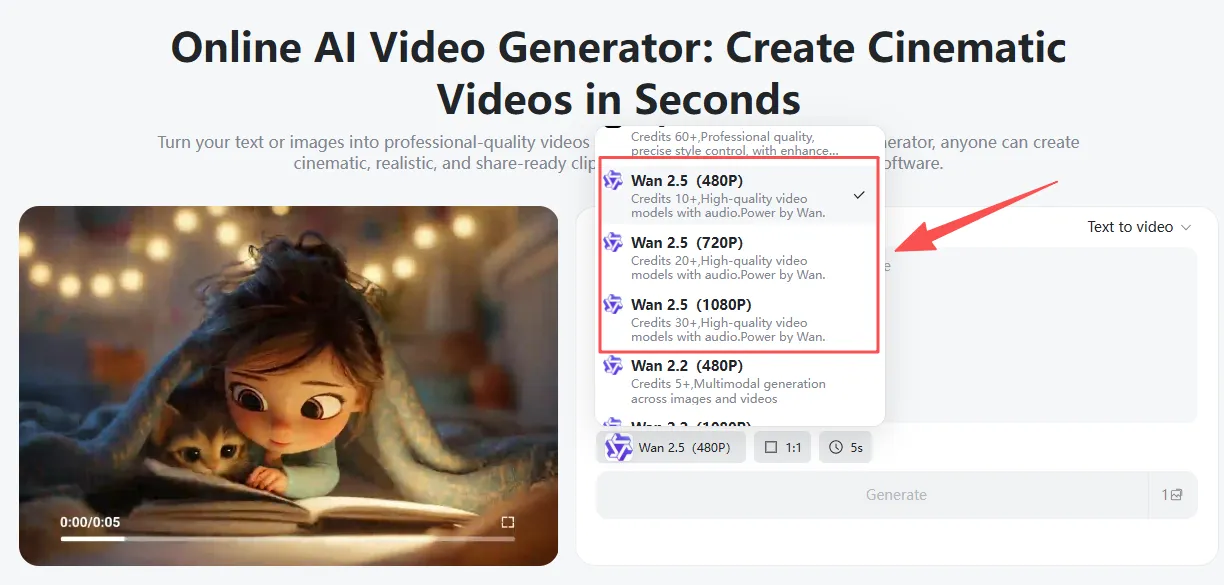
Next, select the Wan 2.5 AI Video Generator model. You can choose between 480p, 720p, or 1080p, depending on how clear you want your video. Higher numbers provide you with sharper videos. After that, select the length of the video, the form of movement, and how much movement you would like to have in the talking face. These settings are what help to provide your end look. The Wan 2.5 video generator makes this step a simple one, since it is created with the ability to keep the mouth matching the voice. It is also an AI lip sync video generator, so everything falls into place perfectly.
Step 3: Decide on Your Method of Creation
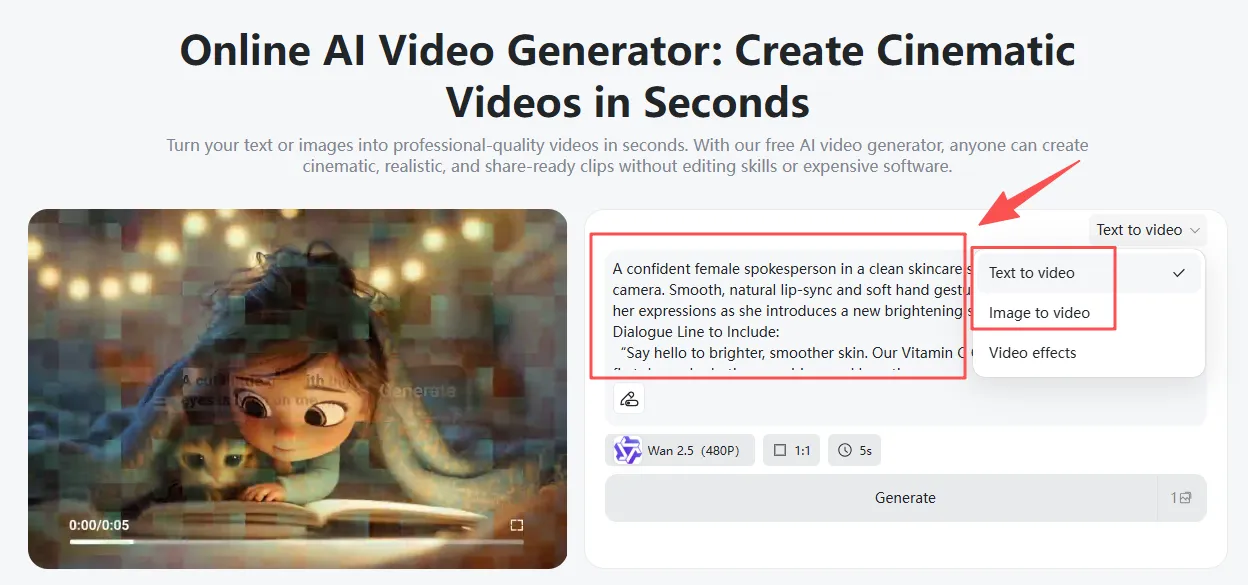
Now choose how you would like to make your talking video.
Text-to-Video: It's possible to type in a short idea. The Wan 2.5 AI video generator online will make your words come to life when it comes to creating a talking person who speaks your message clearly. This is wonderful if you are looking for some fresh character and a quick result.
Image-to-Video: You can upload a picture of a person, cartoon, or character that you like. Then add a little or so afterward to explain how you want them to talk or move. The tool will be used to turn the picture into a smooth talking clip. This mode is ideal for teachers, product demos, and basic explainer videos.
Both work great with the use of the AI video generator with an audio sync system built into the model.
Step 4: Preview and Download
Once your video is ready, preview it to ensure that you like the facial movement, lip sync, and voice. If all is well, press download. The video is saved on your device, ready for YouTube, social media, school projects, or business use. The artificial intelligence lip-sync video generator makes every clip smooth and natural without additional editing to shorten your wait, so that you can enjoy it immediately.

What Makes Wan 2.5 Exceptional for AI Talking Videos
The Wan 2.5 AI Video Generator is unique because it creates talking videos that look smooth, clear, and natural. One of the best parts of it is its powerful audio and video match. The mouth moves simultaneously with the words, thus making a top AI video generator with sound synchronized. You don't need to correct anything afterwards. It works well right away.
Another great feature is motion stability. Many tools shake or move too much, but the Wan 2.5 video generator is steady. Faces move gently, eyes do not look away, and expressions seem so real. This also makes the video easy to watch.
The AI lip sync video generator in Wan 2.5 also has compatibility with a lot of voice types. It has different languages and accents, so people from all over the world can create videos that sound like it. This comes in handy for teachers, product demos, or customer support videos.
Due to the ease of use of Wan 2.5's AI video generator online, it is possible for individuals who are new to video creation to have the ability to make high-quality video clips in just minutes. The results are professional, even if you only type a bit of text in advance or upload a picture. Everything looks clean, steady, and human-like, hence Wan 2.5 makes a good choice for talking clips.
Best Use Case for Wan 2.5 Lip Sync AI Talking Videos
Marketing & Product Demos
Businesses can make products more friendly to use by using the talking AI video generator. A talking guide can be used to explain how something works, why it is helpful, or why your customers should buy it. With the Wan 2.5 AI Video Generator, the mouth movement and the voice perfectly match, thus making the message real.
Example Prompt
One video caption: Good female host in a bright studio explaining a new skincare serum with good lip-sync.
Example Line
Say hello to brighter skin. This serum helps your face glow with every drop.
Social Media Product Reviews
Creators can use Wan 2.5 video generator to create short review videos. These videos can present a sense of excitement and not mumble, which helps people trust the message. With the AI lip sync video generator, the talking character appears lively and has a good match with the sound.
Example Prompt
A friendly TikTok-style reviewer speaking with energy. Medium shot. She holds a pair of lightweight running shoes and explains why she loves them. Natural lip-sync with expressive gestures.
Example Line
These are the softest running shoes I have tried. Super light and perfect for daily runs.
Educational Material & Tutorials
Teachers and students can write simple lessons using the Wan 2.5 Artificial Intelligence video generator online. The talking character can describe the topics of school in a rebuilding voice. With the AI video generator with audio sync, the teaching becomes realistic and easy to follow.
Example Prompt
A calm, friendly instructor standing in a bright classroom. Medium shot with clear eye contact and natural lip-sync. Smooth head and hand gestures. The instructor explains a specific concept (e.g., photosynthesis, math formulas, grammar rules). Background: clean classroom or digital whiteboard.
Example Line
Today, we learn how plants use the sun, the water, and the air to make energy.
Customer Support & Onboarding Manuals
The companies can make videos that are useful and helpful with the talking AI video generator. A relaxing support guide could explain the steps to a task, show how to start using a tool, or answer questions. The smooth lip sync coming from Wan 2.5 keeps the message clear.
Example Prompt
A great support agent in a modern office teaches you how to set up a new app.
Example Line
Let's get started. Create your workspace, add your files, and select your settings.
Tips on Writing Better Lip Sync Lip Sync Prompts Wan 2.5 Lip Sync Videos
Keep prompts short and clear. Choose a tone, such as friendly, excited, calm, or formal. Add in simple camera concepts like close-up, medium shot, looking at the camera, etc. You can also include something about movement, such as gentle hand movement or a soft smile. If there's a specific background you want to use, tell us what it sounds like (bright room or clean studio, for example. These hints help the Wan 2.5 AI Video Generator and the AI lip sync video generator make a video that feels real. Good prompts never go wrong.
Conclusion
The Wan 2.5 AI video generator online makes talking easy for everyone. With smooth lip-sync, constant motion, and easy-to-use tools on insMind, anyone can produce a clear and friendly video in minutes. Try it once and you will see how quickly the AI video generator with audio sync can turn your ideas into reality.

Jayson Harrington
I am the Chief Editor of insMind. I provide tips and skills to help users design better photos with insMind, whether for e-commerce, social media, or any other use.


![How to Add Logo to Photos Online for Free [The Simplest Method]](https://static.xsbapp.com/market-operations/market/side/1718795949162.jpg?x-oss-process=image/resize,w_690,h_460,type_6/interlace,1,image/format,webp "How to Add Logo to Photos Online for Free [The Simplest Method]")
![How to Remove Tattoos from Photos [Ultimate Guide 2025]](https://static.xsbapp.com/market-operations/market/side/1718787534476.jpg?x-oss-process=image/resize,w_690,h_460,type_6/interlace,1,image/format,webp "How to Remove Tattoos from Photos [Ultimate Guide 2025]")


