
AI Explainer Video Generator: How to Turn Text and Images into Explainer Videos
Try the insMind AI Video Generator

Explainer videos are one of the best ways to present ideas clearly. Whether you're introducing a new product, teaching a concept, or training employees, explainer videos make learning easy and engaging. But creating professional videos can take a lot of time, effort, and money, until now.
Thanks to AI explainer video geanerators, anyone can turn text or images into ready-to-share videos in minutes. aWith tools like insMind's AI Explainer Video Maker, you don't need a camera, a voice actor, or editing skills. Just describe your idea, and the AI creates a full explainer video automatically.
This guide will show you what an AI explainer video generator is, how it works, its key features, and how to make your own step by step.
Table of Contents
What is an AI Explainer Video Maker?
An AI explainer video maker is an online tool that uses artificial intelligence to create short, informative videos. You simply enter your text or upload an image, and the AI generates a professional-looking video with visuals, motion, and voiceover.
Instead of spending hours on scripts, animation, and editing, AI handles everything for you. It can automatically match your text with scenes, movements, and even background sound.
With tools like insMind's AI Explainer Video Generator, you can easily make explainer videos for:
1. Marketing and advertising campaigns
2. Online courses or educational content
3. Product tutorials or demos
4. Company training materials
It's a fast, cost-effective, and creative way to produce high-quality videos without needing technical experience.
Key Features of insMind's AI Explainer Video Generator
Here are some key features of insMind's AI explainer video generator:
1. Text-to-Video and Image-to-Video Creation
The tool can turn your written script or uploaded image into a complete explainer video. It understands your input and automatically creates visuals, motion, and sound that match your message.
2. Advanced AI Video Models
insMind integrates next-generation AI models such as Kling 2.5, Sora 2, Veo 3.1, and Wan 2.5. Each model creates different video styles, from cinematic storytelling to animated or realistic visuals, giving you full creative control.
3. Realistic Motion and Lighting
The AI makes scenes look smooth and lifelike with natural motion and lighting effects. Your video will look polished and professional even if you're a beginner.
4. Voiceover and Sound Sync
insMind can automatically add voiceovers, music, or sound effects that match your video's pace and tone. This makes it one of the best AI explainer video makers with voiceover available online.
5. Easy Customization
You can adjust video length, aspect ratio, and style. Choose cinematic, anime, or realistic themes depending on your audience and purpose.
6. HD Export Without Watermarks
Export your explainer videos in full HD with no watermarks. The results are ready for presentations, YouTube, or social media.
7. Beginner-Friendly Interface
No editing or design skills are needed. The interface is simple, type your idea, choose a model, and the AI does the rest.
How-to Steps:
Here are the steps that will help you:
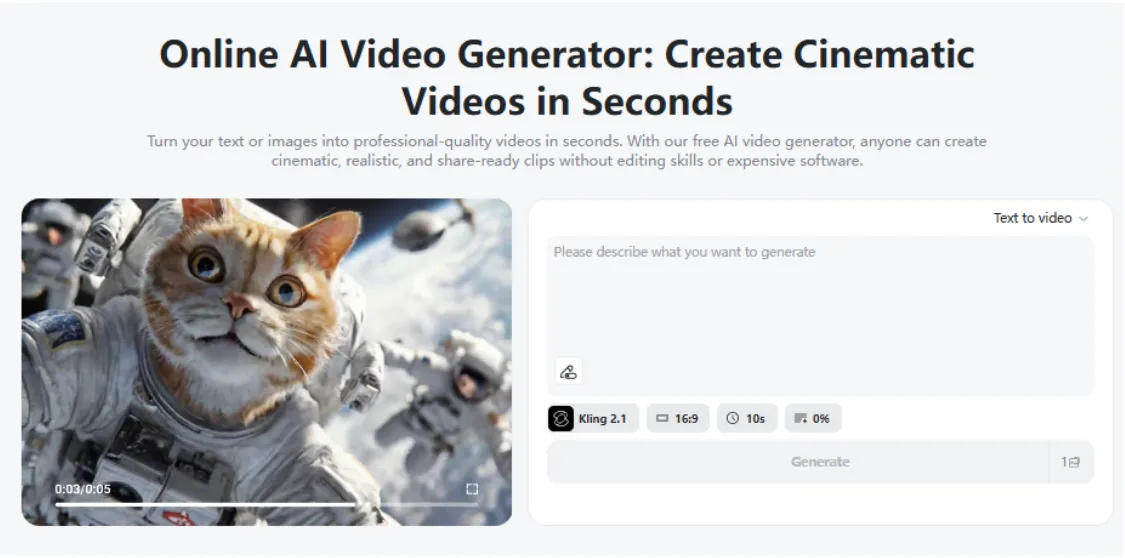
Step 1: Go to insMind AI Video Generator
Open the insMind AI Video Generator in your browser. You don't need to install anything, it works completely online.
 Step 2: Enter a Text Prompt or Upload an Image
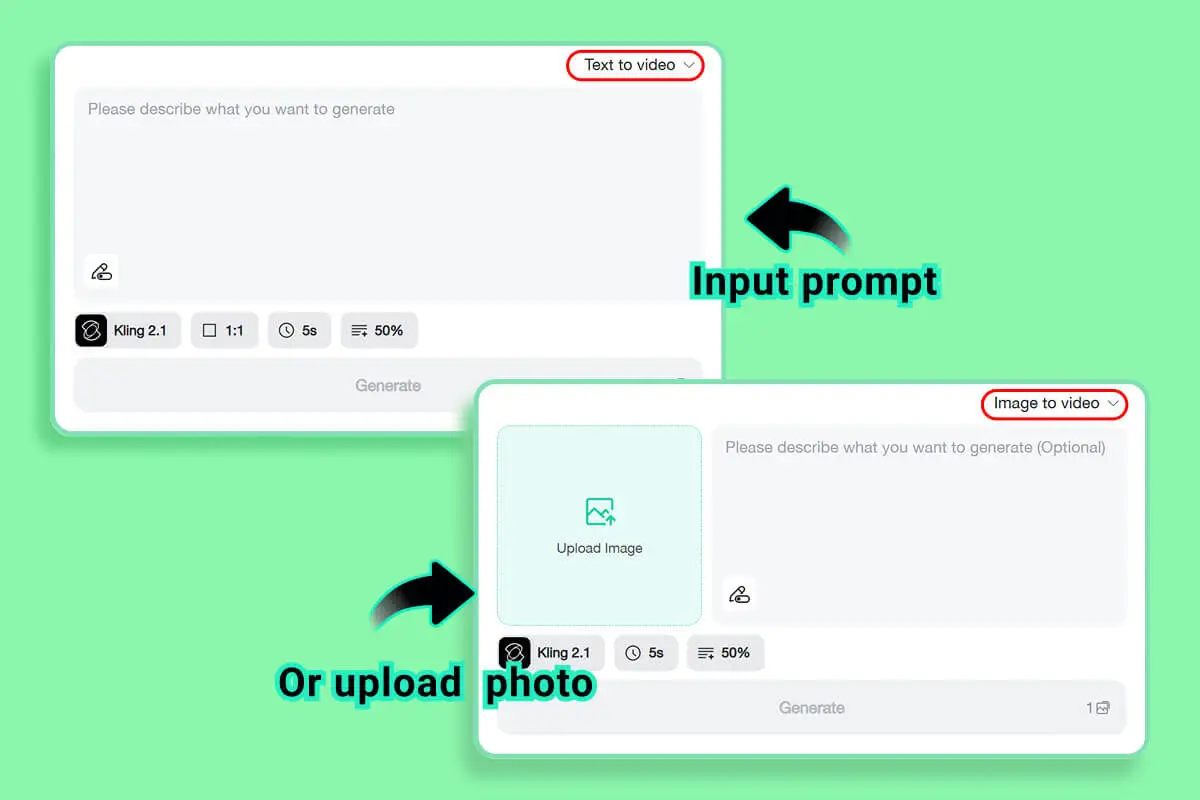
Type a short description, such as "how electric cars work," or upload an image related to your topic. The AI uses this input to understand what your video should show.
Step 3: Choose Your Preferred Video Model and Customize Video Elements
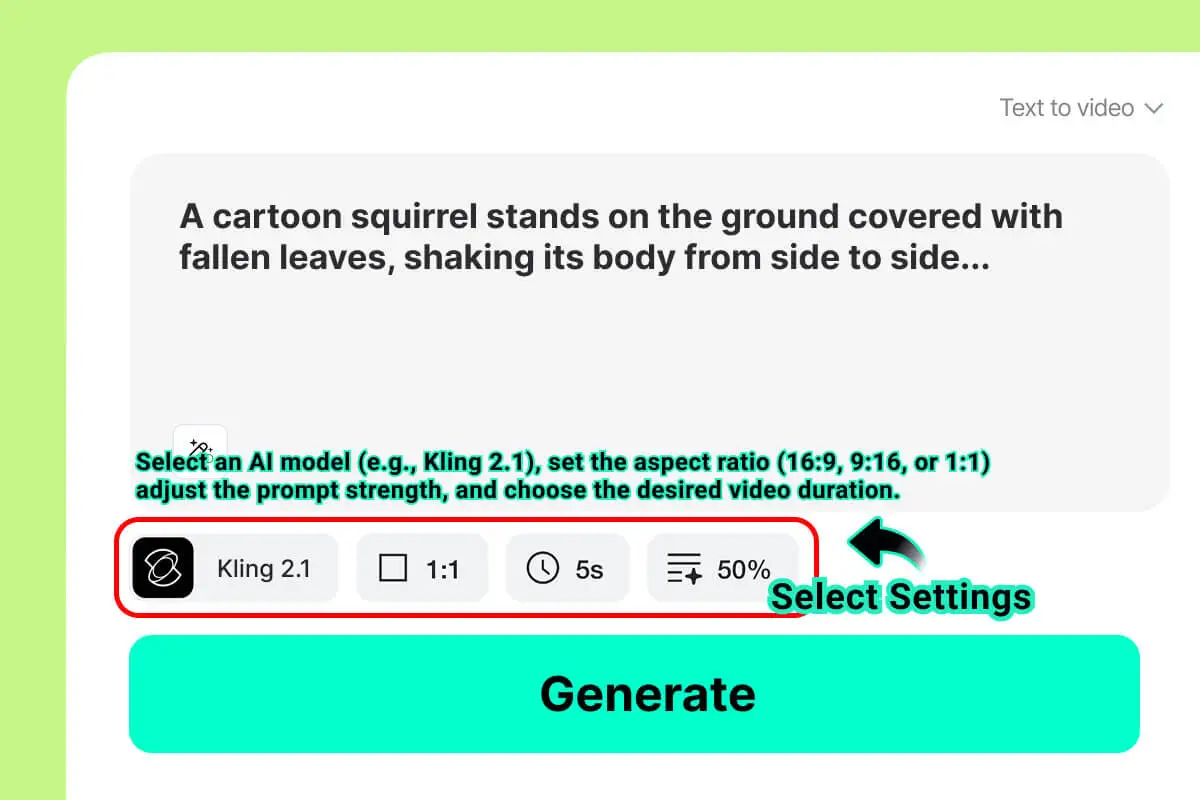
Pick from models like Sora 2, Veo 3.1, or Kling 2.5.
Then:
1. Set your video's duration (for example, 30 seconds or 1 minute).
2. Choose the aspect ratio (16:9 for YouTube or 9:16 for TikTok).
3. Select your video style (cinematic, anime, or artistic).
Step 4: Generate the Explainer Video
Click "Generate," and the AI will create a full explainer video with motion, camera effects, and sound. You can preview and make small edits if needed.

Step 5: Review and Export the Video
Watch your video, add music or voiceover if you like, and export it in HD quality. You can now use it for your presentation, campaign, or class.
Pro Tip for Voiceovers: For hyper-realistic or multilingual text-to-speech with emotional tones, consider using tools like PopPop AI text to speech to elevate your video.

Creative Ways to Use insMind's AI Storyboard Generator
1. Marketing Campaigns
Marketers can easily create visual storyboards for ad campaigns, brand videos, and social media promotions. It helps teams visualize ideas, test different concepts, and plan engaging visuals before launching campaigns.
2. E-Learning and Education
Teachers and course creators can use AI-generated storyboards to plan animated lessons, explainer videos, or interactive tutorials. It helps simplify complex topics and makes online learning more visual and interesting for students.
3. Product Demos and Tutorials
Brands can design clear and engaging product demo storyboards to show how their items work. AI helps visualize each scene step-by-step, making tutorial and feature videos faster and easier to create.
4. Corporate Training Videos
Companies can use AI storyboards to plan workplace training videos, safety guides, and onboarding materials. It helps HR and creative teams save time while ensuring consistent and professional visual communication.
5. Social Media Content Creation
Content creators can quickly design storyboards for short-form videos like reels, TikToks, or YouTube Shorts. AI helps bring creative ideas to life and maintain a unique visual style for every post.
Why Choose insMind for Explainer Videos
insMind is one of the best AI explainer video makers that turns your text or images into engaging, professional-quality videos. You don't need to know video editing, the AI handles everything from visuals to voiceovers in just minutes.
The platform combines text-to-video and image-to-video generation, supported by next-gen models like Kling 2.5, Sora 2, Veo 3.1, and Wan 2.5, ensuring smooth motion, realistic lighting, and creative flexibility.
Here's why creators, educators, and marketers love using insMind:
1. Fast and Easy Creation: Turn text or images into full videos instantly, perfect for quick explainer videos or product demos.
2. Professional Visual Styles: Choose from cinematic, anime, or corporate styles to match your message.
3. Powered by Advanced AI Models: Generate lifelike animation and natural voiceovers using multiple top-tier AI systems.
4. Free to Try: Experiment with the free AI explainer video maker before upgrading for higher-quality results.
5. Perfect for All Uses: Great for marketing, training, education, and brand storytelling.
With insMind, you can explain complex ideas clearly and visually, all while saving time and boosting creativity.
Conclusion
Creating explainer videos used to require cameras, editors, and a big budget. Now, with tools like insMind's AI Explainer Video Generator, it takes just a few minutes to go from idea to finished video.
You can create explainer videos from text or images, add voiceovers, and export in HD, all in one place. The combination of next-gen AI models like Kling 2.5, Sora 2, and Veo 3.1 makes insMind one of the best AI video generators online today.
If you want to explain your ideas clearly and creatively, try the insMind AI Explainer Video Maker, the easiest way to turn your thoughts into engaging, cinematic videos.

Sarah Michelle
I'm a freelance writer with a passion for editing and designing photos. Here at insMind, I strive to educate users on image creativity, photography, and enhancing product photos to help grow their businesses.


![How to Add Logo to Photos Online for Free [The Simplest Method]](https://static.xsbapp.com/market-operations/market/side/1718795949162.jpg?x-oss-process=image/resize,w_690,h_460,type_6/interlace,1,image/format,webp "How to Add Logo to Photos Online for Free [The Simplest Method]")
![How to Remove Tattoos from Photos [Ultimate Guide 2025]](https://static.xsbapp.com/market-operations/market/side/1718787534476.jpg?x-oss-process=image/resize,w_690,h_460,type_6/interlace,1,image/format,webp "How to Remove Tattoos from Photos [Ultimate Guide 2025]")


