


Let's be honest — static images don't stop scrolling anymore.
Whether you're running an ecommerce store, building a personal brand, or launching social ads, audiences today expect motion, storytelling, and visual energy. Video consistently outperforms images in engagement, clicks, and conversions across platforms like TikTok, Instagram Reels, YouTube Shorts, and online ads.
But traditional video production comes with real challenges:
-
Filming requires equipment and time
-
Editing software has a steep learning curve
-
Hiring creators or agencies is expensive
-
Creating multiple ad variations becomes slow
This is where AI changes everything.
Today, you can create marketing videos from images using AI — transforming product photos, brand visuals, or even simple graphics into dynamic promotional videos in minutes.
With tools like insMind, turning images into marketing videos is no longer a creative bottleneck. It's a fast, scalable workflow.
Let's break down how it works and how you can start today.
Table of Contents
- 01 What Does “Creating Marketing Videos from Images” Mean?
- 02 Why Marketers Are Switching to Image-Based Video Creation
- 03 Best Types of Marketing Videos You Can Create from Images
- 04 How to Create Marketing Videos from Images with insMind
- 05 What Makes insMind Ideal for Marketing Video Creation?
- 06 Real Marketing Use Cases (How Creators Actually Use This)
- 07 Frequently Asked Questions
What Does “Creating Marketing Videos from Images” Mean?
Image-to-video AI technology converts a static picture into a moving visual story.
Instead of manually animating frames, AI analyzes your image and automatically generates:
-
Camera motion
-
Subject animation
-
Lighting adjustments
-
Cinematic transitions
-
Scene movement
-
Visual storytelling flow
The result feels like a professionally edited marketing video — without filming anything.
You provide the visual starting point. AI handles the motion and production.
Why Marketers Are Switching to Image-Based Video Creation
Marketing teams and creators are adopting AI video workflows because they solve three major problems.
1. Speed
A promotional video that once took hours or days can now be created in minutes.
Perfect for:
-
product launches
-
seasonal campaigns
-
rapid ad testing
2. Cost Efficiency
No cameras. No studios. No editing teams.
One product photo can generate multiple video variations for different platforms.
3. Scalability
Need 10 ad versions? Just adjust prompts or settings and regenerate.
This makes AI ideal for performance marketing and ecommerce growth.
Best Types of Marketing Videos You Can Create from Images
AI image-to-video tools unlock many marketing formats.
Product Promotion Videos
Turn product photos into cinematic showcases with motion and lighting effects.
Social Media Ads
Create vertical videos optimized for TikTok or Instagram instantly.
Brand Story Clips
Animate lifestyle imagery into emotional storytelling sequences.
Ecommerce Listing Videos
Improve product pages with short demonstration visuals.
Before & After Transformations
Perfect for beauty, fitness, home, or digital services.
How to Create Marketing Videos from Images with insMind
Here's the beginner-friendly workflow.
Step 1: Open the Image to Video Generator and Upload Your Image
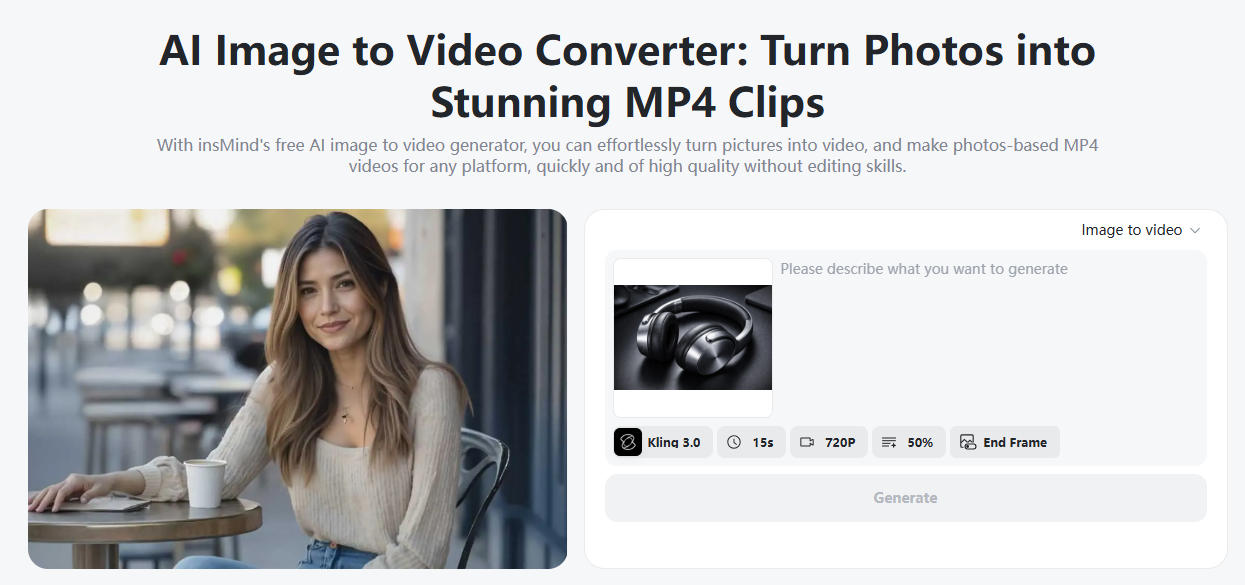
Go to the insMind image to video generator tool.
This feature converts any image into an animated marketing video using AI motion technology.
You can upload:
-
Product photos
-
Brand visuals
-
AI-generated images
-
Lifestyle photography
-
Character or influencer images
Tip: High-resolution images produce the best results.
Step 2: Enter a Marketing Prompt and Adjust Video Settings
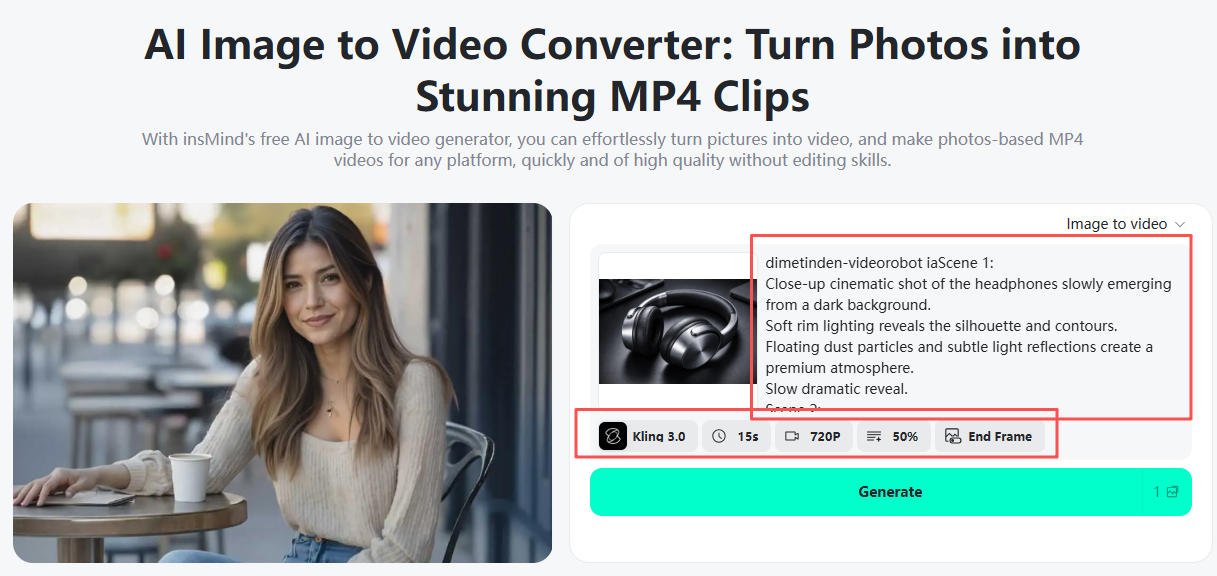
Now describe how you want your video to feel.
Your prompt controls storytelling direction — almost like directing a commercial.
Customize your marketing video:
-
Choose AI model (Google Veo 3.1, Kling 3.0, Wan, etc.)
-
Select video duration
-
Set aspect ratio (9:16 for TikTok, 16:9 for YouTube)
-
Choose resolution
-
Adjust motion intensity
This flexibility allows creators to tailor videos for different platforms.
Step 3: Generate and Download
Click Generate.
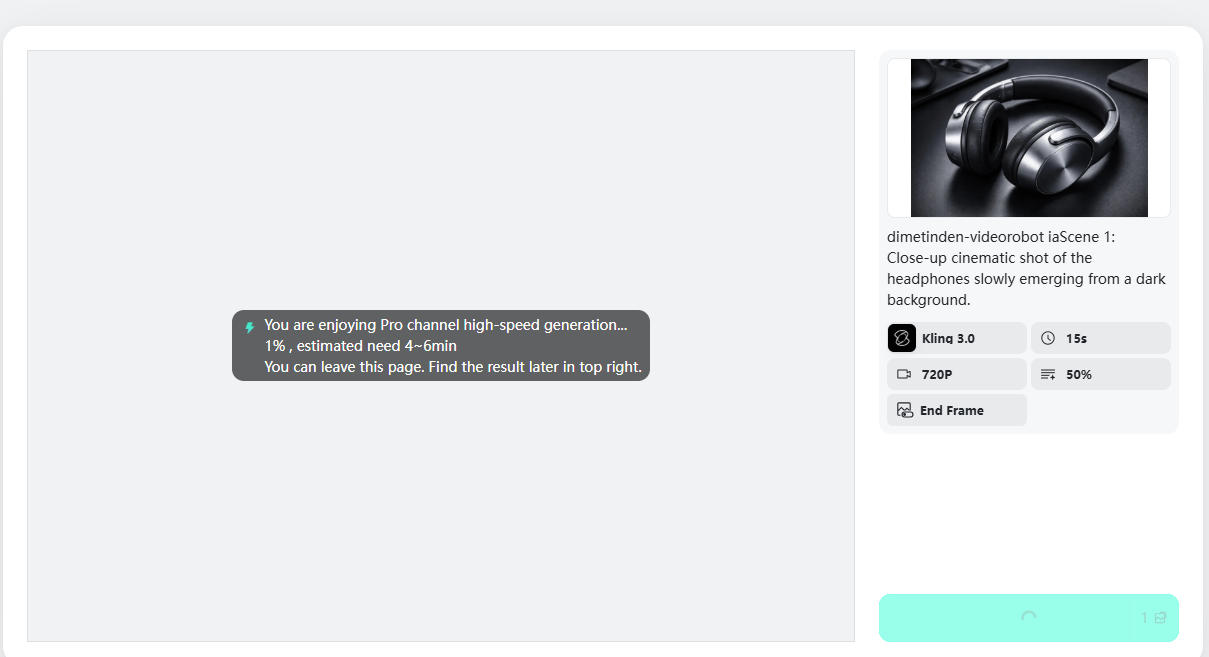
Within moments, insMind creates a fully animated marketing video.
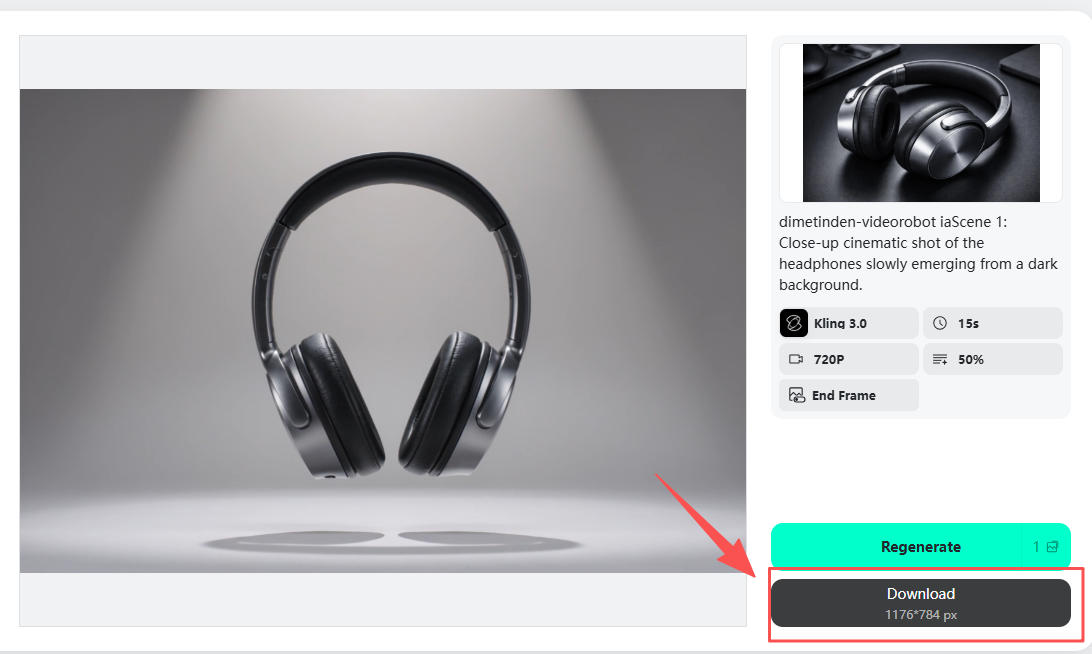
Preview instantly, then download your video ready for:
-
Ads
-
Reels
-
Shorts
-
Product pages
-
Campaign launches
No editing required.
What Makes insMind Ideal for Marketing Video Creation?
Many tools animate images — but marketing requires control and consistency.
insMind focuses specifically on creator and brand workflows.
Intelligent Motion Design
AI generates camera movements that feel intentional rather than random.
Marketing-Ready Formats
Export videos optimized for social platforms immediately.
Multiple Advanced Models
Choose different AI engines depending on style and realism needs.
Prompt-Driven Creativity
Direct the visual outcome without technical editing skills.
Fast Iteration
Create multiple ad versions quickly for A/B testing.
Real Marketing Use Cases (How Creators Actually Use This)
Ecommerce Sellers
Turn product catalog photos into engaging ad creatives.
Result: Higher engagement without new photoshoots.
Small Businesses
Create promotional videos for launches or discounts using existing brand images.
Content Creators
Convert thumbnails or artwork into short-form video content.
Agencies
Produce client marketing assets faster and scale campaigns efficiently.
Frequently Asked Questions
Can I create marketing videos from images without editing experience?
Yes. AI handles animation, motion, and transitions automatically. You only upload an image and describe the result you want.
What images work best for marketing videos?
Product photos, lifestyle shots, brand visuals, and AI-generated images all work well, especially high-resolution images.
Are AI marketing videos suitable for ads?
Absolutely. Many creators use image-to-video AI specifically for paid ads because it allows fast creative testing.
Can I create videos for TikTok and Instagram?
Yes. Choose vertical (9:16) format during settings to generate social-ready videos.
How long does it take to generate a video?
Most videos are generated within minutes depending on settings and model choice.
Do I need multiple images?
No. One image is enough, though multiple versions can help create campaign variations.
Final Thoughts
Marketing success today depends on motion, storytelling, and speed. AI makes all three accessible to everyone — not just professional video editors.
Instead of letting great visuals sit unused as static images, transform them into engaging marketing videos that capture attention and drive results.
Upload an image. Describe your vision. Let AI handle the rest.
Your next high-performing marketing video might already be sitting in your photo library.

Ryan Barnett
I'm a tech enthusiast and writer who loves exploring AI, digital tools, and the latest tech trends. I break down complex topics to make them simple and useful for everyone.


![How to Add Logo to Photos Online for Free [The Simplest Method]](https://static.xsbapp.com/market-operations/market/side/1718795949162.jpg?x-oss-process=image/resize,w_690,h_460,type_6/interlace,1,image/format,webp "How to Add Logo to Photos Online for Free [The Simplest Method]")
![How to Remove Tattoos from Photos [Ultimate Guide 2025]](https://static.xsbapp.com/market-operations/market/side/1718787534476.jpg?x-oss-process=image/resize,w_690,h_460,type_6/interlace,1,image/format,webp "How to Remove Tattoos from Photos [Ultimate Guide 2025]")


