


The competition between GPT Image 1.5 and Nano Banana Pro is redefining visual creation standards. Both models promise improved image realism, faster generation speeds, and smarter prompt understanding for creators. As AI images dominate design and marketing workflows, choosing the right model matters. This detailed comparison breaks down performance, features, and use cases. Moreover, you will discover which AI image generator delivers better results for creative needs today online.
Table of Contents
Part 1. What is GPT Image 1.5?
GPT Image 1.5 turns written ideas into detailed visuals through natural chat-based interaction. Integrated inside ChatGPT, it lets users generate, edit, and refine images without complex tools or workflows. By understanding style, composition, lighting, and context, the model converts simple prompts into realistic scenes, illustrations, diagrams, and creative assets suitable for learning, design, and everyday visual experimentation across modern creative and professional environments today.
GPT Image 1.5 is based on a transformer-based neural network that was trained on large image text datasets. It does not anticipate the next word, but anticipates the visual objects one after another, forming colors, shapes, and structures. This approach enables consistent styles, controlled edits, iterative refinement, and flexible image generation for creators, educators, marketers, and professionals working across diverse industries and demanding visual production needs.
Part 2. What is Nano Banana Pro?
Nano Banana Pro is Google's advanced AI image model built on Gemini 3 Pro for professional visual creation and editing. It focuses on studio-quality output, combining realism, accurate text rendering, and strong layout control. It supports up to 4K resolution, delivering rich color, crisp detail, and clean typography for leading creative work across marketing, design, and enterprise workflows worldwide.
Additionally, this kind of AI model allows performing more sophisticated image editing, such as local editing, light editing, camera angle editing, and step-by-step editing. It can fuse multiple reference images while maintaining character consistency across scenes. Available through Google platforms and partner tools, it is widely used for marketing creatives, UI mock-ups, infographics, product visuals, and professional visual workflows requiring accuracy, control, scalability, speed, reliability, and enterprise-ready results globally.
Part 3. Comparison of GPT Image 1.5 and Nano Banana Pro
Now that both AI image models are explained, it is time to view them side by side. This section highlights key differences between GPT Image 1.5 and Nano Banana Pro clearly.
Performance Pace
- GPT Image 1.5 focuses on speed, making it ideal for quick image creation and rapid experimentation.
- Nano Banana Pro moves more deliberately, favouring refined output over instant results.
Image Quality
- GPT Image 1.5 delivers solid image quality, with standout results in many creative prompts.
- Nano Banana Pro consistently produces sharper visuals with stronger realism and fine detail.
Editing Flexibility
- GPT Image 1.5 supports smooth, fast adjustments, helping users iterate ideas efficiently.
- Nano Banana Pro offers deeper control, enabling precise edits suited for professional standards.
Text in Image Accuracy
- GPT Image 1.5 can include text in images, though minor alignment or clarity issues may appear.
- Nano Banana Pro excels at rendering clean, readable text with accurate placement and layout control.
Part 4. Real-World Use Cases: Where Each Wins
While technical differences matter, real value appears when these models are applied to everyday creative tasks. The following section explores real-world use cases to show where each AI image model performs best:
1. Marketing Poster with Text and Branding
When creating a marketing poster with text and branding, a common need is a promotional coffee poster featuring a clear slogan and clean layout. Using the prompt "Design a modern coffee poster with the text 'Fresh Brew Daily,' warm lighting, and minimalist branding," GPT Image 1.5 generates a visually appealing and creative result. However, the text may appear slightly uneven, and the layout less structured.
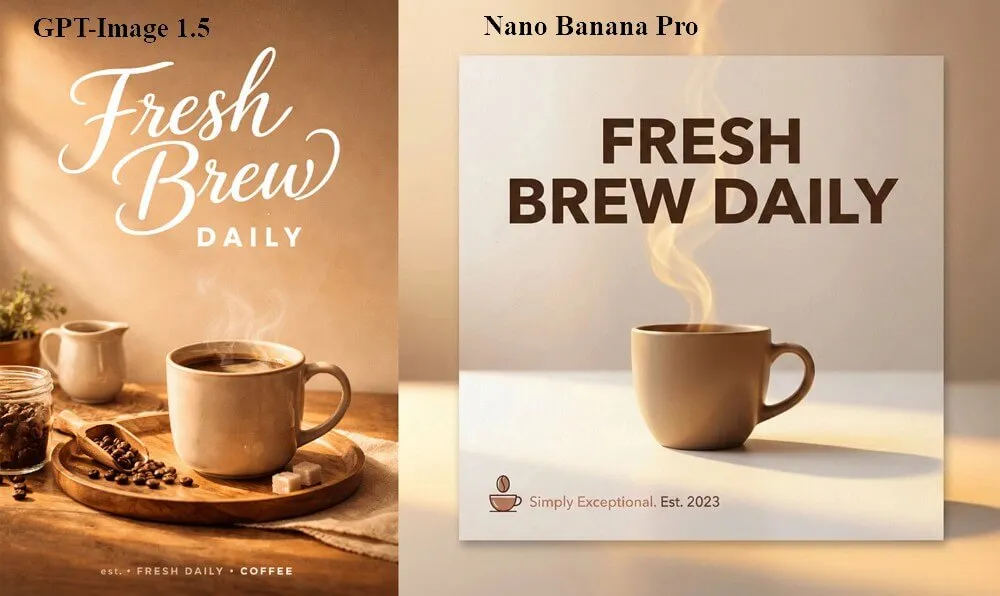
Comparatively, Nano Banana Pro delivers a refined poster that has proper text arrangement, spacing, and a business-level marketing touch and feels superior to brand-conscious designs.
2. Social Media Concept Art
In the case of social media concept art, the creators usually require a visually appealing image to sell a new concept in a short period of time. When prompted to "Create a colorful futuristic city world in a playful digital art style," GPT Image 1.5 delivers a fast, vibrant, and imaginative image that captures attention and suits casual, idea-driven content.
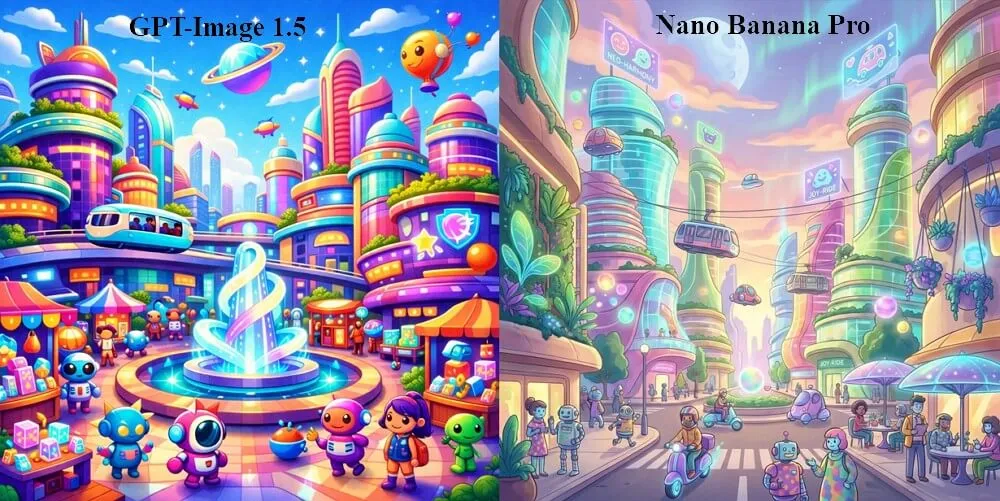
Nano Banana Pro, on the other hand, produces a less vibrant and detailed picture, and the generation process takes longer. In this case, GPT Image 1.5 stands out for speed and creative ideation, making it more suitable for social media use.
3. Product Mock-up for an Online Store
Creating a product mock-up for an online store requires a realistic image suitable for ecommerce listings. With the prompt "Generate a realistic product photo of wireless headphones on a clean studio background." GPT Image 1.5 produces an attractive result, though reflections and proportions may appear slightly stylized.
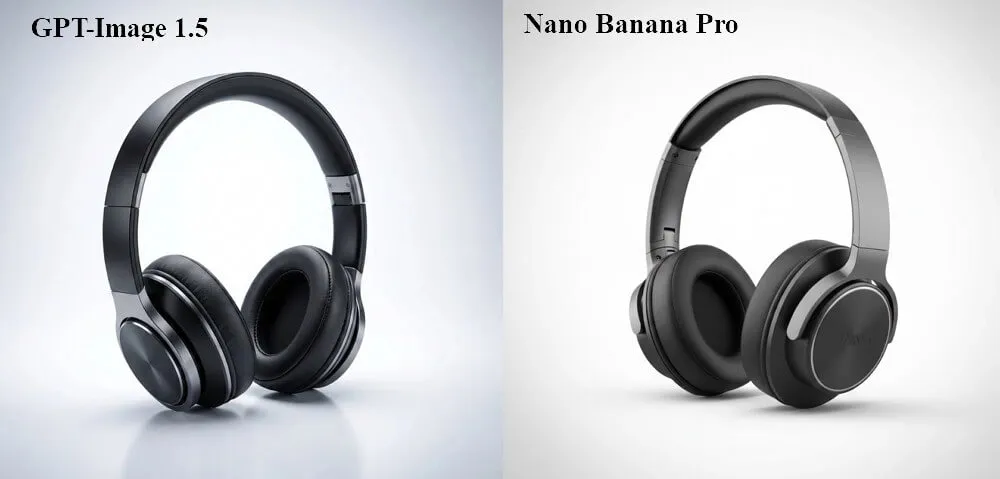
In contrast, Nano Banana Pro delivers a photo-realistic image with accurate lighting, detailed textures, and a polished professional finish. Due to its higher visual accuracy and realism, Nano Banana Pro is the stronger option for commercial product presentations.
4. Quick Design Iterations for Brainstorming
Rapid design brainstorming often involves testing multiple ideas before selecting a final direction. Using the prompt "Create three variations of a modern app dashboard with dark mode," GPT Image 1.5 generates multiple versions quickly, enabling fast feedback and smooth refinement through conversation.
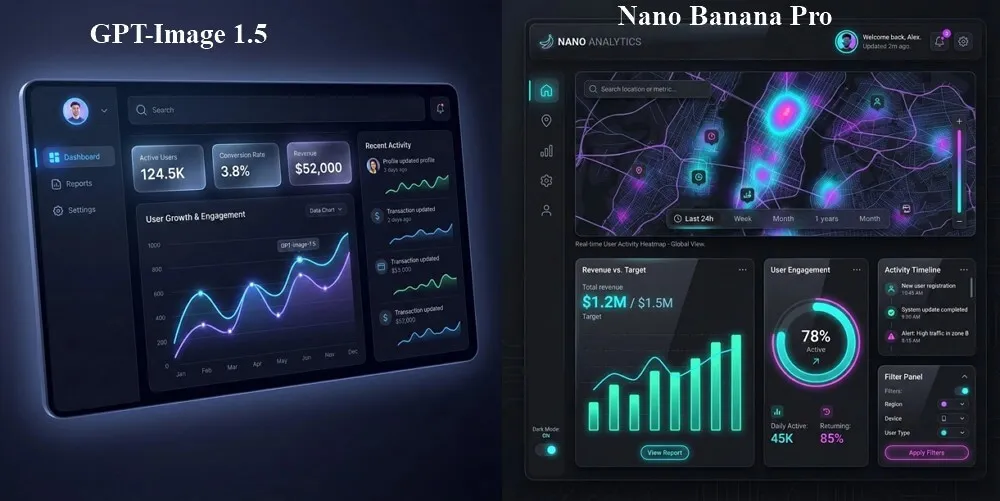
Nano Banana Pro delivers more detailed outputs, but the slower generation pace can interrupt rapid iteration. Since speed and flexibility matter most during brainstorming, GPT Image 1.5 performs better in this use case.
5. Educational Diagram or Infographic
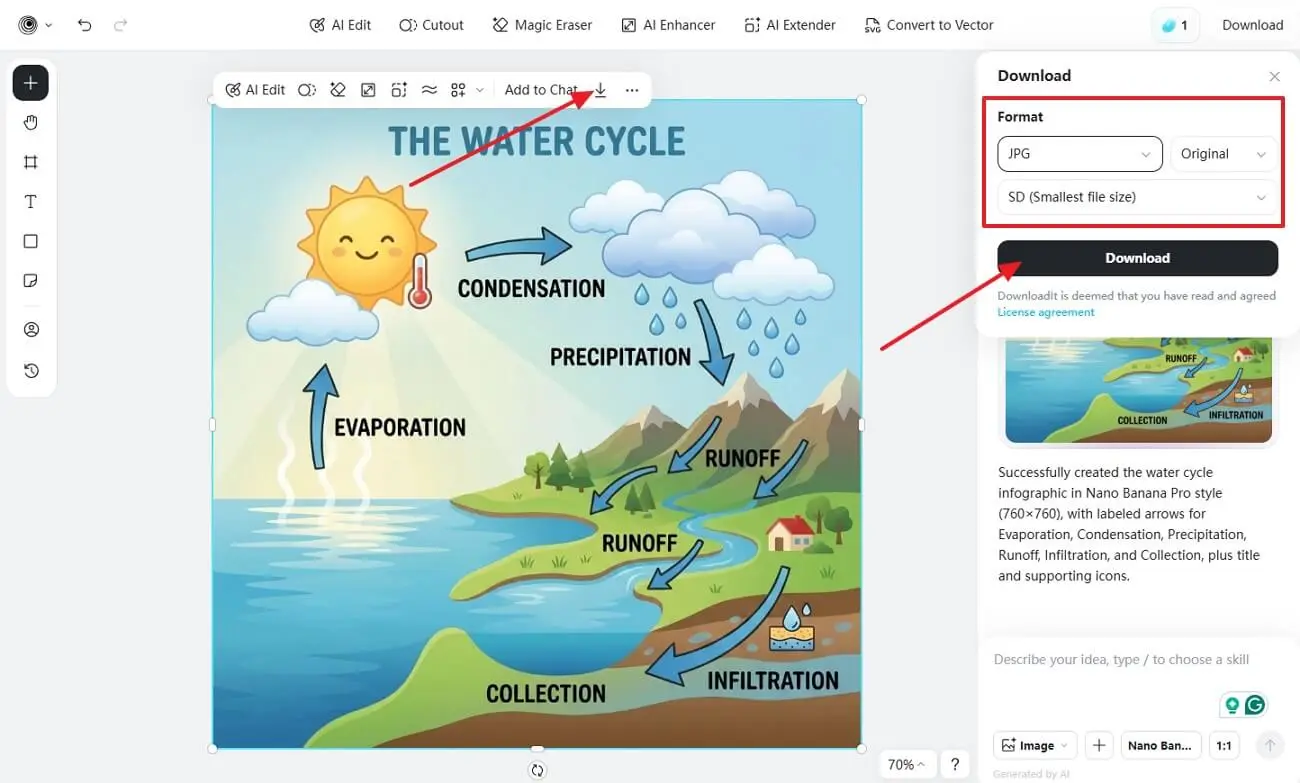
Educational visuals demand accuracy, clear structure, and easy readability for learners. With the prompt "Create an infographic explaining the water cycle with labels and arrows," GPT Image 1.5 delivers a diagram that communicates the concept effectively. However, some labels may appear slightly misaligned or less clear.
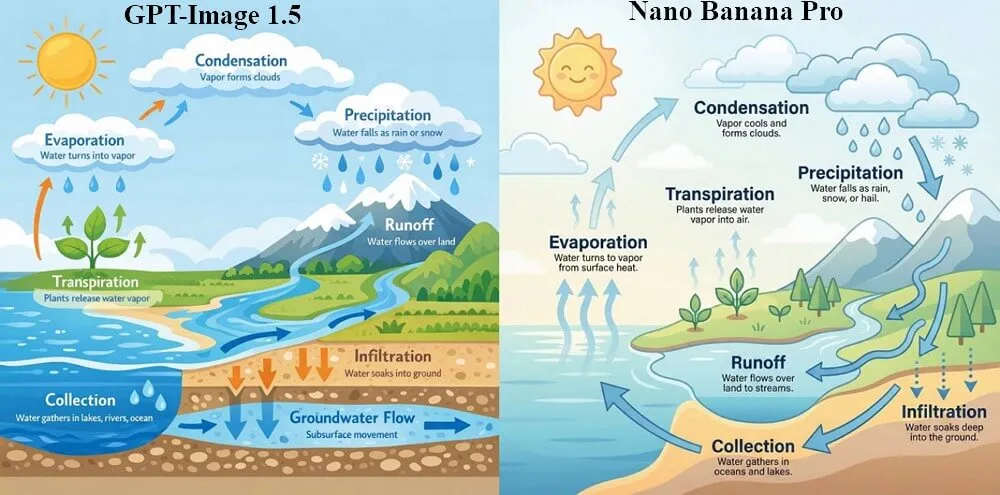
Nano Banana Pro, however, produces a more refined infographic with clean text, precise labelling, and a well-organized visual flow. As a result, Nano Banana Pro performs better for educational diagrams where clarity and structure are essential.
Overall Takeaway
The GPT Image 1.5 is faster, more creative, and quicker to experiment with, whereas Nano Banana Pro is more precise, realistic, and professional. The choice of model will depend on your preference between speed in ideation and a refined end product.
Part 5. How to Use insMind GPT Image 1.5 and Nano Banana Pro for Quality and Control
Imagine managing social posts, product visuals, and brand assets while working under strict deadlines. In such workflows, creators often need refined visuals with strong control rather than repeated experimentation. insMind AI Image Generator addresses this by centering its workflow around Nano Banana Pro, enabling users to produce polished, studio-quality images with minimal friction. The interface keeps the process smooth, allowing creators to focus on outcomes instead of technical setup.
Furthermore, Nano Banana Pro delivers realistic lighting, accurate text, and consistent layouts, making it ideal for final marketing visuals. insMind's Enhancer tools further improve results by sharpening details, adjusting lighting, and refining textures within the same workspace. Users can switch aspect ratios, preserve visual consistency, and apply improvements without restarting projects. This streamlined workflow improves efficiency, reduces rework, and supports professional-grade output across marketing, ecommerce, and brand design tasks.
Key Features
- Integrated Dual Models: Switch between GPT Image 1.5 and Nano Banana Pro smoothly within one workflow.
- High-Resolution Export: Generate detailed images suitable for commercial or client-ready use.
- Unified Workspace: Create, refine, and finalize images without switching external tools.
- Reliable Text Integration: Ensure accurate, legible text placement with controlled layout behavior.
- Extensive Style Library: Access more than fifty artistic and professional styles for diverse outputs
insMind AI Image Generator Guide: Nano Banana Pro and Enhancer Tools
Adhere to the steps below to generate a creative image using the insMind AI image generator:
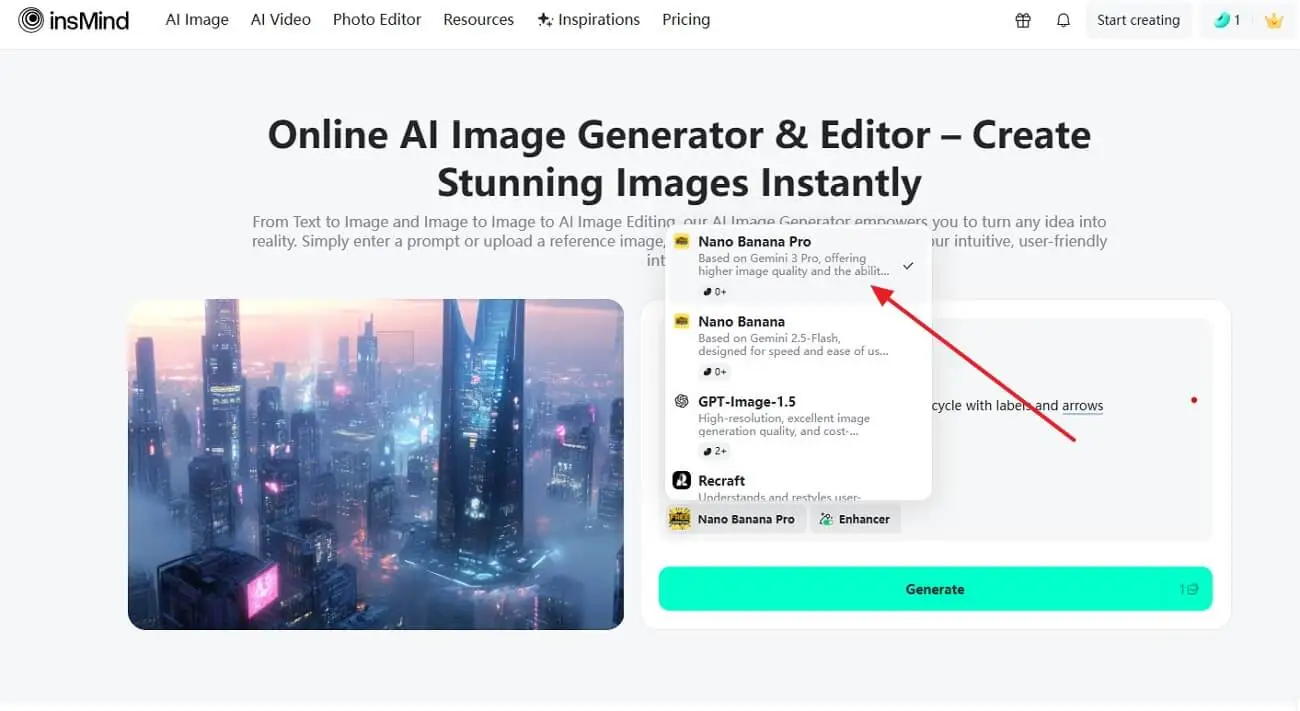
Step 1. Select Nano Banana Pro or GPT Image 1.5 AI Model
Begin by opening the model selector on the insMind AI Image Generator interface. From the available options, choose "Nano Banana Pro" or "GPT Image 1.5" to enable high-quality image generation with stronger realism, accurate text rendering, and controlled layouts. This step ensures the model is optimized for polished, professional visuals before proceeding.
Step 2. Enable the Enhancer to Start Generating an Image
Here, enter a clear and specific prompt in the input field describing the image you want to create. You can also upload a reference image to guide the style, layout, or visual details. After setting the prompt and reference, enable the "Enhancer" option to improve overall clarity. Once everything is set, click "Generate" to start creating the image using Nano Banana Pro.

Step 3. Download the Final Image
Lastly, review the final image, open the "Download" panel on the right side. Next, select the required file format and resolution based on your use, then click "Download" to save the image.
Want to create the perfect image with either of the models across insMind AI Image Generator? This service provides an exclusive experience of generating images with no hassle, while having dedicated options for editing the image as well.
Conclusion
In conclusion, GPT Image 1.5 and Nano Banana Pro each excel in different creative scenarios. GPT Image 1.5 suits fast ideation and flexible design workflows. On the other hand, Nano Banana Pro delivers precision and polished visuals for professional use. For creators seeking both speed and control in one place, the insMind AI Image Generator offers a balanced workflow by combining both models with powerful Enhancer tools for high-quality results.

Jayson Harrington
I am the Chief Editor of insMind. I provide tips and skills to help users design better photos with insMind, whether for e-commerce, social media, or any other use.


