Obraz AI
Wideo AI
Edytor zdjęć
Zasoby
InspiracjeWycena

Filtr Studio Ghibli: Przekształć swoje zdjęcia w sztukę Ghibli

Zanurz się w magiczny świat Ghibli! Dzięki filtrowi Studio Ghibli możesz przekształcić zwykłe zdjęcia w zachwycające obrazy inspirowane animacjami, które pokochały miliony. To szybkie, darmowe i niezapomniane doświadczenie!

Filtr Studio Ghibli: Przekształć swoje zdjęcia w sztukę Ghibli
Po
Zanim
Lub upuść obraz tutaj, wklej obraz lub adres URL
Spróbuj z jednym z tych
insMind AI Crying Filter Próbka 1
insMind AI Crying Filter Próbka 2
insMind AI Crying Filter Próbka 3
insMind AI Crying Filter Próbka 4
insMind AI Crying Filter Próbka 5

Stwórz Podobne

Subject: The main character in the picture. Expression: An anthropomorphic expression, with the mouth wide open, revealing teeth, canine teeth and tongue. The eyes are narrowed, looking disdainfully at the camera. Style: An exaggerated portrait painting in a digital painting style, combining expressionist brushstrokes. Texture: Has distinct brushstroke textures, as if it was quickly applied with rough oil paints or acrylic brushes. Detail depiction: The details are very realistic, such as hair, teeth, a moist nose and the inside of the mouth, but the overall structure and expression are highly exaggerated to achieve a humorous effect. Posture: Frontal shot, profile view Background: Solid color background
Subject: The main character in the picture. Expression: Extremely angry / Exaggerated anger. Furrowed brows, wrinkled forehead, dilated nostrils, mouth wide open and revealing clenched teeth, facial muscles completely contracted. Looking at the camera. Pose: One-to-one replication of the main character in the picture. Costume: One-to-one replication of the character's costume. Style: Exaggerated portrait painting in a digital painting style, combining expressionist brushstrokes. Texture: Has distinct brushstroke textures, as if it was quickly applied with rough oil painting or acrylic brushes, especially the background and clothing parts. Character style: Satirical caricature style, extremely exaggerated features (big mouth, big teeth, big eyes, big nose), funny expression, proportion: The head is significantly enlarged, the proportion is distorted, while the body is relatively smaller. Facial features: The facial muscles are extremely exaggerated, there are deep expressive lines around the eyes and mouth. Detail depiction: Skin texture, pores, teeth and other details are depicted very realistically, but the overall proportion and expression are exaggerated to a great extent. Lighting: Uses dramatic and intense contrast of light and shadow, highlighting the three-dimensionality of the character's face and the tension of the emotions. Posture: Frontal, portrait Background: Abstract and rough blue-green and orange/brown brushstrokes form the background, without specific environmental depiction, completely focusing on the character.
Character: The main figure in the picture. Core: An exaggerated comic with a wedding photo theme. Style: A highly exaggerated cartoon comic style, presented through digital painting. Head: Both of their heads are significantly enlarged, with distorted proportions, while the bodies are relatively smaller. Facial features: The facial muscles are extremely exaggerated, with deep expressive lines around the eyes and mouth, a very large and prominent nose, and very large teeth. Expression: An extremely exaggerated and joyful wide-open mouth laugh, with bulging eyes, fully matching the joyful mood in the reference image. Both are looking directly at the camera. Light and details: Sharp highlights on the forehead, nose, and cheekbones, contrasting with deep, smooth shadows to emphasize the exaggerated contours. Clean, smooth digital brush strokes. Background: A pure white background, with two red hearts decorating the gap between the two heads. Appearance: A one-to-one replica of the main character in the picture. Costume: The bride is wearing a white strapless wedding dress with a veil, and the groom is wearing a black tuxedo with a bow tie. Posture: Full body, both looking at the camera, the groom holding the bride like a princess, and the bride holding a red rose bouquet of flowers.
Main character: The person in the picture Art style: Exaggerated cartoon style. Bright colors, bold outlines. Character blush. Proportion: The heads are significantly enlarged and the proportions are distorted. Facial features: Exaggerated processing based on the facial features of the reference figure, exaggerated facial muscles, extremely exaggerated facial features (big mouth, big teeth, big eyes, big nose), funny expressions. Expression: Reproduce the main character's expression in the picture and exaggerate it. Facing the camera. Hair: Reproduce the hairstyle of the main character in the picture. Clothing: Exactly the same as the main character's clothing in the picture. Background: Solid color background. Light and details: Styled highlights and shadows, highlighting the facial contours, with the typical smooth texture of digital painting. Posture: Affectionate action, head touching head, looking at the camera, half-length portrait
Subject: The main figure in the picture. Core: A high-resolution real photo showing a couple standing beside a framed painting hanging on the wall. The center of the picture features a large black-framed portrait. The content is an exaggerated caricature style of the main character: extremely exaggerated facial features (big mouth, big teeth, big eyes, big nose), with a funny expression. Portrait: Black simple border (no white border), style: highly exaggerated cartoon comic style, presented by digital painting. Head: Both people's heads are significantly enlarged, with distorted proportions, while the body is relatively smaller. Facial features: Facial muscles are extremely exaggerated, there are deep expressive lines around the eyes and mouth, the nose is very large and prominent, and the teeth are also very big. Comic expression: Extremely exaggerated, joyful mouth wide open laughter, eyes bulging, fully matching the joyful mood in the reference image. Both are looking directly at the camera. Light and details: Sharp highlights on the forehead, nose, and cheekbones, contrasting with the deep, smooth shadows to emphasize the exaggerated contours. Clean, smooth digital brushstroke texture. Low saturation blue as the background of the portrait. Style: One-to-one replication of the main figure in the picture Clothing: One-to-one replication of the main character's clothing Photo scene: Indoor, with warm decoration, warm yellow background wall Posture: The main figure stands in front of the portrait, looking at the camera, with one hand raised in front of the chest pointing at the portrait on the wall. Warm lighting, natural integration of light and shadow, clear image quality, 8K
Subject: The main character in the picture. Art style: Exaggerated cartoon style. Head: The head is enlarged while the body is relatively small. Facial features: Exaggerated facial muscles, exaggerated facial lines, and a large nose. Expression: Reproduce the expression of the main character in the picture and exaggerate it. Looking at the camera. Family name: Exactly the same as the appearance of the main character in the picture. Attire: One-to-one reproduction of the main character's outfit in the picture. Background: Solid color background. Lighting and details: Stylized highlights and shadows, highlighting the facial contours, with a smooth feel typical of digital painting. Pose: Frontal half-length portrait
Retain all the details of the image and convert it to color.
Use the character from the uploaded image exactly as it appears — keep all features, colors, proportions, and style unchanged. Create a four-panel comic/storyboard with each panel showing a different scene of the character. Maintain the same cartoon art style as the reference image. Add speech bubbles/dialogues for the character in each panel, appropriate to the story. Ensure visual continuity: same background style, color palette, and lighting consistent across all panels. Focus on clear composition, expressive poses, and readable dialogue. Output: four distinct panels forming a coherent story.
Refer to Figure 2 and convert the style of Figure 1
Generate a set of powerful 3-panel Japanese anime storyboards by referring to the image
Polaroid 2:3 photo: IMG1 person and IMG2 cartoon character hugging like friends, smiling and laughing, heads close together, looking at the camera, hips-up; original clothes; white-curtain background; cartoon character’s arms naturally around person, proportions adjusted for natural interaction; subtle shadowing for depth; strong flash, slight overall blur, soft light vignette, no omissions; no face-swap, no distortion; classic white-border Polaroid, flat on white table, back flush, 90° top-down, zero tilt, no extras.
Optimize the line drawing, transform it into a Japanese anime style and color it to add a campus background
Young Millionaire Photo to Anime Cartoon
Mother's Day Disney Filter
Disney Style Mother Holding Baby
Cute Cartoon Boy
Cute Cartoon Boy
Cute Cartoon Boy
Attractive Anime Girl Filter
A girl in a blue shirt and black jacket sitting at a table with coffee and drinks, A steampunk-style background featuring intricate gears, brass pipes and glowing lights illuminating the scene. A desk with mechanical tools is in sharp focus while surrounding walls display vintage timepieces and cogs.
depicting futuristic cities with towering skyscrapers made from metallic gold and green hues. Include flying cars and high-tech elements to create a sense of wonder in space and cyberpunk aesthetics.
Beautiful Anime Girl
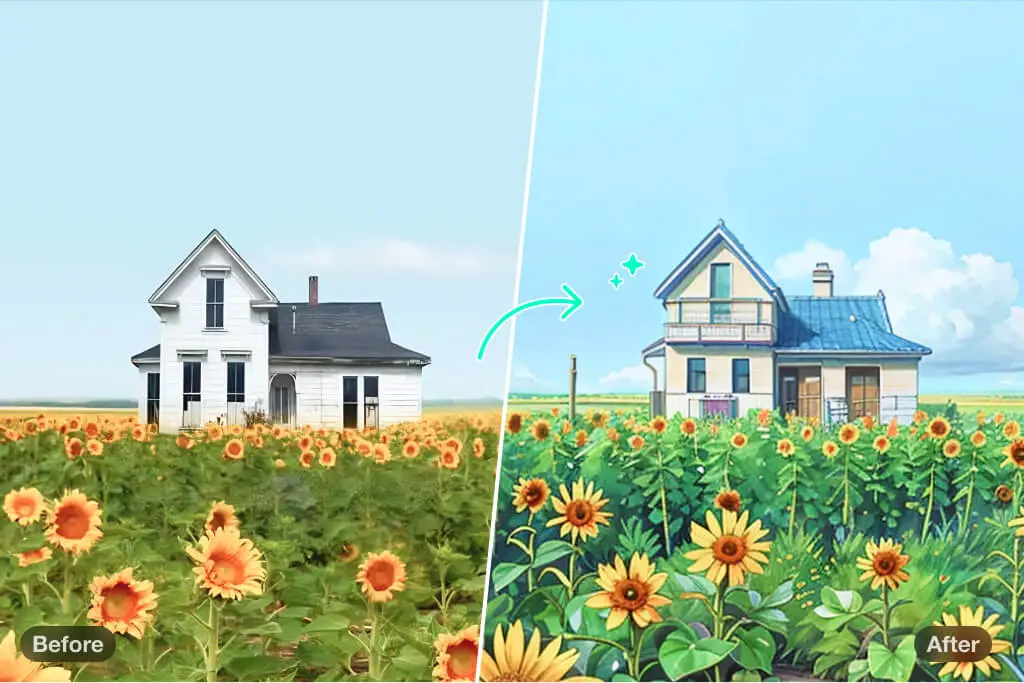
Przekształć swoje zdjęcia krajobrazowe w sztukę w stylu Studio Ghibli

Przekształć swoje zdjęcia krajobrazowe w sztukę w stylu Studio Ghibli

Przekształć swoje zdjęcia plenerowe w magiczne ilustracje dzięki filtrowi Studio Ghibli od insMind. Niezależnie od tego, czy to zielone wzgórza, lśniące jeziora, zachodzące słońce na plaży czy kolorowe ulice miasta — filtr ożywia każdy detal i zamienia zdjęcie w marzycielski obrazek.

Z pomocą bogatej palety barw, miękkich tekstur i charakterystycznego uroku Ghibli, Twoje fotografie będą wyglądać jak kadry z anime. To idealny sposób na podrasowanie zdjęć z podróży, stworzenie dekoracji ściennej lub po prostu wyrażenie własnej kreatywności. Prześlij zdjęcie, wybierz filtr Studio Ghibli i odkryj swój krajobraz w zupełnie nowym świetle.

Przekształć zdjęcie w sztukę Ghibli
Przekształć portrety w sztukę w stylu Studio Ghibli

Przekształć portrety w sztukę w stylu Studio Ghibli

Dodaj nutę magii do swoich portretów! Dzięki stylowi Studio Ghibli możesz zmienić selfie, zdjęcia rodzinne i ujęcia bliskich w wyjątkowe dzieła sztuki. Nasz filtr podkreśla detale twarzy, zmiękcza tonację i dodaje nostalgicznego uroku.

Pokochasz efekt końcowy, inspirowany ręcznie rysowanymi postaciami znanymi z Ghibli. To świetne rozwiązanie do stworzenia unikalnego zdjęcia profilowego, wyjątkowego prezentu lub po prostu zabawy kreatywnością. Wypróbuj i zobacz, jak Twoje portrety nabierają nowego życia w stylu Studio Ghibli!

Przekształć zdjęcie w sztukę Ghibli
Twórz oszałamiające ilustracje inspirowane Ghibli

Twórz oszałamiające ilustracje inspirowane Ghibli

Pracujesz nad projektem artystycznym? Eksperymentujesz z przekształceniami graficznymi? Nasz filtr Studio Ghibli oferuje idealne połączenie lekkości i precyzji. Zaprojektowany z myślą o artystach, hobbystach i fanach, generuje marzycielskie, ręcznie ilustrowane obrazy dla każdego.

To idealne narzędzie do tworzenia koncepcji postaci, storyboardów czy projektów cyfrowych. Nasz filtr AI zachowuje wszystkie szczegóły, dodając miękkie tekstury i subtelne kolory, które przywołują klasyczne animacje Ghibli. Działa błyskawicznie, jest intuicyjny i nieskończenie twórczy.

Przekształć zdjęcie w sztukę Ghibli
Zachwyć obserwujących zdjęciami w stylu Ghibli w mediach społecznościowych

Zachwyć obserwujących zdjęciami w stylu Ghibli w mediach społecznościowych

Chcesz oczarować swoich odbiorców? Udostępniaj zdjęcia w stylu Studio Ghibli na Instagramie, Facebooku czy TikToku! Możesz publikować magiczne krajobrazy, bajkowe portrety lub ilustracje artystyczne. Wyjątkowa estetyka filtru sprawi, że Twoje zdjęcia będą się wyróżniać i wywołają lawinę pozytywnych reakcji.

Wystarczy przesłać zdjęcie, wybrać filtr Studio Ghibli i pozwolić, by insMind przekształcił je w kilka sekund. Niezależnie czy robisz to dla zabawy, czy w celach marketingowych — zdjęcia w stylu Studio Ghibli na długo zapadną w pamięć. Z każdej publikacji zrób małe arcydzieło!

Przekształć zdjęcie w sztukę Ghibli
Zamień zdjęcia w sztukę Ghibli – gdziekolwiek jesteś

Zamień zdjęcia w sztukę Ghibli – gdziekolwiek jesteś

Czekasz w kolejce, jesteś w podróży albo pijesz kawę? Zabierz ze sobą odrobinę magii Ghibli, gdziekolwiek jesteś! Niezależnie od tego, czy korzystasz z telefonu, tabletu czy laptopa — nasza intuicyjna platforma pozwala tworzyć przepiękne obrazy kilkoma kliknięciami.

Wystarczy przesłać zdjęcie, zastosować filtr Studio Ghibli, i gotowe! Twoje zdjęcie zmieni się w urokliwe dzieło sztuki w kilka sekund. Gdziekolwiek poniesie Cię życie — niech podąża za Tobą także Twoja wyobraźnia.

Przekształć zdjęcie w sztukę Ghibli

Odkryj Więcej Filtrów i Stylów AI

Jak przekształcić zdjęcie w sztukę Studio Ghibli?

Prześlij zdjęcie
1

1 Prześlij zdjęcie

Kliknij przycisk „Prześlij zdjęcie”, wybierz obraz z urządzenia lub galerii. Może to być krajobraz, portret, ilustracja, a nawet szkic – narzędzie obsługuje wiele formatów i typów zdjęć.
Zastosuj efekt Ghibli
2

2 Zastosuj efekt Ghibli

Po przesłaniu zdjęcia wybierz z naszej galerii filtr Studio Ghibli, kliknij „Generuj” i poczekaj chwilę, aż sztuczna inteligencja uchwyci bajkowy klimat Ghibli i przekształci obraz.
Pobierz swoje dzieło
3

3 Pobierz swoje dzieło

Jeśli efekt Ci się podoba, pobierz gotowy obraz na swoje urządzenie jednym kliknięciem. Możesz go udostępnić w mediach społecznościowych, wydrukować lub używać dowolnie!

insMind AI Ghibli Filter – Najlepsze Kreatywne Rozwiązanie dla Każdego

Utkwiłeś w martwym punkcie projektu kreatywnego? Wypróbuj Filtr Studio Ghibli od insMind. Przekształć swoje projekty z różnych branż za pomocą wysokiej jakości wizualizacji, które inspirują i przyciągają uwagę.

Ilustracje do Książek

Ilustracje do Książek

Jeśli jesteś ilustratorem lub projektantem, Styl Studio Ghibli tchnie życie w Twoje szkice, dodając im filmowej jakości. Postacie i scenerie zyskują miękki, baśniowy wygląd, który trafia do czytelników w każdym wieku.

Kampanie Marketingowe

Kampanie Marketingowe

Dodaj odrobinę magii do materiałów promocyjnych i zmień bannery, logotypy oraz grafiki w prawdziwą Sztukę Studio Ghibli. Urokliwe wizualizacje wprowadzą nostalgię i emocje, które wyróżnią Twoją markę i przyciągną uwagę odbiorców.

Grafika do Gier

Grafika do Gier

Udoskonal swoje zasoby do gier — tła, portrety postaci czy grafiki w grze — używając Filtru Studio Ghibli. Artystyczna, bajkowa estetyka urzeknie graczy i przeniesie ich do pięknego, fantastycznego świata.

Dlaczego warto wybrać insMind AI Filtr Studio Ghibli?

Generowanie obrazu jednym kliknięciem

Generowanie obrazu jednym kliknięciem

Stwórz zachwycającą grafikę inspirowaną Stylem Studio Ghibli w kilka sekund. Nasze narzędzie jest łatwe w obsłudze – wystarczą dwa kliknięcia, by wygenerować magiczne dzieło bez żadnych umiejętności edycji.

Kreatywność wspierana przez AI

Kreatywność wspierana przez AI

Zaawansowana technologia AI insMind wiernie odwzorowuje Styl Studio Ghibli, zapewniając szczegółowe, pełne uroku przekształcenia zgodne z estetyką ukochanych animacji.

Wiele kreatywnych filtrów

Wiele kreatywnych filtrów

Poza Filtrem Studio Ghibli, insMind oferuje inne style: akwarela, szkic, retro, kreskówka, glina i więcej. Eksperymentuj i odkryj swój idealny styl graficzny.

Najczęściej zadawane pytania o Filtr Studio Ghibli do Zdjęć

Czym jest AI Ghibli Filter?

insmind expand icon
AI Ghibli Filter to narzędzie, które przekształca Twoje zdjęcia w dzieła inspirowane stylem animacji Studio Ghibli. Wykorzystuje zaawansowaną sztuczną inteligencję, aby odtworzyć miękki, baśniowy i magiczny klimat filmów Ghibli. Pokochasz oniryczną jakość końcowych obrazów, które mają unikalny i urzekający wygląd.

Kto może skorzystać z efektu AI Studio Ghibli?

insmind expand icon
Każdy może skorzystać z filtra insMind AI Ghibli, aby dodać artystycznego wyrazu swoim zdjęciom. Projektanci graficzni mogą łatwo tworzyć koncepcje i ilustracje do książek. Marketerzy cyfrowi mogą wpleść ten styl w kampanie reklamowe, by się wyróżnić i przyciągnąć uwagę odbiorców. Twórcy gier mogą projektować elementy w Stylu Studio Ghibli, takie jak tła czy postacie. Twórcy treści w social media mogą przyciągnąć uwagę użytkowników i zwiększyć liczbę polubień i udostępnień. Hobbystyczni użytkownicy mogą zmieniać codzienne zdjęcia w artystyczne pamiątki lub prezenty.

Gdzie znajdę generator AI w Stylu Studio Ghibli?

insmind expand icon
insMind to najlepsza platforma, która umożliwia zastosowanie Filtru Studio Ghibli do zdjęć w kilka sekund. To przyjazne użytkownikowi narzędzie internetowe, dostępne na każdym urządzeniu. Uzyskaj dostęp w kilka chwil i edytuj nielimitowaną liczbę zdjęć za pomocą naszych kreatywnych narzędzi.

Czy insMind AI Ghibli Filter jest darmowy?

insmind expand icon
Tak, możesz korzystać z narzędzia za darmo i pobierać obrazy w niższej jakości. Jeśli chcesz uzyskać obrazy w wysokiej rozdzielczości (HD) bez znaku wodnego, wystarczy przejść na wersję Pro za niewielką opłatą. Zyskasz dodatkowe funkcje i filtry, które wyniosą Twoje projekty na wyższy poziom.

Misschien ben je geïnteresseerd in

Laat je foto's opvallen met functies die volledig gratis zijn.