AI Image
AI Video
Editor Foto
Sumber daya
InspirasiHarga

Filter Studio Ghibli: Ubah foto Anda menjadi seni bergaya Ghibli

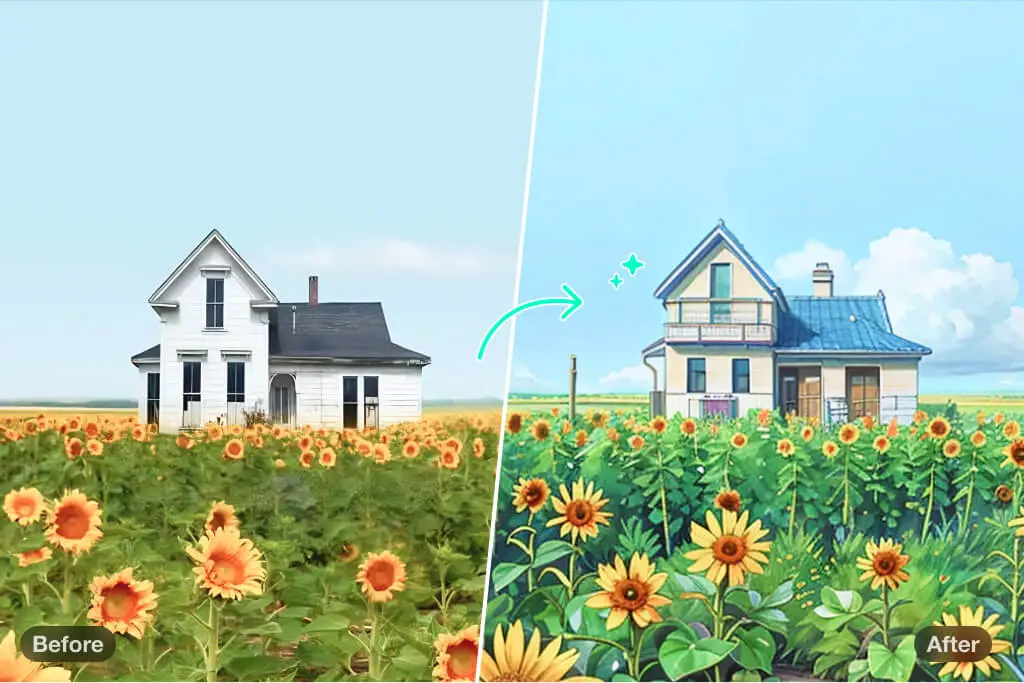
Bawa keajaiban Studio Ghibli ke dalam foto Anda! Dengan Filter Studio Ghibli, Anda dapat mengubah gambar sehari-hari menjadi karya seni yang memukau, menangkap pesona dan keunikan animasi favorit Anda. Gratis, menyenangkan, dan tak terlupakan!

Filter Studio Ghibli: Ubah foto Anda menjadi seni bergaya Ghibli
Setelah
Sebelum
Atau jatuhkan gambar di sini, tempel gambar atau URL
Coba dengan salah satu dari ini
Contoh Filter Menangis AI insMind 1
Contoh Filter Menangis AI insMind 2
Contoh Filter Menangis AI insMind 3
Contoh Filter Menangis AI insMind 4
Contoh Filter Menangis AI insMind 5

Buat Serupa

Subject: The main character in the picture. Expression: An anthropomorphic expression, with the mouth wide open, revealing teeth, canine teeth and tongue. The eyes are narrowed, looking disdainfully at the camera. Style: An exaggerated portrait painting in a digital painting style, combining expressionist brushstrokes. Texture: Has distinct brushstroke textures, as if it was quickly applied with rough oil paints or acrylic brushes. Detail depiction: The details are very realistic, such as hair, teeth, a moist nose and the inside of the mouth, but the overall structure and expression are highly exaggerated to achieve a humorous effect. Posture: Frontal shot, profile view Background: Solid color background
Subject: The main character in the picture. Expression: Extremely angry / Exaggerated anger. Furrowed brows, wrinkled forehead, dilated nostrils, mouth wide open and revealing clenched teeth, facial muscles completely contracted. Looking at the camera. Pose: One-to-one replication of the main character in the picture. Costume: One-to-one replication of the character's costume. Style: Exaggerated portrait painting in a digital painting style, combining expressionist brushstrokes. Texture: Has distinct brushstroke textures, as if it was quickly applied with rough oil painting or acrylic brushes, especially the background and clothing parts. Character style: Satirical caricature style, extremely exaggerated features (big mouth, big teeth, big eyes, big nose), funny expression, proportion: The head is significantly enlarged, the proportion is distorted, while the body is relatively smaller. Facial features: The facial muscles are extremely exaggerated, there are deep expressive lines around the eyes and mouth. Detail depiction: Skin texture, pores, teeth and other details are depicted very realistically, but the overall proportion and expression are exaggerated to a great extent. Lighting: Uses dramatic and intense contrast of light and shadow, highlighting the three-dimensionality of the character's face and the tension of the emotions. Posture: Frontal, portrait Background: Abstract and rough blue-green and orange/brown brushstrokes form the background, without specific environmental depiction, completely focusing on the character.
Character: The main figure in the picture. Core: An exaggerated comic with a wedding photo theme. Style: A highly exaggerated cartoon comic style, presented through digital painting. Head: Both of their heads are significantly enlarged, with distorted proportions, while the bodies are relatively smaller. Facial features: The facial muscles are extremely exaggerated, with deep expressive lines around the eyes and mouth, a very large and prominent nose, and very large teeth. Expression: An extremely exaggerated and joyful wide-open mouth laugh, with bulging eyes, fully matching the joyful mood in the reference image. Both are looking directly at the camera. Light and details: Sharp highlights on the forehead, nose, and cheekbones, contrasting with deep, smooth shadows to emphasize the exaggerated contours. Clean, smooth digital brush strokes. Background: A pure white background, with two red hearts decorating the gap between the two heads. Appearance: A one-to-one replica of the main character in the picture. Costume: The bride is wearing a white strapless wedding dress with a veil, and the groom is wearing a black tuxedo with a bow tie. Posture: Full body, both looking at the camera, the groom holding the bride like a princess, and the bride holding a red rose bouquet of flowers.
Main character: The person in the picture Art style: Exaggerated cartoon style. Bright colors, bold outlines. Character blush. Proportion: The heads are significantly enlarged and the proportions are distorted. Facial features: Exaggerated processing based on the facial features of the reference figure, exaggerated facial muscles, extremely exaggerated facial features (big mouth, big teeth, big eyes, big nose), funny expressions. Expression: Reproduce the main character's expression in the picture and exaggerate it. Facing the camera. Hair: Reproduce the hairstyle of the main character in the picture. Clothing: Exactly the same as the main character's clothing in the picture. Background: Solid color background. Light and details: Styled highlights and shadows, highlighting the facial contours, with the typical smooth texture of digital painting. Posture: Affectionate action, head touching head, looking at the camera, half-length portrait
Subject: The main figure in the picture. Core: A high-resolution real photo showing a couple standing beside a framed painting hanging on the wall. The center of the picture features a large black-framed portrait. The content is an exaggerated caricature style of the main character: extremely exaggerated facial features (big mouth, big teeth, big eyes, big nose), with a funny expression. Portrait: Black simple border (no white border), style: highly exaggerated cartoon comic style, presented by digital painting. Head: Both people's heads are significantly enlarged, with distorted proportions, while the body is relatively smaller. Facial features: Facial muscles are extremely exaggerated, there are deep expressive lines around the eyes and mouth, the nose is very large and prominent, and the teeth are also very big. Comic expression: Extremely exaggerated, joyful mouth wide open laughter, eyes bulging, fully matching the joyful mood in the reference image. Both are looking directly at the camera. Light and details: Sharp highlights on the forehead, nose, and cheekbones, contrasting with the deep, smooth shadows to emphasize the exaggerated contours. Clean, smooth digital brushstroke texture. Low saturation blue as the background of the portrait. Style: One-to-one replication of the main figure in the picture Clothing: One-to-one replication of the main character's clothing Photo scene: Indoor, with warm decoration, warm yellow background wall Posture: The main figure stands in front of the portrait, looking at the camera, with one hand raised in front of the chest pointing at the portrait on the wall. Warm lighting, natural integration of light and shadow, clear image quality, 8K
Subject: The main character in the picture. Art style: Exaggerated cartoon style. Head: The head is enlarged while the body is relatively small. Facial features: Exaggerated facial muscles, exaggerated facial lines, and a large nose. Expression: Reproduce the expression of the main character in the picture and exaggerate it. Looking at the camera. Family name: Exactly the same as the appearance of the main character in the picture. Attire: One-to-one reproduction of the main character's outfit in the picture. Background: Solid color background. Lighting and details: Stylized highlights and shadows, highlighting the facial contours, with a smooth feel typical of digital painting. Pose: Frontal half-length portrait
Retain all the details of the image and convert it to color.
Use the character from the uploaded image exactly as it appears — keep all features, colors, proportions, and style unchanged. Create a four-panel comic/storyboard with each panel showing a different scene of the character. Maintain the same cartoon art style as the reference image. Add speech bubbles/dialogues for the character in each panel, appropriate to the story. Ensure visual continuity: same background style, color palette, and lighting consistent across all panels. Focus on clear composition, expressive poses, and readable dialogue. Output: four distinct panels forming a coherent story.
Refer to Figure 2 and convert the style of Figure 1
Generate a set of powerful 3-panel Japanese anime storyboards by referring to the image
Polaroid 2:3 photo: IMG1 person and IMG2 cartoon character hugging like friends, smiling and laughing, heads close together, looking at the camera, hips-up; original clothes; white-curtain background; cartoon character’s arms naturally around person, proportions adjusted for natural interaction; subtle shadowing for depth; strong flash, slight overall blur, soft light vignette, no omissions; no face-swap, no distortion; classic white-border Polaroid, flat on white table, back flush, 90° top-down, zero tilt, no extras.
Optimize the line drawing, transform it into a Japanese anime style and color it to add a campus background
Young Millionaire Photo to Anime Cartoon
Mother's Day Disney Filter
Disney Style Mother Holding Baby
Cute Cartoon Boy
Cute Cartoon Boy
Cute Cartoon Boy
Attractive Anime Girl Filter
A girl in a blue shirt and black jacket sitting at a table with coffee and drinks, A steampunk-style background featuring intricate gears, brass pipes and glowing lights illuminating the scene. A desk with mechanical tools is in sharp focus while surrounding walls display vintage timepieces and cogs.
depicting futuristic cities with towering skyscrapers made from metallic gold and green hues. Include flying cars and high-tech elements to create a sense of wonder in space and cyberpunk aesthetics.
Beautiful Anime Girl
Ubah foto lanskap Anda menjadi seni bergaya Studio Ghibli

Ubah foto lanskap Anda menjadi seni bergaya Studio Ghibli

Ubah foto luar ruangan Anda menjadi sesuatu yang magis dengan Filter Studio Ghibli dari insMind. Baik itu perbukitan hijau, danau berkilauan, pantai saat matahari terbenam, atau jalanan kota yang semarak – filter ini akan menghidupkan setiap detailnya.

Dengan warna-warna kaya, tekstur lembut, dan pesona khas Ghibli, foto Anda akan terlihat seperti potongan langsung dari anime. Cocok untuk memperindah foto perjalanan, membuat dekorasi dinding yang menakjubkan, atau sekadar mengekspresikan kreativitas Anda. Unggah foto Anda, pilih filter Studio Ghibli, dan lihat pemandangan Anda tampil dalam cahaya yang benar-benar baru.

Ubah Foto ke Seni Ghibli
Ubah Potret Anda Menjadi Karya dengan Gaya Studio Ghibli

Ubah Potret Anda Menjadi Karya dengan Gaya Studio Ghibli

Tambahkan sentuhan sihir Gaya Studio Ghibli ke potret Anda. Ubah selfie, foto keluarga, atau momen bersama orang tercinta menjadi karya seni yang memikat. Filter Ghibli kami meningkatkan detail wajah, melembutkan warna, dan memberikan kesan nostalgia yang hangat.

Anda akan menyukai tampilan akhir bergaya ilustrasi tangan yang terinspirasi dari karakter ikonik Ghibli. Efek ini sempurna untuk menciptakan foto profil yang unik, hadiah istimewa, atau mengekspresikan sisi kreatif Anda. Coba sekarang dan lihat bagaimana potret Anda berubah menjadi seni Studio Ghibli yang memesona!

Ubah Foto ke Seni Ghibli
Buat Ilustrasi Mengagumkan Bertema Ghibli

Buat Ilustrasi Mengagumkan Bertema Ghibli

Sedang mengerjakan proyek kreatif atau bereksperimen dengan transformasi visual? Filter Studio Ghibli kami menawarkan perpaduan sempurna antara imajinasi dan ketelitian. Dirancang untuk seniman, pehobi, dan penggemar, filter ini menghasilkan seni yang dreamy dan penuh karakter.

Sangat cocok untuk membuat karya seni kustom, storyboard, atau desain digital. Filter AI kami mempertahankan detail penting sambil menambahkan tekstur lembut dan nuansa warna pastel yang mengingatkan pada animasi klasik Ghibli. Cepat, intuitif, dan sangat kreatif!

Ubah Foto ke Seni Ghibli
Buat Pengikut Anda Terpesona dengan Foto Gaya Ghibli di Media Sosial

Buat Pengikut Anda Terpesona dengan Foto Gaya Ghibli di Media Sosial

Ingin memukau pengikut Anda? Bagikan hasil kreasi gaya Studio Ghibli Anda di Instagram, Facebook, atau TikTok. Unggah foto pemandangan penuh imajinasi, potret magis, atau ilustrasi artistik – estetika filter Ghibli akan membuat unggahan Anda mencuri perhatian.

Cukup unggah foto, pilih Filter Studio Ghibli, dan biarkan insMind mengubahnya dalam hitungan detik. Baik untuk hiburan pribadi atau promosi brand, foto dengan sentuhan gaya Studio Ghibli akan meninggalkan kesan mendalam. Jadikan setiap postingan sebagai mahakarya!

Ubah Foto ke Seni Ghibli
Ubah Foto Anda Menjadi Seni Ghibli di Mana Saja

Ubah Foto Anda Menjadi Seni Ghibli di Mana Saja

Sedang menunggu antrean, dalam perjalanan, atau menikmati kopi? Bawa sedikit keajaiban Studio Ghibli ke mana pun Anda pergi! Platform kami yang mudah digunakan memungkinkan Anda membuat seni Studio Ghibli hanya dalam beberapa ketukan – di ponsel, tablet, atau laptop Anda.

Cukup unggah foto, terapkan Filter Studio Ghibli, dan gambar Anda akan berubah dalam hitungan detik. Sesederhana itu. Ke mana pun hidup membawa Anda, biarkan kreativitas Anda ikut serta.

Ubah Foto ke Seni Ghibli

Jelajahi Lebih Banyak Filter & Gaya Foto AI

Bagaimana Cara Mengubah Foto Menjadi Seni Studio Ghibli?

Unggah Foto Anda
1

1 Unggah Foto Anda

Klik tombol "Unggah Foto", lalu pilih gambar dari perangkat Anda. Bisa berupa foto pemandangan, potret, ilustrasi, bahkan coretan. Alat kami mendukung berbagai jenis dan format gambar.
Terapkan Efek Ghibli
2

2 Terapkan Efek Ghibli

Setelah mengunggah gambar, telusuri koleksi filter kami dan pilih "Ghibli". Klik tombol "Generate" dan tunggu sejenak sementara AI kami menangkap esensi ala dongeng dan mengubah foto Anda.
Unduh Gambar Karya Seni Anda
3

3 Unduh Gambar Karya Seni Anda

Jika Anda puas dengan hasilnya, unduh langsung ke perangkat Anda hanya dengan satu klik. Bagikan di media sosial, cetak sebagai kenang-kenangan, atau gunakan sesuka hati!

Filter Studio Ghibli dari insMind AI – Solusi Kreatif Terbaik untuk Semua Orang

Terjebak dalam proyek kreatif? Coba Filter Studio Ghibli dari insMind. Ubah proyek kreatif Anda di berbagai bidang menjadi visual berkualitas tinggi yang memukau dan menginspirasi.

Ilustrasi Buku Cerita

Ilustrasi Buku Cerita

Jika Anda seorang desainer yang mengerjakan ilustrasi, Filter Studio Ghibli akan mengubah sketsa Anda menjadi gambar dengan sentuhan kualitas studio. Karakter dan adegan Anda akan terasa hidup dengan nuansa lembut dan magis, menyentuh pembaca dari segala usia.
Kampanye Pemasaran

Kampanye Pemasaran

Tambahkan sedikit sihir ke dalam materi promosi Anda! Dengan gaya Studio Ghibli, banner, logo, dan grafik Anda dapat berubah menjadi karya seni yang emosional dan penuh nostalgia, membantu brand Anda tampil menonjol dan menarik perhatian audiens.
Seni Game

Seni Game

Tingkatkan kualitas aset desain game Anda—seperti latar belakang, potret karakter, dan elemen visual dalam game—menggunakan Filter Studio Ghibli. Estetika yang kaya, artistik, dan imajinatif akan memikat pemain dan membawa mereka ke dunia fantasi yang menakjubkan.

Kenapa Memilih Filter Studio Ghibli AI dari insMind?

Generasi Gambar Sekali Klik

Generasi Gambar Sekali Klik

Buat karya seni Studio Ghibli yang indah hanya dalam hitungan detik. Alat kami mudah digunakan—cukup beberapa klik, tanpa perlu keahlian mengedit!
Kreativitas yang Didukung AI

Kreativitas yang Didukung AI

Teknologi AI canggih kami meniru gaya Studio Ghibli dengan presisi tinggi, memastikan setiap transformasi penuh detail dan setia pada nuansa animasi orisinal.
Beragam Filter Kreatif

Beragam Filter Kreatif

Selain Filter Studio Ghibli, insMind juga menyediakan filter AI lainnya seperti efek cat air, sketsa, gaya vintage, kartun, dan tanah liat. Eksplorasi dan temukan gaya visual unik Anda!

Pertanyaan Umum tentang Filter Studio Ghibli untuk Foto

Apa itu AI Ghibli Filter?

insmind expand icon
AI Ghibli Filter adalah alat yang mengubah foto Anda menjadi karya seni Studio Ghibli dengan bantuan kecerdasan buatan. Teknologi ini mereplikasi nuansa lembut, ajaib, dan imajinatif khas film-film Ghibli. Anda akan jatuh cinta dengan kualitas visual akhir yang tampak seperti mimpi.

Siapa saja yang bisa mendapatkan manfaat dari efek Studio Ghibli AI?

insmind expand icon
Siapa pun! Desainer grafis bisa membuat konsep atau ilustrasi buku cerita dengan mudah. Pemasar digital dapat memakai gaya Studio Ghibli untuk menonjolkan kampanye. Pengembang game dapat merancang elemen visual yang imajinatif. Kreator media sosial dapat menarik perhatian audiens dan meningkatkan engagement. Bahkan pengguna biasa dapat mengubah foto sehari-hari menjadi kenang-kenangan artistik atau hadiah personal.

Di mana saya bisa menemukan alat Studio Ghibli?

insmind expand icon
insMind adalah platform terbaik untuk menerapkan Filter Studio Ghibli ke foto Anda dalam hitungan detik. Ini adalah alat berbasis web yang mudah digunakan dan dapat diakses dari perangkat mana saja. Anda bisa langsung mulai dan mengedit foto tanpa batas.

Apakah Filter Studio Ghibli AI dari insMind gratis?

insmind expand icon
Ya, Anda bisa menggunakannya secara gratis untuk mengunduh gambar resolusi rendah. Untuk kualitas tinggi tanpa watermark, Anda bisa upgrade ke versi Pro dengan biaya terjangkau dan mendapatkan fitur tambahan serta filter premium.

Anda mungkin tertarik pada

Buat gambar Anda menonjol dengan fitur-fitur yang sepenuhnya gratis.